The way businesses communicate has transformed dramatically in the last decade. What began with rule-based chatbots that followed rigid scripts and preprogrammed logic has evolved into a new generation of intelligent, conversational systems. Today’s generative artificial intelligence (AI) chatbots can understand nuance, context, and emotion — generating dynamic, human-like responses in real time.
This shift has been made possible by breakthroughs in large language models (LLMs) and natural language processing (NLP). Instead of relying on predefined keywords and decision trees, generative AI chatbots can adapt on the fly. They can handle unexpected questions, switch topics smoothly, and even adjust their tone to sound more natural or empathetic.
For businesses, the benefits of chatbots go beyond streamlined customer interactions. GenAI chatbots allow organizations to boost efficiency without sacrificing quality. From e-commerce to healthcare, companies in every industry are using them to handle high volumes of customer queries, offer tailored recommendations, and enhance engagement across digital channels.
In short, generative AI has redefined what’s possible in conversational automation — turning chatbots from static tools into intelligent digital partners.
What is a generative AI chatbot?
A generative AI chatbot is an artificial intelligence tool that can hold natural, human-like conversations with users. Instead of replying with prewritten answers, it uses machine learning and LLMs to generate responses on the spot. In other words, it doesn’t just follow a script — it thinks through what to say based on the user’s message and the conversation’s context.
Generative AI chatbots can
- Understand natural language: They recognize meaning, tone, and intent — even with slang or typos.
- Create original responses: They write new answers instead of pulling from a preset list.
- Remember context: They keep track of what’s been said in a conversation to maintain consistency.
- Learn over time: They improve with each interaction by identifying patterns and user preferences.
These qualities make GenAI-powered chatbots more flexible and human-like than earlier models. A generative chatbot can help troubleshoot technical issues, explain policies, and recommend products while tailoring tone and content to each user.
In a nutshell, these chatbots are the evolution of rule-based agents. They’re intelligent assistants that learn, reason, and communicate in a way that feels natural — bringing AI agents closer to human-like digital conversations.
Pro Tip
Generative AI models are just one of several types of chatbots that businesses use today, each offering distinct strengths depending on the use case. For instance, some organizations use hybrid chatbots before transitioning fully to generative models. These combine rule-based flows with AI-driven responses. It’s worth exploring a few different approaches to find the right one for you.
Real-world use cases of generative AI chatbots
Generative AI chatbots have become a mainstay of business operations, helping teams personalize customer communication at scale. By combining natural language understanding with machine learning, they can hold complex conversations with minimal oversight.
These advanced systems build on the fundamentals of what is a chatbot, extending traditional automation into richer, more dynamic conversations that adapt to each user’s needs.
Below are just some of the most valuable ways businesses are putting them to work.
E-commerce: Personalized shopping experiences
Retailers use generative AI chatbots as virtual sales assistants, helping customers find products, compare options, and complete purchases all within the chat. By analyzing browsing history or cart behavior, the chatbot can make personalized recommendations and recover abandoned carts automatically.
One example is David’s Bridal chatbot, “Zoey” — a generative AI assistant that answers product questions and processes dress orders via messaging apps. It demonstrates how chat-driven personalization can directly increase sales and reduce friction in the buying process.
Healthcare: Efficient, empathetic patient communication
In healthcare settings, chatbot generative AI tools automate patient intake, appointment scheduling, and follow-up instructions. They also adapt tone and language for more sensitive interactions, helping maintain trust while reducing administrative load.
Mass General Brigham used a generative AI chatbot to power its COVID-19 hotline, triaging thousands of patient inquiries. It showed how intelligent automation can improve response times and free up staff for critical care tasks.
Travel: Real-time assistance and itinerary updates
Travel companies rely on GenAI chatbots to simplify trip planning and support. When a flight is delayed or a booking changes, the chatbot can rebook accommodation, update itineraries, and share personalized suggestions.
Pelago, a Singapore Airlines venture, introduced a generative AI travel assistant that plans trips conversationally — allowing customers to use phrases like “help me plan a family vacation to Bali” instead of SEO-driven language. It showcased how generative AI can elevate customer experience through responsive, contextual service.
Finance: Secure, tailored customer service
Banks and financial institutions use generative AI chatbots to deliver secure, real-time support for balance checks, fraud alerts, and account insights. These bots understand user intent and provide detailed responses without compromising sensitive information.
ING, for example, worked with McKinsey to build a generative AI chatbot that retrieves knowledge from internal data to deliver precise, human-like responses. It demonstrates how AI-driven assistants can strengthen customer trust while reducing manual workload.
Across industries, generative AI is reshaping the way businesses communicate. For teams ready to explore this technology without deep technical setup, Jotform AI Agents offer an accessible way to build, train, and deploy intelligent chatbots tailored to their workflows.
Introducing Jotform AI Agents: A leading generative AI chatbot solution
While many generative AI tools require technical setup or custom integrations, Jotform AI Agents make it easy for any business to harness the power of conversational AI. If you’re looking to understand what AI agents are in a real-world sense, Jotform offers a practical, no-code way to build them — enabling intelligent systems that understand natural language, automate workflows, and respond in real time.
Jotform’s no-code builder also allows you to train an AI agent that responds to your customers just like a human representative would, using your brand voice, your data, and your preferred communication style. Whether you want to streamline support, qualify leads, or manage appointments, Jotform provides the flexibility and automation to make it happen.
Key features include
- Real-time assistance: Offer 24-7 support through natural, conversational interactions that resolve customer requests quickly.
- Multi-channel support: Deploy your AI chatbot across chat, phone, WhatsApp, SMS, and web interfaces using a single dashboard.
- Customizable workflows: Automate data collection, scheduling, and follow-ups with logic tailored to your business needs.
How it works
Behind the scenes, Jotform AI Agents use advanced machine learning and natural language processing to deliver contextually relevant and accurate responses. You can even train your agent by uploading company documents, product details, or frequently asked questions, allowing it to learn directly from your organization’s knowledge base.
For businesses seeking scalability, Jotform integrates seamlessly with tools such as Google Calendar, Slack, customer relationship management (CRM) platforms, and custom APIs to connect your chatbot to the rest of your ecosystem.
Here’s an example workflow:
- A customer chats with your AI agent to book a consultation.
- The agent checks your team’s Google Calendar for availability and confirms the time.
- It automatically creates a new entry and posts a confirmation message in Slack, notifying your team instantly.
- The booking details are then sent to your CRM, ensuring your sales team has the context to follow up.
- Finally, a personalized confirmation email is triggered through your connected automation.
Ultimately, Jotform AI Agents bridge the gap between conversational AI and practical business automation, making it possible to deploy sophisticated, generative AI chatbots in minutes instead of months.
How Jotform AI Agents enhance business efficiency and customer experience
AI chatbots are reshaping how teams operate day to day. With Jotform AI Agents, companies can automate repetitive tasks, respond faster, and deliver a more personalized experience without adding headcount or complexity. Here’s how that translates into real-world impact.
Automate repetitive tasks — and reclaim valuable time
- Use case: Routine interactions like booking appointments, collecting customer details, or qualifying leads often take up hours of human effort. Jotform AI Agents handle these workflows automatically — from initial contact to confirmation.
- Example: A boutique hotel relies on an AI agent to manage routine guest requests, such as late checkouts, amenity inquiries, or reservation changes. The agent verifies information, updates the system, and automatically sends confirmation messages, freeing staff to focus on in-person guest experiences.
Pro Tip
Train your AI agent using actual frequently asked questions or intake forms. It’ll mirror your real processes and deliver more accurate automation.
Provide consistent, 24-7 support without expanding your team
- Use case: Human agents can’t always be available, but an AI agent never clocks out. With multi-channel support, Jotform AI Agents can respond on your website, over SMS, and even on WhatsApp, offering customers instant help at any hour.
- Example: An e-commerce retailer uses an AI agent to handle after-hours order tracking and returns. When customers message late at night, the chatbot retrieves order details, initiates return requests, and automatically provides tracking updates.
Pro Tip
Use your analytics dashboard to identify when customers reach out most often and tune your agent’s responses to meet those peak needs.
Personalize every interaction with contextual awareness
- Use case: Because Jotform AI Agents learn from your data, they can adjust their tone, recommendations, and follow-ups based on who’s chatting and what they need.
- Example: A fitness studio’s AI agent recognizes when a returning client asks about classes. Instead of offering a general response, it recommends new sessions that align with the client’s past preferences and syncs the booking to their account.
Pro Tip
Upload your brand voice guidelines and product details directly into your AI agent’s training materials. Consistency in tone builds trust and reinforces your brand identity.
Improve decision-making with real-time insights
- Use case: Every conversation becomes a learning opportunity. Jotform AI Agents can identify frequently asked questions, customer pain points, and missed opportunities to help you refine your services over time.
- Example: A SaaS company uses conversation logs from its AI agent to pinpoint recurring setup issues. The team then creates a targeted onboarding guide, reducing new-user support requests by 30 percent.
Pro Tip
Review chat analytics weekly. Small content or flow updates based on real user data can dramatically improve accuracy and engagement.
Qualify leads faster and move prospects through the funnel
- Use case: Jotform AI Agents can identify and qualify potential customers automatically by asking the right questions and capturing key details. They can then route hot leads to your sales team in real time.
- Example: A marketing agency uses an AI agent on its website to engage new visitors. When someone requests a quote, the chatbot asks about company size, goals, and budget range, before sending qualified leads directly to the agency’s CRM for follow-up. The result is faster lead response times and higher close rates.
Pro Tip
Teach your AI agent what a “qualified lead” looks like by feeding it past form submissions or CRM data. The more it understands your criteria, the more accurately it filters and prioritizes leads.
Jotform AI Agents don’t just respond faster — they make your entire operation smarter, leaner, and more customer-centric.
Getting started with Jotform AI Agents
Launching a generative AI chatbot used to mean a complex setup, hours of data preparation, and constant fine-tuning. Jotform AI Agents remove that barrier with an intuitive, no-code builder that lets anyone create and customize an AI-powered assistant in minutes.
1. Start with a simple setup
You can build your first AI agent directly from the Jotform dashboard without any programming. Just choose a template or start from scratch, and then follow the guided setup to define your chatbot’s role, goals, and tone.
Here’s how the initial setup flows:
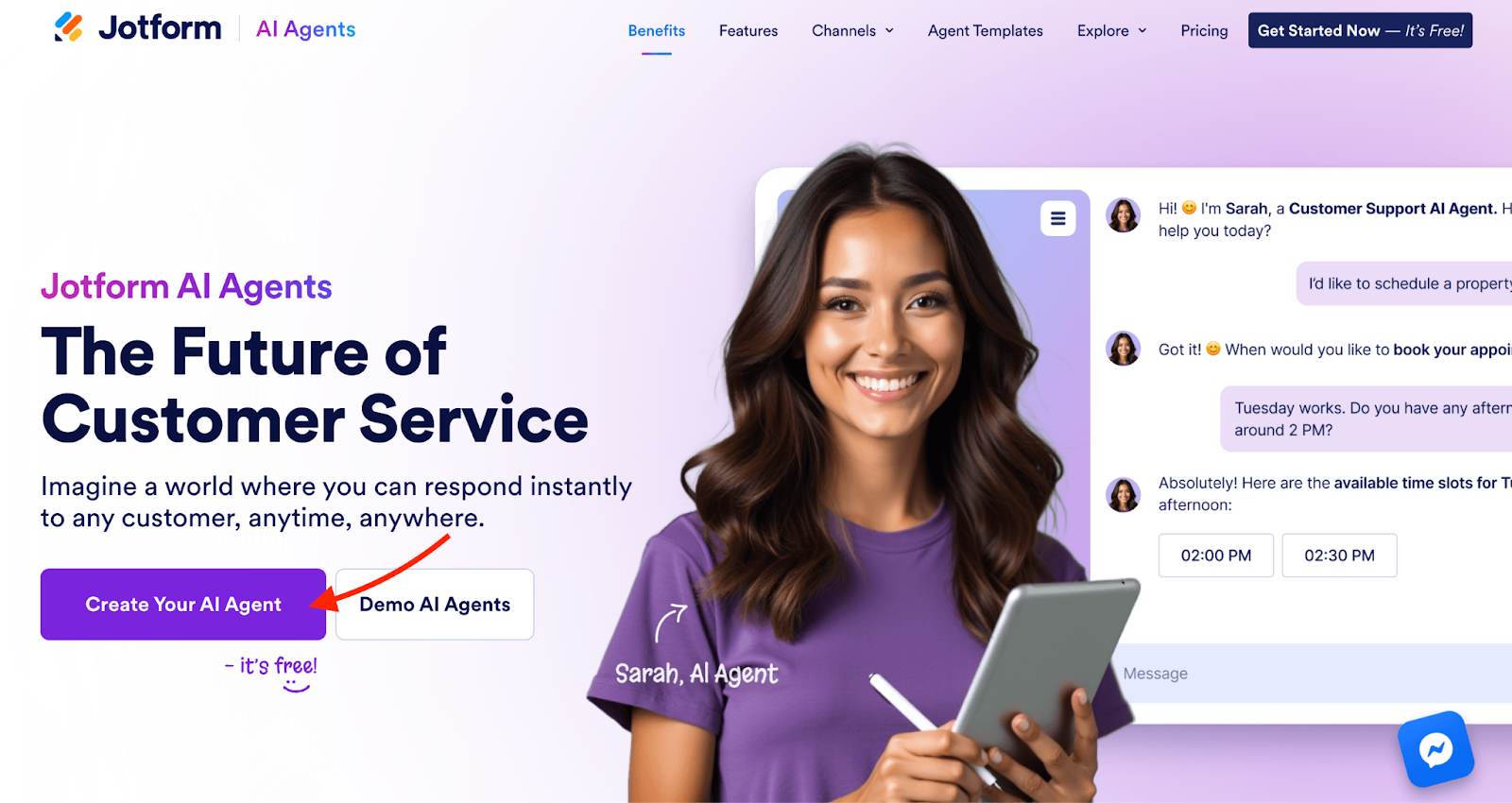
1. On the Jotform AI Agents website, click on Create Your AI Agent.
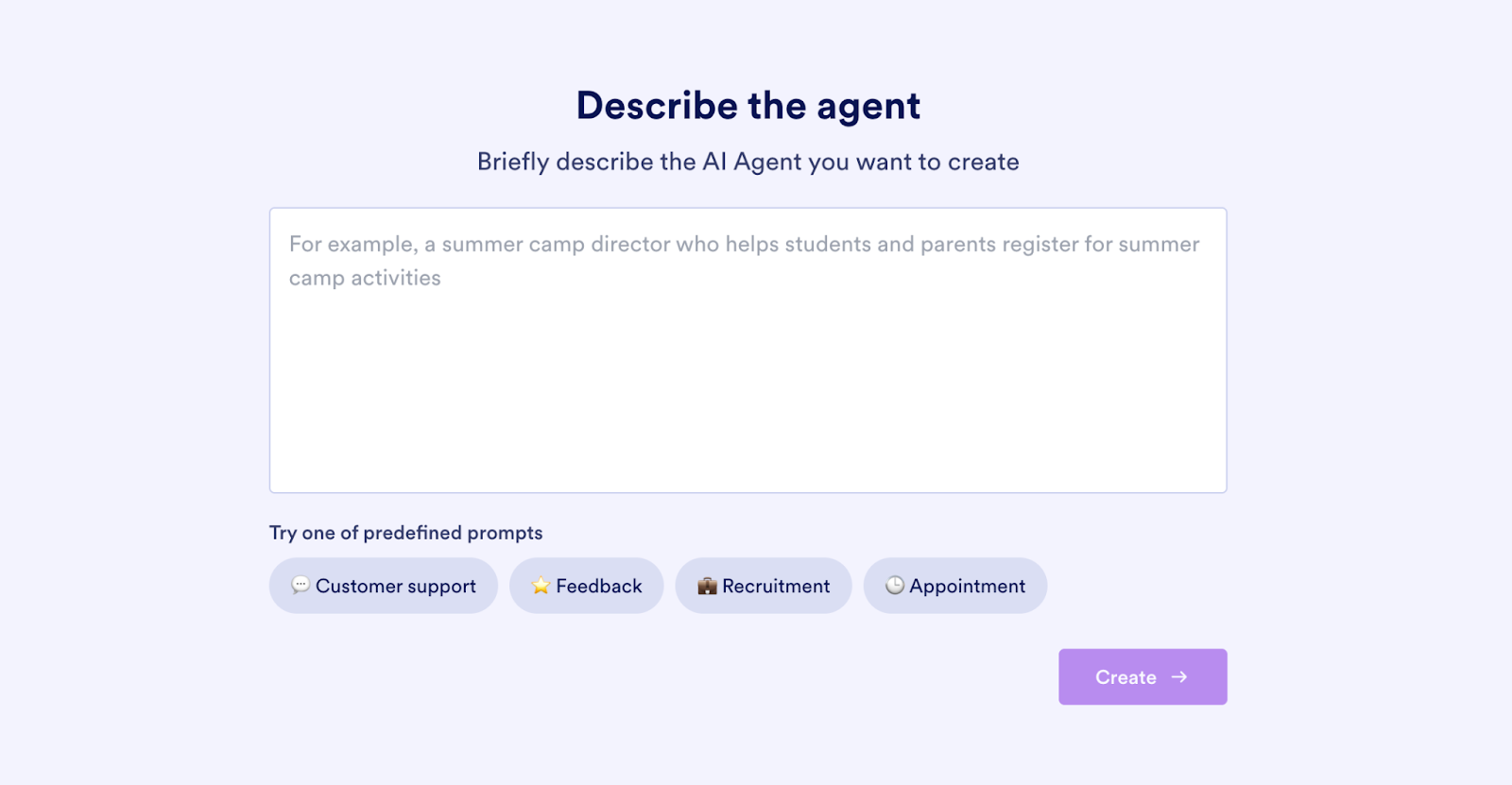
2. Enter a description of the job you want the agent to perform. Alternatively, click on one of the predefined prompts to get started even faster.
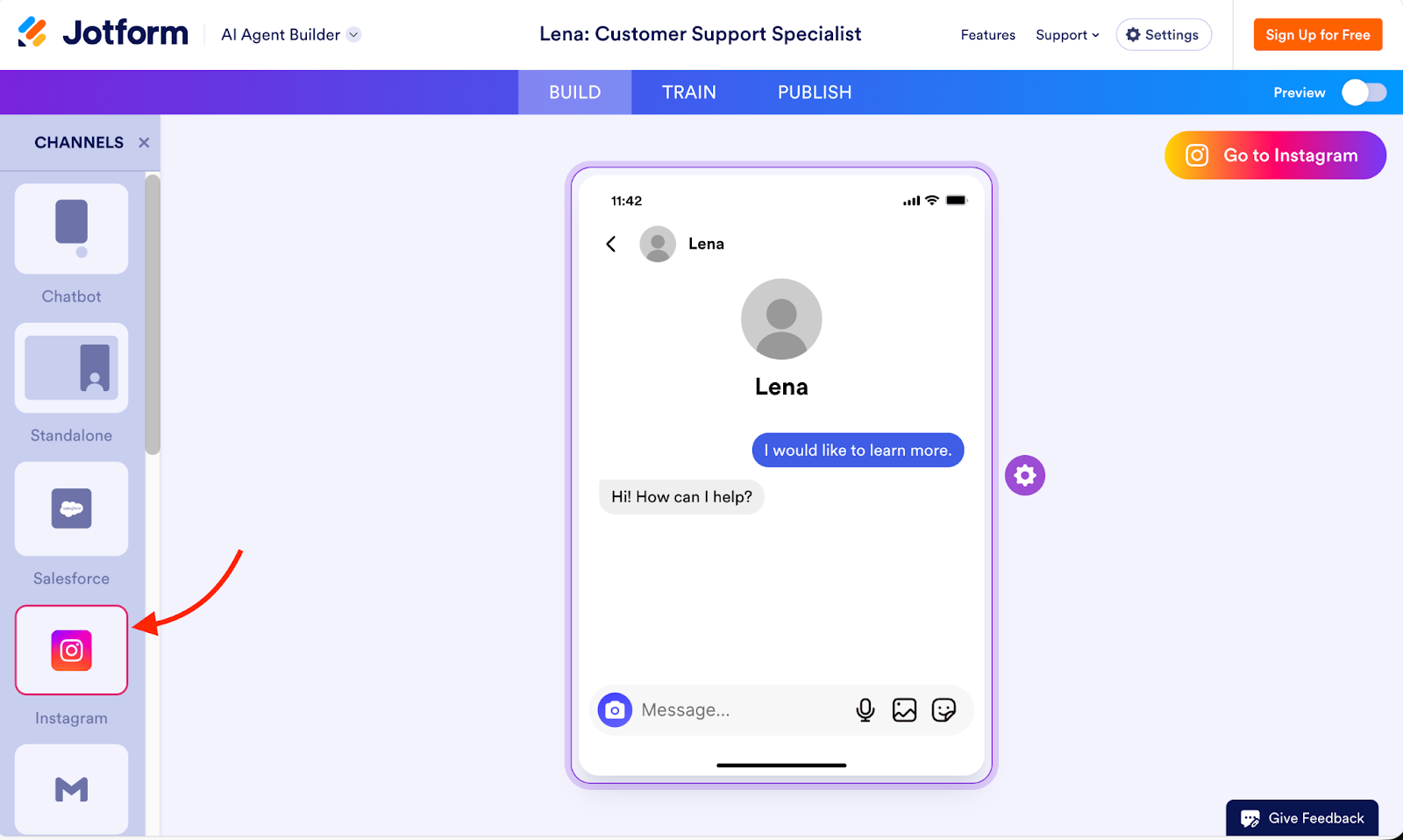
3. Select the channel for which you’d like to build the chatbot. In the screenshot, we chose Instagram as an example.
4. Next, click the Train tab to customize how your AI agent behaves and responds. On this screen, you can do the following:
- AI persona: Change response length, voice, and chat guidelines.
- Knowledge base: Train your agent with your business’s information by either manually entering data or adding files and URLs for the agent to learn from.
- Actions: Provide your agent with specific directions for various situations.
- Tools: Add tools to give your agents more capabilities, like access to Shopify store data.
- Forms: Give your agent access to your forms.
- Teach your agent: Instead of typing detailed instructions, teach your agent by chatting with it.
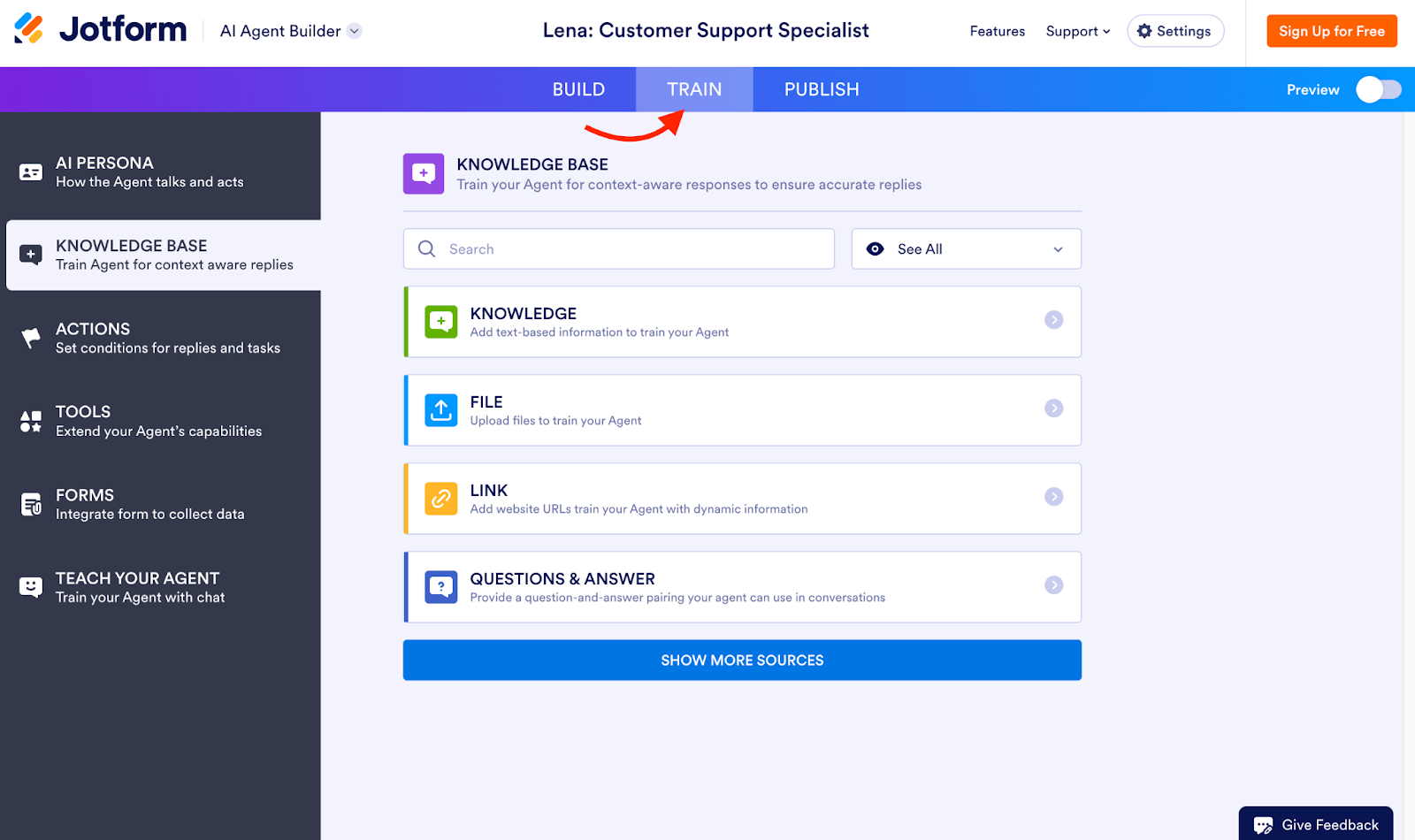
5. Lastly, click the Publish tab. Publishing your AI agent may require you to connect to an account (like an Instagram account).
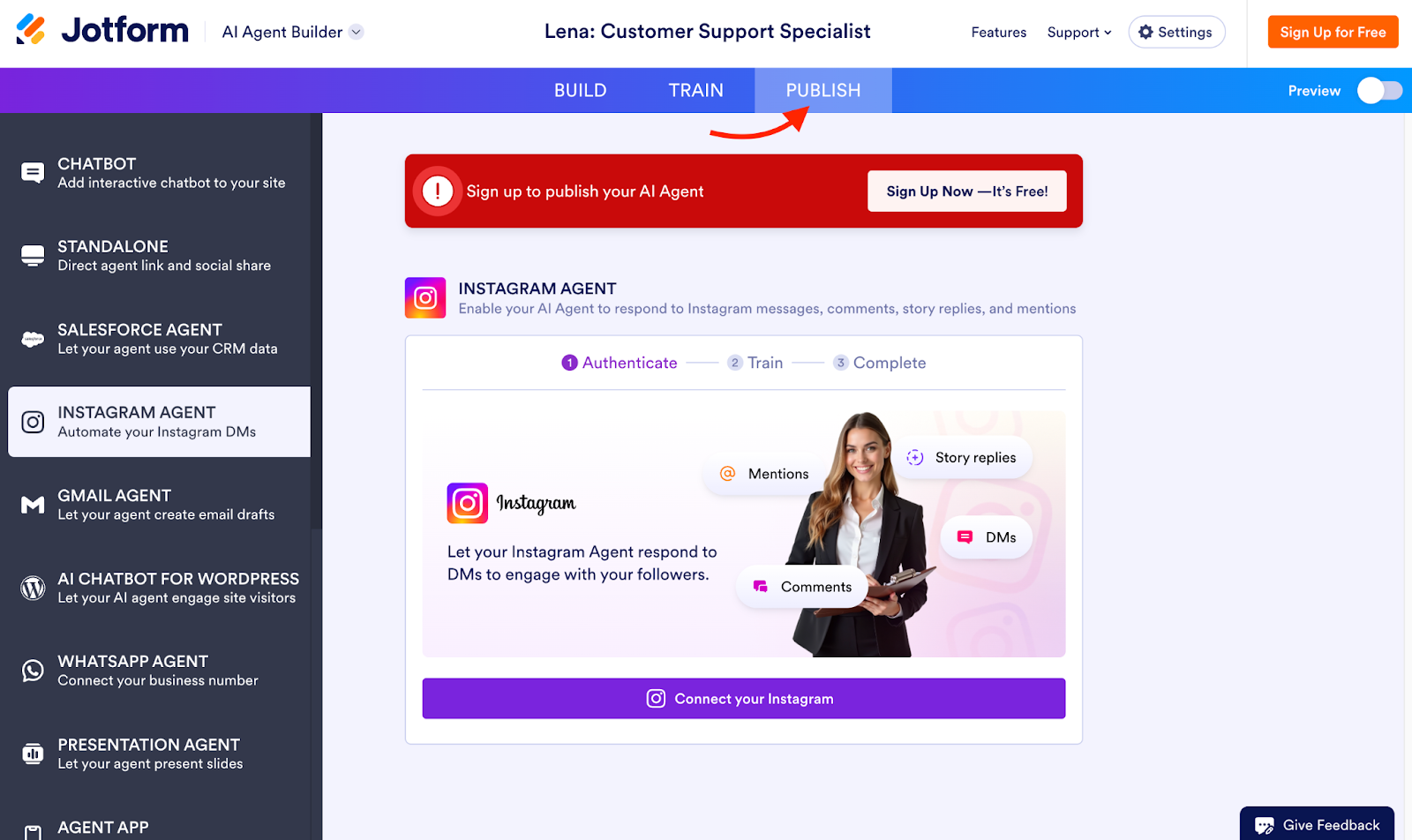
This Instagram-connected AI agent would be perfect for a small boutique. It allows customers to ask about product availability and place inquiries directly through DMs. The agent responds instantly, links shoppers to items, and collects order details — all without you having to manually monitor messages.
2. Train your agent in plain language
Once the structure is in place, the next step is to provide your agent with the necessary information to respond accurately and effectively. Jotform makes this process easy by letting you train your agent in the same way you’d train a new team member: Through plain language, examples, and your existing documentation.
You can train your agent using
- Business documents: Upload PDFs, guides, product catalogs, manuals, policies, or internal documents.
- Website content: Add URLs so the agent can learn directly from your site.
- Manual entries: Paste key information, instructions, or sample answers.
- Interactive teaching: Chat with the agent and refine responses as you go.
This blended training approach allows your agent to learn quickly and adapt to the way your organization communicates, whether it’s friendly and conversational or formal and process-driven. If you’re a financial services firm, for example, you might upload compliance documents and frequently asked questions, and then chat with the agent to refine wording. The result would be a chatbot that answers regulatory questions clearly while maintaining a compliant tone.
We recommend starting with your top 10 customer questions and teaching the agent how you want them answered. That way, you’ll give your bot a solid foundation and dramatically improve response quality from day one.
3. Customize it to match your brand
A generative AI chatbot becomes significantly more effective when it feels like an extension of your brand. Jotform gives you full control over the look, voice, and behavior of your agent so that it blends seamlessly into your customer experience.
Customization options include
- Visual branding: Tailor your agent’s colors, logos, fonts, chat widgets, and placement.
- Tone and personality: Choose professional, friendly, concise, playful, or whatever tone matches your brand.
- Conversation rules: Control how explanations are structured and phrased, when to escalate, and how to deliver guidance.
- Workflow logic: Build automated actions (e.g., “If a customer mentions rescheduling, trigger the appointment calendar”).
- Form and data handling: Decide what information the agent collects and how it’s stored or routed.
This level of customization ensures your AI agent feels trustworthy, consistent, and aligned with your overall brand voice. You can even add your brand guidelines (key phrases, dos and don’ts, etc.) directly into the agent’s persona settings for a seamless customer experience across all channels.
4. Deploy across channels
After training and customization, it’s time to put your AI agent to work. Jotform supports multi-channel deployment, allowing you to engage customers wherever they are without rebuilding the bot for each platform.
Supported channels include
- Website chat (embedded widget)
- Instagram DMs
- Salesforce
- SMS texting
- Phone calls
- Custom channels through API
- And more
All conversations are consolidated into a unified inbox, where your team can review interactions, step in when needed, and analyze performance data. That means you can scale customer support without switching tools.
For instance, a travel agency might deploy its agent on both its website and WhatsApp. Travelers can check itinerary updates, change bookings, or ask destination-related questions using their preferred channel. All conversations are displayed in a single Jotform dashboard, providing staff with visibility when they need to intervene.
Pro Tip
Start with one channel to refine the agent’s flow. Once performance stabilizes, expand to other channels to reach customers in their preferred communication platform.
Bringing it all together: The power of generative AI chatbots
Generative AI is making conversations smarter, faster, and more personalized at every touchpoint. What once required rigid scripts or costly development work can now be achieved with tools that understand language, adapt to context, and automate complex workflows in ways that feel natural to customers.
As companies seek to enhance efficiency and improve customer experience, generative AI chatbots have emerged as a practical and accessible solution. They help teams resolve questions instantly and create more meaningful interactions across every channel.
Jotform AI Agents make this technology even more feasible. With no coding required, real-time training, and seamless integration with your existing tools, you can build a powerful generative AI chatbot that fits your business. Whatever your goal is for improving customer interaction, your AI agent can evolve in tandem with your goals.
If you’re ready to explore what generative AI can do for your business, now’s the perfect time to get started. Try Jotform AI Agents for free today and transform the way you communicate.
This article is for digital marketers, website operators, and business decision-makers exploring AI-driven communication tools, and anyone who wants to understand how generative AI chatbots can transform customer engagement and automate complex business interactions.












































































Send Comment: