When you return to a website, you may notice that the AI chatbot remembers your name or even your past interactions. The chatbot’s memory consists of just a few key pieces of information that enable the digital assistant to provide you with a more personalized experience.
If you’ve ever wondered how exactly AI chatbot user identification works, follow along to learn more about the methods AI uses to identify users, and what you need to do to keep your data safe in 2026
Why does user identification matter?
User identification is vital to how AI chatbots generate a seamless user experience. Not only does the AI chatbot user identification process allow these assistants to personalize conversations, but it also streamlines your interactions. User identification is also used as an additional security measure, helping prevent fraud and ensuring you are the one actually using your account.
Identifying the logged-in users
The user profile you create in an AI chatbot interface is the simplest form of user identification. When you log in securely, chatbots can quickly pull personalized data and provide a customized experience. But to ensure AI chatbot privacy, there may be a few secure chatbot login methods you’ll need to navigate:
- JSON web tokens (JWT): AI tokens are the fundamental units of data that AI chatbots process. JWTs are secure, compact, URL-safe tokens that provide AI models with the user ID information necessary to verify logged-in users’ identities. These tokens are particularly essential for ensuring a secure chatbot login.
- Single sign-on (SSO): SSO is a login method that allows users to use a single set of credentials to sign in across multiple platforms, including AI chatbots. For example, some LLMs allow you to use your Google profile to log in, and will request access to specific information from said profile to improve session management in AI.
- Database linking: Using credentials, such as those mentioned above, AI chatbots can connect to internal databases via an API or backend service to verify user identity after login and support chatbot long-term memory.
These methods provide AI chatbots with a way to both securely verify your identity and access the information necessary to provide optimal performance. Even if you don’t have a profile, there are still ways for conversational AI to identify potentially relevant content and make recommendations.
Pro Tip
If you’re embedding an intelligent AI chatbot on your site, use Jotform’s User Identification feature to enable your embedded agent to recognize logged-in visitors instantly. This shifts the conversation from generic support to a personalized experience where the chatbot already knows the user’s name and past account actions.
Identifying the anonymous users
Although AI chatbots will not inherently collect personal information about you without your permission, there are some pieces of identifying data that they will store automatically. These data points will not reveal your identity to AI chatbots, but can be used to provide recommendations and streamline your experience.
- Cookies and local storage: Both are methods your browser uses to store data about your preferences. AI chatbots may draw on these data sources to secure general insights and facilitate user profiling in generative AI.
- IP addresses: Your IP address can be used to provide location-based recommendations. Although this won’t store any other personal information in the chatbot’s long-term memory, it can be used to offer deals specific to your general geographic region.
- Device fingerprinting: If you consistently use the same device to interact with an AI chatbot, conversational AI can collect technical signals from your browser, hardware, and network to build a device identifier.
Although these signals allow AI to get a general idea of your preferences, they don’t provide chatbots with your actual identity. Meanwhile, if a bad actor gains access to your device or login credentials, the AI can use pattern-based signals, such as behavioral biometrics, to detect fraud.
Behavioral biometrics: How do AI chatbots know that it’s you
Behavioral biometrics are your “digital body language.” As you interact with them, AI chatbots passively analyze how you use your device and act as key signals for how AI chatbots identify you vs fraudsters. If an AI chatbot detects unusual behavior from someone logged into your account, it may raise a flag to prevent identity theft and fraud.
Biometric identification in AI may include behaviors such as:
- Keystroke dynamics: The rhythm, speed, and pressure of your typing.
- Mouse/trackpad movement patterns: Navigation patterns, stroke and scroll speed, finger pressure.
- Touchscreen gestures (mobile): Similar to mouse/trackpad movement patterns, except on mobile devices. Analyzes common gestures used and gesture data points.
- Scrolling and navigation rhythm: Speed, patterns, how you move through websites or apps, consistency and intention, and hesitation or pauses.
- Session anomaly detection: AI uses machine learning to identify deviations from typical user behavior and flag potential data security threats.
Although biometric identification in AI is not perfect, it helps identify potential risks that AI chatbots can use to enhance their security. It’s also important to note how certain circumstances may change your biometric behaviors, such as an injury affecting your hands.
From typing pressure to geolocation, it may seem like AI has its eyes on you at all times. But let’s consider what’s actually happening behind the scenes regarding what’s being tracked and what isn’t.
Security and anonymity concerns
AI security is one of the top concerns of chatbot users today. In fact, only 47% of people trust that AI companies will protect their user data. But the truth is that AI is not watching you wherever you go. Although there are risks and dangers of AI, conversational AI chatbots only have access to the information a website or app shares with them, as well as what you type into their interface.
There are a few key considerations to keep in mind when considering whether agentic AI poses a risk to your anonymity. By understanding what is being tracked by these digital assistants, you can make informed decisions about how you choose to engage with them.
- UI vs behind-the-scenes tracking: There are two different systems that your AI chatbots may be using to track your interactions. User interface (UI) focused chatbots primarily gather information directly from the text you enter, prioritizing the user experience. Behind the scenes, tracking focuses on intent-based actions and speed, using data scraping and API integrations to better AI workflow automation. Most AI chatbots today combine these methods to produce a hybrid approach.
- What the chatbot can see by default: What chatbots see automatically is confined to what you enter into the interface and some high-level data points. This includes conversational data, timestamps, location data, IP addresses, metadata, and system or app data.
- What it might collect if enabled: AI offers users control over how or if some of their data is collected. The primary instance of this is whether or not user data is used to train AI models. However, this also includes the choice of uploading files, the collection of personal information, and the storage of voice interactions with interactive voice response (IVR) systems.
- What it usually can’t access: Typically, AI chatbots are designed not to collect private, local, or non-digitized data. This could include local files that have not been directly uploaded, confidential work information, protected personal records such as medical information, hyper-localized data, and data behind a paywall or firewall.
It’s also important to note that the term “anonymous” does not imply complete confidentiality in the context of AI chatbots. This term typically means that any data collected by AI will not be associated with you personally, but it doesn’t mean that data will not be collected.
While some users may be concerned about AI chatbot privacy, from a business perspective, AI chatbot user identification is essential to creating a positive experience. That’s why Jotform AI Agents use clear, controlled methods to identify users based on secure chatbot login information.
How Jotform AI Chatbots identify your visitors instantly
If you’re considering using an AI agent, you want it to minimize generic conversations and maximize the value it provides to your users. Let Jotform’s User Identification feature be the bridge between your logged-in users and your embedded agents.
With Jotform’s User Identification, you can transform the knowledge-based agents you build in the Jotform AI Chatbot builder into personalized assistants that accurately address customer needs.
These advanced features offer two core benefits for session management in AI:
- Your embedded agent can instantly recognize logged-in visitors and use basic identity info to personalize their chat interactions.
- Customer conversations shift from anonymous, one-size-fits-all support to user-specific, context-aware help that delivers real value and increases overall satisfaction.
User identification technology also addresses common problems that may have been found in your support process, with solutions such as:
- Using post-login context (name, account details, past actions) to keep the conversation relevant.
- Reducing repeat questions (“What’s your email?” “Which order?”) and speeding up resolution.
- Enabling more natural, personalized flows without requiring the user to restate who they are.
Let’s compare the journey of a user who is and is not properly identified. A user who’s not identified may need help with a recurring problem that they must re-explain every time they interact with your chatbot, causing frustration and potentially leading to turnover. A logged-in user who is identified by your chatbot can get this same issue resolved quickly thanks to your agent’s ability to draw on past conversations to produce a resolution.
How to enable the user identification feature
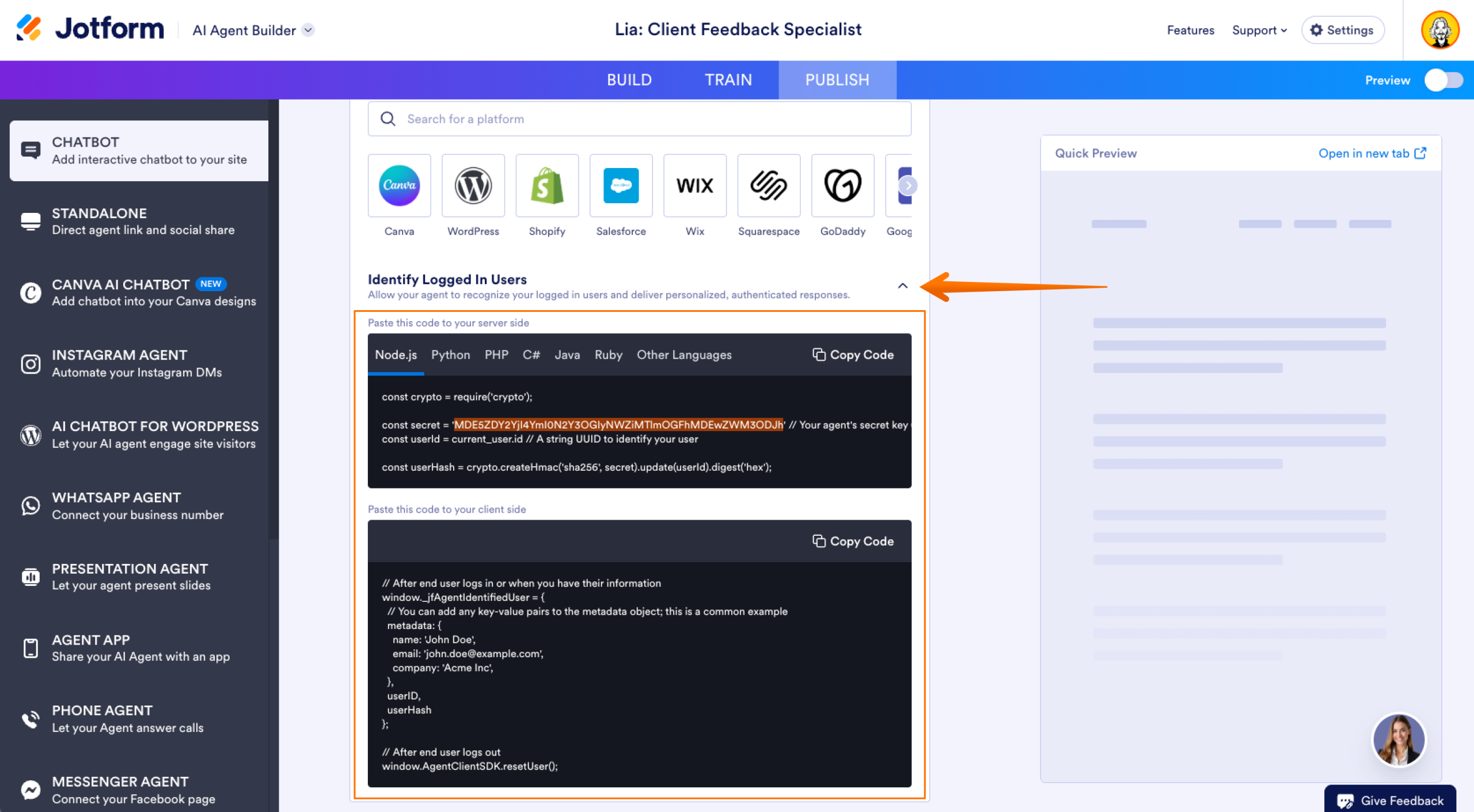
Before you can implement the user identification feature, you’ll need to add a two-step integration to your system, comprising server-side and client-side components. This structure is required to ensure both security and accurate user identification.
To access the integration setup for the user identification feature, follow these quick steps:
- Navigate to the Agent Builder Page.
- Open the Chatbot channel.
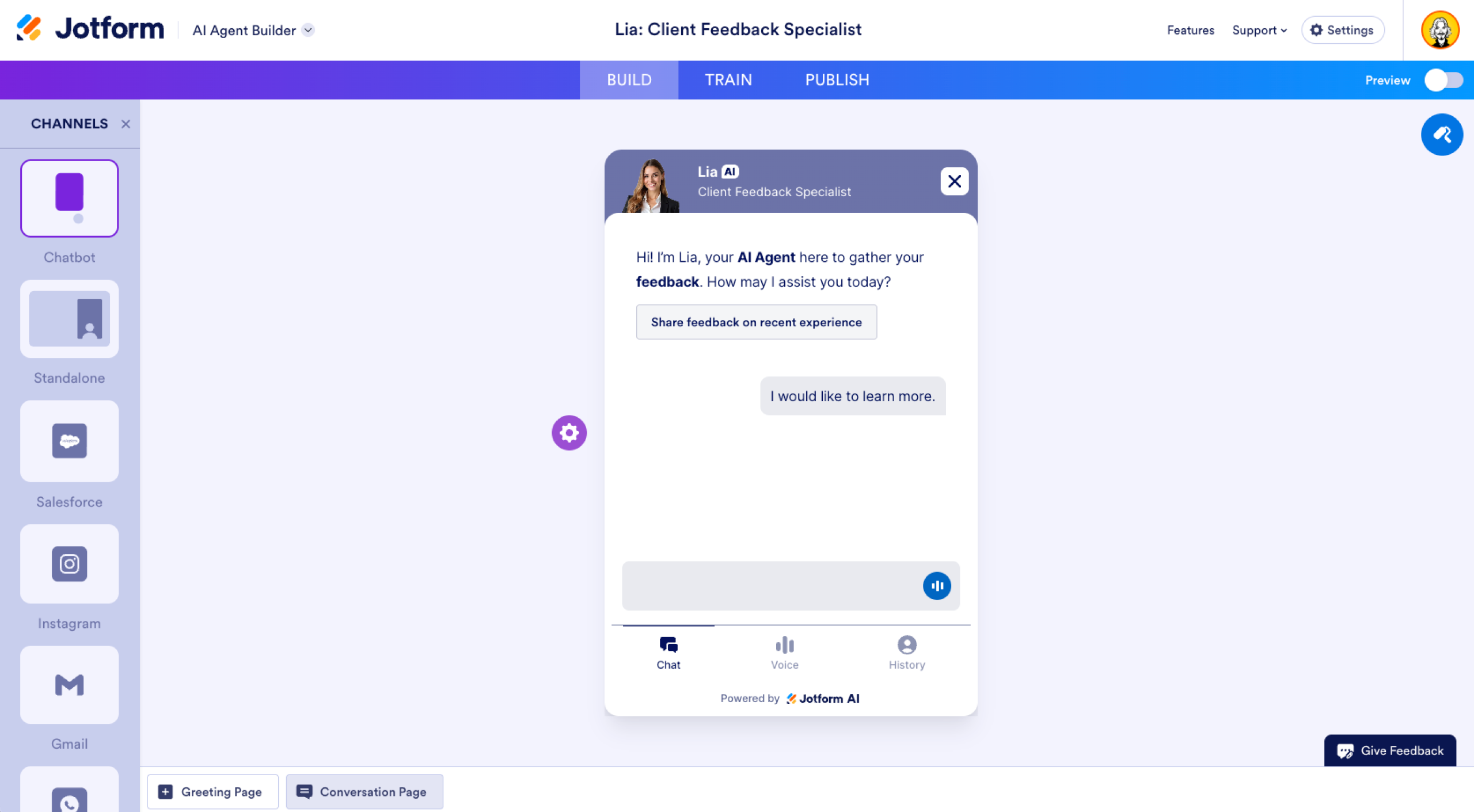
- Go to the Publish tab.
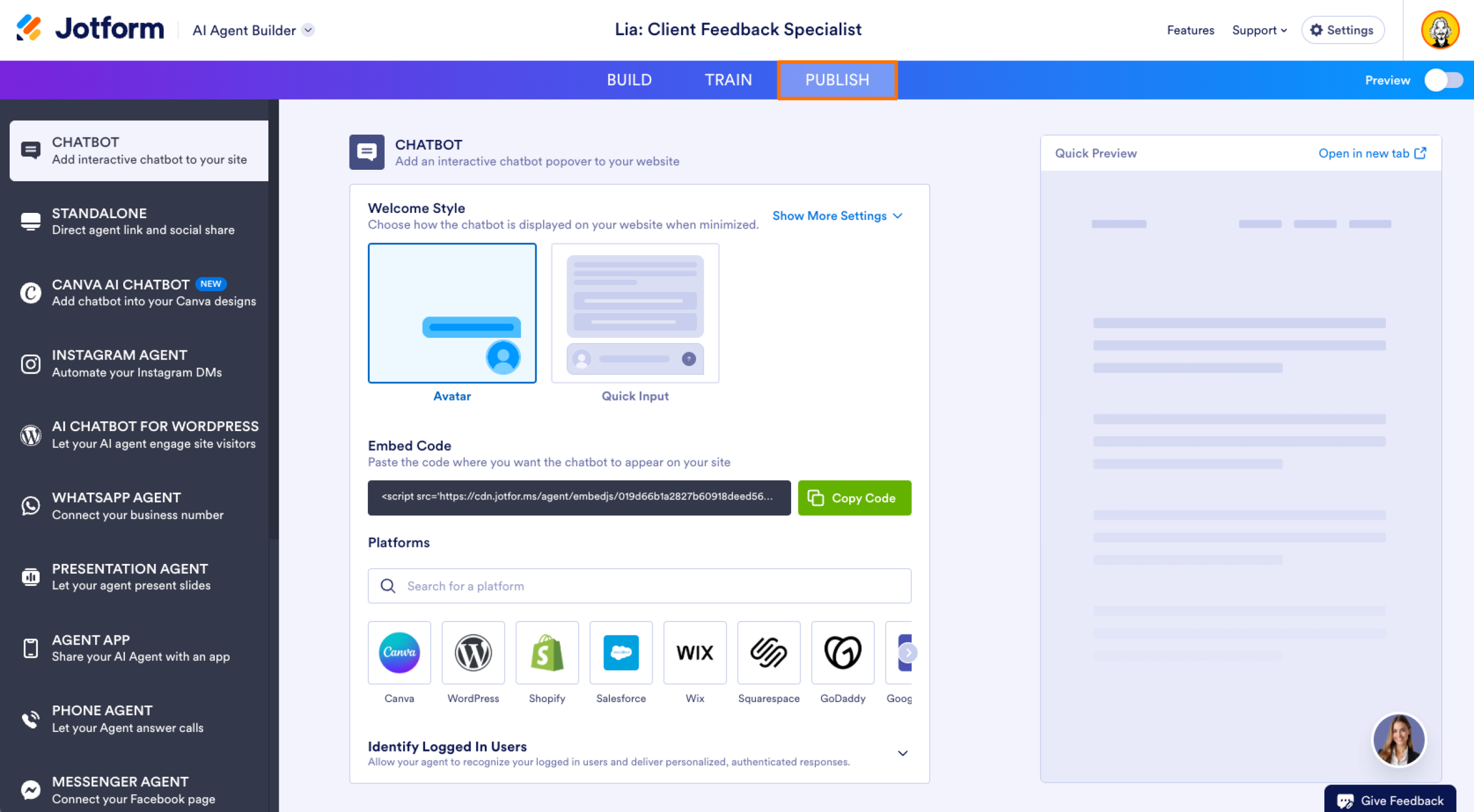
- Click on Identify Logged In Users.
User identification is a key part of any AI chatbot interaction. Build trust with your users and provide a positive experience with Jotform AI Chatbots, one of the best AI chatbots for business purposes. The straightforward, secure AI agent platform offers AI chatbot user identification with your users’ privacy and protection in mind.
This article is for the developers, IT managers, and privacy-conscious users who want to understand the magic and the risks behind how AI remembers them across sessions.











































































Send Comment: