-
 jobibrahim77
Mobile Offline
1
Message
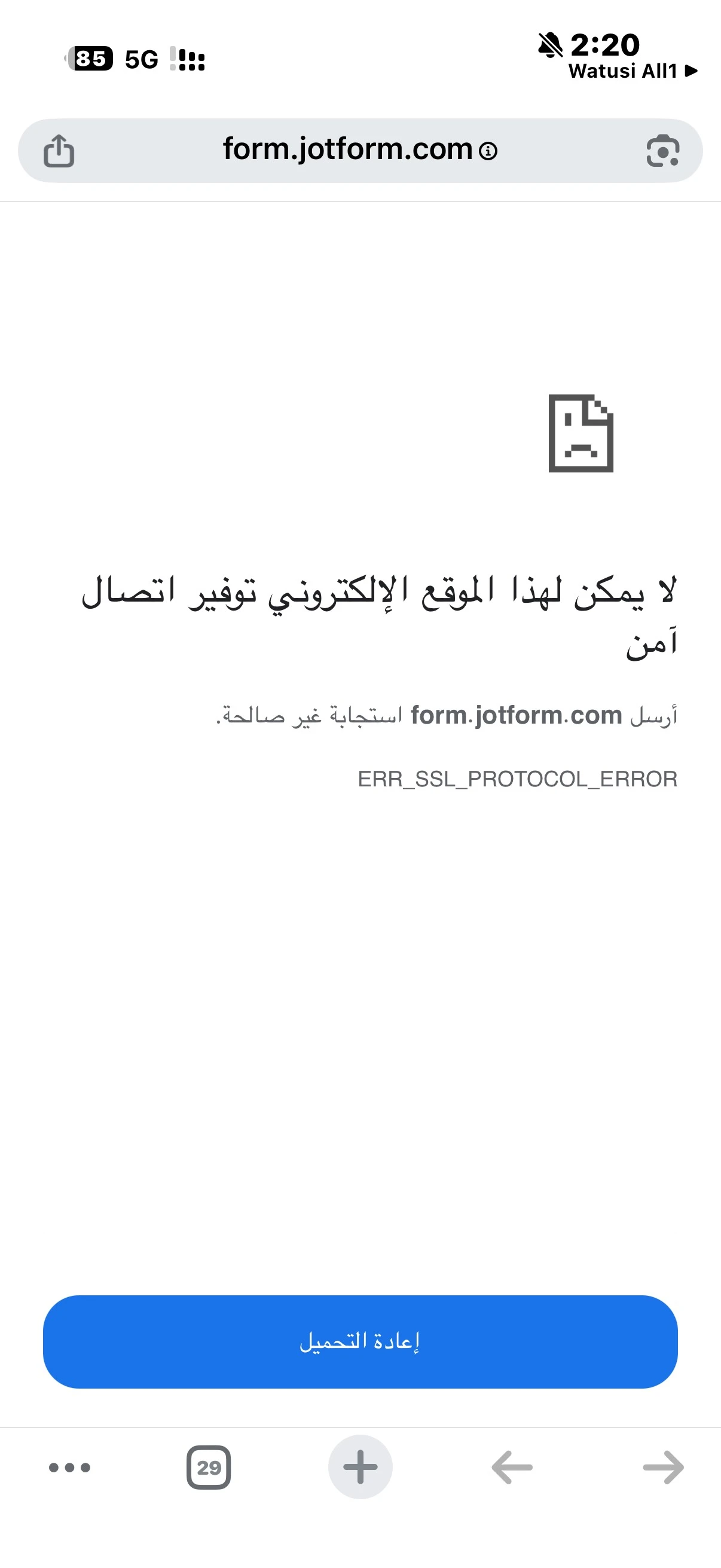
لا يمكنني فتح الرابط ف المتصفح عند نشره
Platform
iOS
Appversion
2.12.36
Deviceinfo
User Device: Apple - iPhone - Handset - 26.1
Source
Report
App
Jotform
-
 Yunus
Yunusمرحباً jobibrahim77،
شكراً لك على الاتصال بدعم Jotform.
- نظراً لأن جميع نماذجك تبدو نشطة من جانبنا، هل يمكنك إخبارنا بالمتصفح والجهاز الذي تستخدمه؟ بالإضافة إلى ذلك، فإن مشاركة لقطة شاشة للخطأ سيساعدنا في إجراء مزيد من التحقيق.
-
jobibrahim77هذه صوره br/>ن الbr/>شكله
في اثنين، 1 ديسbr/>بر، 2025 في 1:55 br/>، كتب Jotform <noreply>:
</noreply>... -
 Bilge
Bilgeمرحباً إبراهيم،
شكرًا على التحديث. يبدو أن لقطة الشاشة لم تصلنا.
يرجى محاولة رفع لقطة الشاشة مباشرةً في موضوع الدعم على Jotform باستخدام الخطوات الموضحة في هذا الدليل:
كيفية رفع لقطات الشاشة إلى منتدى الدعم
https://www.jotform.com/help/438-how-to-post-screenshots-to-our-support-forum/
بمجرد أن نتمكن من رؤية رسالة الخطأ في لقطة الشاشة، سنتمكن من متابعة التحقيق بشكل أدق.
وفي هذه الأثناء، هل يمكنك أيضاً تأكيد ما يلي:
- المتصفح الذي تستخدمه على iOS (Safari، Chrome، إلخ)
- ما إذا كانت المشكلة تظهر في أكثر من متصفح
- الرابط الذي تحاول فتحه (يمكنك إخفاء أي معلومات حساسة)
سننتظر لقطة الشاشة والمعلومات الإضافية لكي نتمكن من مساعدتك في حل المشكلة.
-
jobibrahim77ارفقت لكbr/> اعلاة. لقطة الشاشه للbr/>شكله التي تظهر عند br/>حاولة فتح الرابط
وقد اجريت تجربه في عدة br/>تصفحات ولكن نفس الbr/>شكله
لا يفتح الرابط عند نشره الا بواسطة برناbr/>ج vpn
I have attached above to you. The screenshot of the problem that appears
when trying to open the link
I conducted an experiment in several browsers, but the same problem
The link does not open when published except through the vpn program
في اثنين، 1 ديسbr/>بر، 2025 في 3:13 br/>، كتب Jotform <noreply>:
</noreply>... -
jobibrahim77

-
 Egemen
,Hi jobibrahim77
Thanks for reaching out to Jotform Support. I'll try to help you in English using Google Translate, but you can reply in whichever language you feel comfortable using. Or, if you'd rather have support in Arabic, let us know and we can have them do that. But, it might take a while until they're available again.
This issue on a mobile device when accessing the Jotform website indicates a failure in establishing a secure connection (SSL handshake).This can stem from issues with your device , network or the websites configuration.
So we need to collect more information if this also happens in laptop computer.
Also can you share your console log and check your device network or website configuration?
-
jobibrahim77
Could you please help me with how to open it on my device?
I don't think the site is blocked here, but I don't know what the problem is, as the program was working fine a month ago.
-
 Abdul JotForm Support
Hi Ibrahim,
Thanks for reaching out to Jotform Support. I understand that you are experiencing an issue opening your form link in the browser on your iOS device, and the link only opens when using a VPN.
Based on your description and the screenshot you provided, the issue seems related to your network or device settings rather than the form itself, as the form works properly on our end.
This issue typically indicates a failure in establishing a secure connection (SSL handshake) between your device and the website, which can be caused by network, device, or browser settings. Let me help you with that:
- Test in Incognito Mode: Try opening the link in your browser's incognito or private mode to rule out cache or cookie issues.
- Clear Browser Cache and Cookies: Clear your browser cache and cookies, then try opening the link again.
- Check Internet Connection: Use a stable internet connection without VPN or browser add-ons that might interfere with the connection.
- Try Different Browsers: Test opening the link in different browsers on your device to see if the issue persists.
- Disable VPN and Add-ons: Since you mentioned the link only opens via VPN, try disabling VPN and any browser extensions or add-ons that might affect connectivity.
- Share Console Log: If the problem continues, connect on a desktop PC and share the browser console log or any error messages you see. This will help us investigate further.
Give these steps a try and let us know how it goes or if you need further assistance.
-
jobibrahim77Hello dear,
Actually, I don't use a VPN at all, but the problem isn't with me
personally. I sent the link to several people, and they're experiencing the
same issue. Opening the program on a tablet doesn't cause any problems; it
... -
jobibrahim77
Dear Sir/Madam, the problem isn't with the browser, but with the links. I hope you can fix this issue as I'm about to subscribe and upgrade my package.
-
 Başak
BaşakHi Ibrahim,
Thanks for your patience and understanding. We really appreciate it.
We checked your forms on both desktop and mobile, and everything appears to be working correctly on our side. Can you try accessing the form using a different internet connection? It looks like you were on mobile data in your screenshot, so switching to another network (such as Wi-Fi) may help resolve the issue.
Give it a try and let us know how it goes.
-
jobibrahim77
Hello: I've tried several times, but the problem persists. I've tried sending the link to several people, and they all encounter the same issue.
I don't know what the problem is.
-
Abdul JotForm Support
Hi Ibrahim,
We tested the forms from different devices and networks and did not encounter any issues. Could you confirm the network IP you are using to access the forms so we can verify it on our end?
If the problem persists, connect from a desktop PC and share the browser console log. This will help us investigate further.
Once we receive this information, we’ll have a clearer understanding of the issue and how to assist you.
-
jobibrahim77
The problem might be that the links aren't mobile-friendly, as I've tried sending the links to several different phones and the same issue persists.
Even the links for previous projects don't work on mobile.
-
 Ece JotForm Support
Hi Ibrahim,
Thanks for the update this information actually helps narrow things down a bit.
Since we’re able to open all of your form links normally on multiple devices and networks on our side, the next step is to understand what exactly is different in the connection that fails on your end. The error you shared (ERR_SSL_PROTOCOL_ERROR) usually means that something in the network path is blocking or altering the secure connection before it reaches Jotform.
To move forward without guessing, could you share just two things:
1) The exact link(s) that fail to open on your device
2) A quick screenshot of the full browser address bar at the moment the error appears
(Especially helpful if it shows https://form.jotform.com/... before the error pops up.)
This will help us see whether the request is reaching our servers or if it’s being stopped somewhere earlier in the connection.
You don’t need to run more tests just those two pieces of information are enough for us to investigate this properly.
I’m here and happy to continue digging into this with you.
-
jobibrahim77
Good morning. Yes, I can.
This is the link that failed to open (https://form.jotform.com/253341762223451)
Note that all the previous form links, which worked without any problems, now have the same issue; I can't open them.
This is a screenshot.
-
 Kemal_Sarper
Hi Ibrahim,
Thanks for reaching out to Jotform Support. I have escalated your issue to the developer team. In the meantime, try opening the form using alternative Jotform URLs:
https://www.jotform.me/253341762223451
https://jotformpro.com/253341762223451
https://www.jotform.us/253341762223451
https://www.jotformeu.com/253341762223451
https://www.jotformz.com/253341762223451
https://cdn.jotfor.ms/253341762223451
https://www.jotform.ca/253341762223451
https://myjotform.com/253341762223451
Reach out again if you need any other help.
-
jobibrahim77
The problem became clear to me after using this link (https://form.jotform.com/253341762223451). Due to security measures in our country, some forms are blocked by our telecommunications companies for security reasons. However, I found a solution: use the link without adding the word "form" at the beginning. In other words, like this:
(https://jotform.com/253341762223451)
I hope this issue can be resolved with the telecommunications companies in our country through your communication with them.
Thank you for your cooperation and for bearing with the pressure I'm putting on you.