

Several text inputs with accompanying labels and a huge prominent CTA at the end to submit a form and send it to the recipient – usually, a contact form looks exactly like that. And it seems that there are no difficulties in generating one at home.
But once you start, things get a bit trickier. Want your form to be fully responsive, powered by Bootstrap, or tailored with custom styles? That’s when you’ll need to dive into CSS, JavaScript, and possibly some server-side scripting like PHP to get things working smoothly.

Fortunately, you don’t have to start from zero. There are numerous reliable, pre-defined solutions — templates, code snippets, and design patterns — that handle most of the heavy lifting for you. They save time, reduce friction, and give you a solid foundation to build from.
How to create a simple HTML contact form
If you do want to build your contact form, starting with clean, semantic HTML is the way to go. At its core, a basic html form includes a few labeled input fields (like name, email, and message) and a submit button. From there, you can enhance it with custom CSS, responsive layout techniques, and interactivity through JavaScript.
Whether you prefer to build it manually or use a ready-made snippet, the following examples offer practical and elegant options to get your contact form up and running quickly.
Fullscreen Form Interface

Creator: Manoela Ilic
Responsive Contact Form with Map

Creator: Lentie Ward
Responsive Material Design Contact Form

Creator: Nikhil Krishnan
Clean Contact Form

Creator: nick haskell
Elegant Contact Form

Creator: Mark Murray
Responsive Contact Form Using Bootstrap 3 and Google Maps API

Creator: Craig Wheeler
Sass Flip Contact Form

Creator: Danny Beton
Vintage Inspired Contact Form

Creator: David Fitas
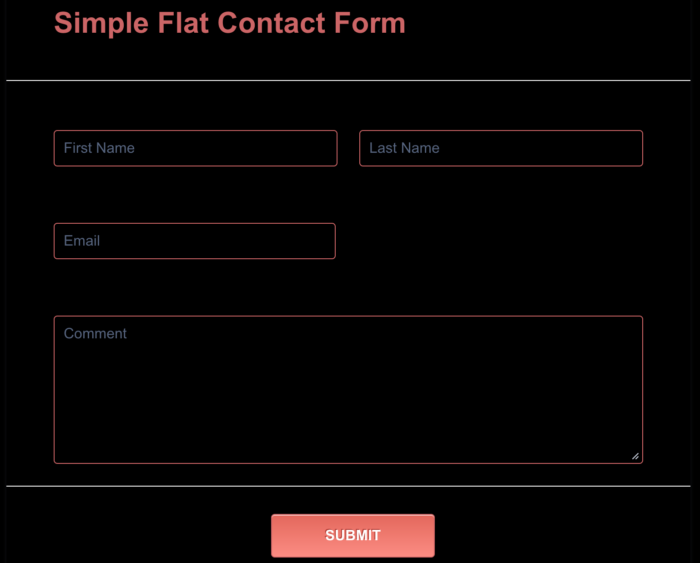
Simple Flat Contact Form

Creator: Zach Saucier
Contact Form

Creator: Iulian Savin
Drop-Down Contact Form

Creator: Greg Sweet
Contact Form HTML+CSS

Creator: Trevor L.J.M. McIntire
Form Feedback

Creator: CrocoDillon
Minimalistic Form

Creator: Matheus Marsiglio
Flat Responsive Form

Creator: And Studio
Personal Website

Creator: Tim Robert-Fitzgerald
Blackboard/Chalkboard Contact Form

Creator: Greg Sweet
CSS Only, Responsive Modal Form

Creator: Daryll Doyle
Under the Sea Contact Form

Creator: Geert-Jan Hendriks









Send Comment:
6 Comments:
June 20, 2023
Lot of thanks for this Templates and the code
December 1, 2020
How do I:
On form submission, copy the contents of my submission back to my email address?
Tnx
July 28, 2020
Excellent post. Nice work keep it up. Thanks for sharing the knowledge.
May 30, 2020
these are not responsive contact form
just heading says they are responsive
April 22, 2020
Hello sir how to use this in my blogger site?
March 27, 2019
Hi, how do I add this snippets to my site?
Where do I place the CSS info? Can I use a HTML Widget?