The iframe embed method works on virtually any web page and is one of the most reliable ways to display a form online. Because the form loads in its own container, it stays isolated from the rest of the page—reducing the risk of script conflicts, especially if your site uses plugins, tracking codes, or third-party tools. Many widgets, like social sharing buttons and maps, use the same method because it’s simple, flexible, and widely supported across all modern browsers.
Getting your form’s iframe embed code is quick and easy. Here’s how to do it:
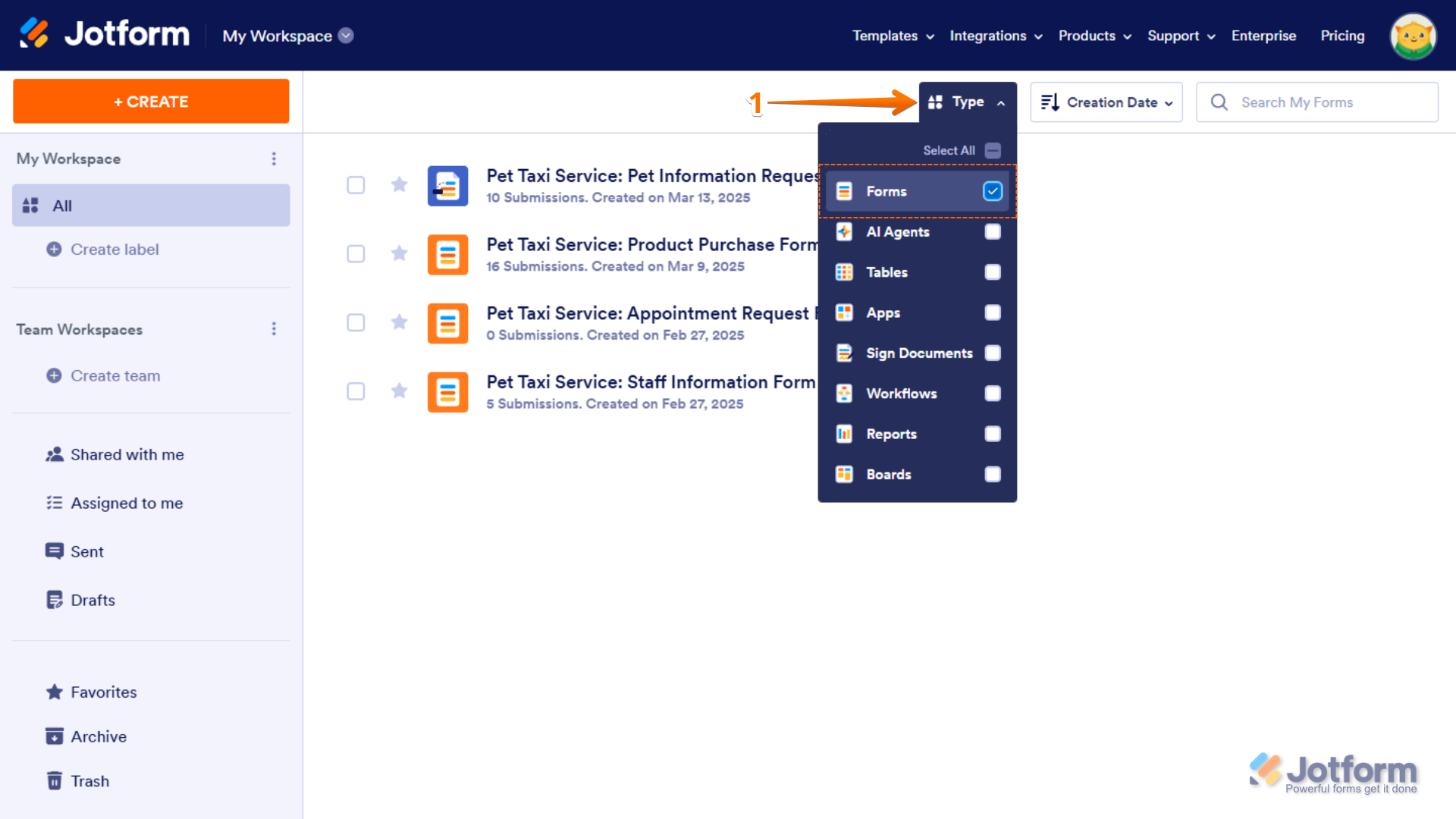
- On your My Workspace page, click on Type at the top and in the Dropdown menu that opens, uncheck the boxes next to all the assets except Forms, so only they’ll be shown on the page.
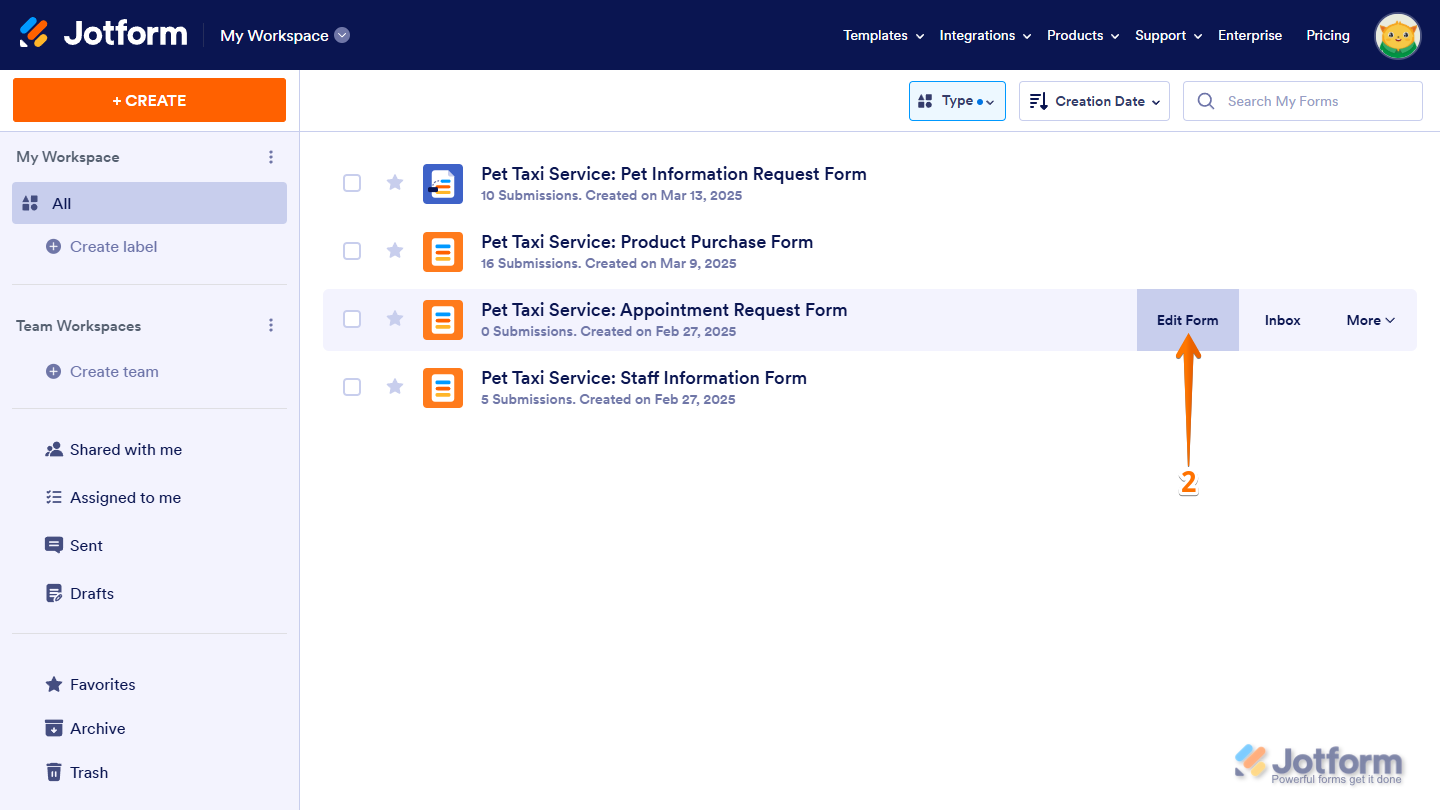
- Hover your mouse over the form you want to get the iFrame code for, and click on Edit Form on the right side of the page.
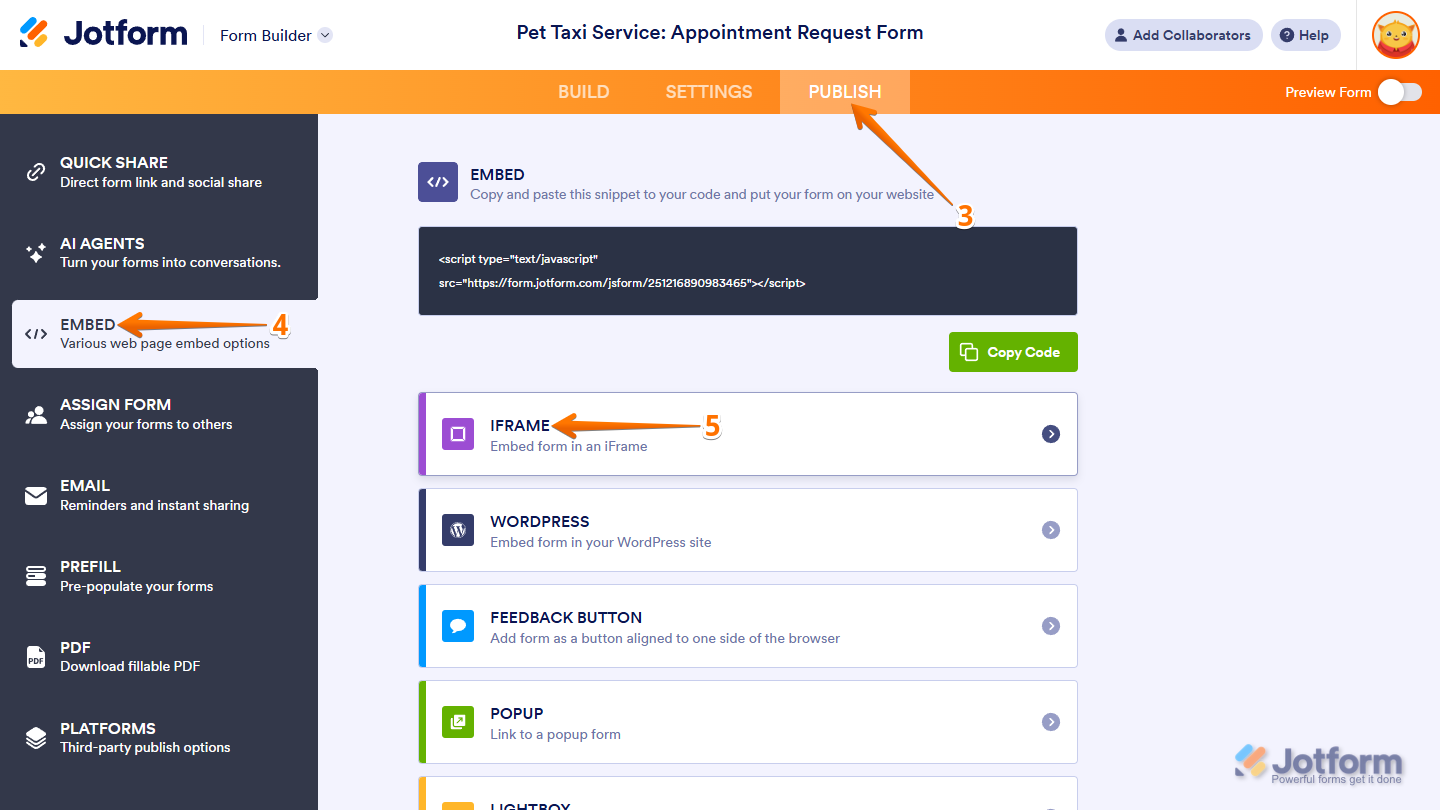
- In Form Builder, in the orange navigation bar at the top of the page, click on Publish.
- Now, click on Embed in the menu on the left.
- Then, in the Embed options, select iFrame.
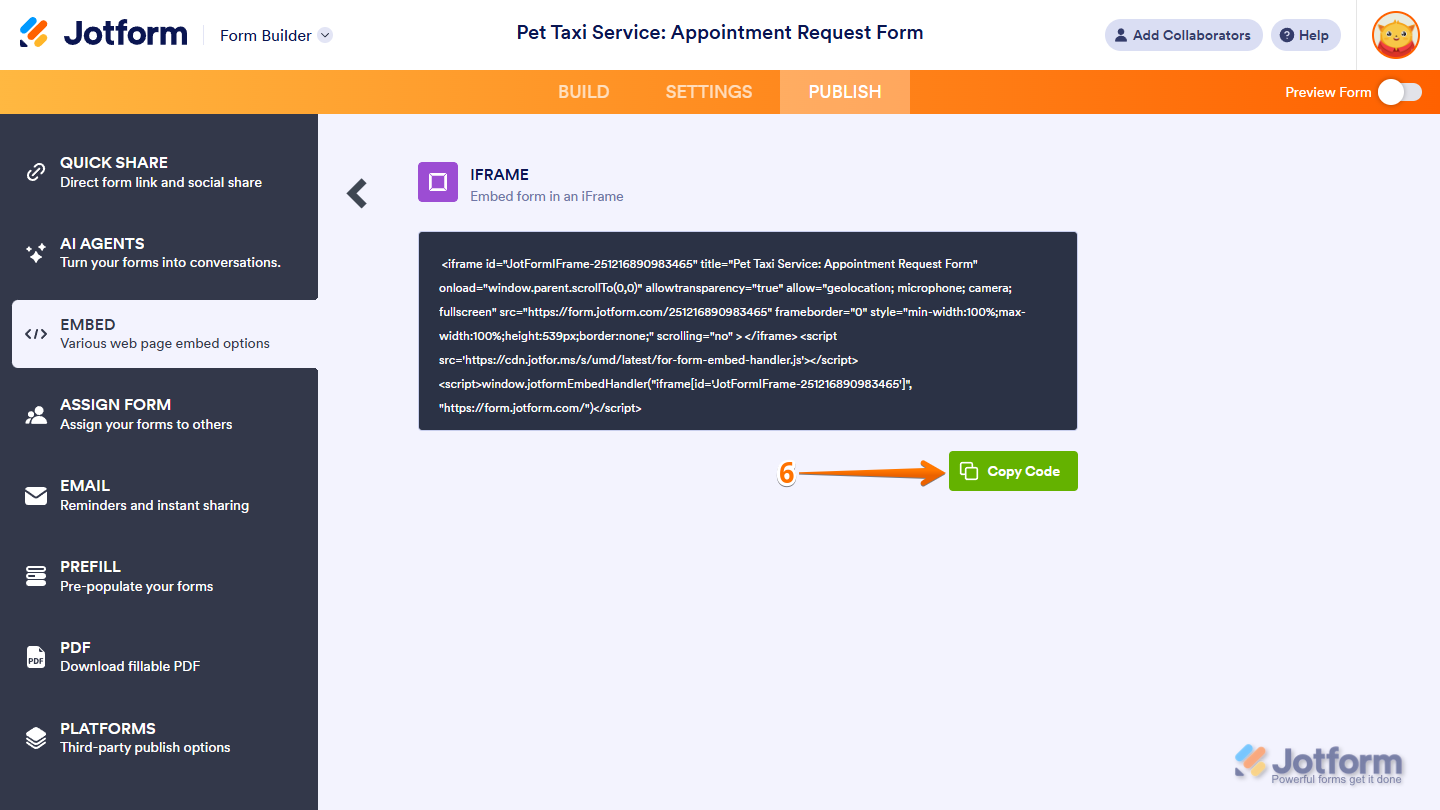
- Next, in the iFrame section, click on Copy Code.
That’s it. You can add the code anywhere in your website’s HTML, usually inside the tag where you want the form to be displayed. If you’re using a content management system like WordPress, Wix, or Squarespace, find a custom HTML or embed block in the editor, and then paste the iframe code there to show your form on the page.

Send Comment:
132 Comments:
May 23, 2024
que se pueda copiar el código para acoparlos y modificarlos en nuestra página web de cada una de nuestras tareas
September 26, 2023
I'm having issues with formatting the form using this method. The form is only showing a third and when I increase the height there's extra space at the bottom throwing off spacing. Is there a proper method to dynamically adjust height for viewing on desktop vs mobile?
July 28, 2023
I forgot password please help
May 3, 2023
My submit bottom does not work on my website after embedding it
March 15, 2023
Hello everyone, I want more information, please, because I have filled out a form on this platform, please tell me anything. thank you already
November 16, 2021
I have tried this and it seems to work. Expect it cuts of the last part of the iframe. I can see that other persons have had this issue. You recommend setting height of container or finding some script error, but non of this is the issue.
Last attempt was to embed it as an iFrame. You can go to to see the very basic code.
Can you spot the error?
October 13, 2021
Click PUBLISH at the top of your Form Builder.
Go to the EMBED section.
Select the IFRAME embed option.
Lastly, click the COPY CODE button to copy the codes.
September 14, 2021
Anyone know how to install eBay Banners to a website. A lot of people want to know
September 8, 2021
I will try this, thank you for your help!
June 28, 2021
Thanks, yes, I'm using the iFrame method.
May 23, 2021
When trying to embed my jotform code into Adobe Portfolio I get an error "This embed code is not valid" I've tried IFrame too and always this error message. Any info shared would be oh-so appreciated!
April 25, 2021
sir how can i embed a quiz on my artical .
March 25, 2021
I get this message when i try to embed IFRAME code on sharepoint?
"We can't show this embedded content because the code seems to be incomplete. Make sure that the embed code includes width, height and a valid address for the src attribute."
March 22, 2021
I selected the embed IFrame code as you suggested, no difference..
What is Platforms - Like Wordpress we use?
thanks
March 12, 2021
Would it be possible to pull this embed markup through the API? That would help our users during setup a lot, and would enable us to automatically embed these forms for them without this needed step for our not so savvy users.
March 1, 2021
I am unable to get the iframe embed code to function properly on my SharePoint site. It keeps telling me the embed code is incomplete...
What do I do to embed the form?
January 28, 2021
Thanks, got it
January 9, 2021
Thanks again.
There is no iframe widget in the version of Elementor I am using. I copied the iframe script and pasted it into the HTML widget frame of Elementor on the customer engagement form page of the website. So far the only glitch I notice is on the Cell Phone view. When holding the Cell Phone in the vertical position the bottom of the form is cutoff and the signature field is missing. However, when you start entering data into the fields at the top of the form you can then scroll to the bottom and the rest of the form is there. But, when you try to enter your signature as soon as you lift your finger off the screen the form jumps right back up to the top to fill in the other fields. This of course is very inconvenient and time consuming. However, when turning the Cell Phone to the horizontal position the form is completely viewable with the signature field present. The Tablet seems to work fine.
Please get back. Victor
November 12, 2020
On my client website (Dentist) there is downloadable pdf file.
Unfortunately this download on mobile devices is not convenient. Also it is not easy to fill it up.
Is there a away to do this online!
Fill the form>click to send.
Or is there any samples to watch it!
Thank you
November 4, 2020
please make it more clear
October 28, 2020
ok once iframe code copy and after that the paste in that code in app.js but i have errors how to solve the solution
August 11, 2020
Can someone please call me @ (305) 467-1024. Everything was working fine last week , but now people have contacted stating there not able to send $$$.
Thank You
Ulysses
August 8, 2020
Last part of form is still cut off and not accessible
July 29, 2020
Hello,
je n'arrive toujours pas à voir mon formulaire dans mon email. J'ai copié le code iframe, enregistré en .html et ajouté en tant que ficher depuis Outlook "insérer en tant que texte et rien n’apparaît dans le corps de mon email. qu'est-ce que je fais mal ? y-a-t-il une autre intégration possible ?
merci
June 23, 2020
I can embed it fine, but then it does not appear full screen