Adobe Muse lets designers create HTML websites for desktop and mobile devices without writing code. Hey, that’s our line 🙂 By using Jotform and Adobe Muse, you’ll be able to create the perfect website.
Getting the Embed Code for Adobe Muse
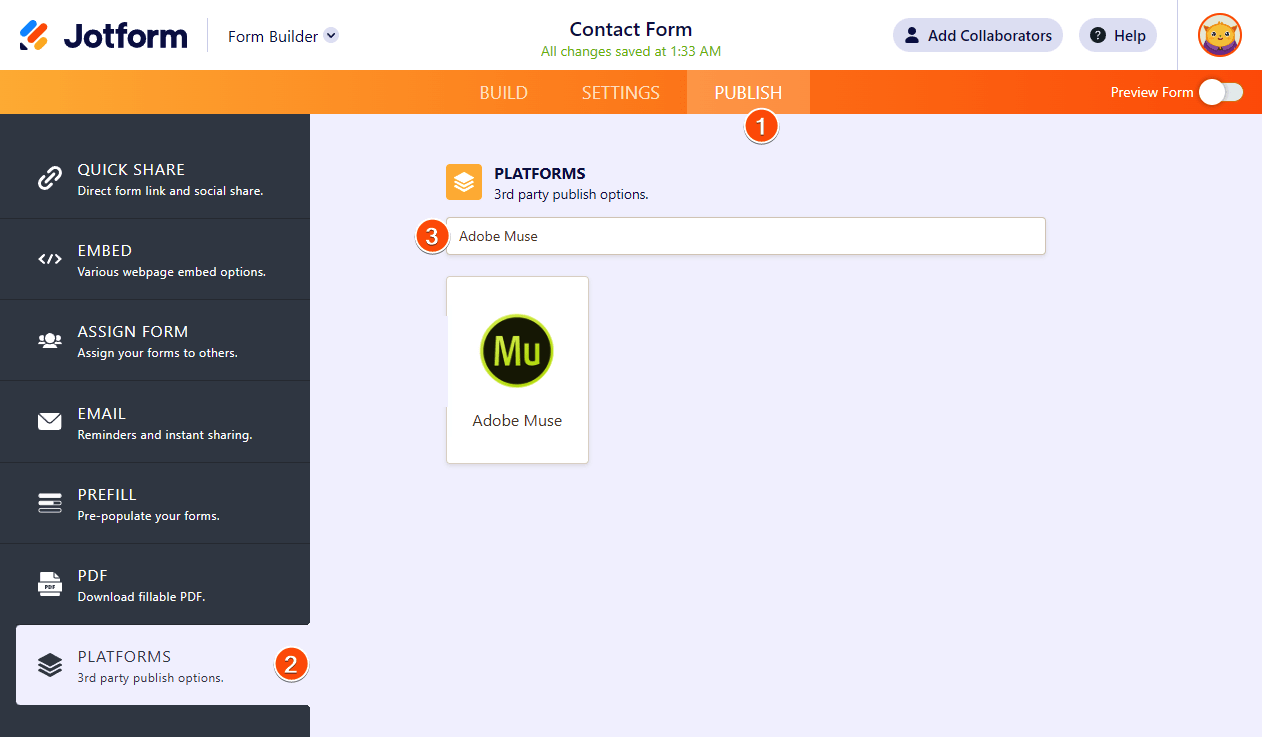
- In the Form Builder, go to the Publish tab.
- Go to the Platforms section.
- Search for Adobe Muse, and click it.
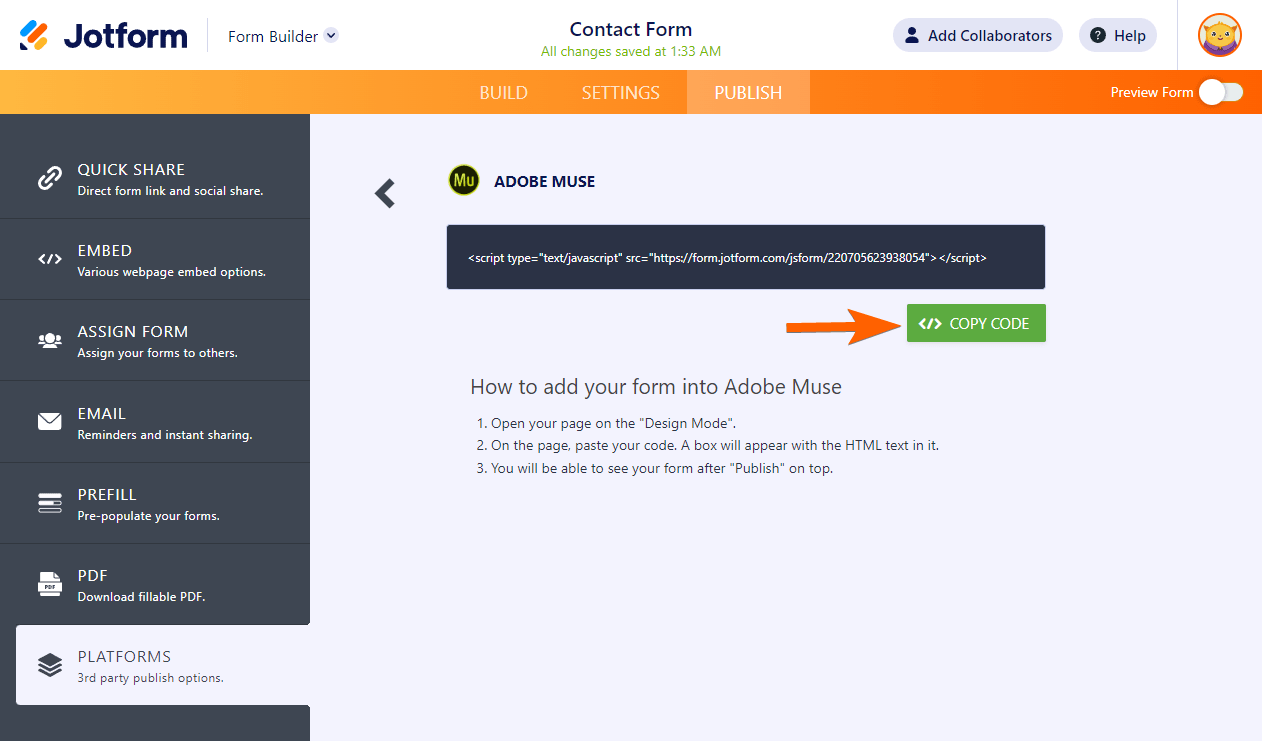
- Click the Copy Code button on the next window.
Embedding Form to Adobe Muse
- Edit the file of the webpage you’d like to add a form to. Or create a webpage if you want a dedicated page for the form.
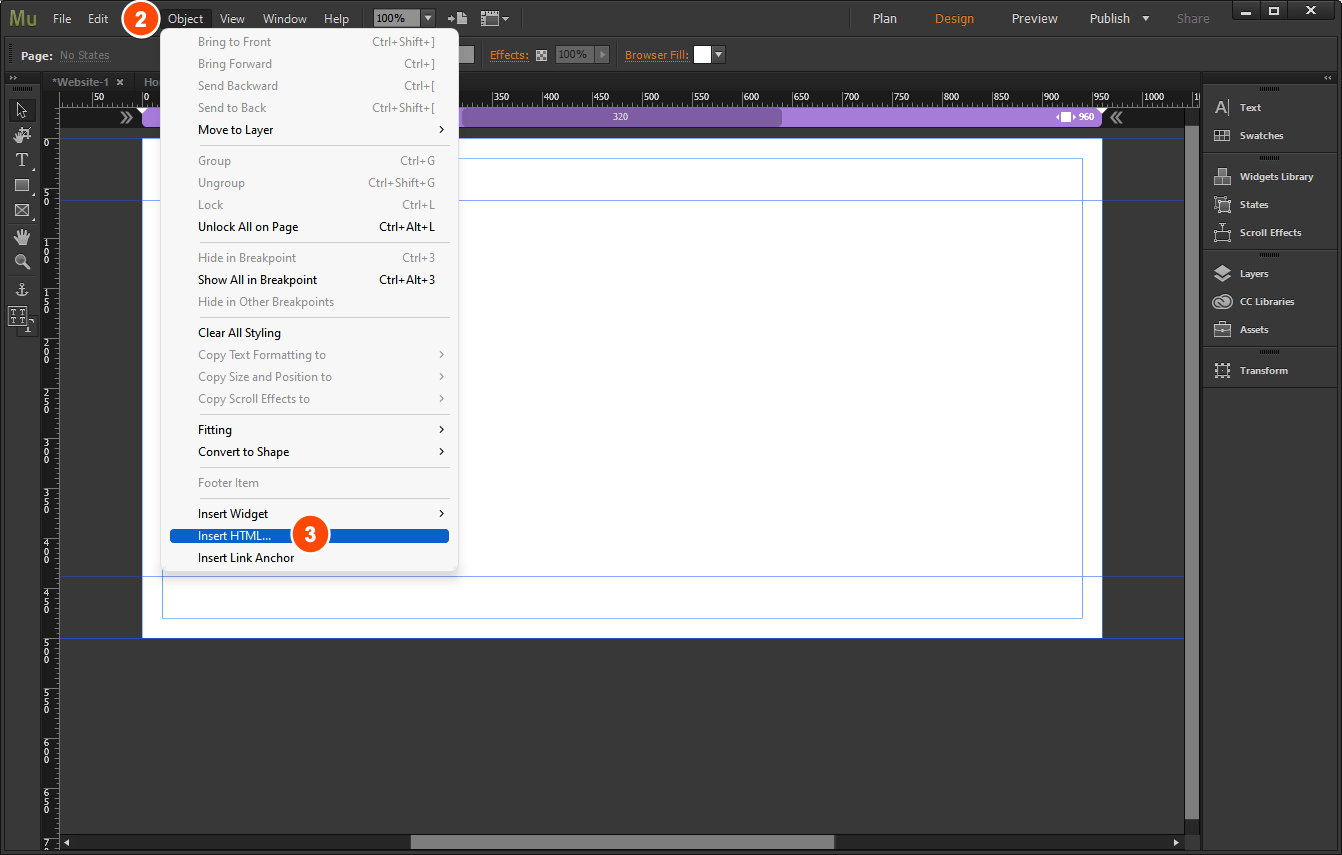
- From the top Menu bar, click the Object option.
- Click Insert HTML from the list of Object options.
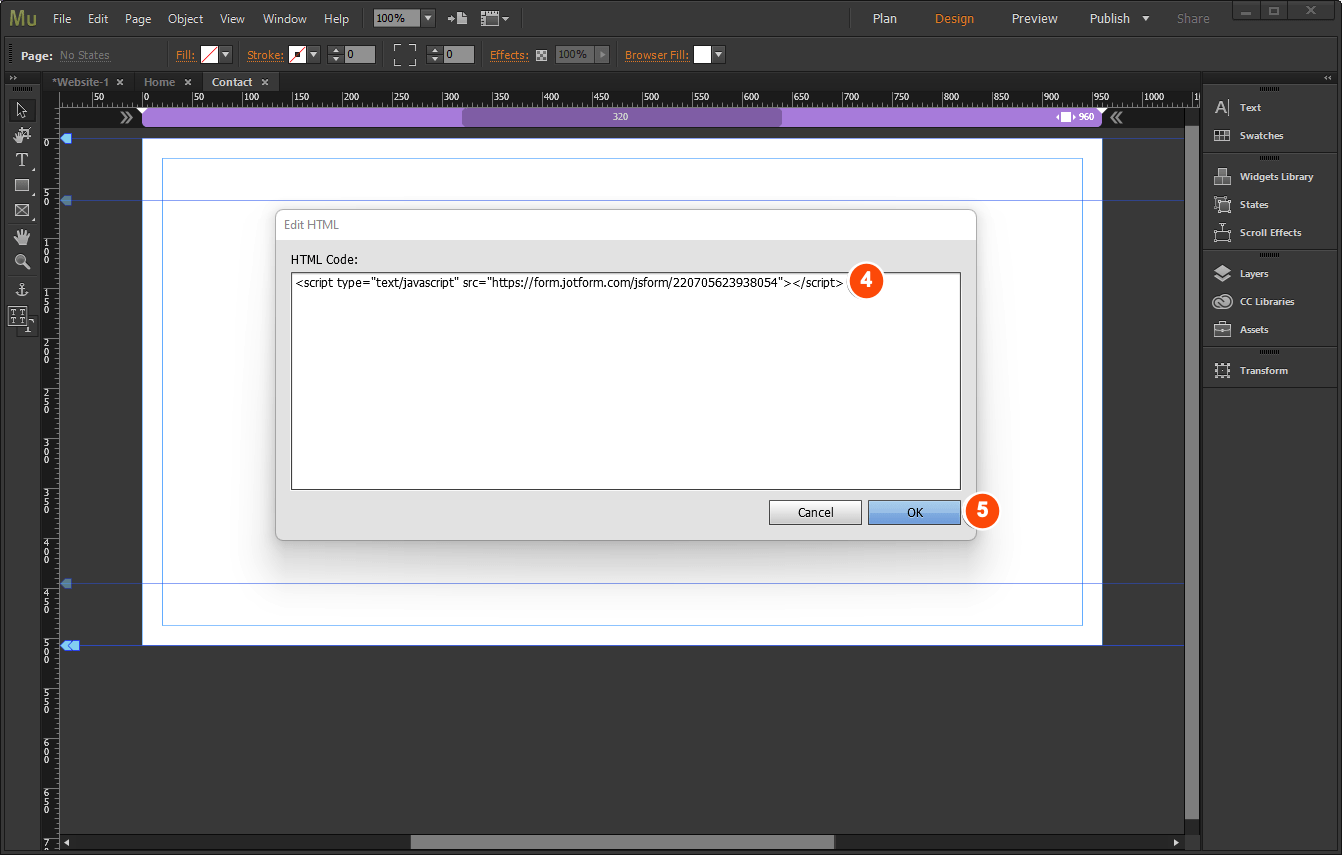
- Paste your form’s embed code.
- Finally, click the OK button. Please wait for the form to load, and that’s it.
Notes
You can adjust the location, height, and width of the HTML Object if its placement is incorrect on the page.
The above steps are through Adobe Muse Muse CC version 2018.0.0.685. The UI may differ from other versions, but the steps are likely the same.
How did it work out for you? Tell us if you had any difficulties adding your forms to Adobe Muse.

Send Comment:
31 Comments:
December 24, 2019
yeaah this is good
February 6, 2019
Thanks
October 8, 2018
For the last few weeks my jotforms are not displaying in browser on new and old Muse websites.
I am using Muse 2018.1 and embedding the form with Insert HTML...
Any help appreciated.
July 21, 2017
HI, I use my form in MUSE (embed -
Iframe) and it appears in all breakpoints, but THE PART OF THE SEND BUTTON and TOTAL doesnt appear. It just appears the jotform logo. That´s the only way to insert my form in MUSE in order to it works. I don´t like the other options (not for this design)
June 22, 2016
hi
i added my form to my page in Muse and it works perfectly on a desktop mode, I mean 1200px width.
the problem beging in the Breaking-Points, 768px for tablet and 480px for mobile.
the form is there but not display ion the web.
please help :)
May 29, 2016
When I add my form to a Muse website, it doesn't appear on mobile devices. What should I do? The error is: JavaScript exception: Error calling selector function:TypeError: Cannot read property 'style' of null.
May 26, 2016
Hello,
I tried everything now to get my jotform in muse. Strange thing is that I see the form in Muse and also in the test page, however when it is uploaded to our FTP it has disapeared/it is not showing somehow.
and on the blog page we tried to put the form in for testing.
April 28, 2016
mi formulario no refresca me podrían ayudar por favor .gracias
April 11, 2016
Hello,
when i'm inserting an html code in the adobe muse, the inserted part does not seem to be responsive !!
any body can help me please ?
thank you.
April 11, 2016
it doesn't work with a transparent background...background is always visible
May 3, 2015
Form is working great on my Muse Desktop. However, I cannot get the form to appear on either my iPad or my iPhone.
Any help would be appreciated.
March 20, 2015
Hey,
thank you very much for a great service answering all my previous questions.
now i have problems with my android laptop drop down list does not work on Internet browser it's on 3rd Page of the form.
Link to the form:
chrome works well.
February 18, 2015
I've added my form but no buttons work. I have form 'collapse buttons' and next 'page buttons' not doing anything.
I also can't insert the form into muse with a transparent background.
Pop Up window disables the button for the form all together.
October 16, 2014
doesn't show in an iphone or on an ipad—I get a brief flash of it with a page reload then it disappears.
July 16, 2014
thanks it worked , but how do i direct the form to my server or email.
May 8, 2014
traduction Français...?
Pourquoi ne traduisez-vous aucun article en Français ou autre langue... il y a des personnes qui ne comprennent RIEN à l'Anglais...
May 6, 2014
I have been trying but I can't get it to work.
Here is my form:
It has the web hook. but nothing goes to clinchpad. I have tried many times with different fields. but nothing.
April 28, 2014
When I publish my page I have a problem. The site loads at the bottom of the page where the contact form is, not at the top of the page. Do you have any suggestions why this may be happening?
March 17, 2014
When I try to adjust the width of the form in Muse it is stretching the content.
February 27, 2014
how do i change the email the form is sent to
February 9, 2014
How do I add the text provided in a comments form back into the website?
November 5, 2013
I changed the font of the form to a google web font, but it just shows as Arial when I add the form to my site. It previews on jotform as the correct font. What am I missing?
August 20, 2013
I tried to add a form with the lightbox code and now I have error on the page: MuseJSAssert:
Error calling selector function:[Exception... "Could not convert JavaScript argument arg 0 [nsIDOMWindow.getComputedStyle]" nsresult: "0x80570009 (NS_ERROR_XPC_BAD_CONVERT_JS)" location: "JS frame :: :: Dt :: line 2" data: no]
June 9, 2013
How do you designate the username and password required????
February 15, 2013
Can I use a lightbox form with Muse?