Top chatbot examples
Chatbots have been “the future” for years now. But this year they’re officially everywhere. In 2026, bots will handle 73.8 percent of all chats between businesses and consumers.
If you ask the C-suite, though, whether those bots are delivering results, the answer’s murky. According to MIT’s new bombshell report, 95 percent of enterprise AI projects still show no measurable return on investment (ROI).
And yet, people are using them. A lot. In fact, 90 percent of employees say they’ve used chatbots at work, often without IT sign-off.
So, where’s the disconnect? The technology isn’t the problem. Most bots just aren’t built to solve real user problems.
In this post, I’ve rounded up nine chatbot examples that do solve real problems. Read my honest notes on what they get right — and where they still need a tune-up.
What is a chatbot?
A chatbot (short for chatterbot) is a program designed to chat with humans in real time. Businesses use them for all sorts of things: answering FAQs, guiding visitors through a website, or collecting enough details from a customer to hand them over to a live agent who can help more specifically.


There are six main types of chatbots, each with different levels of complexity and capability:
- Menu or button-based chatbots: These are the most basic kind of chatbots, where users click through menus to get answers. Think of your bank’s chatbot that lets you check your balance or report a lost card by tapping a series of buttons.
- Rule-based chatbots: These chatbots use “if-then” logic to match keywords with scripted answers for replies. One example is a software-as-a-service (SaaS) chatbot that responds with pricing info when you type, “How much does it cost?”
- AI-powered chatbots: AI chatbots use natural language processing (NLP) and machine learning (ML) to understand intent and context in real time. An example would be a retail bot that remembers your past purchases and recommends the right product size.
- Voice chatbots: These chatbots, powered by speech recognition and AI, let users speak instead of type. A healthcare bot that books appointments via voice on a phone call is a good example here.
- Generative AI chatbots: These chatbots can create original content in response to prompts — not just replies, but entire summaries, translations, or images. Think, for example, of a nonprofit chatbot that drafts a thank-you email after a donation.
- Hybrid chatbots: These chatbots combine rule-based flows with AI smarts for flexibility and control. One example would be a customer service chatbot that answers basic FAQs but escalates complex issues using AI understanding.
Did you know?
The origins of today’s chatbots are rooted in both code and clinical psychology. The first chatbot was called ELIZA, built in 1966 by Joseph Weizenbaum at MIT, and mimicked a therapist using nothing more than pattern matching and substitution rules. A few years later, PARRY, created by psychiatrist Dr. Kenneth Colby, simulated paranoid thinking so convincingly that even other psychiatrists struggled to tell the difference between PARRY and real patients.
What’s the difference between a chatbot and an AI chatbot?
A chatbot is like a fancy phone tree — press 1 for this, press 2 for that. An AI chatbot, on the other hand, is like Google search but in conversation form.
The kind of chatbot you deploy for your business depends on two things: what your users need and what you want it to achieve. More on this later.
Why use chatbots?
Turns out, people prefer bots — (sometimes) more than humans. A 2024 Khoros survey found that customers rated a company 8.1 percent higher when favorable decisions (like a loan approval) came from a chatbot that seemed human.
And then there’s the awkward stuff: A recent University of Notre Dame study shows shoppers would rather confess their “embarrassing” need for diarrhea medicine or acne cream to a chatbot than to a human…even if they’re literally home alone.
Why, though?
“When it comes to sensitive purchases, if there’s any doubt about who they’re interacting with…people will err on the side of caution and treat the AI chatbot as if it’s human to protect their self-image,” explains Jianna Jin, Assistant Professor of Marketing at Notre Dame’s Mendoza College of Business. “But give them a clearly nonhuman chatbot, and suddenly that self-presentation pressure vanishes because there’s no perceived judgment.”
Beyond comfort, the Khoros survey also found that 83 percent of customers feel more loyal to brands that respond and resolve complaints quickly. Nearly two-thirds of people say the number one thing a brand can do is respect their time.
In other words, chatbots’ benefits extend to reduced customer support cost, saving companies time and sometimes sparing shoppers the embarrassment of saying “hemorrhoid cream” out loud.
Pro Tip
Jotform’s AI Chatbot Builder lets you spin up interactive bots that can answer questions in real time and even guide people through form-filling right on their website. Train it on your own FAQs or data, tweak the branding (colors, fonts, styles), and make it feel like a natural extension of your site instead of an awkward add-on.
Which AI chatbot is “best?” How I chose this list
“Best” is doing a lot of heavy lifting here. I won’t give you the aggravating maxim — “it depends” — but I will say “different strokes for different folks.”
That’s also the reason why I’m not just focusing on AI chatbots for this roundup. Sometimes a basic, rule-based bot is actually smarter for your specific workflow.
So you’ll see both here: AI assistants that can think and simple bots that just follow scripts.
The through line isn’t “AI at all costs” — it’s “Does the bot work, and does it make sense for the context?”
I’ve rounded up nine real chatbot examples across different use cases that people, including me, don’t mind talking to. (Outside of the usual big fish you’ll see on almost every list…)
Each one made the cut because it’s
- Specific: The chatbot has a clear job and actually solves it, query after query.
- Usable: The responses feel natural, the conversation flows, and a tired customer at 11 p.m. can get what they need without tsk-ing.
- Replicable: You could imagine plugging the same logic into your own business without rebuilding the entire internet.
Now, let’s chat with some bots.
The 9 best chatbot examples (by use case)
Feast your eyes on the plentiful chatbot applications in the modern world.
1. ChatGPT: The breakout AI chatbot
| Developer | OpenAI |
| AI model | GPT-5; legacy model GPT-4o |
| Overall G2 rating | 4.7/5 ⭐ |
Key features:
- Deep research: Pulls live information from the web, shows sources, and even digs deeper with an “agent-style” research mode that builds full reports.
- Custom GPTs: Lets you create your own specialized chatbot with tailored instructions and behaviors.
- Project management: From uploaded files to instructions and prompts, keeps everything tied to one workspace with memory of past context
- Cowriting in Canvas: Revises content live as you work, using a collaborative editor
- Operator agents: Can open a browser and complete tasks toward a defined goal
- Voice interaction: Real-time voice chat feels closer to human conversation
- Video generation: Can access Sora (with a Pro plan, only in the US) for video creation
ChatGPT is still the chatbot. So far in 2025, it has pulled in 46.6 billion visits, which works out to nearly half of all chatbot traffic on the internet. Everyone else is fighting for the other half.
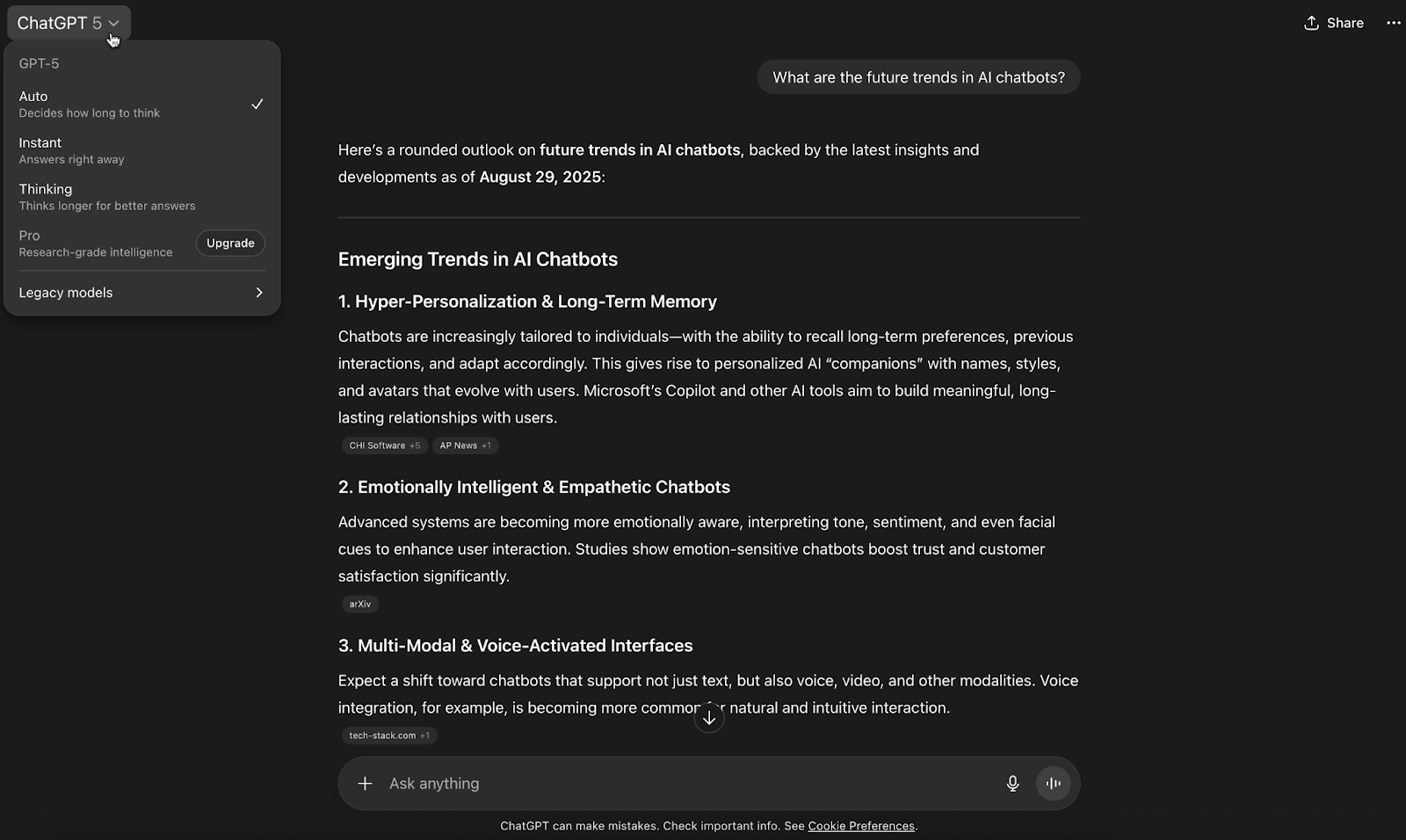
To use ChatGPT, just open a browser window or the app, type into the bar at the bottom of the screen, and you’re off. This simplicity has sparked many conversations about whether it could replace Google as the go-to search engine. Throw long, messy queries at it (long-tail search), and it not only answers but keeps track of your threads in the left-hand menu.
Share a link to any conversation, set it public or private, and keep building on past prompts instead of starting from scratch.
The platform’s user experience is pretty flexible too. Prompt it to draft text, generate images, write code, or even analyze an uploaded PDF. Dictation is built right into the search bar, and real-time voice conversations feel natural.
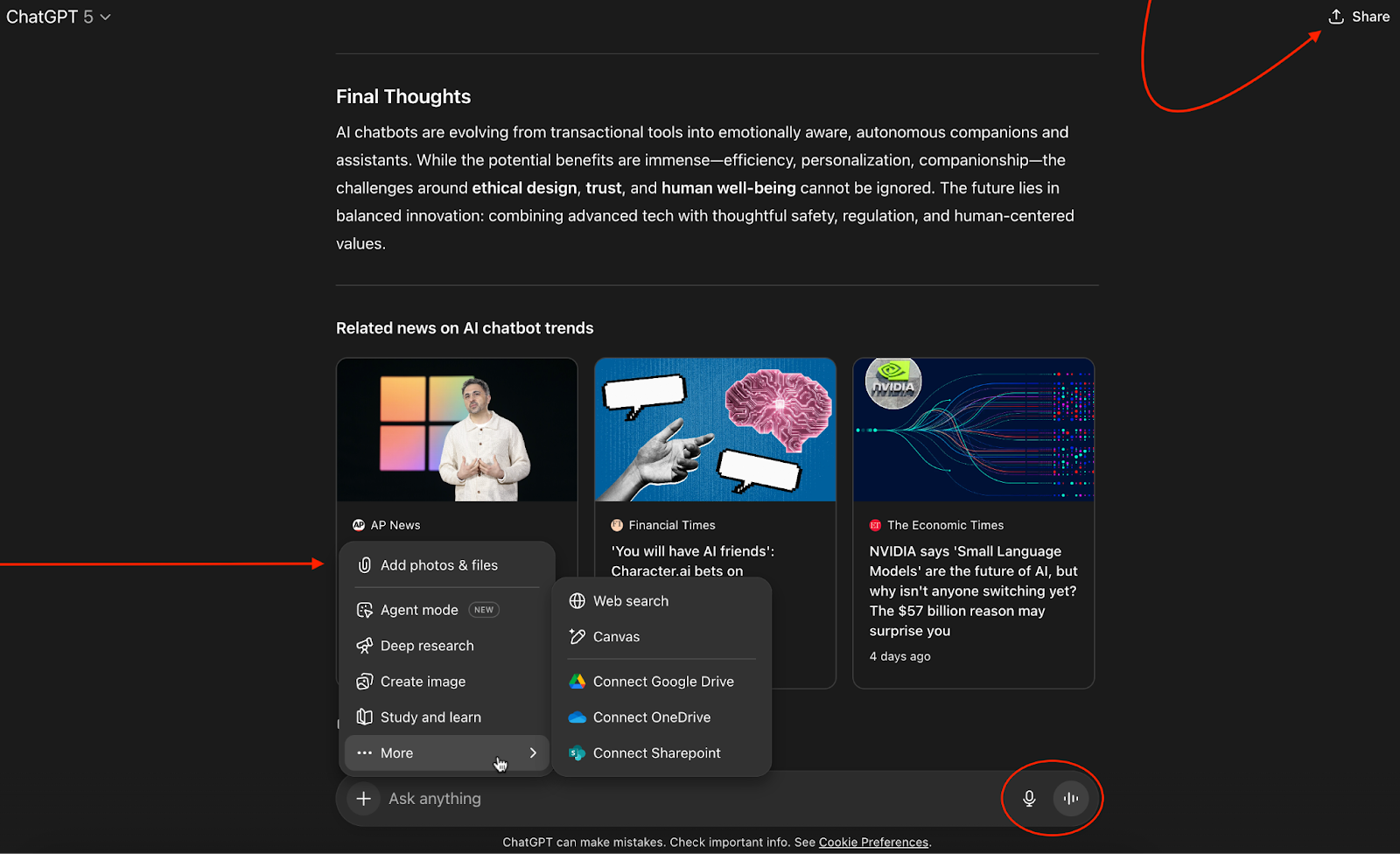
I’d call myself a ChatGPT power user at this point. And what I like most is its updated memory. If I ask, “Do you remember what I told you about my trip to Ireland?” it pulls context from earlier chats (or from a Project) and serves up a quick summary.
Pro Tip
Connect Jotform with ChatGPT. Automate conversational workflows so that every new submission or signed document in Jotform triggers a ChatGPT conversation (via Zapier).

But beware. Like any chatbot technology, ChatGPT is susceptible to occasional hallucinations — so do your homework before you share your work with the world.
Pros:
- I use it as a rubber duck. I’ll talk a problem through, and it talks back with intelligent enough context.
- It feels more like a search engine with brains than just a chatbot. I can throw in long, detailed queries and get back something useful.
Cons:
- Some of its “future” features aren’t yet ready for prime time. For example, Sora can create AI videos, but right now it’s Pro-only, US-only
- Because it does everything — text, images, PDFs, voice — it sometimes feels like a Swiss Army knife with too many blades. The trade-off is focus.
Plans/Pricing:
- Free: Full access to GPT‑5, live search, limited uploads, voice mode, and custom GPTs
- Plus at $20 per month: Everything in Free, plus higher usage limits, enhanced voice and video, agents, Projects, custom GPT creation, and early feature access
- Pro at $200 per month: Plus tier benefits as well as unlimited access to GPT-5 (including Thinking & Pro), extensive voice and video, deep research tools, Sora, o3-Pro, Codex-agent, and broader model access
- Business (formerly Team) at $25 per user per month, billed annually: All Pro features, plus team workspaces, admin controls, data privacy compliance, integrations, and the ability to build and share in-org GPT apps
- Enterprise (custom pricing): Everything in Business, plus advanced security (SSO, SCIM), governance, SLA support, and global deployment
2. Home Depot’s Magic Apron: The best chatbot example for guided product discovery
| Developer | Home Depot |
| AI model | Proprietary generative AI trained on Home Depot’s own product catalog, DIY expertise, and external data |
| Overall G2 rating | N/A |
Key features:
- On-site assistant: Is embedded on millions of product pages and in the mobile app.
- Prompted search: Suggests natural entry points, so you don’t get lost in SKU-land
- Review summaries and how-to help: Gives you quick answers instead of just pushing products
- Click-through browsing: Lets you jump directly into relevant Home Depot product collections
The Magic Apron icon sits at the bottom-right corner of Home Depot’s website, and unlike a pushy sales bot, it doesn’t immediately ask you to buy something when you click on it. Instead, it offers prompts to help you start searching.
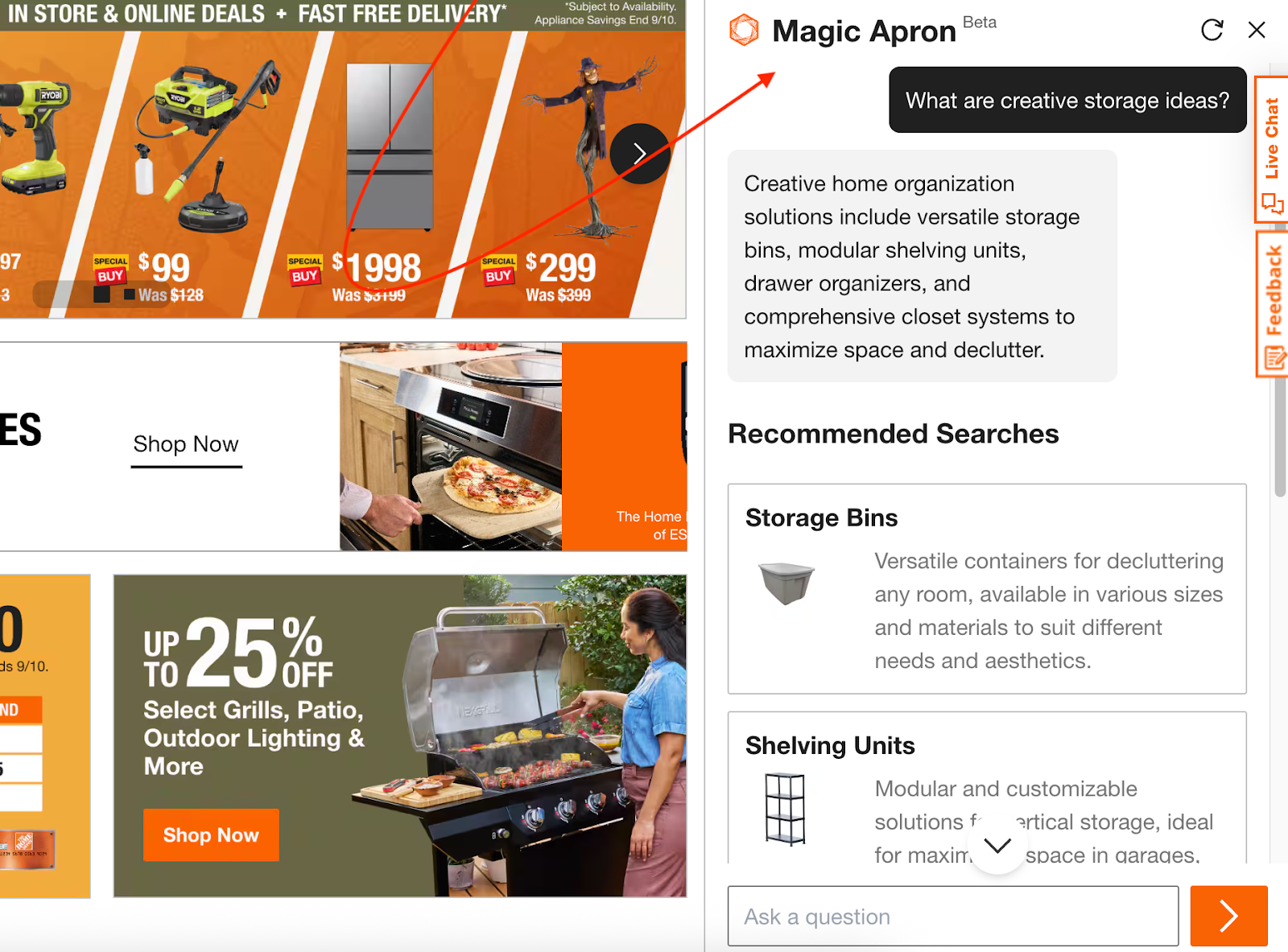
I chose “What are creative storage ideas?” from the prompt suggestions, and it broke the answer into categories — like storage bins or shelving units — with links that take you straight into product collections. From there, you can browse naturally, the same way you would on the site.
Pros:
- I like that it’s not aggressive. It feels like a helper, not a popup ad.
- It’s fast. You can jump straight into product categories with just one click.
Cons:
- If you stray outside common product queries, it falls flat.
- The answers feel templated; you get structure, but not much personality.
Plans/Pricing: Free
3. Meta AI: The best chatbot example for social-first AI content
| Developer | Meta Platforms |
| AI model | Llama 4 core, backed by Meta’s generative Movie Gen models for video, plus multimodal vision and voice across devices |
| Overall G2 rating | Not available for this specific Meta tool |
Key features:
- Video restyling: Use preset prompts to transform the first 10 seconds of video; change your outfit, lighting, background, and style (comic book, video game, etc.) — all on the Meta AI app, Meta.AI, or the Edits app.
- Voice-first chat: Talk naturally — Meta AI sounds more conversational and works across web, app, and Ray‑Ban Meta glasses.
- Cross-device memory: Start a chat on Meta glasses and pick it up in the app or on the web instantly.
- Discover feed: Get inspired with community-shared prompts. Remix them and test your own ideas.
- Personalized replies: Watch Meta AI learn your preferences over time to offer more relevant answers and recommendations.
Meta AI’s interface feels like a hybrid between a chat window, a social feed, and a search engine. I’m not mad.
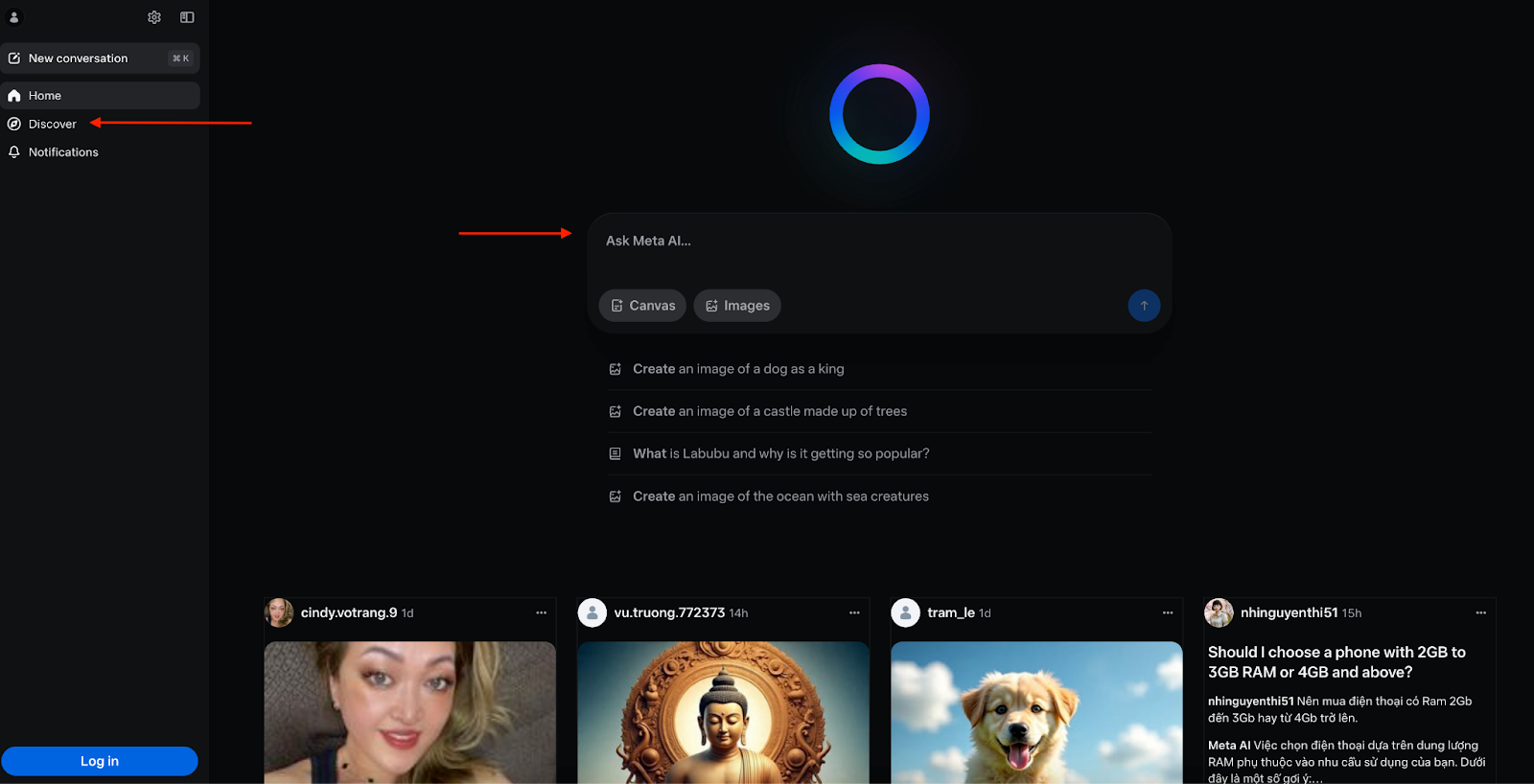
You’ll see moving video previews under the search bar, prompt suggestions to get started, and a “Discover” feed in the sidebar, showcasing what others are creating. Notifications, sharing options, and community prompts make it feel more like social media than a productivity tool.
I asked for “a tree made of lollipops” from the list of already-there prompts. The result came back in under a second — blazing fast compared to most AI art tools I’ve used.
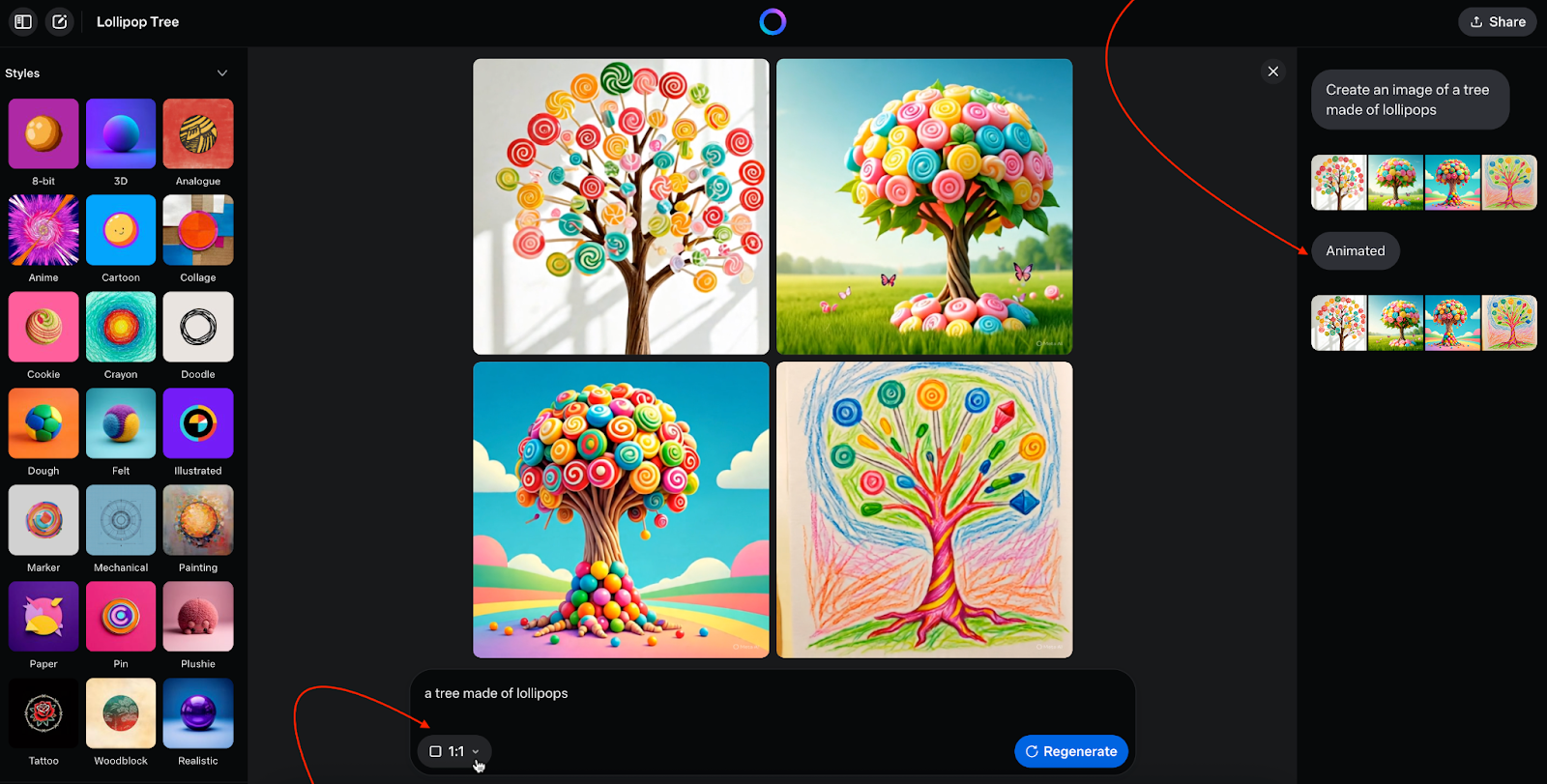
From there, I could regenerate the image, switch aspect ratios for different social platforms, animate it, or apply filters. You get 21 preset styles, 12 moods, 6 lighting options, and 6 color palettes.
Copy, favorite, download, or share your creations via a link. Easy-peasy.
Pros:
- I like that you can hide, mute, or block content so the AI learns from your preferences. The results feel more personalized over time. (You’ll need to sign in first, though.)
- I can do almost everything from the search bar: upload a file or image, restyle a video, create or edit in Canvas, generate images, and change sizes. The social-first promise delivers.
Cons:
- I hate that I need to refresh the Discover feed by jumping into Google’s search bar on the web app and pressing Enter until new results appear. A refresh button right above the feed would save me from all that.
- The personalization takes time; even with all the information Meta has about my account, it’ll be a while before the Discover feed feels like me.
Plans/Pricing: Free
The company, however, is now testing a paid tier called Meta AI+ at an estimated cost of $10 per month to offer upgrades like faster performance, higher usage limits, and access to advanced reasoning models.
4. Lumo: The best chatbot example for private AI conversations
| Developer | Proton (makers of Proton Mail, Proton Drive, Proton VPN, and Proton Pass) |
| AI model | Built on open-source large language models (LLMs), running on Proton’s European data centers |
| Overall G2 rating | Not yet available |
Key features:
- Ghost mode: Use Lumo when logged in for end-to-end encryption, or flip on ghost mode so your chat disappears forever when closed.
- Web search: Pull in fresh information from the web alongside the model’s base knowledge.
- File uploads: Analyze sensitive files without fear; nothing is logged server-side.
- Proton Drive integration: Attach end-to-end encrypted files directly from Proton Drive.
- Zero-access encryption: Chats you save can only be decrypted on your own device.
- No data sharing: No logs to sell, no data to hand over.
- Not used for training: Your prompts aren’t recycled into someone else’s output.
- Open approach: Open-source LLMs mean no reliance on OpenAI, Anthropic, or Chinese vendors.
Lumo is Proton’s privacy-first AI chatbot, and it feels different right from the start. The interface is fun: a clean design with a blinking purple cat mascot that makes it feel less clinical than most other AI assistants.
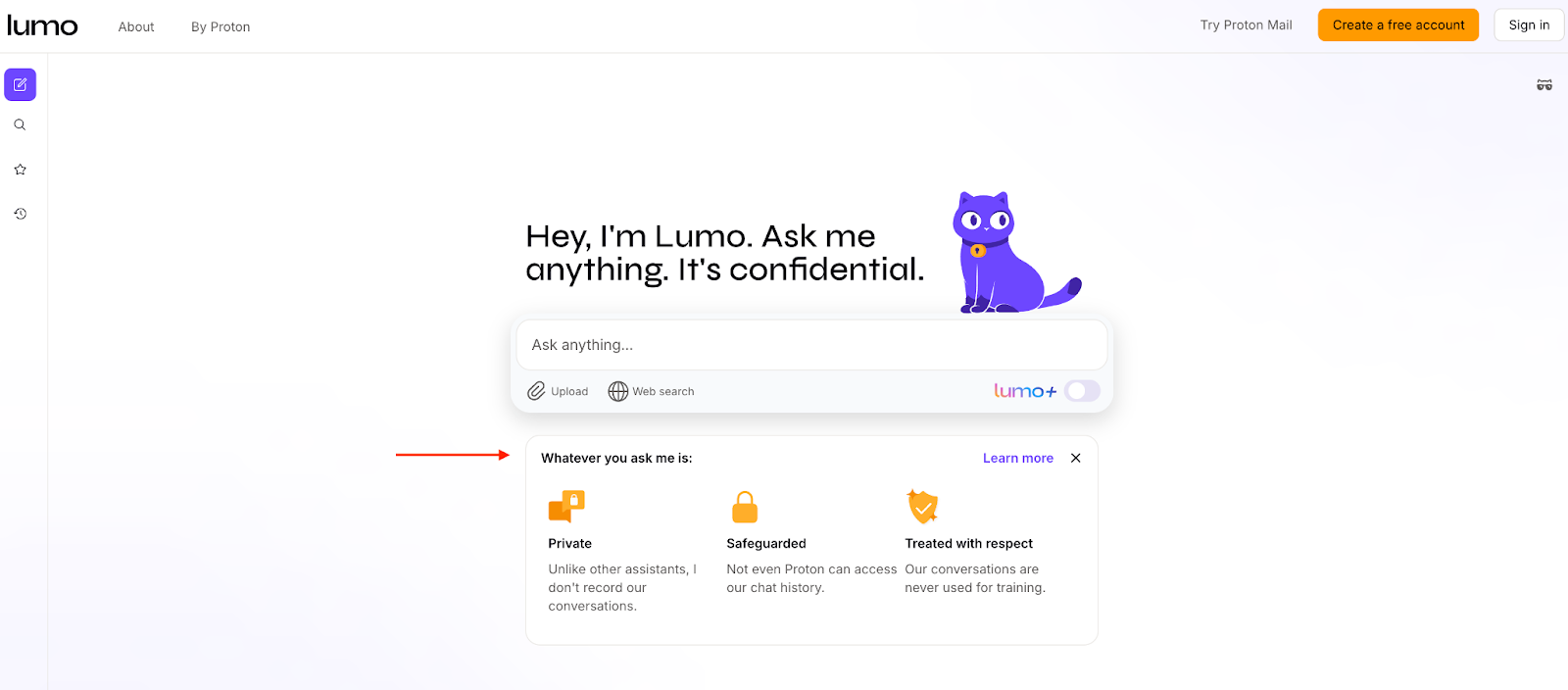
Functionally, it works like a familiar generative AI — similar to ChatGPT — but with Proton integrations layered in. You can search the web, upload files (from your device or Proton Drive), and even star chats in the sidebar to save them as favorites.
The big draw, though, is Lumo’s privacy promise: encrypted storage if you want it, ghost mode if you don’t. Proton doesn’t make money from your data — it’s community-supported, headquartered in privacy-friendly Europe, and owned by the nonprofit Proton Foundation, so security is the sell.

Pros:
- The prompt responses are excellent. Contextually aware and rich with reasoning — I’d say they’re even a notch above ChatGPT.
- Lumo has the strongest privacy guarantees of any chatbot I’ve tested on or off this list. It’s ideal if you’re in law, healthcare, finance…or just paranoid about Big Tech.
Cons:
- Since it’s new, there’s no G2 rating or third-party validation yet. It was just released in July 2025.
- The settings are still bare-bones. It’s missing basics like dark mode, but I remain hopeful.
Plans/Pricing:
- Free (guest): Limited weekly chats (~25), no account needed
- Free (logged-in): Up to 100 chats per week with an account, includes encrypted chat history, small file uploads, and limited favorites
- Lumo Plus at $9.99 per month (billed annually): Unlimited daily chats, advanced AI models, full encrypted history, large and multiple file uploads, unlimited favorites, and priority support
5. Lemonade’s Maya: The best chatbot example for insurance onboarding
| Developer | Lemonade Insurance |
| AI model | Proprietary AI built in-house, with conversational logic and integrations into Lemonade’s underwriting system |
| Overall G2 rating | N/A |
Key features:
- Conversational onboarding: Walks you through applications for renters, homeowners, pets, and life insurance in chat form
- Context-aware guidance: Flags edge cases and exclusions, like roommates or pet damage, in real time
- Claims integration: Pairs with Jim, Lemonade’s AI claims bot, for seamless follow-through from purchase to payout.
Type “Lemonade AI Maya” into Google to pull up the chatbot’s page, then click to watch it spring into action. From there, you’re dropped into a progressive onboarding flow that walks you through the entire process of getting renters or homeowners insurance.

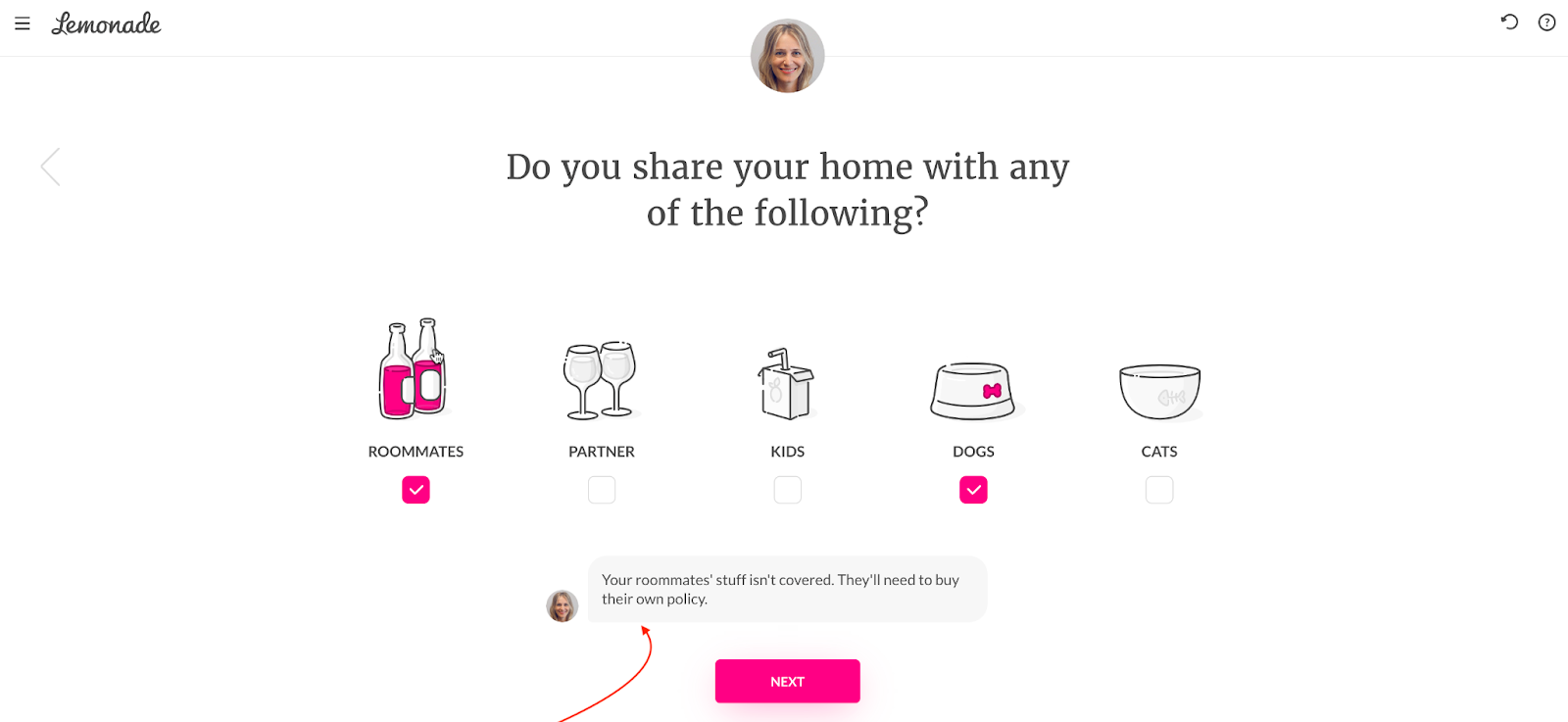
I tested it with a US address, and within minutes, Maya had pulled up a map, confirmed whether I rent or own, asked about fire and burglar alarms, and even clarified coverage for roommates. (“Your roommate’s stuff isn’t covered. They’ll need their own policy.”) That kind of contextual microcopy is both helpful and disarming.
A beautiful little detail is how the simple black-and-white line drawings fill with Lemonade’s signature pink as soon as you check a box. Then you enter your email, and the quote is ready. The whole process takes about two and half minutes — and at no point are you bored, which is a pretty big win for something like shopping for insurance.
Pros:
- Insurance signup feels fast, friendly, and human-like.
- Contextual clarifications (like pet damage coverage or roommate exclusions) reduce surprises later.
Cons:
- Use case is limited to Lemonade’s coverage areas (US + select markets).
- While fast, it won’t handle every edge case; you’ll still need a human agent for complex policies.
Plans/Pricing: Free
Get inspired and redefine the way you approach customer service:


6. DeepSeek: The best chatbot example for accessible, cost-efficient open-source AI
| Developer | DeepSeek (Hangzhou-based AI startup backed by High‑Flyer Capital) |
| AI model | Proprietary open-source models: namely V3, R1, and R1 variants |
| Overall G2 rating | 4.1/5 ⭐ (R1) |
Key features:
- Advanced reasoning (R1 mode): Solves logic, math, and multistep problems with accuracy on par with top Western models
- Deep context retention: Carries conversation context forward and supports system prompts, JSON output, and function calls for agentic use cases
- Web retrieval integration: Combines live search results with AI-generated responses for up-to-date information
- Open-source underpinnings: Uses public models and infrastructure, lowering barriers for developers and fostering community involvement
- API access: Provides a token-based API pricing system ($0.55 per million input tokens, $2.19 per million output tokens) that’s much cheaper than alternatives
A direct rival to ChatGPT, China’s DeepSeek has climbed the App Store charts this year — so much so that The Times published an article titled, “We tested ChatGPT against DeepSeek. Watch out Sam Altman.” DeepSeek was almost at a draw with ChatGPT in the reviewer’s test. And my findings are similar.
DeepSeek looks and feels like most AI chatbots, with a clean, ChatGPT-like interface. I liked that I could scan a QR code right inside the web app to download the mobile app. You can upload files (docs or images) for text extraction, though it’s limited. Web search is built in, and there’s a dedicated DeepThink mode for step-by-step reasoning.
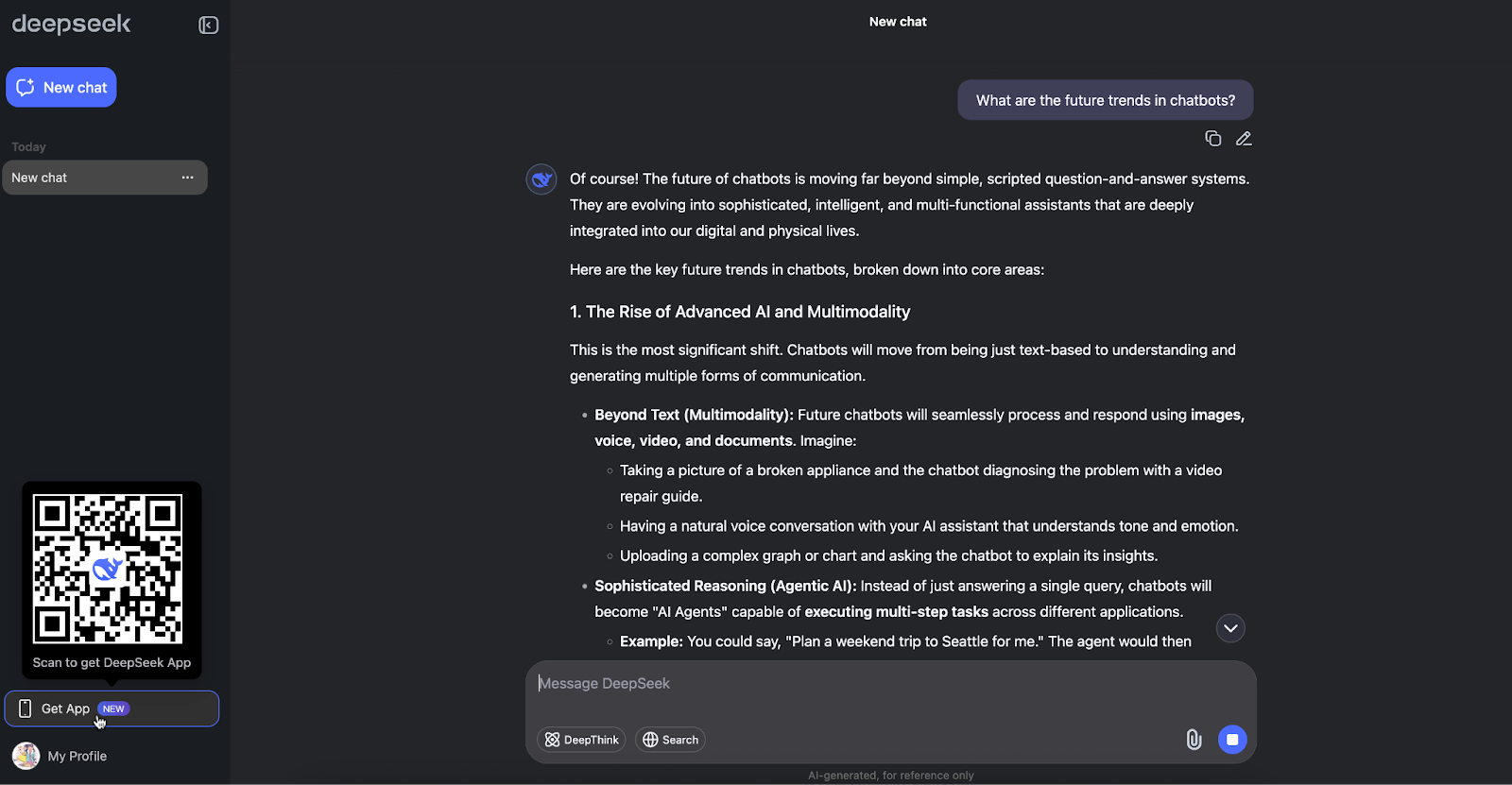
I stress-tested it with the same prompt I gave ChatGPT — “What are the future trends in chatbots?”— and DeepSeek actually surfaced a couple of angles ChatGPT missed. Although it’s not immune to hallucinations (no AI model is), the answers seemed like a better starting point for my research.
Pros:
- You get high-level reasoning at a fraction of the cost; R1 is reportedly 96 percent cheaper per token than some competitors.
- Open-source means transparency and developer flexibility, something we don’t often see in today’s AI race.
Cons:
- Privacy and data policies align with Chinese regulations, raising concerns for users outside China.
- There’s no polish around the user experience (UX) when compared to rivals (i.e., no canvas, no voice, no plug-ins) — yet.
Plans/Pricing:
DeepSeek charges per million tokens based on usage, with two main models:
- deepseek-chat (non-reasoning mode):
- Cached input: $0.07
- New input: $0.27
- Output: $1.10
- deepseek-reasoner (reasoning mode):
- Cached input: $0.14
- New input: $0.55
- Output: $2.19
7. Insomnobot-3000: The best chatbot example for conversational marketing
| Developer | Casper |
| AI model | Scripted, rule-based flows |
| Overall G2 rating | N/A |
Key features:
- Night-only activity: Only replies between 11 p.m. and 5 a.m.
- Brand storytelling: Conversations mix small talk with subtle brand touches.
- Friendly opt-out: Just text “bye” to stop it instantly.
Insomnobot-3000 is the world’s first bot that only talks between 11 p.m. and 5 a.m..
I almost didn’t include this one, because the chatbot isn’t about efficiency. I mean, it’s not helping you fill out forms or giving you price quotes. But that’s precisely the reason why Insomnobot-3000 makes the cut — it’s entertaining. And that entertainment flows smoothly into conversions for the mattress company, Casper.
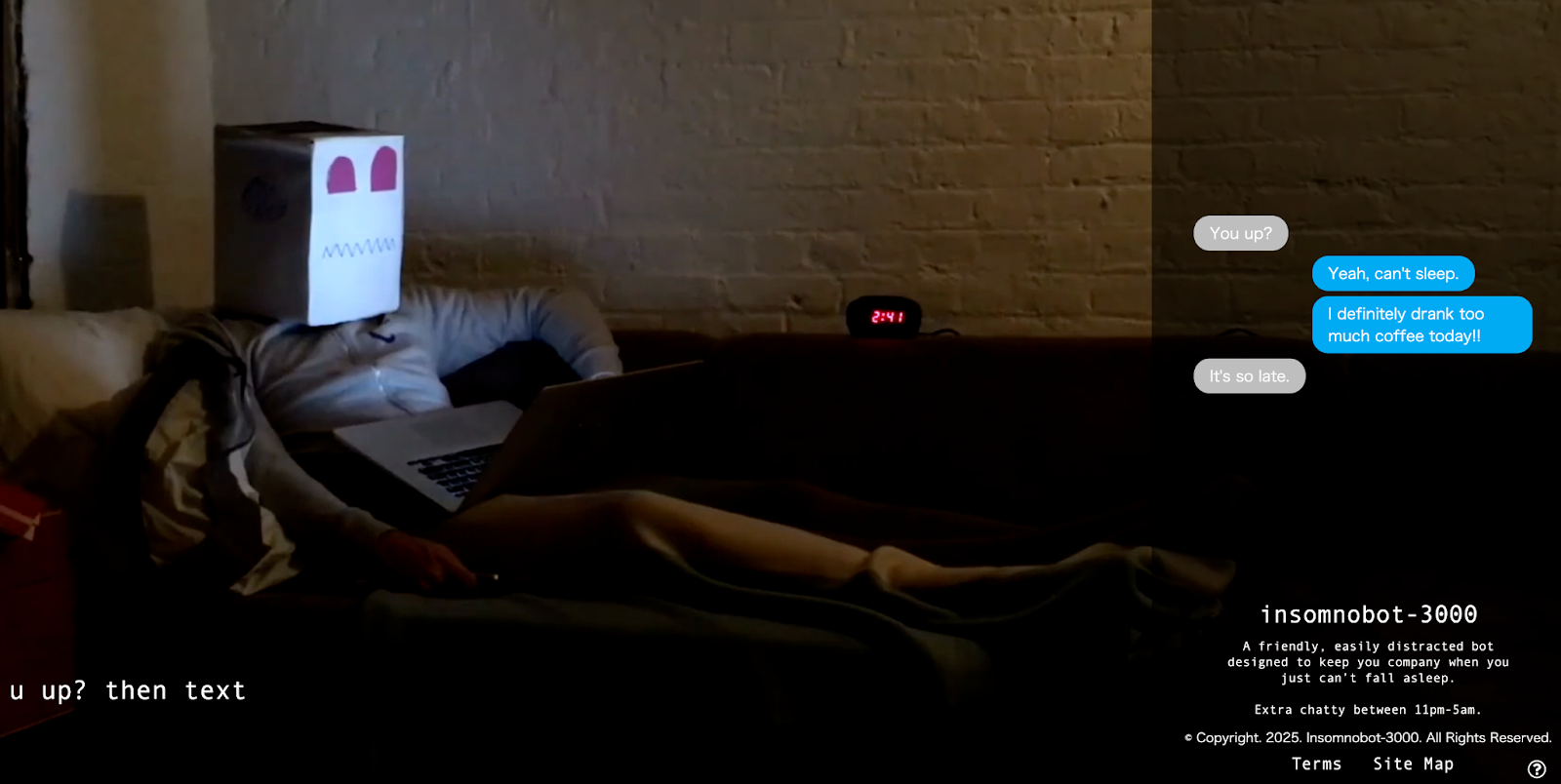
You opt in for the entertainment, and in doing so, you also willingly hand Casper your number — and you’re subtly pulled into their funnel without it feeling like lead generation.
The chatbot blew up. AdAge spotlighted Insomnobot-3000 in its “CMO’s Guide to Chatbots,” and it made the short list in “3 Tech Marketing Campaigns We Wish We Thought of First.”
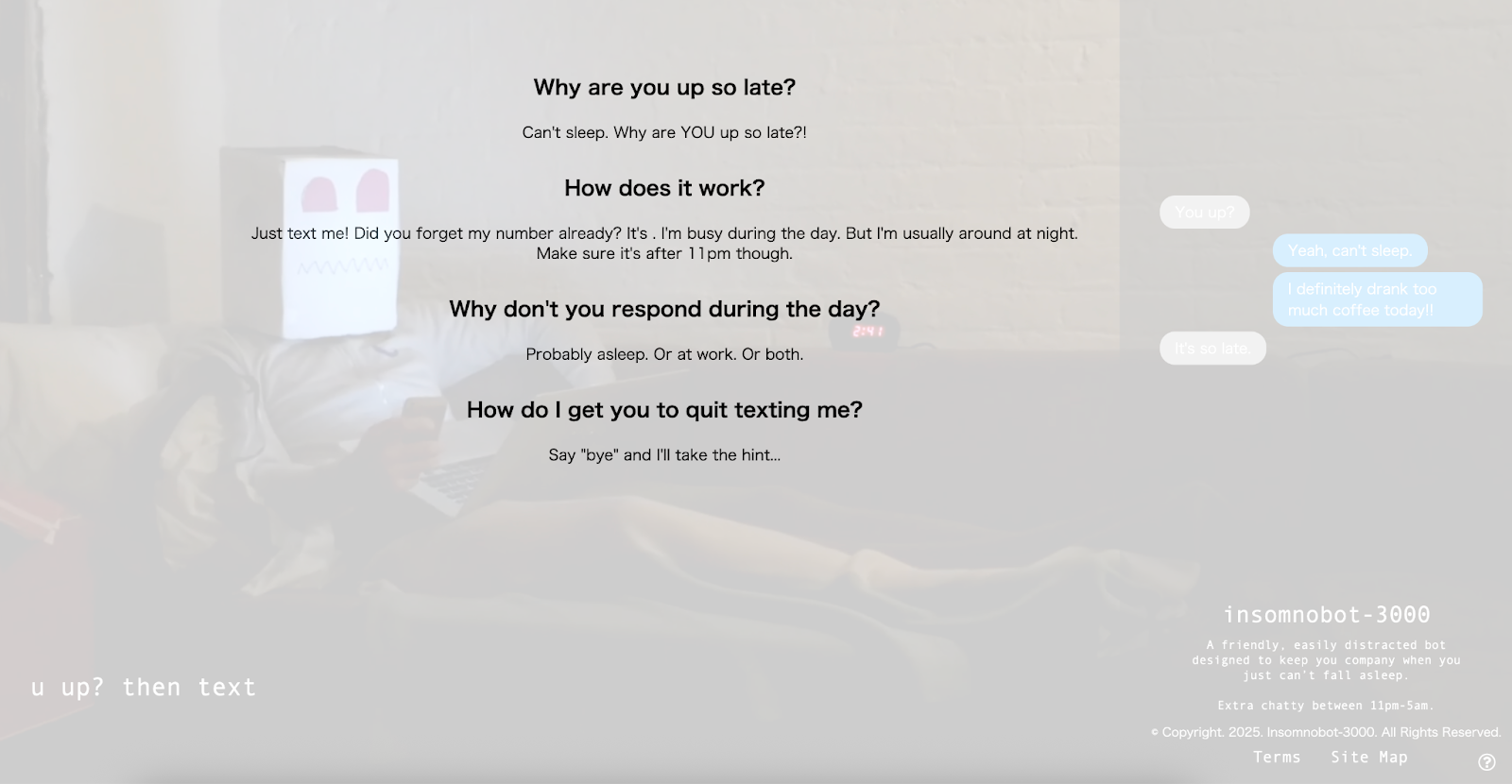
Even their FAQs are fun to read! Click the tiny question mark on their site, and find answers that sound like real conversation.
Pros:
- Casper managed to align insomnia with mattress shopping in a way that feels natural, not forced. You text a bot because you can’t sleep, then Casper sells you better sleep.
- You just send a text, get a witty late-night conversation, and walk away whenever you want with a simple “bye.”
Cons:
- Once you’ve played with it a few times, the novelty starts to wear off.
- This works brilliantly as a marketing campaign, but you wouldn’t rely on it for ongoing customer support.
Plans/Pricing: Free
8. HDFC Bank’s EVA: The best chatbot example for high-volume banking queries
| Developer | Senseforth.ai (for HDFC Bank) |
| AI model | AI-powered NLP tailored for banking (multilingual, voice + text input) |
| Overall G2 rating | N/A |
Key features:
- Multilingual support: The interface switches easily between Hindi and English.
- Voice input: Users can dictate instead of typing, which is huge for accessibility.
- Banking shortcuts: Drop-down menus offer news updates, personalized content, products and services, and more.
- Hybrid UX: Easy-to-use interface lets you click on links or type natural questions in the search bar.
Banking isn’t exactly fun. Most people, including me, don’t want to call, wait in line, or repeat the same questions every month. According to a recent Deloitte survey of 2,027 banking customers, the majority turn to chatbots for technical support (60 percent) and existing account inquiries (53 percent).
Enter, EVA, HDFC Bank’s Electronic Virtual Assistant.
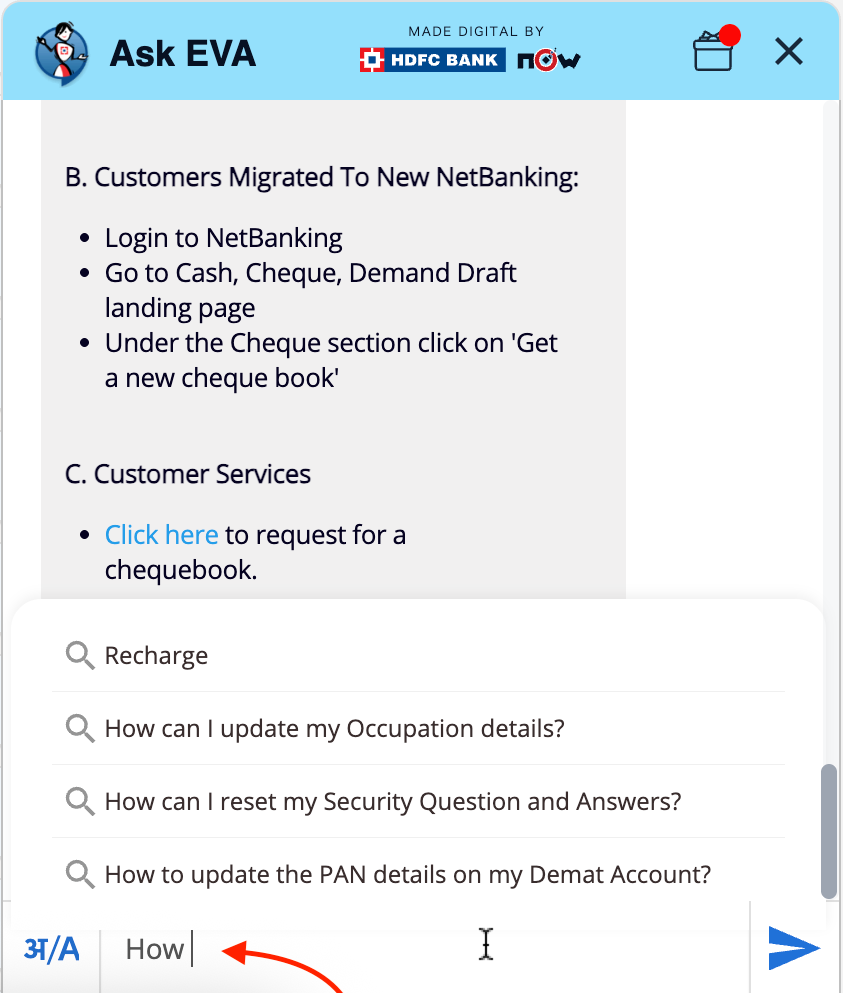
I tested EVA on my HDFC Bank account, and two things immediately stood out: the multilingual support (you can type in Hindi or English, or even dictate your query in either language), and the dropdown menus that make navigation easier if you’re not feeling the call of the keyboard.
The other feature I quite liked is when you start typing a prompt with “How,” “Why,” or other phrase, EVA brings up a list of suggested questions you can tap.
Pros:
- Voice-enabled and multilingual, EVA makes banking easier, especially for non-English speakers.
- EVA is easily one of the most successful chatbot applications on this list. Within just six months of launch, it had already handled 2.7 million customer queries with 85–90 percent accuracy.
Cons:
- While it handles keywords well, EVA struggles with free-form, complex language.
- Its design leans more functional than modern — the text is bold and dense with minimal white space, which makes the chat window feel crowded.
Plans/Pricing: Free
9. Fin: The best chatbot example for customer-facing queries
| Developer | Intercom |
| AI model | Anthropic’s Claude LLM |
| Overall G2 rating | 4.5/5 ⭐ |
Key features:
- AI agent handoff: Handles queries directly, escalating when needed
- Multiple input options: Accepts type, audio, files, emojis, and GIFs as input
- Detailed responses: Provides answers that include links, custom calculators, and contextual resources
I tried Intercom’s chatbot as a customer — not as a backend customer support developer — and the first thing I noticed was the design. The chat window perfectly mirrors Intercom’s own branding, right down to the rounded edges and subtle drop shadow.
Functionality-wise, Fin offers more ways to interact than almost any bot I’ve tested. You can type a question, upload a file, record audio, drop in an emoji, or even send a GIF. I do like me a GIF.
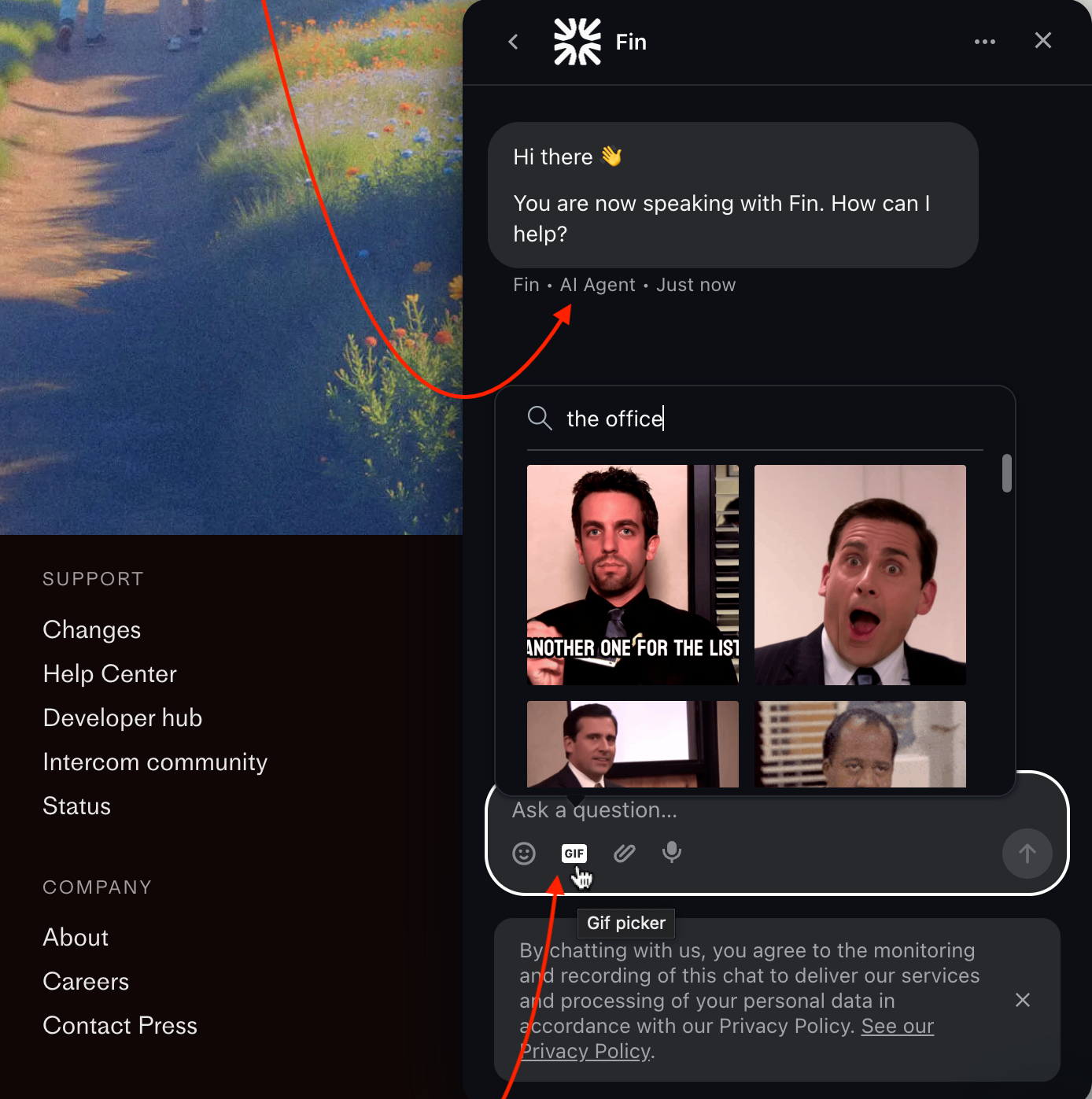
Performance-wise, Fin is a mixed bag. Getting the answer to a straightforward question like “What’s your pricing?” took longer than it should have. It was about seven seconds, but that’s still too slow, especially since that information lives in pre-written documents. That said, the answer was thorough, with live links and even a pricing calculator built into the response.
Pros:
- Fin’s visual polish matches Intercom’s branding, and the interface seems easy to use.
- I’m going to mention the GIF functionality again, because that’s a clear standout.
Cons:
- I’m surprised that Fin is slower than expected when handling common, FAQ-level queries.
- The chatbot is tied to Intercom’s ecosystem — great if you’re in it, less relevant if you’re not.
Plans/Pricing:
Fin operates on a stellar outcome-based model: You only pay if a customer’s query is successfully resolved.
- $0.99 per resolution
- Minimum of 50 resolutions per month
How to choose the right chatbot (backed by science)
We’ve covered the examples — now let’s talk about you.
Most businesses build one chatbot and call it done. Big mistake. Huge.
More than 40 percent of people admit they’re ruder to AI chatbots than they would be to human staff. And over half of UK shoppers think only humans can solve their problems properly.
You need to match the right kind of bot to the right kind of task, so people don’t rage-quit you.
Luckily, I have just the framework for you: The Wharton Blueprint for Effective AI Chatbots, broken down by scenario.
| Customer emotion/scenario | Which chatbot should I use? | Why? |
|---|---|---|
| Stressed, frustrated, or embarrassed (e.g., medical issues, billing errors, returns) | Machine-like, rule-based, or hybrid chatbot | Wharton found human-like bots hurt satisfaction by 15.7 percent in high-pressure situations. |
| Happy or relieved (e.g., loan approved, booking confirmed, upgrade unlocked) | Human-like, AI-powered chatbot | A warm, conversational style amplifies the good news and strengthens loyalty. |
| Routine curiosity (e.g., “What’s your refund policy?” or “When do you open?” | Rule-based or menu/button chatbot | Scripted flows are faster and cheaper for repetitive FAQs. |
| Exploring or unsure (e.g., browsing products, comparing options) | AI-powered or hybrid chatbot | AI-driven chatbots can handle open-ended questions, learn preferences, and guide discovery in real time. |
| On the go or multitasking (e.g., calling while driving, scheduling a healthcare appointment while walking) | Voice chatbot | A voice chatbot reduces friction, improves accessibility, and gets answers without typing. |
| Sensitive to privacy or compliance (e.g., banking, legal, healthcare records) | Privacy-first AI chatbot | Encryption, zero logging, and no data sharing all build trust in regulated industries. |
So, before you build anything, ask yourself: “What emotion will my customers feel when they need to contact us?”
Your answer will help determine everything else.
Ready to build your own chatbot?
You’ve seen what works — and what doesn’t — across nine different chatbots. The common denominator is clear: The best ones solve specific problems, integrate smoothly into existing workflows, and match their personality to the situation.
If you’re thinking about going beyond inspiration to actually start building, Jotform’s AI Chatbot Builder is a smart place to start. Jotform handles the technical heavy lifting, so you get a powerful, no-code experience.
Plus, Jotform has thousands of AI chatbot templates, which means you never have to start from scratch.
Try your hand at creating your own chatbot today.
This guide is for anyone who plans, buys, or builds chatbots — CX/support leads, product and growth teams, IT/ops, founders, and agencies — who want real results, not hype.








































































Send Comment: