With the recent rise of GPT and other generative AI models, businesses of all varieties and sizes are rushing to integrate chatbots and conversational AI agents into their frontline marketing. Your business, too, can use chatbots at several touchpoints (for example, your website, social media, or messaging tools) to connect with consumers.
However, it’s not enough just to have a chatbot. You’ve got to have the right one for your business needs, one that appeals to your target audience. Businesses that deploy user-focused and strategically aligned chatbots will find the most success. Whether they’re for lead generation (lead gen), customer support, internal workflows, or another purpose, chatbots deliver the highest return when they are designed, built, and implemented with specific goals in mind.
How can you create a chatbot that engages users and serves your business objectives? To jump-start your process, we’ve compiled a list of more than 35 creative chatbot ideas, tailored for different goals, channels, and users.
If you’re creating your first chatbot, or looking to enhance your existing strategy, you’ll find plenty of AI chatbot inspiration to put you on the path to success. But first, let’s look at the different types of chatbots available, so you can determine which is right for your needs.
What are the different types of chatbots?
There are three major types of chatbots: rule-based chatbots, AI-powered chatbots, and hybrid chatbots.
Rule-based chatbots use predefined rules, decision trees, and if-then logic to answer user queries. Chatbot applications for these tools include answering common questions, completing basic administrative tasks, and offering simple customer service support. Rule-based chatbots don’t have the capacity to understand complex questions or instructions.
AI-powered chatbots use natural language processing and machine learning, and are able to understand user intent, subtleties, and context. So they can complete more complex tasks and craft highly personalized responses to detailed, nuanced customer queries.
Hybrid chatbots, as the name suggests, are a combination of rule-based and AI-powered chatbots. They use rules and decision trees for basic questions and AI for more sophisticated ones. They can be used in customer support and administrative scenarios.
Chatbot vs live chat vs virtual assistant
Chatbots are sometimes confused with live chat or virtual assistants. While all three tools enable conversations with users, there are some key differences:
– Live chat,typically offered through widgets, enables users to speak with human customer support agents to get help with complex issues.
– Virtual assistants are AI tools that complete specific administrative tasks, such as scheduling meetings.
– Chatbots use rules or AI to automate conversations with users, answering questions and providing information. Chatbots can include the functions of live chat (such as triaging users to speak with live customer agents) and virtual assistants (such as helping users to fill out forms).
35-plus chatbot ideas to inspire you
Here are over 35 creative chatbots you can use as inspiration for your own business.
E-commerce and lead-gen bots
Lead-gen chatbots offer a great way to collect prospects’ contact information so you can nurture them toward a sale. You can also use these chatbots to communicate special offers. Check out these e-commerce and lead-gen chatbot examples:
- Product quiz recommender: Are your customers often confused about which product is right for them? Use a product quiz recommender chatbot on your website to interact with users and provide personalized suggestions for products or services. This tool works well for e-commerce brands.
- Abandoned cart reengager: If your customers frequently leave products in their carts without completing a purchase, use an abandoned cart reengager chatbot to encourage them to complete the sale. The chatbot can also offer helpful information, product benefits, and even a last-minute discount for high-value carts.
- Discount offer assistant: Entice prospects who are browsing your site or social media posts with discounts and special offers via a discount offer assistant. The chatbot can help increase conversion rates and customer satisfaction rates for e-commerce and product-centric businesses.
- Real estate lead screener: Qualify your real estate leads before you even speak to them with the real estate lead screener chatbot. Placed on your website, it can ask questions regarding needs and budget, so you can pinpoint the right clients for your agency.
- Client intake bot: If your client intake process involves numerous questions, place a client intake chatbot on your website or customer portal to automate the gathering of key information. This tool works well in industries like legal and professional services.
- Quote assistant: Collect information so you can provide prospects with quotes for your services using a quote assistant chatbot. Those in industries like insurance and professional services can use these automation tools to increase productivity.
Customer service and FAQ bots
Prospects and customers have a lot of questions, some simple and some complex. They also want service quickly and around the clock. Consider these chatbot ideas to take your customer service to the next level:
- Multilingual FAQ responder: If you have clients who live in different countries and speak different languages, a multilingual FAQ responder chatbot, placed on your website or social media pages, can answer questions in users’ native languages. Adding this feature shows users your business cares about their needs.
- Refund/exchange processor: Dealing with high refund or exchange rates? Hand this task off to a refund/exchange processor chatbot on your website or customer portal. This assistant is useful in product-led businesses, such as retail clothing stores and houseware companies.
- Troubleshooting flow bot: If users tend to have questions about how to set up or use your products, a troubleshooting flow bot on your website or customer portal can provide basic help and triage customers for live agents. This tool works well for software companies.
- Billing explainer: Are your billing statements detailed and complex? A billing explainer chatbot on your telecommunications or SaaS company website can answer FAQs specific to billing.
- Claims filing bot: If you’re in the insurance business, your customers may require help filing claims. Place a claims filing chatbot on your website or customer portal to guide customers as they provide the necessary information.
- Citizen service assistant: Government agencies can place a citizen service assistant on their websites to help users get information about how to obtain permits, for example. A tool like this is a great way to provide customer service at scale, increasing satisfaction.
Booking, scheduling, and workflow bots
Administrative tasks like booking meetings and scheduling appointments are cumbersome and lower overall productivity. Chatbots that specialize in these tasks can speed up workflows and free up employees to work on high-value tasks.
- Appointment scheduler: For medical clinics, hair salons, massage studios, and other service-based businesses, booking appointments is a key part of running the business. Use an appointment scheduler chatbot on your website to help prospects and customers book appointments with ease.
- Reservation assistant: If you’re in the hospitality or food service industry, your business may require customers to make reservations. Use a reservation assistant chatbot on your website and social media to engage users and help with scheduling.
- Passport/license renewal scheduler: Government agencies that offer passport and license renewal services can use a scheduler chatbot to help people book the necessary appointments. The bot can also provide information about relevant forms.
- Court date reminder: People involved in legal proceedings may have questions about upcoming court dates. A court date reminder chatbot on a website or portal can provide this information to users 24-7.
- Internal meeting and form submission bots: To enhance workplace productivity, employers can use GPT-powered bots to handle support tasks for internal meetings and form submissions. The chatbot can help schedule the meeting and process the intake forms.
Education and training bots
Students of all ages, and parents and guardians, often have questions about educational material. Using chatbots on educational websites and training portals is a great way to provide answers. Doing so also frees up instructors to focus on other student needs.
- Student quiz bot: If your students have trouble completing traditional quizzes, consider using a student quiz chatbot. It asks questions one at a time, which may reduce anxiety for students who feel comfortable using a chatbot.
- Tutor chatbot: For students who would like extra help with specific subjects or assignments, consider using a tutor chatbot on your class website or portal to coach students through areas of difficulty.
- Feedback assistant: Providing students with individual feedback is a time-consuming task for teachers. A feedback assistant chatbot can take on some of the work, giving students personalized feedback based on their test scores and learning outcomes.
- Onboarding coach for new hires: If your institution has multiple processes and forms associated with new hires, try an onboarding coach chatbot. Placed on an internal website, it can guide new employees in completing the various workflows and hiring documents.
- Financial literacy explainer: Those working in insurance and financial services can use a financial literacy explainer chatbot on a website to help users understand complex information. It can also provide answers to common questions.
Internal productivity and HR bots
Increasing productivity in the workplace is no easy task. When you have the right tools, however, anything is possible. These chatbot ideas for task automation and HR processes help your team get more done in less time. You can use them on internal websites and employee portals, as well as on internal tools like Slack.
- HR policy FAQ assistant: An HR policy FAQ assistant chatbot can answer internal policy questions and direct users to specific areas in the employee handbook for more information.
- Employee onboarding wizard: Onboarding requires employees to learn a lot of new information. An employee onboarding wizard chatbot guides employees through the onboarding process and helps them fill out the required documentation.
- IT help desk ticket bot: An IT help desk ticket bot can increase productivity for your IT team, answering users’ questions and triaging tickets based on urgency.
- DEI bias checker: HR screening support can help businesses that prioritize diversity, equity, and inclusion. Your HR team can use a DEI bias checker to confirm their hiring practices are not biased against specific groups of people.
- Legal document drafting assistant: Legal documents, like contracts, require specialized expertise. A legal document drafting assistant chatbot can help employees draft such documents, which can then be reviewed by your legal team.
Lifestyle, wellness, and niche hobby bots
Chatbots aren’t just for doing business. They can also be used in your personal life, for example, with hobbies or wellness.
- Recipe and meal planner: Not sure what to make for dinner? A recipe and meal planner chatbot on a food website can help you plan delicious meals based on the ingredients you have available.
- Gardening Q&A bot: If you need help maintaining your garden, a gardening Q&A chatbot on a home improvement or garden center website can provide details on specific plants, care instructions, and more.
- Mental wellness check-in: Mental health professionals can use a mental wellness check-in chatbot to touch base with patients. Be aware that it cannot provide medical advice!
- Journaling companion: Use a journaling companion chatbot to provide inspiration and motivation for reflection time. You can use it to bounce ideas off or talk about your day.
- Budgeting coach: Need help managing your finances? A budgeting coach chatbot can help you set goals, figure out how much you’re saving and spending, and organize your expenses.
Creativity and entertainment bots
Chatbots can do more than offer helpful information. They can also entertain users. Depending on your industry, you might be able to take advantage of one of these creative chatbots to help you connect with people:
- Storytelling bot: A storytelling bot can develop fun, engaging, and original stories based on user input. Using this type of bot is a great way to appeal to your target audience and have them spend more time on your website.
- Role-play bots: Role-playing with a chatbot can be a fun pastime. A role-play bot can pretend to be a chef or a travel agent, for example, and answer questions about those specific professions.
- Brand-trained content coach: For copywriters in training, a brand-trained content coach chatbot can help you work on your writing skills, providing writing prompts and helpful feedback.
- Trivia game master: A trivia game master chatbot can engage users with fun questions about your business or industry. Offer different categories for users to choose from and provide points for each correct answer.
- Brainstorming and idea generator: On writing websites, a brainstorming and idea generator chatbot can attract users. The chatbot can suggest scenarios to help writers perfect their craft.
How to choose the right chatbot idea for your goals
With so many options, how do you determine which chatbot is right for your business goals? Consider these criteria:
- Audience: Is your chatbot for prospects and customers, or employees? Determine whether it will be inward or outward facing.
- Goal: What do you want to achieve with the chatbot? For example, you could generate leads, provide customer support, increase conversion, or educate users.
- Complexity: Do you want to build a rule-based chatbot or an AI-powered one? What will best serve your needs?
- Platform: Where will your chatbot live: on your website, WhatsApp, social media, Slack, an internal portal, or somewhere else?
- Integration: What other tools will your chatbot need to do its job? Will it need to integrate with your online form builder, CRM, API, or something else?
Ready to build your own chatbot? Try Jotform’s AI Chatbot Builder
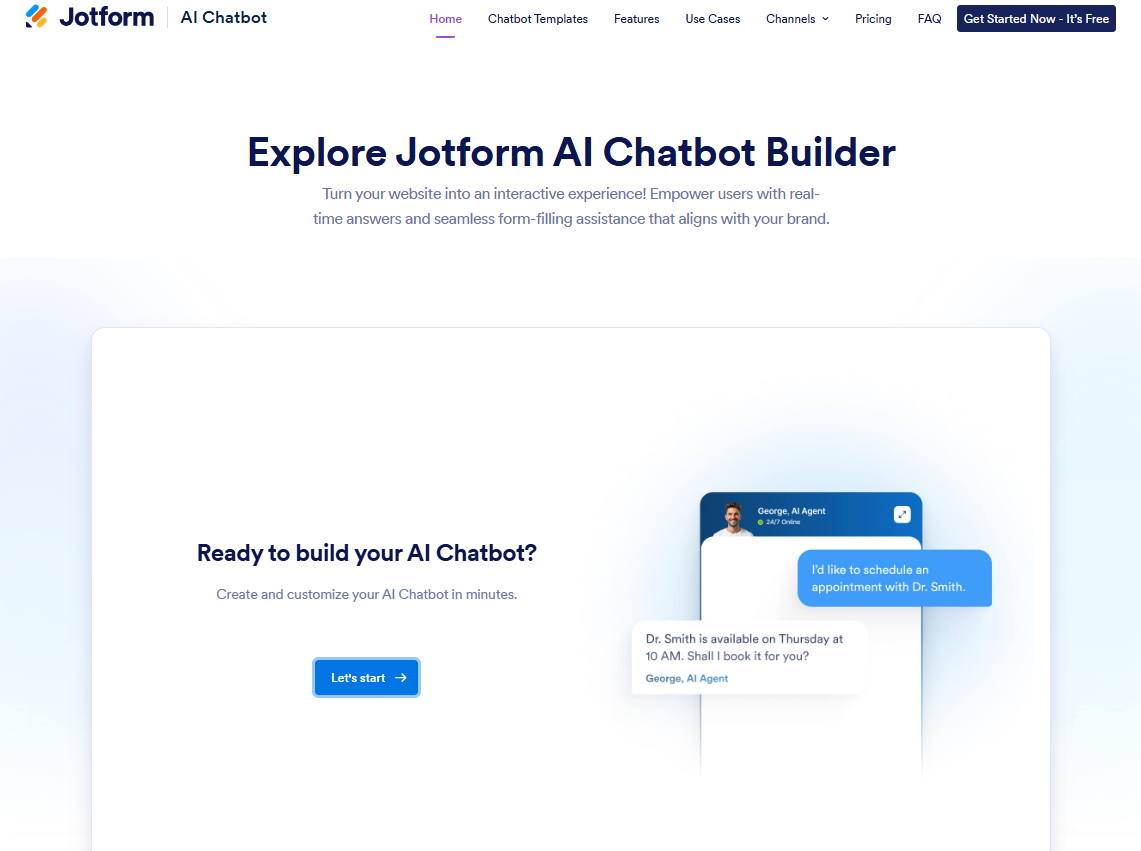
You don’t have to build your chatbot from scratch. Jotform’s AI Chatbot Builder supports a wide variety of chatbots and can help you create one that is perfect for your needs. If you’re just getting started, exploring different chatbot name ideas can also help you define your bot’s personality and purpose.
Jotform’s chatbots are sophisticated AI agents that can enable customer service automation, lead gen, increased conversion, and much more. Using AI in customer service is a great way to converse with users at scale without increasing your head count or sacrificing customer service quality.
Use Jotform’s AI Chatbot Builder to enhance internal workflows, gather information with online forms, receive feedback for your business, and other tasks. Jotform can be deployed on your website, WhatsApp, Messenger, and landing pages, so you can talk with users wherever they are.
Jotform offers a no-code chatbot builder. You don’t need to be a tech wizard to get going. Check out the Jotform AI Chatbot Builder, and set one of these chatbot ideas in motion today!
This article is for website operators, content managers, marketing agencies, and anyone who wants to explore proven chatbot ideas that enhance engagement, streamline workflows, and drive business outcomes across various industries and platforms.


































































Send Comment: