Jotform helps you quickly download your form submissions as Microsoft Excel, CSV, or PDF files so you can organize, review, and share your data more easily. Different file formats give you more flexibility depending on how you want to manage your submissions or who you want to share them with.
Pro Tip
- If you’re not sure where to find the Jotform Tables, check out our guide on How to View Form Submissions to learn more.
- You can also integrate your form directly with Microsoft Excel. Take a look at our guide on How to Integrate Your Form With Microsoft Excel for more details.
Downloading All Form Submissions
You can download all your form submissions in different file formats depending on how you want to organize, review, or share your data. Getting started is simple—here’s what to do:
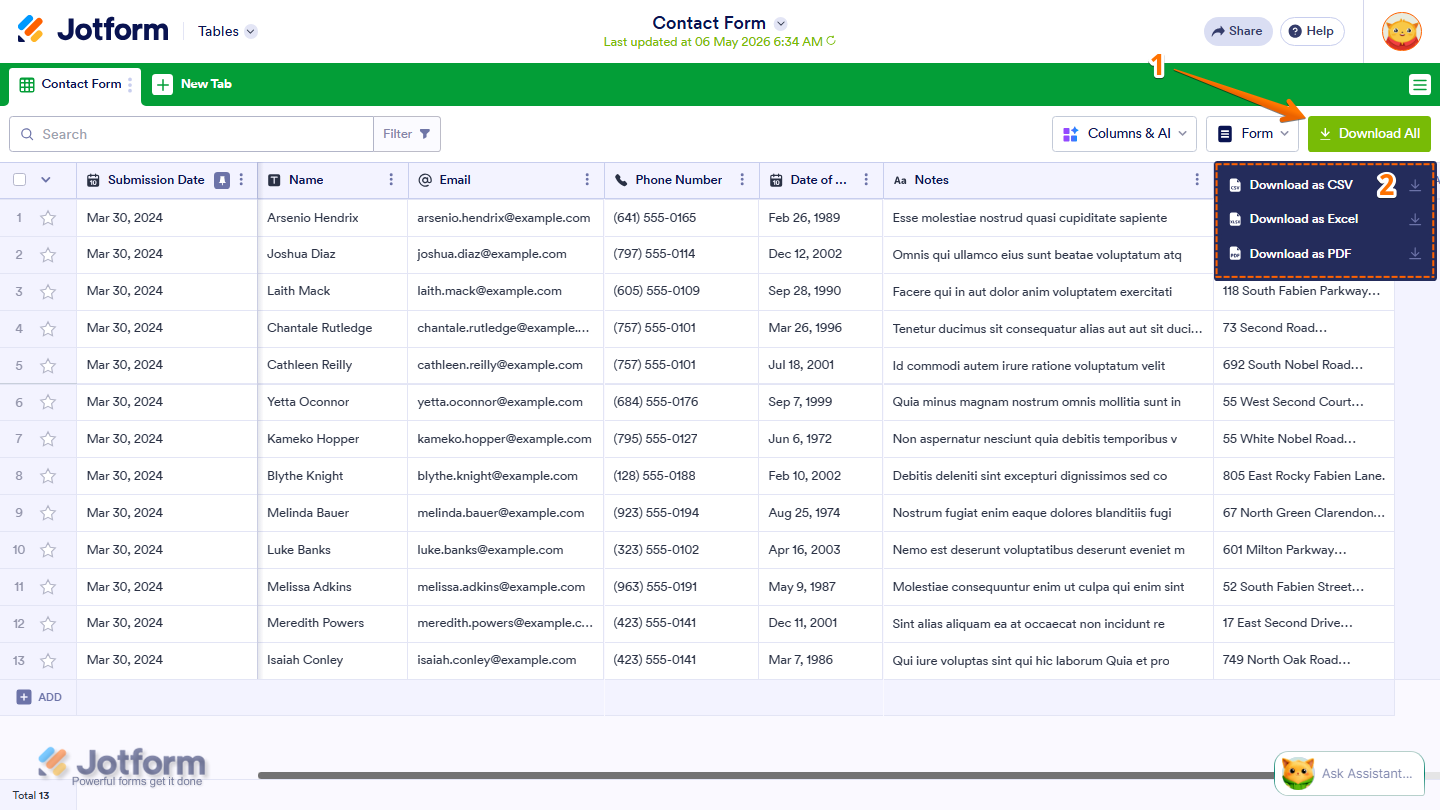
- In Tables, on the upper-right side of the page, click on Download All.
- Now, in the menu that opens, select from the following options:
- Download as CSV — Downloads your submissions as a comma-separated values file, compatible with most spreadsheet tools.
- Download as Excel — Downloads your submissions as a Microsoft Excel file, great for sorting, filtering, and creating reports.
- Download as PDF — Downloads your submissions as individual PDF files. A zip file will be created and sent to your registered email address.
Note
- For both CSV and Excel, the download will start automatically once your file is ready. This may take a moment depending on the size of your submissions.
- For PDF, a zip file will be created and sent to your registered email address instead.
Downloading Specific Form Entries
If you only need to download certain submissions instead of the entire table, you can select specific entries before exporting your file. Here’s how to do it:
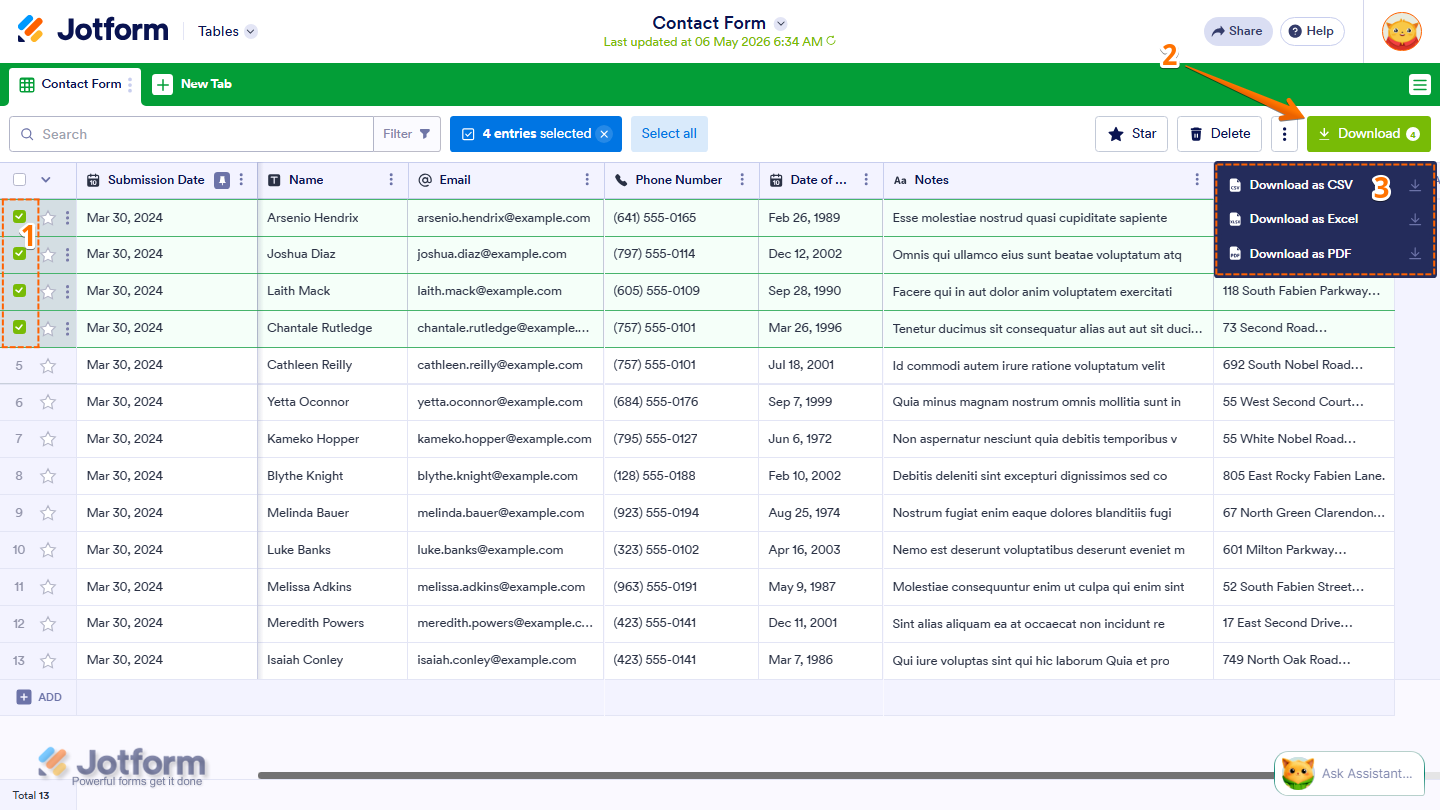
- In Tables, tick the checkboxes on the left side of the entries you want to download.
- Then, on the upper-right side of the page, click on Download All.
- Now, select Download as CSV, Download as Excel, or Download as PDF, and only the selected entries will be included in your download.
You can also filter your submissions first before downloading. This way, only the filtered results will be included in your file. Check out our guide on How to Filter Entries in Jotform Tables to learn more about it.
That’s it! You can now download your Jotform submissions as Excel, CSV, or PDF files and manage your data in the format that works best for you.

Send Comment:
92 Comments:
March 24, 2026
only csv and excel available for download options how do i enable pdf download>?
February 26, 2026
OMG!!!!! WHERE ARE MY FORMS???? THE "DOWNLOAD ORIGINAL PDF/FORM" OPTION??? WHY DO YOU GUYS DO THIS????
February 26, 2026
This option is currently not working properly. It does not put the form in the correct format.
February 24, 2025
Even if I click on download as excel it get download as CSV file only. Need a resolution asap
February 3, 2025
This does not seem to work. CSV files are not CSV, the downloaded data is in an unusable format and not the columns that are nicely displayed on the UI.
January 27, 2025
When I download my form as a PDF it leaves off most of the info. Why does this happen? I don't see anything in the options to fix this.
October 3, 2024
Very Helpful information to know as I may not have to use the cost of Zapier now to Zap my information from my JF survey results directly into my Click Funnels Contacts. THats the easy way but costs $'s. IF I can download a .csv its a simple process to Import that file into my CF workspace CONTACTS section.
May 22, 2024
it should be like google sheet for online excel
April 22, 2024
I have set up the date field on my form with the format DD-MM-YYYY, but when I download the submissions to csv, and then open it in Excel, the date field is displaying MM/DD/YYYY which means that some entries are being treated as text and others are displaying incorrectly. e.g. a date of birth which is 4th September 1976, was entered in the form in the three field boxes as 04 09 1976, but it is showing as 9/04/1976 and another date 21st November 1977 (entered as 21 11 1977) is showing as 11/21/1977. Changing the date format in Excel (for example to d-mmm-yyyy) does not fix it. The first date converts to 9-Apr-1976 (which is incorrect) and the second date doesn't convert at all. How do I fix this problem?
April 15, 2024
If I download a file from Jotform - does that make the main file disappear? Or am I just downloading a copy?
September 13, 2023
I have 11 form submissions and it has been over 9 hours since I tried to download the PDF file and I still have not received it. I have a deadline for printing and submitting the forms to the district I am working with, when can I expect them?
May 3, 2023
Is there a way to download an individual submission as a csv/excel? Rather than the entire list?
April 24, 2023
It doesn't seem like I can do this as a collaborator (not the owner of the form). Is that right?
April 17, 2023
I'm just trying download a PDF of one of my tables and it says “Creating a zip file...
We will send you an email when your export is ready for download”
But nothing comes...
April 13, 2023
I have been trying t download 50 form entries for the last 3 hours without success!!!
We have tried multiple browsers and still no joy!
It seems the perhaps using a desiccated form creation like Constant Contact may be worth considering!
December 16, 2022
Hi, we are testing the platform, it's seems really nice. I have a question, is it possible to automate downloading the submissions through an API connection?
October 17, 2022
I've done the above and the PDF file I receive is blank other than the Jotform footer
August 4, 2022
I did all the steps. But my form still says over quota? Does it work on your end?
June 3, 2022
I have integrated the responses with Google Drive, but all submissions get uploaded as folders instead of simple PDF files. How do I fix this?
March 15, 2022
Hi, i encountered another problem, which is when i want to download all the form in PDF, i selected all the entries and selected download, but when i open the PDF file, the PDF combined all the entries into single PDF.
How can i download the PDF all at once but in seperate PDF file?
March 7, 2022
preciso transformar o arquivo de CSV para VCARD para outolook . Como faço ?
January 21, 2022
hi, Is it possible to download the submission table as PDF? if I download the PDF file, it will display the entry on separate pages and if I download in Excell/CVS file, it would not display the sign submission, only link to image.
December 15, 2021
Hi. When I download submission to CVS / Excell all key in numbers starting with 0 (zero) disappear ..
November 19, 2021
Dear Jot Forms support team, is there any way i could tally all the different orders?
July 16, 2021
Dear Jot Forms support team, is there any way of downloading multiple files without zipping them into an archive?
For example, I want to download 70 different forms, but I don't want them to be merged into 6-7 files. I want to keep the separated.
Is it possible?
Thanks