

インシデントレポート テンプレート

ヒヤリハット報告書
ヒヤリハット報告書フォームで現場の危険事象を記録し、共有と振り返りを通じて再発防止に役立てられます。製造、物流、施設管理などの安全活動で使えるフォームテンプレートです。
カテゴリーへ移動:レポートフォーム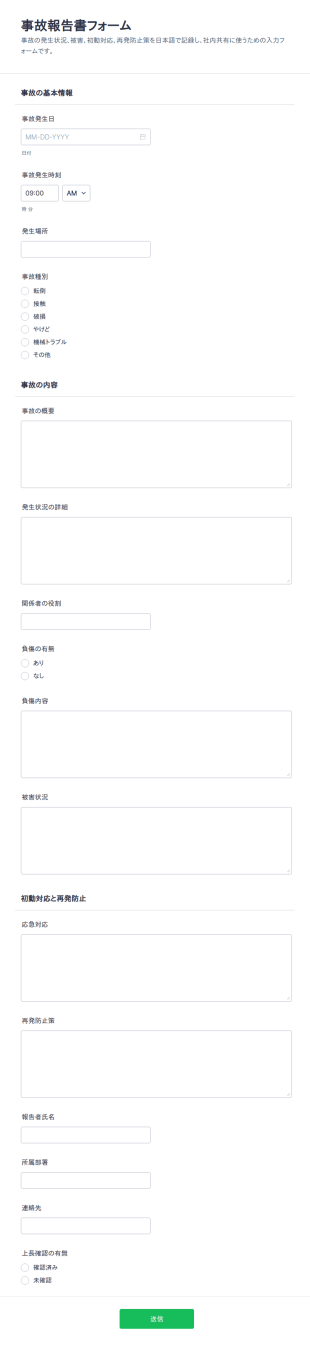
事故報告書 チェックリスト
事故報告書フォームは、社内の事故やヒヤリハットの内容をオンラインで記録し、関係者への共有と原因分析を進めたい現場責任者や管理部門に役立つフォームテンプレートです。
カテゴリーへ移動:レポートフォーム
労災事故報告書フォーム
労災事故報告フォームで、職場の事故やけがの報告を社内用にまとめ、再発防止に必要な情報共有とデータ収集を進めたい事業所や安全衛生担当者に役立ちます。
カテゴリーへ移動:レポートフォーム

サポート問い合わせ記録フォーム
サポート案件記録フォームで問い合わせ内容を統一フォーマットでデータ収集し、受付から社内共有までの運用を整えたいサポート部門や技術部門に役立ちます。
カテゴリーへ移動:カスタマーサービスフォーム
根本原因分析調査
根本原因分析調査票フォームで、発生事象の整理から要因分析と再発防止策の共有までを一つに集約し、現場部門や管理部門のデータ収集と報告の標準化を支援します。
カテゴリーへ移動:インシデントレポート テンプレート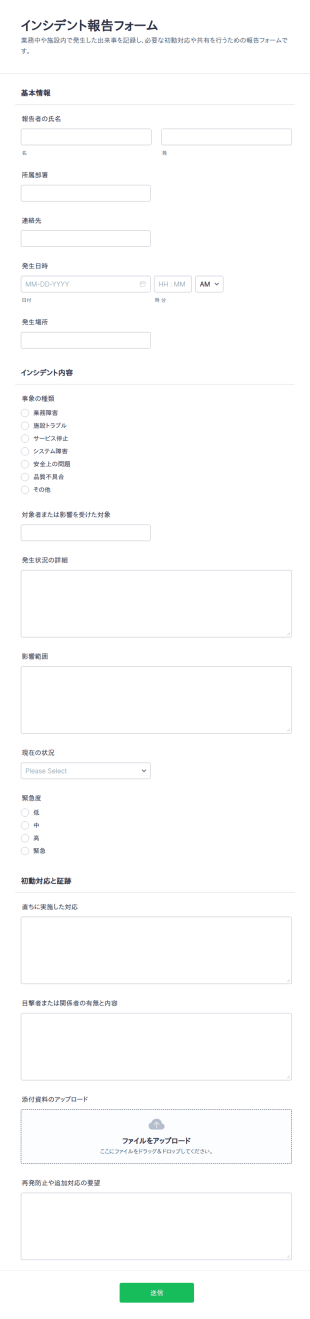
インシデントレポート テンプレートについて
Jotformの無料インシデントレポートを使って、インシデントレポートをオンラインで収集しましょう。スタッフ、応急処置、火災など、どのようなインシデントレポートを収集する場合でも、既成のテンプレートを選び、ドラッグ&ドロップビルダーを使って、数秒でオリジナルのフォームを作成できます。作成したフォームは、リンクで共有したり、社内ポータルに埋め込んで簡単にアクセスできるようにしましょう。これらのテンプレートは、デフォルトでモバイル対応になっており、スマートフォン、タブレット、PCのいずれからでも入力することができます。
Jotformのコーディング不要の直感的なビルダーを使って、インシデントレポートをニーズに合わせてカスタマイズしましょう。ドラッグ&ドロップするだけで、ロゴの挿入、フォームフィールドの追加や更新、チェックリスト項目の追加、フォントや色の変更など、様々なカスタマイズが可能です。Dropbox、OneDrive、Airtableなど、100種類を超える連携を利用して、送信内容を自動的に同期させることができます。送信データは安全なJotformアカウントに保存され、256ビットSSL接続、CCPA準拠、PCI準拠、オプションでHIPAA準拠で保護されています。
インシデントレポート テンプレートを使用する理由
- インシデントレポートは、インシデントの記録におけるデータの正確性と一貫性を確保するうえで重要です。構造化されたデジタルフォームを使用することで、手書きの報告書で生じやすいばらつきやミスを減らし、高いデータ品質と信頼性を維持できます。
- これらのフォームにより、データの収集と処理を大幅に迅速化できます。従来の紙ベースの方法とは異なり、デジタルフォームではデータを即座に送信し、一元管理されたシステムに連携できるため、インシデントの解決プロセスを迅速化できます。
- インシデントレポートを使用するもう一つの大きなメリットは、データを適切に取り扱えることです。ワークフローの自動化とリアルタイムのデータ収集により、組織はすべてのインシデント情報を適切に管理し、データの紛失や不適切な取り扱いのリスクを軽減できます。
- インシデントレポートは、業界の規制や基準への準拠にも役立ちます。すべてのインシデントについて包括的かつ容易に確認できる記録を保持することで、組織は安全基準や報告ガイドラインを遵守していることを容易に証明でき、法的・金銭的なペナルティを受けるリスクを軽減できます。
- これらのフォームを使用することで、組織内のコミュニケーションや連携も強化できます。インシデントレポートの形式を標準化することで、すべての関係者が必要な情報を共有し、認識を一致させることができるため、インシデントに対してより連携の取れた効果的な対応が可能になります。
インシデントレポートで解決できる一般的な課題
- インシデントレポートが解決する主な課題の一つは、従来の書類作業の非効率さです。紙のフォームは記入に時間がかかるうえ、ミスが発生しやすく、管理も容易ではありません。デジタルフォームを使用することで、プロセス全体を効率化し、より迅速かつ効率的に対応できます。
- 手作業によるデータ入力も、これらのフォームによって軽減できる一般的な課題の一つです。データの収集やシステムへの連携を自動化することで、手入力によるミスのリスクを最小限に抑え、より正確で信頼性の高いインシデント記録を維持できます。
- インシデントレポートでは、データの紛失や所在不明が大きな懸念となります。デジタルフォームを使用することで、すべてのデータを安全に保存し、必要なときに簡単に検索・取得できます。これにより、書類を紛失するリスクをなくし、必要なインシデント情報にいつでもすぐにアクセスできるようになります。
- インシデントレポートフォームは、インシデントへの対応が遅れるという課題の解決にも役立ちます。リアルタイムでのデータ送信と通知の自動化により、組織はインシデントにより迅速に対応できるため、被害を最小限に抑え、全体的な安全性と業務効率を向上させることができます。
活用例に適した機能
- インシデント発生時に効率的にデータを収集できるよう、ドラッグ&ドロップ式のフォーム作成ツールを使って、インシデントの種類に合わせたフォームをすばやく作成・カスタマイズできます。これにより、必要な情報を漏れなく、正確かつ効率的に収集できます。
- 条件分岐を活用すると、ユーザーの入力内容に応じてフォームのフィールドを動的に調整できるため、フォームへの入力プロセスを効率化できます。これにより、必要な情報のみを収集し、フォームの複雑さを軽減できます。
- Jotformの電子サイン機能を使用すると、フォーム上で直接取得できます。これにより、コンプライアンスへの対応を促進し、すべてのインシデント報告が適切に承認・確認されていることを確実にできます。
- PDFエディターを使用すると、フォームの送信データからプロフェッショナルなPDF文書を自動生成できます。インシデントを関係者や規制当局に報告する際に、整った標準形式の文書を作成できます。
- 既存システムとのスムーズなデータ連携が必要な組織向けに、JotformはGoogleスプレッドシートやSalesforceを含む100種類以上の外部サービスとの連携機能を提供しています。これにより、インシデントデータを既存のシステムと自動的に同期し、さらなる分析やレポート作成に活用できます。
- Jotformテーブルによる安全なデータ管理により、すべてのインシデントデータを安全に保存できます。アクセス制御と暗号化によってデータ保護規制への準拠を確保し、機密情報を保護できます。
インシデントレポートの作り方
- まず、テンプレート一覧からインシデントレポート テンプレートを探すか、空白のフォームから作成を始めて、具体的なニーズに合わせてデザインをカスタマイズします。
- ドラッグ&ドロップ式のフォームビルダーを使ってデザインやフィールドをカスタマイズし、必要に応じて要素を追加・削除して、インシデントに関する必要な情報をすべて収集できるようにします。
- フォームが完成したら、公開して、直接リンク、メール、またはウェブサイトへの埋め込みを通じて共有し、すべての利用者が簡単にアクセスできるようにします。
インシデントレポートの主な活用例
- 管理者向け:インシデントレポートを使用することで、管理者は組織内で発生したインシデントを包括的かつ体系的に追跡できます。詳細で一貫性のある報告データを確認することで、繰り返し発生する問題の傾向を特定し、予防策を講じて職場全体の安全性を向上させることができます。また、これらのフォームから得られるリアルタイムのデータを活用することで、管理者は迅速かつ的確な意思決定を行い、インシデントが業務に与える影響を軽減できます。
- チーム向け:インシデントレポートを使用することで、チームはインシデントの発生時に、標準化された効率的な方法で記録できます。これにより、すべてのチームメンバーが共通認識を持つことができ、インシデントへの対応や解決におけるコミュニケーションと連携が向上します。また、これらのフォームを活用することで報告プロセスを効率化し、時間を節約するとともに、従来の紙ベースの報告方法に伴う管理業務の負担を軽減できます。
- 顧客向け:インシデントレポートは、問題やインシデントを報告するための透明性が高く効率的な仕組みを提供し、顧客満足度の向上にも役立ちます。顧客はオンラインで簡単にフォームに入力できるため、報告された問題に迅速に対応し、解決につなげることができます。このようにインシデントへ積極的に対応することで、顧客からの信頼やロイヤルティを高められるだけでなく、優れたサービスと迅速な対応への姿勢を示すことができ、組織の良好な評判の維持にもつながります。
インシデントレポート テンプレート
インシデントレポートは、インシデントの記録・管理プロセスの効率性、正確性、信頼性を高めることで、ビジネスに大きな価値をもたらします。Jotformの高機能なオンラインフォーム作成ツールを活用することで、組織はインシデントレポートのワークフローをカスタマイズ・自動化し、必要なデータを漏れなく収集して効果的に管理できます。これにより、インシデントへの迅速な対応、コンプライアンスの強化、より適切な意思決定が可能になり、最終的には、より安全で生産性の高い職場環境の実現につながります。
よくあるご質問
1. インシデントレポートとは何ですか?
インシデント報告フォームは、事故やトラブル、ヒヤリハットなどの予期せぬ出来事を記録するためのフォームです。何が起きたのか、誰が関わったのか、どのような対応が行われたのかを整理して記録できま
2. インシデントレポートが重要な理由は?
正確な記録管理、調査のサポート、規制へのコンプライアンスの維持、安全性とリスク管理における改善領域の特定を確実にするために不可欠です。
3. インシデントレポートには、どのような情報を含めるべきですか?
インシデントレポートに記載すべき主な項目は、発生日時、場所、関係者の氏名、事象の詳細、目撃者の証言、対応措置などです。
4. インシデントレポートには、さまざまな種類がありますか?
はい、インシデント報告フォームは、職場での負傷、セキュリティ侵害、医療イベント、学校でのインシデントなど、特定のシナリオに合わせてカスタマイズでき、それぞれ独自の項目と要件を設定できます。
5. インシデントレポートは誰が記入すべきですか?
インシデントを目撃した人、または当事者となった人が記入するのが一般的です。多くの場合、上司、安全管理者、または指定されたスタッフのサポートを受けながら記入します。
6. インシデントレポートを送信する際、プライバシーはどのように保護されますか?
Jotformは安全なデータ保存と暗号化を使用して機密情報を保護します。送信へのアクセスは、許可された担当者のみに制限できます。
7. インシデントレポートフォームは、法的または保険目的で使用できますか?
はい、適切に記入されたインシデントレポートは、法的調査、保険請求、規制コンプライアンスに必要不可欠な文書を提供します。
8. インシデントレポートは、イベント発生後どのくらいの期間内に完成させるべきですか?
インシデント発生後は、正確性と迅速な対応を確保するため、できるだけ早くインシデント報告書を作成することが推奨されます。速やかな報告により、組織は問題に迅速かつ効果的に対処できます。