

Laboratory Forms

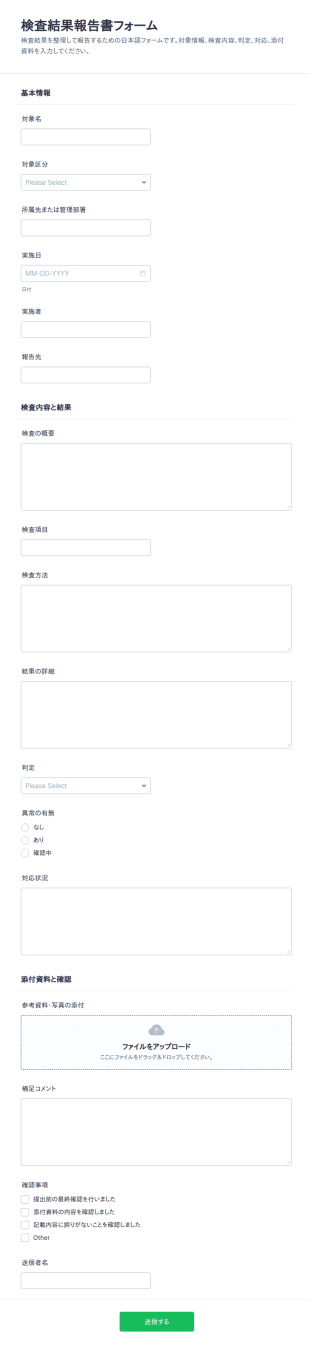
検査結果報告書チェックリスト
検査結果報告書フォームは、点検や検査の結果を関係者へ共有し、記録とデータ収集を一元化したい品質管理部門や現場担当者に役立つフォームテンプレートです。
カテゴリーへ移動:ヘルスケアフォームLaboratory Formsについて
Laboratory forms are structured documents used to record, track, and manage lab activities, samples, tests, and compliance processes. They help labs collect consistent information for sample intake, experiment documentation, equipment use, results reporting, and safety procedures in a clear and organized way. Laboratory forms are commonly used in research labs, clinical labs, educational labs, manufacturing QA labs, and environmental testing settings. Typical use cases include sample submission, chain of custody documentation, test request forms, lab result reporting, equipment logs, and safety incident reporting. By standardizing lab workflows, laboratory forms reduce errors, improve traceability, and support quality and regulatory requirements.
With Jotform, laboratory forms can be created quickly using a no-code, drag-and-drop Form Builder and customized for different lab workflows. Conditional logic can show different fields based on test type, sample category, or urgency, while file upload fields can collect supporting documents such as protocols or reference files. Submissions are stored in Jotform Tables so authorized teams can track samples, monitor turnaround, and maintain searchable records. Automated notifications help labs route submissions to the right team members and respond faster when urgent or nonconforming cases occur.
Use Cases of Laboratory Forms
Laboratory forms support sample handling, testing operations, and documentation across research and quality workflows. Below are common ways these forms are used and the problems they help solve.
活用例:
- 申請・受付リクエストのサンプル
- 検査依頼と優先順位付けフォーム
- 検体引継ぎ・移送記録フォーム
- 検査結果のレポート作成と承認ワークフロー
- 機器の使用状況と保守記録フォーム
- 安全、インシデント、不適合報告
問題解決のポイント:
- 検体、検査、結果のトレーサビリティを向上
- 検体受付とテスト依頼時の記入漏れを減らす
- 品質管理とコンプライアンス文書をサポート
- 検査室の業務量、処理時間、例外事項の追跡を支援
想定される所有者と利用者:
- 検査技師と検査室管理者
- 検体を提出する研究者や学生
- 品質保証およびコンプライアンスチーム
- 臨床スタッフまたは診断スタッフ(該当する場合)
- 安全管理者と研究室コーディネーター
作成方法の違い:
- 検体提出・受付フォームでは、検体識別情報、採取情報、保管条件、依頼する分析内容、優先度や希望納期などの情報を収集します。
- 点検および結果フォームは、検査方法、測定項目、品質チェック、レビュアーの承認、レポート形式の要件を重視しています。
- ラボ機器管理・コンプライアンスフォームでは、機器ID、校正またはメンテナンス状況、使用ログ、安全チェック、問題発生時のインシデント記録を優先的に管理します。
How to Create a Laboratory Form
Creating a laboratory form with Jotform helps you capture lab data in a consistent format and keep lab workflows traceable from intake to reporting.
テンプレートを選ぶか、ゼロから作成
マイワークスペースで「作成」をクリックし、「フォーム」を選択します。依頼フォームや記録フォームのテンプレートから開始し、ラボ業務に合わせてカスタマイズできます。詳細な送信にはクラシックフォームが適しており、カードフォームはユーザーを段階的に案内し、入力漏れを減らすことができます。
2. Add Core Lab Context and Identification Fields
フォーム要素を追加して、提出者の詳細、検査部門、サンプルID、検査タイプ、日時、必要な参照情報やプロジェクト識別子を収集します。ドロップダウンを使用すると、サンプルのカテゴリーや検査方法を標準化できます。
3. Build Sections Based on Lab Workflow
検体受付フォームには、採取方法、検体量、保管温度などの検体情報に加え、依頼する検査・分析方法、希望する処理期間(ターンアラウンドタイム)、報告要件(単位や合否判定基準など)を含めましょう。
4. Use Conditional Logic for Different Tests and Priorities
条件分岐を使えば、検査の種類やサンプルのカテゴリーに応じて異なるセクションを表示したり、緊急時や規制対象のケースには追加のフィールドを表示することができます。たとえば、「臨床検査」が選択された場合は、必須の患者識別情報や承認フィールド(該当する場合)を表示し、「緊急」が選択された場合は、エスカレーションや通知のフィールドを表示できます。
5. Add Supporting Documentation and Attachments
プロトコル、参考資料、画像、測定機器から出力されたデータファイルなどを添付できるよう、ファイルアップロード項目を追加しましょう。必要な情報をフォームと一緒に収集できるため、確認や追加依頼のやり取りを減らし、業務を効率化できます。
6. Publish, Test, and Track Submissions in Jotform Tables
プレビューとテストを実施してから公開しましょう。社内や承認済みの送信者と共有できます。送信データはJotformテーブルに保存され、チームはサンプルID、テストの種類、優先度、ステータスで絞り込むことができます。
よくあるご質問
1. What are laboratory forms?
Laboratory forms are documents or online forms used to manage lab workflows such as sample intake, test requests, results reporting, equipment logs, and safety documentation.
2. Why are laboratory forms important?
They standardize data collection, improve traceability, reduce errors, and support quality and compliance requirements.
3. What information is typically included in laboratory forms?
Common fields include sample identifiers, test type, collection details, requested analyses, results, reviewer notes, and equipment or safety details when relevant.
4. Who uses laboratory forms?
Lab technicians, researchers, students, QA teams, and lab managers use laboratory forms depending on the workflow.
5. Are laboratory forms only for research labs?
No. They’re also used in clinical labs, educational labs, environmental testing, and manufacturing QA settings.
6. Can laboratory forms be completed online?
Yes. Online forms make it easier to submit requests, track samples, and store records centrally for review.
7. How do laboratory forms help with traceability?
They capture standardized identifiers, chain of custody details, and a record of actions taken from sample intake through results reporting.
8. Can laboratory forms be customized for different tests or departments?
Yes. Labs can tailor fields and conditional logic based on sample type, test method, urgency, and reporting requirements.