

起業家フォーム

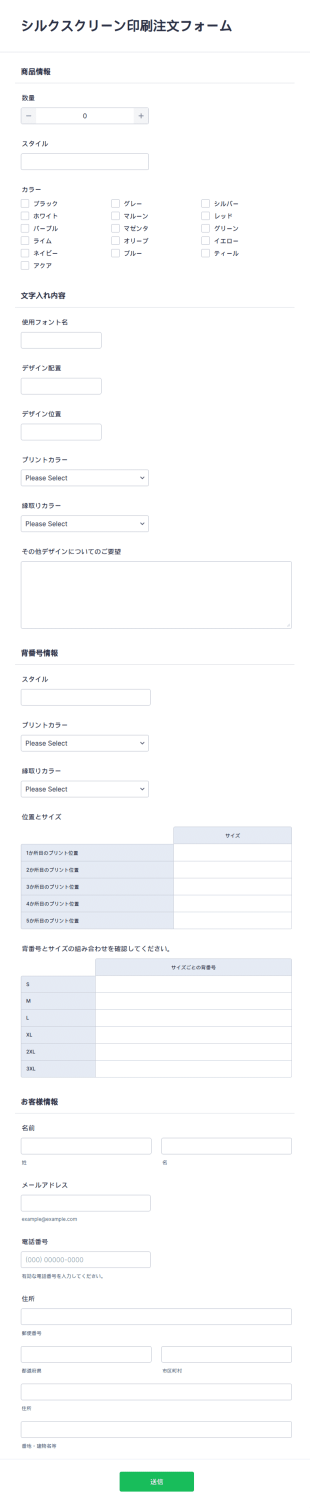
シルクスクリーン印刷注文フォーム
無料のシルクスクリーン印刷注文フォームでTシャツをオンライン販売。カスタマイズやサイト埋め込みが簡単。カード決済対応・130以上のアプリと連携。
カテゴリーへ移動:Eコマースフォーム起業家フォームについて
ビジネスを展開する上で、シームレスにデータを収集する方法が必要ですか?Jotformの起業家フォームを使えば、どんなデバイスからでもアンケートの回答や融資の依頼などを収集することができます。まずはドラッグ&ドロップビルダーでテンプレートを選び、ロゴの追加、色やフォントのカスタマイズなど、コーディングの知識は一切必要ありません。フォームをウェブサイトに埋め込んだり、リンクで共有したりする準備も、数回のクリックで完了します。オンライン起業家フォームで、必要な情報を素早く入手しましょう。
Jotform stands out as the leading online form builder for entrepreneurs seeking to optimize their data collection processes. With its user-friendly interface and powerful customization capabilities, Jotform allows entrepreneurs to create forms that perfectly align with their unique business requirements. The platform's ability to automate data collection not only boosts operational efficiency but also ensures data accuracy and integrity. Additionally, Jotform Tables provides a centralized data management system where all collected data is securely stored and easily accessible, facilitating seamless data analysis and decision-making processes.
Why Use Entrepreneur Forms?
- Entrepreneur Forms significantly enhance operational efficiency by automating data collection and management processes. This automation reduces the time spent on manual data entry, allowing entrepreneurs to allocate more time to strategic business activities.
- The precision and accuracy of Entrepreneur Forms ensure that data is collected in a consistent and error-free manner. This accuracy minimizes the risk of data entry errors, which can lead to costly mistakes in business operations.
- With Entrepreneur Forms, businesses can maintain a professional image by using well-designed, custom forms that reflect their brand identity. This professionalism can improve client interactions and enhance the business's reputation.
- The speed at which Entrepreneur Forms can be deployed and shared enables businesses to quickly respond to changing needs and market demands. This agility is crucial in maintaining competitiveness in fast-paced industries.
- By integrating Entrepreneur Forms with over 100 third-party applications, businesses can effortlessly sync data across platforms, enhancing collaboration and data accessibility across teams and departments.
Common Problems Solved by Entrepreneur Forms
- Entrepreneurs often struggle with the inefficiency of traditional paperwork, which can be both time-consuming and prone to errors. Entrepreneur Forms eliminate this issue by digitizing the entire process, allowing for quick and accurate data collection and retrieval.
- Manual data entry is a significant pain point due to the potential for errors and the labor-intensive nature of the task. Entrepreneur Forms streamline data entry through automation, reducing the likelihood of errors and freeing up valuable time for employees.
- Data loss and mismanagement are critical issues that many businesses face when relying on outdated systems. Entrepreneur Forms provide a secure and reliable means of storing and managing data, greatly reducing the risk of data loss.
- The lack of integration with other business systems often hinders operational efficiency. Entrepreneur Forms solve this problem by offering seamless integration with a variety of platforms, ensuring data is easily accessible and usable across different systems.
活用例に適した機能
- Entrepreneurs seeking streamlined data collection can utilize the Drag-and-Drop Form Builder to create customized forms that cater to specific business needs, resulting in more efficient and accurate data capture.
- For businesses requiring complex workflows, the Conditional Logic feature allows for the creation of dynamic forms that adjust based on user input, ensuring that the form experience is tailored and relevant.
- Entrepreneurs who need to process payments can take advantage of the 30+ Payment Gateways, such as Stripe and PayPal, which facilitate secure and efficient payment processing directly through the forms.
- The Electronic Signatures feature is ideal for businesses that require signed agreements or contracts, providing a legally binding solution that is integrated directly into the digital form process.
- To transform form submissions into insightful visual data, businesses can leverage the Report Builder, which converts data into customizable reports that aid in data-driven decision-making.
- Offline Data Collection is a valuable feature for entrepreneurs needing to gather data in areas without internet connectivity, ensuring that no data is lost and can be synced once connectivity is restored.
- Secure Data Management through Jotform Tables ensures that all collected data is securely stored and easily accessible, allowing for efficient data handling and compliance with data protection regulations.
How to Create a Entrepreneur Form
- Start by browsing the Template List for an Entrepreneurs template that suits your needs, or opt to start from a blank form to craft a bespoke solution.
- Customize the design and fields using the Drag-and-Drop Form Builder, tailoring the form to capture the exact data required for your business operations.
- Once your form is complete, publish and share it via Direct Link, Email, or Website Embed to ensure it reaches the intended audience with ease.
Top Use Cases for Entrepreneur Forms
- For Managers: Managers can utilize Entrepreneur Forms to streamline their internal processes, such as performance evaluations and project approvals. By automating these workflows, managers can ensure consistency and accountability within their teams, leading to improved operational efficiency and clear communication across various departments.
- For Teams: Teams benefit from Entrepreneur Forms by having a centralized platform for collaboration and information sharing. Whether it's submitting project updates, tracking progress, or gathering feedback, these forms facilitate seamless communication and ensure that every team member is on the same page, enhancing productivity and collaboration.
- For Customers: For customer-facing activities, Entrepreneur Forms provide an intuitive and professional interface for collecting feedback, processing orders, or managing inquiries. These forms enhance the customer experience by providing a streamlined and efficient process, leading to higher satisfaction levels and stronger customer relationships.
Summarizing Entrepreneur Forms
Entrepreneur Forms are instrumental in enhancing the operational efficiency and data management capabilities of businesses. By leveraging Jotform's robust online form builder, entrepreneurs can create customized forms that streamline data collection, improve accuracy, and facilitate seamless integration with other business systems. These forms not only support operational needs but also contribute to a professional and cohesive brand image. With features that address common pain points, Entrepreneur Forms empower businesses to focus on growth and innovation, ensuring they remain competitive in their respective industries.
よくあるご質問
1. 起業家フォームとは何ですか?
起業家向けフォームは、ビジネスオーナー、スタートアップ、創業者が、事業運営、顧客オンボーディング、資金調達などに関する情報を収集・管理するために設計された、カスタマイズ可能なオンラインフォームです。
2. 起業家向けフォームは、スタートアップや中小企業にとってなぜ重要なのですか?
データ収集を効率化し、繰り返し作業を自動化し、情報を一元管理することで、起業家は管理業務ではなく、成長と意思決定に集中できるようになります。
3. 起業家向けフォームでは、一般的にどのような情報を集めますか?
一般的な項目には、ビジネス詳細、連絡先情報、プロジェクト説明、財務データ、ファイルアップロード(事業計画書やピッチ資料など)、フィードバックが含まれます。
4. 起業家向けフォームには、さまざまな種類がありますか?
事業計画の提出、投資家向けピッチ申請、顧客オンボーディング、パートナー募集、市場調査アンケートなど、さまざまな用途に活用できます。
5. 起業家向けフォームは、誰が利用できますか?
スタートアップ創業者や中小企業経営者、コンサルタント、投資関連担当者、支援機関など、幅広いビジネスシーンで活用されています。
6. 起業家向けフォームは、プライバシーとデータセキュリティにどのように役立ちますか?
Jotformでは、すべてのフォーム送信が安全に保存され、暗号化オプションやデータ保護規制への準拠により、機密性の高いビジネス情報をしっかりと保護します。
7. 起業家向けフォームは他のビジネスツールと連携できますか?
はい。JotformはCRMシステム、決済サービス、クラウドストレージ、生産性向上アプリとの連携に対応しており、ワークフローとデータ管理を効率化します。
8. 起業家向けフォームカテゴリーのテンプレートを使用するメリットは何ですか?
テンプレートを使えば、フォーム作成の手間を減らしながら、統一感のあるフォームを作成できます。用途に合わせて柔軟にカスタマイズできるため、事業立ち上げや運用拡大にもスピーディーに対応しやすくなります。