

フォトグラフィーフォーム

インフルエンサー契約書フォーム
ブランドのインフルエンサーや広告主の方の場合、契約書へのサインが必要となります。このインフルエンサー契約書フォームのテンプレートを使用すると、インフルエンサーと広告主の間の契約をまとめたPDFを作成することができます。 このインフルエンサー契約書フォームのテンプレートには、インフルエンサーに関する詳細や広告主、ソーシャルメディアのアカウントを尋ねるフィールドが用意されています。また、開始日や終了日、支払い金額、支払い方法など、マーケティングキャンペーンの詳細についても記載できます。また、フォームには電子署名ウィジェットがあり、ユーザーと広告主がデジタルで署名できるようになっています。
カテゴリーへ移動:フォトグラフィーフォーム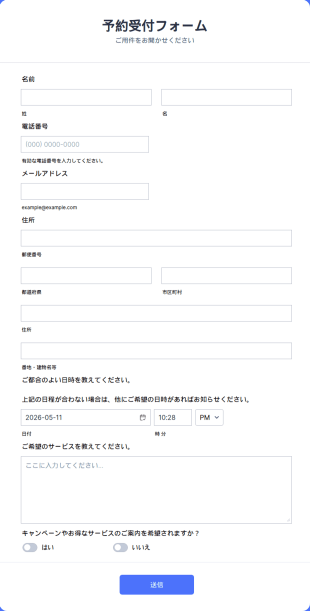
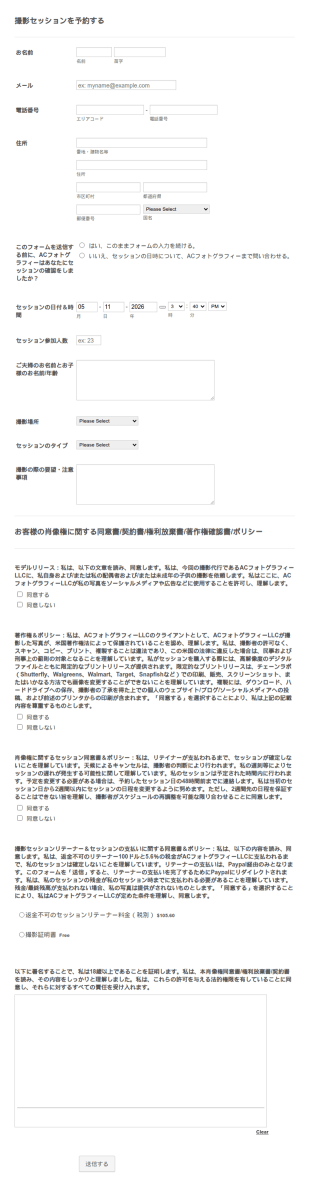
撮影予約フォーム
この撮影予約フォームでは、顧客の方は、連絡先、撮影人数、撮影日時、撮影場所、撮影タイプを選択することができます。このフォームには、契約書、著作権契約書、およびデポジット支払いオプションが含まれています。このテンプレートでは、予約情報と支払いを安全な方法で収集することができます。
カテゴリーへ移動:フォトグラフィーフォーム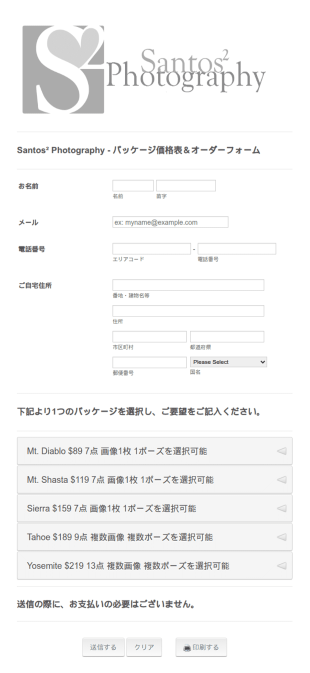
写真撮影オーダーフォーム
このシンプルな写真撮影オーダーフォームは、顧客の個人情報や連絡先を収集し、顧客がセッションパッケージから選択できるようにすることで、写真撮影セッションを手配できるように設計されています。あなたの要件に基づいて、お好きな写真撮影オーダーフォームのテンプレートをカスタマイズし、ウィジェットを追加したり、あなたのウェブサイトへ埋め込んだり、独立したフォームとして使用することができます。
カテゴリーへ移動:フォトグラフィーフォーム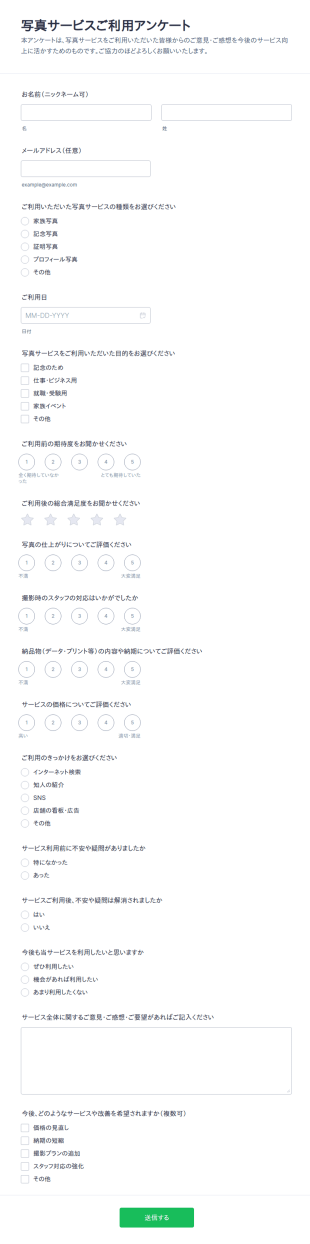
写真サービス利用者のご意見アンケート
写真サービスご利用アンケートフォームで、写真館や撮影サービス提供者が利用後の評価をデータ収集し、改善点の把握やリピート促進に役立つフォームテンプレートとして活用できます。
カテゴリーへ移動:アンケートテンプレートフォトグラフィーフォームについて
カメラマンは、カメラを向ける前にクライアントから具体的な情報を聞く必要があります。そのためには、プロ仕様のオンライン・フォトグラフィーフォームがとても便利です。Jotformでは、電子署名、デポジットの支払い、撮影日や撮影場所の詳細などを、すべて一つのフォームで収集することができます。
Jotformの撮影向けフォームテンプレートは、セッション契約書、モデルリリースフォーム、注文フォーム、写真の使用に関する同意書、問い合わせフォームなどをかんたんに作成できます。誰かがフォームを使用して回答すると、inboxやJotformの統合機能に直接、通知が送信されます。すてきなフォームを作成することで、回答率を高め、必要な情報を整理することができます。
Why Use Photography Forms?
- Photography Forms provide photographers with an efficient way to manage client interactions, ensuring that all necessary information is collected promptly and accurately. This reduces the risk of misunderstandings and enhances the overall client experience.
- By utilizing these forms, photographers can streamline their booking processes, allowing clients to schedule sessions directly online. This not only saves time but also eliminates the potential for double bookings or scheduling conflicts.
- The forms facilitate easy collection of feedback and testimonials from clients, which can be crucial for marketing and improving service offerings. This feedback loop helps photographers continuously refine their services to meet client expectations.
- With built-in payment gateway integrations, Photography Forms make it simple to handle transactions securely and efficiently. This feature is particularly beneficial for photographers who require deposits or payments upfront.
- Photography Forms are designed to handle large volumes of data without compromising on speed or accuracy, making them ideal for managing extensive client lists and session details. This ensures that photographers can focus on their creative work rather than administrative tasks.
Common Problems Solved by Photography Forms
- One of the most significant challenges in the photography industry is the reliance on manual paperwork, which can be time-consuming and prone to errors. Photography Forms eliminate this problem by digitizing the entire data collection process.
- Photographers often struggle with managing client data efficiently, leading to lost or misplaced information. These forms provide a centralized and secure platform for storing and retrieving client details, reducing the risk of data loss.
- Keeping track of client appointments and payments manually can result in scheduling conflicts and financial discrepancies. Photography Forms automate these processes, ensuring that all appointments are accurately recorded and payments are tracked seamlessly.
- Collecting client feedback is another area where photographers face challenges, as traditional methods can be cumbersome and inefficient. With Photography Forms, feedback collection is integrated into the workflow, making it easier to gather and analyze client opinions.
- Ensuring secure data handling is critical, especially when dealing with sensitive client information. Photography Forms incorporate secure data management practices, safeguarding client information against unauthorized access.
活用例に適した機能
- For photographers managing client bookings, the Drag-and-Drop Form Builder allows for easy customization of appointment scheduling forms, ensuring a seamless booking experience for clients.
- The integration of Conditional Logic in Photography Forms enables photographers to create dynamic forms that adapt to client inputs, providing a personalized and efficient data collection process.
- With the availability of over 30 Payment Gateways, photographers can easily integrate payment options such as Stripe and PayPal into their forms, facilitating secure and convenient transactions.
- Jotform Sign enables photographers to include Electronic Signatures in their forms, ensuring that contracts and agreements are signed digitally, reducing the need for physical paperwork.
- The PDF Editor feature allows for automated PDF generation of form submissions, enabling photographers to maintain organized and professional records of client interactions.
- The Report Builder offers photographers the ability to create detailed reports of form submissions, providing insights into client preferences and business performance.
- With over 100 Third-party Integrations available, including Google Sheets and Salesforce, photographers can seamlessly integrate their forms with existing systems, enhancing data flow and operational efficiency.
How to Create a Photography Form
- Browse the Template List for a Photographys template or start from a blank form to suit your unique requirements.
- Customize the design and fields using the Drag-and-Drop Form Builder, ensuring that the form aligns with your branding and operational needs.
- Publish and share the form via Direct Link, Email, or Website Embed to reach your clients and streamline data collection.
Top Use Cases for Photography Forms
- For Managers: Photography Forms are invaluable for managers overseeing photography studios, as they provide a systematic approach to handling client bookings, payments, and feedback. By using these forms, managers can ensure that all operational aspects are seamlessly integrated, leading to improved efficiency and client satisfaction. Additionally, the centralized data management offered by Jotform Tables allows managers to keep track of all client interactions, facilitating better decision-making and strategic planning.
- For Teams: Photography teams benefit greatly from the collaborative features of Photography Forms. These forms enable team members to access and update client information in real-time, ensuring that everyone is on the same page. The ability to integrate forms with third-party applications like Slack enhances communication and coordination within the team, leading to more efficient project execution and a higher quality of service delivery.
- For Customers: Customers enjoy a streamlined and user-friendly experience when interacting with Photography Forms. The forms provide an easy way for clients to book appointments, make payments, and provide feedback, all in one place. This convenience not only improves the client experience but also fosters a positive relationship between the photographer and their clients, encouraging repeat business and referrals.
Summarizing Photography Forms
Jotformを今すぐ無料で始めましょう。
よくあるご質問
1. 写真フォームテンプレートとは何ですか?
写真フォームテンプレートは、写真家が予約、モデルリリース、注文、フィードバックなどの情報を収集し、管理業務を効率化するためにあらかじめデザインされたオンラインフォームです。
2. 組織にとってなぜ重要なのですか?
Absolutely, Jotform employs industry-standard security measures, including SSL encryption and GDPR compliance, to ensure that all forms and submitted data are kept secure and private.
3) Do I need coding knowledge to build a Photography Form?
No, Jotform’s Drag-and-Drop Form Builder is designed to be user-friendly, allowing users to create and customize forms without any coding knowledge.
4. ITフォームには、さまざまな種類がありますか?
Yes, with over 30 integrated payment gateways, including PayPal and Stripe, you can easily collect payments directly through your forms.
5. ITフォームは誰が使うべきですか?
Yes, Jotform Mobile Forms enable offline data collection and ensure that your forms are accessible and functional on a variety of mobile devices.
6. 写真撮影フォームは、プライバシーとデータセキュリティにどのように役立ちますか?
Yes, Jotform’s PDF Editor allows you to automatically generate professional PDF documents from form submissions, which can be customized to meet your needs.
7. 写真フォームは、さまざまな写真ジャンルに合わせてカスタマイズできますか?
もちろん可能です。テンプレートは、項目やデザイン要素を変更することで、結婚式、ポートレート、商業撮影、学校写真撮影など、さまざまな専門分野に対応できます。
8. 紙のフォームではなく、オンライン写真フォームを使用するメリットは何ですか?
Yes, Jotform provides a variety of templates specifically tailored for photography businesses, enabling you to quickly create forms that meet your specific operational needs.