
Matching quizzes are a fun, interactive way for students, employees, and other learners to test what they know. They present two related lists — like words and definitions, or people and their roles — and challenge users to pair the items in one list with their match in the other.
Teachers and trainers often use matching quizzes to reinforce concepts like vocabulary, historical events, job responsibilities, and more. But unless you found a premade quiz online, creating one from scratch wasn’t always easy.
Until now. With Jotform’s Match Items widget, you can build an interactive matching quiz in minutes. In this article, we’ll show you how to plan an effective quiz and bring it to life with Jotform’s drag-and-drop matching quiz maker.
How to create a matching quiz with Jotform
You don’t need to know how to code or use complicated software to build an effective matching quiz for your students or trainees. Jotform makes building an online matching quiz simple.
To make an online quiz with Jotform, create a free account and follow these step-by-step instructions on how to add and set up the Match Items widget:
- Open your Jotform Workspace and click the Create button in the top-left corner.
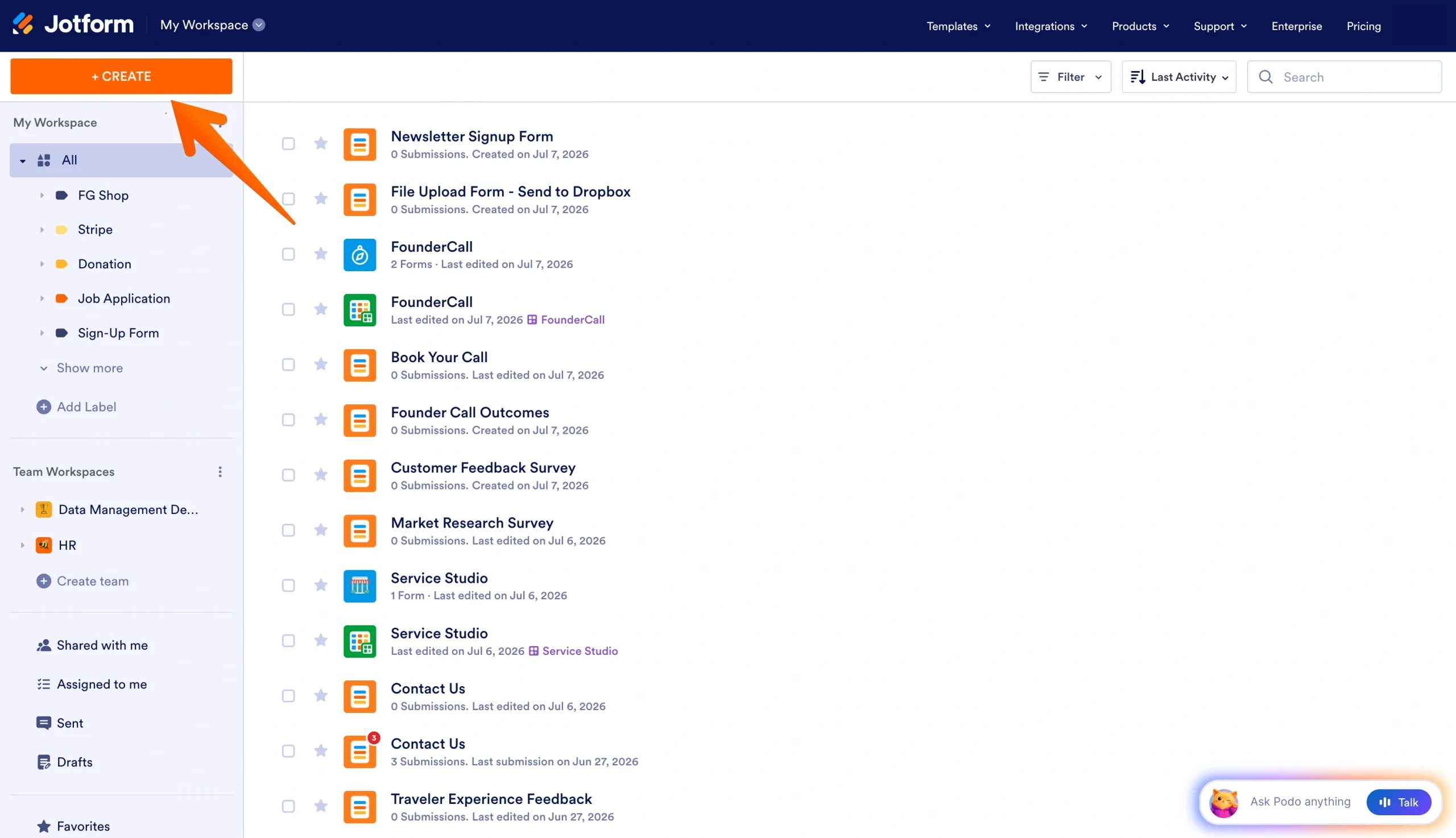
- Click the Form option, then Start from Scratch.
- Choose the Classic form layout.
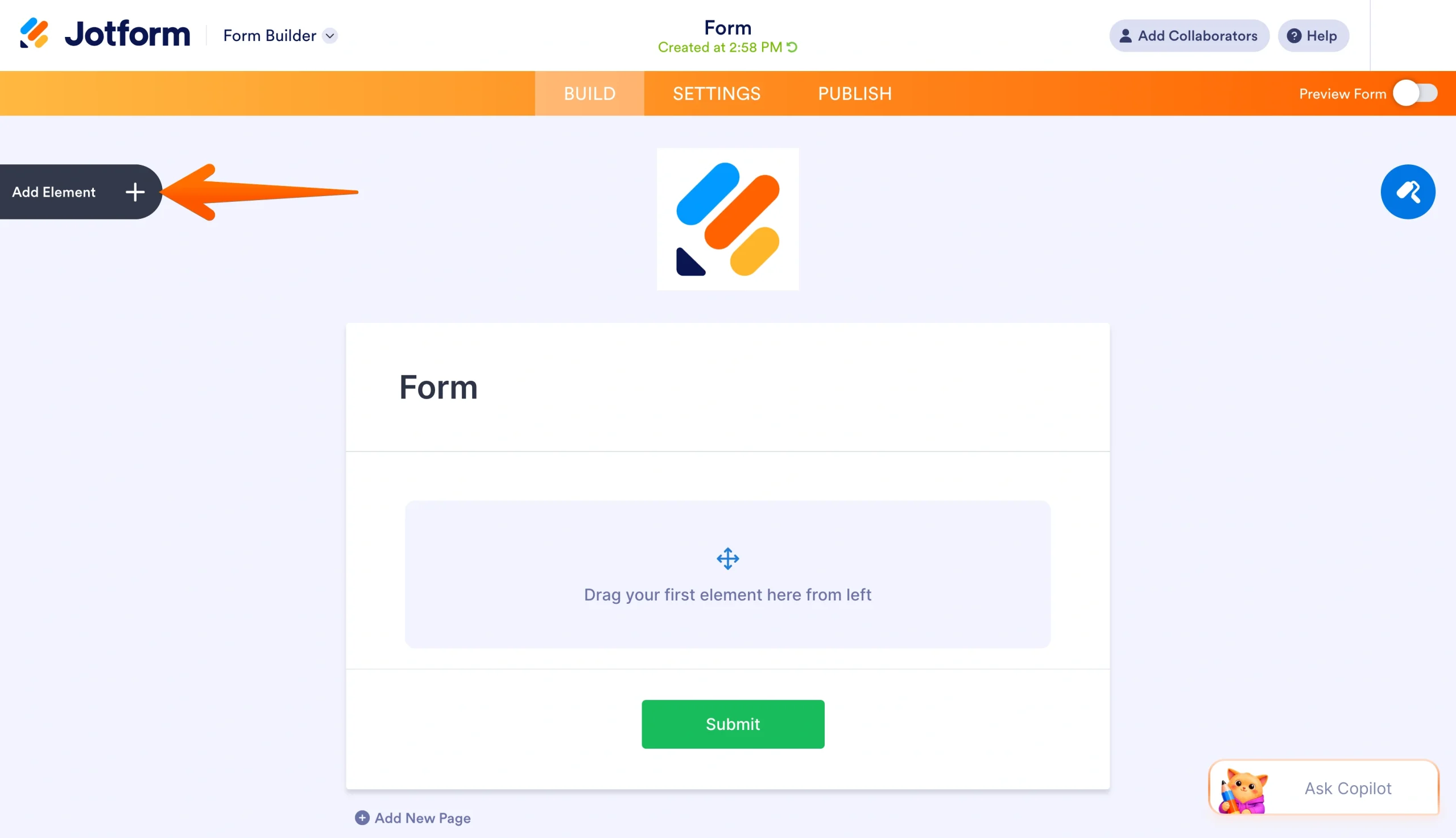
- Once your form opens, add your title and click on the Add Element button on the left.
- Click the Widgets tab and search for “Match Items.”
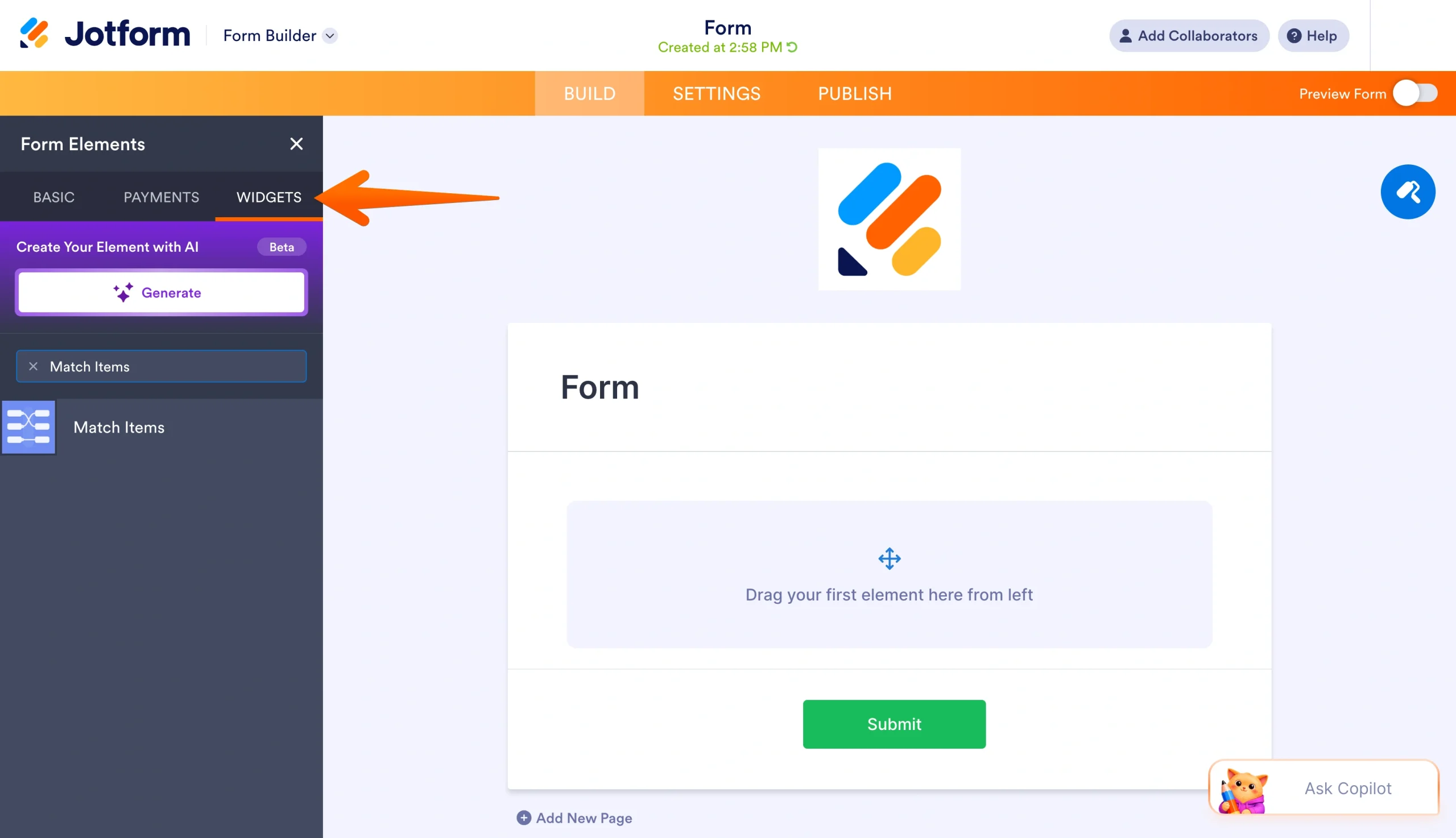
- Select the widget, or drag and drop it into place.
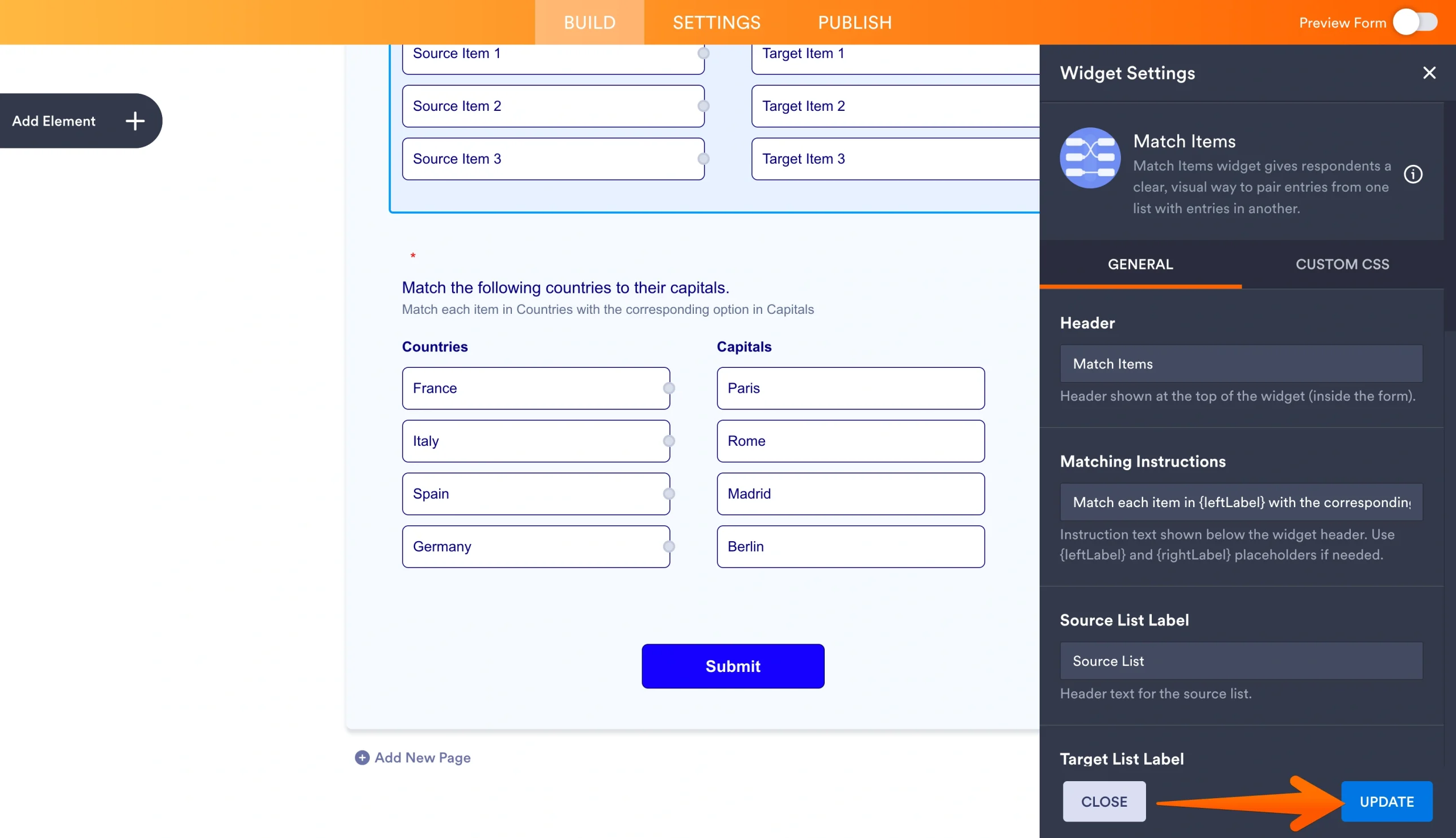
- The Widget Settings menu will open on the right side of the page. In this menu, you’ll update your matching widget’s header, matching instructions, list labels, and list items. You can also toggle settings on and off, including allowing multiple matches for certain list fields.
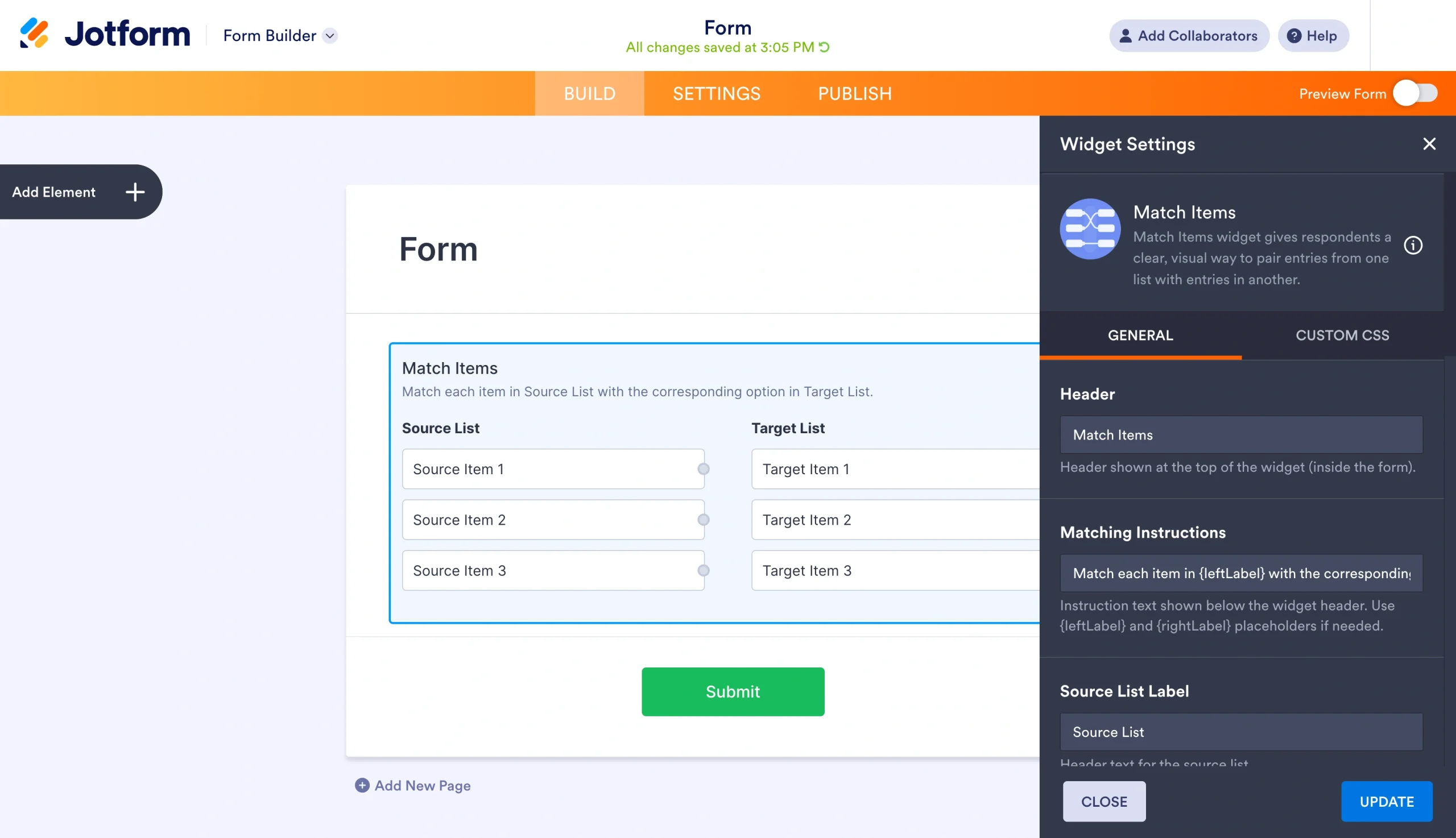
- Customize your connection counts, color assignments, and match colors.
- Click the Update button in the bottom-right corner to finalize your widget selections.
- Fill out the rest of your form, and publish it. You can then easily share your quiz with your recipients using accessible options like
- Quick share links
- Embed codes
- Social media
- QR codes
If you want to skip the initial building process, you can use one of Jotform’s Matching Quiz Response Form templates. And with Jotform’s resources on how to turn your form into a quiz or exam, you can also transform existing forms into educational materials.
As users take your quiz, you can view your results in an organized, interactive spreadsheet using Jotform Tables. Every time a response is submitted, it’ll be automatically uploaded to your form’s connected spreadsheet for later review.
If you want to examine and visualize the results of your interactive matching quiz, you can also consolidate your response data into a single report using Jotform Report Builder. This tool can help you better understand and communicate your results — as well as find opportunities for improvement in your curriculum.
Tips for making a matching quiz easier to complete
Jotform makes it easy to build a matching question quiz online. But how well you structure your questions and use your analytics will ultimately determine how effective your quiz is. Before you start building out your matching type quiz, take these tips into consideration:
- Keep your instructions short and simple: Complex instructions can cause confusion and lead to avoidable frustration, missed answers, or incomplete forms.
- Use consistent column structures: Everything in one column should follow the same format. For example, in a matching quiz for students studying vocabulary terms, one column should contain the terms while the other contains their corresponding definitions.
- Avoid making answers obvious due to distinct length or formatting: This could include having one pair of answers in your quiz that comes from a different unit or is clearly distinct from the rest of your questions.
- Limit each matching set to a reasonable number of pairs: If you want to include a large volume of questions, consider breaking your quiz into different matching sets. Forcing your respondents to connect items across multiple units or concepts will make your online matching quiz unnecessarily difficult.
- Preview your quiz on both desktop and mobile before sharing: This will help you identify any potential issues with design, spelling errors, or other flaws that you may want to correct before your recipients start responding.
- Leverage your Jotform form submission analytics: Here you can review responses, follow up with learners who seem to be struggling, and find new ideas for future quizzes.
Remember that a matching type quiz is best suited for testing the relationship between two items rather than the memorization of an isolated fact. For these other quiz types, like multiple choice or open-ended, you can choose from one of more than 2,000 free quiz templates from Jotform.
If you need a custom online matching quiz, though, Jotform’s Match Items widget is the place to start. With advanced customization options and simple sharing methods, this free solution is an accessible and powerful tool for anyone looking to test their recipients’ knowledge. Try it for free today.
This article is for educators, trainers, course creators, HR teams, and small business owners who want to build a matching-style quiz online without coding. They need a simple way to pair terms, definitions, images, examples, dates, roles, or concepts and collect responses in a clean digital format.



























Send Comment: