The Date Picker element lets your form fillers easily select dates on your form. If you want to limit which dates can be chosen, like only weekends or certain date ranges, you can set these restrictions in the Advanced Options of the Date Picker.


How to Set Date Limits in the Date Picker Element
You can easily set your date limits in your Date Picker Element in a simple way. Here’s how to do it:
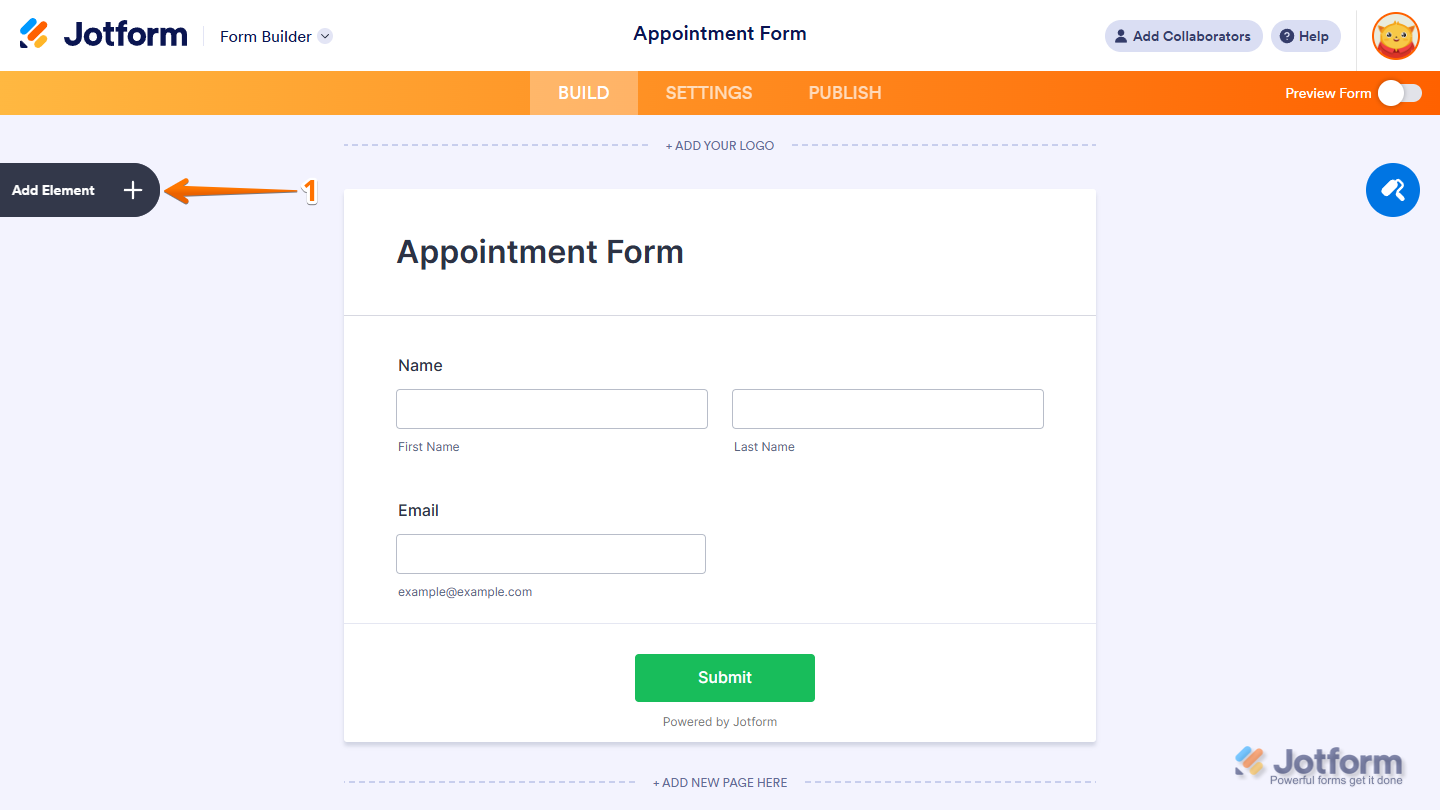
- In Form Builder, click on Add Element on the left side of the page.
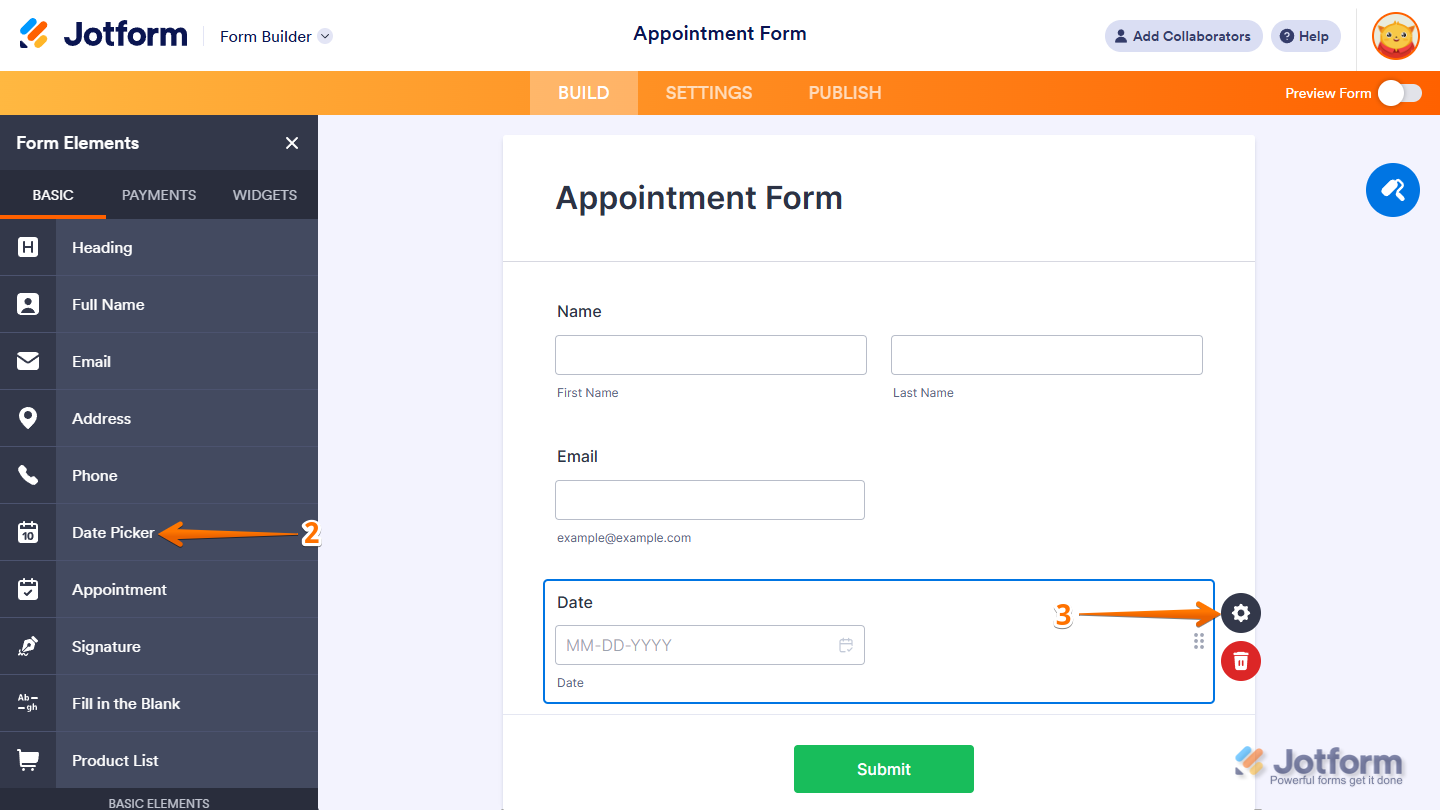
- Under the Basic tab, click on the Date Picker to add it to your form.
- Next, click on the Gear icon next to the Date Picker field.
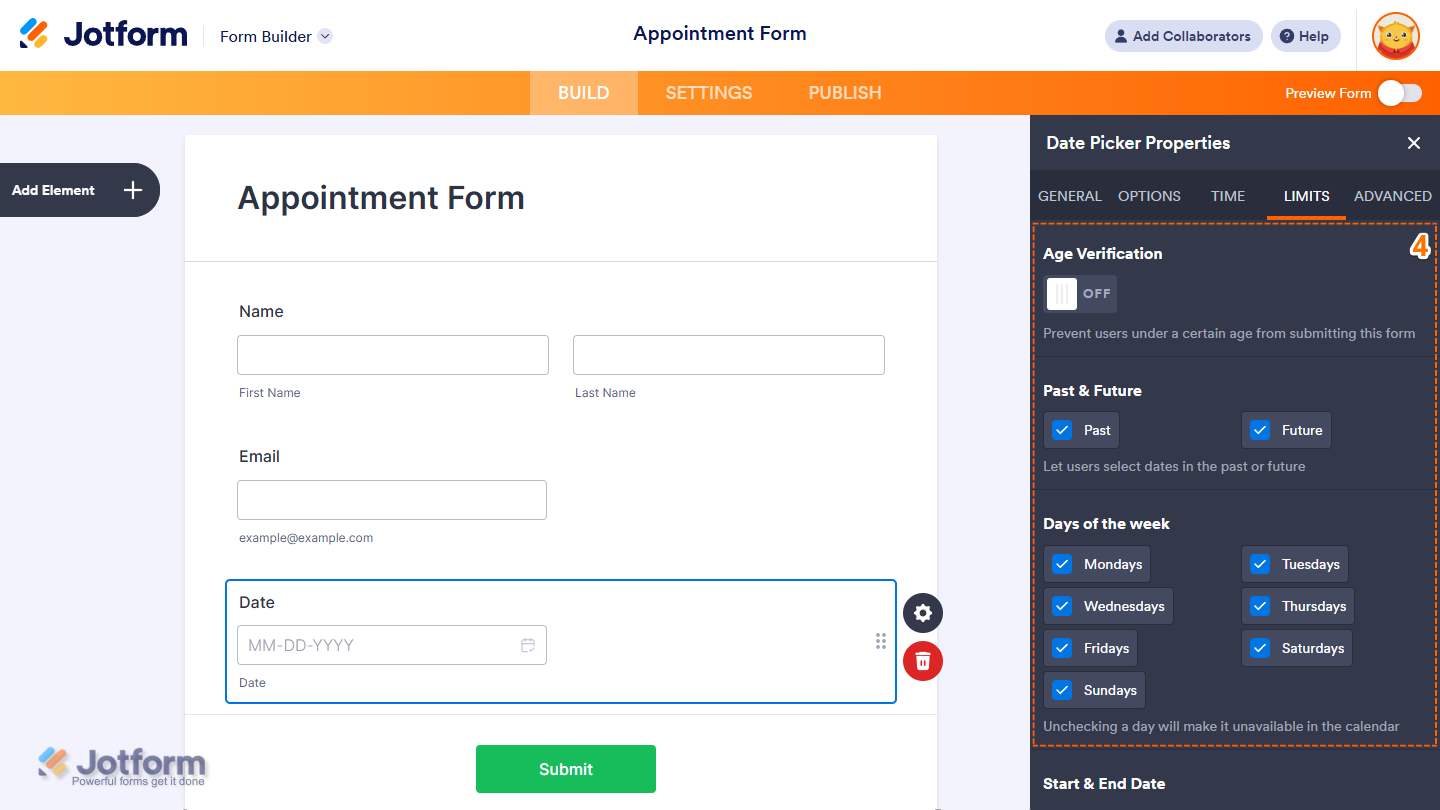
- Now, in the Date Picker Properties window that opens on the right side of the page, under the Limits tab you can setup the following to disable your dates:
- Age Verification — Prevents form fillers under a certain age from submitting your form.
- Past & Future — Enable Past or Future to allow selection of past or future dates, respectively.
- Days of the Week — Choose which days of the week are selectable. For example, uncheck Saturday and Sunday to allow only weekdays.
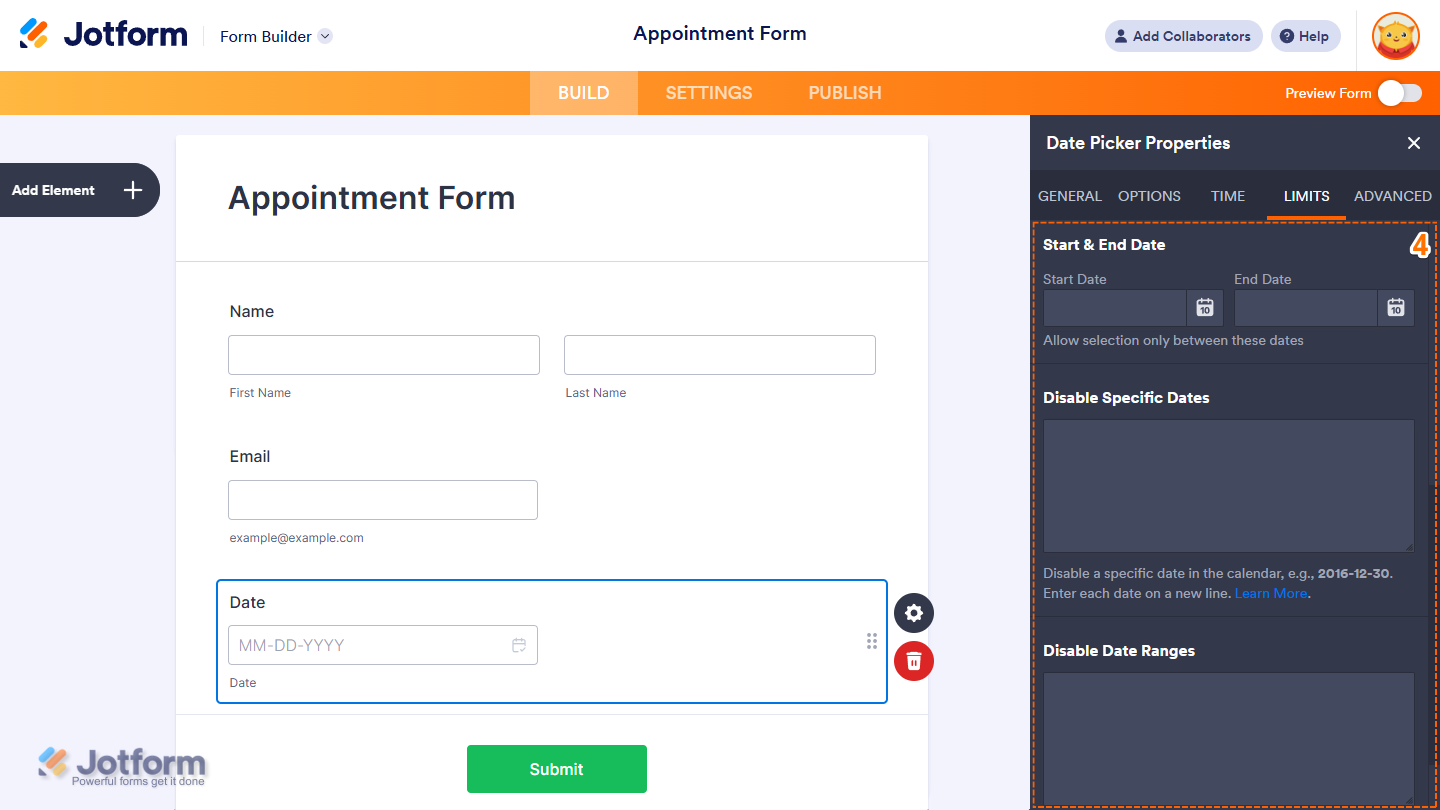
- Start & End Date — Limits date selection to a specific range.
- Disable Specific Dates — Blocks specific dates using supported formats:
- 2017-07-30 disables July 30, 2017
- 07-01 disables July 1st of every year
- 15 disables the 15th day of every month.
- Disable Date Ranges — Lets you disable multiple ranges of dates. For example:
- 1990-01-01>1999-12-31 disables all dates in the 1990s
- 0000-01-01>1999-12-31 disables all dates before the year 2000
Note
Any changes you make in the Date Picker Properties are automatically saved.
How to Set Dynamic Date Limits Using the Start & End Date Option in Date Picker
You can create dynamic date restrictions in your form by using the today+{n} format, where {n} is the number of days added to the current date. This is especially useful for forms like bookings, appointments, or scheduling where date availability needs to be time-sensitive.
For example, let’s say you want to allow users to book a date starting one week from today, and you only want to keep the booking window open for one week. Here’s how to set that up:
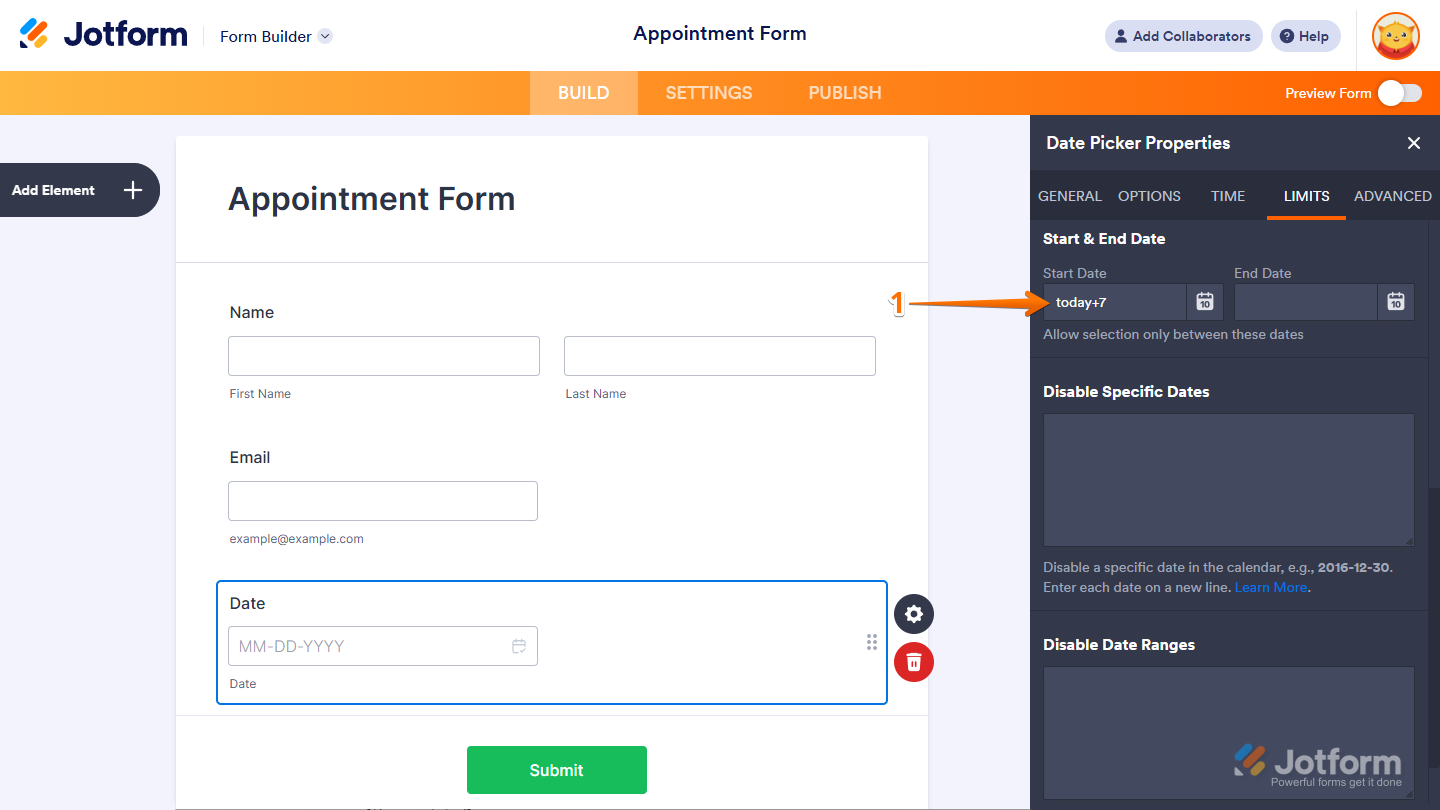
- While you’re still under the Limits tab of your Date Picker field, set the Start Date field to today+7. This means users can only start booking one week after submission.
- Then, set the End Date field to today+13. This limits selection to a one-week window (from day 7 to day 13).
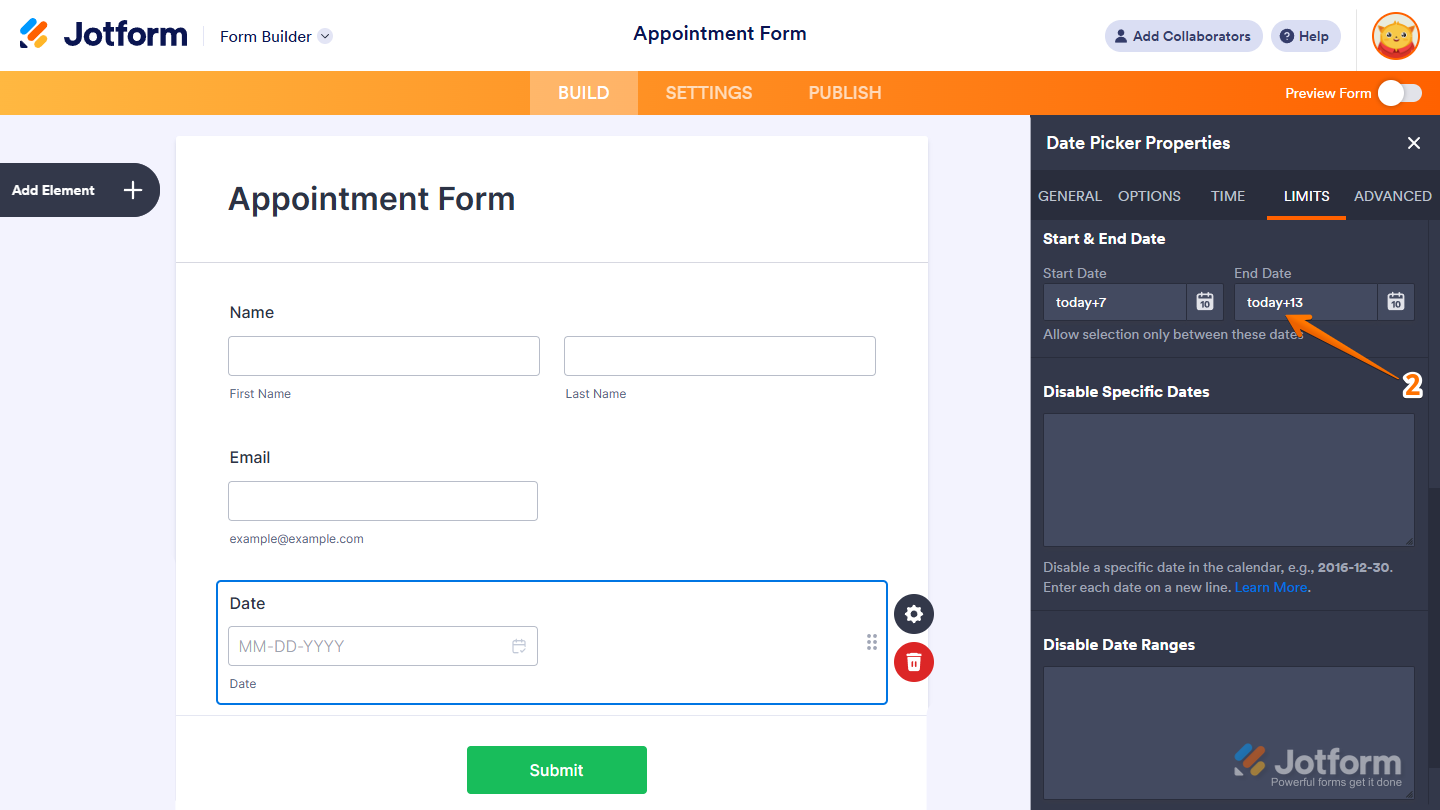
And you’re all set! Only dates between one and two weeks from today will be available for selection. Check out the demo form to see it in action.

Send Comment:
53 Comments:
February 17, 2026
Is there a way to prevent multiple entries of the same dates and times being selected?
November 6, 2025
Hi there, is there a way to set it so there is a cut off time to choosing a date. For example, I don't want them to be able to pick a date for tomorrow IF it is after 2pm today. Basically, I don't want them to be able to pick tomorrow at 10pm at night because I have already left for the day and I will not be able to properly prepare for the next day.
November 5, 2025
Is it possible to disable future ROLLING dates, so for instance disabling the selection anytime before 2 weeks from the day they fill out the form?
September 18, 2025
I'd like my client to select date ranges they want to take a trip. For example, May 1 - 7th. I want them to be able to select the start date and the end date. Thanks!
July 25, 2025
I like you can set a minimum age. However, I want to have a field that requires minimum age and a maximum age. Ex. Only birthdays of people who's age is between 16 and 23. How can I accomplish this?
June 11, 2025
My date picker doesn't show any of those options.
March 15, 2025
Hello, is there a way to limit the dates to a custom list of dates I specify in a google sheet?
March 14, 2025
How to set a date limit to be not less than 14 days from another date mentioned in the form ?
March 6, 2025
no me deja ingresar la fecha dinamica
February 9, 2025
How can I make the date format the way we use it in the UK? DD-MM-YYYY
January 7, 2025
today-90 not work, could u help?
January 6, 2025
how can we limit the selection to only select 3 days upon form application?
December 9, 2024
my date field needs to do a look back of 14 days and it is not working and the date picker is not working.
December 5, 2024
You can achieve dynamic date selections using the Start & End Date limit with
today+{n}
where {n} is the number of days to be added to today.
Suppose you’re working on a booking form and would like to limit the booking dates to at least one week after submission and also limit the booking window to just one week. For this to happen, you need to set the Start Date to “today+7” (a week after) and the End Date to “today+13” (a window of just one week).
but,I want to select yeserday's date i.e. Today-1
November 5, 2024
How to set start date limit to 365 days prior today? Like this will only accept any day within the past year. {today}-365 does not work.
October 28, 2024
hello, how to set limit from 3 days before today to today?
October 16, 2024
I only want the month and year to appear and i only want to allow the month and year not to exceed 5years
October 11, 2024
How do you allow a person to select multiple dates?
August 22, 2024
Hello we have a reservation form with a Date Picker with limited date ranges.
For internal use we would like the form to be usable for all dates, so no limites on the date range.
Is there any possibility ( a cunning trick?! ) to make to application of Date Picker date ranges conditional based on another field or an url parameter?
July 3, 2024
Hola!
Cómo puedo limitar datos en una entrada de texto numérica, para que lo compare con un valor?
Por ejemplo, que el número sea mayor a 250,000. Y en caso de ser menor, mandar un mensaje de error.
Agradezco sus respuestas! Saludos.
May 23, 2024
Hello,
How can I add a condition that if the date user selects is unavailable, to hide the rest of the form, or not be able to submit the form. I'm finding that end users can override the non-available date by typing it in, and still submit forms for dates that are defined as not available.
March 19, 2024
Hi, how would I make it so that my client can book their event up to 12 months in advance? And also be able to go in and disable certain days and weekends?
March 8, 2024
How do I set it up so that the user is able to select a date range or input multiple dates.
March 3, 2024
Hi, I limited the days in the calendar to Mondays only and starting as per June 17.
I also added a condition that in case the first field is "niet van toepassing", in the second field nothing can be entered and no date can be selected.
The problem is that the date that standard appears on the form the actual date is. When the condition is met and it is a Tuesday when the form is entered the customer gets an error message that the date is wrong but due to the condition entered he/she can not change the date.
I hope I described the problem somewhat clear. Can you please help me out ?
Thanks in advance and kind regards
January 10, 2024
It would be great and useful if we could also limit time ranges, not only date ranges. For example exclude 22:00 to 08:00.