With Jotform’s TwentyThree Video (Formerly 23 Video) widget, you can embed videos directly into your form without any coding. This lets you share marketing or informational videos while collecting viewer data such as play counts and engagement insights. It’s a simple way to combine video content and form submissions in one place.
Here are a few ways to use it:
- Add custom TwentyThree videos to your forms.
- Collect video engagement data alongside form responses.
- Share campaign or product videos within registrations.
- Improve the overall user experience with embedded video content.
Whether you’re building a new form or editing an existing one, you can add and configure the TwentyThree widget in just a few steps. This is how it’s done:
- In Form Builder, click on Add Element on the left side of the page.

- Now, in the Form Elements menu, under the Widgets tab, search for the TwentyThree (Formerly 23 Video) widget and click on it. Or, just drag and drop it to where you want it to be on your form.

- Next, in the Widget Settings window that opens on the right side of the page, under the General tab, enter the TwentyThree URL in the URL Input box.
- Once everything’s set, click on Update.
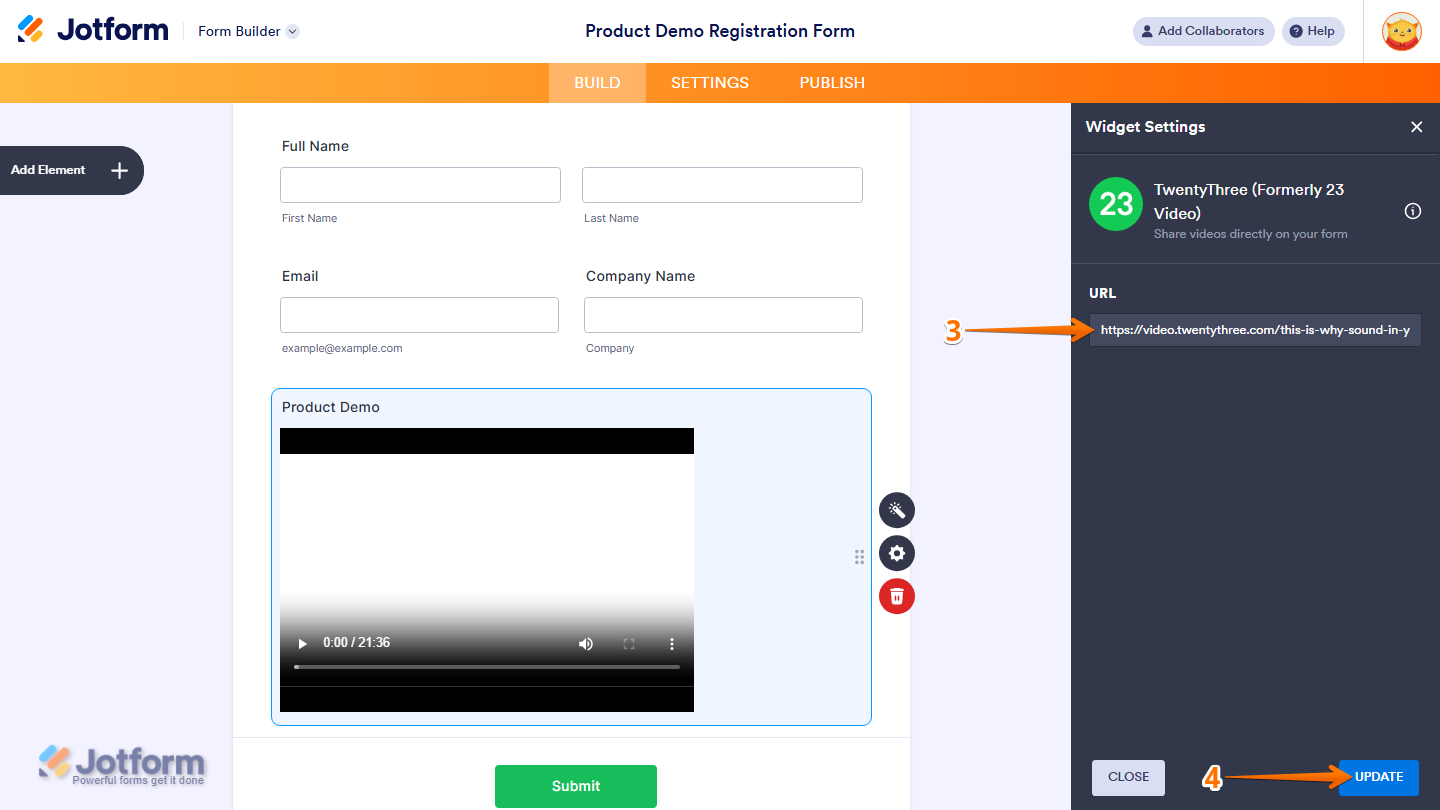
That’s it. Now you’ve added and set up the TwentyThree widget on your form.

Wondering how it looks in action? Check out this demo form.
Note
You can also configure the widget properties, like alignment, labels, size, visibility, and more, to control how it looks and behaves in your form. Check out our guide on How to Access and Configure the Question Properties of a Widget to learn more.

Send Comment: