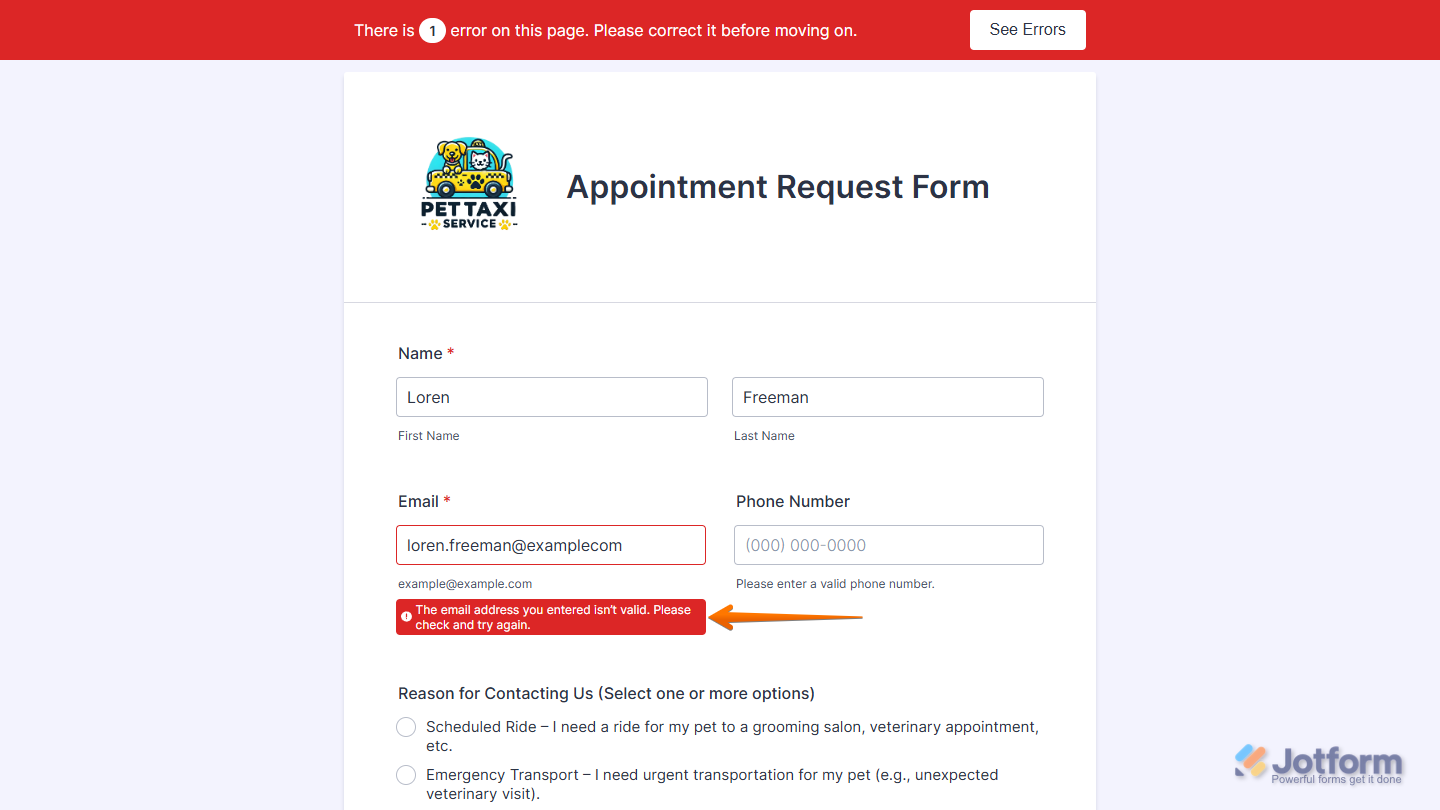
Form warnings guide users while filling out your form. They can stop someone from submitting an incomplete entry, like a missing required field, or catch mistakes such as an invalid email address. Jotform gives you the flexibility to customize these warning messages to match the tone, wording, or language you want to use. Whether you want to keep things professional, friendly, or specific to your audience, you can make these alerts feel like a natural part of your form.
You can change your form’s warning messages in just a few steps. Here’s how to do it:
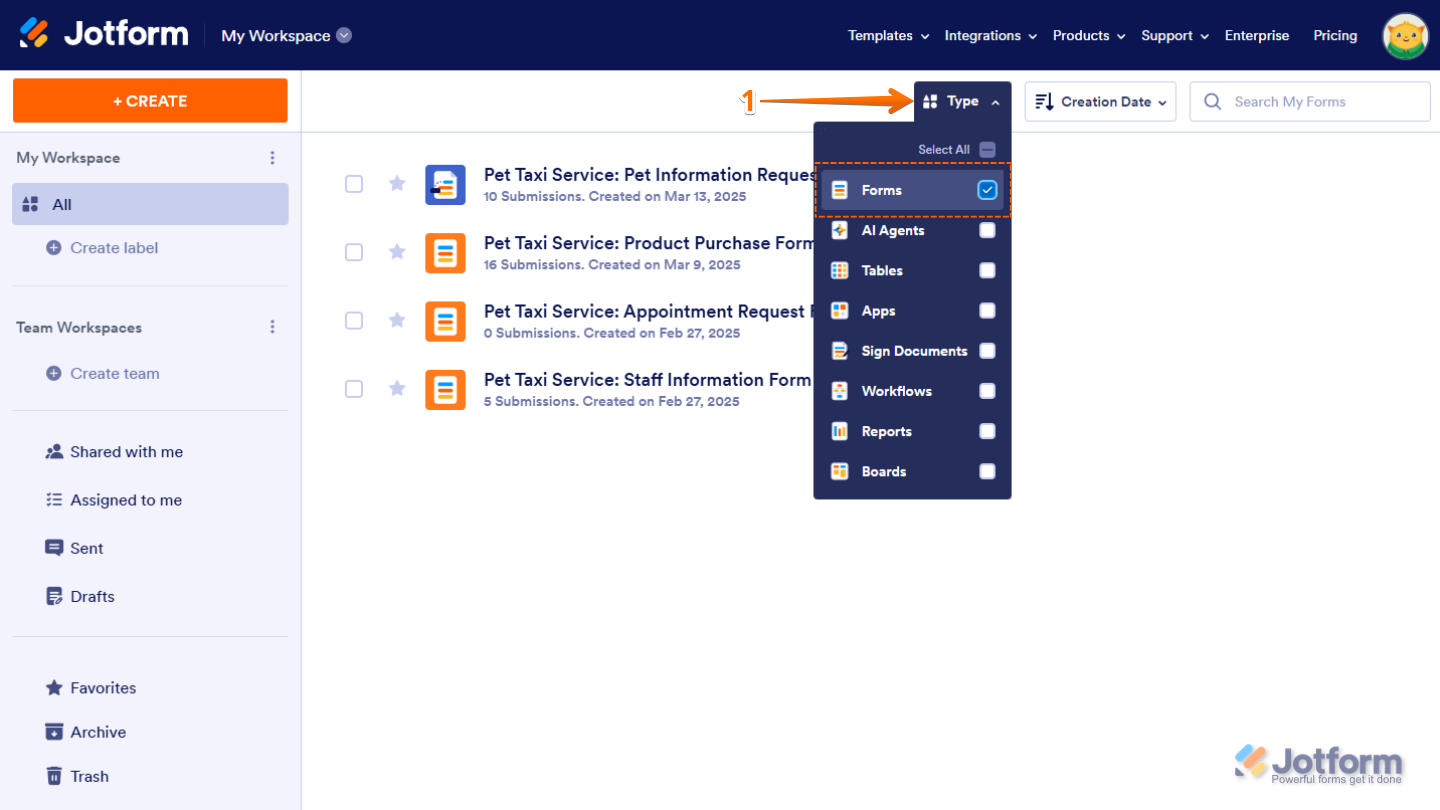
- On your My Workspace page, click on Type at the top and in the Dropdown menu that opens, uncheck the boxes next to all the assets except Forms, so only they’ll be shown on the page.
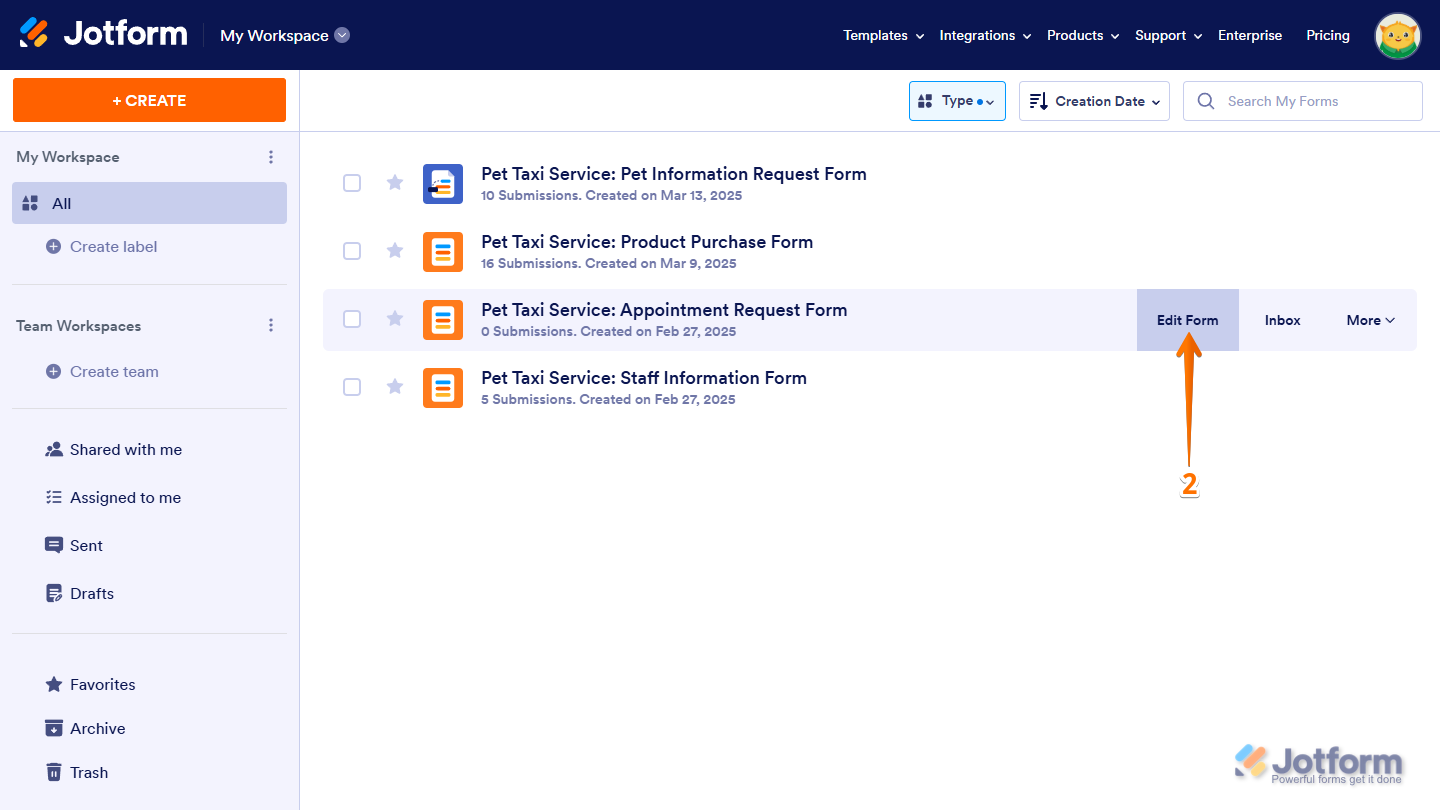
- Hover your mouse over the form where you want to change the warning messages and click on Edit Form on the right side of the page.
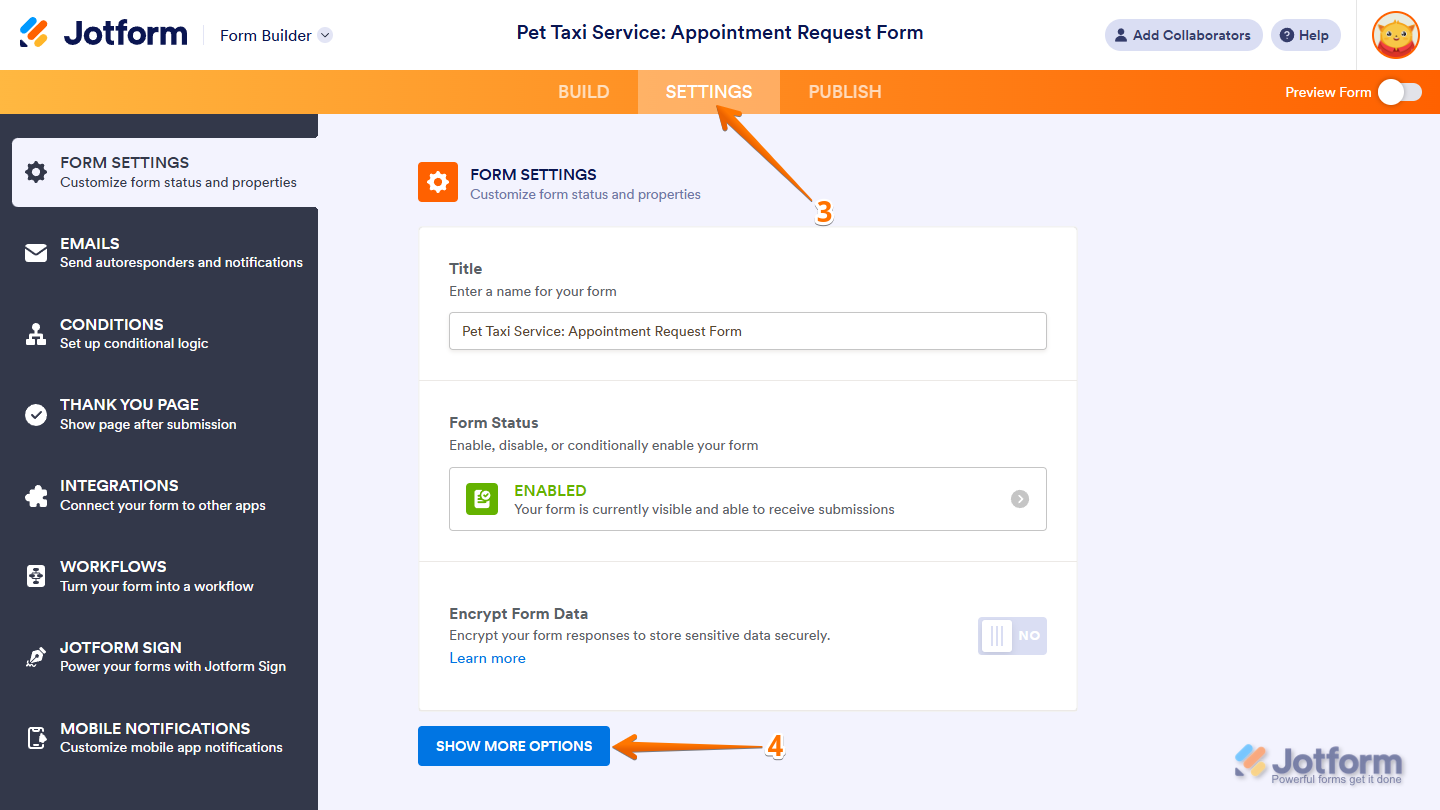
- In Form Builder, in the orange navigation bar at the top of the page, click on Settings.
- Now, under Form Settings, click on Show More Options at the bottom.
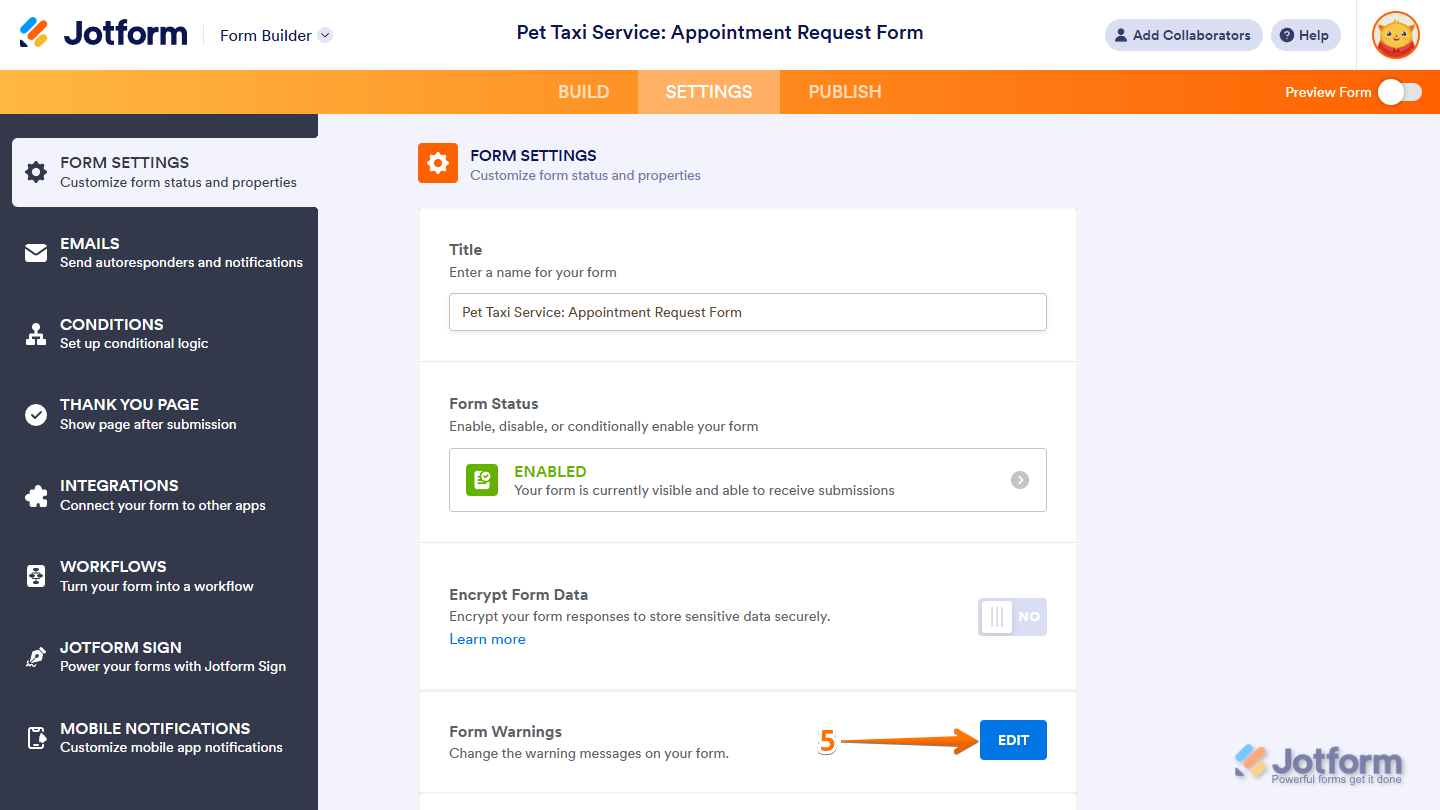
- Then, click on Edit on the right side of Form Warnings.
- In the Form Warnings section, enter a new message in the box of the corresponding warning message you want to change. You can use the search bar at the top to find a specific warning message easily.
- Once you’re done, click on Save Changes at the bottom.
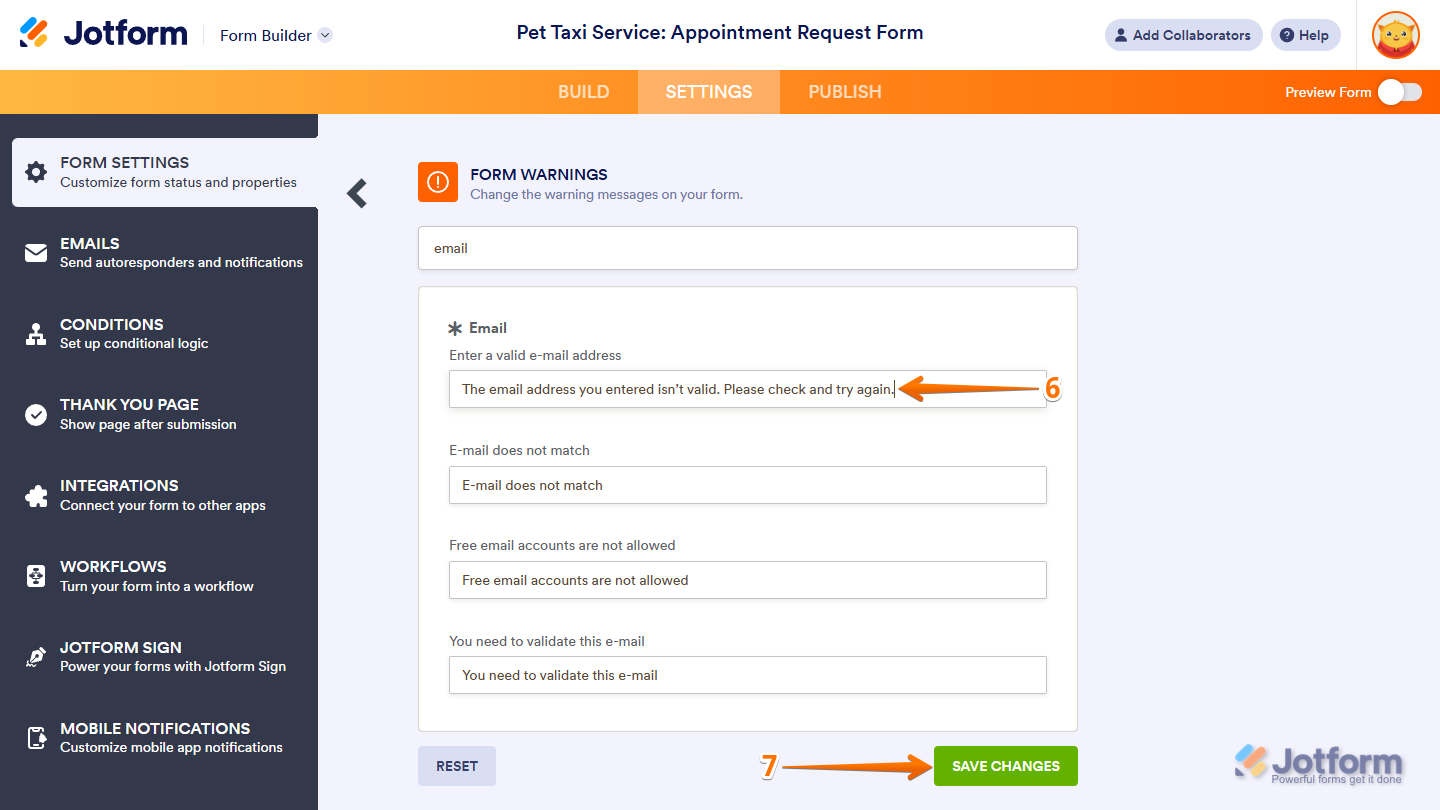
That’s it. Your form warning messages are now updated and will appear on your live form.
Note
Only plain text is supported in form warning messages. HTML Text Formatting elements won’t work and will show up as plain text.



Send Comment:
65 Comments:
October 31, 2025
Receive a Jotform error page for the Terms and Conditions widget when not selected and hitting submit. How to edit that page into a on-form text error message.
December 12, 2024
Hej Jotform-Team,
thanks for the explanation. It's really weird, I have the German text activated, but there are still English warnings in the form: "This field is required.", "There are X errors on this page. Please correct them before moving on. See errors", "Drag and drop files here". Can you check this out?
Thx, Nina
November 10, 2024
Im getting error messages for appointment times when there are still a few open. Keeps saying the " time as just run out
August 28, 2024
why is it saying my form is over quota and how do i fix this?
January 19, 2023
how do I enable multiple submissions for a form? The "Sorry! only one entry is allowed" keeps popping up on my client's end, and I don't know how to get rid of it. Thanks in advance!
January 13, 2023
How can I have a message appear once a form has been disabled?
January 4, 2023
Can I turn off the Error navigation/warning?
July 12, 2022
No stock and out of business
June 13, 2022
error validating phone
June 1, 2022
How do I change the field warning pop-up box background colour from the default red to a custom colour?
September 13, 2021
Two questions:
Accessibility warning: Lite Mode. How do i disable 'lite mode' on my form?
Please include text for the empty option in the dropdown. What does this means?
January 25, 2021
I want to amend the 'Unique Question' warning page to direct users to go BACK and amend the name. Currently the direction to the user is not clear. How may I do this please?
November 16, 2020
Hello
I've deleted all the entries from all my submission forms. During the testing phase of my latest form, every time I complete the form using the "Fill Form" option, or click onto the form link I get this response "Sorry! Only one entry is allowed."
Please advise how to correct this issue.
Many thanks
August 25, 2020
I have a unique question in my form. Where do I find the "Sorry! Only one entry is allowed." message? It's not listed under Form Warnings, and I need to change it to say "Sorry! That email address is already registered. Please try again using a different email." Otherwise they won't know why they can't submit their form.
November 11, 2019
Hi-- I am not seeing this message when using the form to upload a video file... instead, it just looks like nothing is happening for a minute, then I get the Thank You screen. I have put caution instructions to Wait next to the submit button, but it would be awesome if this warning happened once the submit button is clicked.
July 26, 2019
Hi there,
How do I turn off the "Sorry! Only one entry is allowed. Multiple submissions are disabled for this form."?
Thanks heaps
May 21, 2019
Help me please
May 8, 2019
Is there a way to create a custom condition that produces a warning message but at the end of the form before the submit button? For example, we have a form that has the ability to enter info for 3 people on it. If they enter something for person 1 incorrectly can we then trigger the conditional response of you need to adjust this but have it show up by the submit button? The purpose would be that all error messages would populate in one area rather than having to scroll through the full form looking for the error. Which Jotform may not consider an error but rather just a condition that has been triggered due to the users choice.
March 25, 2019
"Start" is not on the warnings list.
June 5, 2018
How do you turn off the highlight that displays when someone doesn't fill a field? I want the "This field is required" but not the big ugly highlight box around it. I turned off Highlights but that only turns off the ugly box when the focus is on a specific field.
June 2, 2018
Hi,
there is no option to change this WARNING MESSAGE
"There are incomplete required fields. Please complete them"
I have a CARD FORM, maybe in this format is not available?
thanks!
November 30, 2017
Is there any way to insert html into my custom warning messages?
I want to make my error message for duplicate entries display a list of options for the user below, in a "UL" element. When I enter the tags, they are sanitized out. So far, I've succeeded by replacing the opening bracket of the tags with an "lt" character reference, but whenever I want to change the message, I have to re-enter them.
May 16, 2017
I don't want hints provided to the user as to what a valid entry is. Can I remove the validation warnings on my forms?
March 2, 2016
Scratch that : I used these videos and it worked a charm!
https://www.jotform.com/blog/video-course-form-designer-basics/
March 2, 2016
Hi there - is there any way to change the colour of the actual warning popup/button/speech bubble?