











Blogger is an online blogging platform that allows you to create multi-user blogs with time-stamped entries. You can add a feedback button to your blog as another communication channel with your audience.
To add a feedback button to Blogger
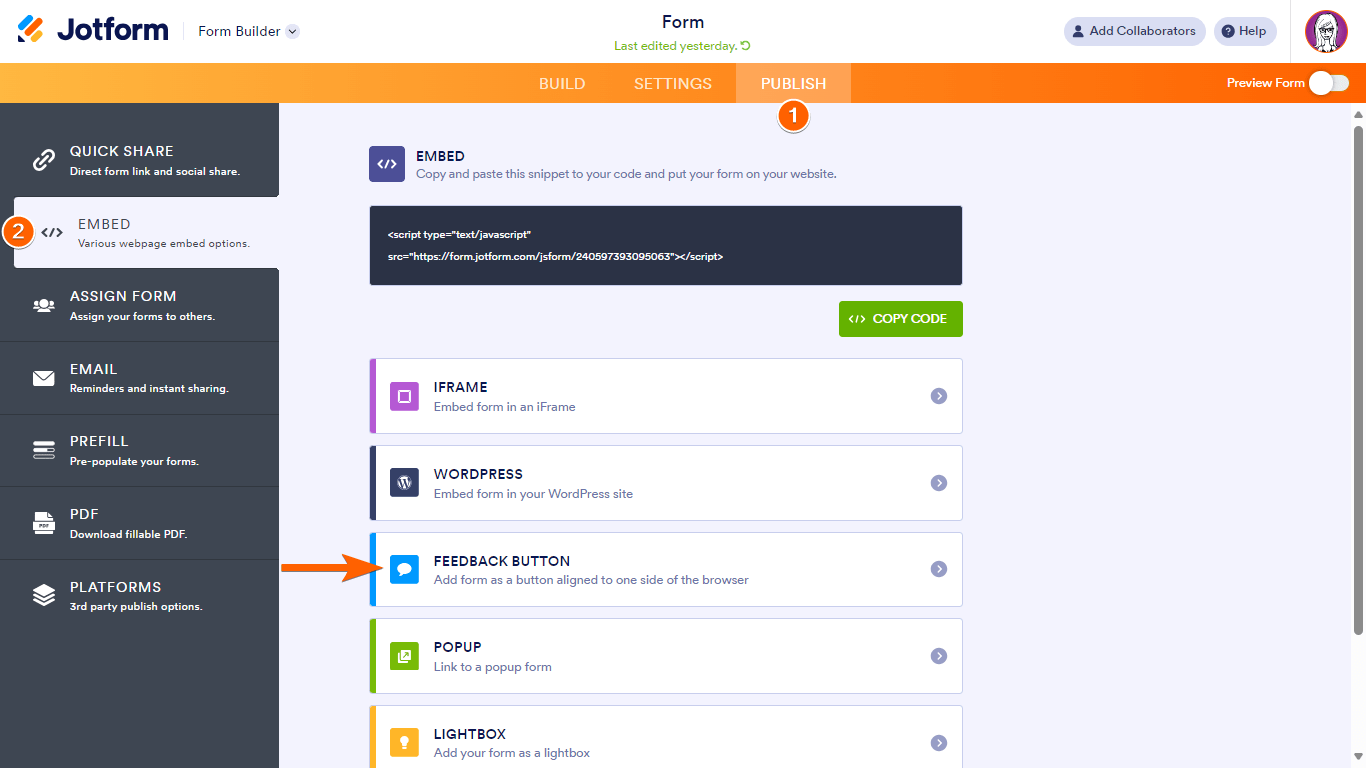
- In the Form Builder, go to Publish at the top.
- Go to Embed on the left.
- Select the Feedback Button option.
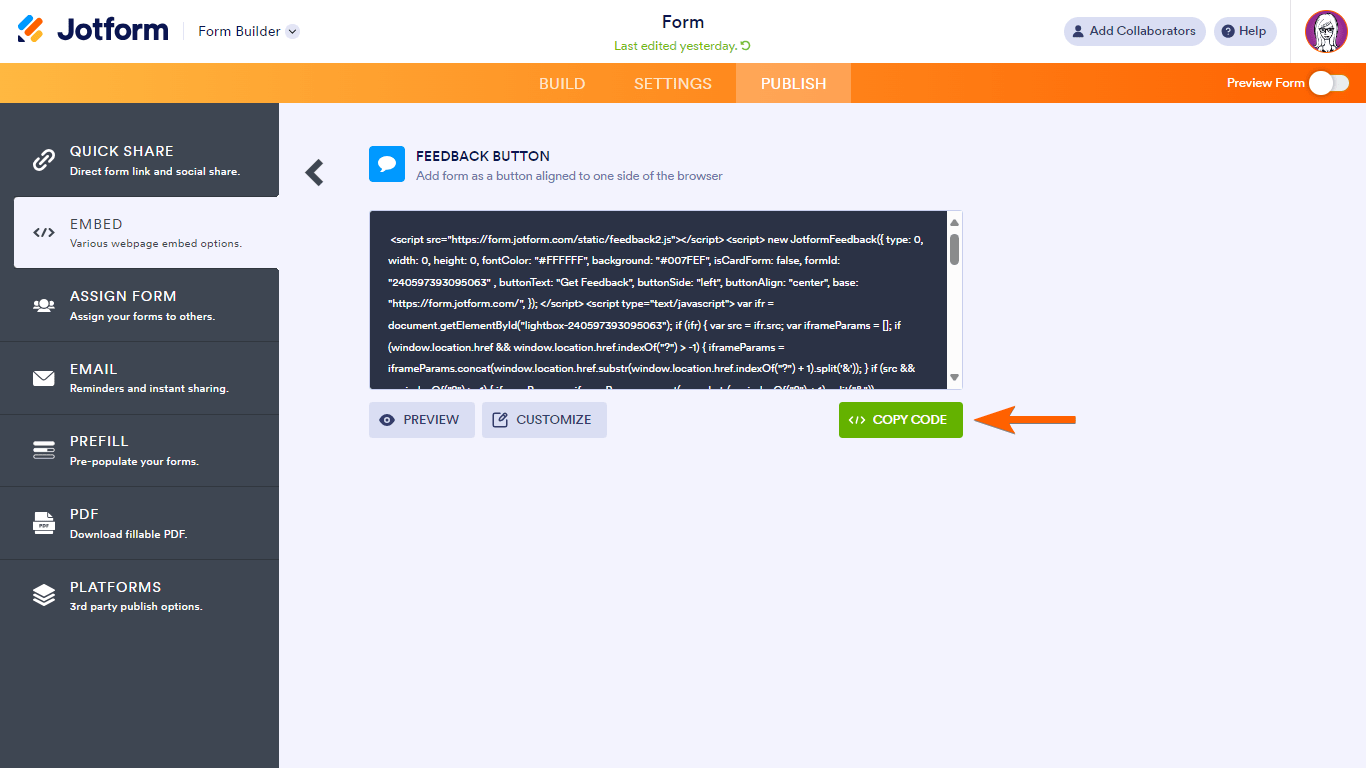
- Select Copy Code.
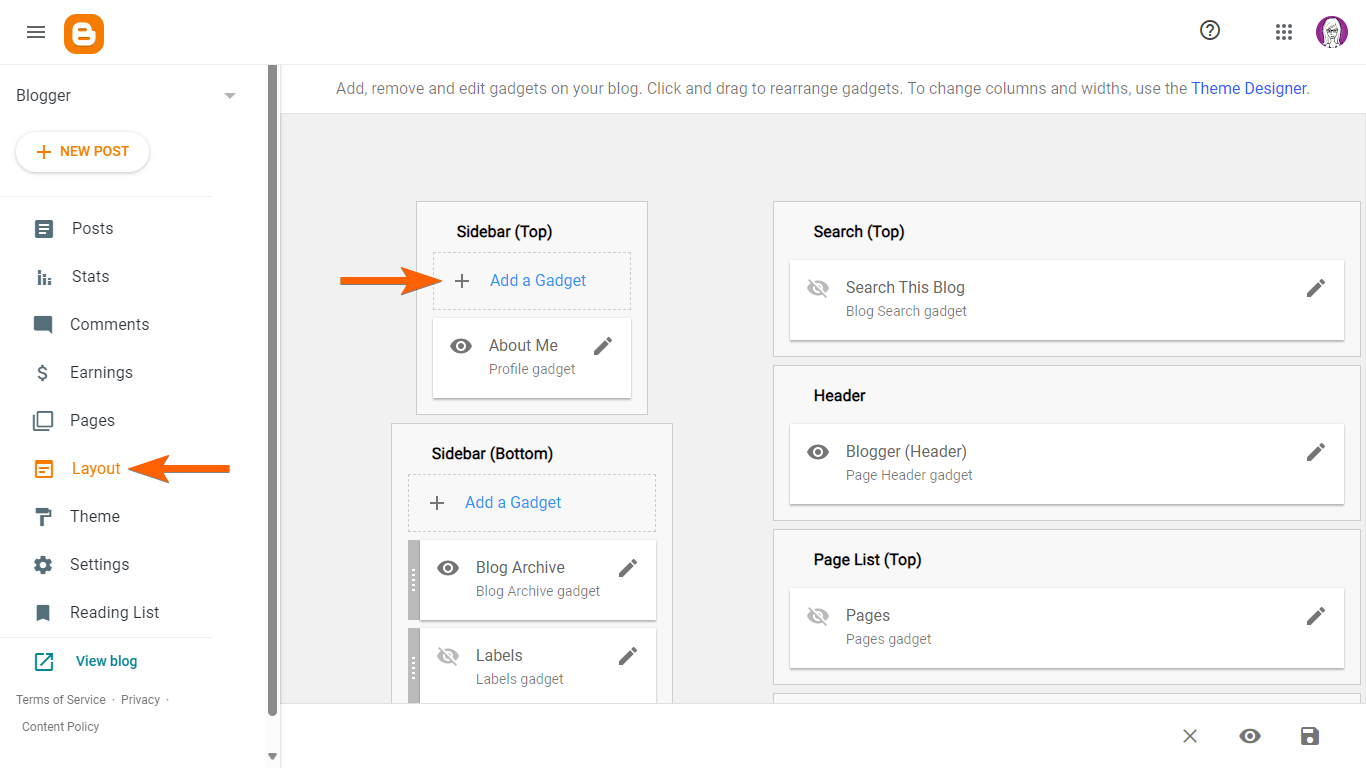
- In your Blogger dashboard, go to Layout on the left, then select Add a Gadget.
- In Add a Gadget, select HTML/JavaScript.

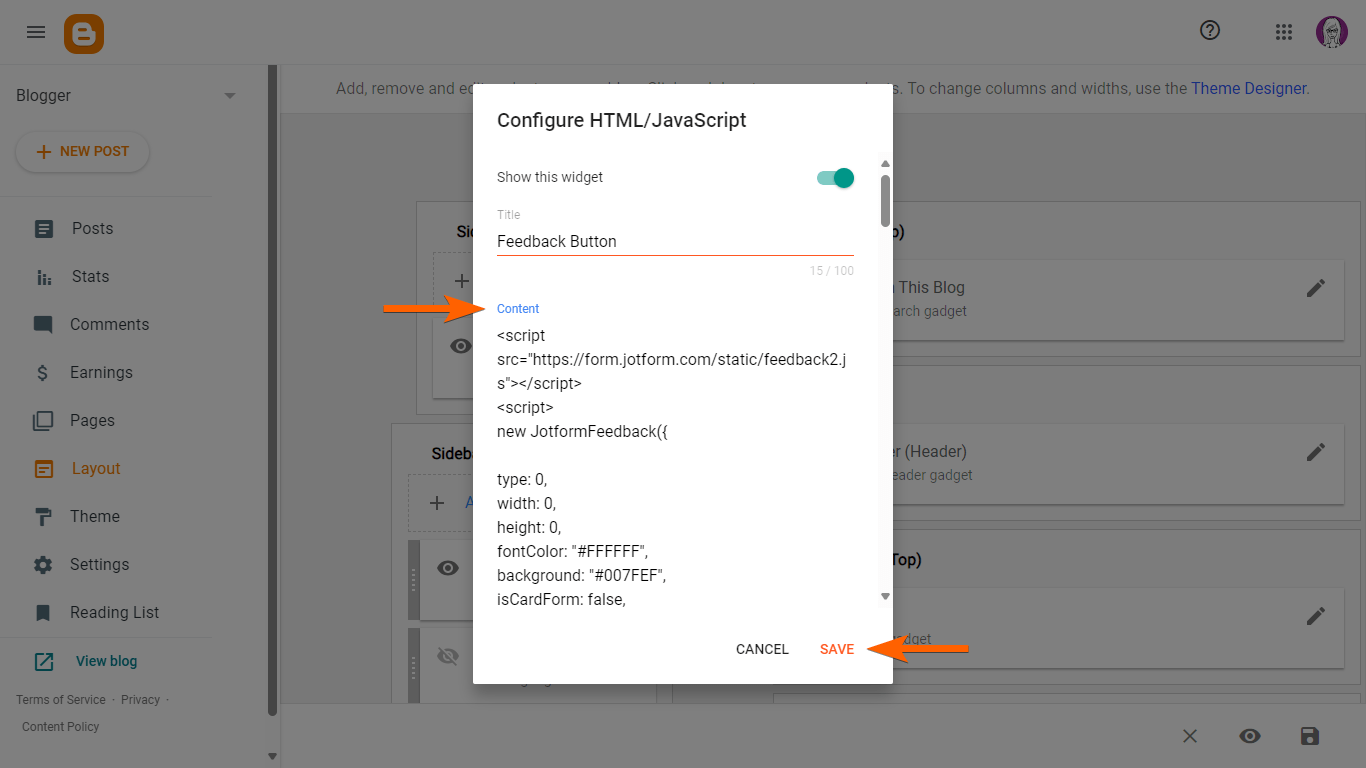
- In Configure HTML/JavaScript, enter your desired title, then paste the code under Content.
- Select Save at the bottom to complete the setup.
Send Comment:
64 Comments:
117 days ago
J'ai une chaîne sur YouTube et des sites Web,est-ce que je peux avoir un lien d´affiliation.
Merci pour tout information,email moi.
296 days ago
I would like to express my gratitude to the Jotform team. The feedback form and feedback button are functioning wonderfully on my blogger site. Taking the feedback into consideration, I plan to proceed with an upgrade. Once the upgrade is complete, I have a quick question: Can I replace the "free Jotform branding & button" with my own custom branding?
More than a year ago
C’est un platform qui sont très interessant !
More than a year ago
¡Excelente!
More than a year ago
i cant receive mail on my blogger mail when i embed this contect us form
please guide me
More than a year ago
Very amazing one
More than a year ago
helpful guid thanks for sharing
More than a year ago
Very best artical for blogger . Good describe for add feedback link in blogger ... ????????????????????
Great keep it up and also Update more..
More than a year ago
Este deu certinho mas não ta dando eu colocar o formulario em minha pagina
More than a year ago
Nice guide really helpful, thanks. Button looks just as similar to BugRem
More than a year ago
plz tell me the directly
More than a year ago
Thanks a lot for this, very useful!
More than a year ago
Thanks for the help! :)
More than a year ago
very usefull thanks for sharing this info really good for biggners like me
quotes
More than a year ago
Useful piece , I learned a lot from the analysis , Does someone know where my company could acquire a fillable Saco River Education Registration Form form to edit ?
More than a year ago
Helpful suggestions - I learned a lot from the information - Does anyone know if my company would be able to acquire a fillable IRS W-9 document to use ?
More than a year ago
What if I had reached a maximum submition in a month? can I reset this? Thanks
More than a year ago
thank you love u
More than a year ago
Thank you nice Love you Jotform
More than a year ago
I copied the code but the button doesn't show on my blog. I only see the title.
More than a year ago
thats great after 5 months i will buy a account of jotform .
More than a year ago
MUY BUENO !
Gracias
More than a year ago
Como hago para k las imagenes k publique me salga pequeñas?
lo k pasa es k se publican muy grandes
More than a year ago
после заполнения формы,переход на другую страницу. это понятно. но форма исчезает...Она потом для другого пользователя появляется ??
More than a year ago
i do not receive the messages to my email address although i found them in your submission form why?
More than a year ago
Muito bom
More than a year ago
thank you very must....
More than a year ago
very nice thanks to jot form
More than a year ago
I have just create a account and I don't have this look at all !! :(
More than a year ago
great !!!!
and congragulations
More than a year ago
Possible to explain to me one I did not understand when he finished page does not want to open I do not know why
More than a year ago
There seems to be a problem with the account details that are displayed when you click on the head in the top right corner. The SSL submission count is cut off at the bottom. I see the bar, but not the count below it. In FireFox(17) this happens on the MyForms page, but not any of the support pages. With IE8, it happens in all cases that I tried.
More than a year ago
why are my submissions not being emailed to me?
More than a year ago
Love it!
Great job guys!
More than a year ago
Interface looks great. Folders are good to have. One thing though... When you select a folder, and edit a form in that folder, when you go back to myForms, you are in the top level. I think it would be better to go back to the folder you were in before you started doing your edit (or viewing submissions).
More than a year ago
The new interface looks great. Much appreciated.
More than a year ago
thanks
More than a year ago
There is a printing problem when printing a form. It sends two pages which overprint on one page and another page with the contents of the page. (I clicked the printer icon on my "Copyfast Printing Prospects" page.) And it prints some other stuff on the bottom such as "Welcome to the NEW MY FORMS", etc. These items overprint the contents of my last field on the form "Contact Notes."
More than a year ago
Como faço para ver o que o pessoal escolheu?
More than a year ago
Its great thank you in advance,
Dear.
More than a year ago
Is there any way to see all the recent forms together rather than just one at a time?
More than a year ago
scusa avette qualche video ??
More than a year ago
come funziona avette un video grazie
More than a year ago
Well deserved!
More than a year ago
I don't know what the name of technology behind your system but i can tell, the result is very satisfied. Keep up the good work Jotform, you guys are amazing.
More than a year ago
Really you make it very good and easy
More than a year ago
wonderful... hats off... your are genius... great man... thanks a lot... very helpful
More than a year ago
Hola, me ha encantado lo sencillo que es crear un formulario, con un diseño que elijamos e info que nos interese del contacto.
Sólo tengo una duda: cómo hacer para que una vez enviado el formulario, haya una forma fácil de volver al blog
More than a year ago
Jotform you are brilliant. You are the only decent free php form builder
More than a year ago
selam letişim formunu burdaki gibi sitemde nasıl yayınlayabilirim
More than a year ago
Like this!!!
More than a year ago
I have added the the feedback form and it works fine, I wanted to know now that if somebody leaves a feedback, where can I view it.
More than a year ago
Hello... Where is the setup& embded tab...?
Please help Me
More than a year ago
no meu nao funcionou ele aparece como
se estivesse blz ai qnd vc escreve tudo e pede pra enviar ele da um erro la ai fode tudo e nem em envia ele so funciona no teste!!!!!!!!!!!!!!!!!!!!!!!!!11
More than a year ago
como eu coloco meu formulario no blogger
More than a year ago
ganhe moedas no jogo habbo https://www.jotform.com/form/20120928248
More than a year ago
I am confused where is the "set up and embed tab"?
More than a year ago
Ok. All ready,good by, succes
More than a year ago
hello guys~i wish to upload the form i made to facebook page,but i couldn't find the setup button or tool==..how can i upload to my facebook?anybody here know?please help me:P thanks
More than a year ago
pero donde saco esa pagina de blogerr
More than a year ago
ok so i realize that it does matter if it's the top gadget. it now shows up but the script isn't working. nothing happens when i click. and i know it's not a pop-up blocker issue because i've enabled pop-ups AND it works in the test.
More than a year ago
this doesn't work for me at all. does it matter that you add the gadget to the top or to the sidebar?
More than a year ago
Oh gosh very nice. Thank you Jotform
More than a year ago
Dear Seyhun now it's OK. Thanks Very Much! I love JotForm.