
Key takeaways
- SharePoint and DocuShare are enterprise document management platforms used to store, manage, and secure business content in distributed teams.
- SharePoint works best for organizations already embedded in the Microsoft ecosystem, while DocuShare is designed for teams needing centralized, compliance-focused content management.
- Choosing between SharePoint vs DocuShare in 2026 depends on integration needs, security requirements, and budget constraints.
When it comes to managing documents across a distributed team, the platform you choose can mean the difference between seamless collaboration and a constant battle with disorganized, inaccessible files. As businesses increasingly rely on digital workflows and remote work, enterprise content management has moved from a nice-to-have to an absolute necessity. In fact, among employees working 100% remotely, limited connection with colleagues is a top concern for more than half — 51% — and without the right document management system in place, that challenge only gets harder.
Two common options are SharePoint and DocuShare, both trusted platforms with different strengths. This guide compares SharePoint vs DocuShare across features, pricing, and real-world use cases to help you choose the best fit in 2026.
SharePoint vs DocuShare: A quick overview
What is SharePoint?
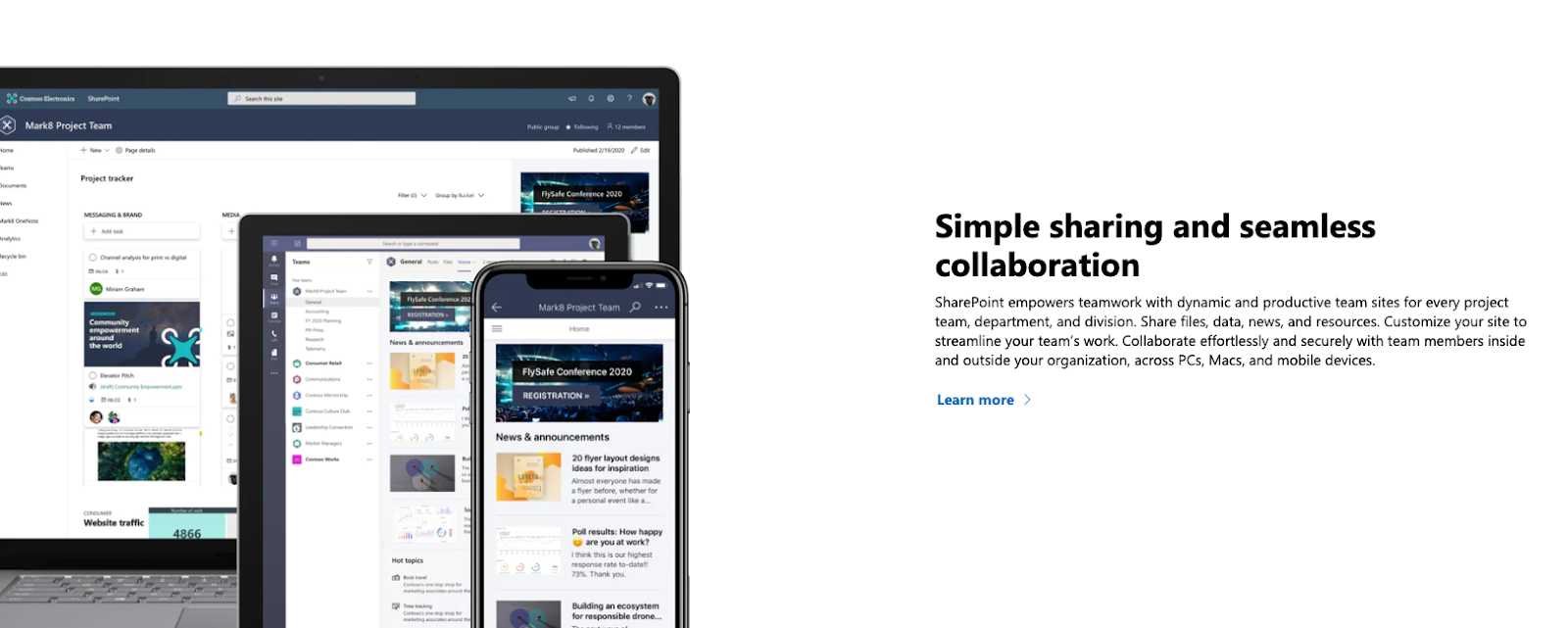
SharePoint is Microsoft’s cloud-based document storage, sharing, and management solution. With over 200 million users and 250,000 organizations relying on it, SharePoint continues to serve as a core collaboration platform in 2026. It integrates seamlessly with Microsoft 365, making it a natural fit for teams already embedded in the Microsoft ecosystem.
You can think of SharePoint as a collaboration hub — document management is at its core, but it extends into workflows, communications, and team coordination across your entire organization.
What is DocuShare?
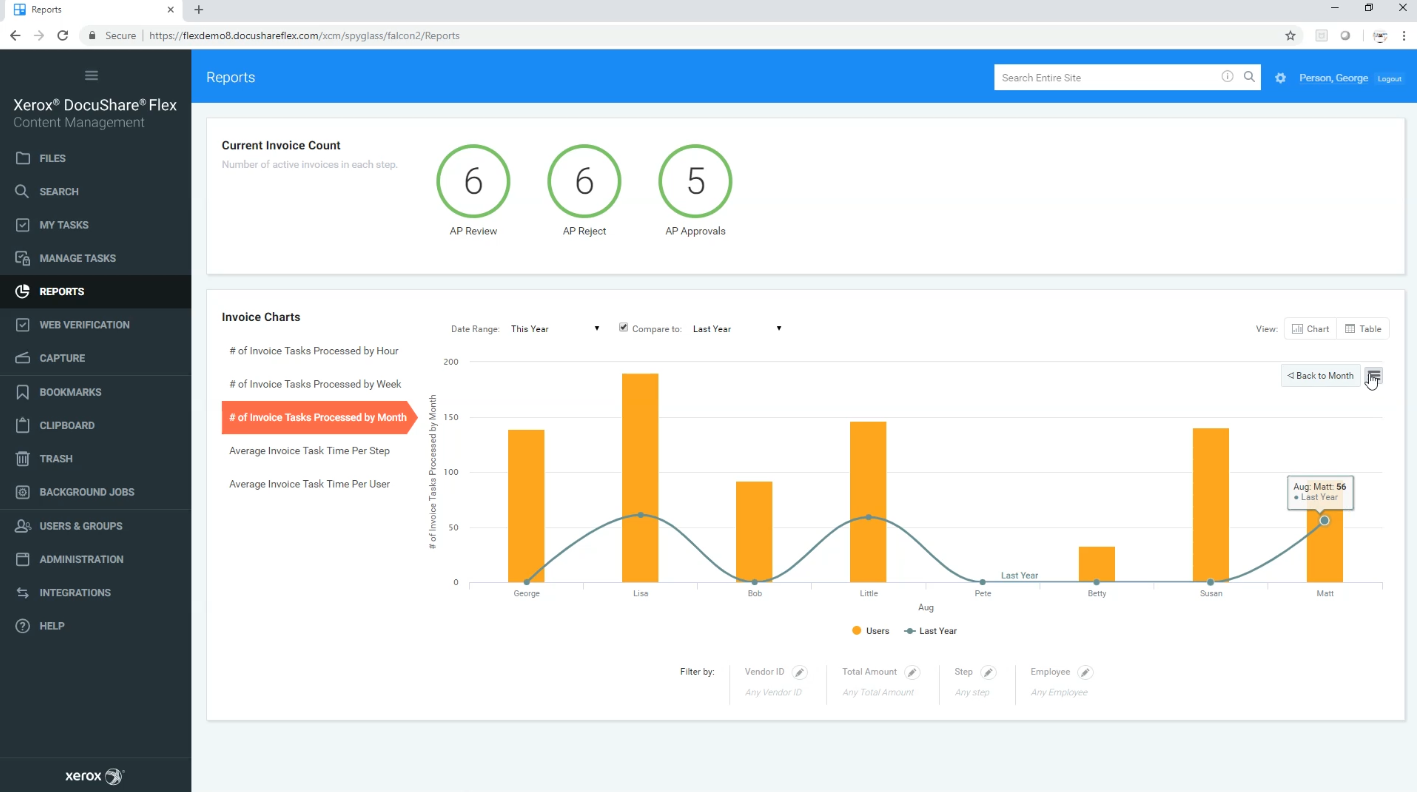
DocuShare is an enterprise content management (ECM) system developed by Xerox, designed to help teams capture, store, access, and collaborate on documents — either on their own servers or in the cloud. Unlike SharePoint, DocuShare’s primary focus is on centralized, compliance-driven document management.
DocuShare is available as both a desktop and mobile app and uses open standards to integrate with other business applications, making it a strong choice in 2026 for organizations that prioritize administrative control and regulatory compliance.
SharePoint vs DocuShare: Key features
Here’s a breakdown of each platform’s key features in 2026:
SharePoint
- Team sites: Segregates workflows by organization, department, team, or project, giving each group its own collaborative space.
- Search and discovery: A powerful search engine helps users quickly locate documents across the platform.
- Workflow automation: Supports notifications, approvals, and streamlined workflows natively.
- Microsoft 365 integration: Deep integration with Office 365, Exchange, and other Microsoft tools boosts efficiency for existing Microsoft users.
- Enterprise security: Includes data loss prevention, supervisor access, document labels, and other compliance features that often exceed competitors.
DocuShare
- Document capture: Users can create new documents directly from the mobile app, including by photographing physical documents.
- Secure cloud access: Provides secure, remote access to documents from any device or location.
- Granular administrative control: Administrators can set access and collaboration permissions on a document-by-document basis for maximum control and compliance.
- Powerful search: A robust search function makes it easy to find documents across the entire system.
SharePoint vs DocuShare: Pros and cons
Every platform has its pros and cons, and they’re often based on each user’s needs. Here are the pros and cons for SharePoint and DocuShare:
SharePoint
Pros:
- Industry-leading security and compliance features built in
- Highly cost-effective pricing, starting from just $5 per user per month
- Deep integration with the Microsoft 365 ecosystem
- Scales easily for organizations of all sizes
Cons:
- Administrative complexity and permissions management can be cumbersome
- Can be overwhelming for teams with simpler document management needs
DocuShare
Pros:
- Comprehensive document management with fine-grained control
- Strong compliance and governance features for regulated industries
- Available on both desktop and mobile for flexible access
Cons:
- May be more than what smaller or less compliance-focused teams need
- Less collaborative by nature compared to SharePoint
SharePoint vs DocuShare: Pricing
Pricing can be a deciding factor between document management platforms, depending on your budget. Here’s how SharePoint and DocuShare compare:
SharePoint
SharePoint offers one of the most cost-effective pricing structures in its category. It is available as part of a Microsoft 365 license, with entry-level plans starting at as little as $5 per user per month. Because it bundles with other Microsoft tools, organizations already using Microsoft 365 often get SharePoint as part of a package they’re already paying for.
DocuShare
DocuShare takes a licensing-based approach to pricing, with costs starting at around $1,500 per license. While this reflects the platform’s advanced compliance and administrative capabilities, it can be a significant investment — especially for smaller organizations. You’ll want to contact Xerox directly for a pricing quote tailored to your organization’s size and needs.
SharePoint vs DocuShare: Integrations with Jotform
Beyond choosing your document management platform in 2026, it’s also important to think about how you’ll handle data collection and form-based workflows.
Jotform is a powerful form-building platform that simplifies data collection and can complement both SharePoint and DocuShare. With its drag-and-drop builder, robust analytics, and automation features, Jotform makes it easy to capture and route information directly into your document management workflows.
Jotform integrates with a wide range of tools and supports connections to Microsoft ecosystems, making it a natural companion for SharePoint users. For DocuShare users, third-party integration solutions can help bridge the gap between Jotform’s data collection capabilities and DocuShare’s document management environment.
SharePoint vs DocuShare: The choice
Ultimately, the right decision between SharePoint and DocuShare comes down to what your organization values most. If you’re already embedded in the Microsoft ecosystem and need a scalable, cost-effective solution for collaboration and document sharing, SharePoint is the clear choice. On the other hand, if your organization operates in a regulated industry and requires centralized, compliance-focused document control with fine-grained administrative oversight, DocuShare is built for exactly that.
No matter which platform you choose, integrating Jotform can help streamline your data collection and document workflows from end to end in 2026.
FAQs about SharePoint vs DocuShare
Depending on your needs, alternatives like DocuShare, Box, or dedicated ECM systems may be better than SharePoint for specific use cases, such as regulated content management or simplified document governance.
A common downside of SharePoint is that its administrative complexity and permissions model can be cumbersome and difficult for some teams to manage effectively.
This article is for IT decision-makers, operations leaders, and enterprise teams, and anyone who wants to compare SharePoint vs DocuShare to choose the right document management platform based on collaboration needs, compliance requirements, and budget considerations.
























Send Comment: