When you add a field to a new form, the form builder automatically sets up an Email Notification and an Email Autoresponder as soon as you add an Email element. If you want to delete your form’s email alerts to view submissions only in your account or through integrated third-party apps, or if you need to start over with a new email alert, you can easily do so, which also helps if you’ve accidentally created multiple alerts and are getting duplicate submission emails you don’t want. Follow the steps below to delete an email alert on your form:
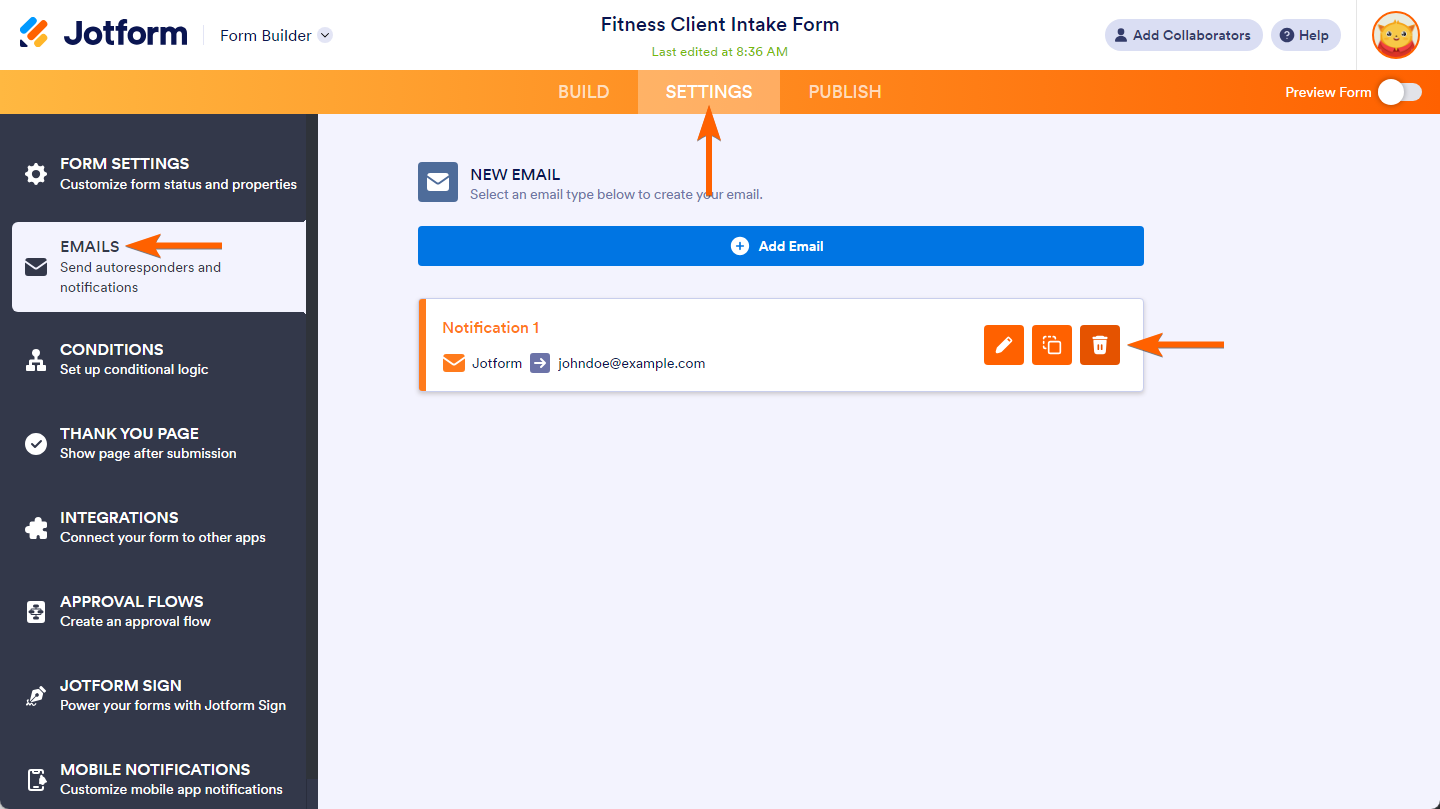
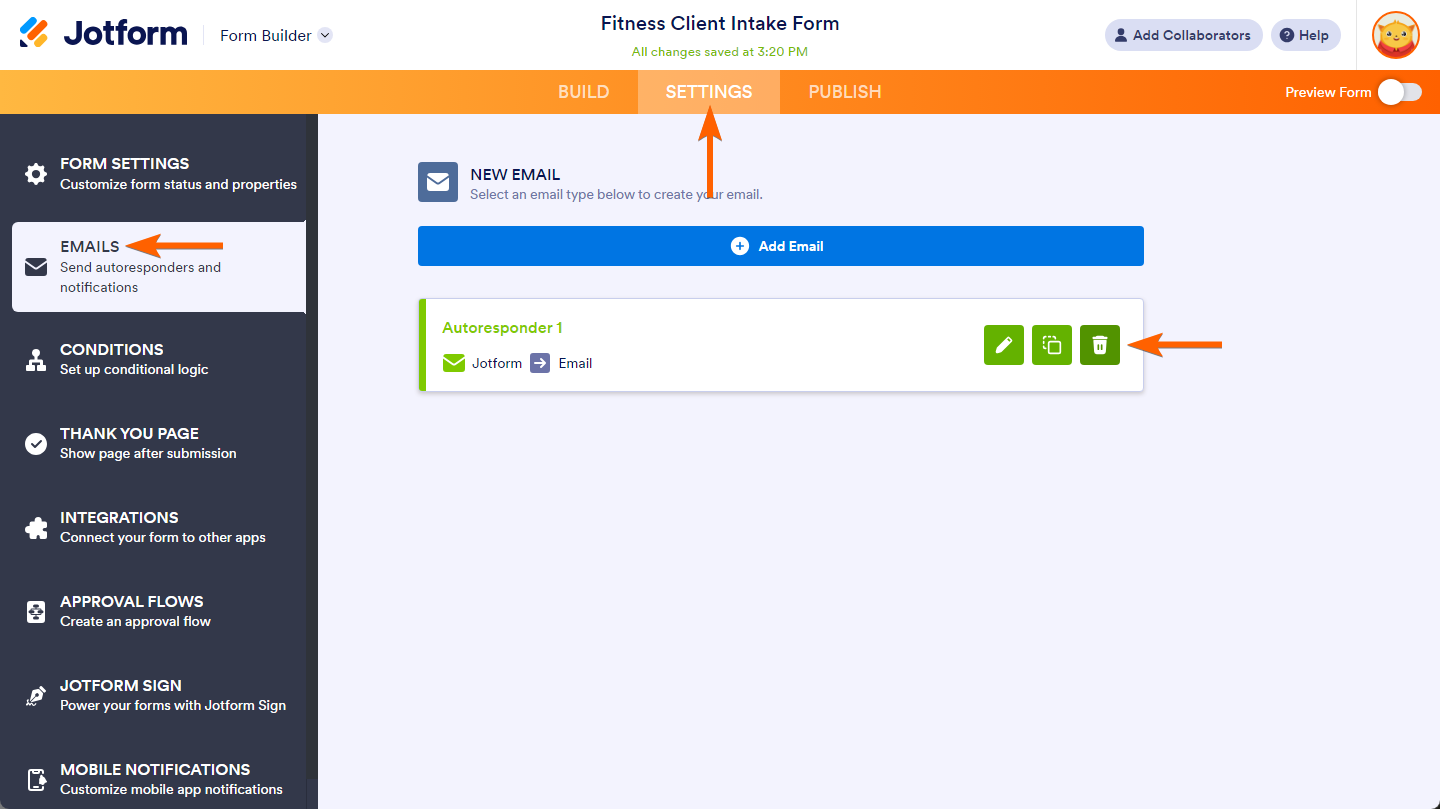
- In Form Builder, go to the Settings tab.
- On the left side of the page, click on Emails from the menu.
- Next, hover your mouse over the Email Notification or Email Autoresponder on the right side of the page that you want to delete, and click on the Trash icon.
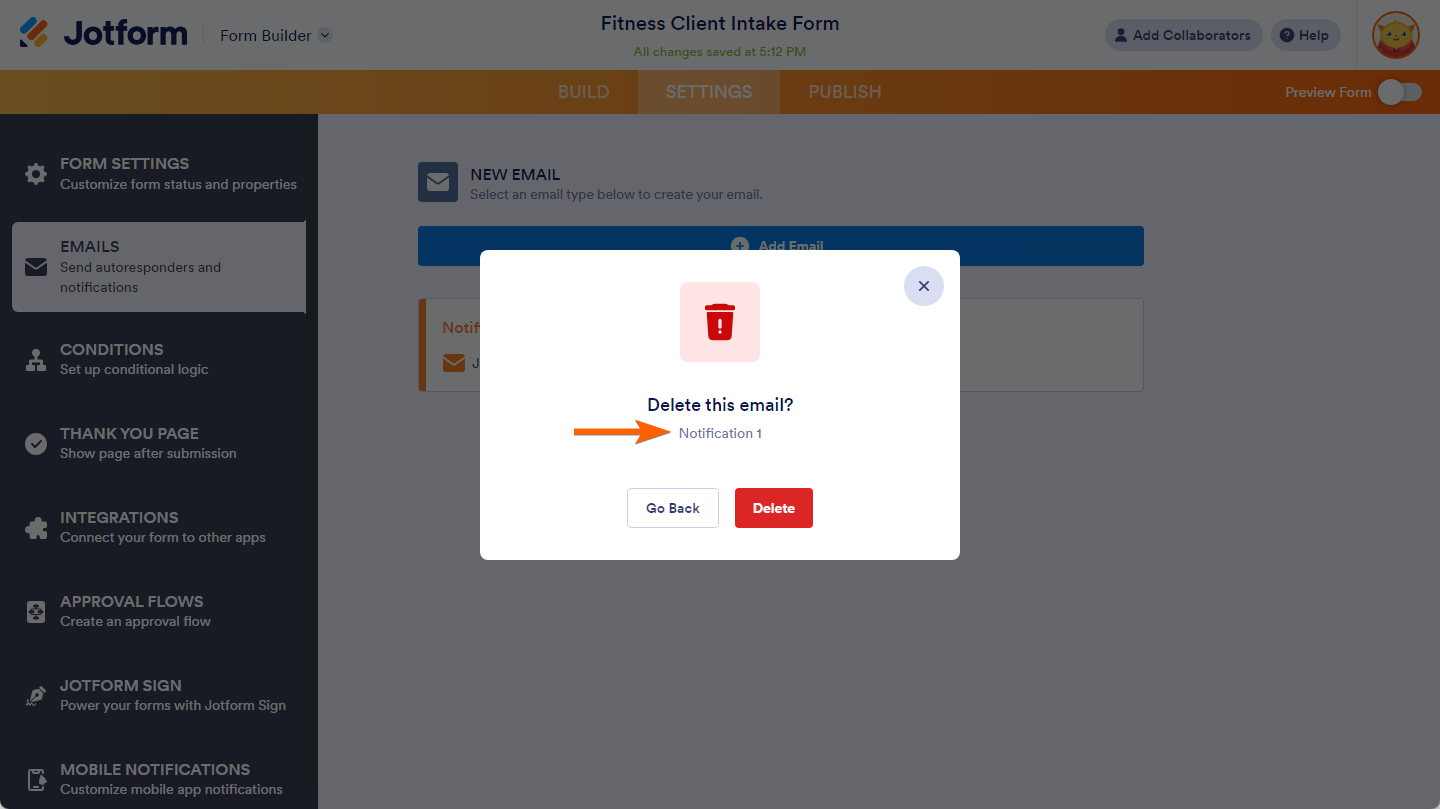
- Then, in the pop-up, click on the Delete button.

The pop-up displays the name of the Email Notification or Email Autoresponder you are about to delete, allowing you to confirm it is the correct one before clicking the Delete button.
Pro Tip
Pressing CTRL+Z on the Build tab of the Form Builder immediately after deleting an Email Notification or Email Autoresponder, without reloading the page, allows you to restore the deleted email alert.



Send Comment:
22 Comments:
October 24, 2024
I deleted the email address - followed the instructions, but am still receiving the email notifications.
August 30, 2022
Hi - Is there a way to prevent a reminder email being sent when a certain condition is met, after a form with a timed reminder is submitted? i.e if we re-enter the submitted form via the edit link and re-submit with a later reminder date, will that prevent the original reminder email?
March 1, 2022
that did not work.
January 26, 2022
When I delete a notification / autoresponder as explained, will it only be deleted in the form that I work in, or will the template be permanently removed for already created or future forms?
June 17, 2020
not interested revers charges 33.00 on my card
August 12, 2019
I cant seem to find the setting to delete email notifications?
Can someone help,please?
August 11, 2019
I cant seem to find the setting to delete email notifications?
April 25, 2019
Very helpful. info Thank you.
October 9, 2018
Is there a way to stop every form created from having these default notifications? I know I can remove/amend, but I'd rather not have them there to begin with for every new form.
Taking into account best data protection practices, by default, using email to send potentially sensitive personal data to the registrant and ourselves via insecure email isn't good at all.
March 19, 2018
Hi,
I have sorted out the email fields , so thanks for that. My last problem is that i have to press `add another traveller` even if not required, to be able to proceed to the next page.
My form has been shared with me by Mike Morris - Academy Travel Request Form.
I think that this is the final hurdle.
Thanks again for your help
March 17, 2018
Hi,
I have a field that requires First name - Surname - Age. Then a button to add another traveller.
I can`t move to the next page unless I press the button. Also, when i do add another traveller, only one name appears on the email confirmation.
How can i make this work?
Many Thanks
February 28, 2018
Muchas Gracias
January 16, 2018
I seem to be having the same issue, I am not able to locate the settings tab. therefore can not change the email settings.
June 20, 2017
I am not able to locate the settings tab.
I tried both the top of the screen and my profile account and it does not show.
September 16, 2015
I need to remove a party from the automatic email list. When I click on the "Emails" icon I don't get the list of people that are receiving the form. How can I delete the party and/or add another person???????>
June 23, 2015
Thank you!
February 25, 2015
Can my users still click on the Adobe FormCentral link to open the form?
January 14, 2015
How do I see who I have getting notified of a registration submission. I need myself; my executive director; and my event coordinator and at the moment only two of us are getting the notice. But I am no longer able to see them listed as I did. So not sure exactly where I need to go to included the other email address so all three of us are receiving.
September 5, 2013
great, just what i needed to know, ty!
July 7, 2013
it worked.
December 6, 2012
Thanks a lot for your help. I am really thankful to you.
December 1, 2011
i followed those instructions.
Now how do i create a new autoresponder?
Thanks
Saul