Jotform Workflows
Everything you need to know about Jotform Workflows. Learn how to turn form submissions into automated approval flows — and enjoy a quicker way to say"yes"!
Guides
What is Jotform Workflows
Jotform Workflows enables you to create workflows tailored to your personal and business needs. One of its key features is its ability to create individual or team approval, request payments, and even collect signatures with Jotform Sign. With...

How to Create a Workflow With Jotform Workflows
Jotform Workflows makes it simple to build automated processes for your forms—no need to add tons of fields, set up multiple email alerts, or juggle complex conditions. Everything you need is built right in. With just a few clicks, you can...

How to Set Up Approval in Jotform Workflows
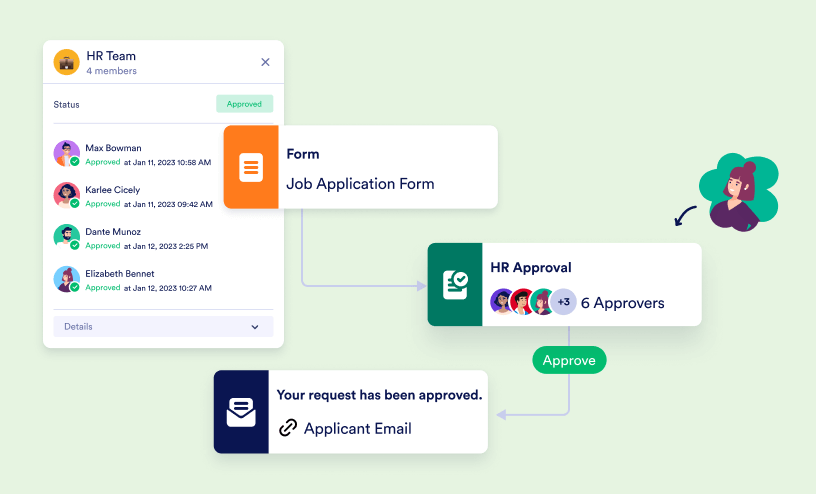
The Approval element in Jotform Workflows allows you to configure and define outcomes for your approval flow. Aside from the default Approve and Deny options, you can add more outcomes if needed and even set up multistep and parallel approvals....

How to Add and Connect Elements in Jotform Workflows
The drag-and-drop feature of Jotform Workflows lets you effortlessly add elements to your canvas. You can also reposition existing elements to improve the layout, making it easier for anyone reviewing your workflow to understand how everything...

A General Approach on Building an Approval Process Workflow
An approval process allows a reviewer to approve or deny a submission, entry, registration, or request. This guide covers a general guideline for building a workflow. Note that an approval flow starts with a form. To get started, create your first...

How to Add Egnyte Integration in Jotform Workflows
Egnyte empowers businesses with a secure, flexible platform for file storage, sharing, and collaboration. By combining cloud and on-premises solutions, Egnyte streamlines workflows, safeguards data, and ensures compliance while adapting to the...
Understanding Group Approval Completion Rules
In Jotform Workflows, it's easy to manage approvals when more than one person needs to decide on a request with the Group Approval feature. You won’t have to worry about adding multiple approval and condition elements in your flow, which can...
How to Enable or Disable Require Login in Workflows
In Jotform Workflows, logged-in approvers or assignees can check their previously completed approvals and complete their pending tasks in Jotform. By disabling "require login," your assignees don't need to sign in to Jotform to access and complete...
How to Create Multi-Step Approvals in Jotform Workflows
A multi-step approval allows multiple approvers to review and decide on requests before the process can advance to the next stage. For instance, you might need HR approval first, followed by setup approvals from IT or other departments. To...
How to Require a Signature in Jotform Workflows
The Approve & Sign element in Jotform Workflows allows you to require your approvers to provide their signature when they approve or deny an entry from their email or Inbox. This adds an additional layer of authenticity and accountability to the...

How to Request Electronic Signatures With Jotform Workflows
With Jotform Workflows fully integrating Jotform Sign through the Sign Document element, requesting and collecting signatures can now be part of your approval processes. You can set up your workflow to send documents for signature either after a...
How to Set Up the PDF Element in Jotform Workflows
One of the great features of Jotform is the ability to add PDF elements to your workflow. This allows you to automatically generate PDFs from form submissions, which can be useful for things like creating reports, invoices, or receipts. By...

How to Setup Team Approval Element in Jotform Workflows
The Team Approval element in Jotform Workflows lets you assign team members to approve forms or requests. You can set up rules for how approvals should happen, such as requiring one person or several people to approve before moving forward....

How to Send an Approval Report in Jotform Workflows
The Flow Report element in Jotform Workflows allows you to generate detailed reports of an ongoing or completed approval process. The reports can be sent to you or any designated recipient via email. This provides a clear record of the approval...

How to Set Approval Reminder Emails
People can get busy and need to remember to take approval actions, so sending them reminders is important to keep the approval workflow moving. One of the components of Jotform Workflows is the ability to remind people of their pending tasks in...

How to Delay a Workflow
Jotform workflow offers the flexibility to slow things down when needed—because not every step has to happen instantly. Sometimes, you might want to give someone time to respond, waiting a few hours, days, months, or even years before taking the...

How to Send Emails Later in a Workflow
Jotform’s workflow offers the flexibility to send emails exactly when it makes the most sense, not just immediately after someone submits a form. Sometimes you may want to hold off on sending a message, maybe to follow up a few hours later, wait...

How to Set up a Send Email Element in Jotform Workflows
Including an Email element in an approval workflow is crucial for improving communication and efficiency. For processes like expense approvals, leave requests, facility use, volunteer applications, and help desk tickets, automated emails notify...

How to Assign Follow-Up Forms With Jotform Workflows
The Form element in Jotform Workflows allows you to add follow-up forms to your flow. You can assign follow-up forms to your respondents or defined recipients and monitor their progress in Jotform Inbox or Tables. The invitation to the form is...

How to Set up an If-Else Condition Element with Jotform Workflows
In Jotform Workflows, the If/Else Condition element allows you to set up logical decisions based on form answers, helping automate the workflow's next steps. This element executes the next step in the workflow by determining whether the condition...

How to Share or Publish Your Workflow
Jotform Workflows allows you to automate your approval process. You can set rules for each approval flow and track activity during the approval process via Jotform Inbox or Jotform Tables. This guide lists the available options in the Publish tab...

How to Set Up a Conditional Branch in Jotform Workflows
Unlike the If/Else Condition element which can only support up to two branches (true or false), the Conditional Branch element allows you to direct your workflow to the number of conditions or branches you define. You can tailor your workflow...

How to Track the Workflow Status in Jotform Tables
Once you’ve created a workflow for your form, the Flow Status column will appear in Jotform Tables when you view the submissions. With the help of this column, you can easily track the outcome of each submission based on their workflow...

How Do Approvers Complete Their Tasks?
Jotform Workflows simplifies the approval process by allowing your approvers to quickly review requests and decide whether to approve or reject them. When your workflow is triggered by a successful form submission, approvers are notified via...

How to Split Branches in Jotform Workflows
The Split Branches element in Jotform Workflows allows you to add parallel branches to your flow where each branch executes tasks concurrently. If your workflow involves multiple processes, you can use the Split Branches element to run these...

How to Merge Branches in Jotform Workflows
The Merge Branches element in Jotform Workflows allows you to combine multiple flow paths. This is useful in flows where different branches must converge at a certain point before proceeding to the next step. If you have parallel processes,...

What Are Errors and Warnings in Jotform Workflows?
If required items aren’t configured for an element, a red circle with a one inside it will appear on the top-left side of the element. That indicates an error. Click on the red one on the element or at the top right corner of the Workflow...

How to Add an Integration to Workflows
Workflows integrates with some of Jotform’s most popular apps, so you can use one workflow to create calendar events, send files, messages, and so much more. In this example we’re going to show you how to use Workflows’ Google Drive...

How to Track Approval Process in Jotform Inbox
Tracking approval requests in Jotform Inbox helps you stay organized and ensures no request is overlooked. The flow status indicator gives you a clear view of each submission's status, making it simple to check the progress of any request and...

How to Track Approval Workflow in Jotform Mobile App
Jotform Mobile Forms allows you to collect and manage data on your mobile device or tablet. It leverages your business potential by enabling you to gather information anytime, anywhere, even without an internet connection. If your form has a...

How to Edit Your Existing Workflows
Jotform makes it easy to update your existing workflows so you can fine-tune steps, adjust approvals, add new elements, or reorganize your process as your needs change. Whether you're modifying a simple workflow or a multi-step setup, you can...

How Do You Disable a Workflow?
If you temporarily don’t need your Workflow, you can easily disable it. Disabling a Workflow pauses it and you can enable it whenever you need. To disable your Workflow: Go to the Form Builder, click on the Settings tab. Select...

How to Create a Task in Jotform Workflows
Workflows often involve blending online tracking with offline actions, like issuing a parking pass during onboarding. Tasks such as vehicle inspections, equipment delivery, or obtaining signatures happen offline but remain vital to the process....

How to Create a Webhook in Jotform Workflows
Jotform’s Webhook element in Jotform Workflows lets you send real-time data from your forms and workflow steps directly to external applications or services. This enables seamless automation by triggering actions in other platforms based on...
How to Add a Payment Element to Jotform Workflows
With payment elements, you can seamlessly integrate payment forms into your Workflows. When you integrate a payment form, you have the ability to request payments at any point in your Workflow. Let’s check out how to add a payment element to...

How to Integrate Multiple Forms With Jotform Workflows
Jotform Workflows allows you to integrate multiple forms with third-party services. You can add follow-up forms to your flow and use the forms' data to configure any supported integrations. This helps make your data collection or management...

How to Request a Group Approval With Jotform Workflows
Jotform Workflows makes it easy to manage group approvals for your team without adding complicated elements to your flow. The Group Approvals feature helps simplify your team's decision-making processes on approval requests. You can set completion...