
Key takeaways
- Survey data analysis turns raw responses into decisions: It cleans your data, summarizes key figures, compares trends and groups, scans open-text answers, and generates insight into what your data implies.
- Match the method to the question: Descriptive statistics, cross-tabulation, and inferential statistics each align with a different kind of question and will provide different results.
- Don’t rely on the mean alone: The mean can be misleading. Always pair your averages with the distribution and with subgroup breakdowns to get a clear picture of your dataset.
- Jotform AI Data Assistant analyzes survey responses where you collect them: This means you can ask questions, summarize open text, and build reports without exporting to another tool.
Survey data collection is easy, but using survey data to inform decision-making can be challenging. Data is the building block of your business’s decision-making process. Experts predict that 65 percent of B2B sales organizations will prioritize data-driven decisions over intuition-based strategy in 2026.
But even in the age of data supremacy, there are still gaps in how businesses are using this essential resource, with 60 to 70 percent of data collected by organizations going unused or unanalyzed. These neglected assets could be the key that unlocks your business strategy, but using them effectively requires proper survey data analysis.
Effective survey feedback goes beyond “yes” and “no” to dig deeper into the “why” behind customer opinions and experiences. Fully understanding both the binary and open-ended responses in your surveys requires understanding the value and methodology behind analyzing these data points.
Read on for insights into how to analyze survey data on your own, and learn more about an AI-powered tool that can streamline your analysis workflows.
Why you should analyze your survey statistics data
Survey data analysis is the process of cleaning survey responses, summarizing quantitative answers, interpreting open-ended feedback, comparing meaningful groups, and generating reports on what your data indicates.
Without proper analysis, data can’t provide the meaningful context or sentiment that’s essential for driving decisions. It’s simply a collection of opinions that offer no insights into trends or potential takeaways.
Mining this data also offers more insight into how your company is actually performing compared to operational stats, since customer opinion is the true driving force behind your business’s success or failure.
Proper data analysis is proving to be a differentiating factor in the business world. Organizations that use data-driven decision-making have been shown to be five times more likely to make faster decisions and report 5 to 6 percent higher productivity and profitability.
But just taking a closer look at your survey data doesn’t qualify as true analysis. Proper data analysis requires a clear goal, one that shapes the outcomes of your analysis and the steps you must take to achieve these outcomes. This all begins with knowing what type of data you’re analyzing.
Types of survey data to analyze
In surveys, there are typically two key types of data: qualitative and quantitative. Knowing whether you’re looking at qualitative vs quantitative data (or a mix of both) will guide your analysis methods.
- Quantitative data: Data that can be measured or expressed through numerical values. This data typically comes from closed-ended questions like scales or ratings. Quantitative data is split between discrete and continuous data. Discrete data includes data points that can only be counted as whole numbers. Continuous data can be any numerical value (such as height or weight). This type of data is ideal for statistics and comparisons thanks to its structured nature.
- Qualitative data: Categorical data typically collected from open-ended survey questions and comment boxes. This data includes nominal and ordinal data. Nominal data structures data using named categories like yes-or-no questions. Ordinal data has a meaningful order, like education levels. Qualitative data offers more nuance and reasoning behind responses, but it requires coding or AI to analyze at scale.
Knowing the difference between these two data types is essential, but it’s unlikely you’ll create a survey with just one or the other. For most surveys, you’ll have to take both into account in your analysis.
How to analyze data from a survey (step-by-step)
Analyzing survey results requires organization, accuracy, and clarity to produce usable insights. As your responses roll in, try following this step-by-step process to analyze your data and extract findings that will help your business make more well-informed decisions.
1. Prepare and clean your data
No matter what data analysis method you choose, you will have to make sure your data is clean before you start to review. Cleaning data involves common housekeeping steps like the following:
- Checking who responded
- Removing duplicate and test entries
- Confirming scales are consistent
- Requesting or removing missing answers
The quality of your data analysis depends on the quality of your data. Skipping this step could result in inaccurate takeaways that lead to misinformed decisions, so cleaning your data can have an outsized impact on your analysis workflow.
2. Summarize quantitative data
Sorting through large numerical datasets can be a headache. This is why descriptive statistics are such a valuable analysis method. Descriptive statistics summarize your qualitative data into figures or graphs that describe the main takeaways of your survey, without making any predictions or generalizations.
This method will provide you with data points such as
- Frequencies (mode)
- Percentages
- Averages (mean)
- Medians (middle)
- Distributions (range)
One common mistake that many businesses make when performing descriptive statistics is focusing too closely on the mean of their dataset. While the mean provides a useful look into your overall average, it can be misleading. An average of three out of five stars may seem healthy, but it could be masking a polarized audience with responses clustered at the top and bottom ends of the scoring range.
As you review your data, always pair your average with the distribution of your dataset. This will provide valuable context necessary to understand the true takeaways of your overall feedback.
3. Segment and analyze subgroups
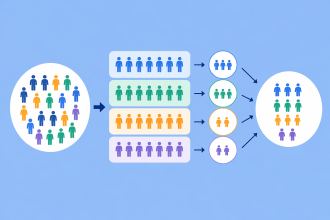
Once you have your numerical data organized, it’s time to take a closer look at who your respondents are, using inferential statistics and cross-tabulation. Inferential statistics is an analysis method that uses a sample of data from a certain subgroup to make predictions about the larger population of people who fall into that category.
For instance, you may sort survey responses based on age, region, tenure, or customer tier. Using the data for that group, you can make more informed decisions that you hope will improve an experience, product, or service for that group in particular.
You can take this even further with cross-tabulation, which hones your data into more specific groups by using multiple variables. An example of this could be examining data for a certain age range and region to address a specific customer persona you’re trying to reach.
Looking closely at these patterns can offer more actionable insight into the wants and needs of your target market than an overall average.
4. Review qualitative (open-ended) feedback
To analyze qualitative feedback, you’ll have to go deeper than just sorting based on binary results. To organize and review your feedback, you’ll first need to code it into thematic groups and then use sentiment analysis to gauge the tone behind certain comments.
Coding open-ended feedback is a labor-intensive process when done by hand. Once you’ve cleaned your dataset, you’ll need to
- Build a codebook of key words or phrases that can be used to organize responses into themes.
- Sort through each response and match answers to your set codes, updating your codebook as you discover new themes.
- Count and analyze each response in your theme sets to find percentages and frequencies of certain answers and sentiments.
This is a slow, long methodology, which is why many businesses turn to AI tools like Jotform AI Data Assistant to tag themes and sentiment across large datasets from online forms.
5. Visualize and report findings
Data visualization is essential for explaining your findings to those who aren’t as familiar with your survey responses as you are. Charts, cross-tab tables, and dashboards transform dense datasets into shareable, translated assets your team can use to make smarter business decisions.
This process starts with an effective reporting tool that connects directly to your surveys and spreadsheets. Jotform Report Builder, for example, takes responses from online Jotform surveys and transforms them into a shareable report without requiring you to rebuild visuals in a separate tool.
3 best practices for analyzing survey data
Survey data analysis methods are rife with opportunities for common mistakes, from reporting the mean without the distribution to ignoring subgroups to cherry-picking quotes to forgetting that surveys come with biases like social desirability and recency.
To help avoid these potential errors, try following these best practices:
- Start with a goal, then clean before you calculate: Walking into data analysis without clear intentions will leave you looking aimlessly through your dataset. To properly organize and review your data, you must first define the question you need answered. Then you can clean your results to ensure you are working with quality data, a top priority among data professionals.
- Pair every number with context: If you’re relying on averages from your dataset, make sure to combine these figures with distributions and subgroup cross-tabulation to provide context for what they truly represent. Remember, a single figure will rarely tell the whole story.
- Centralize your collection and analysis process: Every tool you add to your analysis process can create more chances for errors or friction. The cleanest data analysis workflows rely on a single platform and start with how to create a survey that collects data as effectively as possible.
Jotform lets you handle your entire survey creation and data analysis process in one place. Start by creating a survey in seconds using premade survey templates, such as a customer satisfaction survey, an employee feedback survey, or a NPS® survey. These templates deliver responses that are structured and ready for analysis.
Jotform AI Data Assistant can then directly analyze those responses using questions you ask in plain language. You can summarize open-text answers, classify sentiment with AI Columns, and generate charts without moving data to another tool. This tool integrates with Jotform Tables to filter responses and Jotform Inbox to review submissions and follow up, keeping your collection, analysis, and reporting in one workflow.
Turn survey responses into decisions with Jotform AI Data Assistant

The journey from survey response to data-driven decision requires organization, focus, and diligence to achieve the results your organization expects. Cleaning, summarizing, segmenting, reading the open text, and reporting on your data should all culminate in actionable insights, not just a chart.
But the work involved in doing this process manually can create a bottleneck that slows down your analysis. Coding your data, exporting results, inputting formulas, and switching between a survey tool and a spreadsheet are all additional steps that clog up your workflows. Jotform AI Data Assistant removes this friction, analyzing responses where they already live so you can ask questions, summarize open text, classify sentiment, and build practical reports without exporting a file.
Find out for yourself how Jotform can accelerate your survey data analysis methods by building an online form for free and letting Jotform AI Data Assistant turn your responses into decision-driving insights.
FAQs about survey data analysis
Survey methods vary widely based on your target population, sample size, research timeline, budget, and other factors. But many surveys can be sorted into a few key overarching method categories, including in-person, digital, group, and phone surveys. Although this does not cover the total breadth of all survey methods, it does offer some structure to narrow down options.
The four core methods of data analysis are descriptive analysis, predictive analysis, diagnostic analysis, and prescriptive analysis. Each of these methods answers different questions, deals with unique outputs, and uses varying workflows to help sort through and interpret datasets.
Yes, ChatGPT can analyze both quantitative and qualitative survey data. You can use ChatGPT to analyze data by uploading files directly to a conversation along with a corresponding prompt or through the help of a third-party app.
This article is for survey creators, researchers, data analysts, customer experience teams, and anyone who wants to turn survey responses into reliable insights and better decisions using quantitative, qualitative, and AI-assisted analysis methods.
Net Promoter®, NPS®, NPS Prism®, and the NPS-related emoticons are registered trademarks of Bain & Company, Inc., NICE Systems, Inc., and Fred Reichheld. Net Promoter ScoreSM and Net Promoter SystemSM are service marks of Bain & Company, Inc., NICE Systems, Inc., and Fred Reichheld.





































Send Comment: