Managing the status of your forms is essential for controlling when they’re active and accessible. For example, if a client wants to launch a form on December 16th for a Christmas sale and pause it afterward until next year, you’ll need a way to Enable and Disable it as needed.
There are two ways to change a form’s status. The quickest way is through your Workspace page. As an alternative, you can use the Form Settings, which gives you more control, including options to disable the form conditionally.
Enabling or Disabling a Form Through Workspace page
Enabling or Disabling a Form through your Workspace page is easy. Let’s do it:
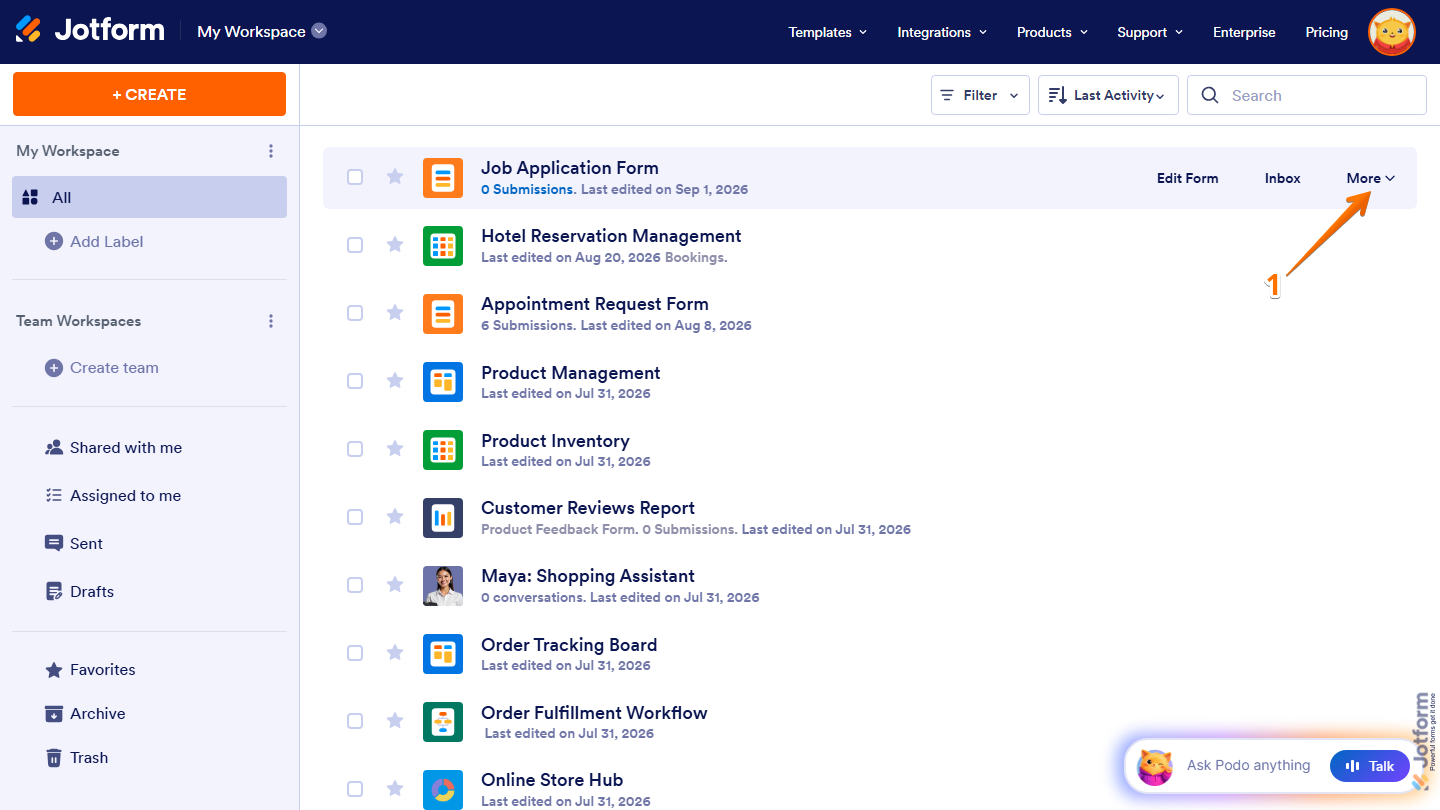
- On your Workspace page, hover your mouse over the form you want to enable or disable and click on More on the right side of the page.
- Then, in the Dropdown menu that opens, click on Disable if the form is currently enabled, or Enable if the form is currently disabled.
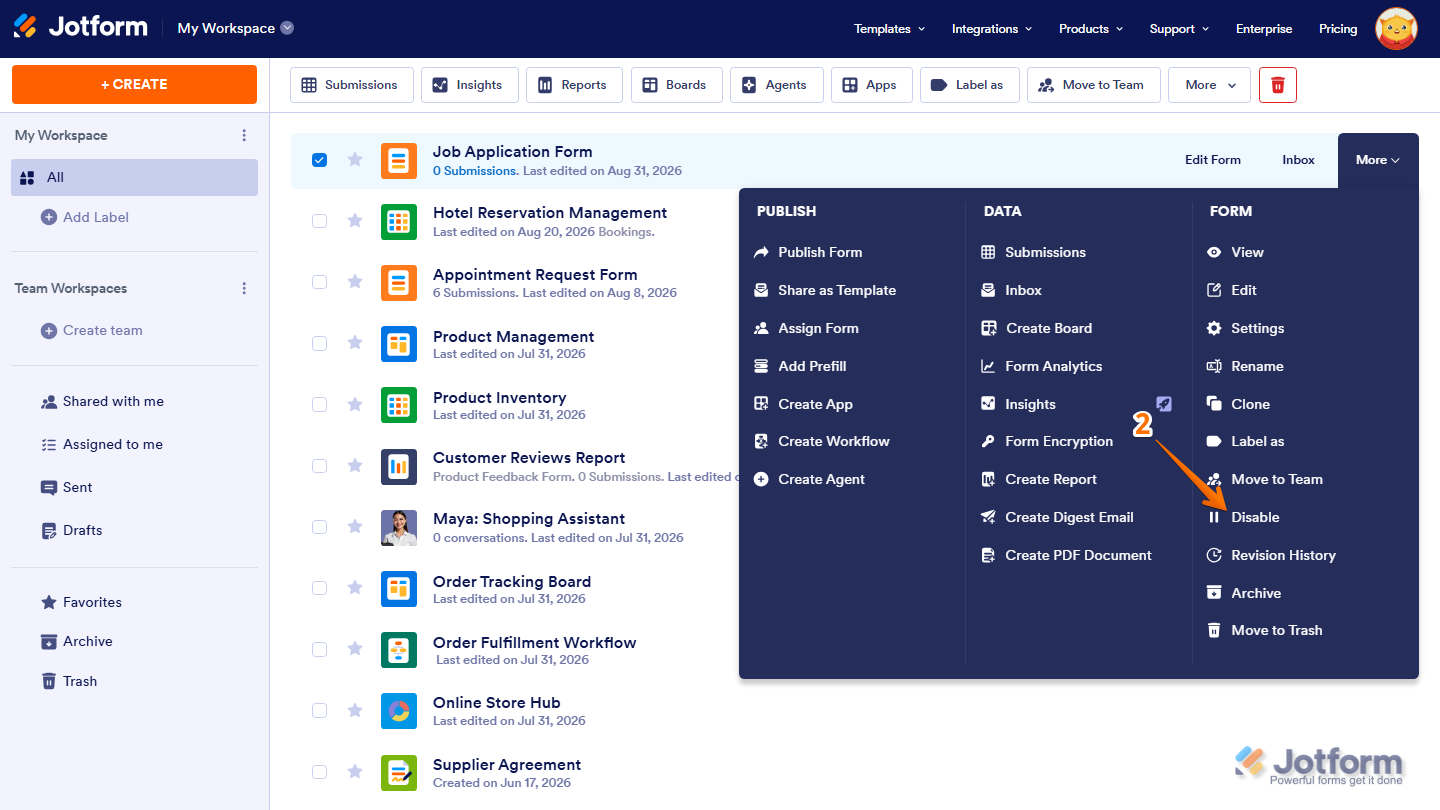
Your form will now be enabled or disabled based on its previous status.
Enabling or Disabling a Form Through Form Settings
You can also Enable or Disable a form through Form Settings. Here’s how to do it:
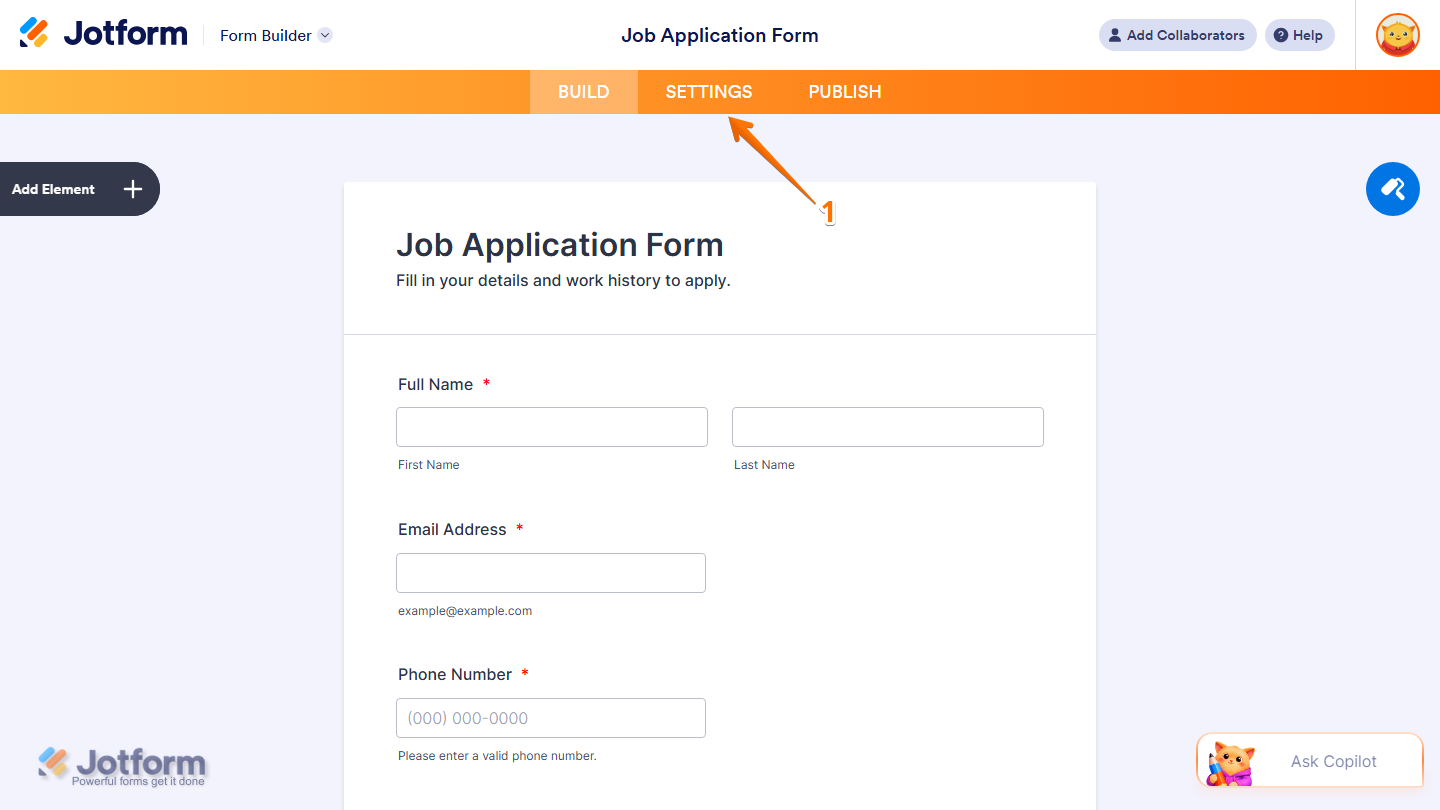
- In Form Builder, in the orange navigation bar at the top of the page, click on Settings.
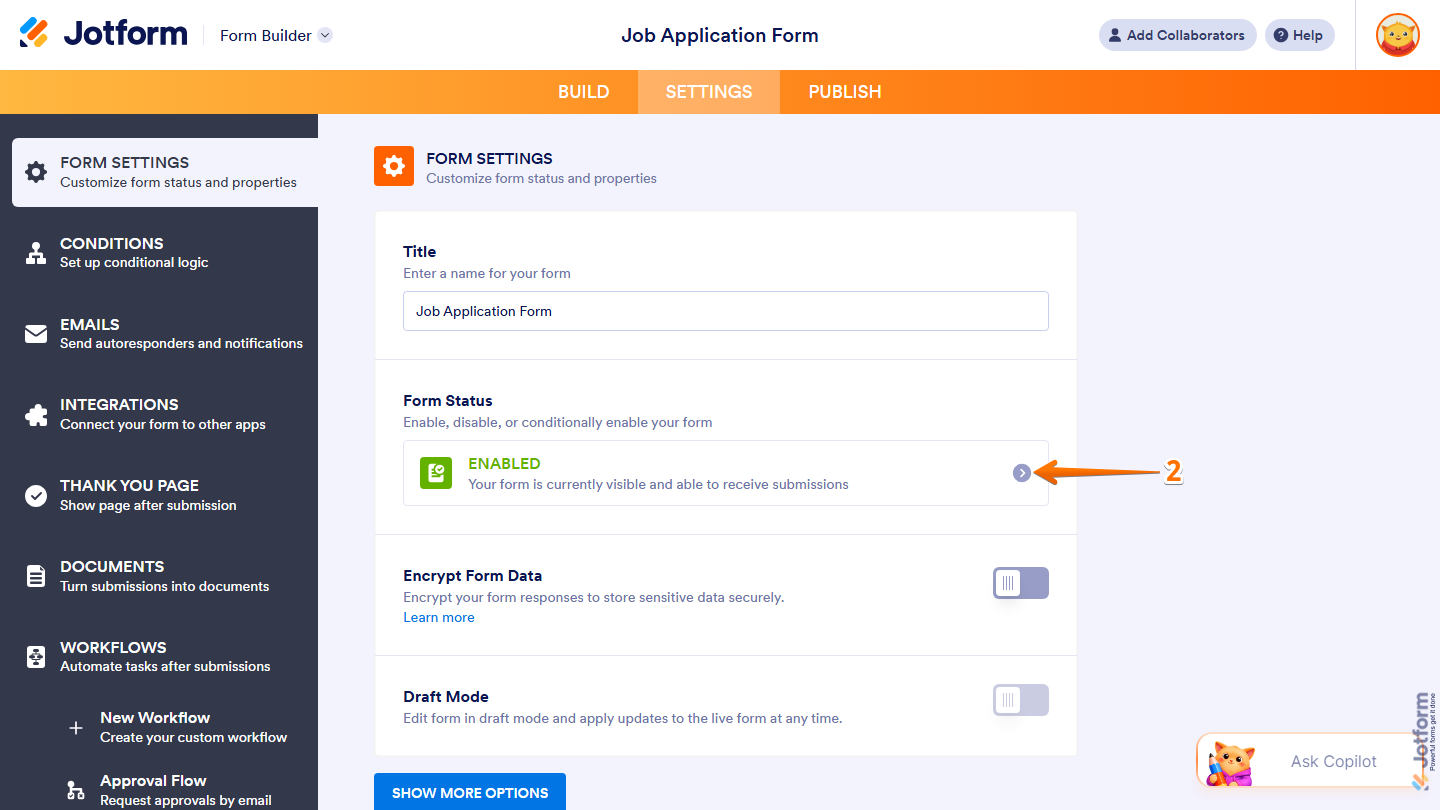
- Then, in the Form Settings tab, under the Form Status section, click on the Forward Arrow icon.
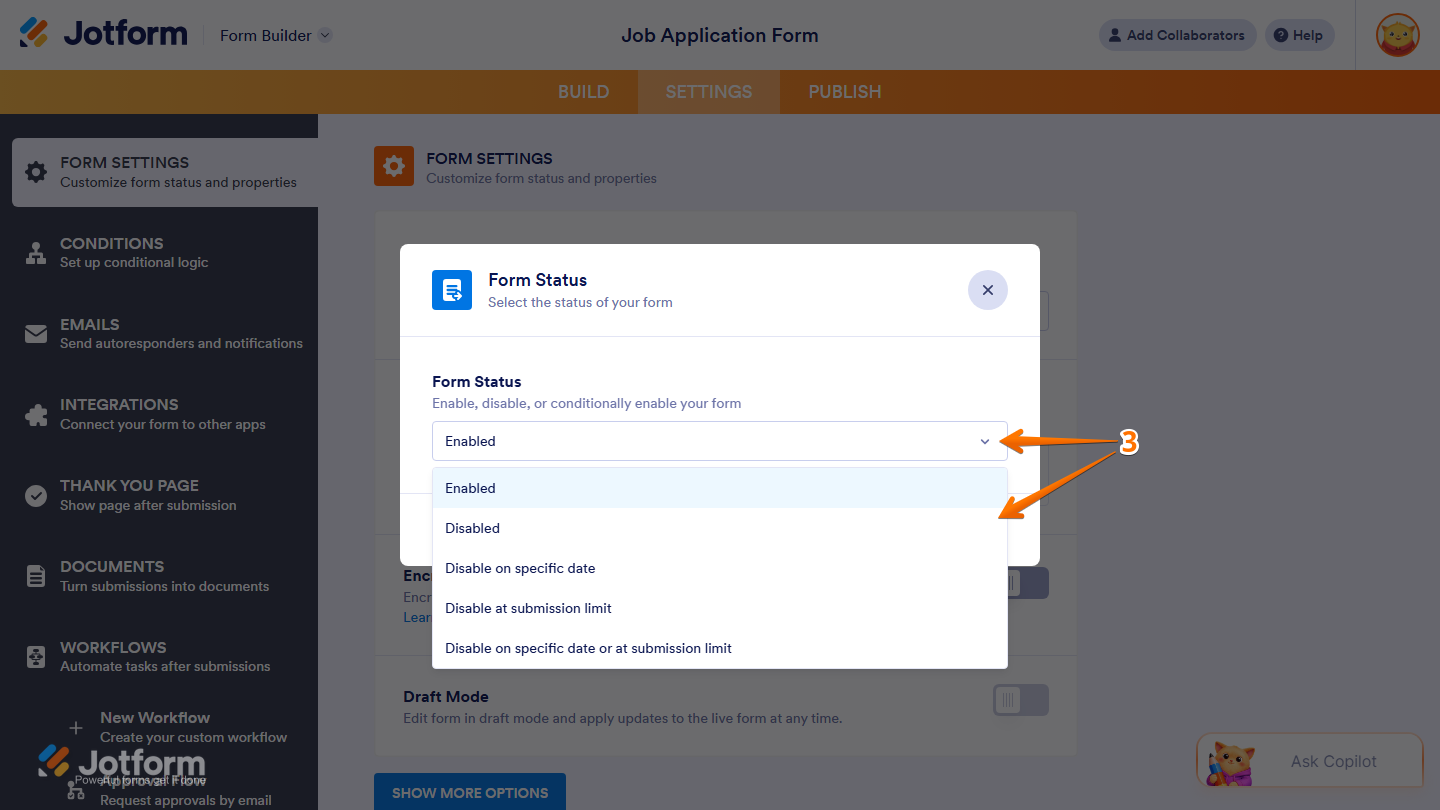
- Now, in the Form Statuswindow that opens, click on the Downward Arrow icon and select how you want to manage your form:
- Enabled — Keeps the form available for users to access and submit.
- Disabled — Disables the form.
- Disable on Specific Date — Automatically disables the form on a specific date.
- Disable at Submission Limit — Automatically disables the form after reaching a specified number of submissions.
- Disable on Specific Date or at Submission Limit — Disables the form when either the specified date is reached or the submission limit is met.
Note
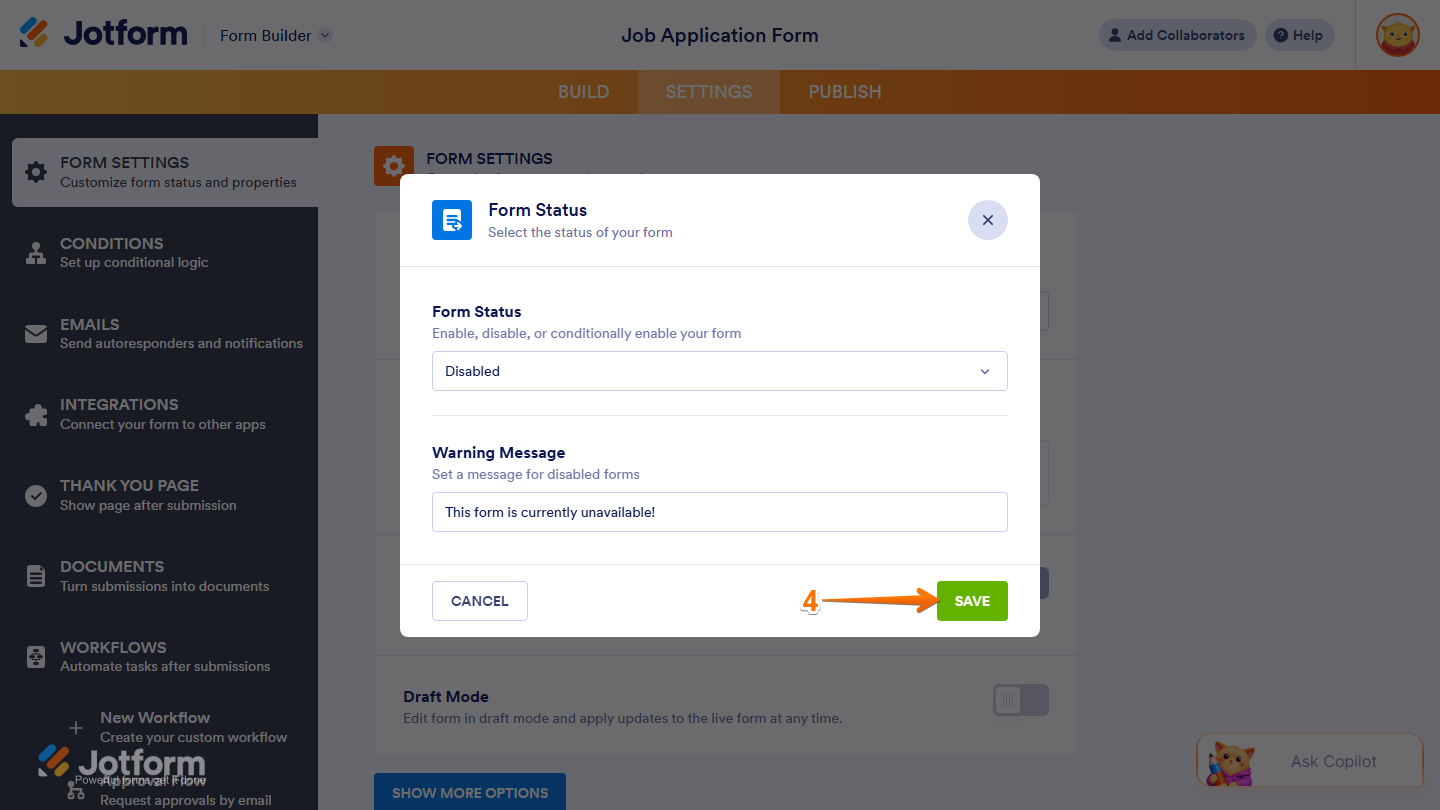
Depending on the Form Status you select, additional settings may appear. Configure the required settings, such as the Warning Message, Specific Date, or Submission Limit, based on your selected option. Take a look at our guide on How to Limit Submissions in a Form for more details.
- Once you’re done, click on Save.
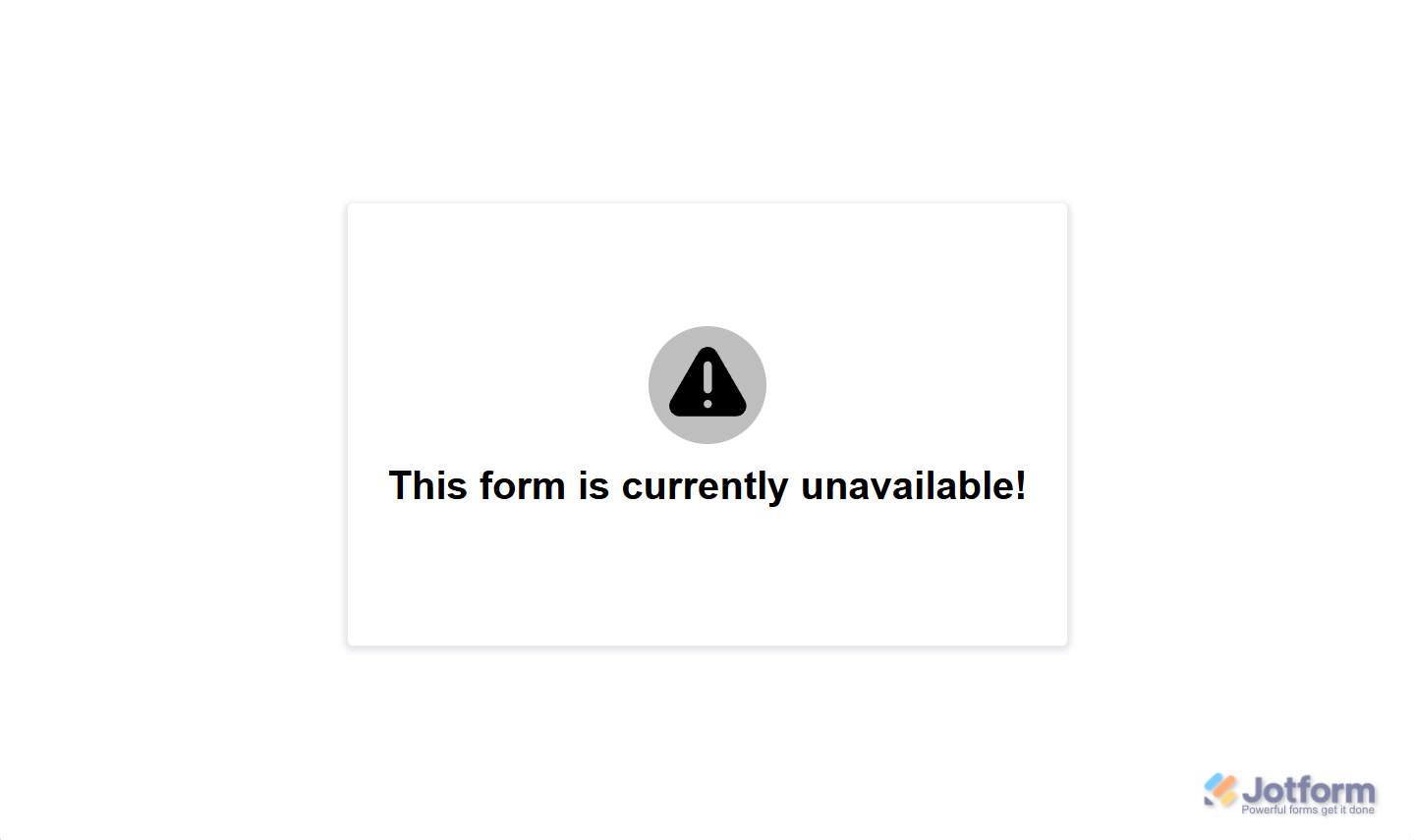
When your form is disabled, anyone who tries to open it will see the Warning Message below:


Send Comment:
73 Comments:
December 10, 2025
When I had someone fill out my form using this link: they are telling me that they are receiving a notice "The form is not available" after they hit submit.
They filled it out twice and got that message both times.
BUT
I got both submissions. Why are they getting that message and how do I stop that from happening?
November 30, 2025
On my form
I already enabled but it still says currently unavailable
How come? Tried it several ways, even signed out and still disabled.
PLEASE HELP. Ty.
July 25, 2025
What is the difference between Archiving a form, and Disabling a form, and why/when would I want to "enable" an archived form?
April 8, 2025
Help! I disabled my form but went in and changed the form to say Registration is now closed. It has deleted all of my entry details. Name, telephone numbers, emails, etc. please is there anything I can do to get that info back? 😭
March 27, 2025
Hello,
I am attempting to disable a form, but when I hover over "more" for the form in my workspace, I do not have the option to click "disable" for the particular form. But what is interesting is that when I hover over "more" for a different form, I do have the option to disable/enable. Can you please help me trouble shoot this?
November 14, 2024
My wife's specialist has sent her a jotform to fill out before her first appointment. I've rung the surgery to say that we can't access it using either MS Edge or Google Chrome and what is the solution. They have no idea. We can see the form but can't fill it in. We can't even print it to be able to fill it in by hand.
And your comments box doesn't even allow me to send you a screen shot. Pretty useless software I must say!
Matthew Buck
Adelaide
Australia
October 29, 2024
Please what can I do for my form page to be enabled
August 26, 2024
I’m trying to sign a form and when I do it comes back form disabled? What’s does this mean?
May 1, 2024
Hi! Is there a way to customize the CSS of the disabled form?
I've tried adding it to the form CSS and even using a style tag in the disabled message...
April 25, 2024
We would like a way to disable a form on a specific date and time and then enable the form at a particular date (and time isn't required but could be used) and do this automatically multiple times a year...
March 20, 2024
Is there a mechanism to set an enabled and disable automation.
example: Form is automatically enabled every Friday at 2pm - 10pm. The rest of the time it is disabled.
March 18, 2024
Thanks for the prompt reply Sheena,
unfortunately it didn't work...
Tank you!
July 29, 2023
If I disable a form, then enable it at a later date, will my WordPress site bring the form back up? In my testing, when I disabled the form, I had to delete the page in WordPress and re-add it in order in order to re-paste the embed link. It would be great if that function worked seamlessly. I look forward to your response! Thanks in advance!
August 17, 2022
Hi. It would be great to have more formatting options for the message notifying visitors that a form is closed. In particular the ability to link to a different page would be really nice.
February 15, 2022
If I disable a form because I don't want to receive new submissions, can the clients that submitted theirs before that still edit their submissions?
January 27, 2022
I need to be able to have my App users 'Enable/Disable' a form I've included in our App. Giving them this option via our employees App will save an unbelievable amount of time verses going to a computer, login in and enabling/disabling a form.
August 25, 2021
I want to disable the form once I reach specific number of entries in integrated Google spreadsheet
April 29, 2021
Hello. How can I activate or deactivate a form through the API?
Maybe modifying some property of the form using "PUT /form/{id}/properties" (add or edit properties of a specific form)?
If so, what property would it be?
Thank you.
January 15, 2021
The company i work for should have a account with you'll COMPANY NAME IS (SEELLLC)
October 19, 2020
Do you provide upgraded plans for free for nonprofits?
We are a small nonprofit and just started using your forms. When we archive a form, can we still see the submissions and data? What's the difference between an archived form and a disabled form? Does an archived form count towards the 5 form limit? Thank you.
October 15, 2020
This is my personal account please open my account
October 4, 2020
My id open pilise
July 21, 2020
Form has disappeared! Please help!
June 21, 2020
Why cant i enable my forms. i have one form that has been working and after i pressed disable i cannot get it to work now. i have pressed enable several times but the form remains disabled. Why is there a pause symbol next to my enable/disable instead of the play symbol. Perhaps this gives a clue. i have tried both methods to enable but i still cannot get it to work. help please.
June 16, 2020
Hi there. May I know if there's any means to retrieve the data from a disabled form? I urgently need to know the participant's input but the form was disabled when she submitted. Please help, many thanks.