Note
This guide is for embedding forms to Google Sites Classic. For the newer version, see New Google Sites.
What is Google Sites?
Google Sites is a structured wiki and web page creation tool offered by Google to help anyone create websites where people can collaborate and share files. Jotform helps those who need customized web forms on their Google Site. Watch the video or follow the steps below to add a form to Google Sites.


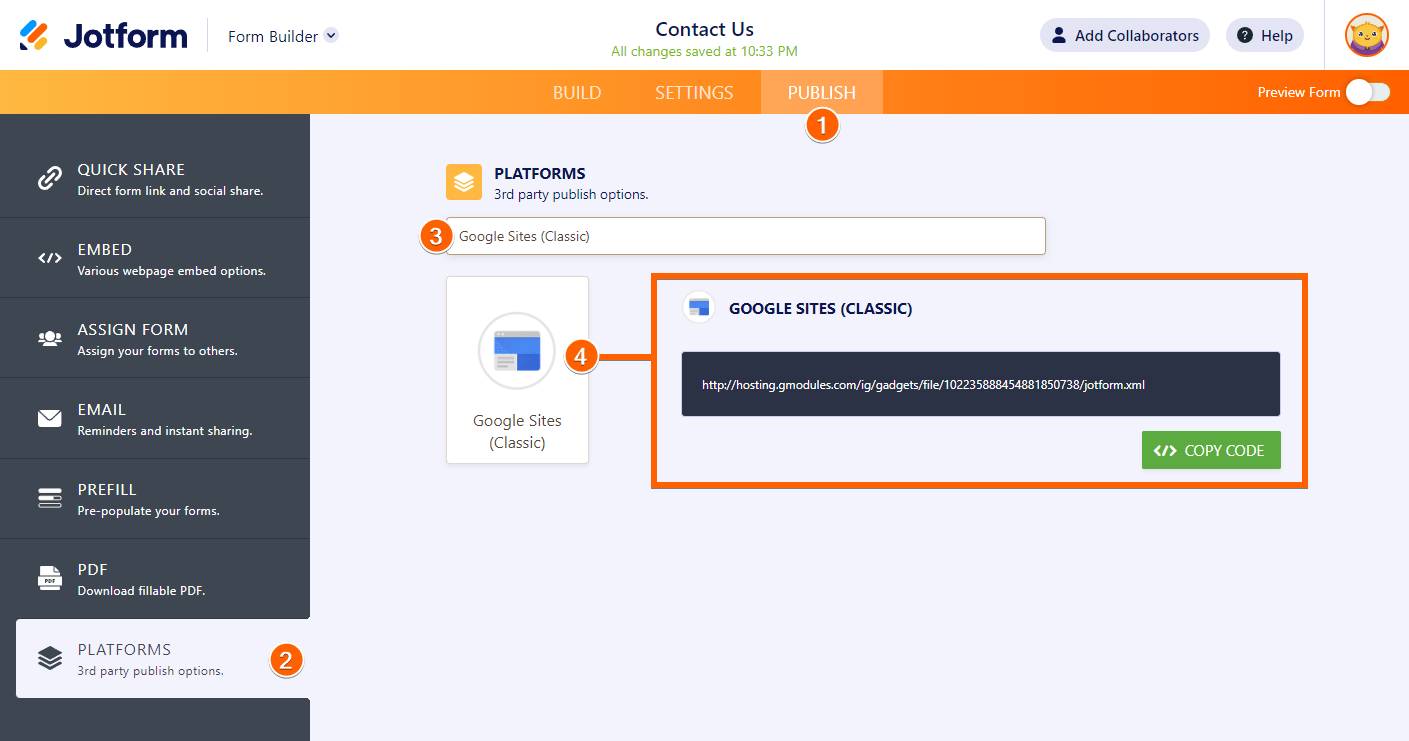
- In the Form Builder, click Publish at the top.
- Go to the Platforms section.
- Search for Google Sites.
- Click on the Google Sites (Classic) tile to open the publish wizard.
- On the next page, click the Copy Code button.
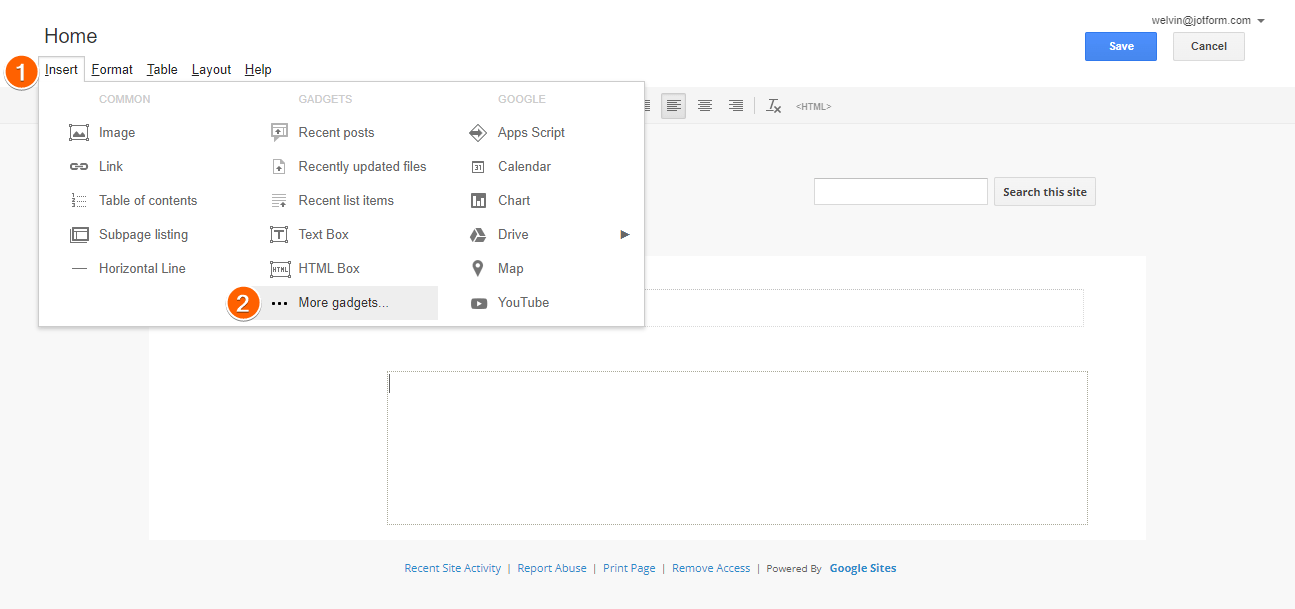
- Now, go to your Google Site, then switch to Edit Mode.
- Go to the Insert tab, then select More Gadgets.
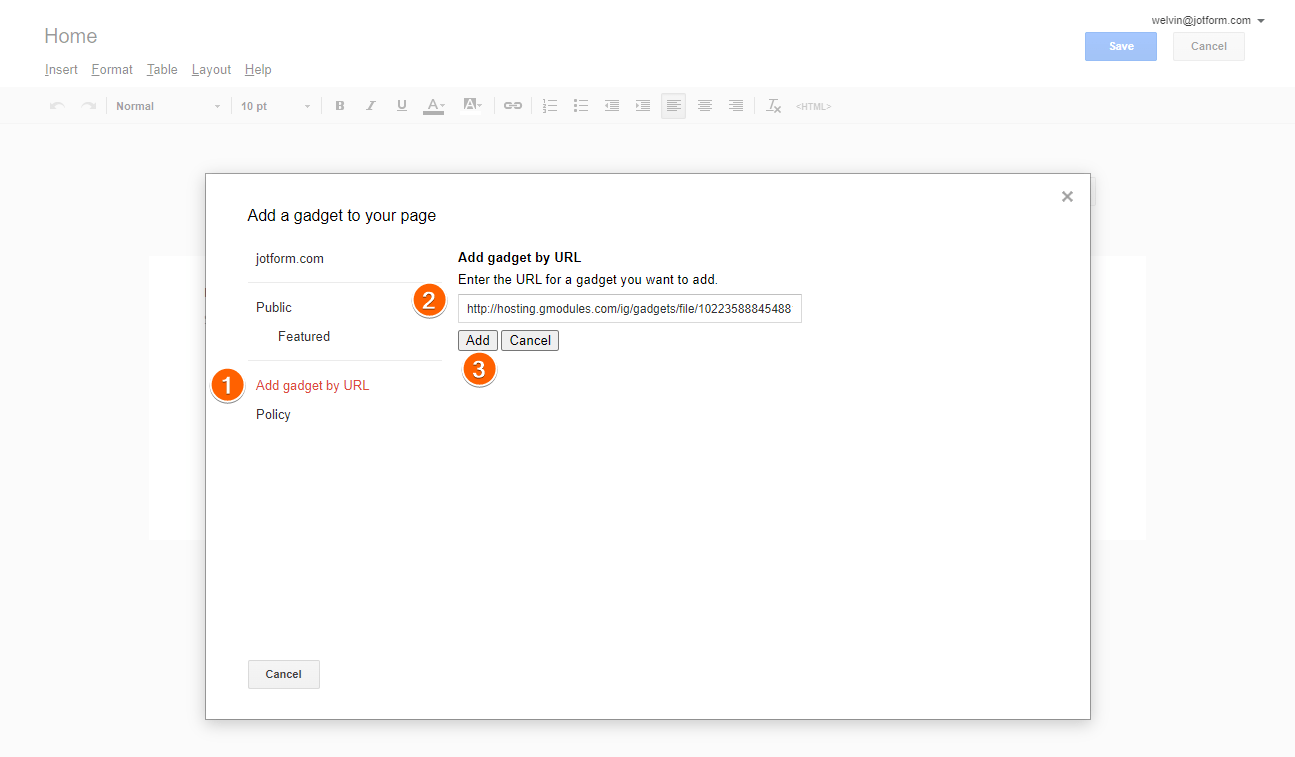
- On the next page, select Add Gadget by URL on the left.
- Paste the gadget URL you just copied from the Form Builder.
- Click the Add button.
- The gadget settings will open where you can type in or paste your Form ID to add the form to your page.
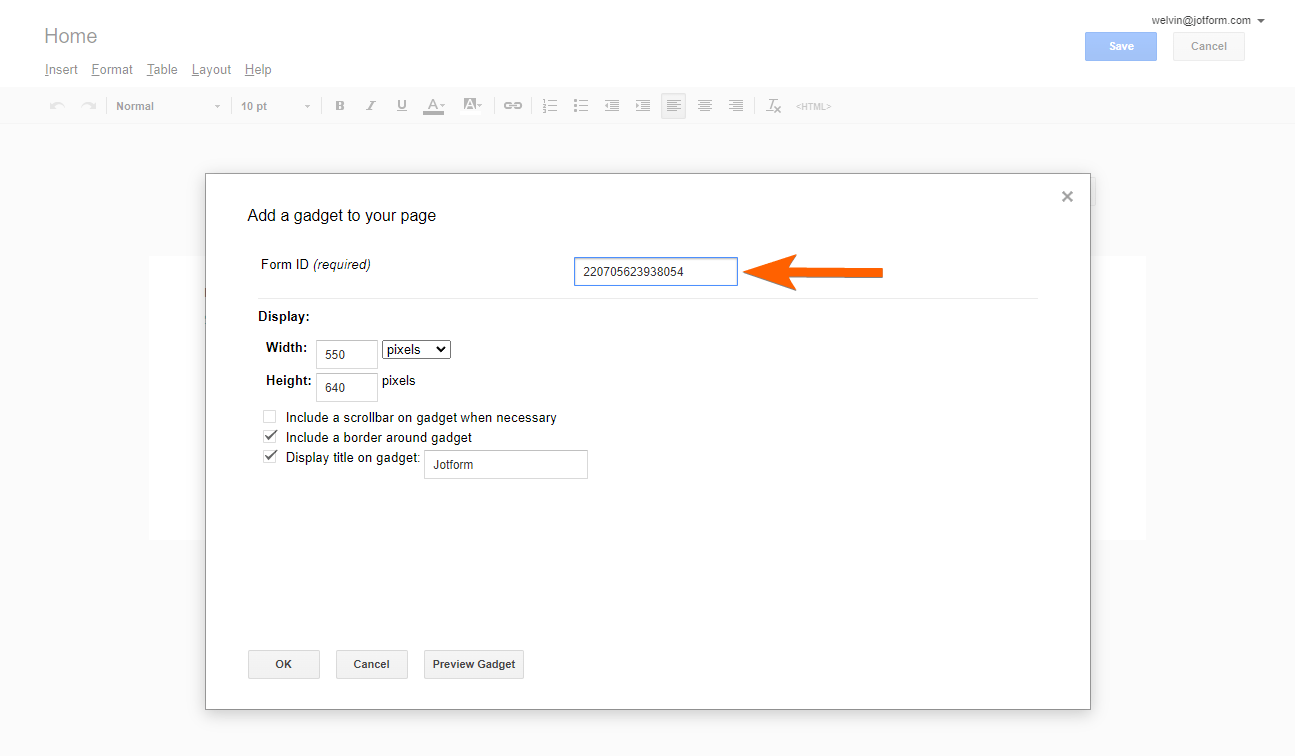
If your form is long, we recommend adjusting the Height value, and at the same time, check the Include a scrollbar on gadget when necessary.
Protip
The Form ID is the long string of numbers found at the end of your form URL. For example, if the form URL is
https://www.jotform.com/220705623938054, the Form ID is 220705623938054.
- Click the Ok button.
- Finally, click the Save button at the top of the editor to save your changes. That’s it!
You can view a demo of an embedded form on the following Classic Google Site: https://sites.google.com/a/jotform.com/jotform-support/membership
If you wish to set your form background to be transparent, look at our guide on Making the Form Background Transparent.
How’d you do? Did you have any difficulties adding a form to Google Sites? Please share your thoughts, recommendations, or anything in the comments section below.

Send Comment:
34 Comments:
March 7, 2023
Sorry this is out of date Google sites has changed
April 14, 2022
Nice post full of information and clear enough .
May 5, 2020
Hi what is the 2020 version of this ??
February 26, 2020
Thanks ! How does the 2020 version work?
August 14, 2019
I'm having the same problem as Sarah. All of the sudden my embedded pages are "blank" even though I've followed the instructions on this page exactly. Why is this now happening and how do we fix this issue?
July 25, 2019
hi,
the "full screen" feature is not working for me !
July 3, 2019
Hello I have been successfully using your forms on my website created with google sites for over 4 years, until very recently.
The form content is suddenly no longer visible.
I have not tampered with this in anyway and today followed your process here to reattach it which works perfectly except that now I have a second blank gadget visible, still with no form.
Please can you help? Has Googlesites suddenly stopped allowing this type of gadget?
Regards
Sarah
May 15, 2018
Nice post. Is there an easy way to auto resize the form for viewing with a mobile phone? I find the view is great through a PC, but get's cut off when viewing with a mobile phone.
February 26, 2018
Has http, have https? dules........
Can I still use the gadget if I want to collect something like DL numbers because the http gadget doesn't matter because the form itself is https?
October 16, 2017
There's a way to add a jotform in the "new" google sites?
thks,
Joao
August 6, 2017
What about the answers in google sites, how do i will receive? In a email message or google sheets?
May 26, 2017
i can't able to locate html box in insert menu, is there any pricing for that?
March 19, 2017
my name is moses nnamdi nwabueze, im from nigeria. i want this noble establishment to help me achive my dreams.it will only cost 800 us dollar. here is contact, +2347032523318. i will never forget if helped, and i will also help others. thank you
April 28, 2016
Is there an easy way to auto resize the form for viewing with a mobile phone? I find the view is great through a PC, but get's cut off when viewing with a mobile phone. I am currently using a form within a Google site.
February 19, 2016
hi
i have this site i want to add but it's not work for me
December 20, 2015
This worked perfectly, even better than embedding Google's own form! This product is an excellent middle ground between Google Forms and a full blown shopping cart product, and infinitely more flexible. LOVE IT!
December 22, 2013
Дольшое спасибо Вам за совет. ВСе прошло замечательно.
November 27, 2012
I agree with nepeansynchro.
Using the way described in this article doesn't work because the call to submit is done via http and not httpS (thanks Fiddler) :-)
I inserted the httpS URL into an iFrame (using Google Sites)
November 25, 2012
Where do you find the "form ID"?
November 20, 2012
Is this so?
September 9, 2012
is working perfect !!! I am sorry Admin , I just put wrong ID number, it is a my fault... thank for great product
September 9, 2012
does not work for me !
August 23, 2012
I cannot add feedback form to my google site. What can I do?
May 14, 2012
Getting the following error
The gadget you added is not valid
Unsupported feature: org.apache.shindig.common.xml.XmlException: Content is not allowed in prolog. At: (1,1)
April 8, 2012
So why is the form id a secret with no information about how to find from id?