


- Jotform Sign is the best free e-signature software for easily collecting signatures
- Dropbox Sign is best for supporting technical workflows
- DocHub is best for Google Workspace integration
- PandaDoc is best for CRM integrations
- Qwilr is best for sales proposals
- HoneyBook is best for small business owners
- GetAccept is best for sales teams
- GleanQuote is best for complex quotes
- Adobe Acrobat Sign is best for Adobe suite users
- Zoho Sign is best for organizations already using Zoho
- Foxit eSign is best for bulk e-signatures
- SignNow is best for freelancers, solopreneurs, and small teams
- Signeasy is best for quick turnaround contract workflows
When remote work exploded in 2020, it increased e-signature adoption by 50 percent within a single year. Five years on, and digital signatures have mostly replaced their “wet” counterparts. It’s easy to see why: One survey from Docusign found that 39 percent of e-signature adopters reported faster turnaround times as a measurable benefit, resulting in an average of $36 in savings per agreement.
Founded in 2003 and announcing its first sales in 2005, Docusign was among the first e-signature tools to hit the market. For many people, signing a Docusign document became synonymous with online agreements. Today, the platform dominates the market with more than 70 percent market share. But it does have some notable drawbacks, and it’s far from the only software out there.
G2 counts at least 350 Docusign competitors, 100 of which have four-star ratings or better. We tested dozens of those tools, picking 13 of the best Docusign alternatives for preparing, signing, acting on, or managing agreements online.
Why consider a Docusign alternative?
Because of its size and how long it’s been around, there’s an immense amount of data on what people like and don’t like about Docusign. But you don’t need to read all 10,000 or so reviews across G2 and Capterra to get the gist. Users tend to coalesce around a few common issues.
Confusing pricing
While Docusign doesn’t seem unreasonably expensive at first glance, with plans between $15 and $65 per user per month, it’s not uncommon to exceed plan limits that aren’t clearly explained. Alessandro N. wrote in a G2 review that “The cost for certain advanced features or high transaction volumes can be a bit prohibitive.”
Forms are only available on the highest plan tiers
Despite most contracts and agreements coming by way of forms, Docusign limits several important form design features to its Business Pro or Enterprise plans. This significantly limits how smaller teams can use the platform, with Stefanny J. mentioning in a Capterra review that “Branding options are basic (logo and accent color only) and template editing lacks the drag-and-drop freedom offered by newer rivals.“
Lack of integrations
Docusign has limited interoperability and syncing with a handful of popular productivity platforms, which can mean it’s inconvenient or flat-out unusable in your environment. “My main pain point is that whilst you can link Google Drive, it only allows you to access My Drive documents and not ones on a shared drive,” Charles S. wrote in one review.
Thankfully, you’re spoiled for choice when it comes to finding a Docusign alternative. Plenty of e-signature tools place significant emphasis on form design, sales workflows, enterprise compliance, or general-purpose use cases. You just need to find one that ticks all the right boxes for your workflows. All told, there are 13 Docusign alternatives we recommend, and we’ve categorized them below by what each is best at.
Curious about our methodology? See how we tested these tools.
The 13 best Docusign alternatives — at a glance
| Tool | Best for | Why it's a good Docusign alternative |
|---|---|---|
 Jotform Sign |
Signatures in forms and contracts |
Free tier and simple pricing, can build fully customizable forms, 150-plus integrations |
 Dropbox Sign |
Technical workflows |
Unlimited signature requests, audit trails are easy to set up and manage |
 DocHub |
Google Workspace integration |
Generous free plan, quick and easy onboarding |
 PandaDoc |
Customer relationship management (CRM) tool integrations |
Lots of useful integrations, unlimited signatures on all paid plans |
 Qwilr |
Sales proposals |
Drag-and-drop document creation, easier to manage proposal lifecycles |
 HoneyBook |
Small business owners |
Detailed setup and onboarding flow, intuitive interface and navigation |
 GetAccept |
Sales teams |
CRM-adjacent features combined with contracts, better signer collaboration and communication, dozens of sales-specific integrations |
 GleanQuote |
Complex quotes |
Far more customizable quotes, built for creating quotes from scratch |
 Adobe Acrobat Sign |
Organizations already using the Adobe suite |
Straightforward interface and workflow, can consolidate e-signatures under existing accounts |
 Zoho Sign |
Organizations already using Zoho |
Integrates with all of Zoho’s apps and platforms, helpful guidance on GDPR and HIPAA compliance |
 Foxit eSign |
Bulk e-signatures |
Fast template creation and adaptation, much cheaper than other options |
 SignNow |
Freelancers, solopreneurs, and small teams |
Clear, pay-per-invite pricing; minimalist contact editing and signing; huge annual plan discounts |
 Signeasy |
Quick turnaround contract workflows |
Microsoft Teams integration, reporting and analytics dashboard, mobile signatures |
Alternatives with form-centric workflows
If you want to build a form, add a signature field, and comply with requirements like those from the E-Sign Act in the US and eIDAS Regulation in the EU, these Docusign alternatives are the first to consider.
Jotform Sign: Best for signatures in forms and contracts


Jotform Sign is the best free electronic signature software for forms, reports, workflows, and even apps. Its feature set is both vastly broader and more accessible than Docusign’s. From adding background images and embedding videos to customizing invitation emails and syncing to third-party storage, Jotform is much easier to adapt to different industries and agreements than Docusign.
Instead of forcing you to upload existing PDFs to gather signatures, Jotform Sign lets you build agreements the same way you’d build any other form. You can then select the fields you want, drop them on the canvas, and share the form via a link, email, or embed code. What’s more, converting PDFs into signable documents is nearly instant, letting you assign each field to a specific recipient without touching complex routing menus. And with the Jotform Sign mobile app, you can simply take a picture of a printed document to turn it into an e-sign compliant form.
Compared to Docusign, the whole process feels more flexible and better suited to organizations that need contracts, questionnaires, and workflows to live under one roof.
Standout Jotform Sign features:
- One-click conversion from PDF to e-signature form
- Scan documents with a phone camera
- Assign different fields to different contract recipients
- Notifications at every collection step
- SOC 2, GDPR, and HIPAA ready
Why Jotform Sign is a good Docusign alternative:
- Free-forever tier and simple pricing
- Build fully customizable forms
- 50 integrations, including with Zapier
Tradeoffs of Jotform Sign over Docusign:
- You may need to add or remove fields and document tracking based on the requirements for e-signatures in your area
Jotform Sign pricing:
- Starter (free): 10 signed documents per month
- Bronze ($39 per month): 100 signed documents per month
- Silver ($49 per month): 250 signed documents per month
- Gold ($129 per month): 1,000 signed documents per month
- Enterprise (custom quote): Unlimited signed documents after a sales call
- Significant discounts for annual plans as well as for nonprofits, educators, and school administrators
Dropbox Sign: Best for technical workflows
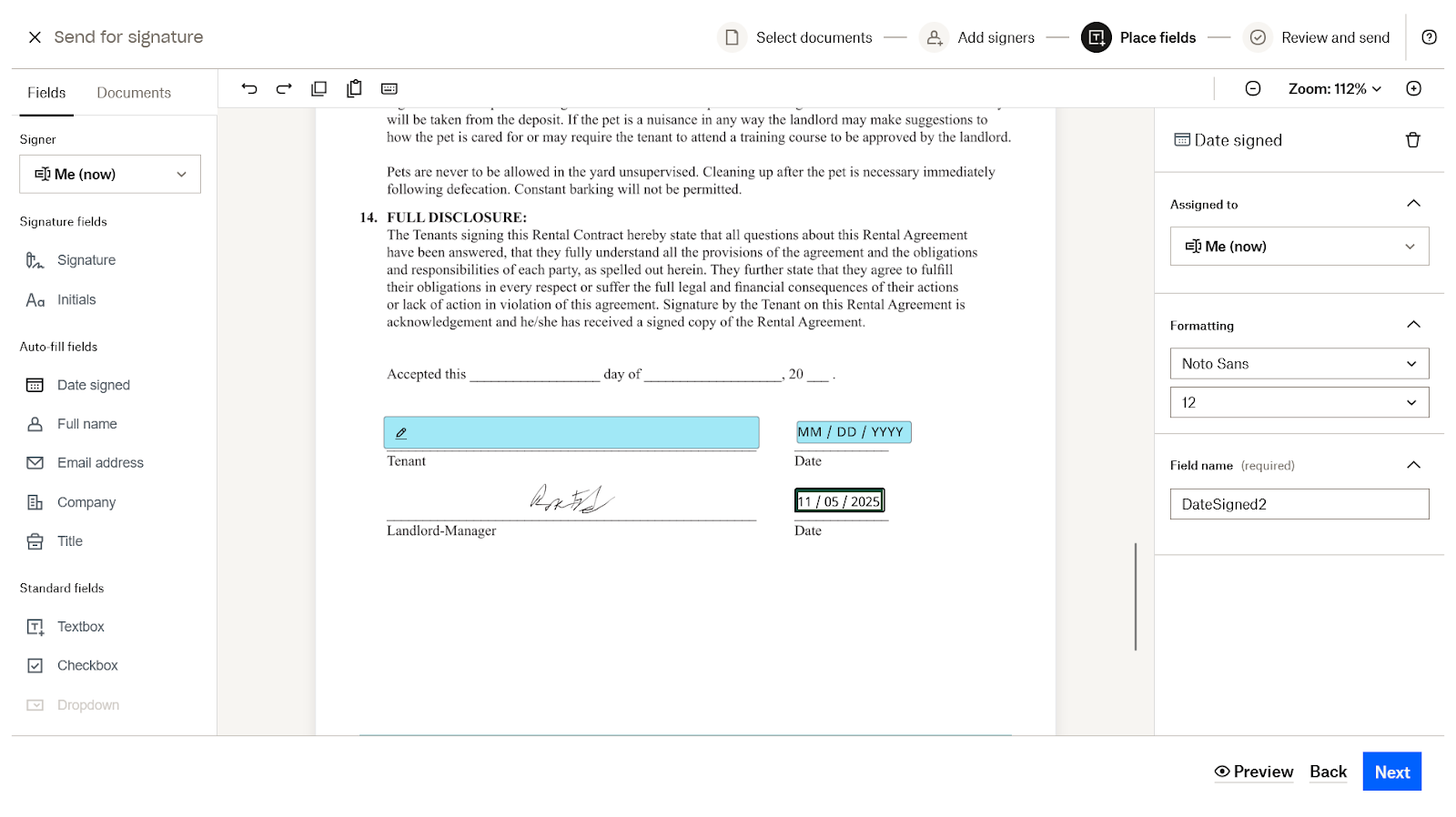
Dropbox Sign leans into a clean, enterprise-ready feel without overwhelming users with configuration screens. Its API and identity verification tools make it a strong fit for technical teams, and integrations with Google Workspace, HubSpot, and Salesforce reduce the friction of pulling contract data from the apps you already use.
What’s more, Dropbox Sign is predictable, stable, and more polished than Docusign’s occasionally cluttered experience. Support quality is another differentiator, with customer reviews repeatedly calling out swift, thorough, and helpful resolutions. Perhaps most interestingly, though, is Dropbox Sign’s artificial intelligence (AI) identity verification feature. Instead of relying on email-based authentication, the platform uses “liveness checks” and government ID validation to confirm that signers are who they claim to be. Once a signer completes verification the first time, they can reuse that digital identity for future agreements — again reducing friction while maintaining QES-level security.
Overall, creating agreements in Dropbox Sign is relatively straightforward as long as you’re comfortable uploading PDFs and placing fields manually. If your workflows already revolve around pre-built documents and API-driven automations, Dropbox Sign is a Docusign alternative worth looking into.
Standout Dropbox Sign features:
- Easy integrations with Google, HubSpot, and Salesforce products
- AI-powered signer identity verification
- Excellent API for e-signatures
- Automatically grab attached documents from signers
Why Dropbox Sign is a good Docusign alternative:
- Unlimited signature requests
- Audit trails are easy to set up and manage
Tradeoffs of Dropbox Sign over Docusign:
- Somewhat limited contract creation process, where you have to upload an existing PDF and drag and drop form fields onto it — there’s no way to build a contract from scratch or auto tag fields based on text content
Dropbox Sign pricing:
- Essentials ($20 per month): One user, unlimited signature requests, up to five saved attachments, and audit trails
- Standard ($30 per month): Everything in Essentials, plus another user, up to 15 saved templates, signer attachment automations, in-person signing, branding options, and SMS signer authentication
- Premium (custom quote): Everything in Standard, plus five-user plan limit, unlimited saved templates, and advanced conditional logic
DocHub: Best for Google Workspace integration
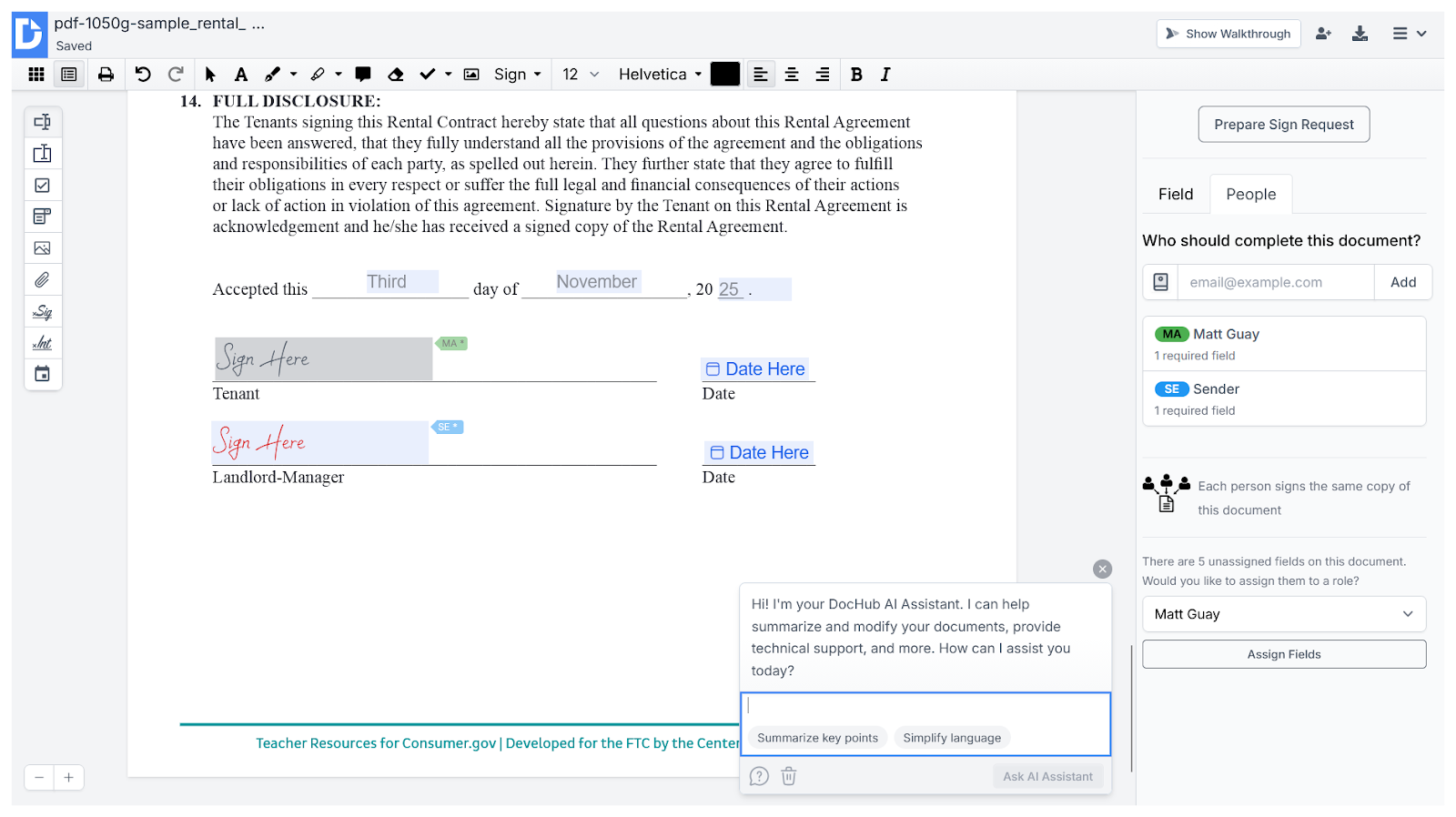
DocHub is built for speed and simplicity, especially if your team lives inside Google Workspace. You can open, edit, annotate, and sign PDFs from within Drive, without jumping into a separate dashboard. That tight integration, combined with an AI Assistant for making quick content edits, makes DocHub one of the easiest tools on this list to pick up and use immediately.
Even niche features, like sending a fax directly from a contract, are easy to find without the user interface feeling overstuffed or overwhelming. While DocHub doesn’t accommodate the same level of e-signature automation that Docusign does, it makes up for it by being noticeably more user friendly and affordable.
It’s also reassuring that, despite targeting decidedly non-enterprise users, DocHub maintains GDPR, PCI DSS, and SOC 2 Type II compliance, with HIPAA-ready features. If regulatory burdens were one of the reasons you were considering Docusign, DocHub is definitely a viable option.
Standout DocHub features:
- AI Assistant for modifying page content
- Share contracts via fax
- Edit and sign PDFs from inside Google Workspace
Why DocHub is a good Docusign alternative:
- Generous free plan
- Quick and easy onboarding
Tradeoffs of DocHub over Docusign:
- Doesn’t have as many features and settings as Docusign
- Positions itself as a tool for freelancers, contractors, and small businesses
- The streamlined user interface is nice, but DocHub may be too simple for some
DocHub pricing:
- Free: Create or edit three PDFs per month, request three e-signatures per month, and limited use of the AI Assistant
- Basic ($11 per month): Three signature requests per month, and unlimited PDF creation and editing
- Pro ($16 per month): Unlimited signature requests, PDF edits, bulk sending, and passwords on documents
- Site license (custom quote): HIPAA compliance tools, single sign on, and other enterprise features
Alternatives built for sales quotes, proposals, and agreements
When your contracts are really just the final step in a sales process, you need a signature tool with deal-winning features baked in. These Docusign alternatives mix e-signatures with pricing tables, content libraries, and CRM integrations so that your team can generate, send, and track polished sales documents without jumping between apps.
PandaDoc: Best for CRM integrations
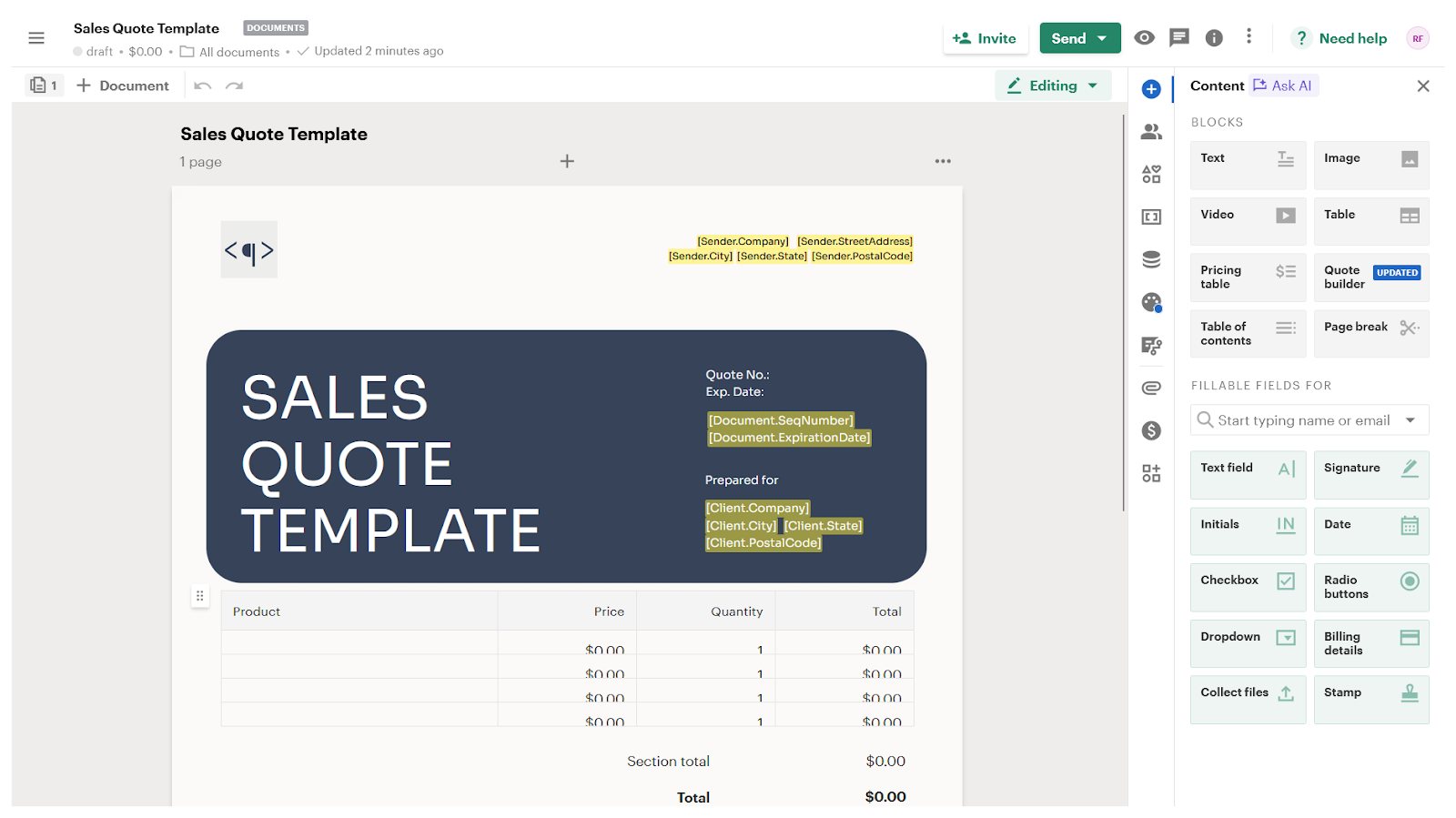
The PandaDoc user interface strikes a nice balance between clean and approachable while still packing in more features than most teams need. That, combined with its simple pricing, makes the platform a good option for teams that want to start small and grow quickly without switching platforms.
Pulling CRM data into a new contract is fast, with dedicated tools for turning sales conversations into finished quotes. For leads that want to play around with pricing before signing a contract, PandaDoc has a dead simple way to create dynamic pricing tables. The template library alone can save new teams hours of design work, and unlimited signatures on paid plans means you won’t get hit with fees as your volume scales.
For sales teams that need quick and easy connections between their CRM, e-signature platform, and payment gateway, PandaDoc is a clear upgrade over Docusign.
Standout PandaDoc features:
- Quick contract creation from CRM data
- Quote builder for dynamic agreements
- Integrated payment fields
- Great template selection
Why PandaDoc is a good Docusign alternative:
- Lots of useful integrations
- Unlimited signatures on all paid plans
Tradeoffs of PandaDoc over Docusign:
- Workflow automations are limited beyond choosing the order of who should sign and approve a document — Docusign allows delayed routing, scheduled sending, and several other steps in between human actions
PandaDoc pricing:
- Free: Up to five e-signatures, five templates, and allowances for sending three documents per month
- Basic ($35 per month): Up to five templates, unlimited e-signatures and allowances for sending documents, and custom design options
- Business ($65 per month): Everything in Basic, plus custom branding, web forms, approval workflows, and in-person signing
- Enterprise (custom quote): Webhooks and API support, data residency options, and custom user roles
Qwilr: Best for sales proposals
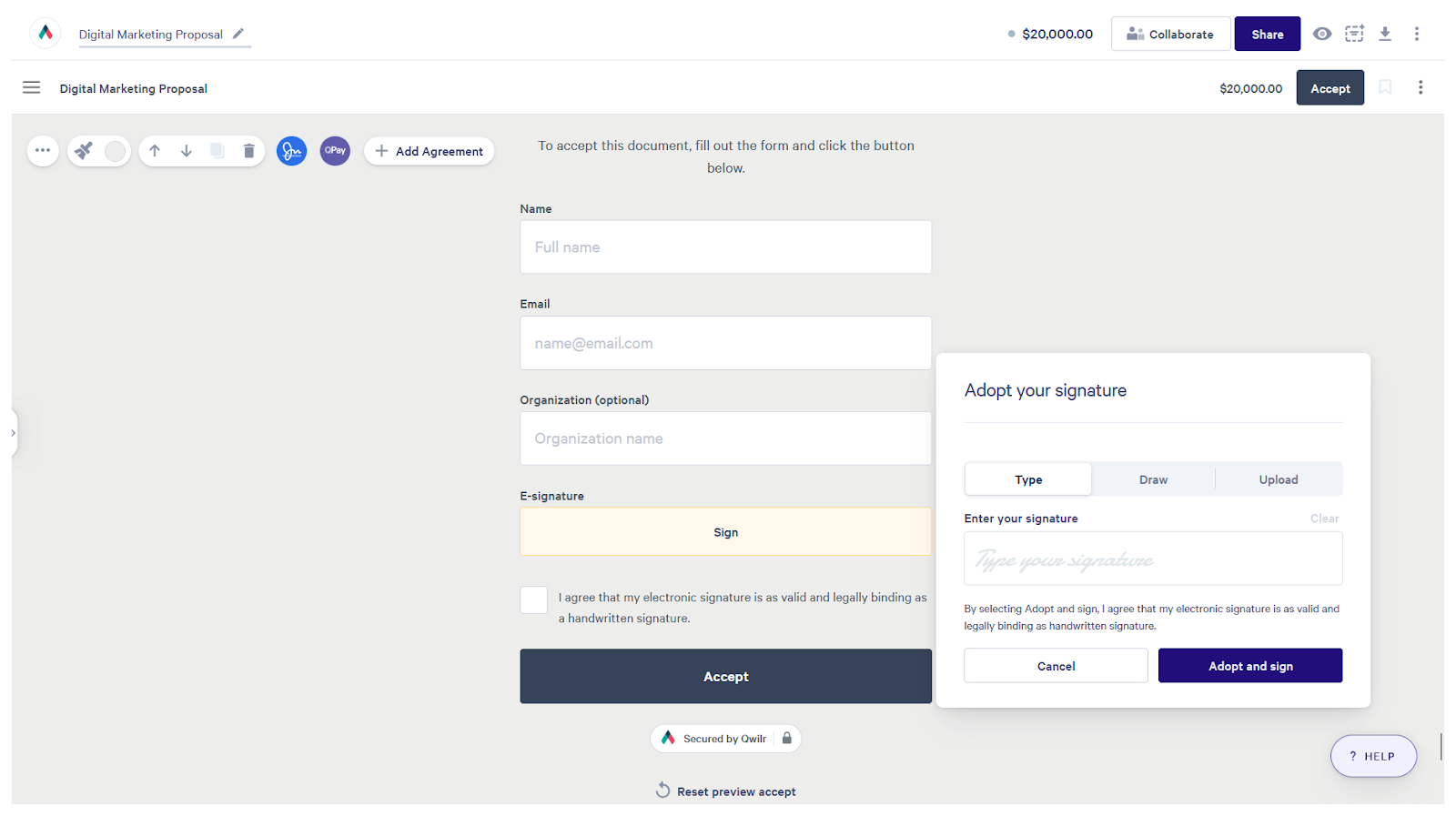
Qwilr turns proposals into interactive web pages rather than static files, giving sales teams a visually engaging way to present terms, pricing, and project scopes. Rather than cobbling together PDFs and attachments, everything is built in a drag-and-drop editor that feels closer to a website builder than a document tool.
Embedded videos, calculators, expandable pricing blocks, and other page elements help keep signers engaged, while domain-level branding ensures each proposal looks like an extension of your site. Another thing that we loved was that Qwilr pages come with built-in analytics, so you can see what sections prospects viewed and for how long.
As long as you’re working with leads and prospects that are comfortable negotiating via links and web pages rather than PDFs, Qwilr will help you produce better-looking, better-performing agreements in far less time.
Standout Qwilr features:
- Build responsive contract web pages (not documents)
- Interactive elements on proposal pages
- Domain-specific access and design
- Track agreement engagement
Why Qwilr is a good Docusign alternative:
- Drag-and-drop document creation
- Easier to manage proposal lifecycles
Tradeoffs of Qwilr over Docusign:
- The platform is exclusively for sales proposals and quotes — it’s difficult to impossible to create more general-purpose agreements in Qwilr
- It can’t compete with Docusign if you want to upload an existing PDF and request signatures on it
Qwilr pricing:
- Business ($39 per month): One user, unlimited documents, dynamic content blocks, audit trails, and payment processing with 0.09 percent fees
- Enterprise (custom quote): 10 users, remove Qwilr branding, page analytics, signer identity verification, and payment processing with 0.05 percent fees
HoneyBook: Best for small business owners
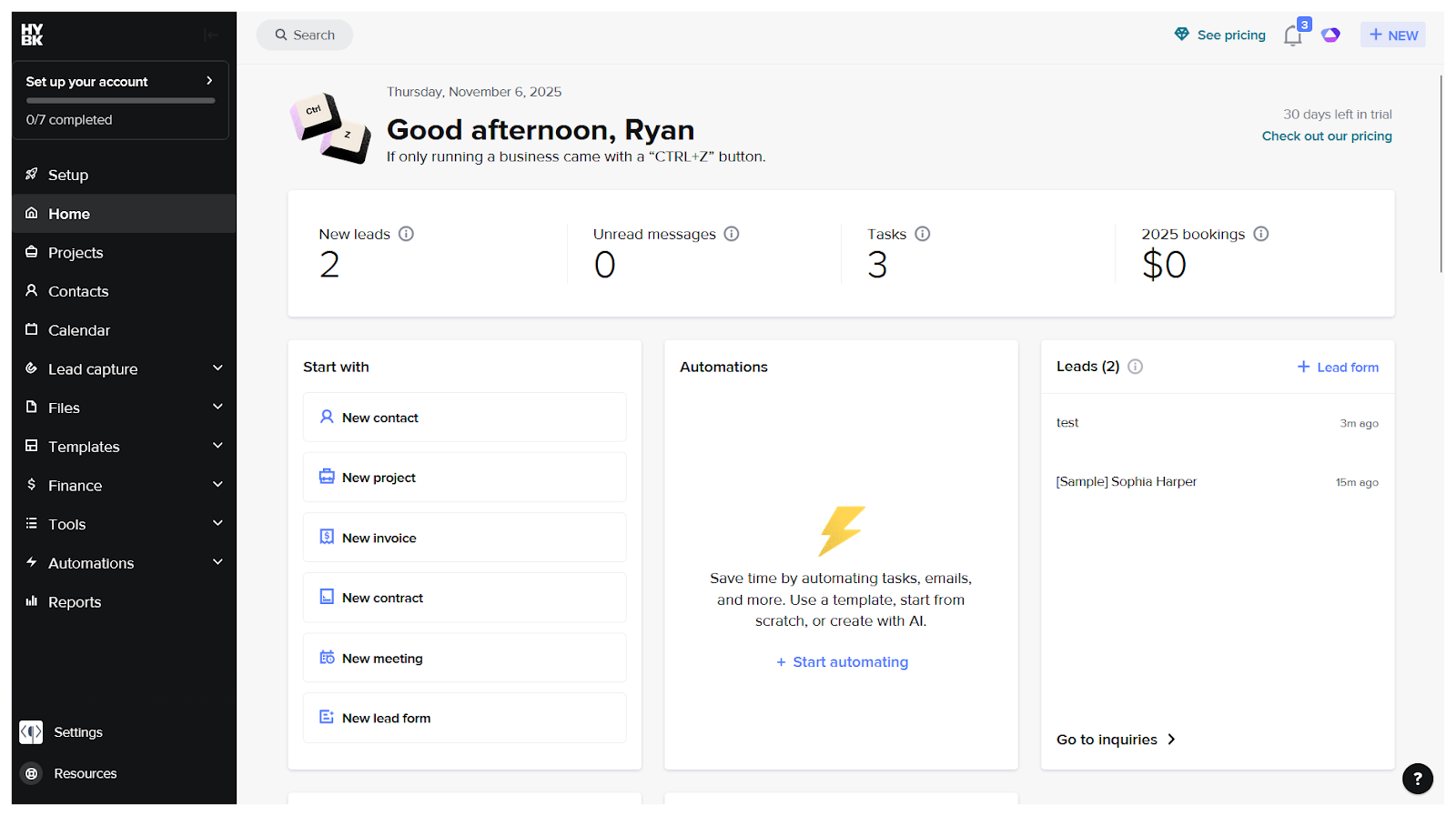
HoneyBook is designed for small business owners who want contracts, forms, payments, and client communication in a single system. With its secure client portals, scheduling tools, and an AI assistant for editing contracts, HoneyBook feels closer to a lightweight CRM than a stand-alone signing app.
Docusign doesn’t have an easy way to start from a blank document, instead forcing you to upload existing files. HoneyBook is the opposite. While it takes some digging to figure out how to upload a PDF, its drag-and-drop form builder and template gallery are a piece of cake.
HoneyBook shines when you need a polished, end-to-end client experience that doesn’t require technical skills or onboarding calls with the vendor. Sales and marketing teams should be able to set everything up themselves, sending a first contract within a couple of hours of getting started.
Standout HoneyBook features:
- Schedule when contracts are sent
- AI agent for agreement and contract edits
- Password-protected client portals
Why HoneyBook is a good Docusign alternative
- Offers an easy, drag-and-drop way to create contracts from scratch without relying on uploaded PDFs
- Combines contracts with client communication, scheduling tools, and payments to deliver a polished end-to-end client experience
Tradeoffs of HoneyBook over Docusign:
- HoneyBook seems to oversell its contract management and auditing features a bit, as it requires more customization and manual setup than Docusign does
HoneyBook pricing:
- Starter ($36 per month): Collect signatures on contracts and forms, up to one contact form, two lead forms, and accept card payments and ACH bank transfers
- Essentials ($59 per month): Everything in Starter, plus up to three contact forms, 10 lead forms, and automations
- Premium ($129 per month): Unlimited contact forms, lead forms, and team members
GetAccept: Best for sales teams
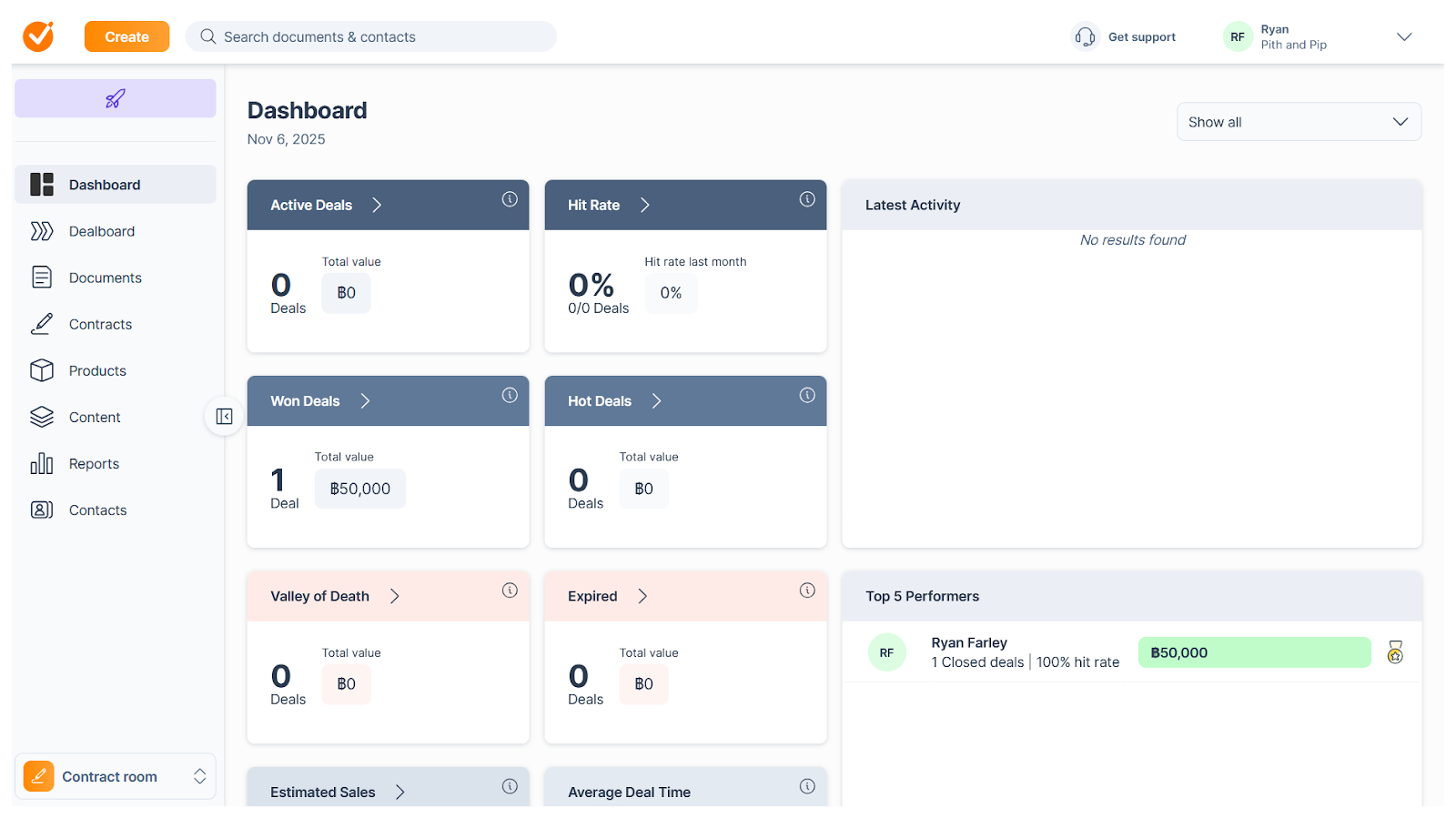
If Zoho is a “do everything” suite, and Dropbox Sign is 100 percent focused on e-signatures, GetAccept lies somewhere in between. Sales and deal-related contracts work incredibly well in GetAccept — arguably much better than they do in Docusign. But other types of agreements are a tad awkward and clunky.
Contracts are built in a block-based editor, which makes assembling and customizing pages feel more like building a sales deck than a legal document. Every contract creates a live chat thread where reps and signers can communicate directly, streamlining back-and-forth questions that would otherwise slow down a deal. And, for those with gripes about Docusign’s limited email notification settings, GetAccept has plenty of customization options.
Integrations are another area where this Docusign alternative shines. You can connect to and automate contract processes via Salesforce, Microsoft Dynamics, Pipedrive, and hundreds of other applications.
Standout GetAccept features:
- Block-based form builder
- Email notification templates
- Live chat conversation created for each contract
Why GetAccept is a good Docusign alternative:
- CRM-adjacent features combined with contracts
- Better signer collaboration and communication
- Dozens of sales-specific integrations
Tradeoffs of GetAccept over Docusign:
- Although GetAccept has everything you need to handle most contract management needs, it’s missing niche features like bulk sending and in-person signing — Docusign inclusions like payment gateways and certain integrations are paid add-ons
GetAccept pricing:
- eSign ($25 per user per month): Unlimited signatures, “simple” branding options, and automated reminders
- Professional ($49 per user per month): Unlimited signatures, advanced branding options, document tracking and insights, and document timelines
- Enterprise (custom quote): Unlimited signatures, advanced contract management, premium integrations, single sign on, and enterprise security
GleanQuote: Best for complex quotes
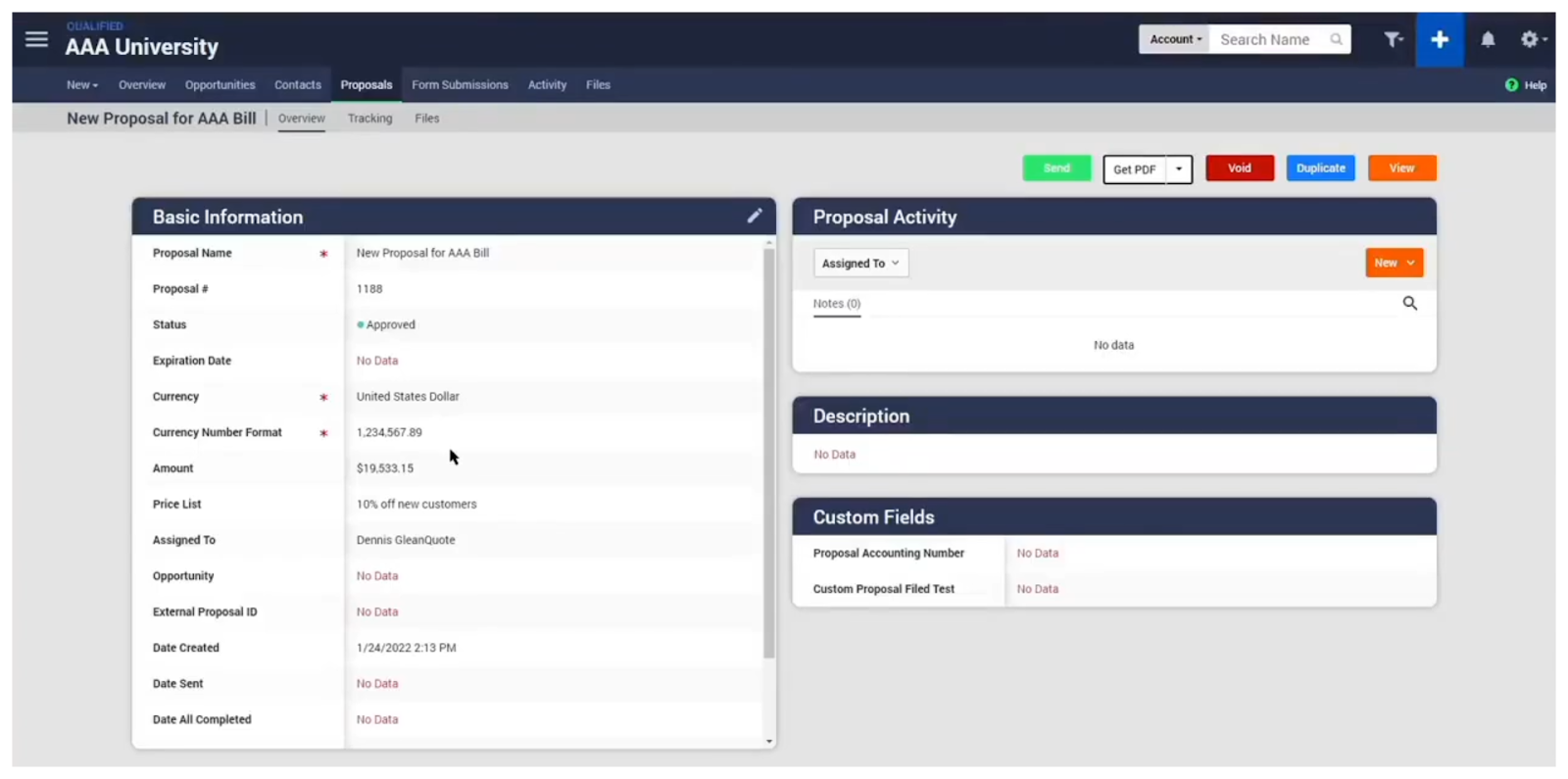
GleanQuote is unapologetically built for complex quotes and contracts. It excels in situations where pricing involves nested tables, conditional rules, and custom product configurations.
The GleanQuote editor is more flexible than almost any other tool on this list, letting you design proposals with dynamic pricing blocks and multi-level tables that automatically adjust as reps or leads change quantities or product mixes. That power comes with a learning curve, and many teams will find the interface overwhelming at first. But for businesses selling configurable services or multi-line products, GleanQuote enables a level of precision that Docusign can’t match without multiple add-ons.
Standout GleanQuote features:
- Unlimited custom templates
- Dynamic pricing blocks on quotes
- Nested product/service tables
Why GleanQuote is a good Docusign alternative:
- Far more customizable quotes
- Built for creating quotes from scratch
Tradeoffs of GleanQuote over Docusign:
- Despite its focus on open-ended proposal design, GleanQuote still puts quite a bit of the tracking and compliance burden on users — you’ll have to do a lot more contract tracking and organizing than you would in Docusign
GleanQuote pricing:
- There is only one pricing option at $55 per user per month and a $2,500 onboarding fee (includes all of the GleanQuote features, integrations, and API access)
- Requires a minimum of five users and annual billing
Alternatives with enterprise ecosystem compliance
Large organizations have security, compliance, and infrastructure needs that often outweigh things like polished interfaces or total cost of ownership. These Docusign alternatives are built for companies that already rely on enterprise platforms like Adobe or Zoho, or that need strict privacy and compliance guarantees.
Adobe Acrobat Sign: Best for Adobe suite users
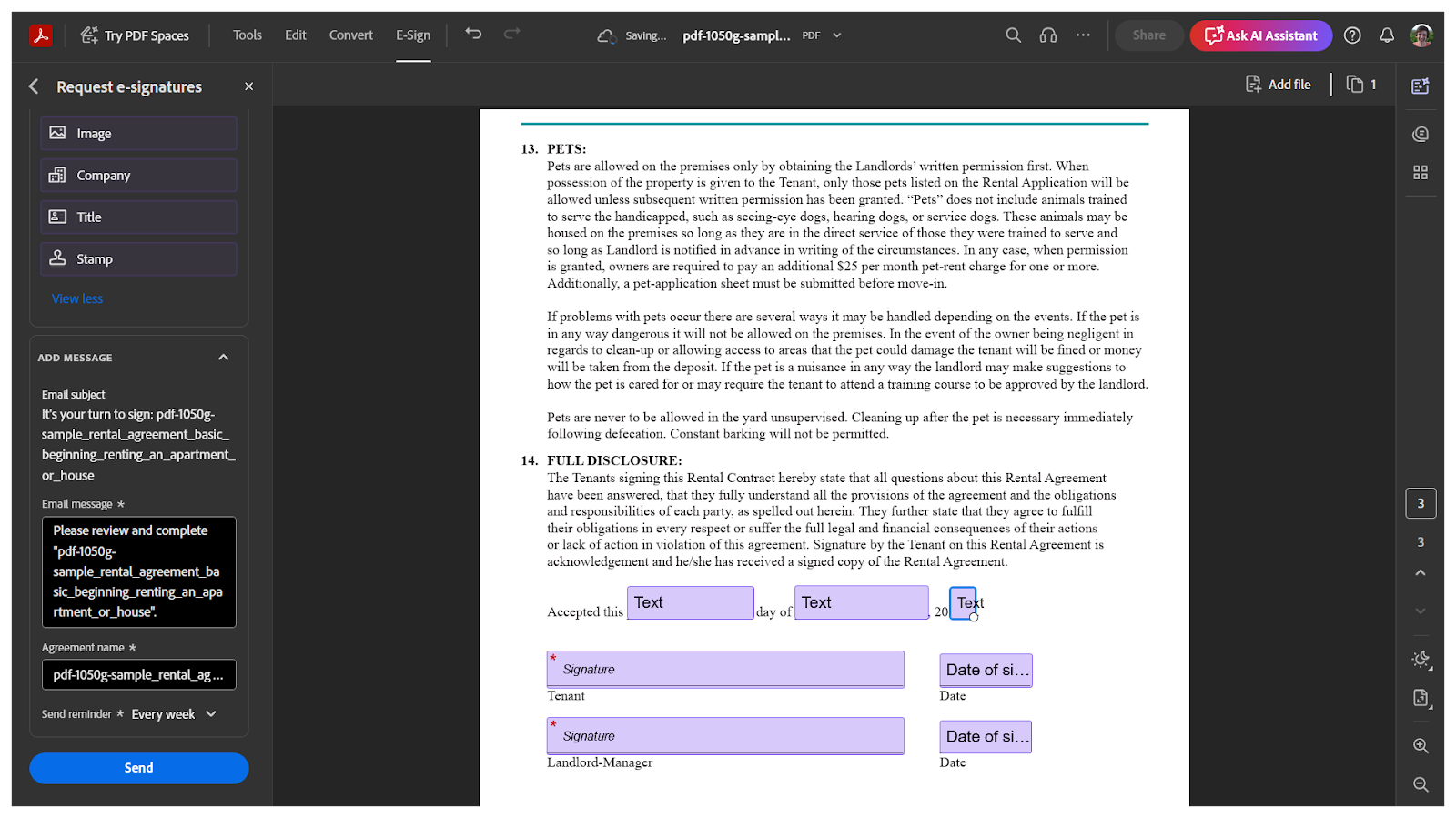
Adobe Acrobat Sign delivers one of the smoothest experiences for teams that already work heavily with PDFs or the broader Adobe ecosystem. It has a few unique features, sure, but it ultimately gets our recommendation because there’s little to no learning curve and none of the buttons or widgets distract from the core task of requesting and managing e-signatures.
More specifically, Adobe Acrobat Sign’s automatic field detection does a surprisingly good job of tagging fields on uploaded documents. And integrations with tools like Microsoft 365 make it easy to send and track contracts in tandem with other collaboration workflows. Finally, there are Spaces, which not only help organize contracts by topic but also create isolated AI training environments for better suggestions and large language model generations.
Most people have already knowingly or unknowingly signed a document in Acrobat Sign, adding yet another layer of convenience and smoothness to the e-signatures. For organizations that currently pay for Adobe products, it’s an easy add-on that consolidates e-signatures into familiar workflows.
Standout Adobe Acrobat Sign features:
- Auto-place fields on uploaded PDFs
- Track agreements alongside other Adobe files
- Convenient Microsoft 365 integrations
- PDF Spaces train personalized AI assistants
Why Adobe Acrobat Sign is a good Docusign alternative:
- Straightforward interface and workflow
- Can consolidate e-signatures under existing accounts
Tradeoffs of Adobe Acrobat Sign over Docusign:
- Limited integration list — in addition to Microsoft connectors, Adobe Acrobat Sign offers native enterprise integrations with Salesforce, SAP, ServiceNow, and Workday, but not much else beyond those and DIY Zapier automations
Adobe Acrobat Sign pricing:
- Standard ($15 per month): Unlimited signature requests and contract tracking on all plans, plus enterprise integrations with Microsoft 365
- Pro ($24 per month): Everything in Standard, plus the ability to collect signatures via web form, PDF branding, and paper document scanning
- Studio ($30 per month): Everything in Pro, plus AI Assistant, Adobe Express, and enterprise admin features
Zoho Sign: Best for organizations already using Zoho
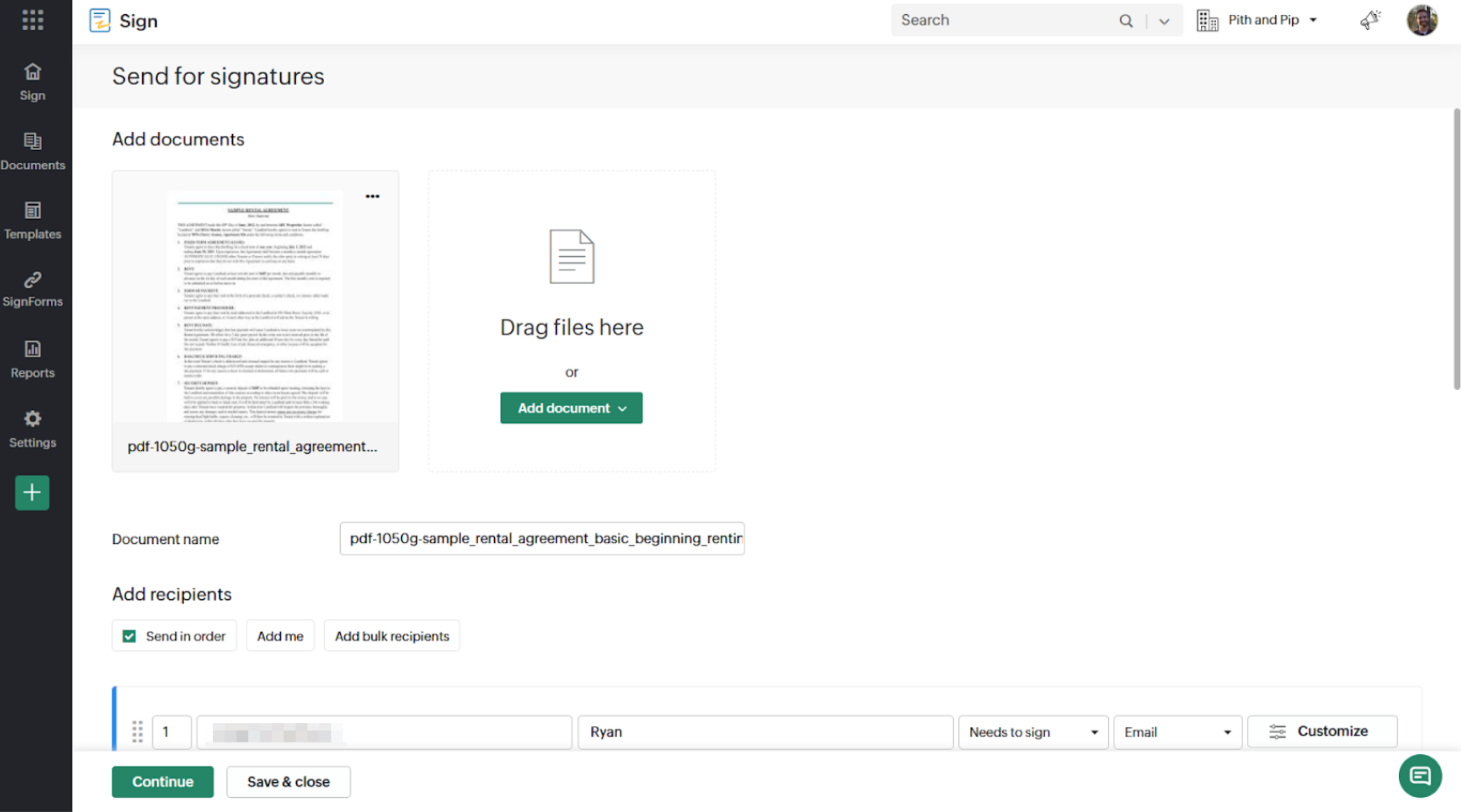
Similar to Acrobat Sign, Zoho Sign works best when it’s part of a larger Zoho setup. If your company already relies on Zoho CRM, Zoho Books, Zoho WorkDrive, or Zoho Creator, the ability to trigger e-signature flows from other apps is a big draw. You can kick off e-signature processes after an event in Zoho Bookings or an update in Zoho CRM, syncing finished documents to Zoho WorkDrive, all built with the Zoho Creator automation platform.
Yet templates, bulk sending, OTP verification, and multi-language support make it a capable signing tool even outside the ecosystem. The standalone pricing is arguably much better than Docusign’s as well.
It’s not the best-looking alternative on this list, or even the most feature-packed. But Zoho Sign offers a number of interesting tools for specific use cases and fits seamlessly into teams that are well acquainted with the Zoho ecosystem.
Standout Zoho Sign features:
- SMS notifications and one-time passwords
- Easy bulk sending options
- Ability to change notification and interface language for signers
Why Zoho Sign is a good Docusign alternative:
- Integrates with all of Zoho’s apps and platforms
- Helpful guidance on GDPR and HIPAA compliance
Tradeoffs of Zoho Sign over Docusign:
- User interface can feel dated compared to more modern competitors, and some advanced compliance or branding options are limited to higher-tier plans
Zoho Sign pricing:
- Free: Up to five envelopes per month (requests to one or multiple users for signature(s) on one or multiple related document(s)), audit trails, automations, and cloud storage
- Standard ($12 per month): Everything in Free, plus up to 25 envelopes, SMS notifications and OTP, AI assistant, and premium integrations
- Professional ($20 per month): Unlimited envelopes, unlimited templates, document branding, multi-language support, and analytics
- Enterprise ($28 per month): Bulk sending, custom form fields, payment collection, custom domains and SMTP, and API access
Foxit eSign: Best for bulk e-signatures
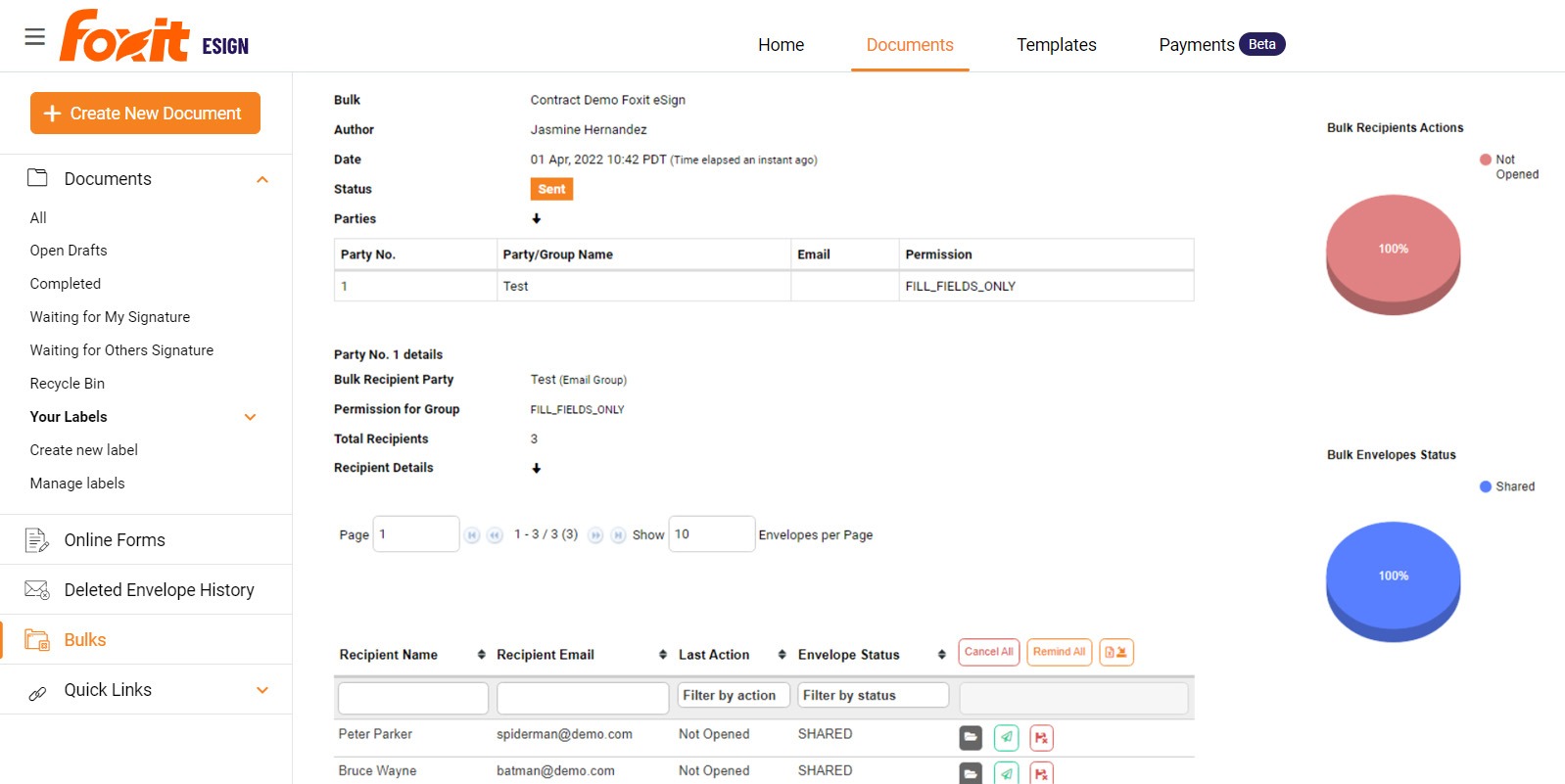
Foxit eSign is built for teams that handle high volumes of agreements. While most of the tools on this list have some sort of bulk sending option, Foxit eSign stands out. It was our favorite for this particular use case because of how quick and easy bulk sending and signing were to set up and automate.
The crux of Foxit’s differentiator is its implementation of signable web forms, which make it exceptionally easy to collect signatures at scale without manually preparing each document. It doesn’t overrely on that feature, though. Offline signing and on-demand notary services give it an edge for real estate, field services, and other industries where signers may not be online.
Tally it all up and Foxit eSign’s novel features, well-rounded user interface, and low price point make it an interesting Docusign alternative for both bulk senders and budget-conscious teams.
Standout Foxit eSign features:
- Signable web forms for high-volume documents
- Bulk sending and signing portal
- On-demand notary services
- Offline collections
Why Foxit eSign is a good Docusign alternative:
- Fast template creation and adaptation
- Much, much cheaper than other options
Tradeoffs of Foxit eSign over Docusign
- Foxit eSign doesn’t significantly improve on Docusign’s subpar branding options — there aren’t enough ways to customize email notifications and document branding, which will be a dealbreaker for many users
Foxit eSign pricing:
- Essentials ($120 per year): 250 envelopes and 10 templates per year, collect payments, and audit trails
- Business ($300 per year): Unlimited envelopes and templates, custom branding, multi-language support, signable web forms, and API access
Alternatives for general-purpose and simple agreements
Not every agreement needs a complex workflow or enterprise-grade compliance. Sometimes you just need a clean, dependable way to send a document, get it signed, and move on. And many of the best free PDF signing tools make that possible without sacrificing legality or security. These Docusign alternatives are one rank above that, focusing on simplicity and user-friendliness with just enough premium features to be worth a paid plan.
SignNow: Best for freelancers, solopreneurs, and small teams
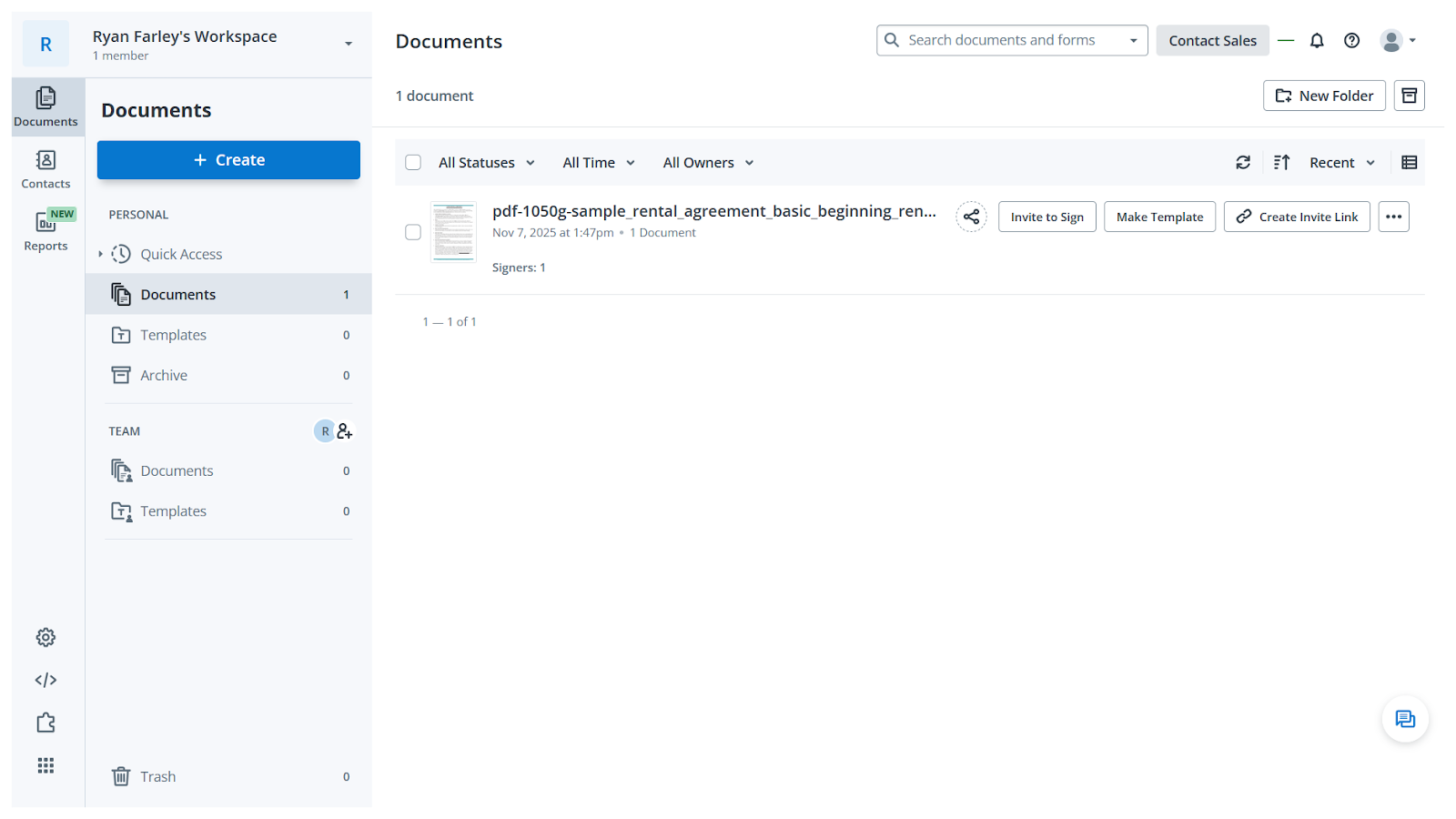
SignNow does an excellent job of keeping its dashboard and interfaces clean and legible. There are only three tabs in the sidebar (Documents, Contacts, and Reports) and they are all that most individual contractors and small teams will need to send, track, and store simple contracts and agreements.
Pulling web-based documents into the platform with a dedicated importer is a surprisingly handy feature, and kiosk mode makes in-person signature collection quick and easy to set up and manage. You can restrict the types of allowed signatures if you want, too, removing options for drawn or uploaded signatures — a rare but essential feature for those who need it.
The biggest advantage that SignNow has going for it, however, is its straightforward pricing. There are a limited number of included signature requests on each plan, with low-cost pay-per-send credits available on the Business Premium and Enterprise plans. That may not sound ideal to some but it’s much better than Docusign’s somewhat hidden overage fees.
Standout SignNow features:
- Import documents via URL
- Disable typed, drawn, or uploaded signatures
- Kiosk mode for tablets and larger screens
Why SignNow is a good Docusign alternative:
- Clear, pay-per-invite pricing
- Minimalist contact editing and signing
- Huge annual plan discounts
Tradeoffs of SignNow over Docusign:
- Doesn’t have as many advanced and power user features
- Some users report issues with email notifications going to spam folders — something you might want to test with a trial account before upgrading to paid
SignNow pricing:
- Business ($20 per month): Unlimited users and templates, up to 100 e-signature invites, audit trails, send via SMS, and custom fields
- Business Premium ($30 per month): Everything in Business, plus pay-per-invite rates after 100 e-signatures, bulk sending, request payments, document branding, and kiosk mode for mobile signing
- Enterprise ($50 per month): Everything in Business Premium, plus signer identity verification, formulas in documents, and conditional routing
Signeasy: Best for quick turnaround contract workflows
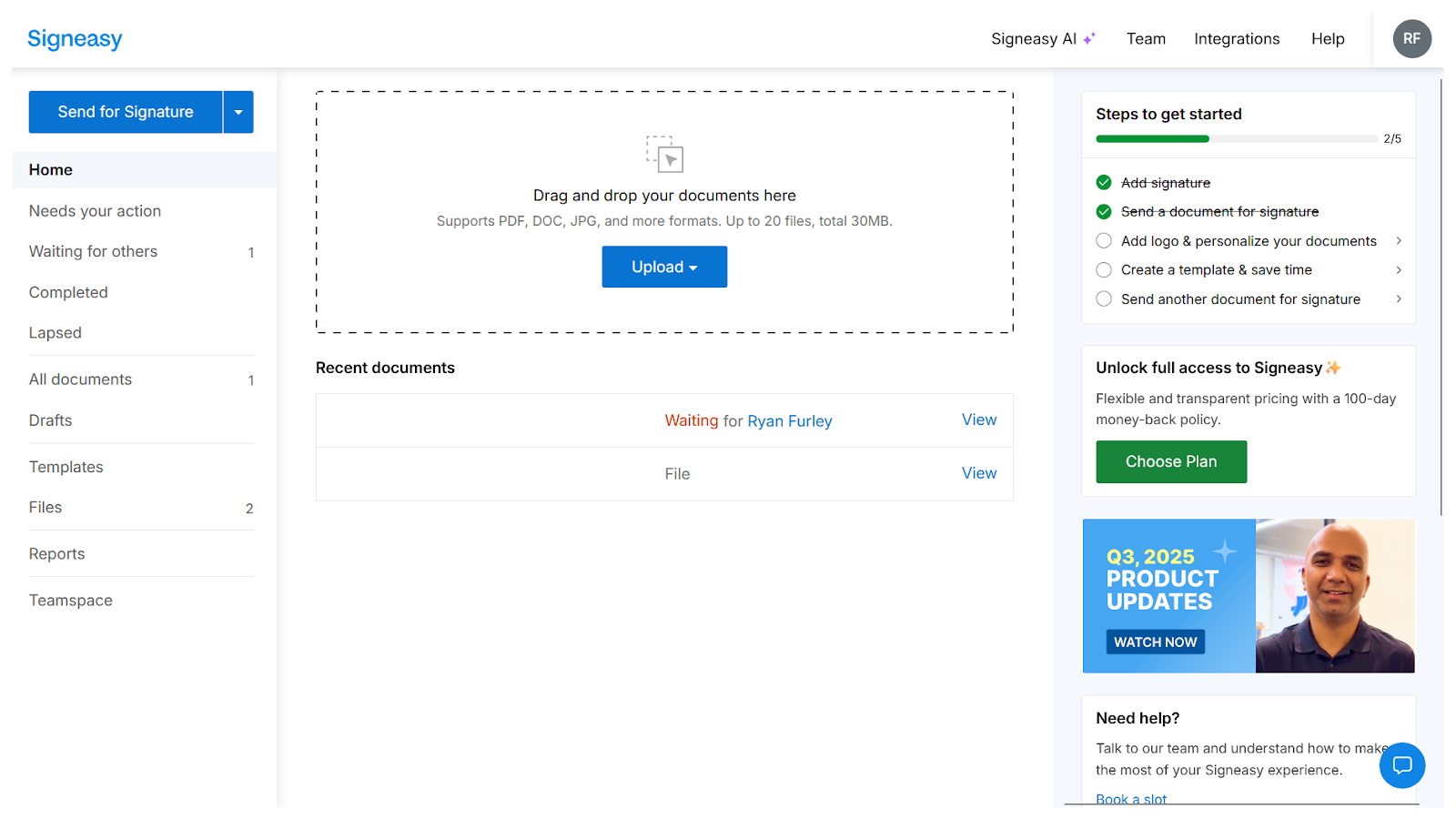
Signeasy covers all the necessary bases for collecting digital signatures and throws in a few extra features for good measure. It’s a platform built by a founder who simply wanted an e-sign on phone feature while traveling — one that was easy to use, mobile friendly, and secure.
This platform feels best when you need to send something for signature while on the go or manage contracts from a smartphone just as easily as from a laptop. Features like the ability to add tags to contracts, assign observer roles, and let signers add attachments help streamline back-and-forth communication. On top of all that, an AI assistant on the signer side reduces confusion during complex agreements.
Whether you’re interested in the mobile-first design, the excellent Microsoft Teams integration, or the big-picture view that Signeasy provides of all your contract statuses, it’s an interesting platform with a lot of potential.
Standout Signeasy features:
- Contract tagging
- Document observers (non-signing) role
- Request attachments from signers
- AI assistant in signers’ view
Why Signeasy is a good Docusign alternative:
- Microsoft Teams integration
- Reporting and analytics dashboard
- Mobile signatures
Tradeoffs of Signeasy over Docusign:
- Docusign’s compliance guarantees are clearer and more straightforward than Signeasy’s — both can achieve GDPR, HIPAA, and 21 CFR Part 11 compliance, but with Signeasy it’s a paid add-on in some cases and a somewhat vaguely worded promise in others
Signeasy pricing:
- Personal ($15 per month): Five signature requests per month, one user, automatic reminders, and Google Workspace integrations
- Business ($30 per user per month): Everything in Personal, plus unlimited signature requests and users, up to five templates, read receipts, AI assistant, and Microsoft Teams integration
- Business Pro ($40 per user per month): Everything in Business, plus custom branding, SharePoint and HubSpot integrations, audit logs, and signer attachments
How we tested these tools
To track down the best Docusign alternatives, we looked for tools that could handle the same e-signature workflows, only faster, simpler, at a better price, or in a more innovative way. Every app on this list supports signing a document electronically and secure contract management, but we paid close attention to how each one approached the details that make or break everyday use:
- Core e-signature features: Uploading, signing, and managing documents had to be seamless and compliant with major e-signature laws like E-Sign and eIDAS.
- Ease of use: We prioritized tools with intuitive interfaces and minimal setup friction, where users can send their first document within minutes.
- Automation and templates: Reusable templates, prefilled fields, and automated routing workflows are big differentiators for teams that send dozens of agreements every month.
- Integrations: Deep connections with CRMs, cloud storage, and productivity platforms make or break adoption, so we tested how well each platform fits into existing software stacks.
- Admin and audit features: We looked for tools with detailed audit trails, role-based access, and central management options for teams with compliance needs.
- Security and compliance: Encryption standards, data residency options, and certifications like SOC 2 or ISO 27001 were reviewed where available.
Our research combined hands-on testing through free trials, demos, and vendor documentation, as well as the review of release notes and third-party listings on sites like G2 and Capterra.
It’s also important to note that pricing clarity played a major role. While Docusign’s tiered pricing and hidden feature limits can make cost forecasting difficult, several competitors make it easy to understand what you’re getting and what it’ll cost — from day one.
Which Docusign alternative wins?
Each of the tools on this list brings something valuable to the table, whether it’s form-centric workflows, sales-oriented contracts, enterprise ecosystems and compliance, or general-purpose features. They represent the best e-sign apps available today.
But if you’re looking for the ideal mix of affordability, flexibility, and security, Jotform Sign is the standout option. Its free-forever plan includes unlimited access to form creation and signature requests, making it one of the easiest ways to explore how e-signatures can fit into your existing workflows and document management process before committing any budget. Try it out today.
Frequently asked questions about Docusign alternatives
Absolutely. Several platforms offer free plans with generous features. Jotform Sign provides a free plan with 10 signed documents per month plus unlimited access to its form builder. DocHub also offers a strong free plan for light usage.
Docusign focuses almost entirely on sending and signing uploaded documents. It’s strong in enterprise compliance but less flexible when it comes to form creation, customization, and automation.
Jotform, on the other hand, lets you build fully custom forms and contracts from scratch, convert PDFs into e-signature documents instantly, assign fields to multiple recipients, and automate workflows. It’s more adaptable for organizations that want forms, signatures, payments, and data collection in one platform.
Microsoft doesn’t have its own native e-signature tool that matches Docusign’s full functionality. However, Microsoft 365 integrates closely with Adobe Acrobat Sign, which many users treat as the “Microsoft equivalent.”
Adobe Acrobat Sign is deeply embedded in Microsoft apps like Word, Teams, and SharePoint, making it a popular choice for organizations already committed to the Microsoft ecosystem.
Google doesn’t offer a built-in e-signature platform comparable to Docusign. But tools like Sign PDF integrate directly with Google Workspace, allowing you to open, edit, and sign PDFs from within Google Drive.
This guide is for operations, IT, finance, and revenue leaders comparing alternatives to a legacy e-signature tool.







































Send Comment:
1 Comment:
April 7, 2020
Docusign and Adobe both have hidden fees. They limit the total number of sends per year but hide that info pretty good.
Others limit number of templates, but its usually public