Including Form Titles in your notification emails and autoresponders is a practical solution for managing multiple forms and keeping track of submissions. For instance, if you’re running a business with different contact forms for inquiries, feedback, and support, having the form title included in the email subject or content helps you quickly identify the form’s purpose. This feature is also valuable for organizations with forms embedded across various web pages, as it simplifies submission tracking and improves workflow efficiency. By customizing your emails to include form titles, you ensure better organization and a seamless experience for both you and your form users.
Adding Form Title to your Email Notification
To add Form Title to your email notification
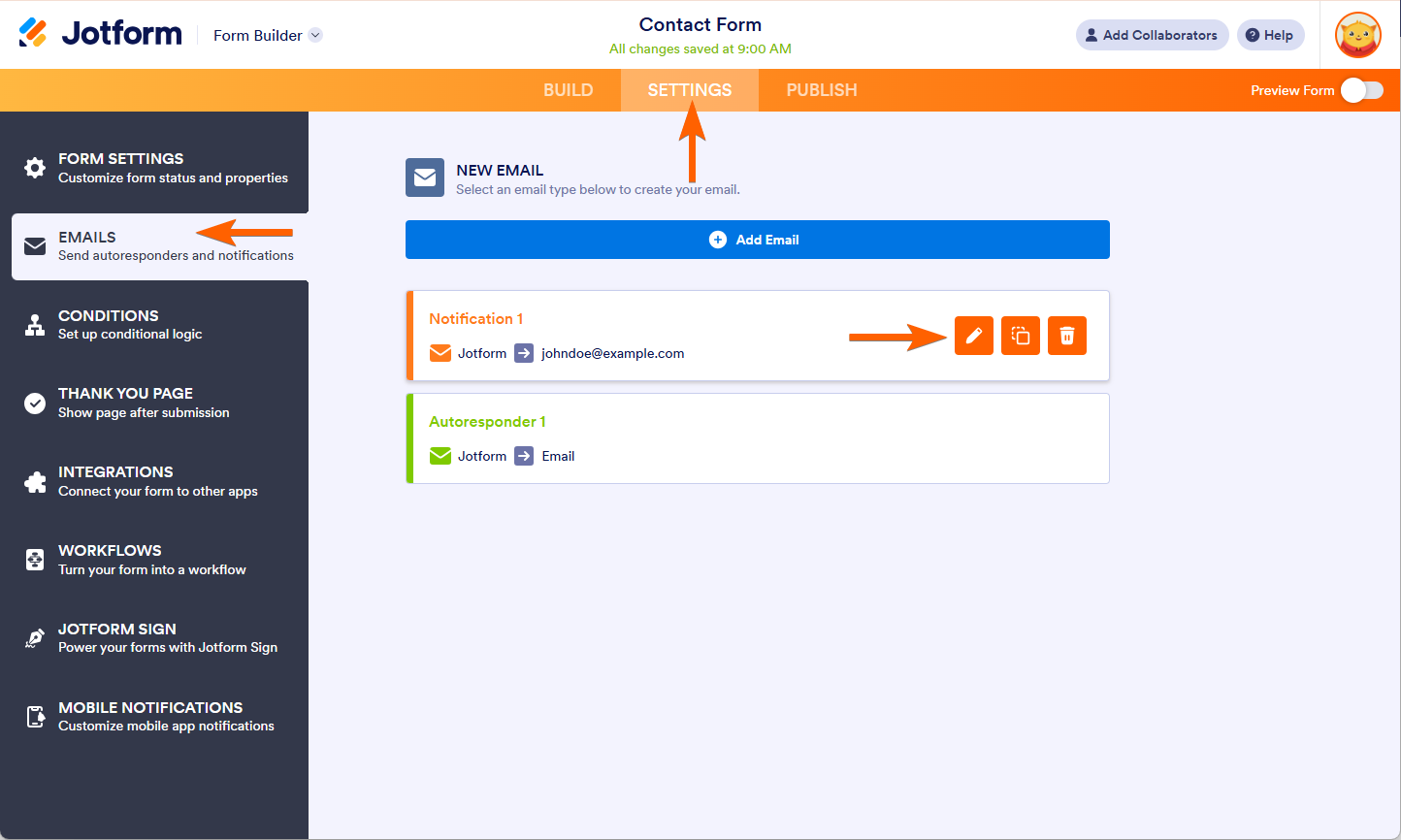
- In the Form Builder, go to the Settings tab.
- Select Emails on the left panel.
- Hover to your Notification Email, and click Edit (pencil icon).
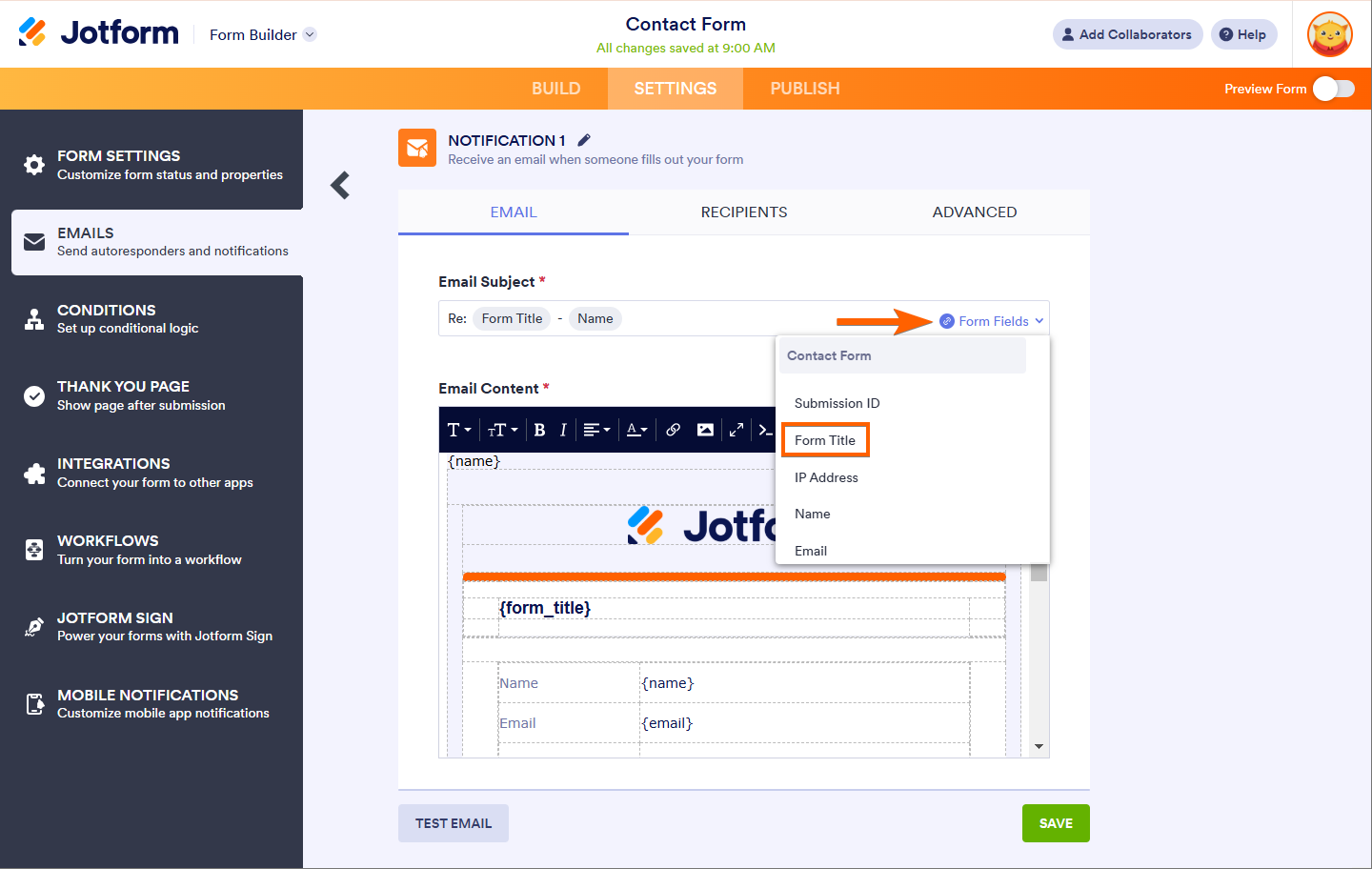
- Click the Form Fields dropdown near the Email Subject section in the Email tab.
- Select and click the Form Title from the options.
- Finally, click the Save button to save the changes.
Adding Form Title to your Email Autoresponder
To add Form Title to your email autoresponder
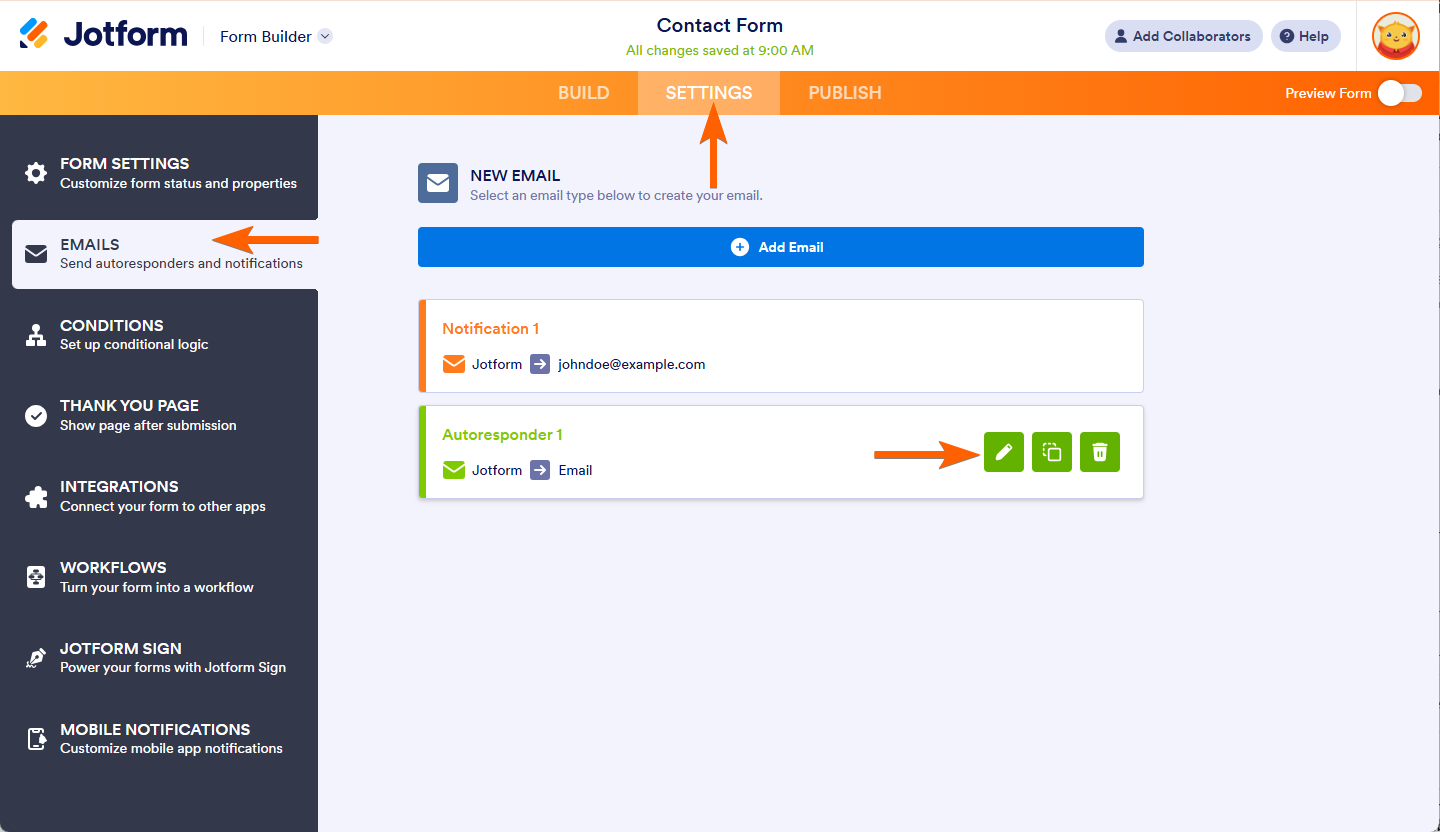
- In the Form Builder, go to the Settings tab.
- Select Emails on the left panel.
- Hover to your Email Notification, and click Edit (pencil icon).
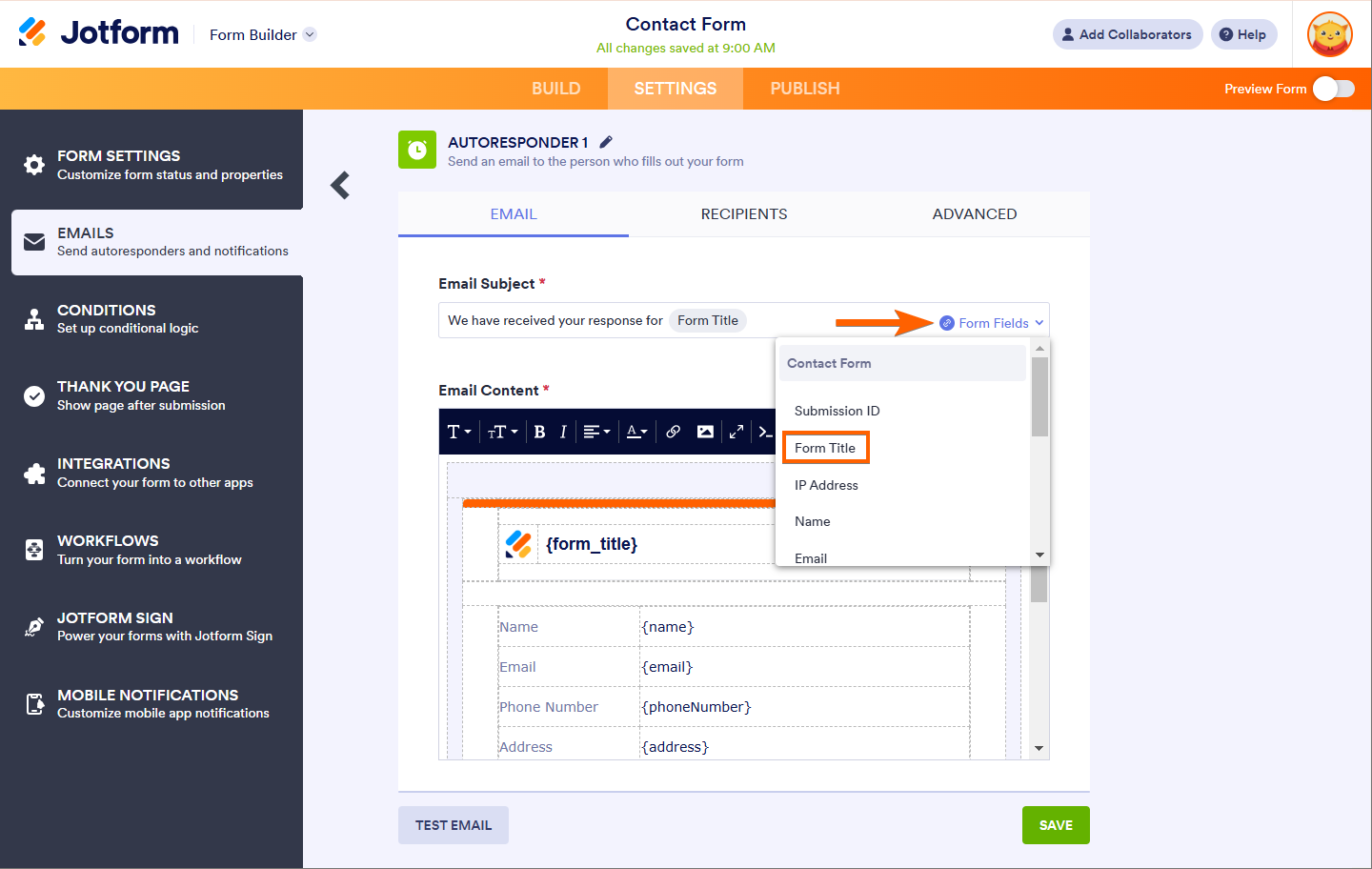
- Click the Form Fields dropdown near the Email Subject section in the Email tab.
- Select and click the Form Title from the options.
And that’s it! Every time you receive email notifications or your users receive autoresponder emails, the Form Title will now be included, making it easier to identify submissions and ensuring a smoother communication experience.

Send Comment:
209 Comments:
February 10, 2021
Our submissions have stopped being emailed to us?
August 6, 2017
I renamed my form but when i share it on facebook , the old title still appears instead of the new one ! what should i do please ?
April 4, 2017
This does not address my question. Can a response (Contact Us) form be structured like an ordinary email wherein you enter a "Subject" line. The recipient, in this case our company, can see at a glance what the inquiry is about and direct it to the proper department.
February 26, 2015
test emails are coming on my gmail but when form actually submitted by a user its not coming to my email id.,
January 14, 2013
how to paragraph my products? the coding grouping all info like product name, quantity and price.. can it done by paragraph like below?
item1 MYR 25 2 set
item2 MYR 20 2 set
September 22, 2012
How can I place the 'contact me form' on my questionair page?
September 19, 2012
Is there a way to place a "field" that exists in the form in the title? I would like to see a name in the title, such as, submitted by XXXXXXXXXXX. The field could change from each submission.
July 22, 2012
help me
February 29, 2012
Estou no Brasil e meu formulário esta ok, porém já mudei a url de acesso.
Grato.
February 24, 2012
Suspending the domain is BS!
But not informing the customers is a shame. Accidentaly discoveed that the form is missing from all of my webistes.
You should update the google gadget so that users can point it to te .net domain or mention that they can simply use an iframe wrapper.
Apart from this stupid issue Jotform has a great service!
February 23, 2012
So you WILL be ending your business relationship with "Cave-In Daddy" correct? I can't imagine that after such a display of caring less about a customer's rights and doing what the law doesn't require them to do just because it was "requested" that any sane business people will continue to rely on Go Daddy.
February 22, 2012
Impeach the whole government!
February 21, 2012
This is just more proof that we need to impeach Obama and remove his jackbooted thugs from their Czar positions. If we don't, this is only the beginning of things to come.
February 18, 2012
my biggest concern is that the US or for that matter any government can shutdown a site WITHOUT DUE PROCESS!!!!
February 17, 2012
wont use your site if it wont be up 99% of the time. Sorry just lost a customer
February 17, 2012
"From doing my own research it look like RSA did in fact contact godaddy over user crated forms used in a phishing scam against Standard Bank, out of South Africa apparently. I guess jotform needs to do a better job of screening for malicious content though this is a battle anyone that allows public postings / hosting of files must fight."
comments like this are ABSURD ... what if I use Microsoft Word to write something not acceptable by the thought police gestapo??? ... The burden is not on a service provider to enforce the law ... it is law inforcement that is responsible for deciding what is legal or not? ... service providers will have to start reading, analyzing and censuring the content their clients create. ARE YOU FU#KING SERIOUS???
February 17, 2012
bottom line is that the Goverment and corporate elite will do what they want. One day we can spit on them as they are dragged through the streets.
February 17, 2012
Thanks guys, we are running hosted jotforms at our university - redirecting .com to .net on our servers fixed our forms.
Was surprised to find that our self hosted installation depended on jotforms.com. I'd like to see this changed in a future update. We have privacy / stability requirements. I understand the application calling home to validate licensing and such but it seems like there should be a way to allow for both.
We have loved jotforms and have invested heavily in migrating to it. I really hope this can be fixed so we can continue to rely on your great product.
Jeremy
February 17, 2012
I'd like to thank all the media buzz surrounding this issue for bringing your company to my attention. I now have an easy to use provider for web forms! Hope your business only picks up as a result of this unfortunate turn of events. Best wishes to you all!
February 17, 2012
Does the suspension lift mean that I no longer have to take any action on updating my forms?
February 17, 2012
Look on the bright side, Jotform team. All this extra publicity will probably turn out to be good for you in the end! I understand jotform.com is now up and running again, but as I have now spent half a day changing all my links and scripts to jotformeu.com (not just on my websites but in many email templates too), I hope I can now leave them in EU land — until the next scare!
February 17, 2012
This is horrible! Just a small business that is paying taxes and now we get hit with having to figure out how to make forms another way. I hope SOPA dies soon!!!!!!!!
February 17, 2012
"Increasingly, I'm not a fan of GoDaddy. Don't want to imply that I am, because that's not so.
HOWEVER, I'm just increasingly confused after reading all of this, including the article linked at the top.
If the Secret Service was involved, could GoDaddy have refused to take down the domain? Could any domain registrar based in the US have refused to take down the domain?
If GoDaddy could have refused, especially in the light of the incredible absence of due process, they should have. But don't they have to do what the government tells them to do? Did they actually have a choice here?"
They do. But...Go Daddy chose to shut down the domain name upon being notified by (apparently) the Secret Service.
It's actually covered in their legal agreement, similar to those of other registrars.
February 17, 2012
Good luck my brothers! Espero que logo esteja tudo resolvido!
February 17, 2012
Checked my websites. There seems to be no problems at all.