
ChatGPT can create and edit documents, but it can’t collect signatures on its own. The best ChatGPT signature apps bridge that gap by turning ChatGPT-generated content into signable online files.
However, with dozens of ChatGPT apps available, choosing a reputable signing solution requires in-depth research and thorough product comparison. To help you pick the most suitable tool, I tested and ranked the top four ChatGPT apps for signing documents in 2026.
What are ChatGPT signature apps?
ChatGPT signature apps are tools that connect ChatGPT to an e-signature platform. They simplify the process of creating signable online contracts, sending them for e-signature, and tracking the signing process.
Here’s how that works, in five steps:
- Draft and edit signable content using ChatGPT.
- Put the content into a signable document or template.
- Send the document to recipients and collect signatures from mobile or desktop devices.
- Track who has viewed or signed the document and when, and send reminders to recipients who haven’t signed.
- Store your signed documents where you can easily retrieve and export them.
Not all e-signing solutions that claim to be the best ChatGPT productivity apps are trustworthy. To choose a reputable ChatGPT signature solution:
- Confirm that the organization that publishes the tool is credible.
- Check the company’s terms of service and privacy policy to see how it handles your data.
- Confirm that its signing process meets the legal requirements for your jurisdiction and document types.
The 4 best ChatGPT signature apps in 2026
The best ChatGPT signature apps help you generate and manage documents quickly with AI, which saves time. Some can turn the generated content into ready-to-sign documents, so you don’t have to do it manually.
Here’s a side-by-side comparison of the top four ChatGPT apps for signing documents online.
| AI e-signature app | Best for | Standout feature | Free plan or pricing model | Platform fit | Main limitation |
|---|---|---|---|---|---|
 Jotform Sign |
Individuals and businesses that want end-to-end e-signature creation in ChatGPT |
Creates, edits, sends, and tracks signature-ready documents in ChatGPT |
Free plan |
Web, iOS, and Android |
Premium users pay for the Jotform platform, not a standalone app. |
 Sign.com |
Small teams |
Offers a drag-and-drop editor |
Free plan and trial |
Web, iOS, and Android |
Generated documents aren’t signing-ready. |
 signNow |
Businesses with existing signNow templates or files |
Creates signable documents from signNow templates and helps you track signer activity within ChatGPT |
Free trial |
Web, iOS, and Android |
You can’t create a signable document from a simple text prompt alone. |
 Docusign |
Individuals and businesses that already use Docusign |
Generates signable documents from Docusign templates |
Free plan |
Web, iOS, and Android |
It requires an existing Docusign template or publicly accessible document to create a signable file. |
1. Jotform Sign
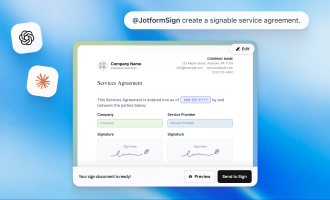
The Jotform Sign ChatGPT app lets you create a signature-ready document from a prompt or upload an existing PDF. During testing, I generated a reusable residential lease, revised its content, and prepared it for the landlord and tenant without leaving ChatGPT.
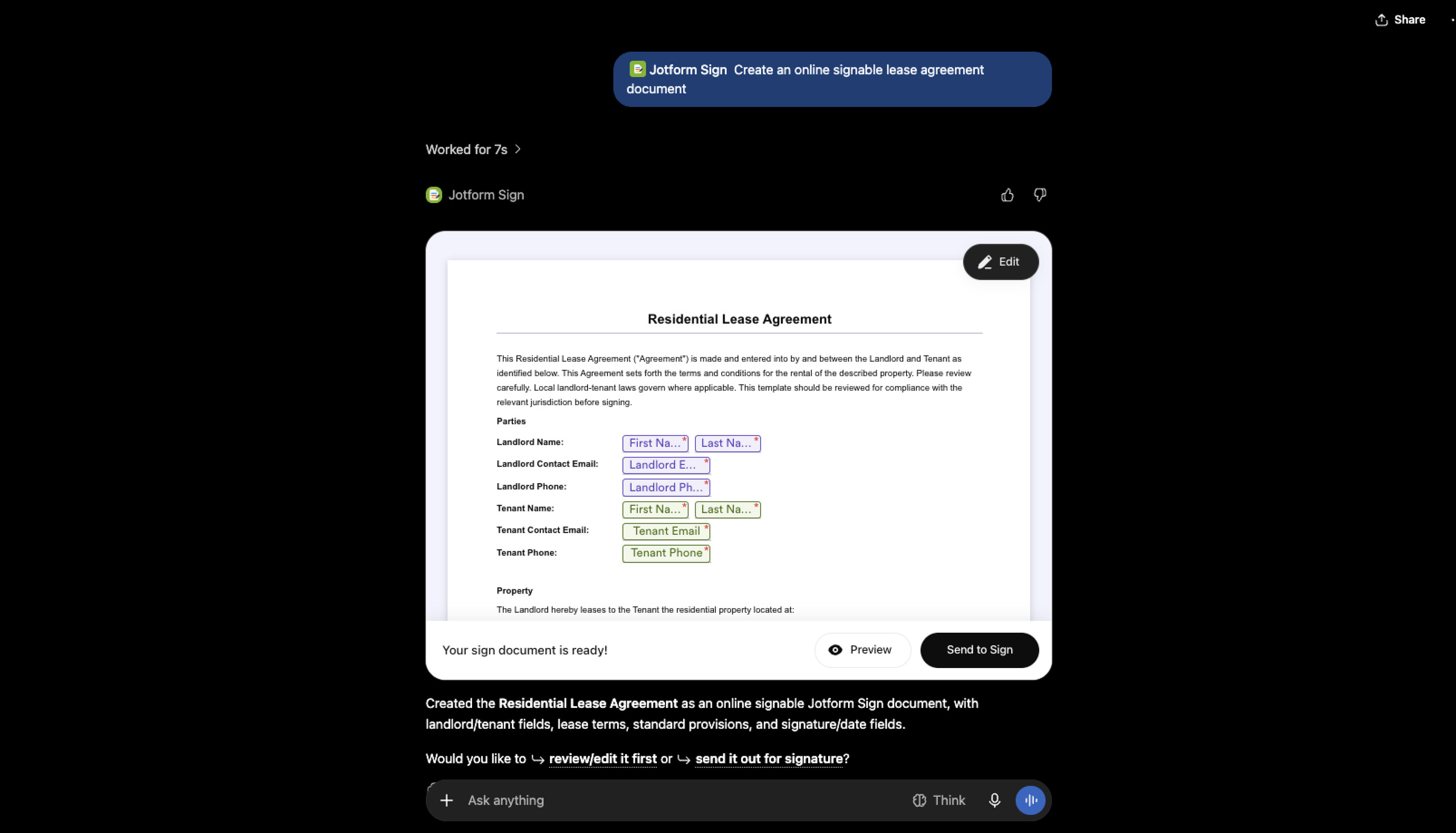
After generating your document, you can ask the app to refine sections without leaving the ChatGPT interface. You can also make edits with the Jotform Sign Builder and Jotform AI.
You can preview and refine documents conversationally, update names, dates, and terms, and customize signature, initial, date, and other fillable fields. When the document is ready, add one or more recipients, assign signing roles, set the signing order, and send the request. You can then ask ChatGPT which documents are pending, viewed, or signed and follow up when needed. Documents are managed through your connected Jotform account, while recipients can sign without a ChatGPT account.
Best for: Individuals, small businesses, and enterprises that want to create and edit signable documents with AI
Developer: Jotform
Key features
- Create signable documents from simple text prompts.
- Edit generated documents without leaving ChatGPT’s interface.
- Set up recipient details and signing order.
- Collect e-signatures online from mobile or desktop devices.
- Track document status and manage signed documents in a central location.
Pros
- Supports single- and multiple-signer flows.
- Keeps document creation, editing, sending, and tracking in one conversation.
- Multiple options (email, link, website embed) for sharing documents with signers.
- Works for contracts, onboarding documents, NDAs, waivers, approvals, and more.
- Mobile app for managing the signing process seamlessly on Android and iOS devices
Cons
- Requires a Jotform account before installing it in your ChatGPT profile
- Some AI-generated sections may need reviewing and manual edits.
Connect Jotform Sign to ChatGPT to create and manage your first signature request.
2. Sign.com
The Sign.com ChatGPT app can generate a signable document from a text command. When I asked the tool to “create an online signable residential lease agreement document,” it produced a PDF that was accessible only on Sign.com. (The PDF link was available on the chat interface.)
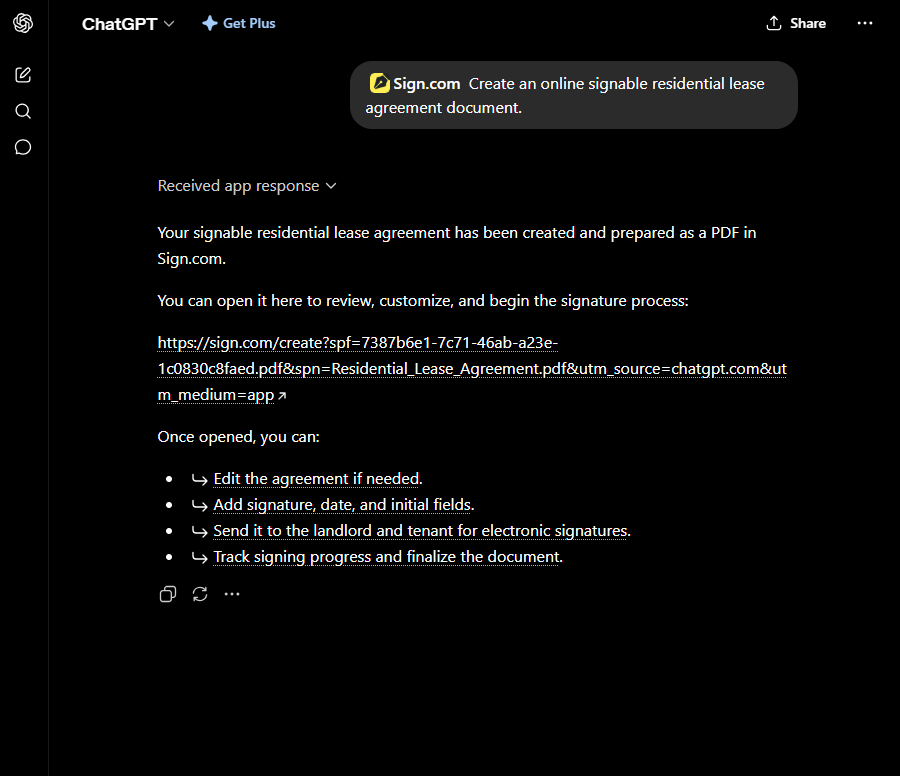
I couldn’t review and customize the generated document in ChatGPT. Additionally, the generated PDF was noninteractive, so I had to manually add fillable boxes using Sign.com’s drag-and-drop editor.
After I edited the document, Sign.com allowed me to configure signer details and set up the order of signatures. I could then ask for e-signatures via email or shareable link.
Best for: Nontechnical individuals and small teams
Developer: Smallpdf AG
Key features
- AI-enabled document generation
- No-code drag-and-drop editor
- E-signature collection via email or a shareable link
Pros
- Allows you to invite individual or multiple signers and track when they receive, open, and sign documents online
- Lets you assign fields to be filled out and signed by recipients
Cons
- Can’t edit generated documents in ChatGPT
- No signature-ready generated PDFs
- No verifiable e-signatures without a premium package
3. signNow
The signNow ChatGPT app can turn an existing document into a signable online file. But it has limitations.
During my test, I asked the app to “create an online signable residential lease agreement.” It said the signNow ChatGPT integration can’t generate the document from a text prompt alone. Instead, it requested one of the following:
- An existing DOCX or PDF file
- A signNow template
- The agreement details so ChatGPT could draft the document
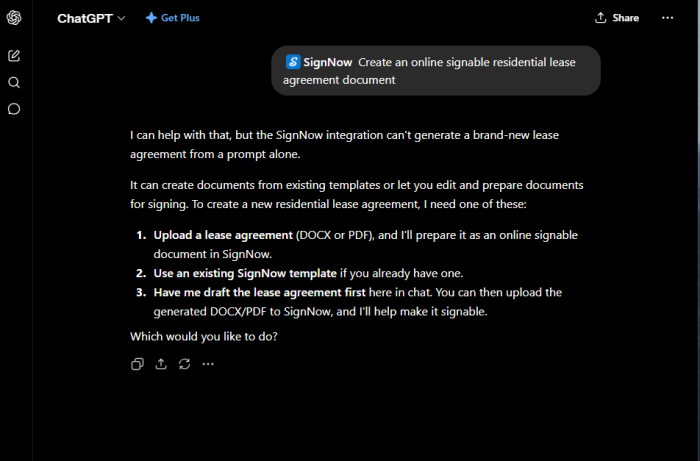
I chose the third option, and signNow asked for more details about the agreement, including the type of property and lease terms. The app then generated the document, which I could review and edit in ChatGPT.
However, to make the document signable, I had to download it as a PDF or DOCX file, log in to signNow, and manually upload it.
Best for: Businesses with existing signNow templates or files
Developer: airSlate Inc.
Key features
- Create signable documents from existing signNow templates or files.
- Track document status with simple ChatGPT prompts. For example, I asked the app to “check the signing status of the residential lease agreement and show me pending signatures.”
- Send reminders to pending signers with text commands inside ChatGPT.
- Request e-signatures via email or shareable link.
Pros
- You can assign specific signature or information fields to each recipient.
- You can send email invitations to recipients individually or in bulk.
- You can schedule signing invitations and set deadlines.
Cons
- Relies on existing templates or complex prompts to generate signable documents
- Requires manual edits to create fillable signature and recipient information fields
- Lacks a free plan
4. Docusign
The Docusign ChatGPT app lets you manage your Docusign documents directly from the ChatGPT interface. For example, you can ask it to
- Find files waiting for your review, approval, or signature.
- Check the signing status of agreements you’ve sent, including recipients and key dates.
- Review signed documents and extract details such as renewal or obligation dates.
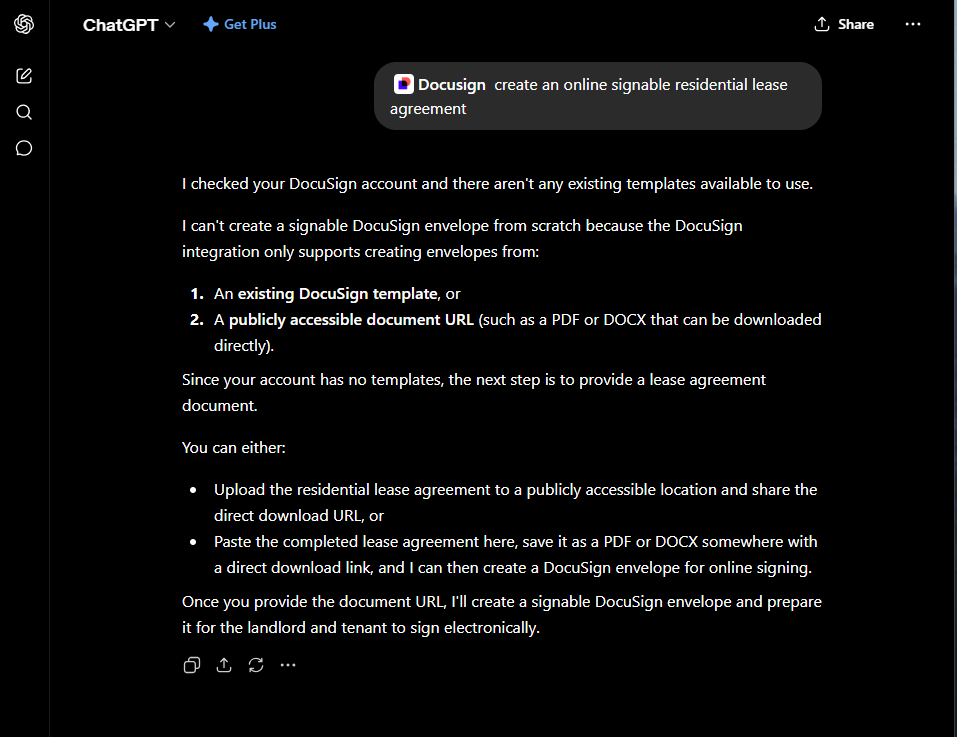
However, you can’t create a signable document from scratch using a ChatGPT prompt. When I asked the app to “create an online signable residential lease agreement,” it said the Docusign ChatGPT integration can create signable documents only from
- An existing Docusign template
- A publicly accessible document URL
Best for: Businesses that want to simplify document management and already use Docusign
Developer: Docusign
Key features
- Create signable documents with ChatGPT using existing Docusign templates.
- Use simple text prompts to retrieve, review, summarize, and track your Docusign files in ChatGPT.
- Ask multiple recipients for e-signatures.
Pros
- Makes it easy to find agreement details using text prompts
- Lets you manage Docusign workflows in ChatGPT
Cons
- Longer setup process than other ChatGPT sign apps I tested
- Manual field placement
- Suitable only if you already use Docusign
How to choose the right ChatGPT signature app
The right ChatGPT signature app for you depends on the types of documents you send, how often you send them, and whether your recipients sign on mobile or desktop. Also, you should choose a tool that fits your workflow while giving you room to scale.
Here are key factors to consider when choosing the best ChatGPT sign app:
Document types
When requesting e-signatures for legal documents, such as contracts, waivers, and consent forms, look for a tool with verification features (e.g., audit trails) that can attribute a signature to a specific individual. Confirm with your lawyer whether an app’s e-signing workflow meets the legal requirements for your use case and jurisdiction.
Sending volume
Most signing tools are reliable when you need signatures from just a few people. But if you’re collecting e-signatures from many recipients, choose a ChatGPT signature app with bulk sending.
Signing order
If you require signatures from multiple signers in a specific order, choose an app that lets you sequence the signing.
Mobile signer experience
Make sure recipients can review and sign documents on their smartphones without having to download software or create an account. A smooth mobile experience makes recipients more likely to complete the signing process quickly.
Status tracking
The best ChatGPT signature app shows you who signed each document and when. This creates a clear record that can help you verify the signer’s identity. The tool should also track pending signatures and automatically remind recipients who haven’t signed. These features reduce manual follow-ups.
Template reuse vs one-off documents
If you send the same types of documents repeatedly, select a ChatGPT signature app that helps you reuse and manage templates. If you plan to create documents you don’t expect to reuse, choose an app that prioritizes content creation over template management.
Final verdict: Which ChatGPT sign app should you pick?
Each signature app I tested excels in a different area, so the best choice depends on how you plan to use ChatGPT in your document workflows:
- Choose Jotform if you want to use simple text prompts to create and edit signable templates, then send them for e-signatures in a smooth ChatGPT workflow.
- Select Sign.com if you prefer to generate agreements or contracts with ChatGPT and make them signable using a no-code, drag-and-drop editor.
- Pick signNow if you already have contracts, PDFs, or templates in the signNow e-signature platform and you want to manage them easily with ChatGPT.
- Go with Docusign if you want to manage your existing Docusign documents from ChatGPT.
Ready to get started? Pick the ChatGPT signature app that meets your needs and start with a one-document pilot. Test how easily you can prepare an agreement, send it for an e-signature, and track the signing progress.
Once you identify a workflow that fits your needs, you can create reusable templates (if needed) to eliminate unnecessary repetition. You can also set up automations, such as reminders, to reduce manual follow-ups.
This article is for freelancers, small business owners, sales and HR teams, and operations managers who want to draft documents faster with ChatGPT and collect legally binding e-signatures from any device without complex setup.



















































































Send Comment: