

Claude connectors help businesses get more done in one interface. The best Claude signature connectors cut admin time: no more copying text into a separate e-signature tool, uploading files, or chasing signers.
This article includes five tried-and-tested Claude connectors for signing documents, including what each one does best, where it falls short, and a pros and cons list. After reading this article, finding the connector that best meets your needs should be easy.
What are Claude connectors?
Claude connectors are integrations that link Claude to the apps you already use, such as Google Drive, Slack, or an e-signature tool.
Once a connector is set up, Claude can pull information from that app and act inside it, like sending a contract for signature. The best Claude connectors let you do all of this in plain language.
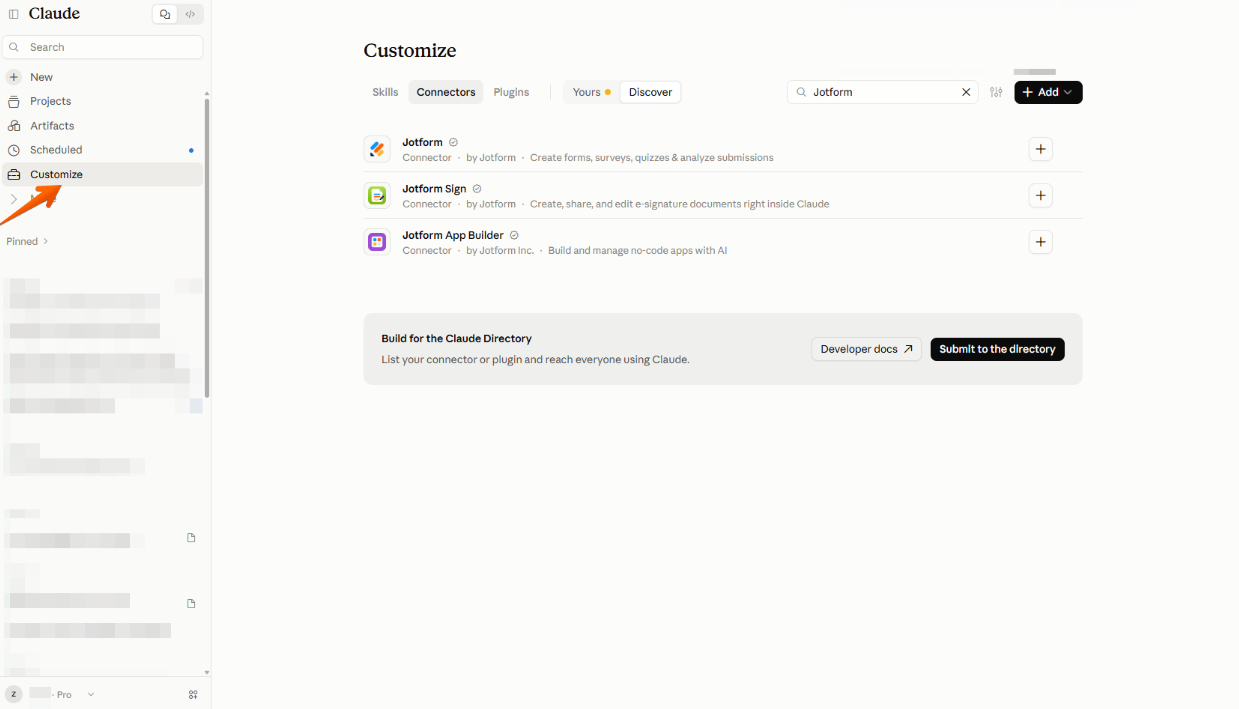
To add a connector, pick it from Claude’s connector directory, sign in to the app, and approve the permissions.
The following screenshot shows where to find connectors (under Customize) and how to search for them.
For e-signature connectors, the workflow usually looks like this:
- Put the content into a signable document or template: Ask Claude to draft it or use a saved template.
- Send it to the recipients for signature: Signers can sign from any device.
- Track status and reminders: Ask Claude who has signed, and send reminders where supported.
- Store and export signed copies: Completed documents are saved in your signing app.
Claude connectors work like ChatGPT apps. Many people choose Claude instead of ChatGPT for coding, writing-heavy tasks, and long documents, which makes it a natural fit for drafting contracts and proposals before sending them for signature.
Pro Tip
Thinking about making the switch? Small changes to your prompts can make a big difference. Our guide on how to prompt Claude for better results walks you through it.
The 5 best Claude sign connectors in 2026
A good e-signing app connected to Claude takes you from draft to signed document in one conversation.
| Tool | Best for | Standout feature | Main limitation |
|---|---|---|---|
 Jotform Sign |
Creating contracts and consent forms from a single prompt |
Builds a signable document with fields and signers from a prompt |
Forms and signing need two separate connectors |
 SignNow |
Sales and ops teams sending the same agreements repeatedly |
Sends prefilled documents from templates in one step |
Can’t draft new documents from scratch |
 Lumin |
PDF-first teams sending to multiple signers with deadlines |
Turns Claude drafts into PDFs and sends them in one flow |
Markdown-based PDFs limit custom layouts |
 SignWell |
Freelancers who want to review drafts before sending |
Claude places signature fields as it drafts |
Setup needs an API key and Node.js |
 PandaDoc |
Sales teams managing proposals and contract libraries |
Answers questions across your whole contract library |
Future usage limits haven’t been announced |
1. Jotform Sign
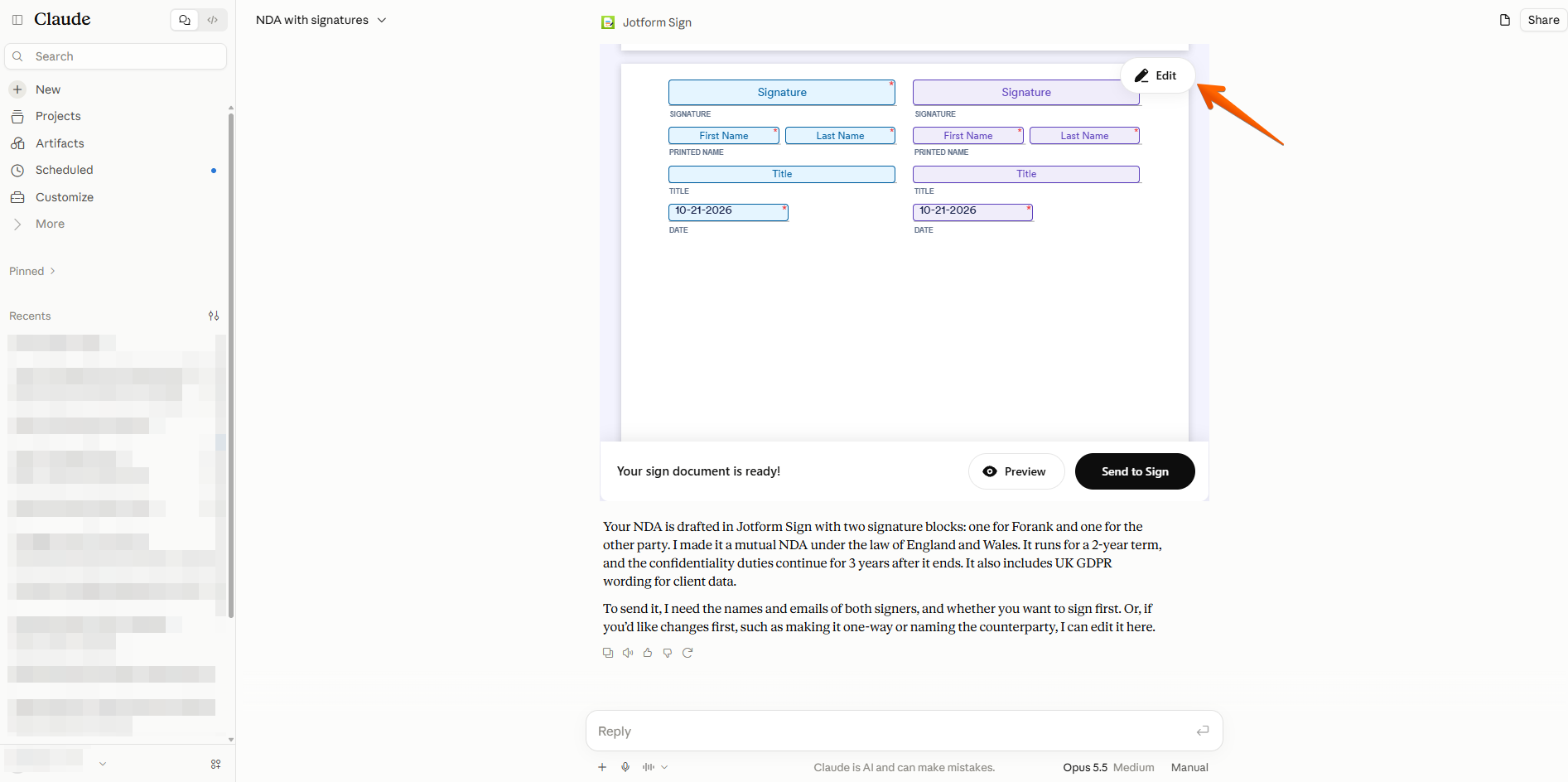
The Jotform Sign Claude connector lets you create, edit, and send signable documents without leaving Claude. Describe what you need, such as a non-disclosure agreement (NDA) or consent form, and Claude builds it with signature fields and recipients in place.
Here’s a look at how easy it is:
First, I wrote a simple prompt in Claude.
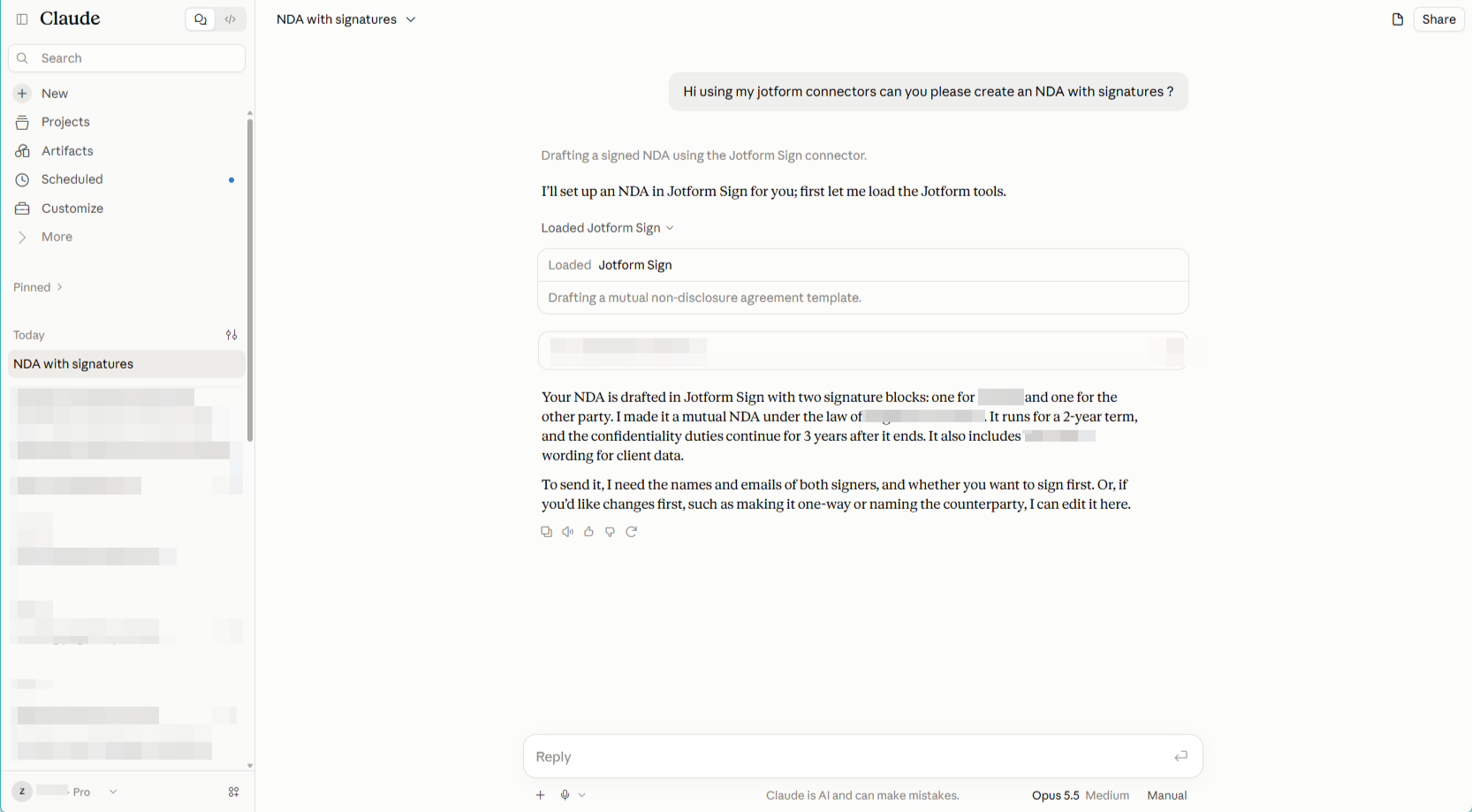
Claude did all the work, and within a minute I had an NDA ready for e-signatures in my Jotform account. Even better: I could edit it directly within Claude:
- Best for: Creating signable documents from a single prompt, then sending them for signature
- Developer: Jotform
- Limitations
- Sending separate copies takes extra steps: The Jotform Sign connector sends one document copy to the configured signer or group at a time. If you need 50 employees to each sign their own copy of a policy, Claude must update the recipients and repeat the send for each employee.
- Key features
- Prompt-to-document creation: Describe the agreement you need in plain language, and Claude generates a signable document with fillable fields.
- Conversational signer setup: Add recipients, set the signing order, and update signer details by asking Claude rather than working through settings menus.
- Status tracking in the chat: Ask Claude who has signed and who’s still outstanding, and it checks the document’s signing status for you.
- Pros
- Builds a signable document from a single prompt
- Sets signers and signing order through conversation
- Cons
- Separate copies require repeated recipient updates and sends
- Canceling signature requests in Claude isn’t listed as a supported feature
Need more than signatures?
The separate Jotform connector lets you build forms through conversation, then filter and summarize the responses. With both connected, you can run data collection and signing from the same chat. For more options on using Jotform, connectors, and Claude, see our roundup of the best Claude productivity connectors.
2. SignNow
The SignNow Claude connector brings the full signing workflow into Claude’s chat. You can create documents from your saved templates, prefill fields, send signature invites, check their status, and download signed copies by describing what you need in plain language.
- Best for: Sending standardized agreements from existing templates.
- Developer: airSlate Inc.
- Limitations
- It works from templates and documents you already have: The connector can’t draft a brand-new document from scratch. You need to upload templates to SignNow first, which adds a step that other connectors, like Jotform Sign, skip.
- Key features
- One-step sending from templates: Claude can prefill fields, so repeat agreements go out in seconds without manual data entry.
- Signing links for in-person and embedded signing: Generate a signing link you can share directly or embed in your own website or app instead of emailing an invitation.
- Status checks and signed-copy retrieval: Ask Claude where an invitation stands, including which step it’s on, and request a download link once it’s complete.
- Pros
- Sends prefilled documents from templates in one step
- Generates signing links for in-person or embedded signing
- Cons
- Can’t draft new documents from scratch
- Templates must be set up in SignNow first
3. Lumin
Lumin’s Claude connector covers the whole document life cycle: Claude can turn a draft into a PDF, file it in your Lumin workspace, send it for signature, follow up with signers, and retrieve the completed copy.
- Best for: Turning drafts written in Claude into PDFs and sending them to multiple signers with deadlines.
- Developer: Lumin PDF
- Limitations
- New PDFs are built from Markdown: When Claude creates a document from scratch, the connector converts Markdown into a PDF. That works adequately for headings, lists, and simple tables, but not for custom layouts like letterheads, logos, or multicolumn designs. Similar to SignNow, if you want to send branded proposals or quotes, you’ll want to set up a template in Lumin first.
- Key features
- Draft-to-PDF in one step: Claude converts text into a PDF and uploads it to your Lumin workspace.
- Multisigner requests with deadlines: Send a document to several signers in a set order and attach a signing deadline in a single prompt.
- Follow-ups without a dashboard: Ask Claude who has signed, send reminders, or push back a deadline, then retrieve the signed document as soon as everyone’s done.
- Pros
- Turns Claude drafts into PDFs and sends them in one flow
- Handles reminders and deadline changes in the chat
- Cons
- Markdown-based PDFs limit custom layouts
- Documents must live in a Lumin workspace
4. SignWell
The SignWell Claude connector lets you draft, send, track, and download contracts from a Claude conversation. Every document starts as a draft you can review before it goes out, and signers don’t need a SignWell account to sign from any device.
- Best for: Freelancers and small businesses that draft agreements in Claude and want a review step before anything is sent
- Developer: SignWell
- Limitations
- Setup is more technical than other connectors on this list: Rather than signing in with one click, you’ll need a SignWell API key and Node.js installed on your computer. If you mainly use Claude in your browser or on your phone, or you’re not comfortable running a setup command in a terminal, expect some extra work.
- Key features
- Draft-and-send with automatic field placement: Ask Claude to write a contract and add SignWell text tags, and it places signature, date, initials, and checkbox fields as it drafts.
- Template sending with preset roles: Send one or several saved templates to a new signer in a single prompt, with signing roles already configured.
- Status, reminders, and signed copies: Ask Claude who’s signed, send a reminder to anyone who hasn’t, and download the completed PDF with its audit trail.
- Pros
- Claude places signature fields as it drafts
- Documents start as drafts for review
- Cons
- Setup needs an API key and Node.js
- Free plan covers three API documents a month
5. PandaDoc
PandaDoc’s Claude connector brings your whole agreement library into the conversation. You can create documents from scratch or from your existing templates, send them for signature, and track who’s signed.
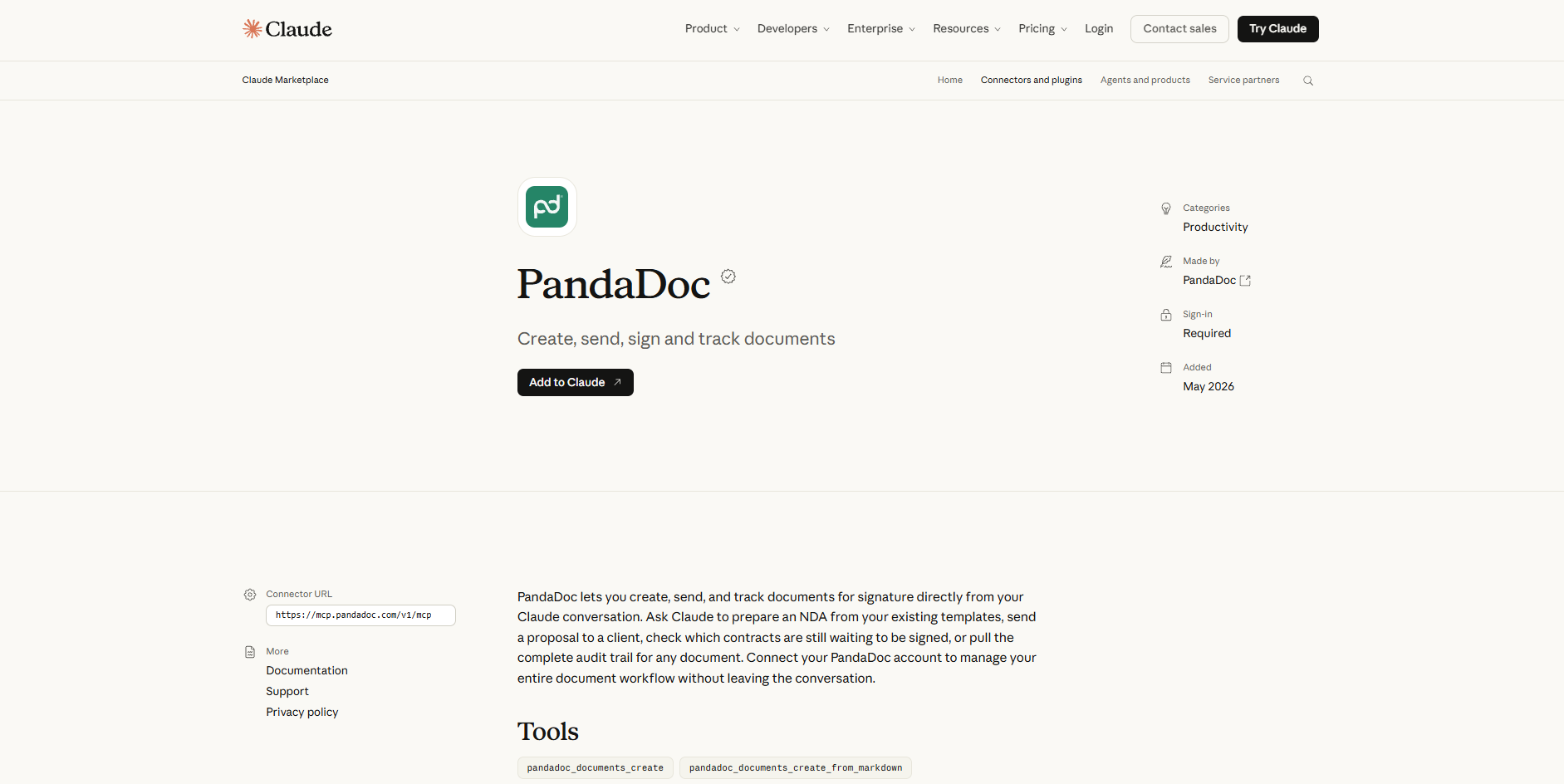
- Best for: Sales and operations teams that send proposals and contracts regularly and want answers from their agreement library without digging through it
- Developer: PandaDoc
- Limitations
- Usage limits are on the way but not yet defined: PandaDoc says paid plan users currently get unlimited access at no extra cost, but usage limits will apply in the future. It hasn’t said what those limits will be.
- Key features
- Draft-to-signature in one conversation: Describe the agreement or template to use, and Claude creates the document, adds recipients, assigns fields, and sends it for signature.
- PDF-to-template conversion: Upload an existing PDF agreement and ask Claude to turn it into a reusable PandaDoc template.
- Questions across your contract library: Ask Claude which proposals are still unsigned, which contracts expire in the next 60 days, or what your average deal size was last quarter, and it pulls the answer from your PandaDoc workspace.
- Pros
- Answers questions across your whole contract library
- Turns existing PDFs into reusable templates
- Cons
- Future usage limits haven’t been announced
- Insights depend on documents already in PandaDoc
How to choose the right Claude sign connector
If you draft one-off agreements in Claude, choose a connector that builds signable documents from a prompt, like Jotform Sign. If you send the same documents repeatedly, a template-first tool like SignNow or PandaDoc is a better fit.
Here are some criteria to check before committing to a Claude connector for signing documents:
- Your document types: Jotform Sign covers contracts, waivers, and consent forms; PandaDoc is built around proposals and quotes; and Lumin suits teams that already manage most of their documents as PDFs.
- Sending volume and number of signers: If your documents need several signers in a set order, look for signing-order controls, which Jotform Sign and Lumin both offer.
- Mobile signer experience: Jotform Sign and SignWell both allow signers to complete documents from any device.
- Status tracking: All five connectors let you ask Claude who has signed. If chasing signatures takes up a lot of your time, Lumin and SignWell can also send reminders.
- Template reuse vs one-off documents: For one-off agreements, Jotform Sign, Lumin, and SignWell can turn a Claude draft into a signable document. For repeat paperwork, SignNow sends prefilled templates in one step, and PandaDoc can turn your existing PDFs into reusable templates.
Final verdict: Which Claude connector should you pick?
Choose a Claude connector that provides the workflows required within your Claude conversation. Jotform Sign is the easiest place to start. You connect it in a single sign-in, describe the document you need, and Claude builds it with signature fields and recipients already in place, so you don’t need an existing template or a separate upload.
Even better: Jotform offers a forms connector, so you can collect information and send the agreement that follows, like a new-hire form and employment contract, without switching tools.
This article is for business owners, professionals, and teams who use Claude and want to simplify document signing, reduce administrative work, and compare e-signature connectors based on their features, benefits, and limitations.






































































































Send Comment: