

7 tips to improve virtual collaboration
- Invest in virtual collaboration tools
- Maintain routines and organization
- Set clear expectations
- Manage time zones
- Overcommunicate your message
- Share information virtually
- Be open to changes
Collaboration is an essential element of a cohesive, productive work environment. The goal of collaboration is to align everyone in a shared vision to accomplish goals together. Effective collaboration not only improves communication, but it also boosts overall results.
What is virtual collaboration?
Virtual collaboration is the remote version of that same goal, keeping people aligned on decisions, responsibilities, and progress when they cannot rely on hallway conversations or shared offices. In most organizations, virtual collaboration includes real-time discussions, written updates, shared project tracking, and accessible documentation so teams can pick up work without losing context.
As more companies shift to remote work, effective virtual collaboration is a growing need in a range of industries. Both employers and employees are finding that this arrangement is ideal for cutting overhead costs and providing employees with flexible, safe working conditions.
Why is virtual collaboration important?
Virtual collaboration is important because it reduces delays and miscommunication by making work easier to understand, easier to track, and easier to hand off between teammates. When teams collaborate virtually with clear systems, meetings produce decisions, decisions become action items, and action items stay visible until they are completed.
While remote work has many benefits, it also brings some undeniable challenges. For example, remote workers sometimes struggle with collaboration and communication. If you want to support your workforce and maximize productivity among your team, then you must implement the right tools and systems.
7 tips for improving virtual collaboration to get work done
Here are seven tips to improve virtual collaboration at your organization in 2026.
1. Invest in virtual collaboration tools
Virtual collaboration tools create a shared workspace for communication, coordination, and accountability in remote teams. The right tools help improve communication and optimize productivity at the same time. When team members are communicating effectively, everyone’s responsibilities and performance expectations are clear. McKinsey notes that a Microsoft study found many employees spend about two full workdays each week in meetings and responding to emails, which is why streamlined collaboration systems matter.
Effective teams use virtual communication tools for a variety of tasks, including
- Team communication
- Videoconferencing
- Project management
- Data collection
- Information analysis
- Time tracking
- Social media marketing
These tools enable employees to work from home, in coffee shops, or wherever they need to be during business hours.
2. Maintain routines and organization
Routines help remote teams create predictability, reduce confusion, and collaborate more smoothly. Just because employees are working at home doesn’t mean that schedules and routines are no longer priorities. Look for ways to replicate the systems and elements of working in an office.
For example, provide ways for employees to engage in “water cooler chat.” Since team members no longer cross paths in the breakroom or hallways, it’s important to give them a place to casually connect with teammates.
While employees can communicate through various digital tools, such as email and chat, nothing beats real-time conversations. Use virtual collaboration tools to improve efficiency and effectiveness in sharing team information and brainstorming each project’s strategic and creative elements.
Set regular meetings and invite team members to participate through videoconferencing. Standing meetings can be helpful in establishing a structured schedule during the week.
3. Set clear expectations
Clear expectations reduce friction by making responsibilities, availability, and meeting norms explicit. Be consistent in managing expectations for work hours. Employees should know when they need to be at the computer each morning and the number of hours they must log daily. Regularly scheduled team meetings are a vital measure to ensure that everyone stays on the same page.
The expectations you set should include guidelines for meeting behavior, productivity, equipment usage, work environments, and more. For example, some companies require team members to have access to a private room with a door to eliminate background noise and distractions.
4. Manage time zones
Time zone planning prevents exclusion and reduces scheduling stress for distributed teams. If your team is spread out across different time zones, consider how that impacts meeting times. Employees can feel isolated if they have a hard time attending team meetings in person due to time zone differences.
People need real-time collaboration, and most people want to work during regular business hours. Be considerate by asking team members about optimal meeting times and always consider time differences when setting these appointments to avoid scheduling a required meeting in the middle of the night for one of your team members.
5. Overcommunicate your message
Overcommunication prevents misalignment by compensating for missing in-person cues like tone, facial expressions, and body language. It’s easy to make assumptions about workflow and responsibilities, especially when you aren’t working with someone face to face. Effective virtual collaboration is built on a foundation of clear communication. When you convey a message through text, audio, or video, you miss out on valuable in-person communication cues, such as body language.
Make sure you’re deliberate about the content and tone of each message to ensure your intended meaning matches the way employees might interpret it. Remote work increases the likelihood of miscommunication, so you should always err on the side of overcommunication. When you think you’ve communicated your intended meaning, take it one step further to ensure that the message comes through clearly.
6. Share information virtually
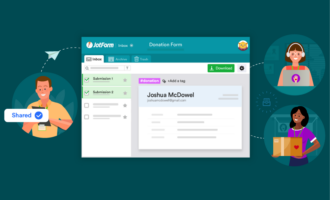
Centralizing information helps teams collaborate without relying on long message threads or scattered files. Jotform offers a variety of tools that make it easy for teams to collect and share information virtually. You can gather employee information and feedback using customized online forms. Team members can then view and share information from these forms using Jotform Tables.
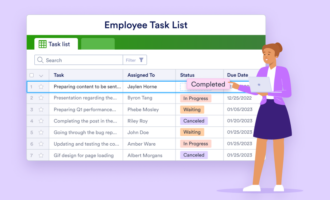
Jotform Tables simplifies virtual collaboration by creating one-click solutions to view your data in a variety of formats. Additionally, teams have the option to import existing data using Excel or CSV files to consolidate existing and new data. Collecting information from employees and customers is just the first step. This data isn’t useful or practical without a way to organize and manage it.
Jotform Workflows can automate what happens after information is collected by routing submissions to the right teammate, triggering approvals, and keeping follow-ups consistent across teams. Jotform Boards can make collaboration more visual by showing collected submissions as cards, helping teams track requests, updates, and action items in one shared view.
By combining online forms, Jotform Tables, Jotform Workflows, and Jotform Boards, teams can collect information, route it to the right people, and keep progress visible without relying on manual coordination.
7. Be open to changes
Virtual collaboration improves when teams regularly review what is working and adjust tools, routines, or expectations as needs change. Virtual collaboration is a process that you can improve and adjust over time. Be open to change so you can stay ahead of your team’s fluctuating needs and improve the results over time.
How to make virtual collaboration work long term
Virtual collaboration improves when teams treat it as a repeatable system, not a collection of tools. The strongest remote and hybrid teams make work easy to follow by standardizing routines, setting clear expectations, and keeping decisions and action items visible in shared spaces. When communication is consistent and information is centralized, teams spend less time clarifying updates and more time executing, which reduces delays and improves accountability.
Use these 7 tips to build collaboration habits that scale as your team grows, work becomes more cross-functional, and schedules become more distributed.
Frequently asked questions about virtual collaboration
You collaborate effectively virtually by using clear routines, shared tools, and explicit communication. Set expectations for availability and response times, document decisions and action items, use the right mix of real-time meetings and async updates, and keep work visible in shared spaces so progress is easy to track and hand off.
Virtual collaboration platforms are tools that help teams communicate, coordinate work, and share information remotely. Virtual collaboration platforms often include features for messaging, video meetings, task management, file sharing, and workflow tracking, so teams can plan work, make decisions, and follow up without relying on in-person interaction.
This article is for remote and hybrid team leaders, managers, HR and operations professionals, and distributed teams, and anyone who wants to improve virtual collaboration by building clearer communication, stronger routines, and more effective digital workflows in a remote-first work environment.





























Send Comment: