Adding your form to breezi.com websites is pretty easy, please follow the steps below.
1. After creating your form at Jotform, get your form’s iframe embed code. Here’s how
a. Go to Setup & Embed
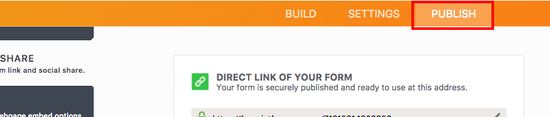
b. Click Publish
c. Select Embed then choose iFrame from the embed options listand copy the provided code.
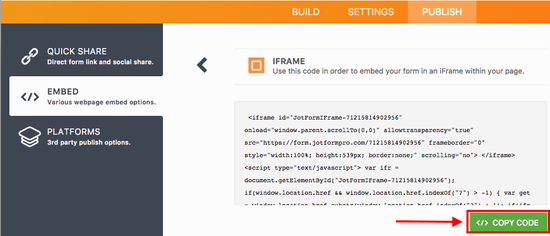
2. Edit your website at breezi and select the page where you’d like to add your form.
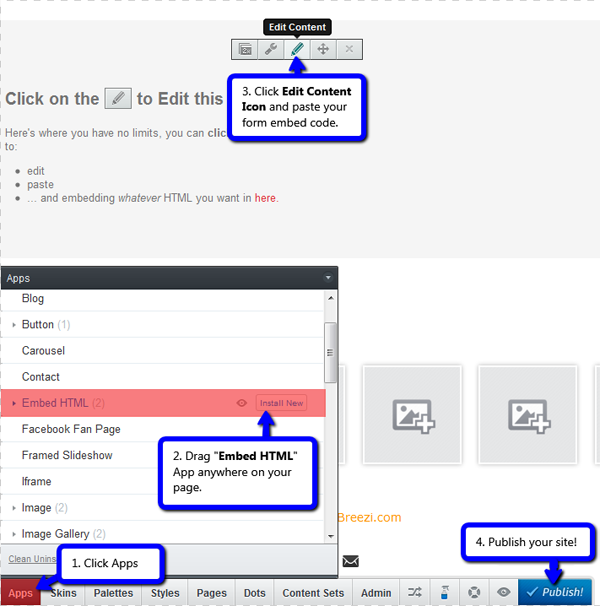
3. Click Apps tab
4. Select Embed HTML app and drag it to your page.
5. Click the Edit Content icon on the Embed HTML app and paste your form’s iframe embed code.
6. Publish your site!
Visual Guide:
A working demo can be seen here: http://jotform.breezi.com/
- If you have questions or difficulties with any of the steps above, please feel free to post it below. Thanks!

Send Comment: