Jotform makes it easy to send automatic emails right after someone submits your form. With an Autoresponder Email, you can quickly send confirmations, thank-you messages, receipts, or next steps without writing or sending anything manually. This helps you respond instantly, even when you’re busy or offline.
You can set up an autoresponder email in two ways:
- Email Copilot — Use AI to automatically generate and configure an autoresponder email.
- Manual Setup — Create and customize the autoresponder email settings yourself.
This setup saves time and keeps communication clear and consistent, so users get quick responses and you stay organized.
Setting Up Autoresponder Email Using Email Copilot
Email Copilot helps you quickly generate an autoresponder email using AI. It can automatically create the email subject and message based on your form fields. Here’s how:
- In Form Builder, in the orange navigation bar at the top of the screen, click on Settings.
- Then, in the menu on the left side of the page, click on Emails.
- Now, click on Add Email.

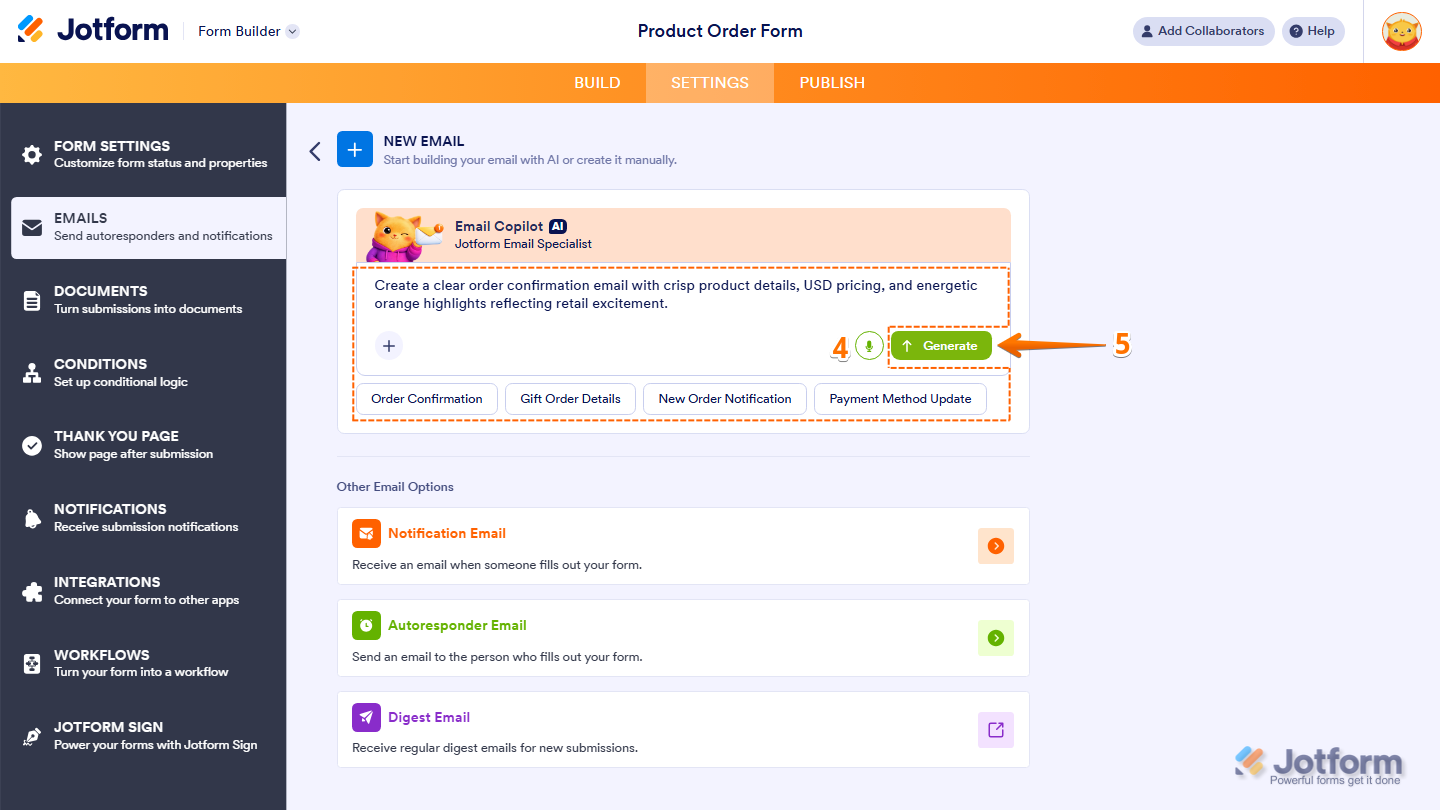
- Next, in the Email Copilot section, you can generate your Autoresponder Email using several options:
- Enter a Prompt — Type instructions describing the email you want to generate. For example: Create a clear order confirmation email with crisp product details, USD pricing, and energetic orange highlights reflecting retail excitement.
- Predefined Template — Select one of the suggested templates that helps you quickly generate a notification email for common scenarios.
- Microphone Icon — Click the microphone icon to describe your email instructions using voice.
- Plus Icon — Upload an image so the AI can match the email style with your branding or visual references.
- Once you’re ready, click on Generate.
Note
Some predefined templates may generate notifications or digest emails. To ensure the correct type is created, make sure your prompt clearly specifies that you want to generate an Autoresponder Email.
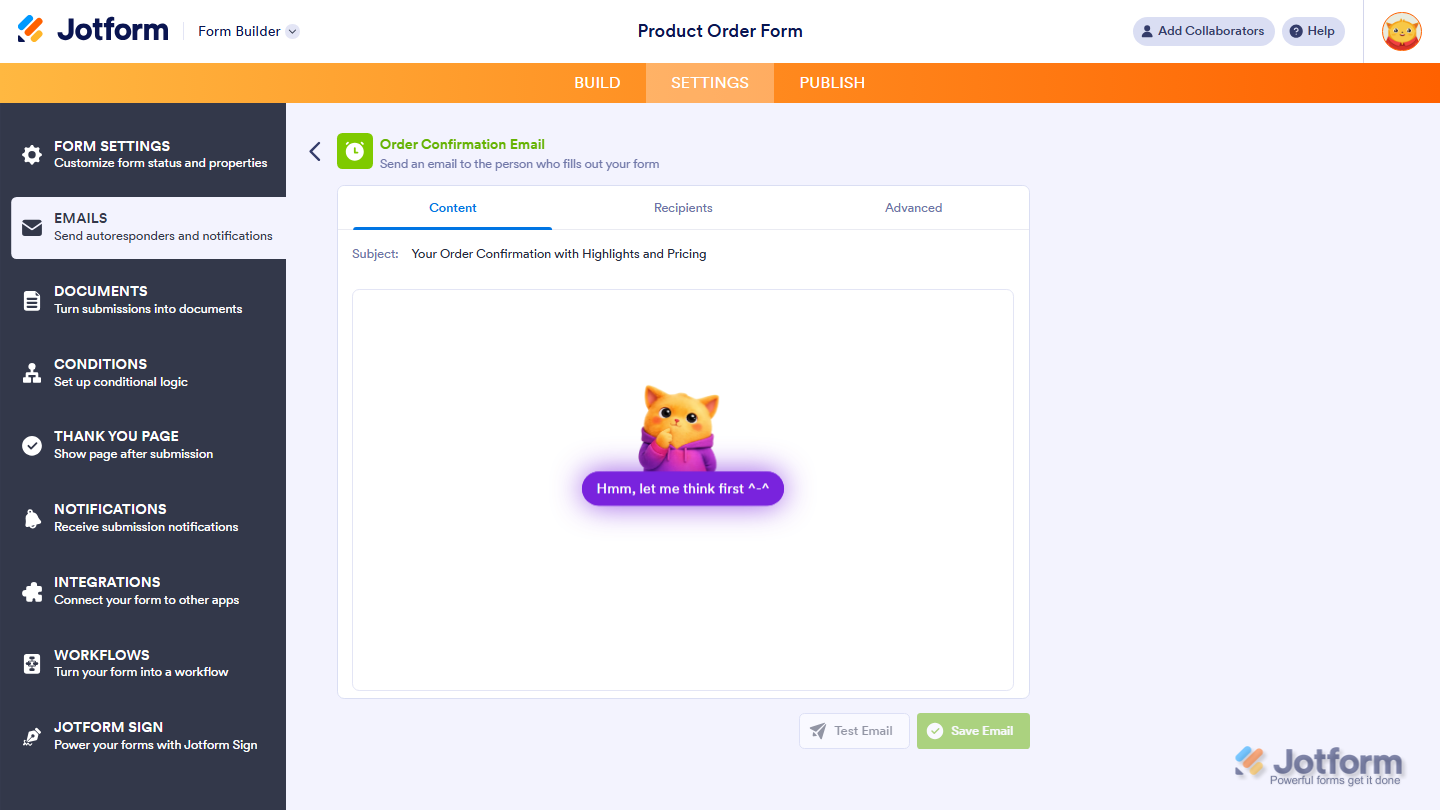
Email Copilot will now generate an autoresponder email based on your prompt and form fields.
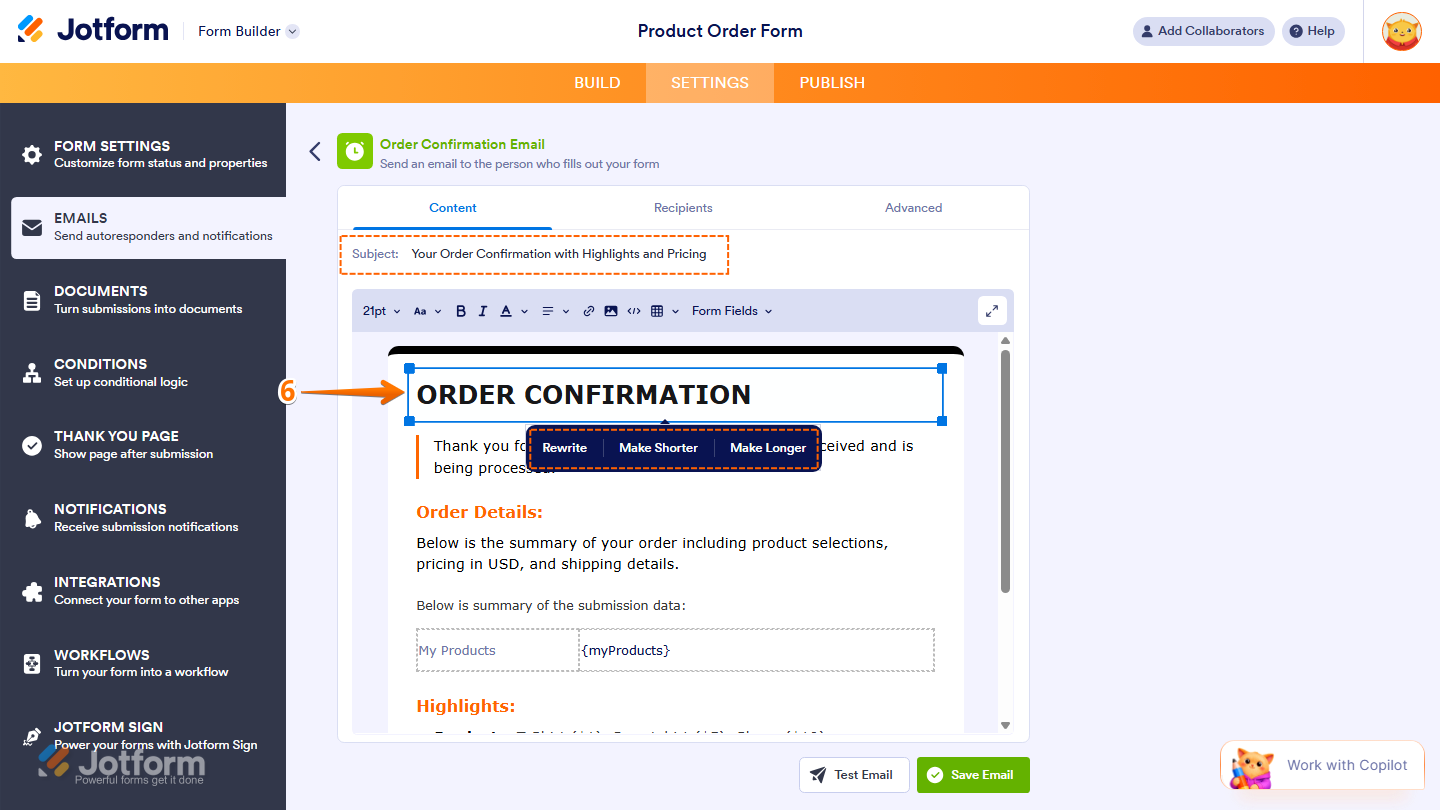
- Now, you can review the generated subject line and email content directly in the editor. If you want to refine the message, you can click on any text block in the Email Content tab to access the following AI editing options:
- Rewrite — Rephrases the selected text while keeping the same meaning.
- Make Shorter — Condenses the text into a more concise version.
- Make Longer — Expands the text with additional details.
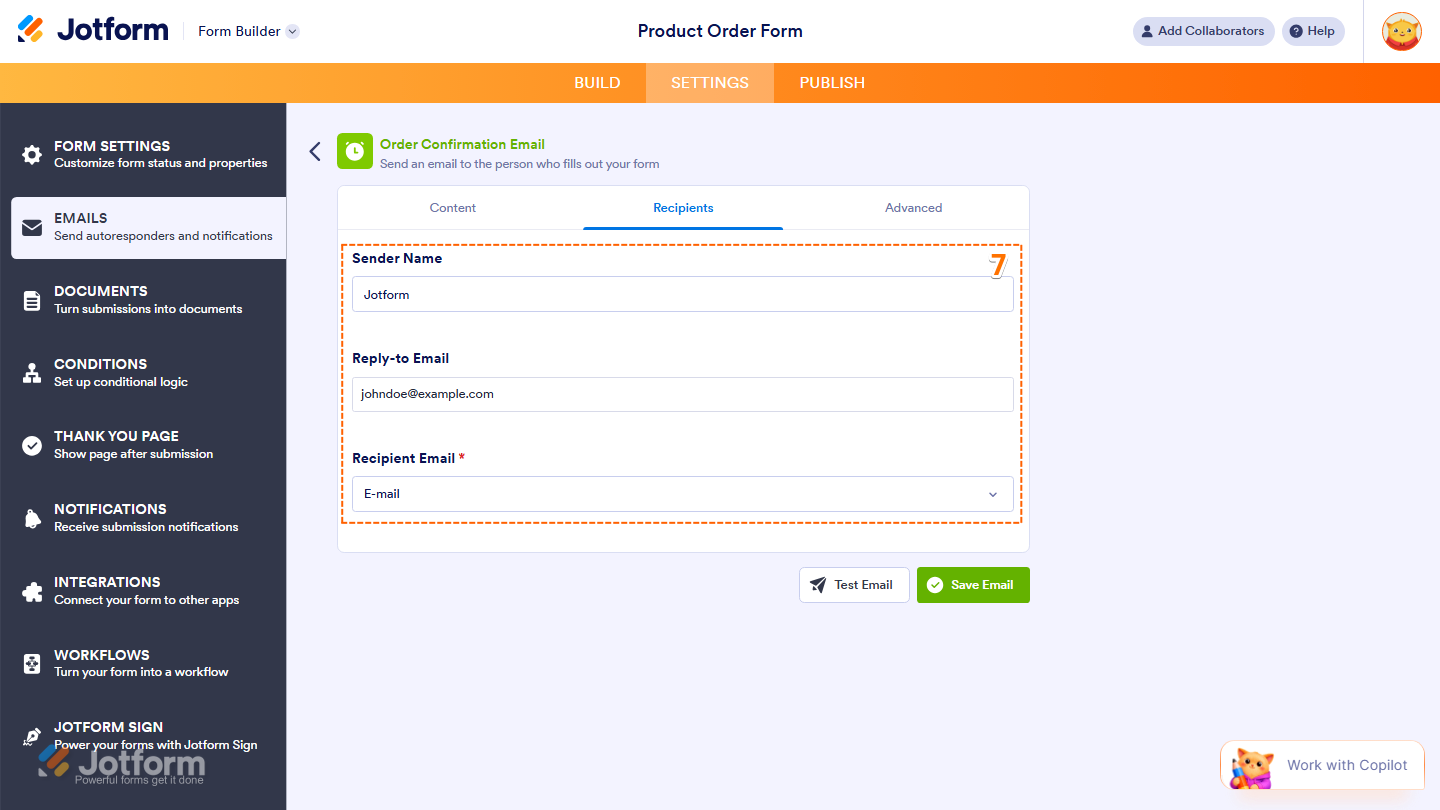
- Then, under the Recipients tab, configure these things:
- Sender Name — The name that will appear as the sender of the email.
- Reply-to Email — The email address where replies will be directed.
- Recipient Email — The email address that will receive the notification.
- Now, under the Advanced tab, setup these things:
- Send Email Automatically — Check this option if you want the email to be triggered automatically when a submission is received or edited.
- Send File Uploads as Attachments — Toggle on this option to attach files uploaded through your form.
- Attach PDF — Toggle on this option and select which PDFs to attach to the email. Take a look at our guide on How to Include Submissions as PDF Attachment in the Email Notifications for more details.
- Hide Empty Fields — Toggle on this option to hide unanswered fields in the email.You’ll find more info in our guide on How to Hide Empty Fields on Email Alerts.
- Updated Email — Toggle on this option to automatically update the email when the form is edited.
- Sender Email — Set up your sender email address. For a full breakdown of how to do it, head over to our guide on How to Set Up a Custom Sender Email with SMTP.
- Finally, once everything’s set, click on Save Email.
Pro Tip
For better results, describe the tone and purpose of the email in your prompt. For example, you can mention your website, brand style, or upload your logo so Email Copilot can generate an email that matches your branding.
Setting Up Autoresponder Email Manually
If you want full control over the email content and settings, you can add and configure the Autoresponder Email manually. Here’s how to do it:
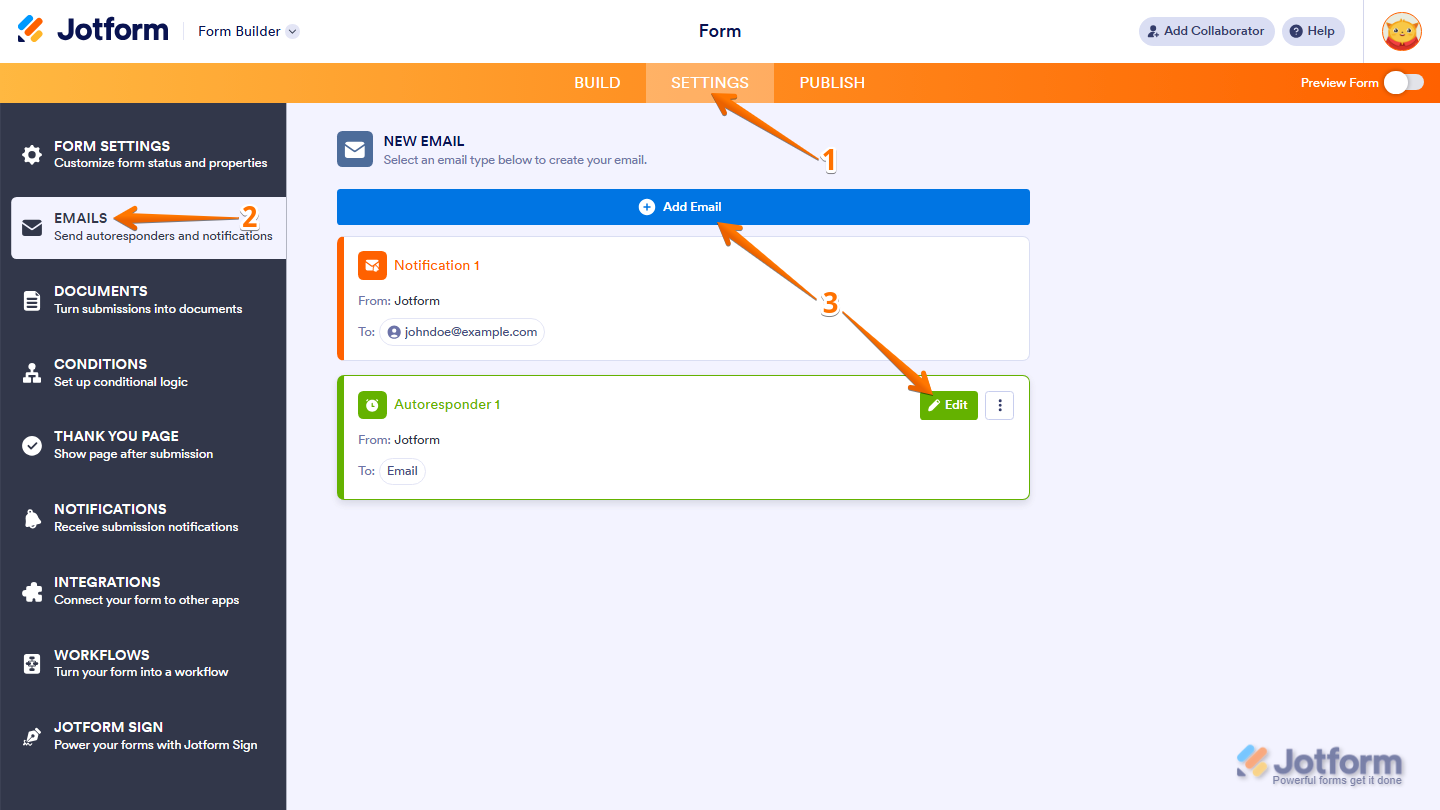
- In Form Builder, in the orange navigation bar at the top of the screen, click on Settings.
- Then, in the menu on the left side of the page, click on Emails.
- Now, hover your mouse over the Autoresponder Email and click on Edit to edit an existing email autoresponder. Or, click on Add Email to create a new Autoresponder Email.
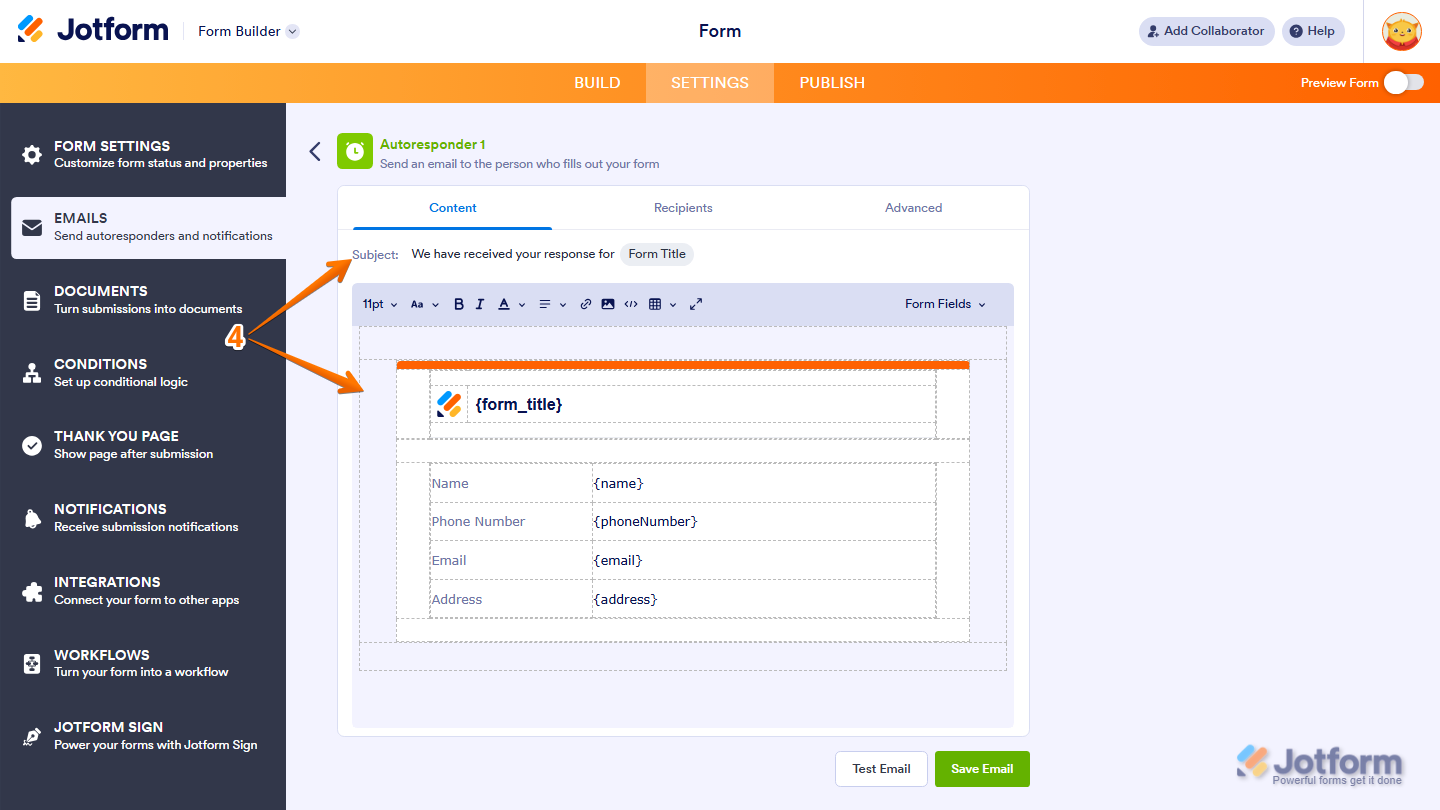
- Then, under the Content tab, customize these things:
- Email Subject — Set the subject line that will appear in the recipient’s inbox.
- Email Content — Edit the body of the email, including the layout and information included in the message.
Pro Tip
Use the Form Fields button to insert responses from your form into the email content. This allows you to personalize the message or automatically include submitted information.
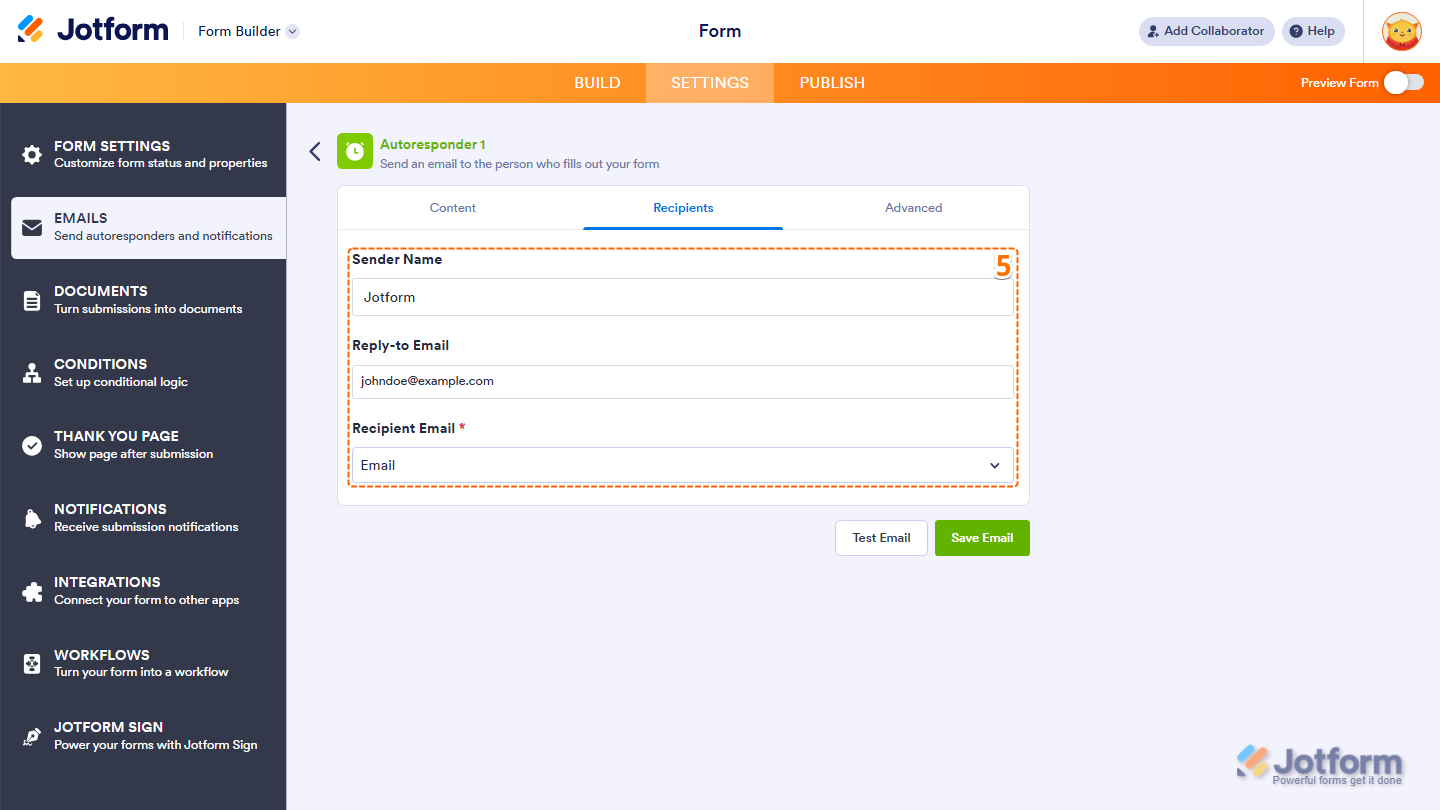
- Next, under the Recipients tab, configure these things:
- Sender Name — The name that will appear as the sender of the email.
- Reply-to Email — The email address where replies will be directed.
- Recipient Email — The email address that will receive the notification.
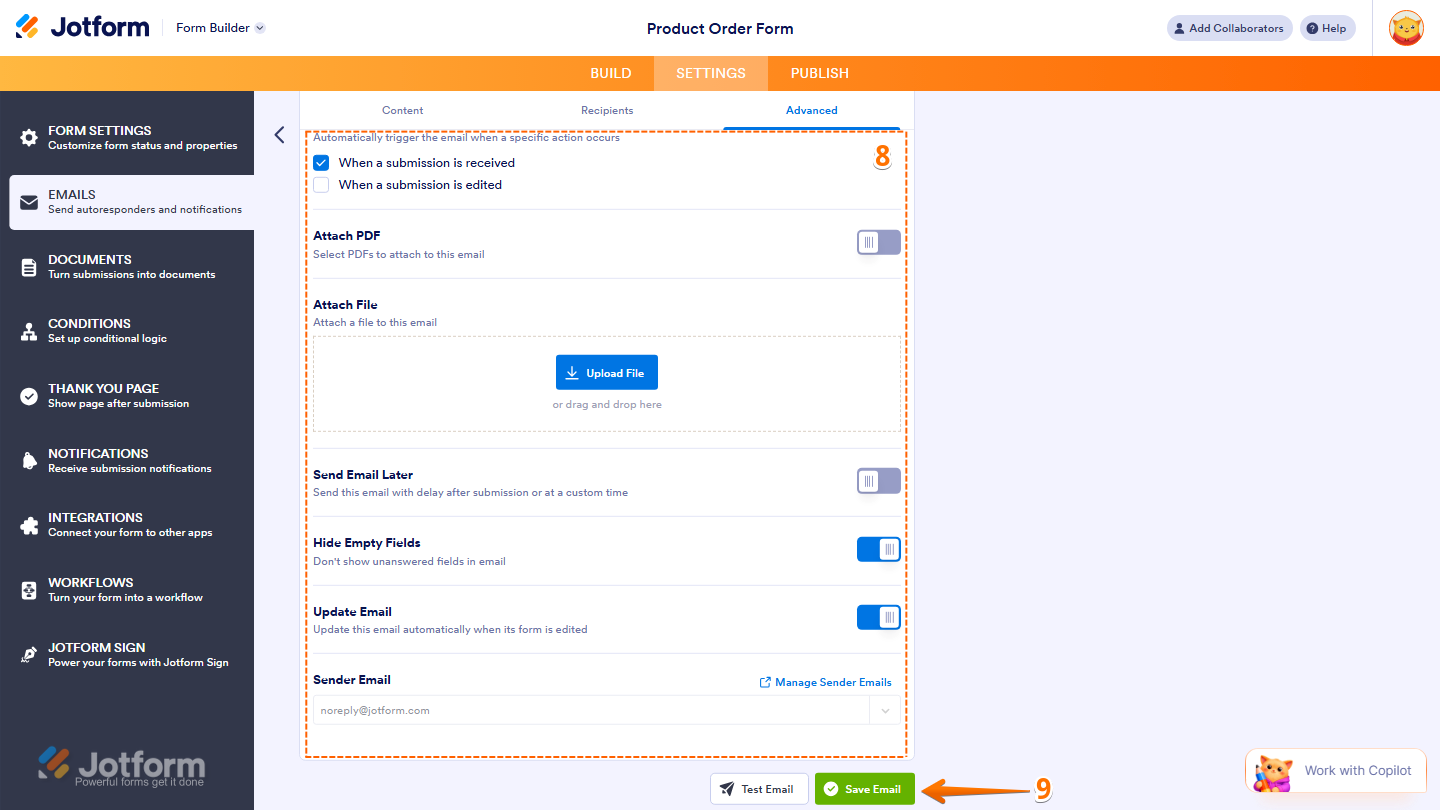
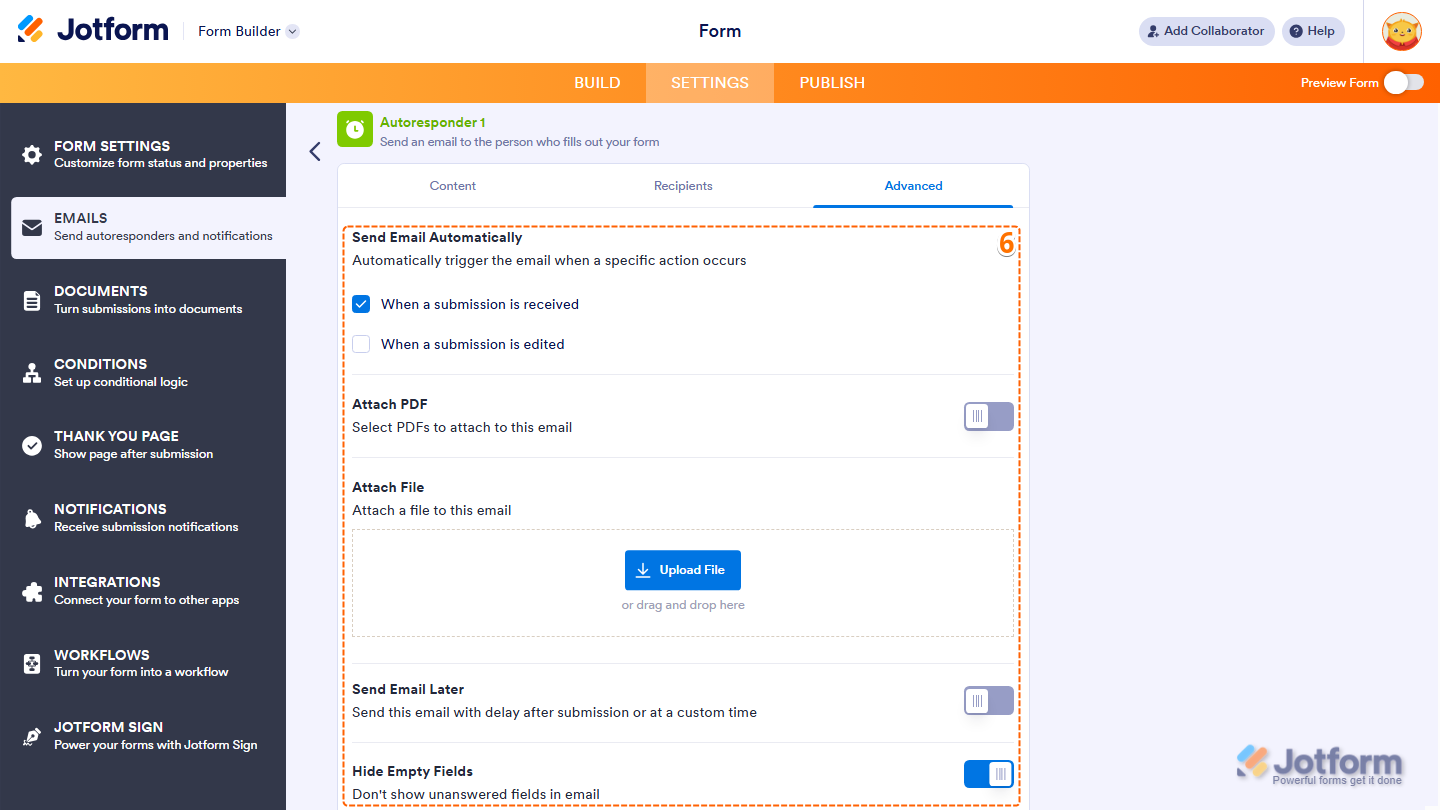
- Now, under the Advanced tab, set up these things:
- Send Email Automatically — Tick the checkbox to automatically trigger the email when a specific action occurs. You can choose between two triggers: when a submission is received and when a submission is edited.
- Attach PDF — Toggle on and select which PDFs to attach to this email. Take a peek at our guide on How to Include Submissions as PDF Attachment in the Email Notifications to learn more.
- Attach File — Upload and attach an external file such as a brochure, terms and conditions, or instructions to send with the email.
- Send Email Later — Toggle on to send this email with delay after submission or at a custom time.
- Hide Empty Fields — Toggle on to hide unanswered fields in the email. Our guide on How to Hide Empty Fields on Email Alerts walks you through everything.
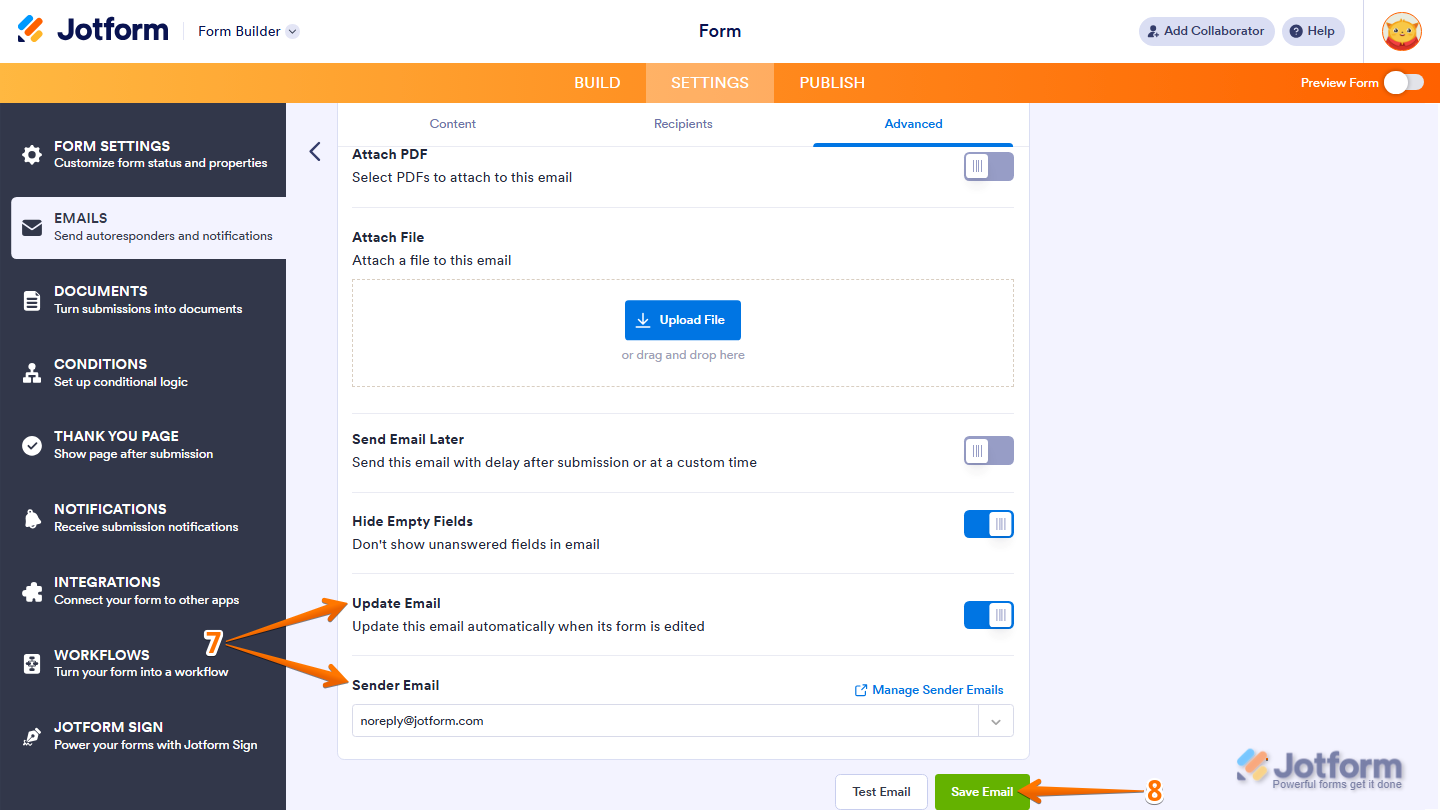
- Then, scroll down to the bottom and continue to set up these options:
- Update Email — Toggle on to automatically update this email when the form is edited.
- Sender Email — Set up your sender email address. Want a step-by-step walkthrough? Our guide on How to Set Up a Custom Sender Email with SMTP has you covered.
- Finally, click on Save Email and you’re all set.
Note
- Use the Test Email button to review your email and confirm everything looks correct before saving.
- Test emails will only be sent to the email address associated with your account.
That’s it! With your autoresponder set up, every form submission will receive a professional and timely response, helping you stay connected and keep communication consistent.



Send Comment:
168 Comments:
March 8, 2026
I want to put a text paragraph and a QR code in the email sent by Autoresponder. I can only add fields in the form. How do I ad something that is not in the form.
October 3, 2025
I am trying to set up an autoresponder email that is supposed to be scheduled to be sent out on an exact day and time. When we tested this the mail was not sent to the list of submissions. And in the Advanced settings there is a blue text box saying: This email can only be sent manually from the Exhibitor SIGN UP: FUN EXPO Liseberg 2025 Table.
What must we do to make this work and not have to send out the mail manually?
July 17, 2025
I have set up an autoresponder email after my form received around 50 submissions. Do these automated emails get sent to people that have previously filled out the form, too?
July 9, 2025
I have questions on how to change the settings so I do not automatically get the Form Submission notification for when a form is signed. Currently my notification set up to notify me when a form is completed and the Subject and Email content has important information by design. I also have the Autoresponder email so that the form filler gets notified and emailed upon completion that is important for the form filler. However, I always receive an additional email that notifies me that the form was signed and this filles my inbox and is redundant because I already received the first email. How do I stop this from happening?
March 5, 2025
Good Morning,
I am trying to set up Autoresponder so that form-fillers receive a copy of what they submitted. In Settings, I clicked on Emails and then clicked Add Email. I clicked AutoResponder Email and clicked on Recipients at the top. The dropdown menu under Recipient Email (Please Select) does not include the option titled Email. It lists only the field titles I created. This is a free account. Is this the reason the Email option is not showing up for me? Thanks.
March 2, 2025
Hi there, I am looking to set an a set of email responses, which I require to attach to weighted conditions. Ive set the logic though do not seem to be able to set a condition for direct to an email? The form i'm building is here, are you able to provide any insights please? I have checked YT, yet unable to locate the information I need. Any guidance gratefully received, Joel
August 14, 2024
HOW MANY AUTORESPONDERS CAN I SET ONCE WE GO FOR THE PAID VERSION
July 22, 2024
can I send multiple pdf's. It shows I can only send one??
July 21, 2024
The autoresponder emails are not being sent/received for my Planning Assessment form. How do I correct this? I am receiving notification that they have filled and submitted the form.
July 15, 2024
how do i send an invoice to the person filling out the form when they submit a form
May 27, 2024
This guide seems to show that all form fields are displayed in the autoresponder email, however I've just created an autoresponder email and that is not the case. It only shows the message 'Your submission has been received. Thanks for filling out {form_title}.' I did a test email and it shows the same. How do we make the autoresponder show all form fields so that the submitter knows what information they have submitted?
May 16, 2024
I have tried to set up notify email to me when somone signed up but I just tested it and still won't work. What happened?
October 12, 2023
Is it possible to setup an auto-email template?
October 7, 2023
Im using a ticket form- how can I get Jotform to send the ticket via email after submission?
September 2, 2023
How do I create a response based on their quiz results? I just created a Dieter Personality quiz form and i want to be able to send a response with their result based on their score...... how would i do that?
March 7, 2023
I have set a form with many fields, so want to hide empty fields in the emails - however even with it set to hide them, they are showing in the emails sent out. Why would this be?
January 11, 2023
How can you send the filled out form as a pdf? As in, all the questions and their answers are on one pdf and sent in an email? Thank you
November 13, 2022
should there be a email address field on the form for the 'save and submit later' functionality to work?
October 28, 2022
On the email test sent from the auto responder, at the end, there are two options for editing the form:
You can edit this submission and view all your submissions easily.
How can I choose only the option: edit this submission
Thanks
August 16, 2022
Autoresponder emails only uses form fields. In my case I use jotform for sending out contract and I want to be able to send them the whole contract (including the fields they filled out and the terms of services defined in the contract, and have the ability to either attach a pdf copy of it or have them download the copy themselves. is there any way to do that?
May 25, 2022
Is there a way to track and see how our autoresponder emails performed? Basic open and click through rates is what I'm looking for.
Thank you
March 28, 2022
The data requested on the Autoresponder and the notification email are the same, however, they print different information in the fields. what have I done wrong.
March 24, 2022
This is great. If I have a form reply I wish to send to my list upon receipt of their Jotform is this possible?
March 22, 2022
I've noticed when I setup an email using the "Input Table Properties" element the form will not send that email. Why? I am using a form entitled "Cash App Input Form"
Benjamin Strickland
bsstrick197@gmail.com
March 4, 2022
We did some test submissions of our registration form, and our club is receiving the notification emails when the form is filled out and submitted, but not everyone that filled out the form receives the autoresponder email. Seems that anyone that has their email with Bellsouth.net does not get the autoresponder.