Each time you create a form, a unique URL is generated, making it easy to share with others. Whether you share it via email, a messaging app, or online, having quick access to your form’s URL helps you reach people faster and start collecting responses right away.
You can find and copy your form’s URL in just a few steps. Here’s how to do it:
- On your Workspace page, click on Type at the top and in the Dropdown menu that opens, uncheck the boxes next to all the assets except Forms, so only they’ll be shown on the page.
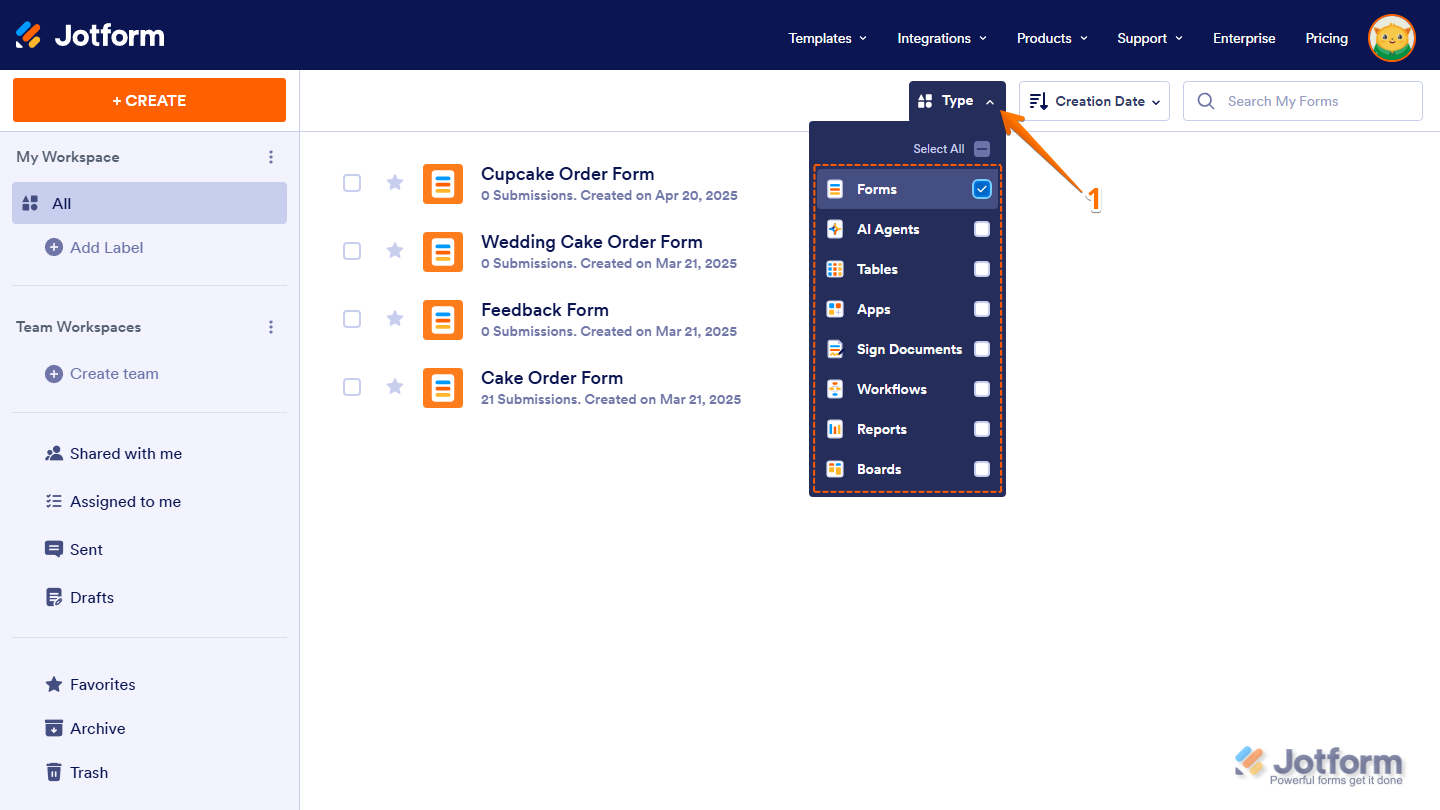
- Now, hover your mouse over the form you want to get the URL for, and click on Edit Form on the right side of the page.

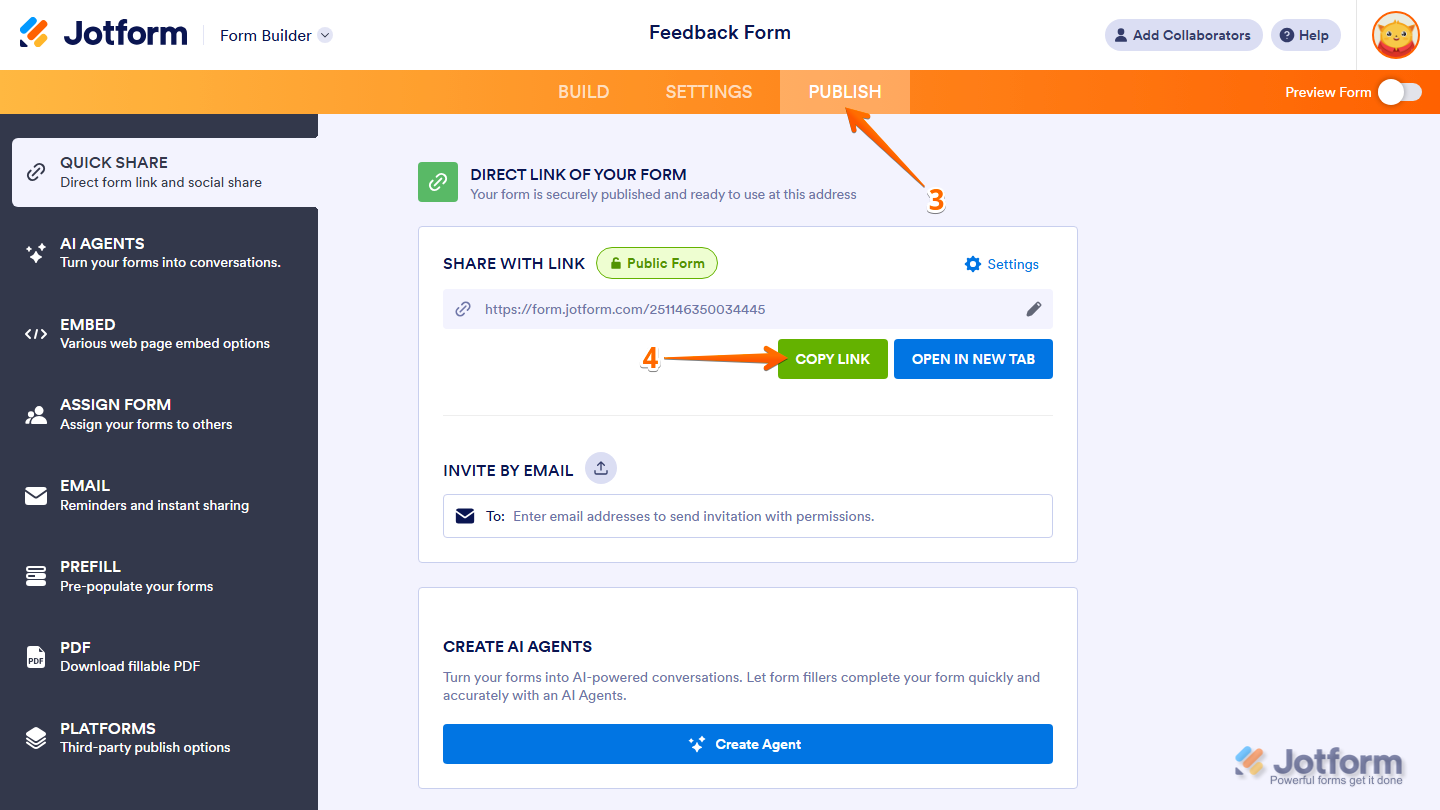
- In Form Builder, in the orange navigation bar at the top of the page, click on Publish.
- Then, under Share With Link, click on Copy Link.
That’s it! Now you can send the URL through any external messaging or email platform and start collecting responses right away.
Notes
- The unique series of numbers at the end of the Form URL is called the Form ID and is used to identify that specific form. The Form ID is sometimes required when connecting your form to other applications through third-party integrations, such as Microsoft Power Automate, or endpoints like APIs or Webhooks that need to define the form’s ID.
- If you want the form URL without the Form ID, you can set up a custom URL for it. For more details, check out our guide on How to Create a Custom Form URL. To use custom domains, you can check our guide on How to Use Custom Domains With Jotform Enterprise to learn more.



Send Comment:
98 Comments:
January 16, 2026
Mi cuenta sigue sin espacio de carga aunque ya eliminé y purgué todos los envíos del formulario registro de ingreso y salida del sitio y limpié la caché de formularios, pero el límite no se actualiza y envíalo desde tu cuenta actual.
September 29, 2025
You are a complete waste of of time and take up way too much of my screen and I just wish you would go away
August 22, 2025
Hi,
I was just wondering if this is a legitimate link through jotform? I see it has render.jotform instead of form.jorform :
render.jotform.com/250577939681877
Thanks
July 28, 2025
اريد ارسال مشروعي عباره عن apk مشروعي القامع
January 14, 2025
You can find my form "Let ESTELLE FINANCIAL file your Taxes " at:
It won't let me click enable
January 2, 2025
Redirect to an external link after submission, adding the thank you chat bot link does not work
December 24, 2024
Hello
I have people responding to my form but I do not see their responses. On my phone app. I cant even see my form. Please HELP!
October 18, 2024
I have been sending my link to my form through text and nobody can click on the link through text to open it up. Is there an option to send a direct link with easy access?
September 10, 2024
This is not what I was asking.
We have folks who are filling out a form and we have enabled the option for them to edit their form once they receive the confirmation by clicking a link included in the confirmation email. The problem is, when they go to edit the form that they just filled out, it asks them to pay the fee again. If they try to pay it causes an error, if they don't pay, it causes an error.
Can you advise how to fix this?
August 14, 2024
Patients are having trouble getting into the forms through these links
August 9, 2024
"We are unable to upload photos entered with prev job entries."
July 31, 2024
it only allows twice save after that you cannot make another save of the form
June 18, 2024
Hello, I contacted support yesterday and my thread has been lost. My ticket number is #16006801...
May 2, 2024
Hi there,
I have a jotform ready to go and when I test it, it is requesting people login even though I have it set to Public. Can you please help me fix this so that I can send my form.
April 18, 2024
What I mean is, after one person sign the form and then second one will sign the 1st signature went missing
April 16, 2024
I don't understand it how can I set my uR
March 11, 2024
Thank you for the clarification. I am getting close on both ends but not getting the exact results I am looking for.
Step 1 - Sender can prefill form or receive data from a zap - this is working.
Step 2 - completed form is sent to signer to fill in the signature.
Currently the sender is only able to sign. Need to send the signing link to the enduser.
Step 3 - tracking. I am able to track the receipts of the document but its only going to the sender not signer for signature...
February 12, 2024
There are been two new submissions that I received notification of via email but don't show up. Also, the new version is showing up and we were on the old version and would like to stay on that.
Thank you,
Pam
January 16, 2024
Good Day,
Below is the url of the form that is giving issues.
once the submit button is clicked, the page hangs and takes too long to load and sometimes gives errors.
January 2, 2024
Buenas
Feliz año nuevo, Por favor conseguirme el usuario y clave de un formulario que diseñe el 29 de diciembre llamado
No puedo entrar y cuando le di a recuperar clave, menos.
Por favor y gracias.
Aida
November 24, 2023
this is my form
November 15, 2023
Service is excellent
October 15, 2023
“WebChat QA Forms - 2023” and “Agent Feedback Form” these are the one for which the mails are not coming through to our inbox.
October 8, 2023
I’m pretty sure I just got scammed filling out a rental application .. everyone beware and I’m not getting any help on the matter
August 27, 2023
It doesn't let me type words or copy paste words.