This guide shows some useful tips when performing date calculations using the Date Picker form element and Form Calculation widget. Working comfortably with Form Calculation helps. To learn more, see Form Calculation.
Notes
- Form Calculation converts dates to sequential serial numbers (datetime) so they can be used in calculations. By default, 1970-01-01 (00:00:00 UTC) is 0, and 2095-01-23 (12:00:00 UTC) is 45678.50 because it is 45,678 days and 12 hours from January 1, 1970 midnight.
- Form fields added in Form Calculation must be set to numeric indicated by the trailing [0-9] label for the calculations to work.
Adding or Subtracting Days to a Date
You can add or subtract days to a date in Form Calculation using the addDays() and subtractDays() functions respectively. The result will be a date in “D M d Y” format, like Sun Jan 06 2030.
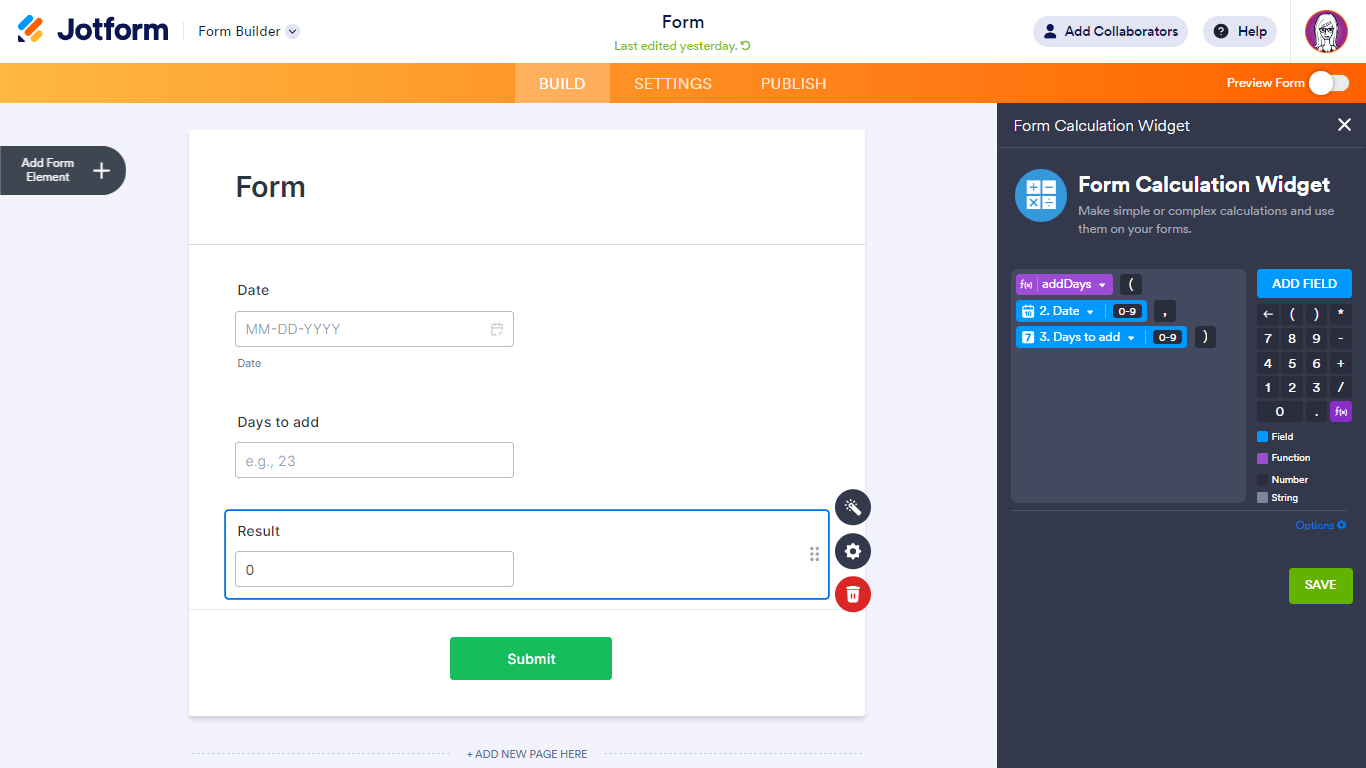
Example:
| Formula | addDays(Date, Days to add) |
|---|---|
| Date | 2030-01-01 |
| Days to add | 5 |
| Result | Sun Jan 06 2030 |
You can also add a specified number of units to a particular date in Jotform Tables using the DATEADD function. To learn more, see Advanced Formula: Date Functions.
Getting the Difference Between Two Dates
To get the difference between two dates, subtract one Date Picker from another. The result will be the number of days, in decimals, between the two dates.

Example:
| Formula | To – From |
|---|---|
| From | 2030-01-01 00:00 |
| To | 2030-01-02 12:00 |
| Result | 1.50 |
To get the absolute result regardless of the dates’ order, use abs() in Form Calculation. You can also get the difference between two dates in your specified units in Jotform Tables using the DATETIME_DIFF function. To learn more, see Advanced Formula: Date Functions.
Converting Days to a Different Unit of Time
Date calculations in the Form Calculation widget return the result in days units. To turn it, or any number, into a different unit of time, add a Form Calculation widget to your form and set the unit’s formula from the following table:
| Unit | Formula |
|---|---|
| Years | Days / 365 |
| Months | Days / 30 |
| Hours | Days * 24 |
| Minutes | Days * 1440 |
| Seconds | Days * 86400 |
Note: Rounded conversion factors are used for years and months. For other values, see Conversion Factors: Time.
Converting Days to Years, Months, and Days
Supposing, you have the number of days, and now, you want to convert this number to a years, months, and days format. To set it up, add three Form Calculation widgets to your form and use the following formula for each:
| Unit | Formula |
|---|---|
| Years | floor(Days / 365) |
| Months | floor((Days % 365) / 30) |
| Days | floor(Days % 365 % 30) |
Notes
- Rounded conversion factors are used for years (365) and months (30). For other values, see Conversion Factors: Time.
- To use the modulo operator, use your keyboard to type in the percent (“%”) symbol in Form Calculation. The modulo operation returns the remainder of a division.
- The floor() function rounds the result down to the nearest integer.
- You can test the results in this demo form.

Send Comment:
21 Comments:
May 23, 2025
hello
how to put differents prices every month between dates check in and dates check out
November 6, 2024
I need ro convert decimal uploaded time in a table to Millitary time
March 12, 2024
I am trying to add so many days to a date to then display the resulting date. Example: 3/5/24 plu 2 days is 3/7/24. I am inputting in my fields exactly as shown but my result just displays 3}],
January 15, 2024
Getting the Difference Between Two Dates formula only provides the number of whole days without any decimals for example 2024-01-15 10:00 am and 2024-01-15 3 pm entered will give a result of 0 instead of any answer even with the decimals allowed to reach 10 where as 2024-01-15 10:00 am and 2024-01-16 3 pm entered will give a result of 1 and so on.
December 31, 2023
my form looks correct with the times in PM but when I go to the form the times are different and in the AM
September 3, 2023
I am trying to get the number of minutes between 2 times. I thought I had the right formula. It works in Excel but not here. What can I use to make this happen?
Calculate a field's value
=(DOWN0-9 - UP0-9)*1440
What am I doing wrong???
DOWN & UP are field names that are "time fields"
May 14, 2023
How do I make sure the time being sent in the auto-responder email is set for the correct time zone? I just received a call stating they received an appointment reminder for 9:30 appt, but the appt is actually for 10:30. It noted Denver, CO time and I'm in Central Time (Texas). Thank you.
January 19, 2023
I just need the day digit to use in a pro-rate form for rental. I see Days() looks like it pulls out this number, but I get the days since 1970. I just want the number 20 in a jan 20, 2023 example.
May 6, 2022
Is there a way to calculate the number of workdays between two dates?
November 16, 2021
How can I add a calculation results in time range field (from, to)
October 3, 2021
Can I simply just convert my date into Julian format so that I can just do a simple subtraction to find out how many days have passed? This is so complicated.
July 1, 2021
I need to auto-fill time in a column while adding 15 mins. So when 1st row is entered with time in decimal (ex. 2.57) second and rest will auto-fill the entire column.
1. 2.57
2. 3.12
3. 3.27
4. 3.42
etc.
April 24, 2021
I am not trying to calculate a date, per se, just trying to set the date picker to a specific date via conditional logic. I have been searching for the correct format to send to the date picker field and it doesn't appear to be anywhere on the help site. Should it be sent the date in epoch format? I've tried guessing a couple formats and ended up showing the years 1899 and 1407, haha! :P Thank you!
January 15, 2021
Awful is all I have to say. One reason I want to quit this system. Dates should be easy. You simplify in the Tables, why not forms?
December 28, 2020
is it possible to calculate the number of years by using a 'Date Picker' field vs a 'Date Picker Month Year' field ? Please advise
September 14, 2020
Hello There, I saw you were able to add 1 year to a date in a question here, but I'm wondering if there is a way to add 1 hour to a time and then the result be summarised into a time format?
For example, 12.30pm + 1 hour ... RESULT: 1.30pm
Is it possible? Many Thanks.
May 19, 2020
I am just wondering if you can do a number of weeks calculation between two dates for accommodation purposes, especially if you are charging on a weekly basis?
April 12, 2020
Why do this? What is the significance of 1/1/70? What benefit is there is finding epoch time? Thank you
January 3, 2020
Thanks for the information.
February 24, 2019
How do I add 1 year to the date selected then display it as a next review date
September 9, 2017
Thanks, a great resource and much appreciated.
Martin