
- Answer piping personalizes forms by inserting previous responses into later questions.
- Higher completion rates and better data quality are achieved through answer piping.
- Google Forms does not support answer piping but offers workarounds like section-based branching logic.
- Jotform allows answer piping, enhancing user engagement and data collection.
- Using Jotform enables dynamic forms with personalized user experiences.
Looking for a way to make your forms more engaging? You could try answer piping, a form feature that lets you insert previous user responses into later questions within the same form.
Form administrators and respondents alike benefit from answer piping. It creates a smoother form experience, so you can expect higher completion rates and higher quality responses. In this article, we’ll explore what answer piping is and everything you need to know if Google Forms is your tool of choice.
What is answer piping and why should you use it?
Answer piping employs user responses to personalize upcoming sections of a form.
For example, if a respondent is asked for their first name in a form, answer piping lets you include that name in forthcoming questions, as in: John, how was your most recent visit to our store?
Another example is that you can pipe a response from one answer field to another answer field, such as carrying over their mailing address to the shipping address field if the respondent specifies that the two should be the same.
The high level of personalization you get with answer piping keeps respondents engaged and improves their form-filling experience. It also builds trust and strengthens your relationship with respondents. So if your goal is to get better data that is accurate and complete, answer piping is a great approach.
Can you use answer piping in Google Forms?
Unfortunately, answer piping is not an option in Google Forms. The software does not have built-in functionality to refer to earlier responses or dynamically insert answers into later questions. (For more information, take a look at our complete tutorial on how to use Google Forms).
One option for creating more dynamic questions in Google Forms is to use section-based branching logic. This tactic guides users to specific parts of the form based on their answers.
Another workaround is to use pre-filled answers in Google Forms with static URL parameters. When you autofill responses in Google Forms, you can fill out some of the form yourself to make it easier on the respondent. You can also experiment with different question structures, such as pairing related options or designing quizzes — approaches often covered in guides on how to make a matching question on Google Forms.
Neither of these workarounds, however, offers the same advantages as answer piping.
How to use answer piping with Jotform
There is no way to use Google Forms and pipe answers, which can be frustrating for many users. But there is another option: Rather than creating a Google Form, try using Jotform to collect data instead.
Jotform is a sophisticated form builder with a robust feature set, including a built-in answer piping or question-to-question feature which allows you to automatically insert an answer from one field into another field. It’s highly intuitive and easy to use.
Here’s how to pipe answers in Jotform:
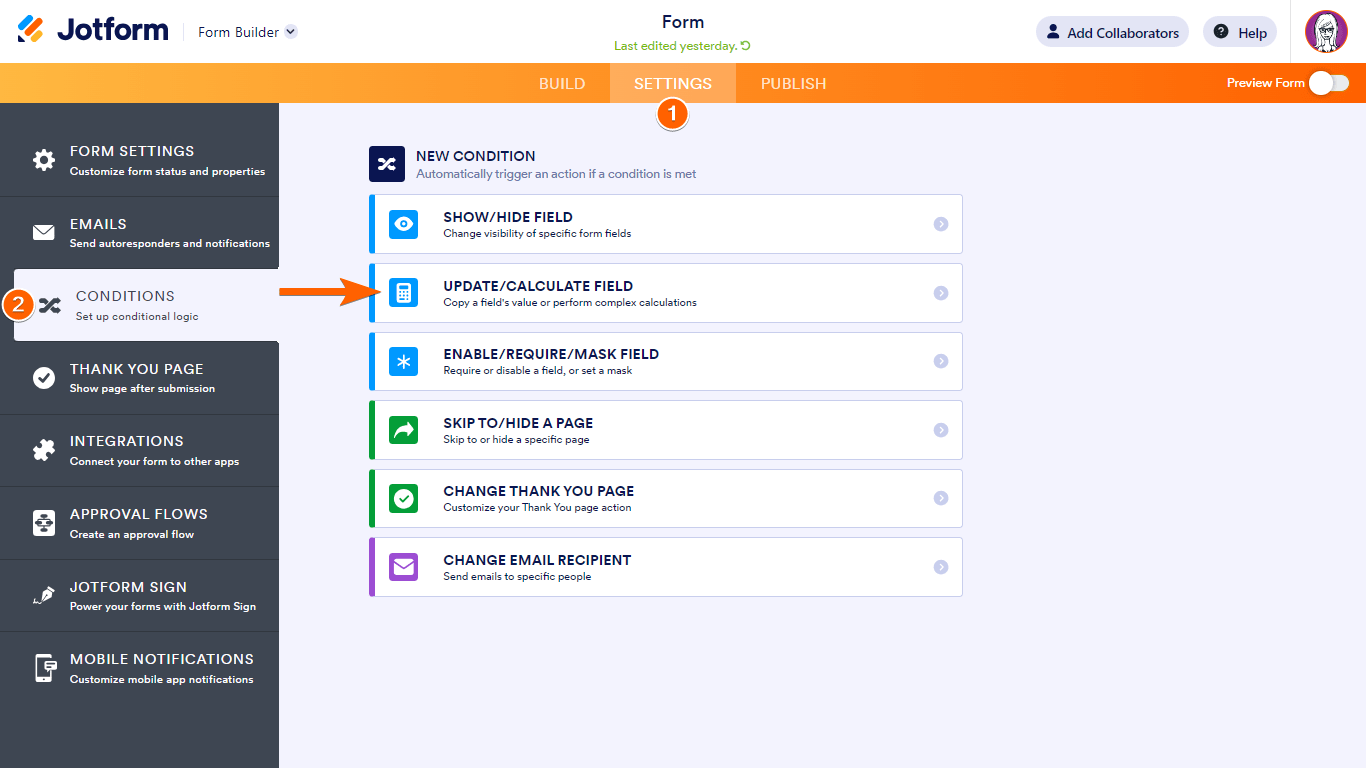
- In the Form Builder, click Settings.
- Click Conditions.
- Click Update/Calculate Field condition.
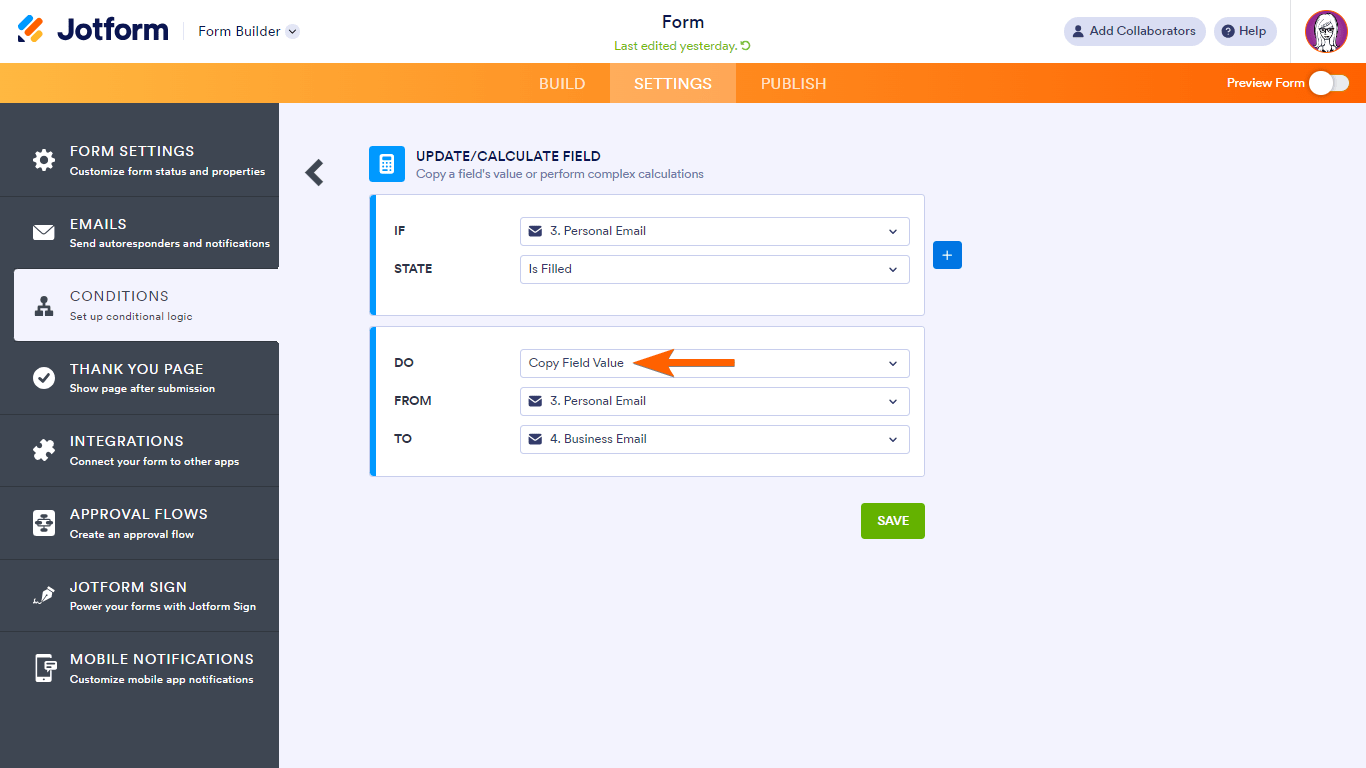
- Under Do, select Copy Field Value. Other options include Copy Multiple Field Values and Calculate Field Value.
- Configure your condition rules for piping answers. For example, if the respondent has filled out their email address, pipe it from one email field to another email field. Click Save.
Advantages of using Jotform for dynamic forms
While you can’t pipe responses in Google Forms, you do have that functionality and more with Jotform. In Jotform, you can pipe answers seamlessly across multiple question types, such as short text, dropdowns, multiple choice, and more.
Thanks to this feature and others in Jotform, you can easily:
- Personalize your forms: Automatically include details such as the respondent’s name within different areas of the form.
- Improve your data collection: Enhance the quality of data collection with answer piping so respondents don’t have to fill out redundant details.
- Create conversational surveys: Whether it’s for marketing, education, or customer feedback, you can design surveys that compel the respondent to fully participate by asking one question per page.
Jotform: A leading form builder with answer piping and more
If you’re looking to create forms that adapt dynamically to each respondent’s answers, you need a form builder that’s up to the task. There is no answer piping in Google Forms, but Jotform offers answer piping and more.
Explore Jotform today and see how easy it is to improve engagement on your forms.
FAQs: Answer piping in Google Forms
Pre-filled forms incorporate data known to users before the respondent starts filling out the form. Answer piping uses new data the respondent provides while filling out the form, making it a more dynamic form-filling experience.
Jotform lets you set specific conditions for the form so you can use question-to-question logic. The Conditions feature is in the Settings tab.
Yes, Jotform offers answer piping, which you can use to create highly personalized forms. The feature is intuitive and easy to use.





































































































Send Comment: