

Formulare für Techniker
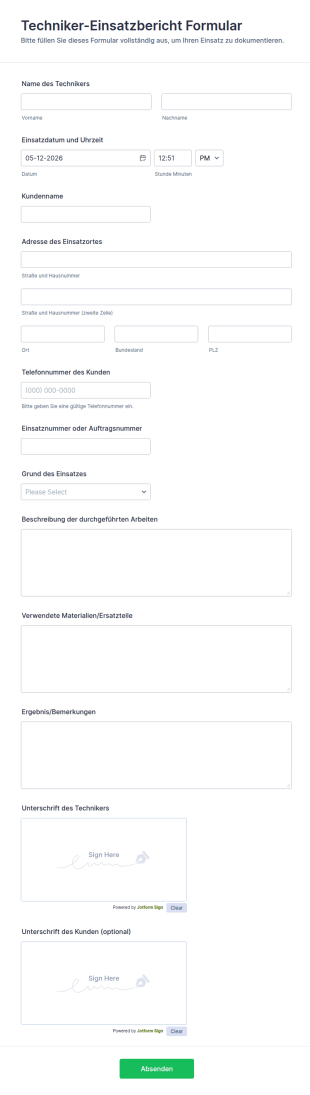
Techniker Einsatzbericht Formular
Dokumentieren Sie Serviceeinsätze mit dem Techniker-Einsatzbericht Formular in Jotform und vereinfachen Sie Datenerfassung, interne Nachverfolgung und Abrechnung für Außendienst, Handwerk und Kundendienstteams.
Zur Kategorie:Formulare für Techniker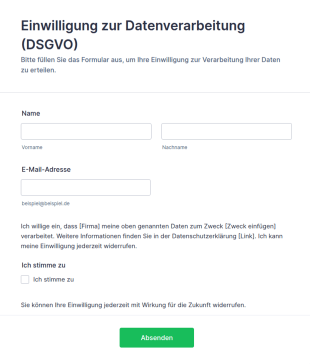
Vorlage Einwilligung Zur Datenverarbeitung (DSGVO)
DSGVO-konforme Einwilligungsformular-Vorlage für Jotform: Opt-in-Checkbox, Widerrufshinweis und Datenschutz-Platzhalter – direkt anpassbar und einsatzbereit.
Zur Kategorie:Werbeformulare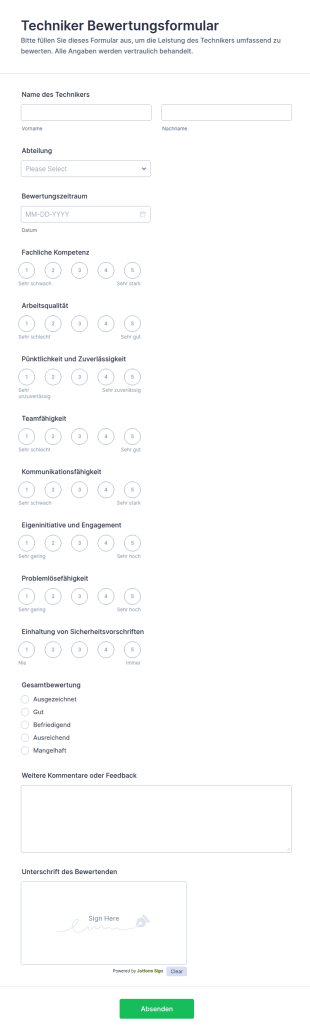
Techniker Bewertungsformular
Das Techniker-Bewertungsformular erleichtert die Datenerfassung für Leistungsbeurteilungen im technischen Service und hilft Teamleitungen und Personalabteilungen, Feedback zu dokumentieren, auszuwerten und Maßnahmen für Entwicklungsgespräche abzuleiten.
Zur Kategorie:Formulare für Techniker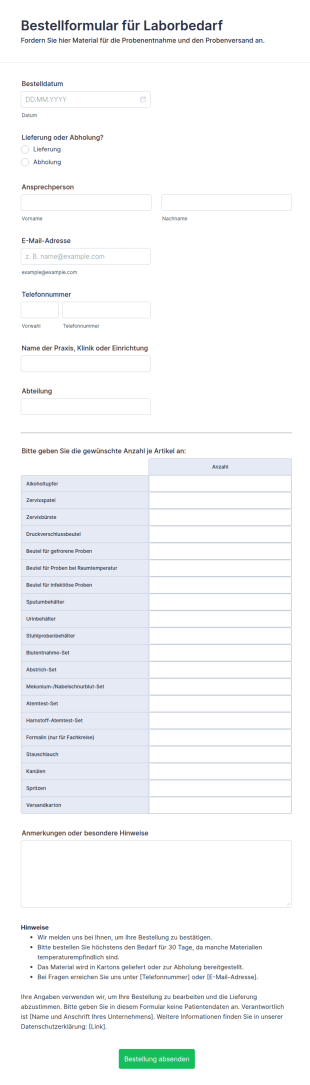
Bestellformular Für Laborbedarf
Weil Probenmaterial nie ausgehen sollte, fordern Praxen und Kliniken hier Behälter, Abstrich-Sets und Versandbeutel beim Labor an.
Zur Kategorie:E-Commerce Formulare
Vorlage Gefahrstoffverzeichnis: Eintrag Erfassen
Führen Sie Ihr Gefahrstoffverzeichnis dort, wo Sie es filtern und exportieren können — statt in einer Excel-Liste auf einem Laufwerk.
Zur Kategorie:Geschäftsformulare
Vorlage Kalibrierauftrag
Ein Formular für alle Geräte, die zur Kalibrierung müssen: Kalibrierart, Justierung, Abholung und Termin auf einen Schlag geklärt.
Zur Kategorie:Geschäftsformulare
Vorlage Kalibrierprotokoll Für Prüfmittel
Protokoll für die betriebsinterne Kalibrierung: Prüfmittel, Normal, fünf Messpunkte, Bewertung und nächster Termin. Ohne Toleranzvorgaben.
Zur Kategorie:Geschäftsformulare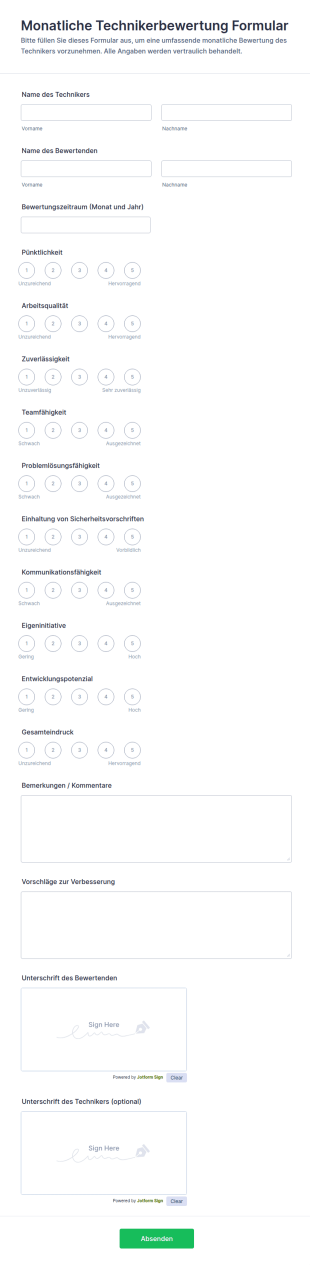
Monatliche Technikerbewertung Formular
Erfassen Sie monatliche Leistungsbewertungen von Technikern mit Jotform, um Beurteilungen im Team einheitlich zu dokumentieren und für Gespräche, Entwicklung und Planung einfach verfügbar zu machen.
Zur Kategorie:Mitarbeiterbeurteilung FormulareÜber Formulare für Techniker
Formulare für Servicetechniker und Wartung sind digitale Formulare, die Abläufe und Aufgaben im Service in vielen Branchen vereinfachen. Typische Einsatzbereiche sind die Wartung von Anlagen, Reparaturberichte und die Dokumentation von Einsätzen. Ein Serviceteam kann damit zum Beispiel die ausgeführten Arbeiten festhalten oder sich die Leistung nach getaner Arbeit vor Ort bestätigen lassen. So entsteht eine vollständige Dokumentation, und die benötigten Angaben lassen sich zuverlässig erfassen: eine gute Grundlage für reibungslose Abläufe und zufriedene Kundschaft.
Mit dem Online-Formulargenerator von Jotform erstellen Sie Formulare für Servicetechniker und Wartung und passen sie unkompliziert an. Weil die Angaben automatisch erfasst werden, sparen Sie Zeit und vermeiden Übertragungsfehler. In Jotform Tabellen laufen alle Einsatzdaten übersichtlich zusammen und sind jederzeit abrufbar. So behalten Unternehmen den Überblick über die Arbeit ihrer Serviceteams.
Warum Formulare für Servicetechniker und Wartung?
- Formulare für Servicetechniker und Wartung sorgen für verlässlichere Angaben, und das wirkt sich direkt auf die Qualität der Arbeit aus. Serviceteams erfassen Details schnell vor Ort, sodass weniger Fehler entstehen als beim nachträglichen Abtippen.
- Ein weiterer Vorteil ist das Tempo: Digitale Formulare lassen sich direkt vor Ort ausfüllen und absenden. Gerade im Außendienst hilft das, wenn es schnell gehen muss.
- Auch die Dokumentation profitiert: Die Formulare geben eine feste Struktur vor und lassen sich an Ihre Prüf- und Wartungsabläufe anpassen, damit nichts Wichtiges fehlt.
- Wiederkehrende Aufgaben lassen sich automatisieren, etwa die Planung von Wartungsterminen oder Erinnerungen. Das nimmt Serviceteams Verwaltungsarbeit ab, sodass mehr Zeit für die eigentliche Arbeit bleibt.
- Auch die Abstimmung im Team wird einfacher. Weil alle Angaben digital an einem Ort liegen, greifen alle Beteiligten auf denselben Stand zu. Das verbessert die Koordination und vermeidet Missverständnisse.
Diese Probleme lösen digitale Serviceformulare
- Im Service fällt viel Papier an, was Abläufe bremst und zu Verzögerungen führt. Digitale Formulare ersetzen einen Großteil davon und sorgen für schnellere, besser organisierte Abläufe.
- Das Abtippen von Hand ist fehleranfällig, und im Servicegeschäft können solche Fehler teuer werden. Mit digitalen Formularen ist das Risiko von Übertragungsfehlern deutlich geringer, und die erfassten Angaben sind verlässlicher.
- Bei Papierunterlagen gehen Angaben leicht verloren. Digitale Formulare speichern alles zentral online, sodass durchweichte Wartungszettel oder verlegte Berichte kein Thema mehr sind.
- Das Suchen in alten Unterlagen kostet viel Zeit. Mit digitalen Formularen sind frühere Einsätze und Prüfberichte schnell gefunden, wenn Sie etwas nachsehen möchten.
Passende Anwendungsfälle für Features
- Der Drag-and-Drop-Formulargenerator ist ideal, wenn Sie schnell eigene Formulare erstellen möchten. Ohne Programmierkenntnisse passen Sie sie so an, dass sie alle benötigten Angaben abfragen.
- Mit bedingter Logik passt sich das Formular an die bisherigen Antworten an, etwa wenn bei einem festgestellten Defekt zusätzliche Felder für Fehlerbeschreibung und Fotos erscheinen. So sehen Serviceteams nur die Felder, die zu ihrem Einsatz passen.
- Technicians who need to process payments for services can take advantage of the 30+ payment gateways, such as Stripe or PayPal. This integration allows for secure and seamless transactions directly through the form.
- Praktisch ist die digitale Unterschrift mit Jotform Signatur: Kundinnen und Kunden bestätigen die ausgeführte Arbeit direkt vor Ort auf dem Tablet. Das spart Papier, beschleunigt den Ablauf, und jede Bestätigung ist nachvollziehbar dokumentiert.
- Mit der Jotform Mobile App erfassen Serviceteams Daten auch ohne Internetverbindung, etwa im Heizungskeller, im Aufzugsschacht oder in ländlichen Gebieten. Sobald wieder eine Verbindung besteht, werden die Angaben automatisch übertragen.
- In Jotform Tabellen laufen alle erfassten Daten zusammen, sodass Serviceteams und Leitung sie leicht einsehen und auswerten können. Das schafft eine gute Grundlage für die Planung.
- Über mehr als 100 Integrationen lassen sich die Formulare mit anderen Anwendungen verbinden, etwa mit Google Tabellen. Neue Einsendungen werden automatisch übertragen, sodass Ihre Systeme auf dem gleichen Stand bleiben.
So erstellen Sie ein Formular für Servicetechniker
- Stöbern Sie zunächst in den Vorlagen nach einer passenden Vorlage für Servicetechniker und Wartung, oder beginnen Sie mit einem leeren Formular, wenn nichts Passendes dabei ist.
- Passen Sie Design und Felder mit dem Drag-and-Drop-Formulargenerator an. Sie können Felder hinzufügen, entfernen oder ändern, damit das Formular alle benötigten Angaben abfragt.
- Wenn Ihr Formular fertig ist, veröffentlichen und teilen Sie es per Direktlink oder E-Mail oder binden Sie es auf Ihrer Website ein, damit alle Beteiligten darauf zugreifen können.
Die wichtigsten Anwendungsfälle
- Für die Einsatzleitung: Formulare für Servicetechniker und Wartung helfen der Einsatzleitung, mehrere Teams und Aufträge zu koordinieren. Sie zeigen auf einen Blick, welche Einsätze anstehen, welche erledigt sind und wie ausgelastet die Teams sind. So lassen sich Einsätze besser planen, der Stand der Aufträge verfolgen und die Dokumentation über alle Einsätze hinweg einheitlich halten.
- Für Serviceteams: Serviceteams profitieren von einheitlichen Formularen, die überall gleich aufgebaut sind. Alle greifen auf denselben Stand zu und können gemeinsam an Aufgaben arbeiten, etwa bei Wartungen oder größeren Einsätzen. Das verbessert die Abstimmung und verhindert, dass Arbeiten doppelt oder gar nicht erledigt werden.
- Für Kundinnen und Kunden: Kundinnen und Kunden schätzen den professionellen und zügigen Ablauf. Serviceanfragen, Rückmeldungen und Bestätigungen werden schnell und zuverlässig erfasst, und die ausgeführte Arbeit lässt sich direkt vor Ort digital unterschreiben. Das macht den gesamten Ablauf angenehmer.
Formulare für Servicetechniker und Wartung im Überblick
Formulare für Servicetechniker und Wartung sind eine große Hilfe für Unternehmen, die ihre Abläufe vereinfachen möchten. Wer von Papier auf digitale Formulare umstellt, erhält verlässlichere Angaben, arbeitet schneller und behält seine Daten besser im Griff. Mit Jotform passen Serviceteams ihre Formulare genau an ihre Aufgaben an, und über die Anbindung an andere Systeme landen die Angaben direkt dort, wo sie gebraucht werden. So werden Einsätze besser organisiert und dokumentiert, wovon Serviceteams und Kundschaft gleichermaßen profitieren.
Häufig gestellte Fragen
1) Kann ich Formulare für Servicetechniker mit Jotform kostenlos erstellen?
Ja, Jotform bietet einen kostenlosen Tarif, mit dem Sie viele Formulare erstellen und anpassen können, auch Formulare für Servicetechniker und Wartung. Zusätzliche Funktionen und mehr Einsendungen pro Monat bieten die kostenpflichtigen Tarife.
2) Sind die Formulare und die übermittelten Daten sicher?
Ja. Jotform nimmt Datensicherheit sehr ernst. Formulare und Antworten werden mit SSL-Verschlüsselung geschützt, und Jotform erfüllt die DSGVO.
3) Brauche ich Programmierkenntnisse, um ein Serviceformular zu erstellen?
Nein, Programmierkenntnisse sind nicht nötig. Mit dem Drag-and-Drop-Formulargenerator von Jotform erstellen und gestalten Sie Formulare ganz ohne technische Vorkenntnisse.
4) Kann ich Zahlungen direkt über meine Formulare erfassen?
Ja. Über mehr als 30 angebundene Zahlungsdienste wie Stripe, PayPal oder Mollie können Sie Zahlungen direkt über Ihre Formulare entgegennehmen. Das vereinfacht die Abrechnung für Sie und Ihre Kundschaft.
5) Können diese Formulare auf mobilen Geräten verwendet werden?
Ja, die Formulare passen sich automatisch an jedes Display an und lassen sich auf allen Mobilgeräten nutzen. Mit der Jotform Mobile App erfassen Sie Daten außerdem offline, was im Außendienst und in Gebäuden ohne Empfang praktisch ist.
6) Kann ich Formularantworten in professionelle PDF-Dokumente umwandeln?
Ja, mit dem PDF Editor von Jotform werden Einsendungen automatisch zu ansprechenden PDF-Dokumenten, etwa für Einsatzberichte oder für eine einheitliche Ablage.
7) Wie gelangen die vor Ort erfassten Daten in meine Systeme im Büro?
Über die Integrationen von Jotform lassen sich erfasste Daten automatisch in Ihre vorhandenen Systeme übertragen, etwa in Google Tabellen. So bleiben alle Beteiligten auf dem gleichen Stand.
8) Was ist, wenn meine Serviceteams in Gebieten ohne Internetverbindung arbeiten?
Mit der Jotform Mobile App erfassen Serviceteams Daten auch ohne Internetverbindung. Sobald wieder eine Verbindung besteht, werden die Angaben automatisch in Ihr Konto übertragen, damit nichts verloren geht.