With Jotform, you can easily connect your form to Google Sheets to keep your data organized and always up to date. Every time someone fills out your form, their responses are added to your connected spreadsheet right away.
This is perfect for tracking submissions, sharing data with your team, or backing up form entries automatically—no extra steps needed.
Notes
- Changes in your Google Sheets spreadsheet don’t affect your Jotform form entries.
- Renaming column headings in Google Sheets may break the integration. You can redo the integration in Jotform to fix it.
- Adding filters in Google Sheets may stop your spreadsheet from updating. Reapply the filters in Google Sheets to see the updates.
- Inline edits in Tables won’t update entries in Google Sheets, unlike entry edits.


Follow these quick steps to get started:
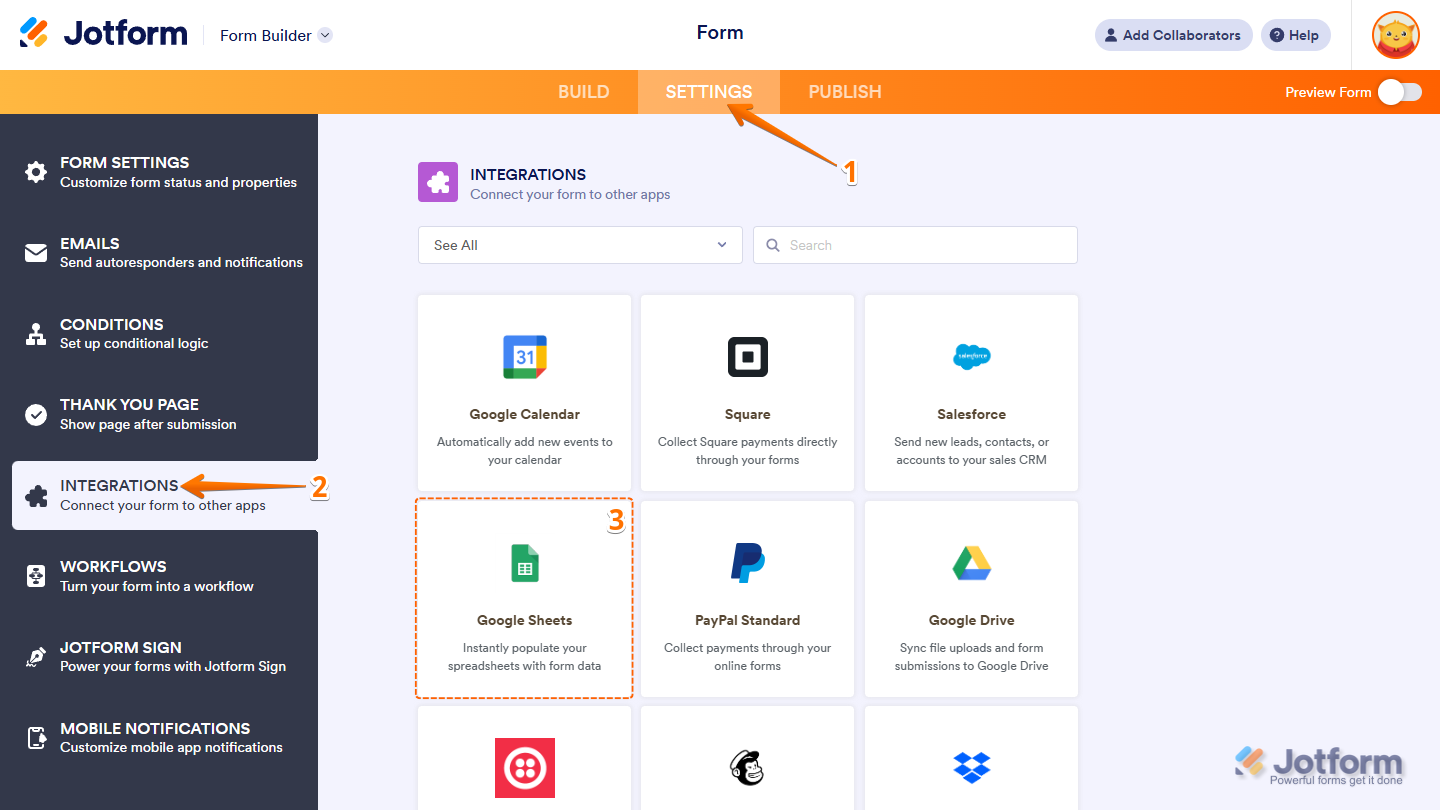
- In Form Builder, in the orange navigation bar at the top of the page, click on Settings.
- In the menu on the left side of the page, click on the Integrations tab.
- Then, click on Google Sheets.
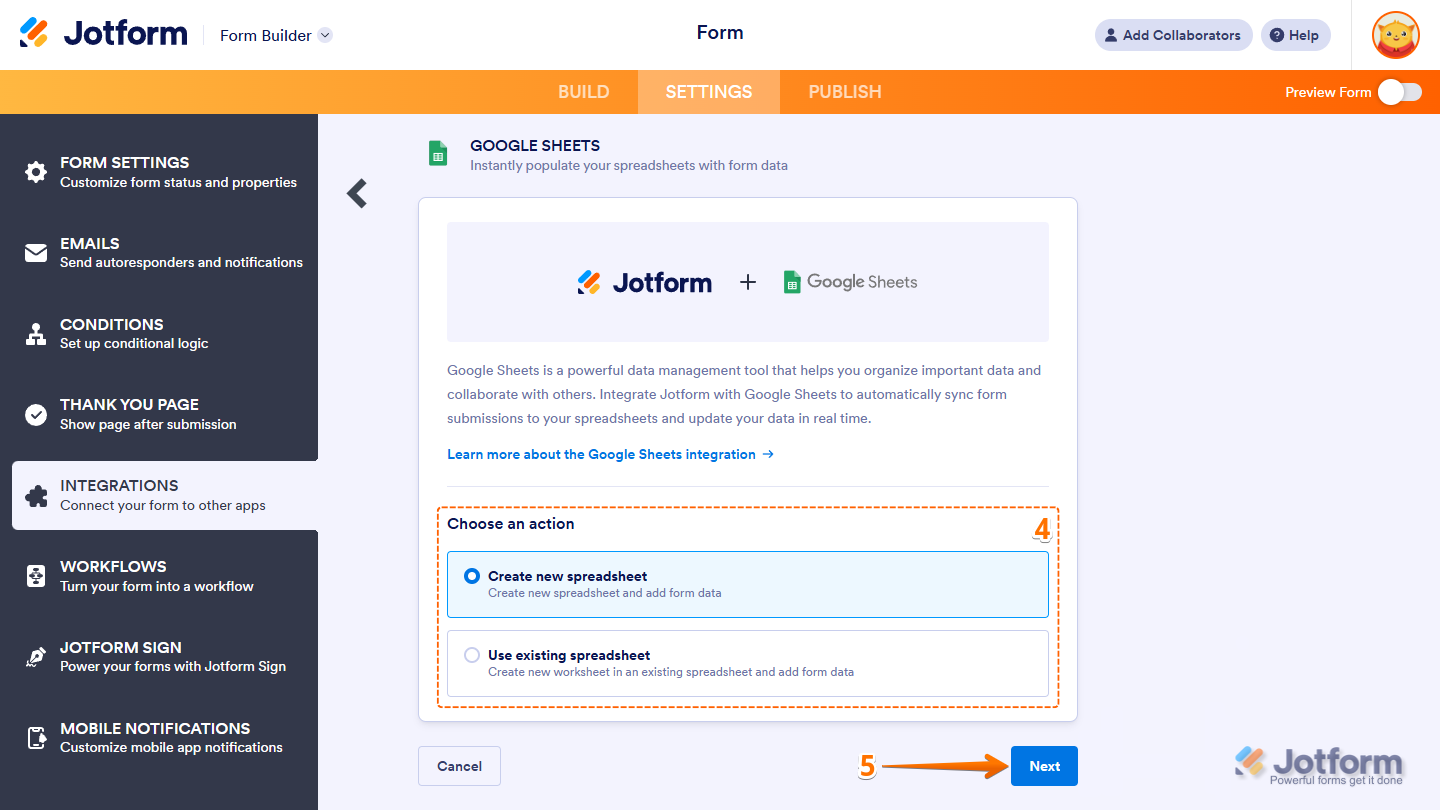
- Next, select one of the following actions:
- Create a New Spreadsheet — Create a new spreadsheet and add form data.
- Use Existing Spreadsheet — Create a new worksheet in an existing spreadsheet and add form data.
- Then, click on Next.
Note
The Use Existing Spreadsheet option allows you to select an existing spreadsheet from your Google Sheets or Drive account, but it works a little differently. Instead of adding new submissions as a new row in the selected spreadsheet, it creates a new worksheet to store your form data.
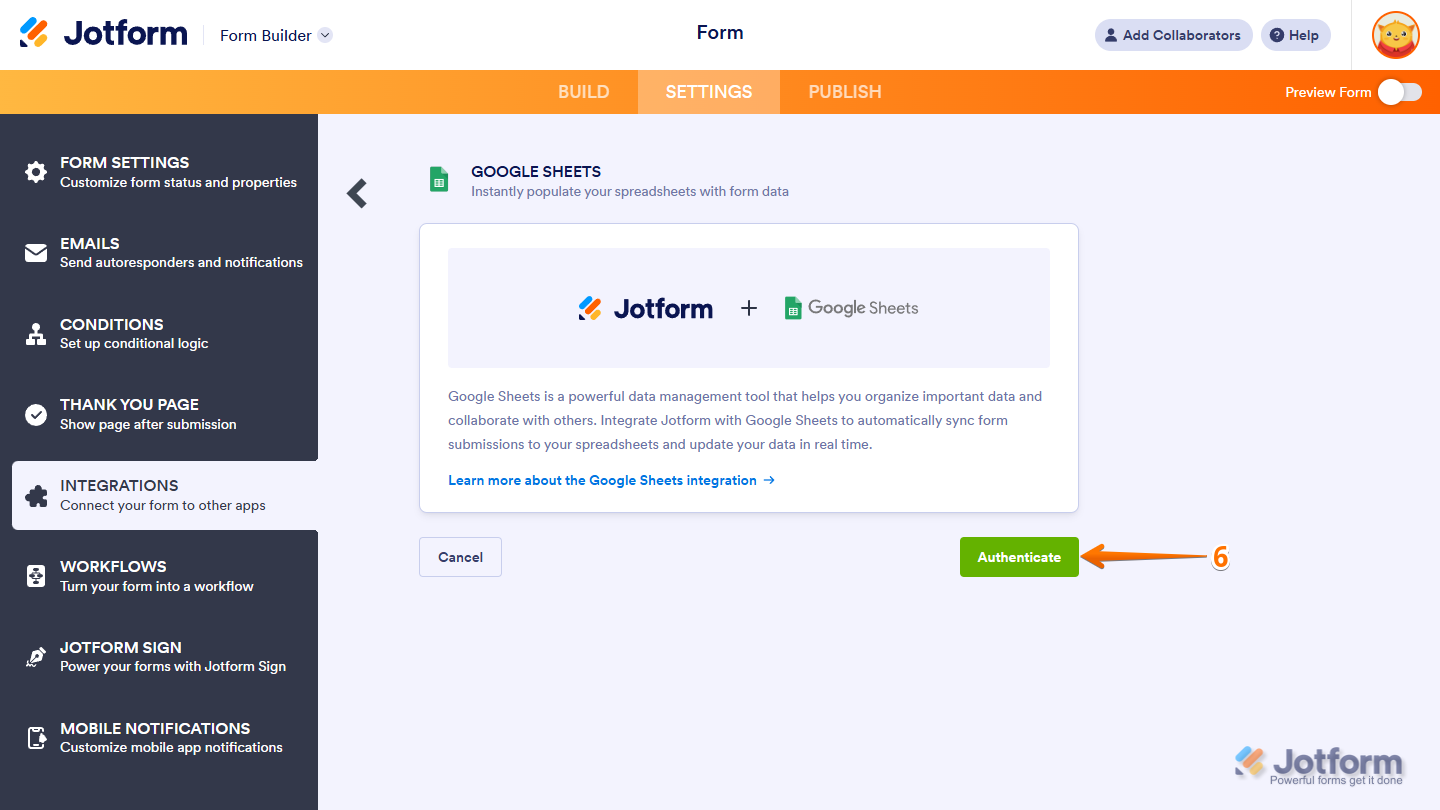
- Now, click on Authenticate and login to your Google Sheets account.
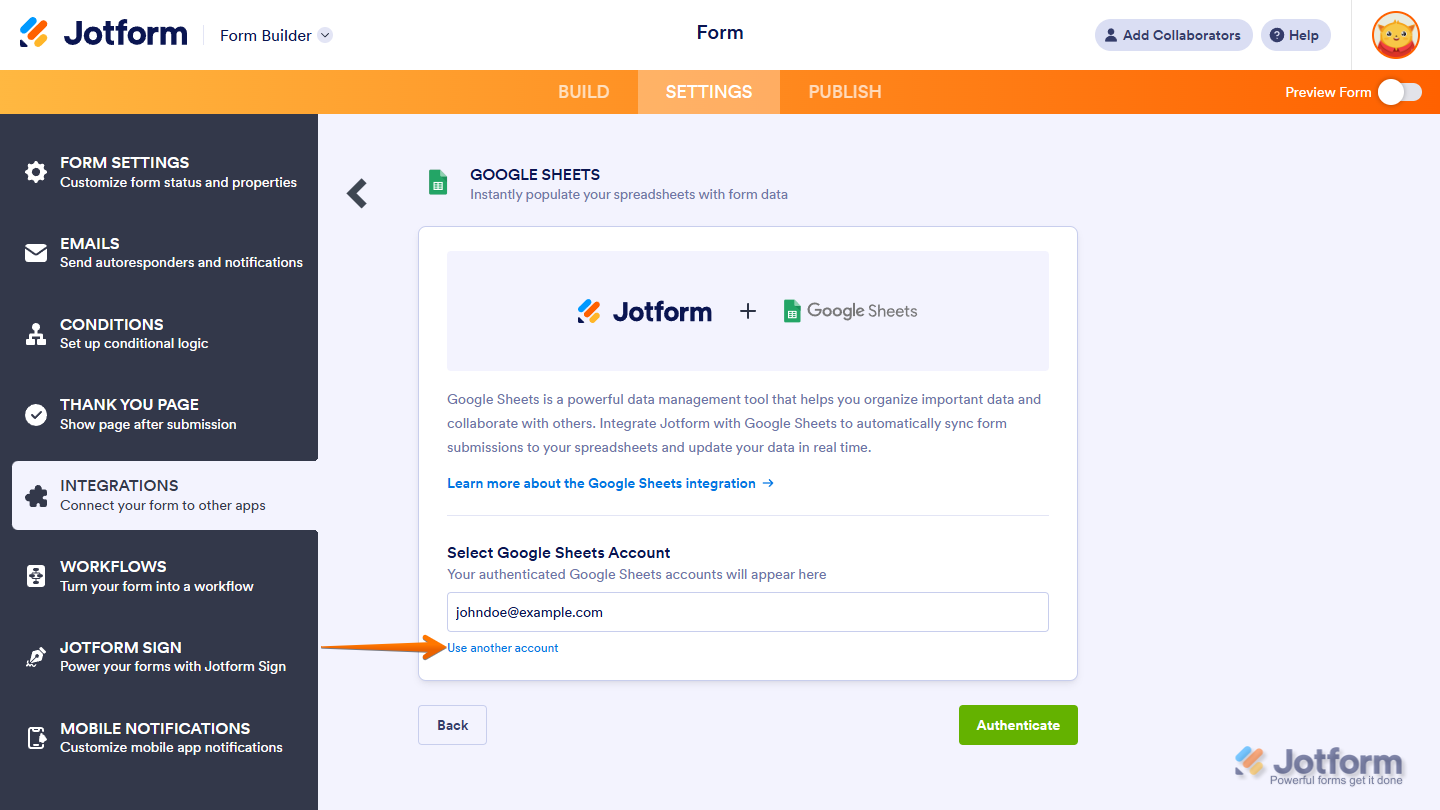
If you’ve logged in before, just pick your Google Sheet account from the dropdown. To use a different one, click on Use another account.
- Once connected, set up these things:
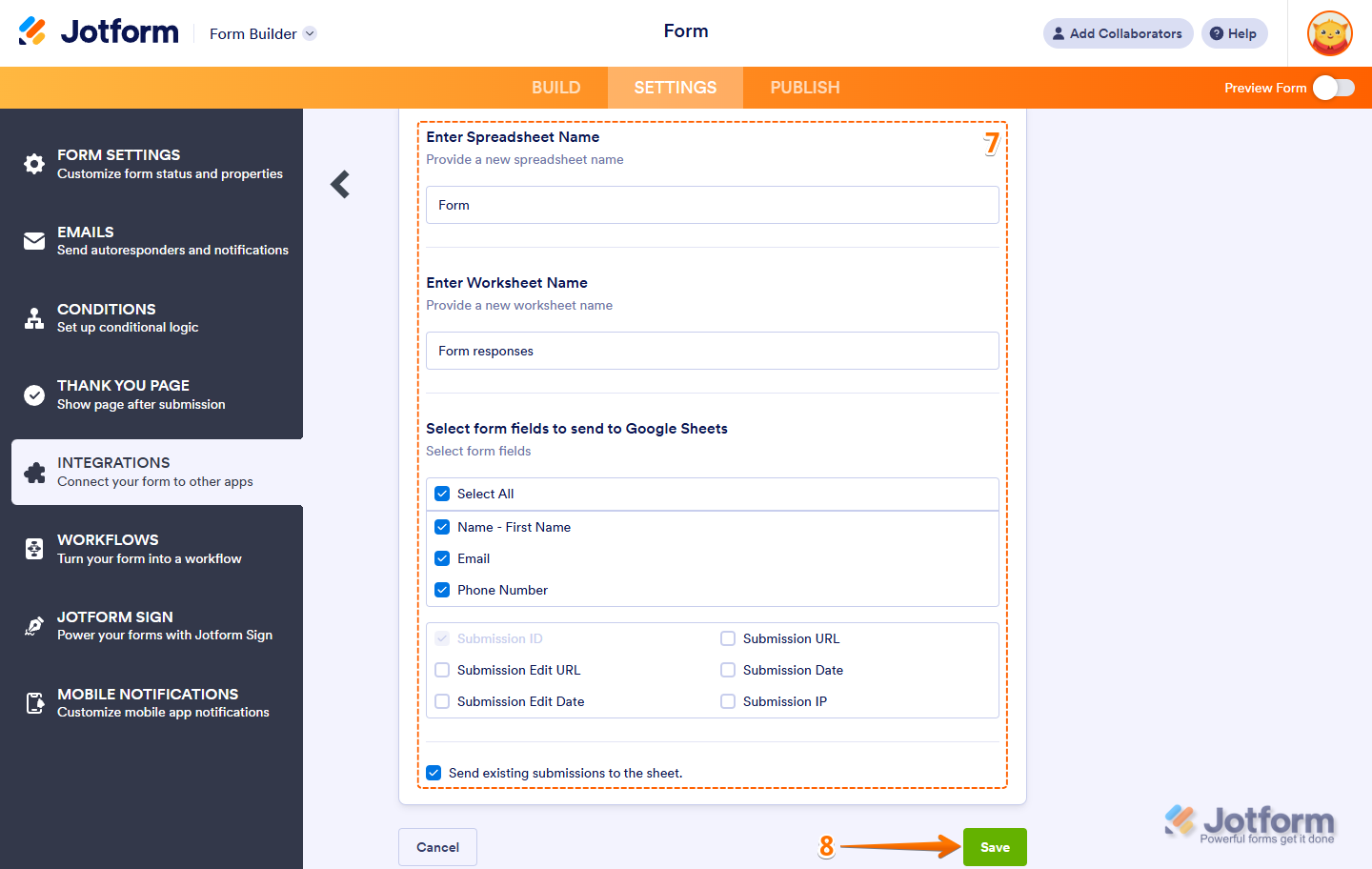
- Enter Spreadsheet Name — Enter the name of the spreadsheet that will be created.
- Enter Worksheet Name — Enter the name of the worksheet.
- Select form fields to send to Google Sheets — the integration selects all fields by default. Uncheck the fields you wish to exclude.
- Send Existing Submissions to the Sheet — If you have existing submissions in the form, you can send them to the spreadsheet by checking this option. The Submission ID is part of the fields sent to the spreadsheet.
- Now, click on Save and you’re all set.
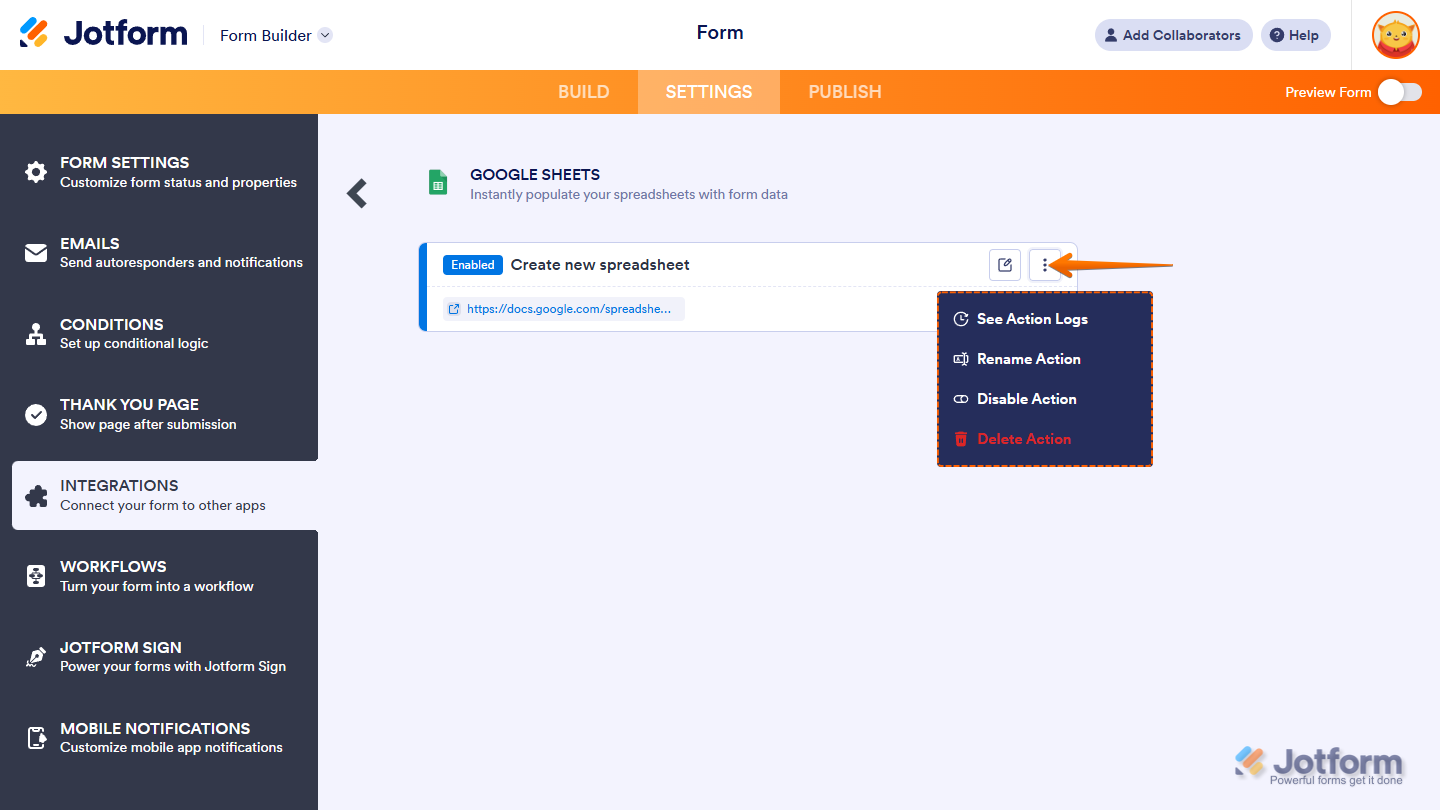
And that’s it! Your form is now successfully connected to Google Sheet. After saving the integration, you’ll see the list of actions you’ve set up and the Add New Action button on the main page. Hover your mouse over an action and click on the Three Dots icon next to it on the right side to access more options:
- See Action Logs — View successful and failed runs, helpful for troubleshooting.
- Rename Action — Change the action’s title.
- Disable Action — Temporarily stop the integration from sending data.
- Delete Action — Remove the action from your form.

Send Comment:
233 Comments:
October 22, 2026
Can you then send the forms link (from Jotforms) to new clients to complete?
October 14, 2026
if this works it will be brilliant because up till now i did not know applicants had to log in to a google account to upload images. google do not make this easy to discover which i think is wrong and its made worse by the raeson given by google that its to protect people uploading malicious files - disingenious at best as clearly its to get more users.
July 20, 2026
Thanks!
May 19, 2026
Is it possible to edit how the data pulls into google sheets vs just on a new row.
March 11, 2026
I am trying to integrate jotform with google sheets. Authentication is taking forever. Does that make sense?
November 12, 2025
If I delete an entry in Jotform, it doesn’t get deleted from the Sheet as well. Is that expected behavior?
November 6, 2025
I had to reconnect my Jotform to my Google sheet and I really hate this new integration. It has completely screwed up my existing sheet and created so much more work and unnecessary formulas to clean up the mess. I do not need the html link for the images on my form. Why would that be something I would ever need in the spreadsheet? I just need to submitted answers. I also do not want to be forced to create a new sheet to reconnect. I had a perfectly good sheet that I was already using.
September 30, 2025
The changed you made are terrible. I use to use this to update and keep track of registrations and now I have to add ANOTHER sheet because this update wont let me make any additions to the integrated spreadsheet or add it to an existing worksheet. It's insanely frustrating that you took away integration without a word.
August 5, 2025
Ia there a maximum columns ?
August 5, 2025
Cannot get java script to work when I did a geolocation. I do not have VPN on.
July 17, 2025
I was unable to complete linking my form with Google sheets.
June 30, 2025
why does this happen? - The “Use an Existing Spreadsheet” option allows you to select an existing spreadsheet from your Google Sheets or Drive account, but it works a little differently. Instead of adding new submissions as a new row to the selected spreadsheet, it creates a new worksheet to store your form data.
I don't need it to add a new worksheet I need it to go into the original worksheet.
May 24, 2025
Is it possible to update an existing Google Sheet Worksheet. I want to be able to select a particular existing Worksheet and map the fields collected in Jotform to particular existing feilds in the Worksheet. Is this possible?
May 5, 2025
I have a working integration with Google Sheets but I need to make bulk edits to some columns. What is the best way to make bulk edits and have the data automatically updated in both Jotform and Google Sheet via integration?
March 27, 2025
Hello, I am trying to integrate Googlesheets with a form and I receive the below error:
{ "error": { "code": 403, "message": "Request had insufficient authentication scopes.", "status": "PERMISSION_DENIED", "details": [ { "@type": "type.googleapis.com/google.rpc.ErrorInfo", "reason": "ACCESS_TOKEN_SCOPE_INSUFFICIENT", "domain": "googleapis.com", "metadata": { "service": "sheets.googleapis.com", "method": "google.apps.sheets.v4.SpreadsheetsService.CreateSpreadsheet" } } ] } }
March 13, 2025
MY PRODUCT ARE NOT GOING ON GOOGLE SHEET , PLEASE HELP
March 3, 2025
While trying to either create a new sheet or select an existing one, a leyend with error 403 appears. I've been trying to integrate google sheets for a week and it keeps happening
February 13, 2025
Can i have input data in spreadsheet for the submission but in formatted data same as form
January 8, 2025
can i send the jotform input data to more than one google spreadsheet?
December 3, 2024
My google sheet is not updating from the jotform integration. Any idea what could be wrong?
November 22, 2024
How do I integrate the data from a form into an existing worksheet in an existing spreadsheet?
I would like to be able to select certain data from the jotform form to integrate into already existing columns in an existing worksheet.
Also, how do I make data from multiple jotform forms integrate data into the same worksheet?
November 7, 2024
Is there any way to pull data from a sheet? Example where I enter an employee name and it would autofill the employee data instead of entering it every time?
October 18, 2024
I would love to have the option to create a new Workbook for every unique entry in one form field (this option exists with the Google Drive integration to make a new folder in this way)
September 25, 2024
Is there any way to pull data from a sheet? Example where I enter an employee name and it would autofill the employee data instead of entering it every time?
July 30, 2024
I need to create an event registration form, and need to create a form that can register multiple individuals, such as two spouses. Is it possible to create a Jotform that can integrate with Google Sheets and transfer information to multiple lines on the spreadsheet? Need one line for Don and the information for him and another line for Bette and the information for her.