
As more companies offer remote and hybrid work options, time spent on managing internal meetings, setting appointments, and hosting virtual events may strain workplace efficiency and project completion rates. Nevertheless, businesses need to make sure remote workers attend meetings and stay on top of project deadlines, regardless of how far they are from the office or what time zone they’re in.
Efficient online scheduling tools like Zoom Scheduler and Calendly have become the leading solutions for dealing with such issues, but which one is best? In this matchup of Calendly vs Zoom Scheduler, we will examine and compare the features offered by both tools and consider what type of organizations would benefit most from each one. We will also show how a service like Jotform, which integrates with multiple scheduling software tools, can make scheduling even easier.
Key features breakdown: Zoom Scheduler vs Calendly
 Zoom |  Calendly | |
|---|---|---|
| Booking page & scheduling links | Zoom scheduling links or personal meeting ID; website embedding requires third-party tools | Customizable booking pages with branding; share links or embed on website |
| Integrations | Native Zoom integration; limited support for other platforms | Integrates with Zoom, Microsoft 365, Google Calendar, and more |
| Time zone detection | Uses computer time zone; manual changes required | Automatically detects time zone via device and calendars |
| Availability & buffer times | Availability sharing and buffer times focused on Zoom meetings | Advanced availability control with buffer times and double-booking prevention |
| Team scheduling | Supports basic round-robin; no specific host assignment | Flexible round-robin, multi-host, and group event options |
| Reminders & notifications | Built-in Zoom reminders and confirmations | Customizable automated reminders across multiple platforms |
| Website embedding | No native embedding; requires third-party tools | Booking pages can be embedded and branded |
| Payment collection | No built-in payments; requires third-party integration | Built-in PayPal and Stripe integrations |
| Analytics & reporting | Zoom-focused reports on meetings and registrations | Insights on booking trends and popular times |
Booking page and scheduling link creation
Zoom Scheduler: This function is built into the Zoom platform, making it ideal for people scheduling Zoom meetings. You can share a Zoom scheduling link or a reusable personal meeting ID. If you want a Zoom booking page to show up on your website, you’ll need to integrate with a third-party platform, like Jotform.
Calendly: Highly customizable, Calendly allows users to include branding, event types, and scheduling rules in its booking pages. You can share generated scheduling links or a custom booking page on your business’ website.
Integrations
Zoom Scheduler: The scheduling tool is integrated into Zoom’s platform and provides seamless access to Zoom meetings, calendars, and mail. It’s great for Zoom videoconferencing but has limited use on other videoconferencing platforms.
Calendly: The tool integrates with a wide range of external apps, including Zoom, Microsoft 365, and Google Calendar. It’s excellent for videoconferencing on multiple platforms.
Time zone detection
Zoom Scheduler: It defaults to the time zone setting on your computer, but you can manually update or correct time zone settings.
Calendly: It checks device settings and synced calendars to determine the preferred time zone. You can view or change your time zone in Account Settings.
Buffer times and availability management
Zoom Scheduler: You can share blocks of your availability via a link on your website, emails, texts, and chats. In addition, Zoom Scheduler lets you set buffer time before and after meetings to avoid scheduling conflicts, build in breaks between meetings, and prepare. However, because it’s built into Zoom, this feature focuses only on Zoom meetings.
Calendly: You can set your weekly schedule and add date-specific hours from your Availability page. Use the Calendly dropdown menu to manage the availability of other users. Calendly also sets extra buffer time before and after an event, for prep or travel time. This also prevents double bookings.
Team scheduling (round-robin, multi-host, group events)
Zoom Scheduler: Because this tool is designed to schedule meetings within the Zoom platform, it supports round-robin but users can’t add specific hosts. However, the lack of advanced features actually makes it simpler to use and potentially less expensive.
Calendly: With the browser extension, you can book meetings in real-time, which streamlines the booking of follow-up meetings. Calendly also offers more flexibility in complex multiperson meetings. Its round-robin scheduling allows users to add hosts who will always attend meetings alongside available round-robin assignees. So prospects can always meet with their assigned sales rep as well as an additional teammate for implementation and renewal conversations.
Automated reminders and notifications
Zoom Scheduler: This tool has meeting reminders for Zoom meetings, including reminders and confirmations for both hosts and attendees. It can be easily integrated with Zoom’s notification system, making it simpler to schedule and manage Zoom meetings from a single platform.
Calendly: You can Integrate Calendly with multiple tools, including Google Calendar, Microsoft Outlook, and Zoom, and it will send automatic meeting reminders and notifications to users on different platforms. It also provides customizable reminder options, so you can, for example, select the timing and frequency of reminders and follow-up emails.
Website embedding
Zoom Scheduler: Currently, there is no way to embed Zoom Scheduler into your website, although there have been attempts to embed Zoom Scheduler with iframe. You can, however, integrate Zoom Scheduler with Jotform and create a form with appointment slots to schedule a Zoom meeting. The form could then be embedded into your website or shared via a link.
Calendly: You can embed booking pages on your business website, so users can book meetings directly from your site, saving them time and improving convenience. The booking page can also be customized to reflect your company’s branding.
Payment collection
Zoom Scheduler: The Zoom Scheduler does not have built-in payment collection. However, you can work around this by integrating with a third-party platform, like Jotform, to enable payment collection. Using the Jotform Form Builder, create a registration form with a payment field and connect this with your Zoom account. Select PayPal, Stripe, Square, or any other payment integration, and connect your Jotform account to your payment provider. Users can then make payments while their registration information is sent to Zoom.
Calendly: Calendly has built-in integrations with PayPal and Stripe, allowing you to collect payments from invitees once they schedule a meeting. You can also provide invitees with context on payment terms, your cancellation policy, and fees. Invitees also receive receipts automatically, eliminating any time-consuming back-and-forth correspondence.
Analytics and reporting
Zoom Scheduler: Because Zoom Scheduler is built into Zoom, its analytics examine Zoom meeting usage. Its reports reveal registration details for meetings, poll results, booking frequency, and popular time slots.
Calendly: Calendly’s analytics and reporting features focus on booking patterns. They look at the most popular times and locations for meetings, enabling companies to optimize scheduling by adjusting team availability to align with meeting trends.
Zoom Scheduler overview
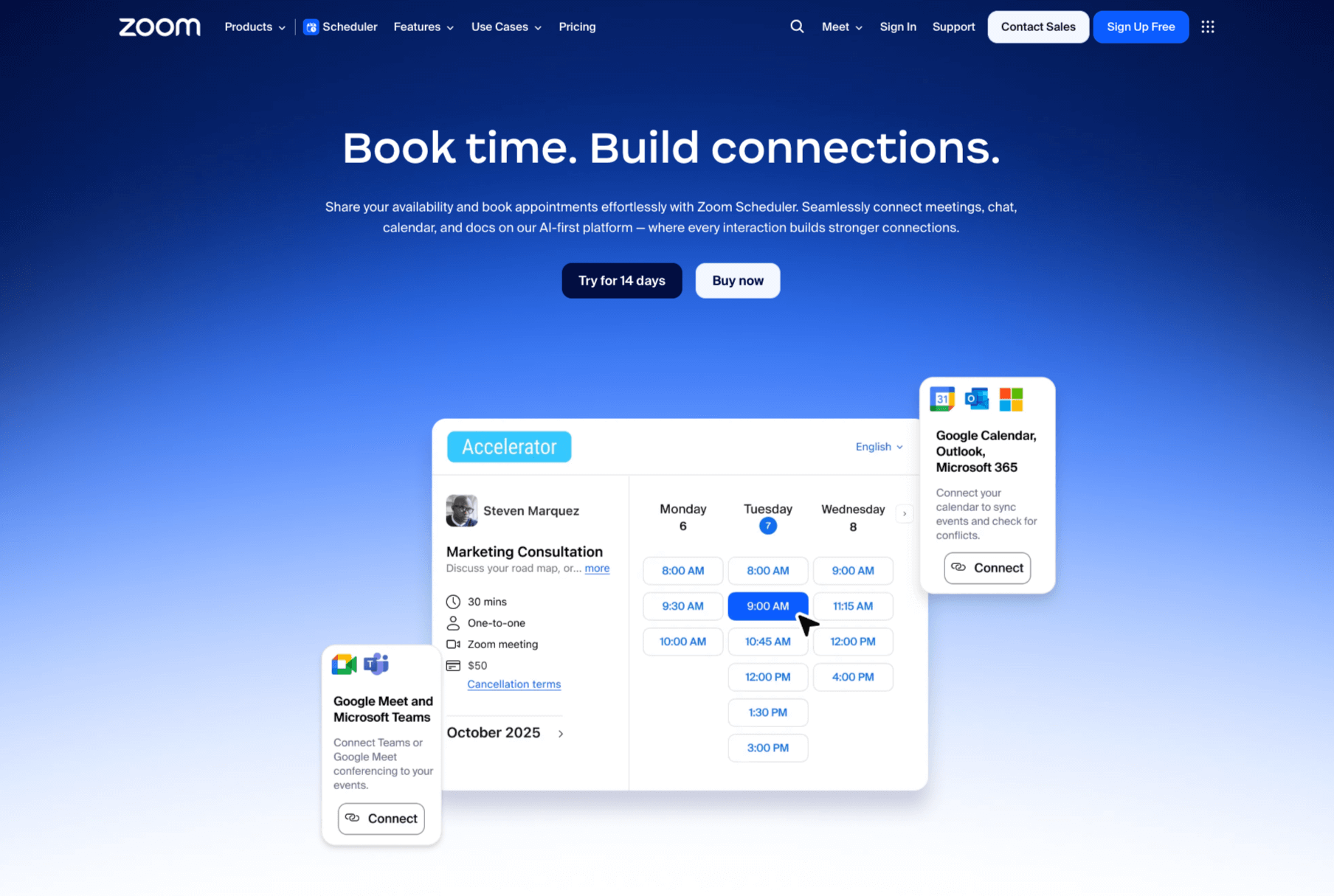
Zoom Scheduler is an integrated tool within the Zoom platform and is designed specifically for scheduling Zoom meetings and managing appointments. Its booking pages reflect your Zoom profile, and you can create recurring or custom booking schedules that show which time slots are available for appointments.
Zoom Scheduler also integrates with Google Calendar, Office 365, Zoom Calendar, and Zoom Mail for real-time scheduling and helps prevent double bookings. It streamlines the scheduling process, while automated email confirmations and reminders help you avoid having meeting no-shows.
While Zoom Scheduler’s direct connection to Zoom meetings enables seamless videoconferencing, it does not support other video platforms. It can’t be used to schedule or manage meetings on Microsoft Teams or Google Meet, making it a better fit for companies that exclusively use the Zoom platform.
Pro Tip
Jotform’s Zoom integration lets you take advantage of Zoom’s videoconferencing software with the drag-and-drop Form Builder. By connecting your Zoom account to Jotform, you can build custom scheduling forms for automatically scheduling new meetings and adding registrants. This integration is perfect for telehealth, webinars, and virtual events and features automated notifications and payment collection through over 40 gateways.
Calendly overview
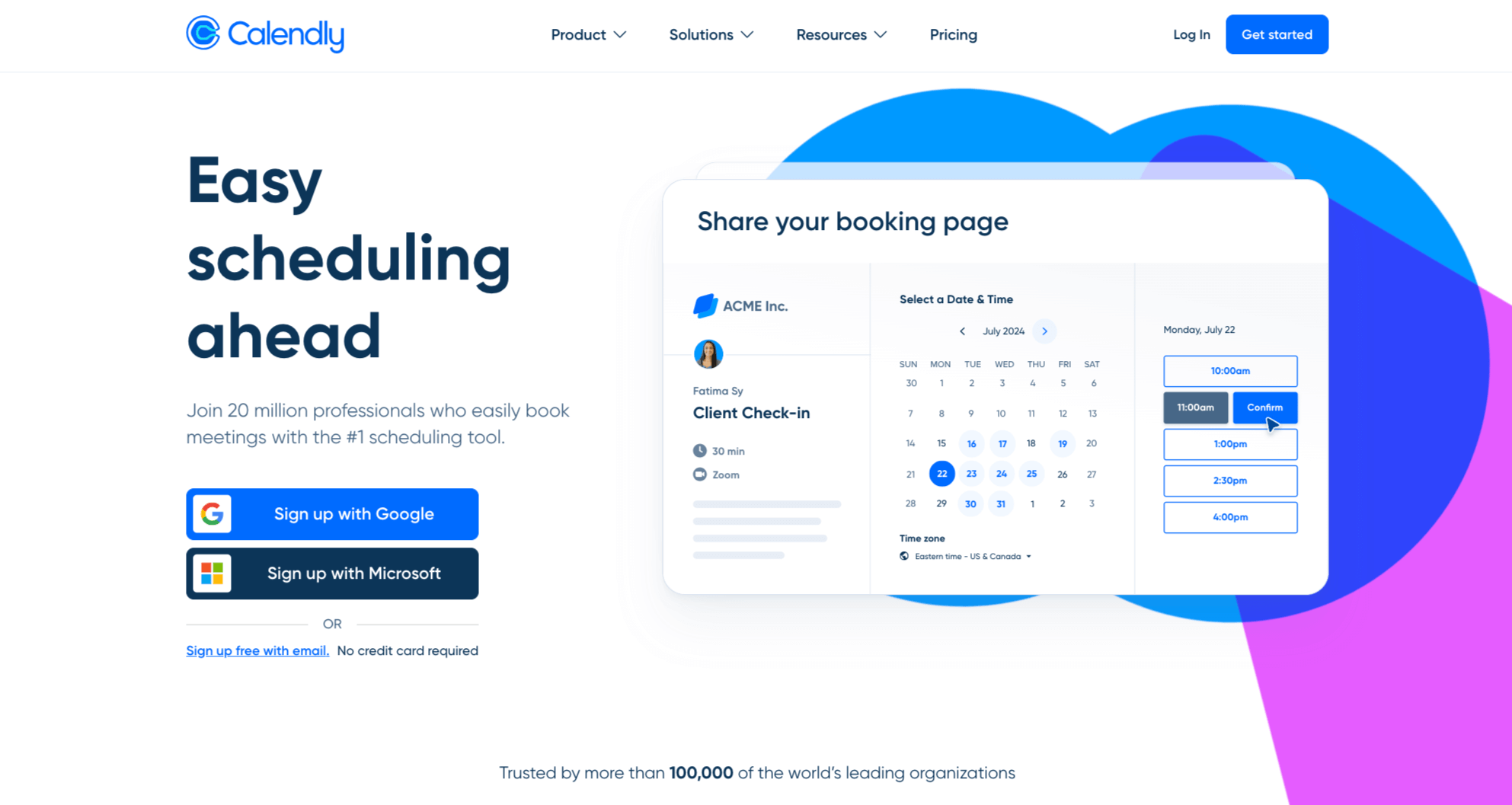
Calendly is a standalone scheduling platform with robust automation, customization, and integration capabilities. Whereas Zoom Scheduler manages meetings only on the Zoom platform, Calendly offers more flexibility and can accommodate users who do not use Zoom exclusively.
Key features include personalized booking links that let you copy and paste shareable links into emails, social media, and other forms. You can also send single-use links that expire after first booking, for security purposes. Embeddable scheduling pages also allow you to fit the Calendly booking page directly onto your website, while customization options let you match your page to your company brand.
Calendly can integrate multiple calendar and videoconferencing apps (including Google Calendar, Outlook, and Zoom), accommodating clients who prefer to meet on different platforms. Its extensive integration ecosystem has well over 100 apps and includes CRM and marketing tools like HubSpot and Salesforce.
Some of Calendly’s more advanced scheduling features include a team account, so multiple users can manage their availability and schedule meetings collaboratively. You can also schedule multiple event types, including one-on-one appointments, group events, and round-robin events (where invitees meet with team members based on their availability).
Additional features include buffer time (extra time added before scheduled events, to allow for prep time or travel). Daily booking limits for each event type help prevent overbooking. Minimum notice periods prevent last-minute bookings and help keep employee schedules more manageable. If you need to collect payment for meetings, Calendly provides integrations with PayPal and Stripe, allowing invitees to submit payments once they schedule an event.
Pro Tip
Jotform also provides a Calendly integration to automate scheduling. Use Jotform’s free Calendly widget, which can be added to your forms to automate the scheduling process and let your customers and clients book meetings directly in your forms. This integration streamlines booking, centralizes data collection, and reduces manual entry for teams and professionals.
When to choose each tool
So which platform comes out on top in a Zoom Scheduler vs Calendly matchup? Actually, the software platforms your company uses and the complexity of your time management needs will determine which tool you should use.
Businesses already deeply invested in the Zoom platform will benefit more from Zoom Scheduler. This tool is built into the Zoom platform and provides a simple, cost-effective solution for managing virtual appointments and events. It also minimizes the learning curve involved in adapting to a new scheduling software (or eliminates it completely).
However, companies that need more advanced scheduling features should look at Calendly. As a standalone scheduling platform, Calendly offers more integrations and payment collection options than Zoom Scheduler. Its tools provide more flexibility for complex or multiplatform scheduling needs and can accommodate clients who prefer to meet on other videoconferencing platforms, such as Google Meet or Microsoft Teams.
Jotform’s role in scheduling automation
Whether you choose Zoom Scheduler or Calendly to manage your meetings, Jotform can help further streamline your scheduling needs. Our platform integrates with Zoom and Calendly, so you can automate meeting scheduling and attendee registration through customizable Zoom or Calendly forms. You can collect payments and client data in a single step and send automated reminders and confirmations, making the scheduling process easier for everyone.
Nonprofits, healthcare companies, educational institutions, and more successfully use Jotform’s integration options to streamline scheduling workflows. See how our system can help improve your team’s organization and productivity with Zoom Scheduler or Calendly by browsing our website.
This article is for business owners, operations managers, and remote or hybrid teams who need an efficient way to manage meetings, appointments, and virtual events. Teams looking to automate scheduling, reduce no-shows, and improve overall productivity will benefit most from this comparison.
























































Send Comment: