


Key takeaways
- Dropbox Sign is best for simplicity and speed. This is especially true if your goal is to send documents and get them signed in seconds. It shines brightest if your team already uses Dropbox or Google Workspace and wants a minimal learning curve.
- SignNow is better for complex, multistep workflows and precise document routing. It offers a strong blend of enterprise-grade depth with a lower price point than most competitors.
- Both tools offer a secure environment for capturing electronic signatures. While Dropbox Sign focuses on a lightweight, mobile-first experience, SignNow provides more “under-the-hood” control for administrators managing high-volume document cycles.
- Jotform Sign stands out as a strong automation-first alternative. It’s specifically designed for users who want to merge data collection with signatures, offering AI-powered field detection, automated approval flows, and the ability to prefill documents directly from database entries.
Digital signatures have transformed how businesses handle contracts and other signed documents. Instead of creating manually driven paper trails, you can now secure instant approvals from any device, greatly reducing administrative burden and potential handling errors. If you’re still using pen and ink, the first step toward modernization is understanding the legal and functional differences between an electronic signature vs a wet signature.
If you’re exploring the best e-signature apps, Dropbox Sign (formerly HelloSign) vs SignNow may already be on your radar. While Dropbox Sign leans into the familiar Dropbox ecosystem, SignNow offers its own unique strengths in document routing and complex workflows.
I’ve prepared this guide to compare two strong e-signature candidates — Dropbox Sign and SignNow — along with a worthy alternative, Jotform Sign, offering practical verdicts to help you make your decision.
Dropbox Sign vs Sign Now: At a glance
 Jotform Sign |  Dropbox Sign |  SignNow | |
|---|---|---|---|
| Best for | Form-driven automation and data collection that’s integrated with signatures | Simple, fast signing for individuals or teams already using the Dropbox ecosystem | Complex document routing and multiparty workflows on a scalable budget |
| Workflows and automation | Advanced AI workflows with visual builders, approval paths, and smart field detection | Standard workflows for simple signature requests and automated reminders | Robust if-then routing, role-based signing, and multistep organizational flows |
| Integrations | Extensive integrations available across different business tools | Ecosystem-focused integrations with Dropbox, Google Workspace, and Salesforce | Broad, API-first integrations, including 300+ direct application integrations |
| Document capabilities | Turns PDFs into fillable forms with prefilled data from your existing databases | Provides fast uploading, tagging, and mobile-friendly signing without complex configurations | Offers high-level PDF editing, reusable templates, and bulk-sending for large-scale distribution |
| Pricing approach | Subscription- based pricing, including a free starter plan; paid plans start at $34/mo. | User-based pricing, billed per user per month, starting at $15/mo. | Value-based plans starting at $8/mo. or site license at $1.50 per signature invite, all with unlimited users |
Dropbox Sign (formerly HelloSign)
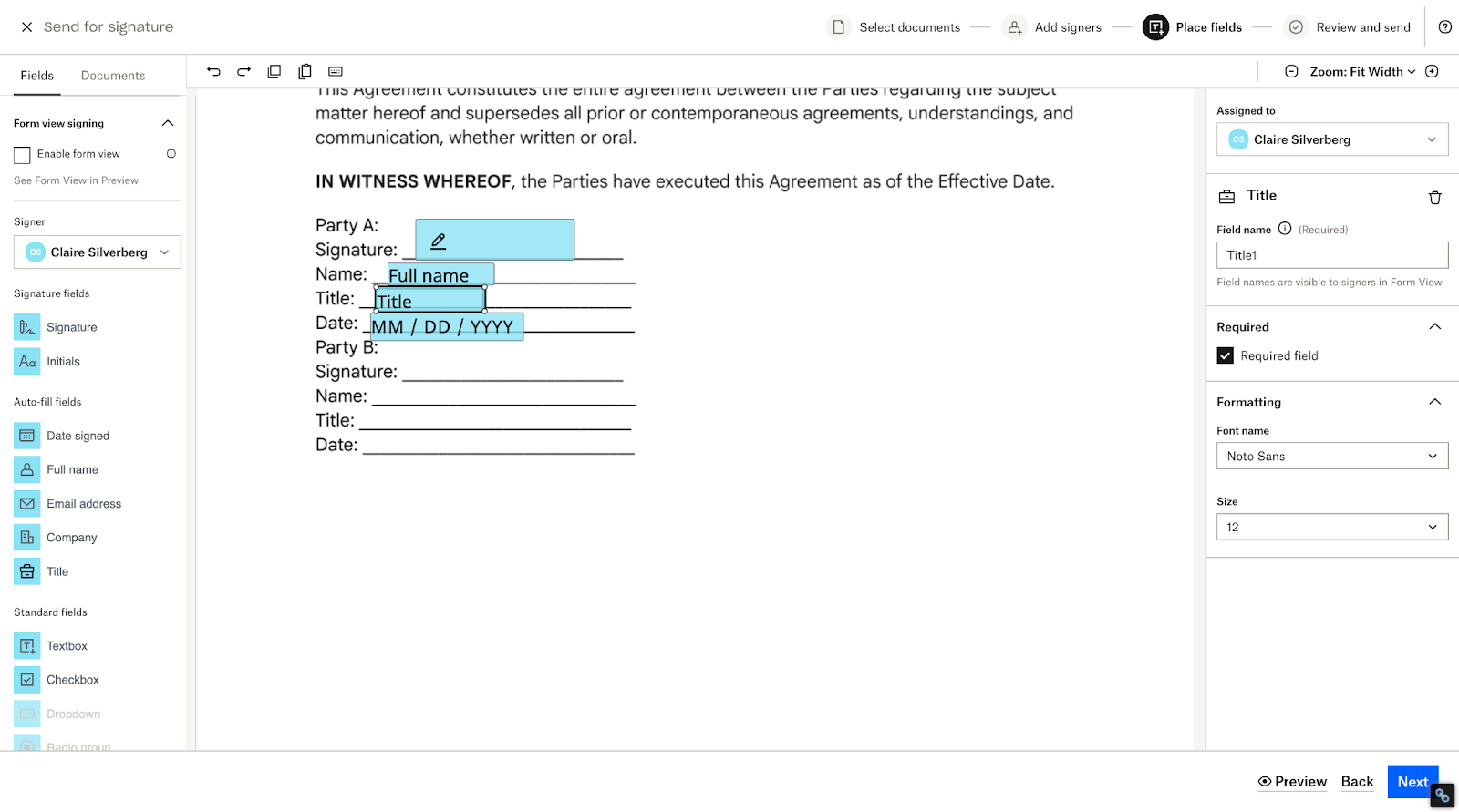
Originally known as HelloSign, Dropbox Sign has spent the last few years perfecting a lean e-signature experience. It’s a highly intuitive choice for teams that want to send documents without a host of enterprise settings. With a clean interface and native integration with Dropbox, it removes the friction of moving files between apps.
Using Dropbox Sign is straightforward: Simply upload a PDF or document directly from your computer or cloud storage, drag and drop the necessary signature and data fields, and send it off.
Recipients can sign on any device — even without a Dropbox account — and the completed document automatically files back into your designated folder with a non-editable audit trail attached.
Typical use cases for Dropbox Sign include high-volume, standard contracts requiring a basic e-signature, such as NDAs, offer letters, and freelance agreements. It’s particularly popular among creative agencies and consultants who prioritize a professional, branded signer experience over complex backend logic.
- Recommended for: Freelancers, small to mid-sized businesses, and teams that are already using Dropbox for file management but need a signing tool with an easy learning curve
- What I loved most about Dropbox Sign: I enjoyed the smooth mobile e-signature experience, which makes it very easy to sign documents while on the move.
- Key features
- Seamless Dropbox integration
- Reusable templates
- Mobile-first design
- Tamper-proof audit trails
- Custom branding
- Pros
- It’s easy to use, fitting well with the Dropbox and Google Workspace ecosystems.
- It offers compliance features to meet eIDAS, GDPR, and ESIGN standards.
- Onboarding is fast — users can often get going without a tutorial.
- Cons
- It lacks the advanced automations of some other tools.
- The jump from an Essentials plan to a Standard plan requires a two-user minimum, which can be pricey for a growing solo professional.
- It is a “sign-only” tool, meaning you can’t build complex, data-collecting forms within the platform.
- Plans/Pricing
- Essentials plan: $15 per month (for individuals)
- Standard plan: $25 per user per month (for two or more users)
- Premium plan: Custom quote (for large teams)
- Free trial: Yes
Pro Tip
If your needs extend beyond simple signing or you’re looking for more advanced customization, take a look at Dropbox Sign alternatives.
SignNow
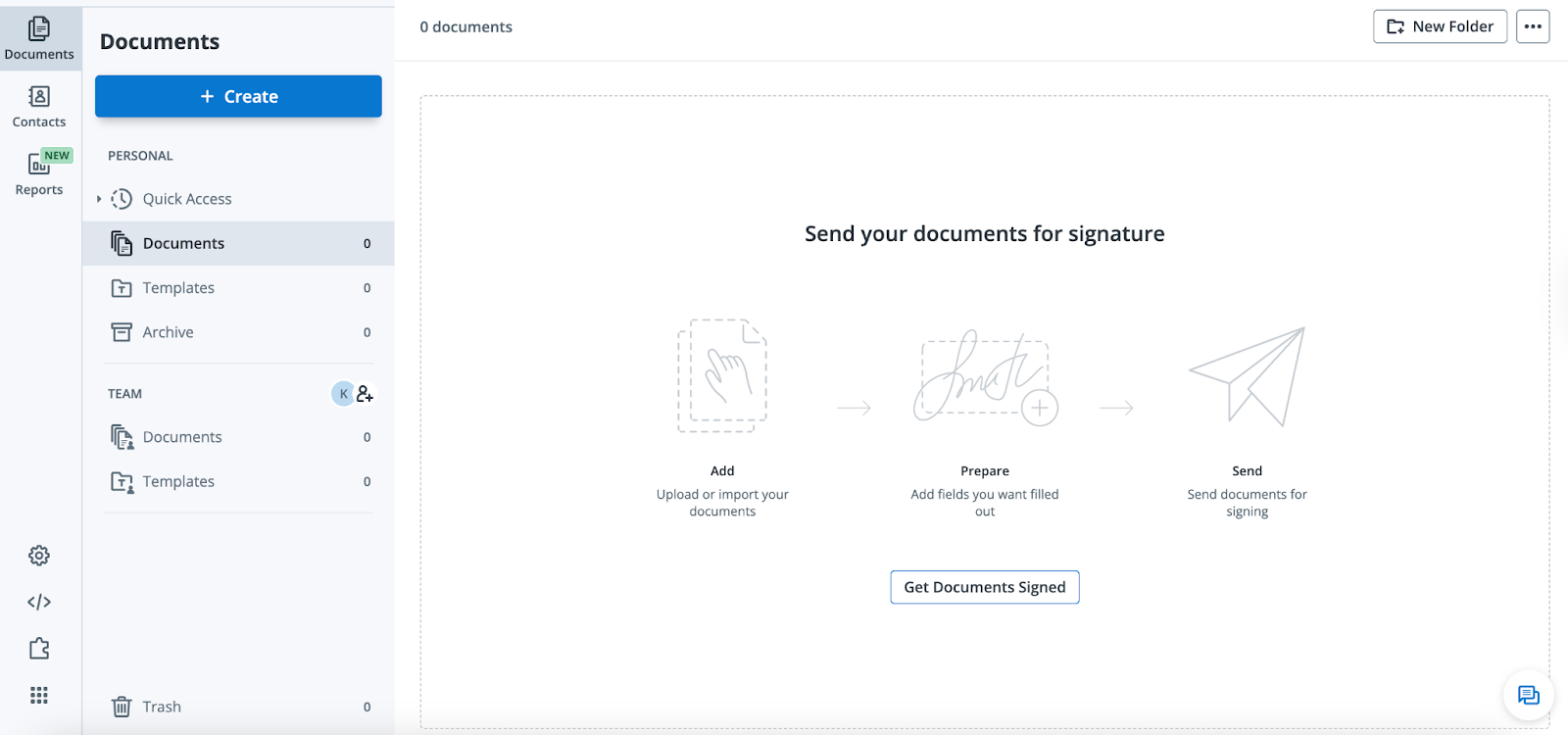
While Dropbox Sign might be described as “sign and go,” SignNow has built out robust features for the before and after process. They’ve carved out a niche for businesses that need enterprise-grade features — like conditional routing and payment collection — without the high price tag of other competitors.
The platform works by allowing you to build intelligent document groups. Instead of sending three separate emails for a contract, an invoice, and an onboarding form, you can bundle them into a single packet with a defined signing order.
SignNow’s editor is robust, allowing you to add calculated fields that automatically sum up costs or conditional fields that only appear if a signer selects a specific option.
Typical use cases for SignNow include real estate transactions, HR onboarding, and legal service agreements where multiple parties need to sign in a specific sequence. Its “unlimited users” philosophy on all plans also makes it a favorite for agencies and departments that scale quickly and don’t want to manage individual seat licenses for every new hire.
- Recommended for: Mid-sized businesses, law firms, and agencies that require complex multiparty signing orders and document automation on a budget
- What I loved most about SignNow: I like the unlimited users approach on all plan tiers. Being able to grant your entire team access without worrying about per-seat costs is a game changer for scaling operations.
- Key features
- Conditional routing to the next signer
- Document bundles
- Integrated payment gateways
- Mobile office mode
- Kiosk mode for multiple signatures on the same device
- Pros
- It provides value for money, with advanced features offered at a fraction of the price of major competitors.
- The ability to add unlimited users across all plans removes the administrative headache of license management.
- It offers full compliance features for HIPAA, SOC 2 Type II, and 21 CFR Part 11 standards, making it a safer choice for the medical and legal industries.
- Cons
- More features can lead to a steeper learning curve and longer onboarding time for some users.
- Some of the most powerful integrations (like those for customer relationship management, or CRM, systems) are locked behind higher plan tiers.
- For some users, the document editor can feel a bit rigid when trying to change fonts or layouts directly in the app.
- Plans/Pricing
- Business plan: $8 per month (billed annually) for unlimited users
- Business Premium plan: $15 per month for unlimited users
- Enterprise plan: $30 per month for unlimited users
- Site License plan: $1.50 per signature invite for unlimited users
- Free trial: Yes
Pro Tip
Before you commit, it’s worth comparing these features against other market leaders. Take a look at our breakdown of SignNow alternatives to see how it stacks up against the competition.
Dropbox Sign streamlines signing, while SignNow is stronger for structured workflows
If your priority is moving a document’s status from draft to signed with as little friction as possible, Dropbox Sign is a strong choice. While both tools are user-friendly, Dropbox Sign strips away the administrative noise to focus entirely on speed and ease of use.
How Dropbox Sign handles usability
The Dropbox Sign interface is intentionally clean and minimal, designed so a first-time user can successfully send a document without a tutorial. By limiting the number of sidebar menus and hidden settings, the platform helps you stay focused on the task at hand.
There are very few extra configurations to manage in Dropbox Sign, so users rarely feel overwhelmed — a positive often mentioned in reviews. This lightweight design choice makes the platform feel more like a modern web app and less like a heavy enterprise tool. The goal is for neither you nor your signers to get bogged down in technical hurdles.
How SignNow handles usability
SignNow puts more power — and, therefore, more icons — directly on your screen. While the interface remains intuitive, it’s visibly more dense because it includes quick access to advanced document routing, conditional field logic, and bulk send options.
This dense layout makes SignNow slightly more complex to learn during your first few sessions. However, you do gain the ability to build sophisticated document cycles that Dropbox Sign simply isn’t built to handle. It’s still a user-friendly experience, but it caters to those willing to spend an extra 10 minutes learning the ropes in exchange for deeper functionality.
Which users benefit most?
Dropbox Sign is specifically designed for professionals who need the fastest path to getting a signature. It’s great for freelancers, real estate agents, or small marketing teams who frequently handle one-page contracts or standard NDAs.
If your team doesn’t have the time or technical overhead to manage a complex software rollout, the plug-and-play nature of Dropbox Sign is a major asset. It’s for the user who wants a tool that gets out of the way and lets them get back to their actual work.
SignNow excels in complex, high-volume workflows, while Dropbox is a fast individual option
While Dropbox Sign excels at quick, individual requests, SignNow is built to handle the sophisticated workflows required by larger teams. If your document process involves multiple steps, diverse signers, or if-then scenarios, SignNow’s automation engine provides the depth you need to keep complex deals moving, well beyond an e-signature.
How Dropbox Sign handles workflow automation
Dropbox Sign is primarily designed for a linear, one-to-one signature process. It efficiently gets a single document from point A to point B, but it lacks the internal logic to pivot based on user input. While you can create reusable templates to save time, the tool is not built to automatically alter the document’s path once it has been sent.
This means that if a signer’s response requires a follow-up document or a different approval chain, you’ll probably have to manage that step manually. It’s an uncomplicated workflow tool, which is a strength for simple tasks but a limitation for businesses with evolving document requirements.
How SignNow handles workflow automation
SignNow acts as a full-scale workflow engine. It allows you to bundle multiple forms into a single document group and set advanced conditional rules. For example, you can configure a workflow where, if a signer checks a box answering yes to a specific question, the system automatically triggers a request for an additional form or routes the document to a specific manager for approval.
Conditional documents and role-based signing orders make sure that the right people see documents at the right time. This level of automation significantly reduces manual errors and prevents the back-and-forth emails often required to fix incomplete or incorrectly routed paperwork.
Which users benefit most?
SignNow is a great fit for HR departments, legal teams, and real estate offices where document packets are the norm and different e-signature types may be required. These users often handle complex onboarding or closing sequences where the necessary forms can change instantly, depending on the signer’s specific situation or choices.
If your business signs hundreds of documents each month and you need a system that can automate the routing and data collection for you, SignNow provides the scalable infrastructure that simpler e-signature tools lack.
Dropbox Sign is the best fit for teams already using Dropbox — SignNow is best for broad integrations
If your organization already relies on Dropbox for file storage, adding Dropbox Sign is the most logical step for your workflow. The two tools are designed to work as a single, unified ecosystem, allowing you to manage the entire life cycle of a document from creation to signature, without ever leaving your primary workspace.
How Dropbox Sign handles integrations
The standout benefit of this pairing is the one-click signature capability directly from your Dropbox folders. You can select a file in your cloud storage and send it for signature immediately, bypassing the need to download the document and re-upload it to a separate e-signature platform.
Overall, Dropbox Sign is light on integrations, focusing on a few key ecosystems. It does, however, offer Zapier as a connector, making it possible to create your own integrations if you need a broader range.
How SignNow handles integrations
SignNow takes a more platform-neutral approach to connectivity. It offers robust integrations with Google Drive, Microsoft SharePoint, Dropbox, and more, but it treats each one as a third-party destination rather than a native home.
The SignNow platform is a great choice for teams that operate across a best-of-breed stack, where you might use SharePoint for internal documents but Google Drive for client-facing assets.
SignNow doesn’t favor one ecosystem over another, so it provides a high level of flexibility for teams that don’t want to be locked into a single vendor.
While you can still sync signed documents back to your preferred cloud storage, you’ll likely spend more time navigating between different app interfaces as compared to Dropbox Sign’s seamless, single app experience.
Which users benefit most?
Teams that already pay for a Dropbox Business subscription will find Dropbox Sign to be the most convenient and cost-effective option. The minimal admin is a drawing card, allowing you to manage users, permissions, and storage billing, all in one place.
However, if your office uses a variety of cloud tools, SignNow is the better fit. It acts as a versatile bridge between platforms, ensuring that your e-signature tool adapts to your tech stack rather than forcing you to consolidate your files in one specific cloud.
Both tools offer secure, compliance-friendly e-signatures, but SignNow gives you more control
While both platforms meet the highest legal standards for e-signatures, they approach signer identity from different angles. If your business requires extra layers of certainty regarding who is actually behind the screen, SignNow offers more granular control over the verification process.
How Dropbox Sign handles security
Dropbox Sign focuses on frictionless security, primarily relying on encrypted audit trails and secure, unique signing links sent via email. Every document you send includes a time-stamped log of IP addresses and document activity, providing a clear record of when a file was opened and signed.
However, since Dropbox Sign is designed for ease of use, it offers fewer options for the sender to challenge a signer’s identity. While it does offer high-level electronic ID verification (eIDV), this feature is typically only available to its Premium plan subscribers.
How SignNow handles security
Compared to Dropbox Sign, SignNow provides a wider array of tools to verify a signer’s identity. In addition to standard encryption and audit trails, SignNow allows you to require signers to enter a one-time code sent via SMS or answer knowledge-based authentication questions before they can view the document.
These extra layers of security give you more confidence when sending high-stakes contracts. SignNow also leans into administrative control, offering robust compliance certifications for HIPAA, SOC 2 Type II, and PCI DSS. This makes it easier for administrators to enforce security protocols across the entire organization without forcing every user to be a security expert.
Which users benefit most?
Companies operating in highly regulated fields, such as healthcare, finance, or legal services, may benefit the most from SignNow. The ability to easily toggle on verification features provides the extra proof of identity required for sensitive patient records or high-value financial transfers.
Dropbox Sign is a great fit for users handling standard business agreements, such as marketing contracts, general service agreements, or NDAs, where the security of a unique email link and a tamper-proof audit trail is more than enough. It’s the better choice for teams that want a secure process that doesn’t feel like a hurdle to their clients.
Dropbox Sign vs SignNow: Which one wins?
Selecting the right e-signature partner comes down to the complexity of your documents and the level of automation your team requires. While Dropbox Sign and SignNow are both excellent platforms for collecting signatures, they serve very different operational philosophies.
Choose Dropbox Sign if
- You are already in the Dropbox ecosystem: If you pay for Dropbox storage, the ability to send and save documents directly from your existing folders is a huge convenience that keeps your files organized automatically.
- Your documents are straightforward: This is a great choice if you primarily handle simple, one-page contracts or standard NDAs that don’t require complex if-then logic.
- You value a zero-training interface: If you want a tool that your team (and clients) can use instantly without reading a manual first, Dropbox Sign’s minimal design is made for ease of use.
- You need to send one-off requests quickly: When speed is your priority, it is the fastest way to get a single document to one or two people.
Choose SignNow if
- You need to send document bundles: SignNow excels when you need to send several different forms to the same person at once, allowing them to sign everything in one seamless session.
- Your forms require conditional logic: This is the better tool if you need fields that change dynamically, such as hiding or showing entire sections based on how the signer answers specific questions.
- You have a large, growing team: SignNow is often the most cost-effective way to add many users to a single account without the steep per-seat pricing jumps found in other platforms.
- You require structured signing orders: If a document must follow a strict path — such as going from a manager to a legal department and then finally to a client — SignNow’s routing tools can handle it with ease.
Consider Jotform Sign if
- You want to build documents with AI: You can use the Jotform AI Form Generator to create custom contracts or complex agreements from scratch, simply by typing a description of what you need.
- You want a fully automated approval flow: You can turn your signed documents into an end-to-end automated process where managers can approve or deny requests, instantly triggering the next step in your business workflow.
- You want to build from the ground up: Unlike other tools that rely on static PDFs, Jotform allows you to build powerful, responsive documents from scratch.
Looking for form-first e-signatures? Meet Jotform Sign
The Dropbox Sign vs SignNow debate often comes down to choice of ecosystem against depth of features. If your signature process starts with a form or ends with a complex approval, you need a tool that treats data and signatures as a single, unified experience.
Jotform Sign pairs naturally with form-centric workflows, automated approvals, and repeatable business processes. Use it to build an automated system that collects data, captures signatures, and triggers the next step in your business logic, well beyond the simple signing of a PDF.
Jotform Sign is the streamlined choice to
- Build signable documents in minutes: Use the drag-and-drop form builder or the Jotform AI Contract Generator to create custom, professional contracts from scratch, without any coding.
- Automate approvals and routing: Go beyond simple signing orders by building complex approval flows that route documents to the right stakeholders based on the data entered.
- Prefill documents from form submissions: Save your signers time by automatically pulling data from previous forms or databases into your signature fields.
- Share and sign on any device: Whether you’re sending a link, embedding a document on your website, or collecting in-person signatures via tablet, the experience is seamless for everyone involved.
Ready to see how an automation-first approach can transform your paperwork? Explore Jotform Sign today and start building more than just a signature.
Send my document for signature
File type is not allowed.
Maximum file size limit exceeded. (5MB)
Something went wrong.
AS ALWAYS, CONSULT AN ATTORNEY BEFORE RELYING ON ANY INFORMATION ON THIS PAGE. THE CONTENT ABOVE IS FOR INFORMATIONAL PURPOSES ONLY. JOTFORM IS NOT PROVIDING LEGAL, FINANCIAL OR OTHER ADVICE.
This article is for anyone comparing e-signature tools for everyday agreements and higher-volume workflows, especially teams choosing between simple, fast signing and more structured routing, automation, and administrative control across devices.




































































Send Comment: