

Top 11 benefits of workflow automation
- Save time
- Save money
- Increase productivity
- Reduce errors
- Streamline approvals
- Increase transparency
- Promote accountability
- Improve the customer experience and vendor relationships
- Manage multiple tasks easily
- Increase employee engagement
- Increase organizational efficiency
Manual workflows feel like a constant grind. When employees waste time chasing approvals, correcting avoidable errors, and hunting for missing information, the business stalls. These inefficiencies drain productivity and slow down teams, making scaling nearly impossible.
If manual processes are slowing you down, causing errors, and eating into your profits, you need workflow automation. With workflow automation, you automate specific tasks and processes in your business to overcome some of the problems inherent in manual work.
The good news is that a surprising number of workflows are ripe for automation. That’s according to research by enterprise technology provider WorkMarket, which found that 74 percent of respondents think automation could handle at least some of their daily tasks.
Workflow automation comes with a whole heap of benefits too. Below, we outline 11 of the most important.


This article is for you if you’re a
- Operations manager trying to eliminate bottlenecks
- HR or finance lead managing forms, approvals, and follow-ups
- Customer support or service manager dealing with repetitive requests
- Small-business owner juggling too many tasks
- Team preparing to scale without adding administrative overhead
Or simply someone who wants to automate repetitive workflows and get more done with fewer resources.
What is workflow automation?
Workflow automation is the process of using software to run tasks and simplify communications by removing friction, all without requiring people to push each step forward. These technologies are commonly deployed to automate repetitive tasks, such as handing off documents or relaying approvals to the appropriate team members.
Traditionally, businesses rely on spreadsheets, emails, or memory to keep work moving. These approaches are unreliable at best and outright filled with errors at worst. Automation ensures everything flows where it needs to go, when it needs to, with fewer delays or errors.
Workflow automation replaces
- Manual data entry
- Back-and-forth emails
- Human routing of requests
- Repetitive task management
- Document generation and approvals
- Status check-ins and reminders
The software achieves automation with
- Conditional logic (if this, then this)
- Automated approvals
- Trigger-based notifications
- Integrations with CRMs, spreadsheets, and databases
- AI-assisted classification and follow-ups
- Centralized tracking
- Audit trials
It’s not about replacing people. You are removing low-value work so your team can focus on tasks driving the business forward. The question: What’s the best way to automate? It depends on the problem.
Agentic AI is one of the most popular emerging solutions for workflow automation. According to McKinsey, 62 percent of survey respondents are “at least” experimenting with AI agents. A Salesforce survey among IT and engineering leaders revealed that 95 percent of respondents’ organizations are making workflow automation a priority.
AI agents are customizable and adaptable to a wide range of tasks. You can use them to collect information, answer common questions, direct users to knowledge-base content, and so much more. Building an army of AI agents saves you a tremendous amount of time and paves the way for scaling your business.
Pro Tip
Looking for a way to streamline your workflows? Jotform might be your best bet!
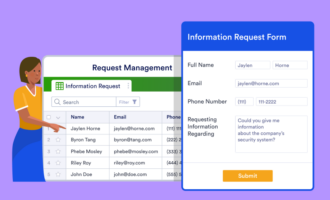
Here’s what an automated workflow looks like inside Jotform. We handle every step for you:
- A customer, employee, or vendor submits a form
A request, inquiry, application, order, or ticket comes in through a form, chatbot, or widget — whatever fits your intake process - Data instantly lands in Jotform tables
Your submission becomes part of a filterable, shareable database your team can use for tracking, reporting, or cross-department visibility - Smart routing moves the request forward
Conditional logic and approvals automatically send items to the right person or team (no emails, nudges, or manual hand-offs required) - Automated actions handle your downstream work
Update spreadsheets or CRMs, trigger emails, send documents, notify Slack or Teams, create follow-up tasks, or run next steps in your process - AI agents can step in without your lifting a finger
AI classifies submissions, generates responses, follows up, escalates issues, or pulls answers from your connected knowledge base - Conversational tools keep the workflow moving
Chatbots and embedded widgets collect additional info, guide users, and feed new data back into your workflow, so there’s no stitching or custom coding
Let us handle the workflow so you can focus on the results instead of the process.
Short-term vs long-term benefits
Our guide breaks down the benefits of workflow automation into short-term and long-term benefits. Short-term benefits provide immediate ROI, while long-term benefits are strategic wins that support your company’s growth, culture, and productivity.
The short-term benefits include the following:
- Save time
- Reduce errors
- Save money
- Increase productivity
- Manage multiple tasks easily
Long-term benefits include the following:
- Increase transparency
- Promote accountability
- Streamline approval processes
- Improve customer and vendor relationships
- Increase employee engagement
- Increase organizational efficiency
Here’s a closer look at each group so you can make a strong case for workflow automation to your company’s C-suite.
Short-term benefits
1. Save time
How much of your employees’ time is consumed by repetitive work that could be automated? Chances are it’s a lot. For example, according to Gartner, accounting teams spend up to 30 percent of their time on manual accounting rework. For a company with 40 full-time accountants, automating those tasks would save 25,000 hours of staff time.
When you implement workflow automation, employees don’t have to do monotonous, time-intensive tasks. Instead, you free up their time so they can help your business grow.
Pro Tip
Automate manual processes, data collection, approvals, and more with Jotform. Sign up for free!
2. Save money
Automation doesn’t just save your company time; it can save you money. This happens in several ways.
The first is a direct result of saving time, which leaves your team free to focus on revenue-generating activities. Second, by adopting new workflow automation software, companies can reduce their reliance on the expensive and outdated legacy solutions employees need to complete manual work. Third, fewer errors combined with an increase in compliance means organizations spend less money fixing mistakes and dealing with regulatory issues.
3. Increase productivity
This benefit is pretty straightforward, and we’ve touched on it already. When your team doesn’t have to waste time on repetitive tasks, they have more time to focus on work that matters and are more productive as a result.
With repetitive busywork removed, employees are also less likely to experience the brain drain that can occur when completing mind-numbing tasks. This can leave them more motivated to work harder on important tasks.

4. Reduce errors
Manual processes aren’t just time-intensive — they’re also often prone to errors.
These errors can occur in any number of ways. Handwritten forms can be hard to read, and team members can enter information from digital forms improperly or make incorrect manual calculations. Worse still, the more repetitive the task, the more likely it is that employees will lose focus and make a mistake.
By applying workflow automation solutions to automate data entry and approval workflows, you can all but eliminate human error. For example, there’s no need to manually input data into multiple systems because once the data is recorded, it can be automatically shared between spreadsheets and databases.
5. Streamline approvals
Manual approval processes are an enormous time suck. They can slow down workflows and lead to errors and missed deadlines. Often, employees spend more time sending and chasing documents than they do signing off on work and tackling tasks.
Digitize and automate the approval process, and all of these problems disappear. With automatic routing, sign-offs are sent to the correct approver based on conditional logic as soon as someone completes a step in the process. Approvers get automatic notifications to remind them that documents are waiting for their attention.
Long-term benefits
6. Increase transparency
Processes of all kinds involve different people at different points, but when tasks are completed manually, they tend to become disjointed from one another. No one has a good overview of the process as a result, making it a challenge to understand, analyze, and improve.
Using workflow automation makes your processes more transparent. It allows everyone to see what happens before and after they get involved, giving people a greater sense of control over their work. Automation tools also provide valuable data about your processes and task completion, so you can easily see where delays tend to occur, for example, and make improvements.
7. Promote accountability
Manual processes tend to go undocumented, with managers expecting employees to implicitly understand their roles and prioritize work appropriately. But the lack of transparency and guidance isn’t ideal if you want to develop a high-performing team.
Workflow automation tools allow you to create tasks, assign them to employees, and indicate work priorities. These tactics highlight individual contributions to larger projects and set clear expectations for team members, all of which contributes a culture of accountability.
8. Improve the customer experience and vendor relationships
As mentioned above, manual processes take more time and introduce errors, which may inadvertently delay vendor payments and contracts, drag down customer service scores, jeopardize sales opportunities, and more.
You might not think that continuing to perform tasks manually could have such an impact, but if your competitors are automating, they’re likely to get higher marks from outsiders for speed, accuracy, and responsiveness.
Workflow automation streamlines your interactions with external parties. For example, you could send automated confirmation emails after receiving customer orders. You could automate vendor contract generation and use e-signatures. You could automatically assign leads to members of your sales team after every landing page form submission and populate your lead database — the possibilities are endless.
9. Manage multiple tasks easily
No one has just one thing going on at work. We usually have more things than we can count, and trying to track it all manually — and keep everything moving along — is a challenge. In fact, you probably spend more time managing tasks than actually doing them!
Automation software removes the bulk of a manager’s low-level administrative tasks. There’s no need to send reminders, request updates, and decipher spreadsheets. You can easily get an overview of tasks and their statuses, see what your team is working on at any given time, and send automated reminders for work that’s coming due.
Workflow automation can also keep projects proceeding smoothly by automatically notifying team members when they have a job to do.
10. Increase employee engagement
Would you be alarmed to learn that nearly half your employees are bored at any given moment? And that 33 percent of employees cite boredom as their main reason for leaving a company? Repetitive, menial tasks are a major contributor to boredom in the workplace, so the more you can do to offload these tasks from workers’ plates, the better.
Automation can handle ho-hum administrative assignments so your employees don’t have to. Rather than spending time inputting data or sending emails, they can be solving customer problems, for example, or negotiating the details of vendor contracts.
Meaningful work keeps employees engaged, which makes them more motivated to do their best work and less likely to leave. That’s good for them — and for you.
11. Increase organizational efficiency
Implementing workflow automation isn’t just about automating discrete tasks, such as inputting form data into a CRM. That’s certainly helpful, but there’s also the bigger picture to consider: Eliminating manual tasks opens the door to greater efficiencies across the entire business.
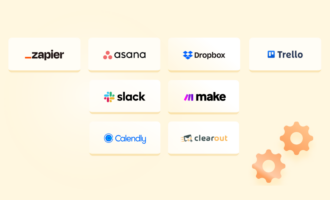
Most workflow automation tools integrate with the other tools you use on a daily basis. Take the CRM example: Using a workflow automation solution, you can automatically input form data into a CRM. That solution might also integrate with Salesforce, which means the data can be automatically relayed to your sales pipeline at the same time.
These types of efficiencies are only possible with digital processes, and workflow automation tools are a good start.
How to get started with workflow automation
Deciding what to automate first is one of the biggest challenges for businesses still doing everything the old-fashioned way. Don’t feel as if you need to automate everything all at once. Most teams start with one task that’s costing them time or money. Here’s how to begin:
- Identify manual processes that are the highest friction
- Map the steps from start to finish
- Build your intake point using a tool like Jotform Form Builder
- Centralize the data in Jotform Tables
- Automate workflow steps inside Jotform Workflows
- Connect your tech stack with integrations
- Add AI to handle repetitive decision-making
- Launch, test, and refine
The key to successful workflow automation is to invest in the right tools. Jotform has solutions designed to help you work more efficiently and automate at scale.
Build custom pathways to get more done with Workflows from Jotform. Jotform Tables gives you the tools you need to condense information into digestible tables.
Want to stay connected with your customers 24-7? Jotform Chatbot Builder makes it easy to create custom chatbots for your website.
Say goodbye to repetitive work
Workflow automation helps your team scale faster and reduce burnout. You’ll not only boost productivity but also deliver consistent service and operate with fewer delays. Even small automations can reclaim hours per week for your staff. Full workflow automation transforms entire departments.
Ready to make your business more efficient with Jotform? Check out Form Builder and other Jotform offerings, including AI Agents, today. There’s no coding required and powerful AI tools built right in, allowing you to automate your most important processes in minutes.
Frequently Asked Questions
No. Workflow automation tools are scalable and affordable, making them accessible to businesses of any size. Small companies often see a fast return, as they often lack administrative staff, meaning manual tasks consume a larger amount of their workday. Automating approvals and data entry immediately reduces workloads and helps smaller teams operate with fewer bottlenecks.
You can automate any process with consistent steps or clear rules. If a task is predictable, it can be automated. Popular examples include responding to customers via email, form-based data collection, HR onboarding, time-off requests, and more. With the right software, you can also set up downstream triggers, such as updating your CRM or creating documents.
That depends on which tools you use. Some tools require heavy lifting from your IT team, including custom coding work. Modern workflow automation solutions are designed to be more user-friendly, even for non-technical users. Most platforms use drag-and-drop builders so anyone can build custom workflows. They also include customizable templates to jumpstart your automated processes. Simple processes can be automated in under an hour.
Manual workflows tend to create bottlenecks for your teams. If employees are frequently retyping data manually, it increases the risk of errors. Even the most detail-oriented employees can be prone to mistakes, especially when they get fatigued.
Additionally, manual workflows frustrate customers and increase delays. They also lack visibility, meaning your management team can’t see where tasks are stuck or why.
This article is for operations managers, HR and finance leads, customer support teams, IT or project owners, and small business leaders who are slowed by manual work. If approvals, data entry, and status chasing are draining time and money, you’ll learn how to automate high-friction processes to cut errors, increase transparency and accountability, and improve the customer and vendor experience.



























































































Send Comment: