
Create a project management workflow in 5 steps
Have you ever been grocery shopping without a list? Despite going in with the best of intentions, you may forget certain necessities and instead overload on items that you don’t really need.
Professional projects can be equally chaotic if they’re not properly planned. “Without careful planning, project performance is almost certainly guaranteed to suffer,” writes Moira Alexander, founder of PMWorld 360 Magazine and Lead-Her-Ship Group.
That’s why creating a project management workflow is so important. Discover our five simple steps for implementing one today — plus how Jotform can help.
The importance of a project management workflow for businesses
A project management workflow gives teams a shared, repeatable way to plan tasks, route decisions, and track progress across tools and departments. With projects involving so many people, processes, and moving parts, they can be prone to miscommunication.
“Trying to get everybody talking in the same language or doing things the same way is difficult,” says Jennifer Bridges, founder of PMP certification education platform PDUs2Go.com.
The solution to overcoming this challenge? A clear project management workflow. No matter how big or small, or how complex or simple the project may be, project management workflows improve the productivity and efficiency of teams — helping to ensure projects meet all requirements upon delivery.
The benefits of building a project management workflow
Project management workflows help teams reduce rework by clarifying what “done” means at each step and making handoffs predictable.
Creating project management workflows can completely transform your organization’s productivity. Projects run more smoothly, and staff are aligned on their functions within the project delivery scope.
By providing a clear set of rules to follow, your organization can benefit from
- Improved productivity and efficiency: Team members are less likely to miss steps or perform unnecessary tasks that impede maximum productivity. This keeps projects on schedule and within budget.
- Better collaboration and accountability: Everyone can see who’s working on what and where they are in the project, increasing each person’s accountability for their part in the process.
- Greater transparency: Key information is centralized within workflows, leading to greater operational efficiencies and reducing the time needed for team members to seek information.
While there are some learning curves associated with implementing new workflows, the benefits you can realize far outweigh any challenges that may present themselves in the beginning stages of developing more detailed workflows.
How to plan and implement a project workflow
Each project workflow will be unique. Project managers are responsible for creating customized workflows that fit the expectations and requirements for each project.
However, there are some basic steps involved in building a project management workflow that serve as a blueprint to get started:
1. Set project goals
It’s often easier to visualize steps when working from end to beginning. Think about what you want this project to accomplish. Are you hoping to increase product sales? Boost brand awareness? Implement a new tool? With the goals in mind, you can then work backwards to establish all the tasks that your team needs to accomplish for the project to be successful.
2. Gather project data
Next, collect as much information as possible in relation to the completion of the project — no detail is too small to take note of, as each piece of data informs task creation and the project’s workflow. Consider items such as physical assets, tools, people, and any other elements that will impact the project. Get input from team members who may be valuable in building workflows too.
3. Create a workflow diagram
Then, use that data to build the workflow diagram — a visual representation of the work that your team needs to complete. The tasks included in the workflow need to be specific and organized chronologically. Keep in mind that this needs to be a flexible template that you can adjust if things change.
4. Get team member support
It’s impossible to execute a project without the support of all the stakeholders. Once you’ve built the diagram, it’s time to get everyone on board. Share it with team members so they have the opportunity to offer suggestions and get their approval where necessary.
5. Adopt the right software
The right software makes it easier to build and manage project workflows. With technology, you can automate workflows to make projects run more smoothly and efficiently.
Jotform makes the project management and delivery process a breeze. Choose from a wide range of pre-generated templates, then let Jotform Workflows do the rest:
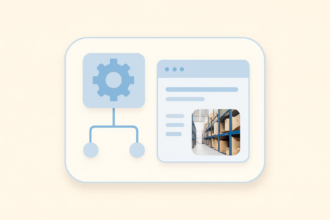
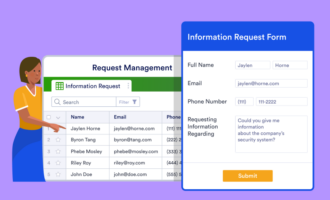
Jotform Workflows helps teams manage project requests by turning form submissions into structured processes. For example, a request can be routed to a manager for approval, escalated if it’s urgent, and then assigned to the right team, all based on rules you define.
You can also organize and analyze this data with Jotform Tables, a tool you can use to manage and track the information you collect with our workflow forms throughout the project period.
Additionally, you can use Jotform Boards to manage project workflows visually by turning submissions into cards that teams can move through stages, making status and next steps easy to understand at a glance. This is especially useful for project workflows because it helps teams track work in progress, spot stuck items, and keep handoffs visible without relying on extra meetings or manual updates.
Build workflows your team can actually follow
Project management workflows help teams deliver projects more consistently by clarifying goals, defining tasks, and making handoffs and approvals easier to manage.
When you set clear project goals, gather the right inputs, map the workflow visually, and align stakeholders, you reduce miscommunication and keep work moving forward.
And by adopting workflow software that automates routing and keeps progress visible, teams can spend less time chasing updates and more time completing deliverables on schedule.
To streamline your project workflow setup and tracking, start using Jotform for free today.
Frequently asked questions about project management workflows
A common seven-step project flow includes: initiating, planning, scheduling, executing, monitoring, controlling changes, and closing.
The five stages are typically: initiation, planning, execution, monitoring and controlling, and closing.
A simple five-step workflow model is: define the goal, list tasks, assign owners, set the sequence and rules, then track and improve performance over time.
This article is for project managers, operations and team leads, and cross-functional business teams, and anyone who wants to create clear, repeatable project management workflows that reduce miscommunication, improve accountability, and keep projects on schedule.




























































































Send Comment: