
Whether you’re collaborating on your Google Form with a team, revisiting previous forms, or correcting accidental changes, it’s good to have the ability to check your Google Forms history.
The problem is that Google Forms doesn’t have a built-in way to do that.
In this article, we’ll discuss what to do when you want to know how to check your Google Forms history. We’ll also show you how easy it is to check your version history with a sophisticated Google Forms alternative: Jotform.
Can you view edit history in Google Forms?
Many Google products, like Google Docs and Google Sheets, have revision history functionality, and even give you the ability to restore previous versions. Unfortunately, that functionality does not exist in Google Forms.
However, there are some related features that, while they don’t address how to check Google Form history directly, are still important to note and may come in handy when you want to view Google Forms changes:
- Response history: You can go to the Responses tab to view individual responses in Google Forms.
- Connected Google Sheets history: If you open your Google Forms responses in Google Sheets, you can view your Google Sheets history.
- Deleted form recovery: If you deleted a Google Form, you can go to the Trash in your Google Drive to restore the form if it has not yet been permanently deleted.
How to check Google Forms history — can you use the Forms History plugin add-on?
Google Workspace Marketplace has a variety of add-ons that extend the functionality of its software products, but in this case, you’re out of luck.
While Google Forms does have a Forms History add-on, it has been removed from the Marketplace. At the moment, you’re not able to install it.
There are some third-party Google Chrome extensions that may be able to help you check your Google Forms history; however, they are not native to Google Forms and may require you to convert your forms to another format. The good news is, you have a great alternative to Google Forms available at your fingertips!
Check your form history easily with Jotform
If you’re wondering how to use Google Forms successfully without this important feature, why not try an alternative form-builder that has built-in version tracking: Jotform.
With Jotform, you don’t need a plug-in, add-on, or anything complicated. Jotform comes with native functionality to check your edit log with ease. Here’s how to do it:
1. Open your form in the Jotform Form Builder.
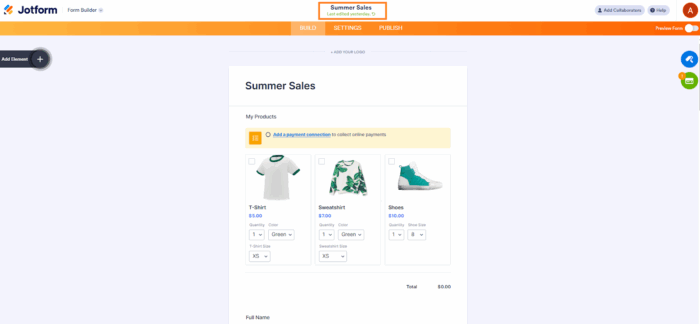
2. Under the form title, you will see a date and timestamp for the last time the form was edited. Click on the circular arrow icon.
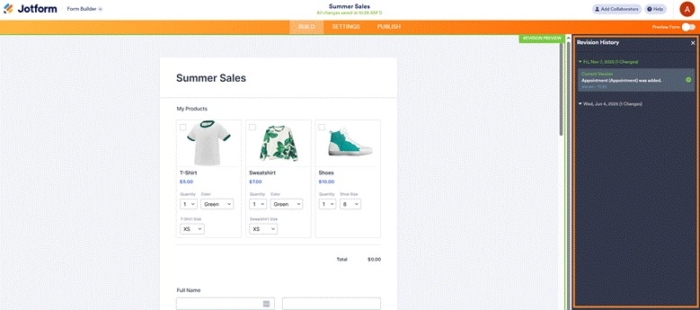
3. This will open the Revision History window on the right-hand side. From here, you’ll be able to browse all previous versions of your form, compare changes, and even restore an earlier version. No workarounds needed!
Take control of your form version history with Jotform
It can be frustrating to create forms without having any way to see prior versions or edits. Enter Jotform, a leading alternative to Google Forms.
With Jotform, you can simply use the Forms History function to see all past versions of your form and restore previous versions if needed. It’s a fast, effective way to manage your form version history without any plug-ins.
Give Jotform a try today and see what a difference this feature makes!
Frequently asked questions
The Google Forms History add-on is not currently available in Google Workspace Marketplace. When it becomes available again, here are the steps to install it: 1) Create a Google Form, then go to the three-dot menu at the top. 2) Click Get add-ons and search Forms History. 3) Install the add-on and allow form permissions.
There is no way to check your Google Forms activity at the moment. Consider using a full-featured form builder like Jotform which has built-in functionality to check your form history.
This article is for form creators, educators, administrators, and anyone who wants to track and restore changes in online forms by accessing edit history or revision logs.






































































































Send Comment: