With Jotform, it is possible to attach submissions as PDFs to your email notifications and track your submission data directly from your email inbox.


To include PDF reports in your email notifications
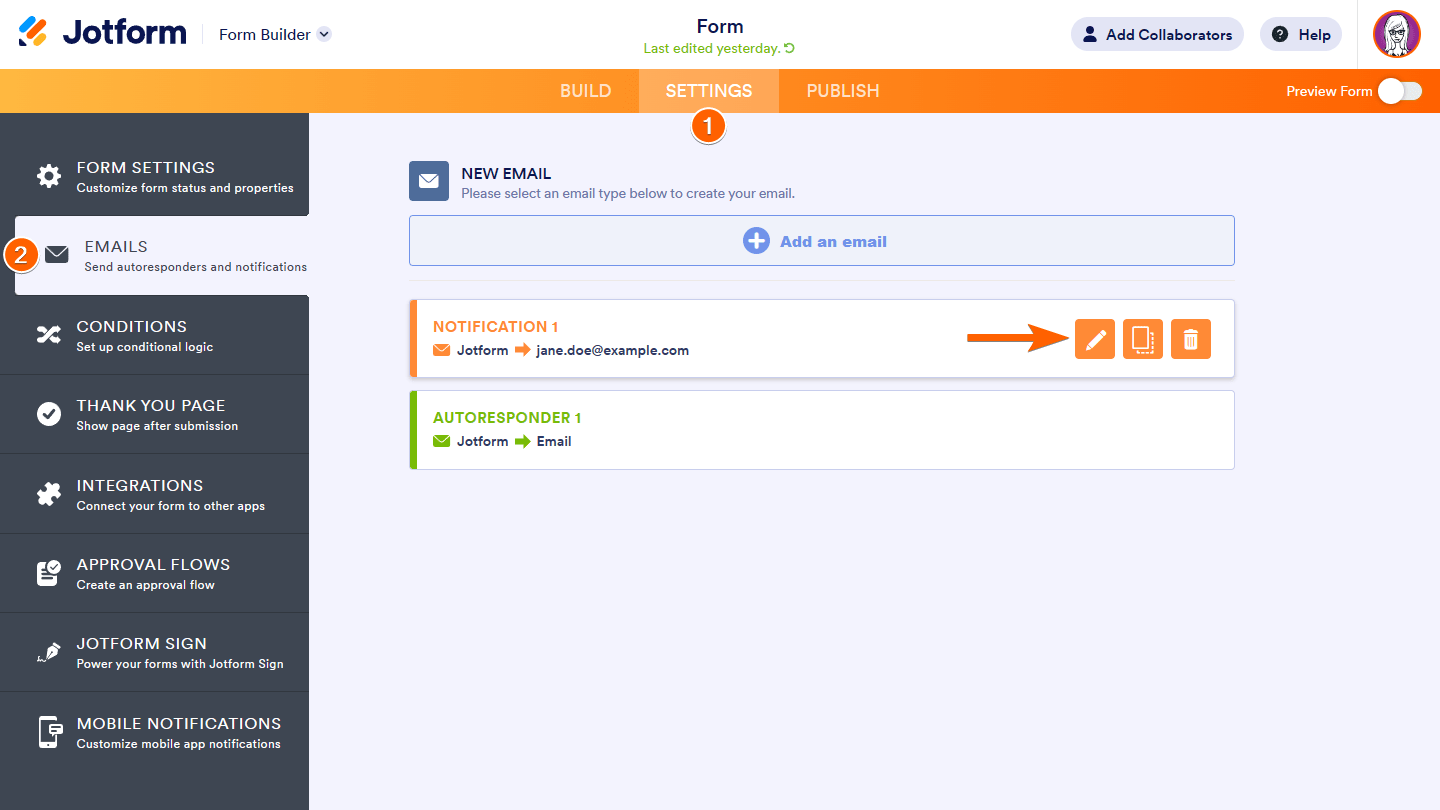
- In the Form Builder, go to Settings at the top.
- Select Emails on the left, then edit your notification.
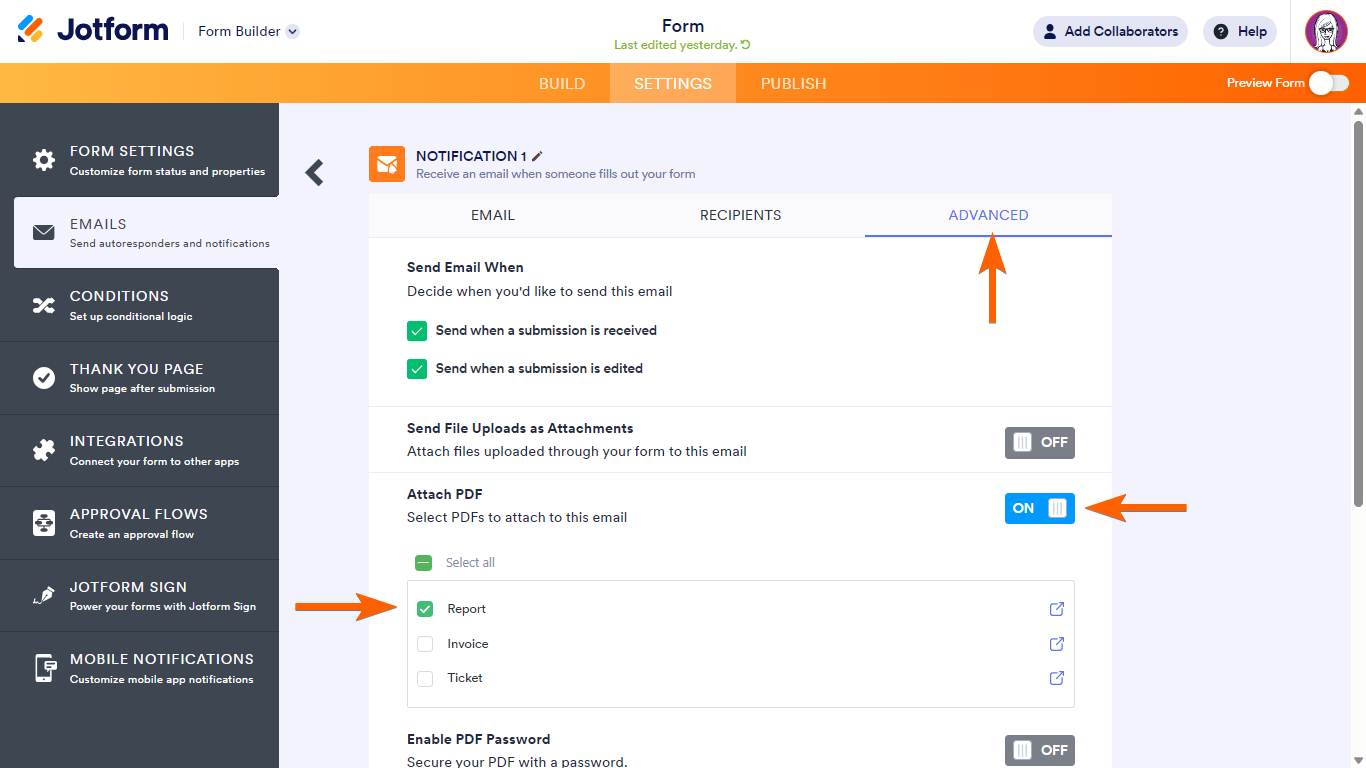
- Go to the Advanced tab.
- Turn on Attach PDF, then choose the PDFs to attach.
- Select Save at the bottom when finished.
Attaching PDFs for HIPAA Forms
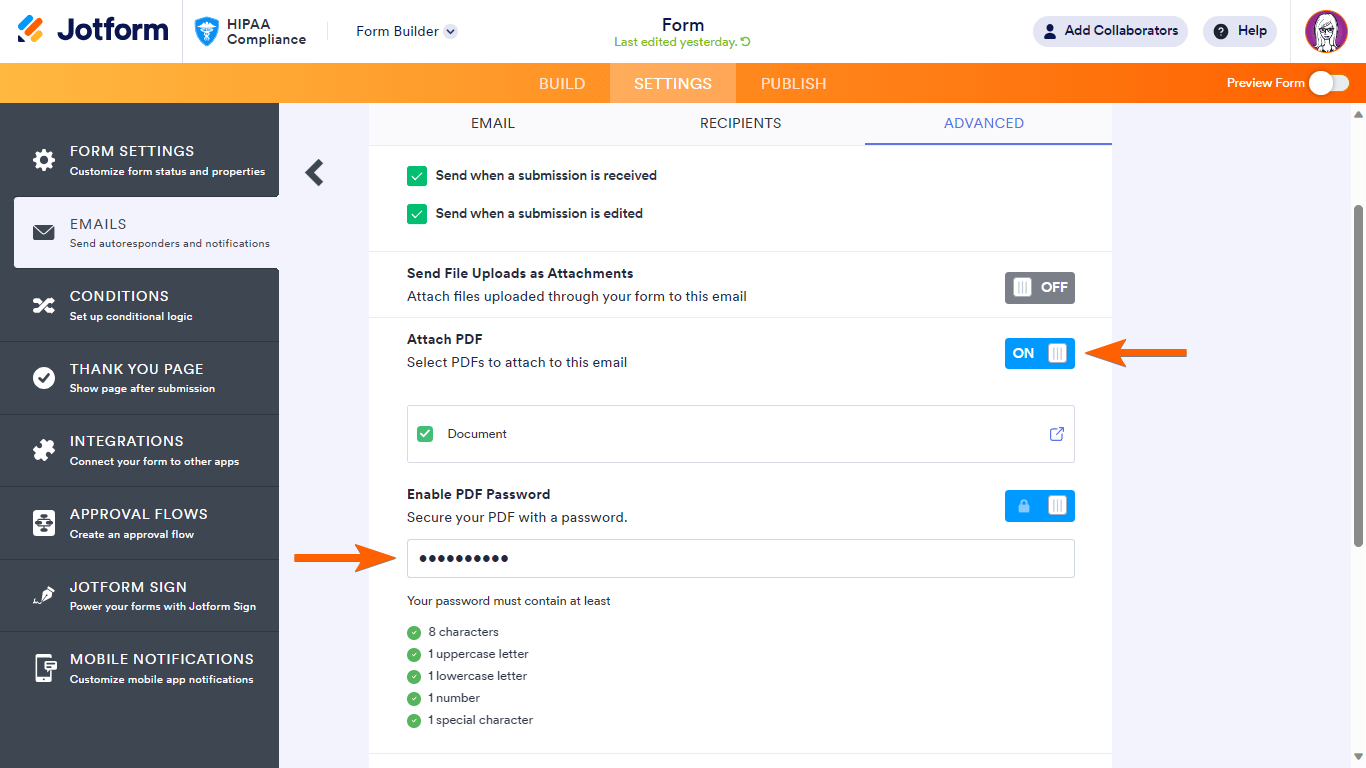
If your submission data contains protected health information (PHI), attaching submissions as PDFs may result in a HIPAA violation as most email services do not provide built-in encryption. To avoid this type of data breach, you need to protect submission PDFs with a password.
Your password must contain a minimum of 8 characters and it must be a mix of upper case, lower case, numbers, and special characters.
After configuring your submission PDFs, you’ll be able to receive them in your email alerts. Open the PDFs in your browser or download them to your computer.



Send Comment:
50 Comments:
February 2, 2025
Is it possible to have that same PDF submission for sent to the person that completed the form?
July 4, 2024
If you have e-signatures on your forms, does the pdf attachment show the signature "image" or a "link" to the image?
January 23, 2024
I am working on a NIL authorization, which includes uploading the JPG pictures to show what images the person is authorizing. However, since they are signing for authorization, I need to include a PDF to show the paragraph they are agreeing to. Is there a way to not show all the pictures on the PDF, and rather, have them show as a link?
November 29, 2023
We tried this, but are still only receiving the email body, no PDF...
September 26, 2023
Hi,if i encrypted the email. The zip file attached needs to be password encrypted? Thank you
March 1, 2023
I am only getting the form uploads (pictures.signatures) as an attachment to the email. Not the PDF.
February 3, 2023
I have updated the PDF attachment field and submitted and actual submission, but am not receiving the PDF attachment.
August 11, 2022
how do we include the Original PDF in the autoresponder email?
August 10, 2022
De persoon die het formulier heeft ingevuld krijgt geen automatische reactie en PDF toevoegen lukt ook niet. Bovenstaande punten uitgevoerd.
June 27, 2022
I have done this and it works for some of my jotforms, but right now one of them it will not work for and we are not receiving a pdf attachment in the email that we receive.
March 23, 2022
what happens if we aren't getting the pdf attachments to our emails?
March 23, 2022
Hi. We store copies of our form submissions (in PDF) in Dropbox. From what I understand so far, with the HIPAA Compliance enabled, PDFs can be password protected. So, if we manually download our PDF submissions and upload them to Dropbox they will remain password protected indefinitely?
December 16, 2021
Hi
I have done this and does not work? I don't have a PDF document at all.
November 30, 2021
When I have notifications set to PDF, the header on hidden/unused pages still shows up on the PDF attachment. Looking at the customizable PDF editor, all of the headers and a photo do not show up as options to include or not to include. I have no idea how to remove those unused headers and photo. I've tried to Hide/Show if the page is used, but that doesn't help this issue. Can you help?
September 15, 2021
i have managed to integrate jotform with monday.com for our quizzes. However, how can we have the results be send to monday.com as well?
August 20, 2021
Does this only print one pdf? I want it to print off a variety of pdfs. Can it print off a variety of pdf. Different form layouts ?
May 21, 2021
Hi. I hope you can help me.
I am looking to create a download link that the buyer receives after submitting their purchase form. My issue is that I have 3 different downloadable items for purchase. Say for example, I have items A, B and C. So, how to do I create an invoice or email that gives them their download link(s) for only item A or items A & B if that is what they purchased?
Thanks in advance for your help.
Ric
May 6, 2021
All options are correctly checked but we still don't receive a PDF attachment to completed forms...
April 9, 2021
It is very disappointing that now you can only choose "Default Document". Before you could select which tab in the PDF editor to attach. This allowed for different subsets of information to be output depending upon user selections. In other words, I could have an user choose A, B, or C in a question, then set up conditional formatting to send notification A, or B, or C in which each of those had a different pdf version attached to it.
Now, that has been taken away and there is only one option, the Default Document. Why would you do that!!!!!
April 1, 2021
I am still not getting an PDF attachment on my submission emails.
February 16, 2021
Does the Password Protected PDF as attached in the Autoresponder/Notification Email show also the PHI Protected (Removed for Privacy fields in the email notification screen cap as shown above) fields?
October 5, 2020
I got the PDF but it captured only the field filled by the user, other elements in the form such as logo and other images are not displaying in the PDF.
September 11, 2020
Please be aware that I've been using this feature for years, and it works *most* of the time, but arbitrarily there are times when the document is NOT attached to the notification email (for whatever reason). There is a bug!
September 4, 2020
I have followed these exact instructions numerous times but when I test the form (or have others try it as well) the PDF is not attached to the autoresponder. When I go back into the settings, it has gone back to the default of "NO" on the PDF Attachment field, even though I clicked it to "YES" and saved the change. I have tried this probably 5-6 times and the same thing keeps happening.
August 12, 2020
Thank you so much! Works perfectly fine.