

This content is intended for general informational purposes only.
It’s critical that covered drivers know how to fill out a driver’s daily log to meet standards by the Federal Motor Carrier Safety Administration (FMCSA). The driver’s log, also called a Record of Duty Status (RODS) is a critical piece of documentation, and losing it, failing to keep it current, or filling it out incorrectly can lead to steep Department of Transportation (DOT) fines, drivers being placed out of service, or a safety rating downgrade that affect the entire company.
Electronic Logging Devices (ELDs) now handle a lot of tracking automatically, so it’s easy to rest on that and assume manual logs are a thing of the past.
But they aren’t.
Federal rules still require commercial drivers to know how to fill out a driver’s log correctly, and that knowledge becomes essential the moment an ELD malfunctions, when a driver qualifies for a short-haul exemption, or when operating older equipment with a pre-2000 engine. In any of those situations, the paper log is the only thing standing between a driver and a compliance violation.
This guide breaks down exactly how to fill out a driver’s daily log step by step, so nothing gets left blank, nothing gets miscalculated, and drivers and fleet managers can reduce the risk of an avoidable roadside violation.
Before you start, understand the 4 core duty statuses
Remember that every minute of your 24-hour day must fall into one of four duty-status categories:
- Off Duty: Completely free from work and vehicle responsibilities (e.g., meals outside the truck, going home).
- Sleeper Berth: Time spent resting inside an approved sleeper berth compartment.
- Driving: Physically controlling the commercial vehicle.
- On Duty (not driving): Working but not behind the wheel (e.g., pre-trip inspections, loading/unloading, fueling).
Step-by-step guide to filling out the 24-hour log
This section breaks down the process of filling out the 24-hour log in chronological steps. This is how a driver handles their logbook day.
1. Complete the administrative header information
Every log sheet needs the following manual logbook instructions completed before the wheels turn:
- Date: The exact calendar day the log covers, since every RODS is tied to a single 24-hour period.
- Total Miles Driven: The total distance covered for that day, used to cross-check against dispatch and fuel records.
- Truck & Trailer Numbers: The specific unit numbers for the vehicle and trailer in use, so the log matches the equipment actually on the road.
- Carrier Name & Main Office Address: The legal name and address of the motor carrier the driver is operating under, confirming who’s responsible for the load.
- Shipping Document Number: The bill of lading, manifest, or shipping order number tied to the freight being hauled.
Pro Tip
It’s important to get into the habit of following a flow when filling these forms out. Form and manner violations cover the most basic and easy mistakes like missing or incorrect header details, miles or locations not tracked. These mistakes are easy to make and therefore the easiest ways to pick up a fine during a roadside inspection.
2. Plot your hours on the 24-hour grid
Traditionally, the logbook page includes a horizontal grid split into 24 one-hour columns, with four rows running down the side, one for each duty status:
- Off Duty
- Sleeper Berth
- Driving
- On Duty (not driving)
For every change in status throughout the day, the driver must follow the paper logbook graph rules. The driver draws a line at the row matching that status, moving it up or down at the exact time the status changes, then draws a continuous horizontal line across until the next change happens.
The driver should mark each transition with a vertical line connecting the two rows, so the grid reads as one unbroken line from midnight that starts the day to the midnight that ends it.
The goal is a graph that shows, at a glance, what the driver was doing during every single minute of the day, with no gaps and no overlapping entries.
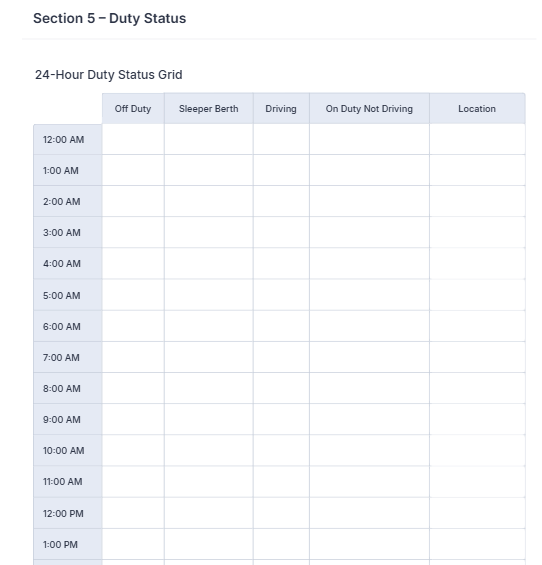
Another way to do it, for internal notes, is a table with 24 one-hour rows, and four columns with each duty status. Drivers can fill in the duty status against the correct time row.
Here’s a DOT driver daily log example using Jotform’s Delivery Driver Daily Log Form template:
3. Reconcile and total your hours
At the bottom of the grid, there’s space to total the hours spent in each of the four duty statuses.
This is the math check that every inspector performs. The four totals have to add up to exactly 24 hours.
If the totals come up short or run over, it signals either a plotting error or a missing entry somewhere on the grid, and it’s one of the fastest ways for an inspector to flag a log as inaccurate.
Getting into the habit of adding up the hours before closing out the day catches these mistakes before they turn into a violation.
4. Certify and sign your log
The last step is the most legally significant.
Once the 24-hour day is complete and the driver has reconciled the hours, the driver signs their full name at the bottom of the log to certify that every entry is correct.
This signature is a legal certification, and it means the driver is taking responsibility for the accuracy of their FMCSA Hours of Service log.
An unsigned log is treated as an incomplete one, and a signed log with inaccurate entries can expose the driver to falsification charges, which carry far more serious consequences than a standard fine.
Can you use Jotform instead of physical paper?
Long-haul interstate drivers hauling freight across state lines are typically required to use engine-connected Electronic Logging Devices (ELDs). But that mandate doesn’t cover everyone.
Millions of drivers are legally exempt, including:
- Short-haul drivers operating within a limited radius
- Agricultural haulers
- Drivers running pre-2000 engines that predate ELD compatibility requirements
However, here’s the part that surprises a lot of exempt drivers: the DOT still requires an accurate record of duty status from them when not using short-haul timecards, but nothing in the regulation says that log has to be on physical paper.
As long as the record captures the same information a paper RODS would, the format is flexible.
This is where the Jotform Delivery Driver Daily Log Template comes in.
It’s a paperless way to handle exactly what a physical logbook does, minus the smudged ink, torn pages, risk of loss, mathematical errors, and the end-of-day scramble to find where the document went.
Online documentation solves many problems across the team.
For example:
- Owner-operators get a log that lives on their computers, phone or other electronic devices, instead of paper shoved in a glove box, so there’s no risk of a page going missing right before an inspection, and no manual recalculation of hours at the end of a long day.
- Fleet and safety managers get visibility they simply don’t have with paper. Instead of chasing down physical logs from a dozen drivers to check for compliance gaps, submissions come in digitally and then managers can review, store, and audit them from one place.
- Company drivers get a form that can be configured and already built to the correct standard, so there’s no guessing whether they’ve filled in the right fields. It’s fast to complete between stops and removes the risk of an incomplete log during a roadside check.
As a paper log replacement, the form is built around the same structure inspectors expect to see, just digitised.
The form includes:
- The FMCSA Header with dedicated fields for carrier information, vehicle and trailer numbers, and shipping document details, so the required header is less likely to get missed.
- The 24-Hour Duty Status Grid so drivers can log their hours across all four core duty statuses directly from a smartphone screen, with no need to hand-draw a grid.
- Built-in Log Types so drivers can select the exact exemption type they’re operating under, whether that’s an ELD Exception, Paper Log, or Internal Tracking, so the record matches their specific compliance situation.
- E-Signatures that use Jotform Sign so drivers can certify their log with a digital signature, the same certification step required at the end of a paper log.
Whether someone’s managing a fleet of fifty trucks or just their own, standardising on a mobile-friendly digital form keeps drivers out of the traditional paperwork nightmare altogether.
Take a look at Jotform’s free fleet management forms and driver forms to see what’s available for fleet managers and drivers alike.
Common logbook mistakes that trigger DOT violations
Most logbook mistakes don’t happen because drivers are trying to cheat the system. They’re small, avoidable slip-ups that inspectors are trained to spot quickly.
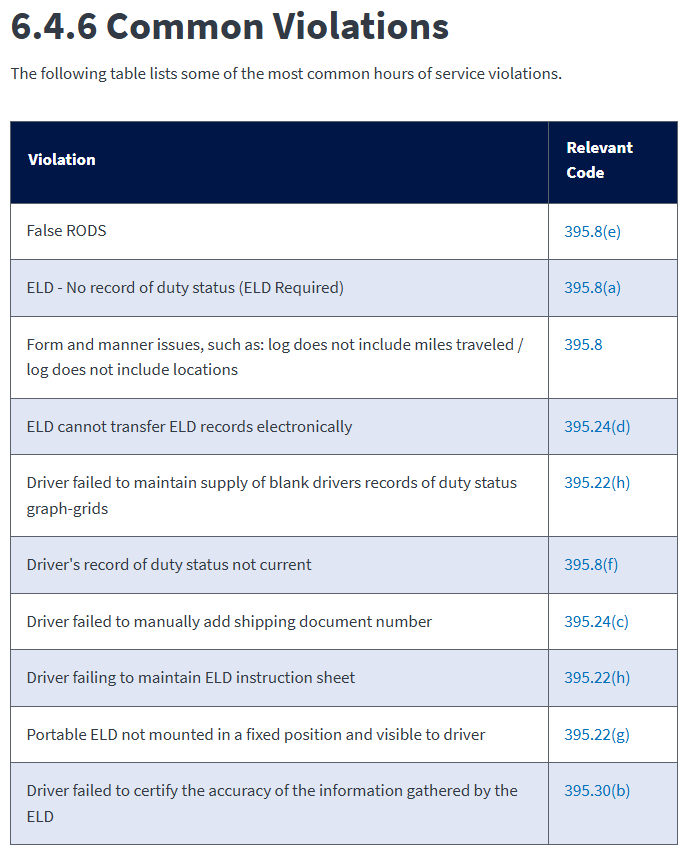
Here are the most common driver log violations that show up, according to FMCSA:
- Missing or incomplete header info: FMCSA flags form and manner issues, such as a log that doesn’t include miles traveled or doesn’t include locations, as one of the most common violations logged. A blank field at the top of the log, whether it’s a missing shipping document number or an incomplete carrier address, is one of the fastest ways to pick up a citation, since inspectors check the header before they even look at the grid.
- Unsigned logs: A log without a signature is treated as incomplete, regardless of how accurate the rest of the entries are. Since the signature certifies the record as correct, an unsigned log can create a compliance issue, and FMCSA treats a false or uncertified RODS as a distinct fineable violation.
- Math mismatches: The four duty status totals have to add up to exactly 24 hours. When they don’t, it’s usually a sign of a plotting error or a status change that never got recorded. This is one of the easiest checks for an inspector to run, since it takes them seconds to add up the totals and compare.
- Failing to update to current status: FMCSA flags a driver’s record of duty status not being current as a common violation category. Every change in duty status needs to be marked on the grid the moment it happens, not estimated after the fact. A driver who forgets to update their status when switching from Driving to On Duty ends up with a log that doesn’t match reality, and can be challenged during the inspection.
Beyond these four, FMCSA’s violation data also flags things like:
- Drivers failing to manually add a shipping document number
- Failing to maintain a supply of blank duty status graph-grids for ELD-exempt situations
Here are the common violations, according to FMCSA with their relevant codes:
In circumstances where a paper log isn’t a must, digital driver logs solve a lot of potential violations, helping maintain the best possible record:
| Violation | How Jotform’s digital drive log form solves It | Resource |
|---|---|---|
|
Missing or incomplete header info |
Required fields can be set for every header field (carrier info, vehicle/trailer numbers, shipping document), so the form simply can’t be submitted with a blank left behind. |
|
|
Unsigned logs |
Jotform Sign can make the e-signature a required step before the log can be marked complete, so there’s no way to submit an unsigned log. |
|
|
Math mismatches |
The form can be built with calculation fields that total the four duty statuses automatically, flagging the driver in real time if the numbers don’t add up to 24. |
|
|
Failing to update to current status |
A mobile, accessible form makes it far easier to update in real time between stops rather than waiting to fill in a paper log later, but the discipline still comes down to the driver. |
FAQs about filling out driver log book
A driver’s daily log covers a single 24-hour period and should be updated in real time as duty status changes throughout the day, not filled in retrospectively. A driver’s record of duty status not being current is one of the most commonly cited HOS violations, so entries need to reflect the actual time each change happened.
Property-carrying commercial drivers generally may drive a maximum of 11 hours after 10 consecutive hours off duty, and all of that driving must happen within a 14-hour consecutive on-duty window that starts when the driver first comes on duty. Passenger-carrying drivers have a slightly different limit of 10 hours of driving after 8 consecutive hours off duty and within a 15-hour on duty period.
This content is for informational purposes only. Jotform is not a law firm and is not providing any legal, financial, or other advice. Please consult a licensed attorney and/or other applicable professionals.
















































































Send Comment: