Jotform Apps
Everything you need to know about Jotform Apps. Learn how to create mobile apps for your business without any coding.
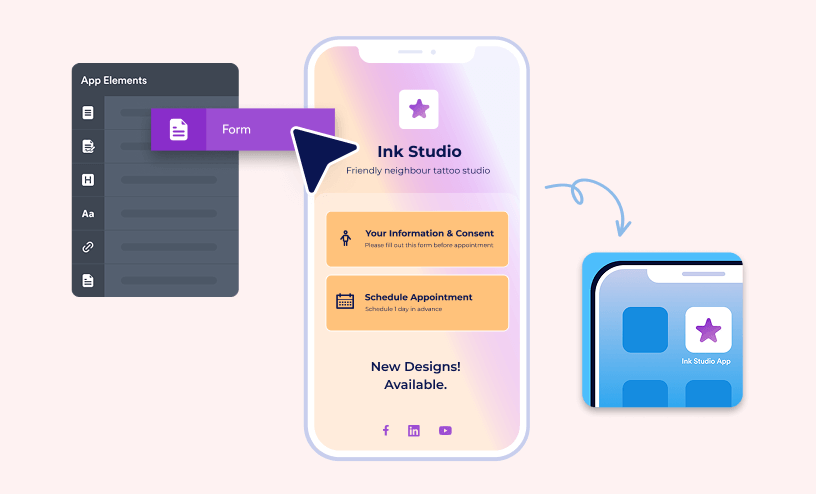
Guides
How to Create a Jotform App
Jotform Apps allows you to create mobile apps without coding. You can build apps with Jotform App Builder to store all of your forms in one place and easily share them with others. Building Your...
How to Add an AI Agent Chatbot to Jotform Apps
With Jotform’s AI Agent, you can easily add a real-time chatbot to your app that helps users get support, ask questions, and explore features on their own. It only takes a few steps to integrate the AI Agent and customize how it looks and...

How to Create and Send Push Notifications for Jotform Apps
Staying on top of new form submissions doesn’t have to mean constantly checking your email or dashboard. With push notifications, you can get instant alerts sent straight to your smartphone through the mobile app, so you’re always in the loop...
How to Add New Elements in Jotform Apps
Jotform Apps is an app builder that allows you to create your own mobile apps. By adding app elements, you can tailor your app to meet specific requirements. Whether it's forms, headings, paragraphs, or links, you have the flexibility to create a...
How to Use Actions in Jotform App Builder
Jotform App Builder offers various Actions that enhance your app’s interactivity, making it more dynamic and user-friendly. By leveraging these actions, you can improve navigation, communication, and overall efficiency within your app....
How to Monitor and Control App Users
With Jotform, you can manage and control the users who access your app while logged in to their accounts—whether they opened it from the invitation email you sent, are viewing a page in your app that you’ve set to require login, or simply...
How to Let Users Edit Submissions from Your App?
Jotform makes it easy to let users edit their submissions directly from your app. By using the Open Edit Form action with a List element connected to a Public Table, users can open and update existing entries with just a tap—no extra steps...
How to View App Submissions
As the form owner, you have complete control of your form submissions. If you created an app with multiple forms, you can view the submissions for each form from a single Table. There are three ways to view app submissions: Product Navigation...
How to Create a Multi-Page Jotform App with an Effective Navigation Menu
Just like in the Form Builder, where you can create multipage forms, Jotform Apps lets you build multipage apps too. By adding pages and sections, you can organize your app’s content neatly, making it easier for users to navigate and for you to...
How to Use Visibility Conditions in Jotform Apps
With Jotform Apps’ Conditions feature, you can decide who sees what based on each user’s role. Set up simple rules to control when pages or elements appear, so users only access the content that’s relevant to them. It’s an easy way to keep...
How to Require Login to Secure Your App Pages
Jotform makes it easy to protect your app content by requiring users to log in before accessing specific pages. The Require Login feature lets you control who can view sensitive or private information, ensuring only authorized, signed-in users can...

How to Share Jotform Apps
You can share the apps you created with Jotform Apps in multiple ways. You can share the app via a direct link or email or by downloading a QR code for Kiosk sharing or embedding. You can also share your app directly on social media. Sharing...
How to Create an App From a Website With Jotform Apps
Jotform Apps lets you transform your website into a fully functional mobile app—without needing coding or complex development. It works well for simple websites, such as informational pages or contact hubs, and can also support more advanced...
How to Customize the Splash Screen of Your App
You can personalize the splash screen of your Jotform App. The splash screen is the initial window that appears when someone taps the app icon on their home screen right as it begins to load. Customizing the splash screen enhances your app's...
How to Change Your App Name and Icon
With Jotform Apps, you can customize your app's name and icon. Use a custom image or choose one from the readily available icons for your app. To change your app's name and icon In the App Builder, go to Settings at the top. Select App...
How to Remove Jotform Branding From Your App
Jotform Apps allows your app users to log in to their Jotform account by selecting the Jotform branding or icon in the upper-right corner. Logged-in users can have access to additional features like tracking their submissions and drafts on your...

How to Add Widgets to Your App in Jotform Apps
Jotform Apps widgets offer various ways to showcase content, such as sliders, videos, or maps. Each widget comes with unique properties and settings, allowing for tailored functionality within your app. To add a widget to your app In the...
How to Disable or Delete Jotform Apps
Jotform Apps provides ways to manage your custom apps effectively. Whether you want to temporarily pause an app's functionality or permanently remove it from your environment, understanding how to disable or delete apps is essential....
How to Embed Your App Into a Website With Jotform Apps
By embedding your app directly into your website, you create a seamless experience for your users. They can interact with your app without leaving your site, enhancing user engagement. To embed your app into...
How to Set Your App Exclusive to an Organization With Jotform Apps
Jotform Apps let you configure company access permissions to restrict your app’s availability to people within your organization. This is useful for apps with content or features designed specifically for internal use. Once you’ve created...
How to Add New Product List to an Existing App
If you already have your app on Jotform platform and you want to add a product list to the app so customers can buy products right from your app, this instruction will show you how to implement this. From the My Forms page, click on the arrow...
How Jotform Apps Differs from Jotform Mobile Forms?
Although Jotform Apps and Jotform Mobile Forms may sound similar, they’re completely different. These two offerings from Jotform cater to distinct needs, whether you’re looking to create custom apps or manage forms efficiently on your mobile...
How to Turn Your Form Into a Mobile App
Jotform Apps allows you to create mobile apps without any coding. This makes it accessible for individuals without a technical background. There are several ways to create an app with Jotform Apps. One in particular is from the Form Builder where...
How to Create a Donation App
Collecting donations has never been easier with Jotform Donation Apps. Now all you have to do to collect donations is drag and drop an element into the App Builder. Open the App Builder and drag and drop the Donation Box element into your...
How to Integrate a Payment Gateway with Donation Apps
Your donation element will not be visible to your donors until you’ve set up a payment integration. With a Donation box element, you have over 30 payment gateways to choose from. So you’re bound to find one that works for you. Keep on reading...
How to Share your Donation App on Social Media
If you want to get the word out about your donation campaign, you can easily do that by adding a share button to your app. Adding a share button can help increase your overall donations by making the process of finding your donation campaign...
How to Create a Checklist App With Jotform Apps
With Jotform Apps, you can create an app that functions as a checklist. For example, you can make a daily task checklist, an onboarding app for new employees, or a series of intake forms by using multiple forms and requiring each to be filled out....
Adding Electronic Signature on the Jotform App Builder
With Jotform's No-Code App Builder, you can easily add external documents of various file types, like photos, videos, and documents, using the Document element. This allows people to access or download them within your Jotform Apps, making it...
How to Customize the App URL
Aside from branding your Jotform App with your business logo and colors, you can customize its URL. The customization will allow you to add your organization and app name to the URL. To customize the App URL In the Jotform App Builder, go...
How to Change the App Layout
In Jotform App Builder, you can find the App Layouts tab, where you can choose from a few premade layouts and apply it to your App. Each of the layouts has a different style, and based on that, the icon, size, shrink mode, alignment of the app...
How to Create a Digest Email for your Donation App
If you want regular check-in emails on how your donation campaign is doing, you should consider creating a Digest Email. It will only take a couple minutes and you can save yourself the time of having to check your app everyday. Keep on reading to...
How to Use App Templates
To provide you with a quick way to get started with Jotform Apps, we've created a number of app templates that cover several categories. Choose a template to schedule appointments for your hair salon or a template to take bookings for your...

