
Contact Form 7 is pretty much the go-to way to create and manage contact forms on WordPress. It’s free, flexible, and lightweight, so you find it on just about every site. Problems only really show up when you want to send someone to a thank-you page after they’ve filled out a form.
Redirects are helpful, particularly if you’re tracking leads from certain sources, or you want to show potential customers a download link or a list of next steps.
Unfortunately, there’s no native Contact Form 7 redirect to thank-you page option. You need a workaround, and some of them cause more headaches than you’d think.
Here, I’ll show you the options you can try, as well as an easier alternative if you’re looking for more than just your average thank-you page experience.
Does Contact Form 7 have a feature to redirect to a thank-you page?
Sorry, but there’s no native option here.
The Contact Form 7 plugin handles submissions in place, using JavaScript to show success messages without moving users to another page. For a basic “contact us” form, that’s fine. The moment you want a real confirmation page, though — for tracking, ads, downloads, or next steps — you’ll be stuck.
There are a few Contact Form 7 redirect options, but they can be a little tricky.
- The most common route is JavaScript. You wait for a successful submission, then trigger a redirect using a custom DOM event. It usually works at first. Then a cache update rolls out, a script loads a split second late, or the theme gets updated, and suddenly the redirect just stops happening.
<script>
document.addEventListener( 'wpcf7mailsent', function( event ) {
    setTimeout( () => {
        location = 'http://example.com/';
    }, 3000 ); // Wait for 3 seconds to redirect.
}, false );
</script>- The second option is a redirect plugin. Tools like the Contact Form 7 multi-step module and CF7 redirect thank-you page plugin work. They add extra settings inside Contact Form 7 so you can choose a thank-you page per form. On smaller sites, this can be a quick fix. On larger ones, it’s another plugin to maintain, test, and explain to whoever works on the site next.
These two approaches technically do let you redirect Contact Form 7 to a thank-you page, and they’re simple enough if you already know how to use WordPress. But none of them feel very stable over time. Little changes to your site or updates can immediately break things.
If redirects aren’t essential, that might not worry you. If they’re tied to tracking, paid traffic, or conversion flow, it will. That’s why people often end up considering alternatives, like the Jotform WordPress plugin.
Jotform: A native, no-code way to redirect users after submission
If you’ve reached the point where workarounds for the Contact Form 7 redirect to thank-you page feel like more trouble than they’re worth, it might be time to change tactics. Instead of asking how you can patch CF7 again, look for a tool that lets you create custom WordPress forms and add redirects as part of the core setup. That’s exactly what Jotform does.
Jotform WordPress plug-in lets you control the form from start to finish: how it looks, how it behaves, and where people go once they’re done. You set it up once and move on.
With Jotform, you’re not forcing behavior after submission. You decide what happens before the form ever goes live. The result is that every form already knows what to do after someone submits it. That’s the big difference: Setting up a redirect to thank-you page contact form is just part of the setup, not something you figure out later. You’re not testing scripts or waiting to see if the redirect fires. It just does.
Plus, once redirects are tied to real traffic, the rest of the features start to matter too, like
- A massive template library — Jotform has thousands of options, and a lot of solid contact form layouts, so you’re not staring at an empty form wondering where to start
- A visual editor, where you move fields around directly
- Built-in connections to tools you actually use, like Google Sheets, HubSpot, Mailchimp, Slack, and Salesforce
- More than 40 payment gateways (if your thank-you page depends on a successful payment)
- Built-in reports, so you can actually see what’s coming through
- Collaboration tools, so you can assign forms to teammates and manage them together
- Over 500 widgets for digital forms with electronic signatures, calendars, geolocation, images, star ratings, and more
- A Report Builder, so you can turn submissions into easy-to-view reports
In other words, you get everything you need to make your WordPress forms a lot more valuable.
How to redirect a form to a thank-you page with Jotform
The best part is how easy it is to get started. The first thing you need to do is follow this guide on how to set up a thank-you page in Jotform.
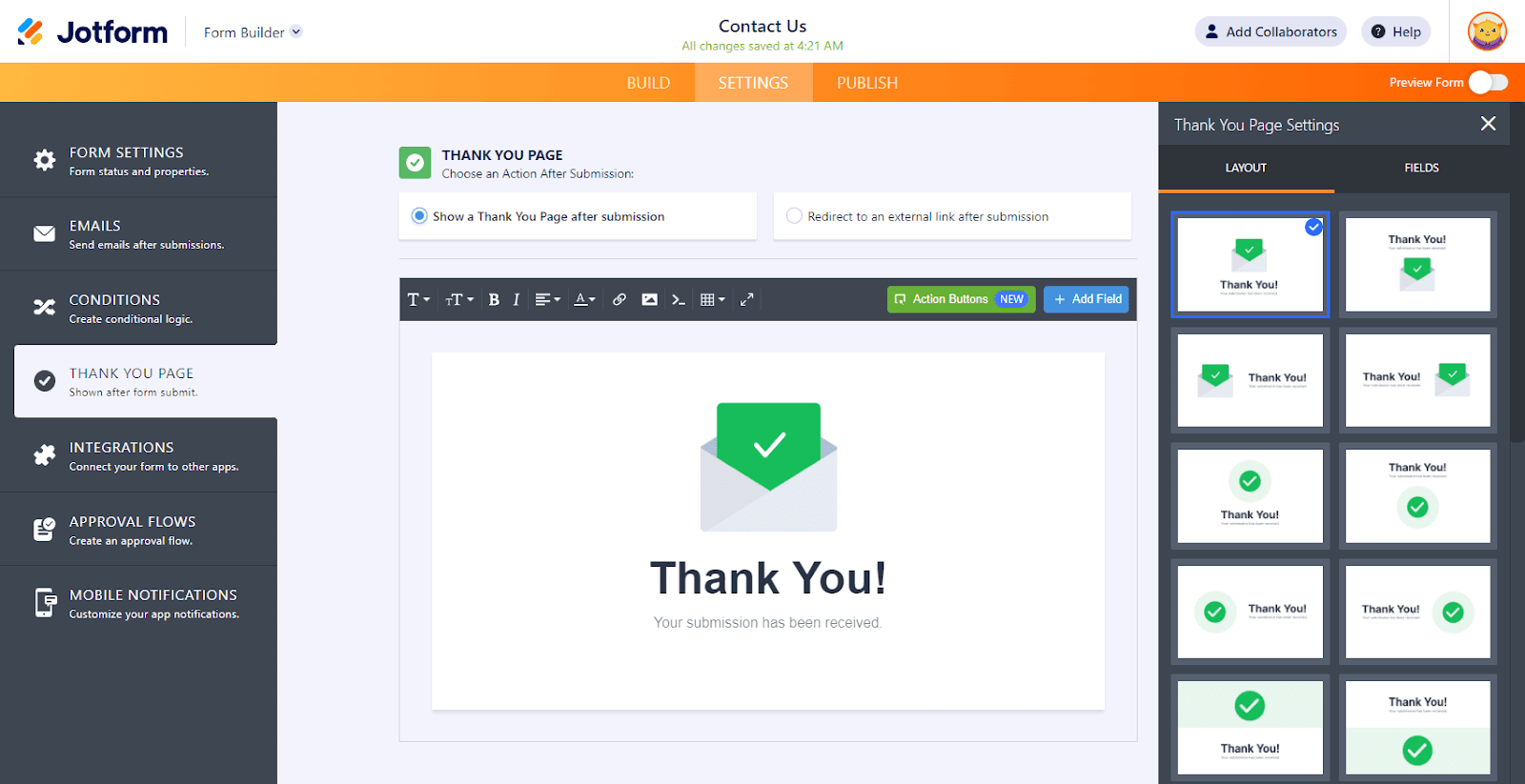
- Inside the form builder, go to Settings then Thank You Page and choose one of two paths.
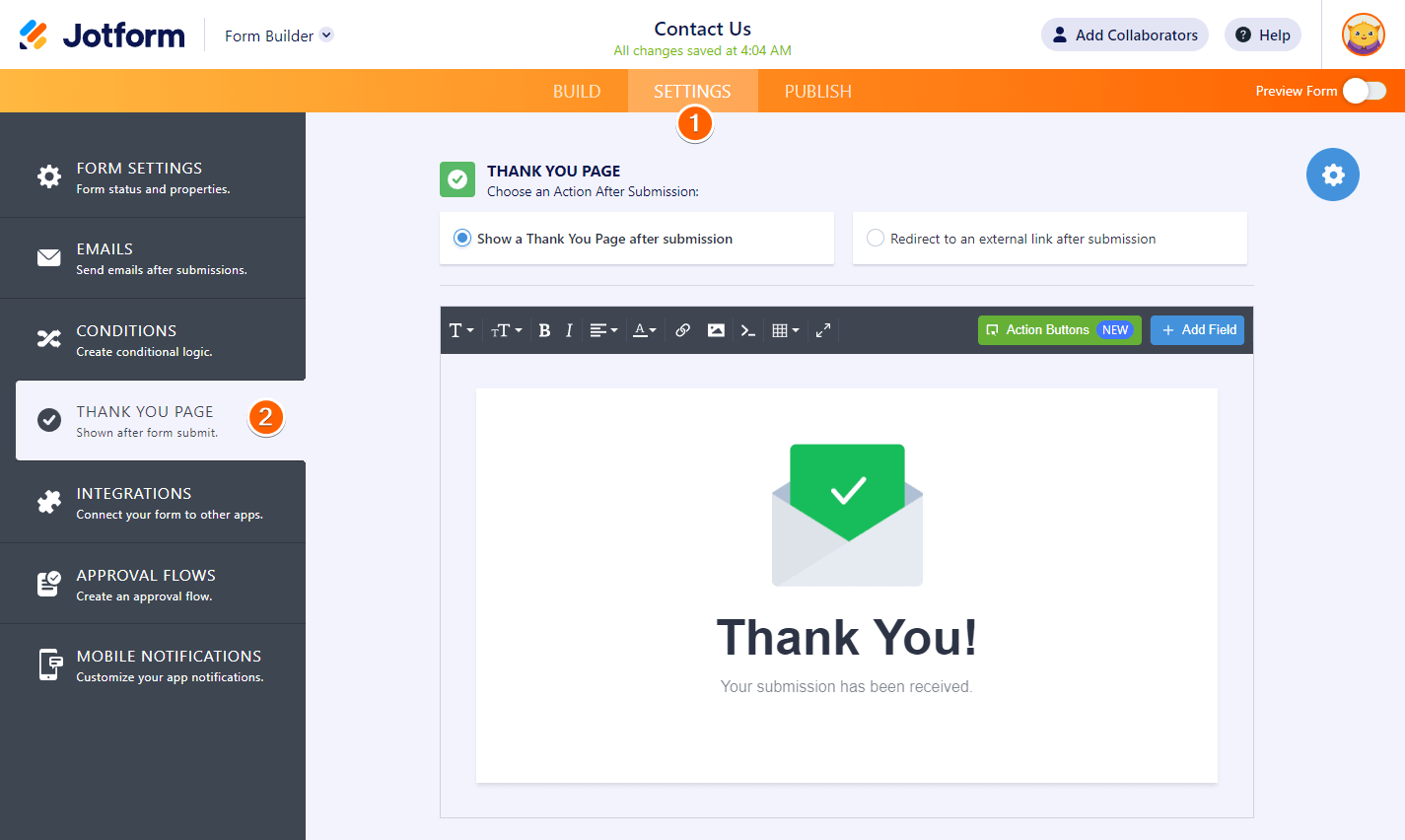
Option 1: Use a built-in thank-you page
Here you choose a template, open it up, and tweak it until it fits what you’re collecting. Drop in text, images, links, tables, or whatever else you need. The buttons are useful, too. They can send someone back through the form, move them to a different one, let them download a copy, or fix something they missed.
There’s also the option to add extra fields, so you can use the thank-you page to do things like show customers their answers.
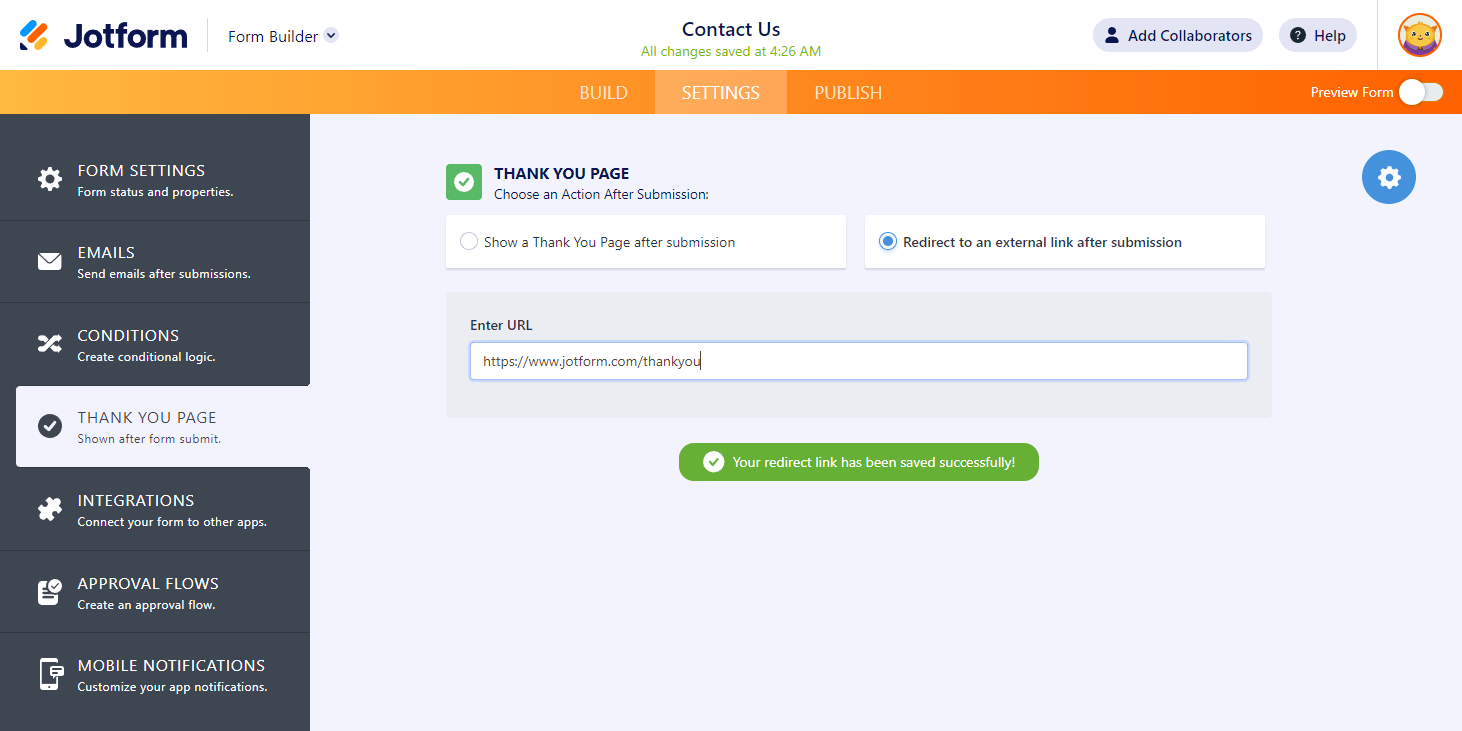
Option 2: Redirect to an external URL
This sends users to a specific page, like your existing WordPress thank-you page, a booking link, or a post-conversion offer. This is where paid traffic and tracking setups usually land.
If you choose this option, you just need to add an URL. It’s that simple.
Why Jotform adds value beyond redirects
Redirects are usually the first thing that breaks with Contact Form 7.
Once you move to Jotform, the biggest difference isn’t just that thank-you pages work — it’s that the rest of the form experience feels better. You’re not building a one-off fix. You’re setting up a flow that holds up over time.
Jotform gives you
- 850+ contact form templates (not to mention thousands of other form options)
- Flexible conditional logic
- Drag-and-drop building simplicity
- More than 500 widgets, 40+ payment gateways, and 240+ integrations
- Reports and collaboration tools to keep your team aligned
You end up with thank-you pages that do more than just say “thanks” — they set expectations, point users to their next step, and make your brand seem stronger. That’s hard to achieve when your Contact Form 7 redirect depends on scripts behaving perfectly.
Plus, WordPress management feels cleaner. You’re not editing theme files. You’re not testing JavaScript after updates. You’re embedding a form and moving on.
Once redirects, confirmation messages, and form logic live in one place, maintenance drops off fast. You stop worrying about whether a submission reached the right page, and start focusing on what happens after it does.
So, patch Contact Form 7 or switch?
If you’re using a basic form and don’t really care what happens after someone clicks submit, Contact Form 7 is fine. It’s when redirecting to a thank-you page becomes part of your process that things get messy. At that point, you’re leaning on scripts and add-ons that were never part of the original setup.
You can keep stacking fixes if you want, but it usually turns into checking things after updates and hoping nothing broke. If you want redirects that behave the same way every time, and a form builder that treats confirmation pages like a normal feature, Jotform tends to be easier to live with. It keeps your attention where it belongs: on what happens after the form is sent. Try it for free today.
This article is for WordPress users, website operators, and marketers who want to redirect Contact Form 7 submissions to a thank you page and are exploring both plugin workarounds and easier, code-free alternatives like Jotform.
























































































Send Comment: