
Even the best educators might sometimes find it hard to know whether their students understood a lesson. A quick review can make the difference between a teacher moving forward confidently and realizing students missed key concepts.
That’s where exit tickets come in.
Using exit tickets is a simple strategy that helps educators quickly gather student feedback. With the right questions, they can reveal misconceptions, reinforce learning, and encourage students to reflect on key lessons.
In this guide, we’ll explore why teachers use exit tickets, examples of effective questions, and how to share exit tickets with students.
What are exit tickets?
In education, exit tickets are short prompts or questions that help teachers better understand their students. Teachers can use them to quickly check their students’ understanding of a concept, measure teaching efficacy, and gauge classroom experience.
Exit tickets, typically done in the last few minutes of class, should be easy to complete. It’s important to create a smooth, frictionless process if you want your students to answer honestly and to use exit tickets repeatedly.
What is the purpose of an exit ticket?
Exit tickets are a quick way for educators to check the pulse of their classrooms. Consider a few reasons teachers might use them:
- Check student understanding: Exit tickets help teachers determine whether students grasped a lesson’s key concept before moving on to the next topic.
- Identify learning gaps or misconceptions: If many students provide incorrect or incomplete answers, teachers can revisit the concept in the next lesson or provide additional support.
- Encourage student reflection and metacognition: Asking students to summarize what they learned or explain a concept helps them actively reflect on their learning process.
- Increase classroom engagement: Students know they’ll be asked to respond before leaving class, so they often pay closer attention during the lesson.
- Gather feedback about the learning experience: Exit tickets, especially when they’re anonymous, can reveal how students felt about the pace and style of the lesson, which activities helped them learn, or what made the lesson confusing.
- Inform future teaching decisions: Teachers can use responses to adjust lesson plans, group students for review activities, or provide focused instruction.
Types of exit ticket questions
Exit ticket questions should be adapted to the lesson’s goal. Some are good for quickly checking comprehension, while others encourage deeper reflection or problem-solving.
Here are five common types of exit ticket questions teachers use in the classroom:
1. Multiple-choice questions
Multiple-choice exit tickets are great because they are low-friction, easy to review, and helpful for checking specific knowledge. Although they can be completed quickly, they can lead students to deduce correct answers rather than solve the problem. They also limit student reflection because they are so concise.
2. Open-ended questions
Open-ended exit tickets help assess conceptual understanding and reasoning. This format provides deeper insight into student thinking and helps teachers identify misunderstandings. Teachers might ask students to explain how a concept works or what the first step in solving a problem is. The downside is that they take longer to review, and response quality can vary across students.
3. Quick reflections
A quick reflection is a type of open-ended question. But while open-ended questions typically focus on understanding, quick reflections prompt students to reflect on their learning experience and foster metacognition. Examples include asking students about parts of the lesson they found confusing or how confident they feel about the topic. Like their counterparts, quick reflections can be nuanced, making it harder to measure consistently.
4. Rating or scale questions
Rating or scale exit tickets ask students to evaluate their level of understanding or confidence. They often use simple scales, such as rating from 1–5 or options like “I understand,” “I’m somewhat confused,” or “I need help.” This format provides quick quantitative data, but it depends on a student’s ability to rate themselves accurately. You can use them for a quick check but be sure to get more context before adjusting lesson plans.
5. Problem-solving questions
Problem-solving exit tickets ask students to apply what they learned during the lesson. They are great for assessing whether students can apply a concept and for reinforcing learning through practice. For example, students might solve a short equation, analyze a brief scenario, or apply a concept to a real-world example. The challenge is that these questions take time and are harder to review quickly.
Examples of exit ticket questions
The best exit ticket questions are short, focused, and aligned with the lesson’s goal. They should help teachers quickly understand what students learned, where they struggled, and how confident they feel about the material.
Below are practical examples of exit ticket questions teachers can use across different subjects.
General reflection questions
These questions work in almost any subject and are designed to encourage student feedback and reflection:
- What is one key idea you learned from today’s lesson?
- Which part of today’s lesson was most confusing?
- What questions do you still have about today’s topic?
- How confident do you feel about today’s lesson, on a scale of 1 to 5?
- What helped you best understand the lesson today?
Math exit ticket questions
Math exit tickets often focus on problem-solving or checking whether students understood a specific concept:
- Solve this problem: What is the value of 3x+5=20?
- What is the first step you would take to solve this equation?
- Which strategy did you use to solve today’s problem?
- What mistake should students avoid when solving problems like today’s example?
Language arts exit ticket questions
Language arts exit tickets can assess comprehension, interpretation, or writing skills:
- What is the main idea of the text we read today?
- Identify one piece of evidence from the text that supports the main idea.
- What new vocabulary word did you learn today, and what does it mean?
- Write one sentence summarizing today’s reading.
Science and social studies exit ticket questions
For these subjects, exit tickets often ask students to explain concepts or apply ideas to real-world situations:
- What is one fact you learned about today’s topic?
- Why is the concept we studied today important in the real world?
- Explain one cause or effect related to the event or concept we discussed.
- What is one example that helps explain today’s scientific principle?
Using a mix of question types (reflection, explanation, and problem-solving) helps teachers gather richer insights from students and better understand how well students absorbed the lesson.
How to use exit tickets effectively
Exit tickets work best when they’re used consistently and tied directly to your teaching goals. A well-designed exit ticket takes only a few minutes to complete, but the insights it provides are game-changing.
Here are several ways to make exit tickets more effective in the classroom:
- Align the question with the lesson objective: Focus the exit ticket on the key concept or skill students are expected to learn.
- Keep exit tickets short and focused: Limit them to one or two questions that students can complete in a few minutes.
- Make them part of your classroom routine: Use exit tickets regularly so students expect them as a normal part of the lesson.
- Review responses before the next lesson: Look at responses before the next class to decide whether to review the topic or move forward.
- Encourage honest feedback: Allow private or anonymous responses so students feel comfortable sharing their confusion.
- Look for patterns in responses: To guide your next lesson, focus on trends across the class rather than individual mistakes.
How to create an exit ticket
Any format teachers use will provide value. But digital tools are especially useful because they can automate organizing and reviewing responses. Let’s look at three ways Jotform helps teachers create exit tickets quickly.
Using Jotform’s AI Exit Ticket Generator
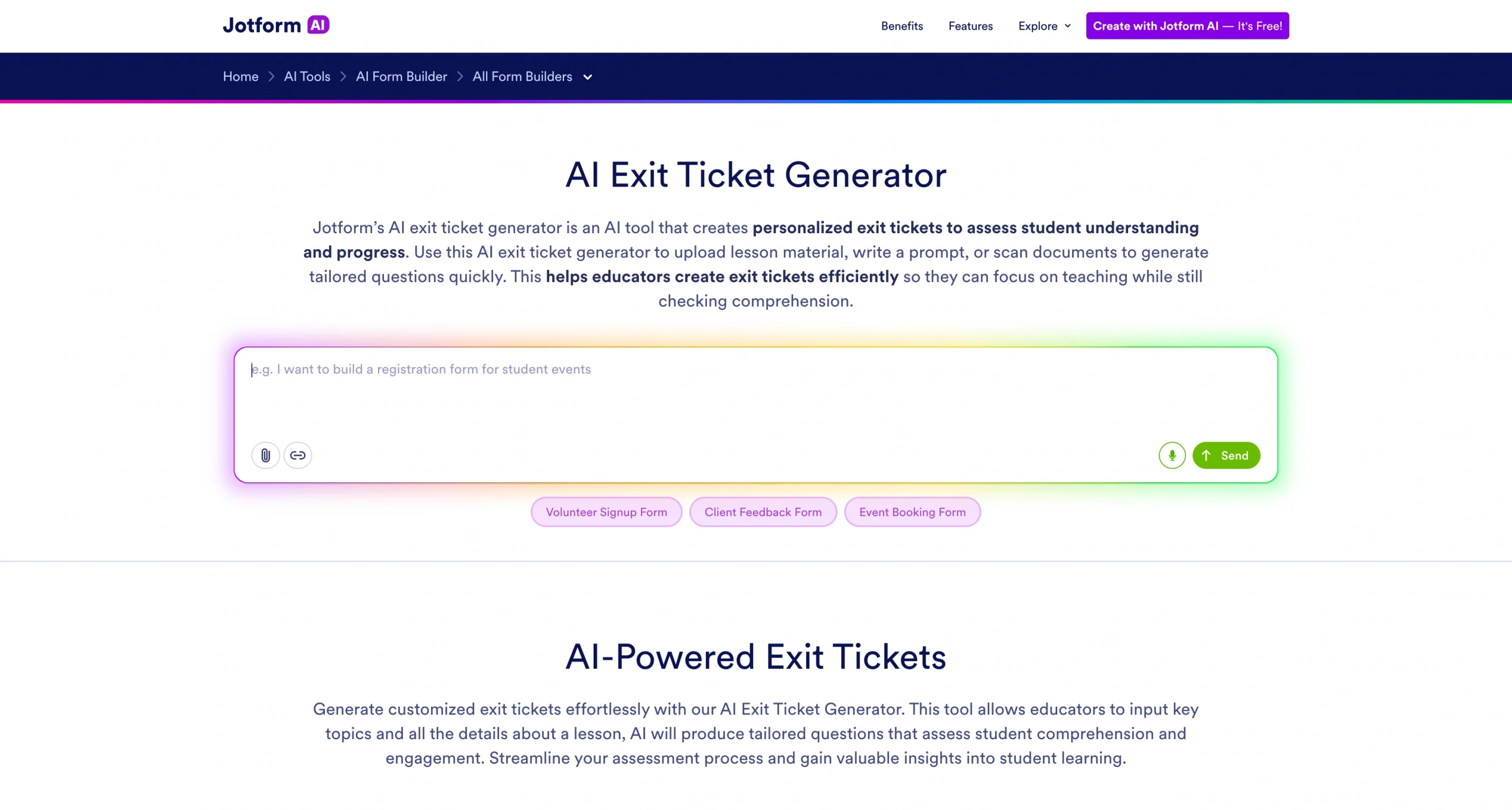
The Jotform AI Exit Ticket Generator can help you generate questions in seconds. It helps teachers create personalized exit tickets tailored to their lessons with minimal input.
There are several ways to generate questions:
- Enter a prompt: Describe the lesson topic and grade level, and the AI will generate relevant exit ticket questions.
- Upload a file: Upload lesson materials or worksheets so the AI can create questions based on the lesson content.
- Scan a document: Teachers can scan printed materials to automatically generate exit ticket questions.
The AI Exit Ticket Generator also allows you to choose how many questions to include in the exit ticket. Once the exit tickets are generated, teachers can easily customize the questions, edit wording, or add new prompts to better fit their lesson.
Creating an exit ticket from a template
If you’re having a hard time getting started, try one of Jotform’s prebuilt templates. The Exit Ticket Form Template provides a structured starting point that can be easily modified for different subjects or grade levels.
Templates can be customized using Jotform’s drag-and-drop Form Builder, allowing teachers to add new questions, rearrange fields, or adjust instructions without needing any technical skills.
For a professional feel, Jotform also offers PDF templates, such as this Exit Ticket Template for PDFs. It automatically converts student responses into pro-level PDF documents.
There is a template for almost any use case. Browse Jotform’s library of customizable education forms to find the form that supports your classroom activities.
Creating an exit ticket from scratch
Do you want something a bit more customized? Teachers can build a fully customized exit ticket from scratch using Jotform’s Form Builder.
With the drag-and-drop interface, you can add different question types, including
- Single-choice questions
- Multiple-choice questions
- Long-answer responses
- Rating scales
The builder also lets you customize your exit ticket’s design by adjusting colors, fonts, and layout. Jotform provides additional design tools for educators through its web design options, allowing you to create forms that match your classroom style or school branding.
How to share exit tickets with students
After creating an exit ticket, the next step is to share it with students and collect their responses. Digital exit tickets simplify sharing because they can be distributed instantly, and responses are automatically organized.
- Share via email: Teachers can send students a link to the exit ticket so they can complete it on their devices before leaving class. Jotform offers several options for sharing forms quickly with a class.
- Embed in a web page or learning management system: Exit tickets can also be embedded in a classroom website, school portal, or learning platform. Jotform makes it easy to embed forms into a web page so students can complete them as part of their normal online workflow.
- Track responses with Jotform Tables: Once students submit their responses, teachers can review them using Jotform Tables, which organize submissions in a spreadsheet-style format. This view facilitates spotting trends and identifying areas where students may need additional support.
As more schools adopt educational technology, tools such as digital exit tickets help improve classroom awareness. If you’re exploring new educational technology tools, Jotform provides flexible tools for teachers that minimize the learning curve while delivering solid classroom insights.
This article is for educators, teachers, and academic professionals who want to quickly assess student understanding, gather feedback, and improve lesson effectiveness using simple exit ticket strategies.








































































































Send Comment: