

ソフトウェア開発チーム
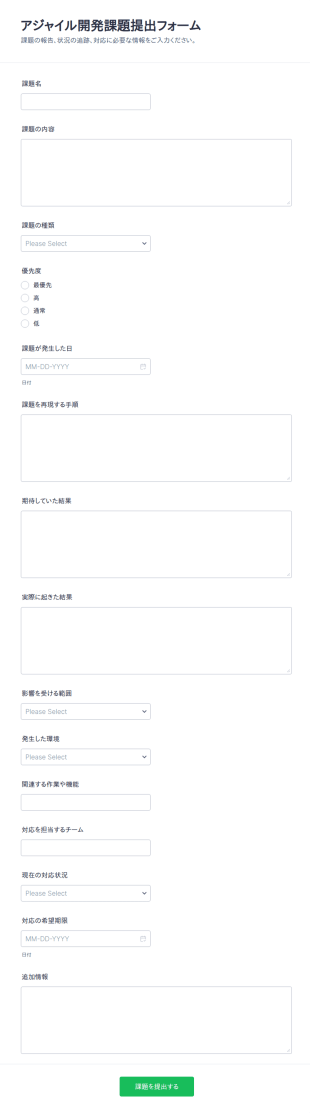
アジャイル課題提出フォーム
アジャイル開発課題提出フォームで、開発チームの課題報告と状況共有をオンラインで統一し、Jotformのフォームテンプレートでデータ収集と送信管理をスムーズに行えます。
カテゴリーへ移動:ソフトウェア開発チームソフトウェア開発チームについて
Software Developer Forms are specialized digital forms designed to streamline and optimize the daily operations and workflows of software development teams. These forms play a crucial role in a variety of processes, such as gathering requirements from clients, managing bug reports, and tracking progress on development tasks. In the fast-paced world of software development, where accuracy and speed are paramount, these forms provide a structured way to collect and analyze data, ensuring that projects remain on track and stakeholders are kept informed. By utilizing these forms, development teams can enhance communication, improve project management, and maintain a clear overview of their tasks and timelines.
Jotform stands out as the premier online form builder for creating and managing Software Developer Forms due to its intuitive drag-and-drop interface and robust customization capabilities. Users can easily tailor forms to meet specific needs, automating data collection processes to save time and reduce errors. Additionally, Jotform Tables offers a centralized platform for managing and analyzing collected data, ensuring that all project-related information is easily accessible and organized. This comprehensive approach to form management allows software developers to focus more on their core tasks, while Jotform handles the intricacies of data collection and organization.
Why Use Software Developer Forms?
- Software Developer Forms enable teams to collect precise and relevant data swiftly, ensuring that all necessary information is captured without delay. This accuracy is pivotal in software development where even minor errors can lead to significant setbacks.
- By automating data collection, these forms expedite the process of gathering and processing information. This reduction in manual effort allows teams to focus more on development tasks rather than on administrative duties.
- Professional data handling is guaranteed with Software Developer Forms, as they provide structured and organized means of capturing data. This leads to cleaner data sets, which are easier to analyze and draw insights from.
- The use of digital forms significantly reduces the risk of data loss as compared to traditional paper-based methods. With cloud storage and secure data management, the collected data is safeguarded against accidental loss.
- These forms enhance communication within development teams by providing a standardized way of sharing information. Whether it's a client request or an internal update, everyone is kept on the same page, facilitating smoother project execution.
Common Problems Solved by Software Developer Forms
- One of the major challenges in software development is the cumbersome nature of paperwork, which can slow down processes and lead to errors. Software Developer Forms eliminate the need for physical paperwork, digitizing all entries for easier handling and access.
- Manual data entry is prone to human error and can be incredibly time-consuming. By automating this process, these forms drastically reduce the likelihood of mistakes and free up valuable time for developers to focus on coding and problem-solving.
- Lost data can be a critical issue, particularly when it pertains to client requirements or bug reports. Digital forms ensure that all data is securely stored and easily retrievable, preventing any loss of vital information.
- Streamlining communication is another pain point that these forms address. By providing a clear and consistent way to report issues or requirements, they enhance clarity and reduce the potential for miscommunication within development teams and with clients alike.
活用例に適した機能
- For capturing client requirements effectively, the Drag-and-Drop Form Builder allows for the easy creation of detailed fields that ensure every client need is documented precisely. This capability streamlines the initial phase of project planning and ensures all team members have access to the same information.
- Conditional Logic can be employed to create dynamic forms that change based on user input, which is ideal for bug reporting forms. This feature guides the user through the process, ensuring that all necessary information is collected without overwhelming them with irrelevant fields.
- Integrating with 30+ Payment Gateways such as Stripe or PayPal is crucial for forms that handle client billing or subscription payments. This seamless integration allows for secure and efficient payment processing directly through the form.
- Electronic Signatures (Jotform Sign) are essential for obtaining necessary approvals or agreements from clients and stakeholders. This feature adds a layer of professionalism and legal validity to the forms, making them suitable for binding agreements.
- The PDF Editor (Automated PDF Generation) feature transforms form submissions into professional PDF documents, which can be used for reports or client presentations. This automation saves time and ensures that documents are consistently formatted and ready for distribution.
- With over 100 Third-party Integrations, such as Google Sheets and Slack, data collected through forms can be automatically synced with other platforms, enhancing cross-platform collaboration and data accessibility.
- Approval Workflows streamline the process of getting necessary sign-offs from various stakeholders, ensuring that all inputs are reviewed and sanctioned before moving forward. This feature is particularly useful in large projects requiring multiple layers of approval.
How to Create a Software Developer Form
- Browse the Template List for a Software Developers template or start from a blank form to cater specifically to your project's requirements.
- Customize the design and fields using the Drag-and-Drop Form Builder, ensuring that each form element aligns with your team’s unique needs.
- Publish and share via Direct Link, Email, or Website Embed, making it accessible to all necessary parties without unnecessary complications.
Top Use Cases for Software Developer Forms
- For Managers: Software Developer Forms provide managers with a clear and concise view of project progress, requirements, and team performance. By using these forms, managers can easily track tasks, identify bottlenecks, and allocate resources more efficiently. The structured data collected allows for informed decision-making, ensuring that projects are completed on time and within budget.
- For Teams: Development teams benefit from the use of these forms by having a centralized system for tracking issues, feedback, and updates. This enhances collaboration and keeps everyone aligned on project goals. With automated notifications and real-time data access, teams can quickly address problems and iterate on solutions, maintaining a high level of productivity and quality in their work.
- For Customers: Clients and stakeholders enjoy a more streamlined experience when interacting with development teams through structured forms. These forms ensure that all client requirements and feedback are documented accurately, leading to improved satisfaction and trust. By providing a clear channel for communication, clients feel more engaged and informed throughout the development process.
Summarizing Software Developer Forms
Software Developer Forms are an invaluable asset for any development team seeking to enhance their operational efficiency and data handling capabilities. By leveraging Jotform’s robust form-building features, teams can automate data collection processes, ensuring accuracy and accessibility of all project-related information. This not only streamlines workflows but also improves communication and collaboration across all levels of a project. With the ability to customize forms to fit specific needs and integrate them seamlessly into existing systems, Software Developer Forms are a critical component of effective project management and execution.
よくあるご質問
1. ソフトウェア開発者向けフォームとは?
ソフトウェア開発者向けフォームは、バグ報告、機能要望、コードレビュー、フィードバックなど、ソフトウェア開発に関連する情報を収集・整理・管理するために使用されるデジタルフォームです。
2. 組織にとってなぜ重要なのですか?
情報を一元化し、必要な詳細をすべて記録することで、チームが問題、申請、進捗を効率的に追跡できるようになります。ミスを減らし、コラボレーションを向上させます。
3. バグ報告フォームには、一般的にどのような情報が含まれますか?
一般的な項目には、問題の説明、再現手順、重要度、不具合が発生した環境の詳細、スクリーンショット、報告者の連絡先などが含まれます。
4. ITフォームには、さまざまな種類がありますか?
はい、フォームは、チームのニーズに応じて、バグ管理、機能要望、コードレビュー、オンボーディング、フィードバックの収集、デプロイチェックリストなど、さまざまな用途に合わせてカスタマイズできます。
5. ITフォームは誰が使うべきですか?
これらのフォームは、ソフトウェア開発者、QAテスター、プロジェクトマネージャー、ITサポートスタッフ、さらにはフィードバックを提供するエンドユーザーやベータテスターにも役立ちます。
6. ITフォームは、どのようにワークフローの効率を向上させますか?
対応すべき項目を構造的に収集・管理できるため、タスクの優先順位付け、担当者の割り当て、そしてプロジェクト全体を通じた進捗管理をよりスムーズにできます。
7. ソフトウェア開発者向けフォームは他のツールと連携できますか?
はい、Jotformはプロジェクト管理ツール、メールプラットフォーム、クラウドストレージとの連携が可能で、スムーズなワークフロー自動化とデータ共有を実現します。
8. ソフトウェア開発者フォームでは、プライバシーとデータセキュリティはどのように扱われていますか?
Jotformでは、すべてのフォーム送信が安全に保存され、暗号化、アクセス制御、データ保護規制への準拠といったオプションにより、機密情報をしっかり保護します。