
What if one invitation could collect everything you need to plan your event? The right RSVP questions get you there — gathering an accurate headcount, final meal counts, and the guest details you’d otherwise chase down by text the week before.
Since no two events are alike, we’ve broken down 40 practical RSVP questions you might want to include in your invitation or form by scenario, from the essentials to a few fun extras.
Essential RSVP questions
Whatever you’re hosting, a handful of questions do most of the work: who’s coming, how many seats you need, and how to reach guests if plans change. If you’re new to the RSVP process, start here, then add questions as needed.
- What is your full name? First-name-only replies are hard to match against your guest list, especially when two guests share a name.
- Will you be attending? Every other plan depends on this answer, so give guests two clear options instead of a free-text box.
- How many people in your party will attend, including you? Spelling out “including you” prevents the classic off-by-one headcount error.
- What’s the best email or phone number to reach you? You’ll need it for venue changes, weather updates, and reminders.
- Do you need any accessibility accommodations? More than 1 in 4 U.S. adults have some type of disability. Asking early lets you plan step-free entry, seating near exits, or an interpreter instead of scrambling on the day.
- Is there anything else we should know? An open notes field catches details your other questions didn’t anticipate.
Pro Tip
In a Jotform RSVP form, mark the first three questions as required so no one can submit it without giving you a usable headcount.
Wedding RSVP questions
Weddings add layers that most events don’t have: multiple events, assigned seating, and a thank-you note for every gift. The following questions cover the details specific to this type of celebration. For help phrasing these, see our guide to wedding RSVP wording.
- Will you attend the ceremony, the reception, or both? Your venue needs a ceremony seat count, while your caterer only needs the reception count.
- Will you join us for the welcome party or farewell brunch? Ask only guests invited to these extra events.
- How should your name appear on your place card? Guests can confirm spelling, nicknames, and titles before anything goes to print.
- How do you know the couple? Knowing who’s a college friend, coworker, or cousin makes the seating chart much easier to build.
- Can you stay after the ceremony for family photos? Your photographer needs to know who to expect before finalizing the shot list.
- What’s your mailing address? Collecting it now saves a round of texts when thank-you notes are due.
Pro Tip
Questions 8 and 11 apply only to some guests. Build your main form with Jotform’s wedding RSVP tool, then clone it and add the extra questions to a version you send only to those groups.
Food and drink RSVP questions
Meal questions give your caterer accurate counts, and dietary questions keep guests with allergies safe. Food allergies are more common than many hosts assume: it’s estimated that around 10.8 percent of U.S. adults have one.
- Which entrée would you like? Add a short description of each option so guests know what they’re choosing.
- Do you have any food allergies? Offer checkboxes for the FDA’s nine major food allergens (milk, eggs, fish, crustacean shellfish, tree nuts, peanuts, wheat, soybeans, and sesame), plus an “Other” field.
- How severe is the allergy, and should we prepare your meal separately? This tells your caterer whether a simple swap is enough or whether cross-contact is a concern.
- Do you follow a dietary preference we should plan for? Vegetarian, vegan, kosher, halal, and gluten-free meals often need advance notice.
- Would you like alcohol-free drink options? This helps you stock the bar and plan mocktails without guessing.
- Which kids’ meal would your child like? A separate count keeps adult entrées from going to waste.
Pro Tip
Try Jotform’s Wedding RSVP form templates and use conditional logic so that question 15 appears only when a guest selects an allergy, and question 18 appears only when a guest says children are attending.
Plus-one and guest count RSVP questions
Guest count is one of the biggest drivers of event cost. For weddings, The Knot’s 2026 Real Weddings Study puts average spending at $292 per guest.
- Will you be bringing a guest? Include this only on invitations that offer a plus-one, so no one assumes they’re allowed one.
- What is your guest’s full name? You’ll need it for place cards, the seating chart, and the check-in list.
- How many adults and how many children will attend? Separate counts matter because caterers often price kids’ meals differently.
- What are the ages of the children attending? Ages help you plan high chairs, booster seats, and kid-friendly activities.
- What will your guest be eating? Repeat the entrée and allergy questions for each additional guest so you don’t miss their needs.
Pro Tip
With conditional logic, questions 20–23 appear only when a guest answers “yes” to question 19. Everyone else gets a shorter form.
Travel and accommodation RSVP questions
When guests travel for your event, you become part host and part logistics coordinator. These questions help you reserve enough hotel rooms, book the right number of shuttles, and know who’s arriving when. For the bigger picture, pair them with our event planning guide.
- Will you be traveling from out of town? This one answer tells you which follow-up questions each guest needs.
- Are you booking a room in our hotel block? Hotel blocks usually have a cutoff date for releasing unbooked rooms, so an early count helps you decide whether to add more or scale back.
- What are your arrival and departure dates? Dates show who can make a welcome dinner or day-after brunch.
- Will you ride the shuttle between the hotel and venue? Your transportation company needs a headcount to send the right number of vehicles.
- Do you need airport transportation? Knowing who needs a pickup lets you coordinate carpools or book a car service.
- Will you need parking, including accessible parking? Venues often have limited accessible spaces, so reserve them for the guests who need them.
Pro Tip
Use conditional logic to skip questions 25 through 28 when a guest answers “no” to question 24. Local guests never see travel questions that don’t apply to them, but everyone still sees question 29.
RSVP questions for paper cards vs online forms
The RSVP format you choose limits how many questions you can ask. A card only has room for three or four questions, while an online form can handle everything in this article.
| Paper card | Online form | |
|---|---|---|
| Room for questions | 3–4 | As many as you need |
| Conditional follow-ups | No | Yes |
| Tracking responses | Manual tally | Automatic |
| Following up | Calls or texts | Email reminders |
| Cost | Printing and postage | No printing or postage |
On paper, keep questions short and easy to check off:
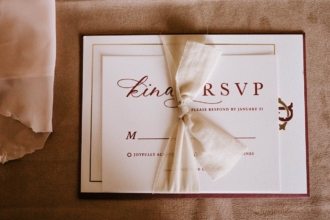
- “M___ __________ Joyfully accepts ___ Regretfully declines ___” The traditional “M” line lets guests write in their own title and name.
- “We have reserved ___ seats in your honor.” Filling in the number before mailing sets the party size without asking outright.
- “Please initial your entrée: ___ Beef ___ Salmon ___ Vegetarian” Initials show which guest chose which meal.
Online, ask what paper can’t handle:
- “Please enter the name and meal choice for each guest in your party.” The form can show one set of fields per guest, based on the party size they entered.
- “How would you like to receive event updates: email or text?” Guests pick the channel they’ll actually check.
Pro Tip
You don’t have to choose one format. Put a QR code on your paper card that links to your online RSVP form, so guests get a keepsake and you get trackable responses. Our guide to online wedding RSVPs covers the digital side in more detail.
Fun RSVP questions to make guests feel involved
A few lighthearted questions make your RSVP feel like the first taste of the celebration. The answers also give you material for playlists, toasts, and table trivia.
- What song will get you on the dance floor? Song requests help your DJ build a playlist your guests actually want.
- What’s your best advice for the couple or guest of honor? Share favorites on cards or read a few during toasts.
- What’s your favorite memory with [host’s name]? Memories make great material for a slideshow or guest book display.
- Trivia time: Where did the couple go on their first date? Reveal the answer at the event. For a reunion, try “What was our senior class prank?”
- Help us name our signature drink. What should we call it? Guests love seeing their idea on the bar menu.
- Turn the answers into a word cloud for a welcome sign.
Pro Tip
Make these questions optional in your Jotform form, so a guest who’s short on time can still submit their RSVP.
Create better RSVP questions with Jotform
Jotform turns the RSVP questions in this guide into a clean, trackable form that guests can finish in minutes.
Here’s how it works:
- Start from a template or AI: Instead of building from scratch, open a template like the Wedding RSVP Form or a customizable RSVP app. You can also describe your event to the Jotform AI Form Generator and get a first draft of your questions from a single prompt.
- Customize the fields: Add the questions your event needs, including ones to do with attendance, guest count, meal choice, plus-ones, dietary needs, accessibility requests, and notes. Then set up conditional logic so guests only see the questions that apply to them.
- Share it anywhere: Send your form by link or email, print a QR code on your invitations, or embed the form on your wedding website.
- Track every response: Submissions land automatically in Jotform Tables, so headcounts, meal counts, and guest details live in one organized view instead of scattered across texts, emails, and paper cards.
- Build a complete event hub: With Jotform Apps, you can combine your RSVP form with invitation details, maps, schedules, and registry links in one mobile-friendly app. The Invitation App with RSVP template helps you get started fast.
Ready to stop chasing replies? Create your RSVP form or RSVP app with Jotform, so guests can easily answer and you can manage every response in one place.
FAQs about RSVP questions
Match the wording to your event’s tone. For a playful card, try “Wouldn’t miss it” and “Sadly, celebrating from afar” as your yes/no options — just keep the choice clear. A fun question, like a song request, adds personality too.
Good RSVP questions collect only what you’ll act on. Start with each guest’s name, whether they’re attending, how many people are in their party, and how to contact them. Then add meal choices, dietary needs, or other questions based on your event. If an answer won’t change your planning, cut the question.
Make replying fast and hard to forget. Set a clear deadline, offer an online form that guests can complete on their phones, and send a friendly reminder shortly before the cutoff. With Jotform Apps, you can send reminder emails to guests who haven’t responded yet. A quick personal text works well for the last few stragglers.
A wedding RSVP card should include a line for guest names, accept and decline options, the number of seats reserved, meal choices if you’re serving a plated dinner, and the reply-by date. If you’re collecting RSVPs online, add your wedding website or a QR code so guests know where to respond.
Keep it short, clear, and easy to finish on a phone. Ask only the questions you need, mark the essentials as required, and use conditional logic to hide questions that don’t apply. Set your deadline based on when your caterer and venue need final numbers, then test the form yourself before sending it.
This article is for event hosts, engaged couples, planners, and small teams creating an RSVP card, online RSVP form, or wedding website RSVP flow. They need to know which questions are essential, which are optional, and how to avoid asking too much while still collecting the details they need for headcount, meals, seating, accessibility, and guest communication.








































































Send Comment: