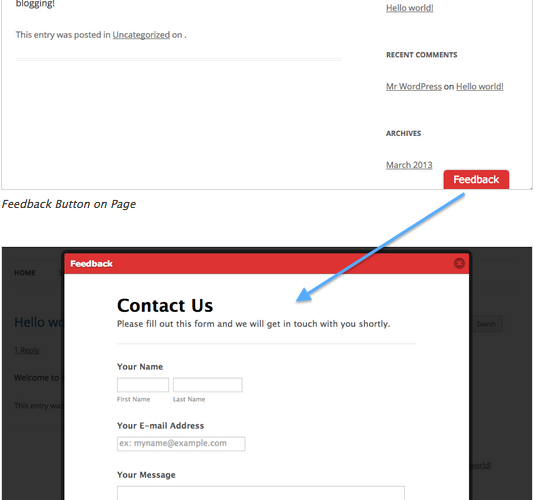

We are excited to bring Jotform Feedback Buttons to WordPress.
The first rule of creating a great web site is to make sure that you can get feedback from your visitors. You want both quality and quantity. Feedback buttons are the best tool for the job.
If there is a problem on your site you want to be aware of it. And, you want to be aware of it quickly. Most people will not bother to find a way to contact you to report problems unless there is a simple and quick way.
“Feedback buttons are simple and quick.”
Jotform Feedback buttons are highly customizable. You can locate them on the either side of the page, or at the bottom. You can choose your own button color. You can customize the form with your own questions. You can change the colors, and the size of the popup window.
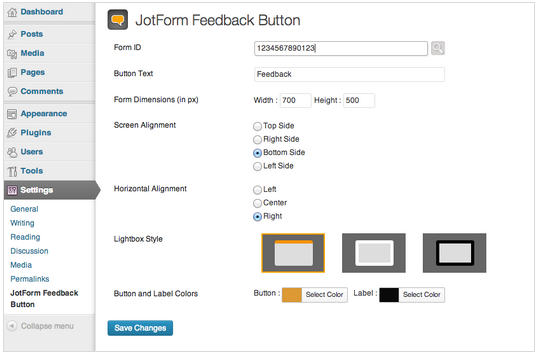
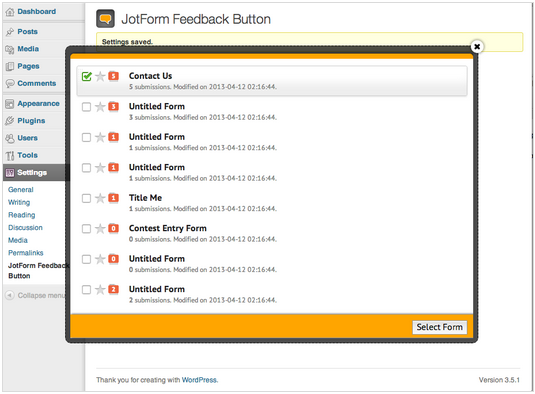
If you already have a Jotform account with many forms Settings page has a “form picker” where you can access your Jotform account and select which form to be used.
We hope that you will love it and share it with your friends who also use WordPress.
Cheers!























































































Send Comment:
11 Comments:
January 27, 2023
Doesn't work at all, and support is basically useless.
May 2, 2019
Hi
This is good article.
January 6, 2015
can anyone help me how to remove the button from the mobile devices.
March 25, 2014
This does not work in my wordpress site. I did the 2 ways of integrating it into wordpress.
1. via embed2. via the plugin
Both don't work. My form does not appear after hitting the button. Very frustrated now.
October 5, 2013
hello
June 5, 2013
Muy bueno, excelente idea ... xD
June 3, 2013
Is there a way for this to pop up after a certain number of seconds, or when a person scrolls down, or goes to close the page?
If so it could be a real Qualaroo or Popfeedback killer!
June 3, 2013
Does this work with Wordpress.com hosted sites?
I can't see the Jotform Feedback item on the settings list...
June 1, 2013
Awesome!
June 1, 2013
Great JOB guys! Was Waiting for this one :)
June 1, 2013
Great!