Facebook is a social media platform that enables users to connect with friends, family, and communities by sharing updates, photos, videos, and more. By adding a contact form to your Facebook page, you provide a convenient and straightforward way for customers or followers to reach out to you directly without leaving the platform.


Note
Before you start, make sure your Facebook Page has at least 2000 fans. According to Facebook, “The Page Tabs feature is only available to Pages with 2000 or more fans or Pages managed by whitelisted apps.”
Adding the Facebook Tab
Sign up for Jotform so you can add forms to your Facebook Page. After you created your form in the Form Builder, please follow these steps:
- Go to Publish at the top.
- Select Platforms on the left.
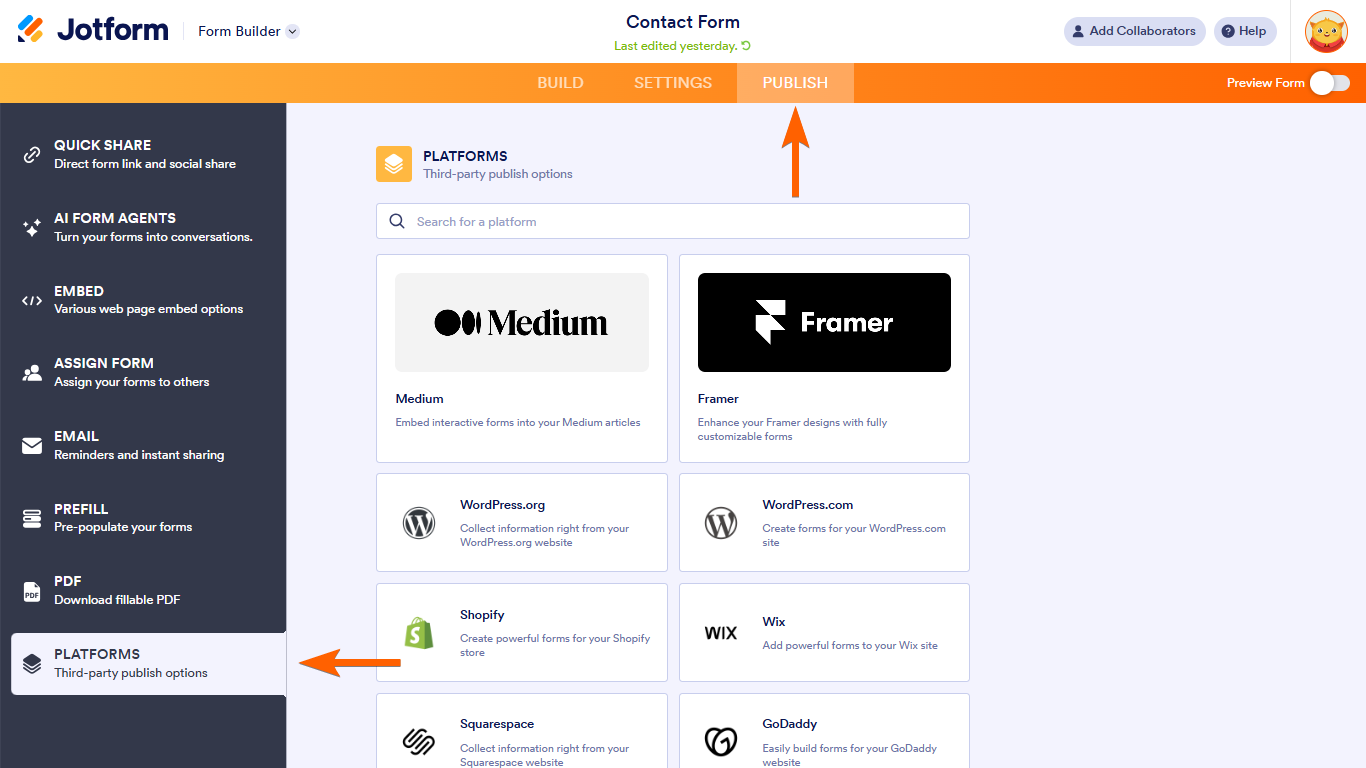
- Search and select Facebook.
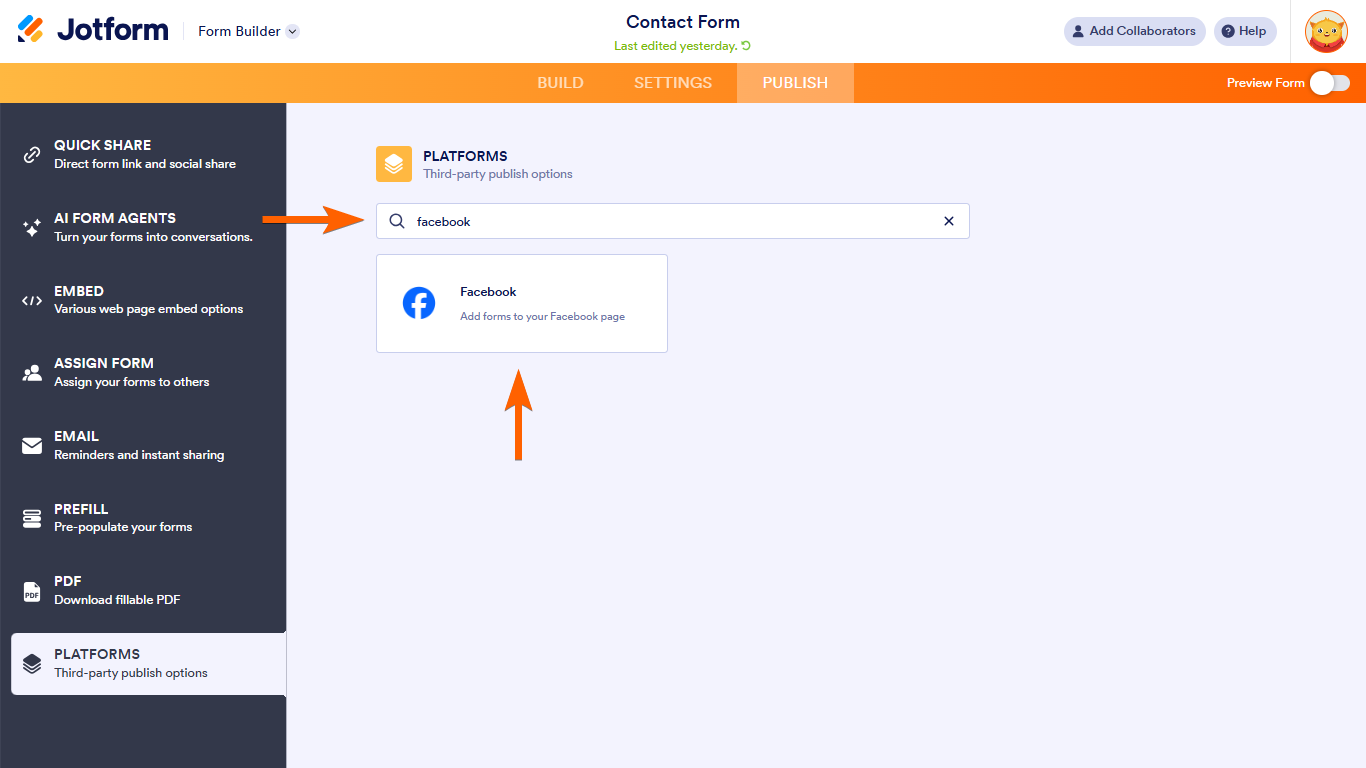
- Select Add Jotform Tab.

- Assuming you’re logged in with Facebook, select the page from the dropdown and click the Add Page Tab button.
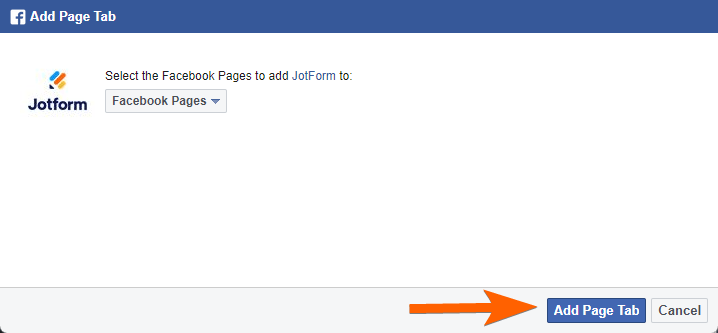
- Go back to your Facebook page after successfully adding the tab.
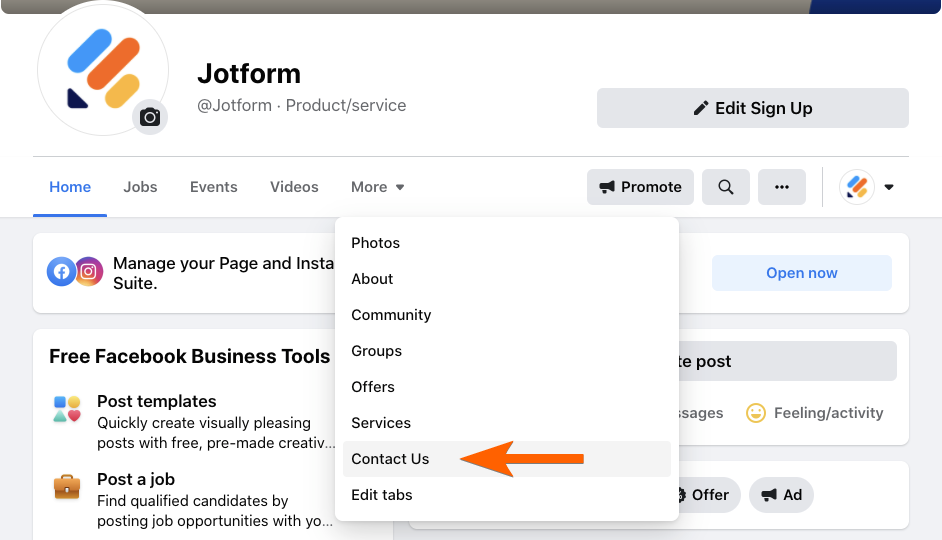
- On your Facebook Page, click More and you will see a Contact Us tab. Click it to view your form.
How to Change the Tab Title
- Add the parameter settings?tab=apps to the end of the URL of your Facebook page. The final URL should look like the following:
https://www.facebook.com/{your_page}/settings?tab=apps- Click the Edit Settings link as highlighted in the image below.
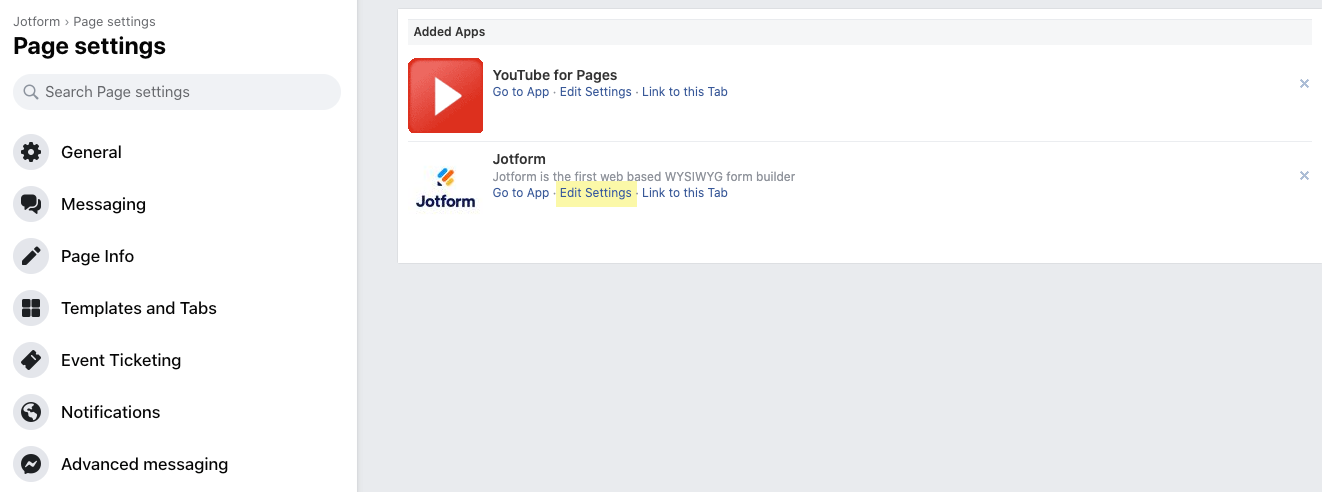
- Type in your custom tab name. Click the Save button. Click Okay to exit.
How to Change the Contact Form
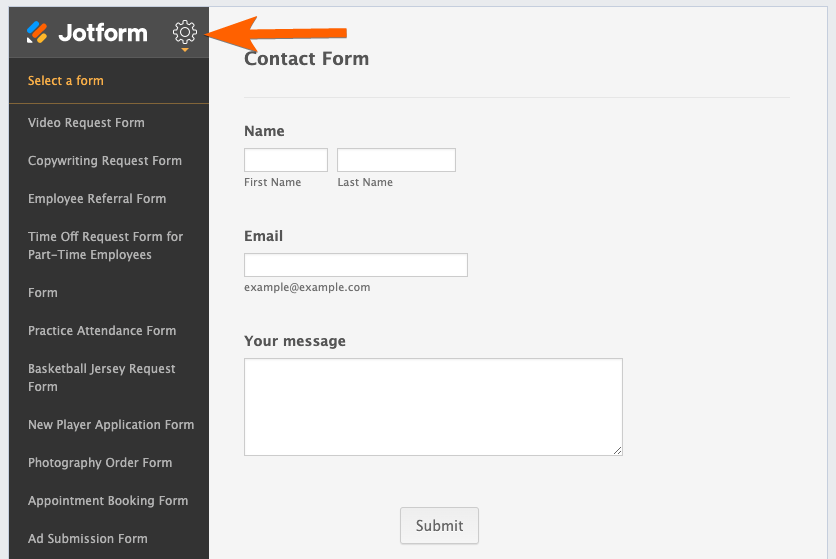
If you want to change the form from the added tab, you can do it by viewing the tab itself. You have to make sure that you are logged in to your Jotform account from the same browser where you’re currently viewing the tab. You’ll see the Settings (gear) icon on the left side. Click it to change the form.
How to Remove the Form on Facebook Page
- Add the parameter settings?tab=apps to the end of the URL of your Facebook page. The final URL should look like the following.
https://www.facebook.com/{your_page}/settings?tab=apps- Click the Remove icon of the Jotform app.
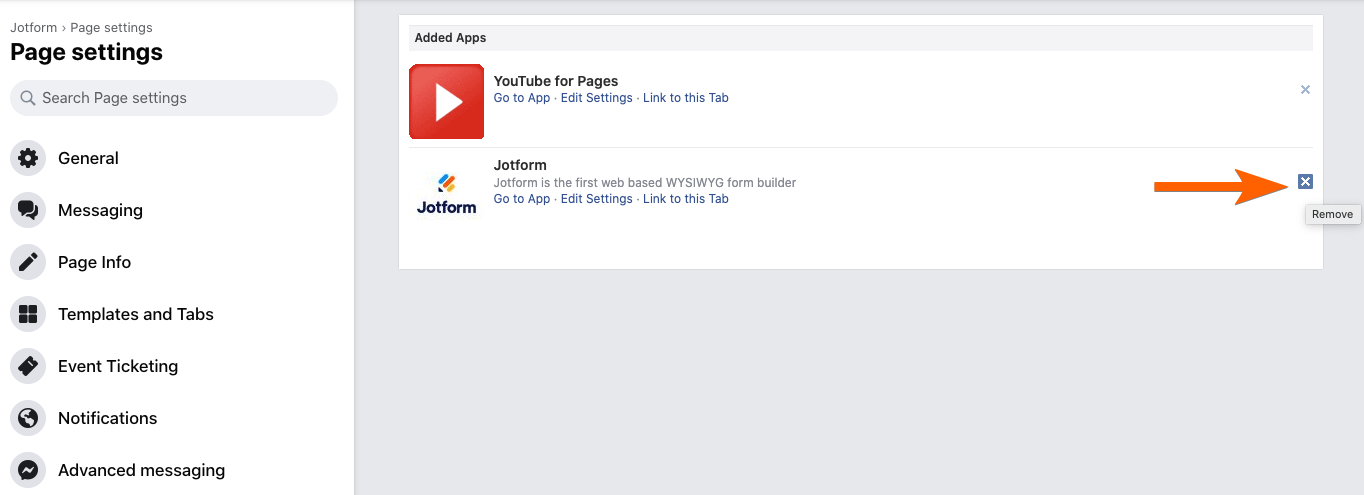
- Click Yes in the confirmation popup.
Important
Facebook Tabs won’t work on mobile. Facebook hasn’t deployed this functionality yet. It should work as intended if you view it on a desktop. There’s a discussion on this page that will further explain Facebook’s stand on this. This post came straight from the Facebook team, courtesy of a developer support engineer.
That’s it! If you have any questions regarding this guide or issues adding your Jotform form to your Facebook page, please comment below or contact us through our support forum.
Haven’t you started to build your form yet? Visit our Contact Form Generator page.

Send Comment:
372 Comments:
March 21, 2023
Go to your Facebook page and click on the Settings button in the top-right corner of the screen From the drop-down menu, click on Templates and Tabs.
Scroll down to the Tabs section and click on the Add a Tab button
From the list of available tabs, select Contact Us and click on the Add Tab
button once you've added the Contact Us tab click on the Settings button next to it.
February 23, 2023
Well I can't add jot form in my fb page can anyoyne tell me the solution of this , it should be consist of all the details regarding the solutions of the forms on fb .. if you have answer kindly tell me thanks
December 20, 2022
Thank you for such a great information
December 13, 2022
Thanks for the information...
November 5, 2022
I face this issue many times but with your guide blog, I got the solution to this issue. Great work really appreciated.
September 7, 2022
The very helpful advice in this particular post! It’s the little changes that make the largest changes. Thanks for sharing
April 5, 2022
When I get to Step 4 - click the add to Facebook button. It's doesn't work. I've tried clicking all over that button and nothing happens. I don't understand what I'm doing wrong. please help
February 11, 2022
I AM UNABLE TO DELETE THEM. IT DOES NOT SHOW TO OTHERS BUT MY VIEW SHOWS THEM ON THERE, I NEED TO DELETE THIS FROM OUR PAGE
January 6, 2022
great help, needs to be updated though since business suite is in play now
December 10, 2021
Thanks for the useful information!! great!!!
October 20, 2021
Great post, really this post is very very informative and helpful. Now I will try to do it. Thanks for sharing this valuable post.
September 18, 2021
I can't add the jot form to my FB Page, it says my page doesn't have the permissions?
September 17, 2021
Quiero recuperar mi cuenta, que m hey olvidado la contraseña
September 8, 2021
Very helpful! I am quite happy that finally I found a way to add a Contact form to my Facebook. Thanks @Jotform :-)
August 21, 2021
Vey helpful information I have Question about face book add account disable how I review my account my fb account for Discovery Gardens Islamabad is blocked and I don't know how to recover it
August 11, 2021
I've been looking for this answer too, so thanks! A bit confused about how to do it.
Mostly because I wasn't aware about the 2000 followers rule, so saved me a lot of time. Does anyone know why this rule exists?
Best regards
Amalie, Junior SoMe specialist ()
July 7, 2021
Hi, I did a Jotform successfully for my one of my work Facebook pages. However, when I posted it, I did it on the wrong page and now I need to remove the form from the Contact Us tab of one of our Facebook pages to publish it on the other. How do I do this? I disabled the form in the meantime but still is the Contact Us tab and I do not know how to remove it. In addition, in the Facebook tab editor it says that I cannot remove it from Facebook because it is a tab published by third parties (i.e., Jotform). Could you please help me? I would very much like to continue using this platform but on the right Facebook page; and I definitely would do not like very well that the contact us interface page has an error and says "form disabled".. thank you!
June 1, 2021
Didn't even know this was a thing. Thanks guys
May 30, 2021
I tried adding the Jot page to our Facebook and got a red error.
February 11, 2021
I tried adding the Jot page to our Facebook and got a red error.
December 14, 2020
cannot remove Contact Us - Facebook page tab with new Facebook UI
November 9, 2020
Page button is not working yet.
October 14, 2020
I want to add one in a post. How do I do that?
July 25, 2020
Error keeps coming up it wont work
June 24, 2020
How do I add a jot form link to a Facebook post instead of page?